is chatgpt plus worth it
Is ChatGPT Plus worth it? That's the question on a lot of people's minds, especially if you've been using the free version and wondering whether the upgrade actually changes anything meaningful. The short answer: it depends entirely on how you use ChatGPT and what you need from it day to day.
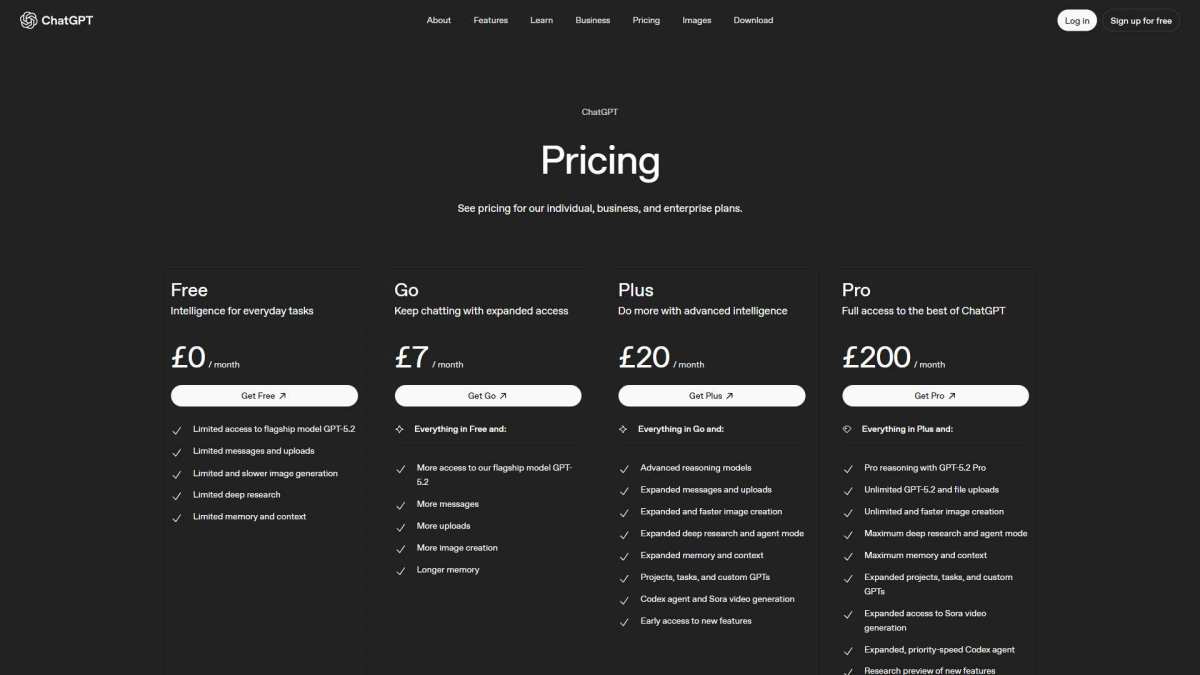
ChatGPT Plus costs $20 per month as of 2026, and it unlocks priority access, faster responses, and advanced models like GPT-4o and o3. But whether those perks justify the price tag comes down to your specific workflow. Let's break it all down so you can make a smart call.
Quick Answer
ChatGPT Plus is worth it if you use ChatGPT daily for work, coding, or complex tasks. The free tier works fine for casual questions and light use. Power users benefit most from priority access, faster speeds, and advanced models.
Occasional users should probably save their money.
What You Actually Get With ChatGPT Plus
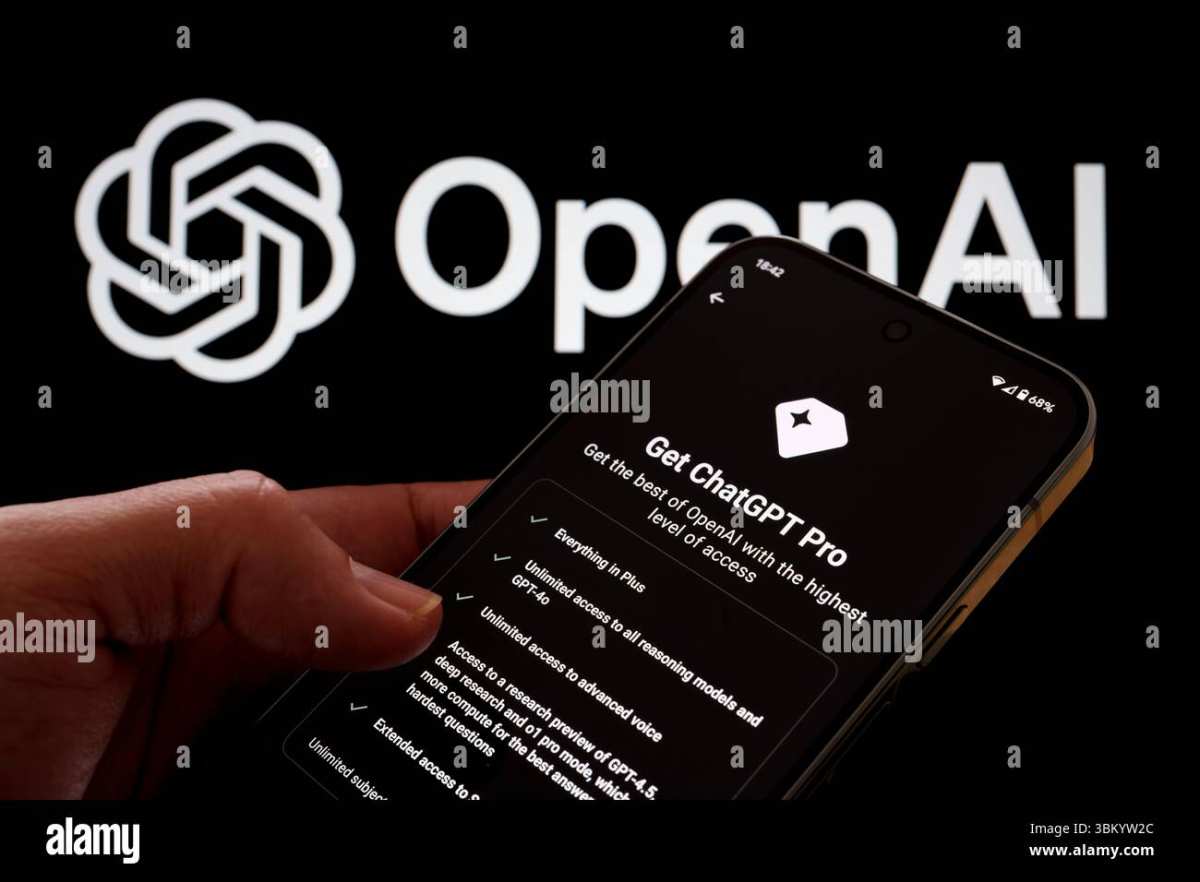
ChatGPT Plus is OpenAI's paid subscription tier, priced at $20 per month. It sits between the free plan and the much pricier ChatGPT Pro tier at $200 per month. The Plus tier is designed for people who rely on ChatGPT regularly and need more reliability than the free version offers.
When you upgrade, you're not getting a completely different product. You're getting the same ChatGPT interface with several meaningful improvements layered on top. Think of it like priority boarding on a flight.
You still sit in the same cabin, but you get there faster and with less hassle.
Here's what changes when you subscribe:
- Priority access during peak hours. Free users get throttled when servers are busy. Plus members jump the queue.
- Faster response times. Answers typically come back noticeably quicker, especially for longer queries.
- Access to GPT-4o and o3. These are OpenAI's most capable models. Free users get limited or no access to the best models depending on current load.
- Higher message limits. You can send more messages before hitting a cap, though limits still exist.
- Advanced data analysis. Upload files like PDFs, spreadsheets, and images directly for analysis.
- DALL-E 3 image generation. Create images without needing a separate tool.
- Custom instructions. Set persistent preferences so ChatGPT remembers your tone, format, and context across conversations.
- GPT Store access. Browse and install custom GPTs built by other users, or create your own.
- Voice mode. Have natural spoken conversations with ChatGPT.
- Early access to new features. Plus members typically get new capabilities before free users.
One thing worth noting: the feature set shifts over time. OpenAI regularly adjusts what's included in each tier. What's accurate today might change in a few months, so it's worth checking their official pricing page if you're on the fence.
The Free Tier vs. Plus: Side-by-Side Breakdown
Let's put the two tiers next to each other so you can see exactly where the differences land.
| Feature | ChatGPT Free | ChatGPT Plus ($20/mo) |
|---|---|---|
| Price | $0 | $20/month |
| GPT-4o access | Limited (drops under load) | Priority, consistent access |
| o3 / o4-mini models | Not available | Included |
| Response speed | Standard (slower during peaks) | Faster, priority routing |
| Message limits | Lower, stricter caps | Higher caps (varies by model) |
| File uploads | Limited | Full access |
| Image generation (DALL-E 3) | Limited or unavailable | Included |
| Custom instructions | Available | Available |
| GPT Store | Browse only | Browse, install, and create |
| Voice mode | Limited | Full access |
| Web browsing | Available | Available |
| Early feature access | No | Yes |
The free tier is genuinely capable. For quick questions, brainstorming, drafting emails, or occasional research, it handles the job. Most casual users won't feel a meaningful gap.
The difference shows up when you push the tool harder. Longer conversations, complex multi-step tasks, coding projects, data analysis, and anything requiring consistent quality across many sessions. That's where Plus starts earning its keep.
Pricing, Limits, and What Changes When You Upgrade
ChatGPT Plus costs $20 per month in the United States. Pricing adjusts for local markets, so if you're outside the US, you might see a different figure in your currency. There's no annual discount as of 2026.
It's month-to-month, and you can cancel anytime.
The auto-renewal is straightforward. You subscribe through OpenAI's website, the iOS App Store, or Google Play. Billing renews monthly unless you cancel.
No long-term commitment, which makes it easy to test for a month and decide.
Now, about those limits. Even on Plus, you're not getting infinite access. OpenAI caps usage per model to manage server load.
Here's what the limits generally look like:
- GPT-4o: Approximately 80 messages per 3 hours, though this fluctuates with demand.
- o3: Approximately 50 messages per day. This reasoning model is more resource-intensive, so the cap is tighter.
- o4-mini: Higher availability but still subject to limits during peak times.
These numbers aren't set in stone. OpenAI adjusts them based on infrastructure capacity and user demand. The key difference is that Plus users always get higher ceilings than free users, and you're less likely to hit a wall mid-task.
For context, if you compare this to paying for the OpenAI API directly, the math favors the subscription for moderate use. API pricing is token-based and can add up fast if you're running long conversations or processing large files. At $20 per month, ChatGPT Plus bundles a lot of capability into a predictable cost.
One thing to watch: if you subscribe through the Apple App Store or Google Play, those platforms sometimes add their own fees. Subscribing directly through OpenAI's website is usually the cheapest route.
Who Gets the Most Value From ChatGPT Plus
Not everyone needs the upgrade. But for certain types of users, ChatGPT Plus pays for itself quickly. Here's who benefits the most:
- Software developers and engineers. Writing, debugging, and reviewing code regularly demands the reasoning power of GPT-4o or o3. The time saved on a single complex debugging session can justify the monthly cost.
- Content writers and marketers. If you're drafting blog posts, ad copy, social media content, or newsletters daily, the speed and quality improvement adds up. Custom instructions also help maintain consistent brand voice across sessions.
- Students and researchers. Analyzing papers, summarizing sources, working through problem sets, and drafting essays all benefit from the higher model quality and file upload capabilities.
- Business professionals and consultants. Preparing reports, analyzing data in spreadsheets, building presentations, and drafting communications are all faster with priority access and better models.
- Small business owners. Using ChatGPT as a virtual assistant for customer service drafts, marketing, bookkeeping questions, and strategy planning makes the subscription a practical business expense.
- Data analysts. The Advanced Data Analysis feature lets you upload CSV files, ask questions about your data, and generate charts. That's genuinely useful and hard to replicate on the free tier.
- Non-native English speakers. Writing assistance, grammar correction, and tone adjustment are noticeably better with GPT-4o compared to lighter models.
The common thread here is frequency and complexity. If you open ChatGPT multiple times a day and your tasks require nuanced, accurate responses, the upgrade makes your workflow smoother and faster.
Who Should Probably Stick With Free
The free tier is perfectly fine for a lot of people. You don't need Plus if:
- You use ChatGPT a few times a week for simple questions.
- Your tasks are straightforward: quick facts, basic writing, simple translations.
- You don't rely on it for professional work or tight deadlines.
- You're comfortable waiting a bit longer during peak hours.
- You mainly use it for casual conversation or curiosity-driven exploration.
There's no shame in staying on the free plan. OpenAI keeps the free tier functional on purpose. It serves as both a useful product and a funnel for upgrades.
If you're not hitting the limits or feeling frustrated by quality, you're not missing out on anything essential.
Some people also find that the free tier with GPT-4o-mini handles most of their needs. It's a lighter model, but for everyday tasks, the difference between it and full GPT-4o isn't always dramatic enough to justify $20 per month.
The honest truth: if you've been using the free version for a while and haven't felt limited, you probably don't need to upgrade. The people who feel the pain of the free tier are usually the ones already pushing it hard.
How ChatGPT Plus Compares to Claude Pro, Gemini Advanced, and Copilot Pro
ChatGPT Plus isn't the only $20-per-month AI subscription out there. Several competitors offer similar tiers, and depending on your needs, one of them might be a better fit.
Here's a quick rundown of the main alternatives:
| Service | Price | Key Strength |
|---|---|---|
| ChatGPT Plus | $20/mo | Broad capabilities, GPT-4o, file analysis, GPT Store |
| Claude Pro (Anthropic) | $20/mo | Excellent writing quality, 200K context window, strong reasoning |
| Gemini Advanced (Google) | $20/mo | Tight Google integration, 1M token context, multimodal strength |
| Copilot Pro (Microsoft) | $20/mo | Microsoft 365 integration, Copilot in Word, Excel, Outlook |
Claude Pro is the biggest competitor for writing-heavy use cases. Aggregated user feedback suggests Claude produces more nuanced, natural-sounding prose, especially for long-form content. It also has a 200K token context window, which is massive.
You can feed it entire documents and it remembers everything.
Gemini Advanced shines if you're deep in the Google ecosystem. It integrates with Google Docs, Gmail, and Drive. It also supports a huge context window at around one million tokens.
For research-heavy work involving lots of source material, Gemini Advanced is a strong contender.
Copilot Pro is ideal if your daily work revolves around Microsoft Office. It embeds AI assistance directly into Word, Excel, PowerPoint, and Outlook. For office professionals who want AI woven into their existing workflow, Copilot Pro is the most practical option.
ChatGPT Plus still holds the edge in versatility. The combination of file uploads, image generation, voice mode, custom GPTs, and multiple model access gives it the broadest feature set. But "best" depends entirely on what you're doing each day.
There's no universal winner here.
Real Scenarios Where Plus Pays for Itself
Let's get concrete. Here are specific situations where ChatGPT Plus clearly justifies the $20 monthly cost:
Scenario 1: Debugging a complex codebase. GPT-4o and o3 handle multi-file debugging with better logical reasoning than lighter models. Aggregate developer reviews report that priority access means no waiting mid-session, even during evening peak hours. One solid debugging session saves hours, which is a positive return on a $20 subscription.
Scenario 2: Analyzing a financial spreadsheet. The Advanced Data Analysis feature lets you upload a CSV file and ask ChatGPT to find trends, anomalies, or create charts. A freelancer reviewing quarterly business data can offload 30 minutes of spreadsheet work to ChatGPT in seconds. Multiply that across weekly tasks and the subscription is an obvious business expense.
Scenario 3: Writing a long-form article under deadline. GPT-4o's output is noticeably better at maintaining coherent structure across 2,000+ words. Plus, the faster response speed lets you iterate more quickly. A content writer hitting a 4-piece-per-week workflow can accelerate the production time significantly.
Scenario 4: Studying for an exam by quizzing yourself. Voice mode creates flashcard-style back-and-forth sessions. This hands-free review technique is more engaging than scrolling static notes, and students tend to stick with it longer.
These are practical, everyday wins. They're not hypothetical edge cases.
Common Reasons People Cancel (and Whether Those Apply to You)
A significant share of subscribers cancel within the first three months. Understanding why can help you avoid buyer's regret.
Reason 1: "I didn't notice a big quality difference." If your usage is mostly casual, the gap between GPT-4o-mini (free) and GPT-4o (paid) is subtler than you'd expect. Simple prompts don't benefit much from the upgrade. This is a legitimate reason to cancel if your use stays light.
Reason 2: "I hit the message limits anyway." Even Plus has caps. o3 runs around 50 messages per day. If you're a power user hammering o3 all day, you'll still hit walls. This mostly affects heavy coding or research workloads.
Consider mixing models, using GPT-4o for lighter tasks and saving o3 for complex reasoning.
Reason 3: "I found a cheaper alternative that does the same thing." Some users switch to Claude Pro or Gemini Advanced and feel they get comparable results. Others go the OpenRouter or API route for lower cost at moderate usage. Valid options if you're willing to switch ecosystems.
Reason 4: "I only really needed it for one project." Some people subscribe, finish a specific task, and then forget to cancel. If you only need a boost for a week or two, consider subscribing for one month, finishing your work, then downgrading. No commitment means no trap.
Reason 5: "The free tier is good enough now." OpenAI has improved the free tier over time. GPT-4o-mini is genuinely capable for many workloads. If you're not feeling the squeeze, you might not need Plus anymore.
The takeaway: subscribe with a purpose. Use it intentionally for one month. Evaluate whether you actually used the premium features.
Then decide.
How to Decide in Under 5 Minutes
Still on the fence? Ask yourself these five questions:
Do you use ChatGPT at least 3 to 5 times per week? If yes, you're in the target zone. If not, the free tier probably covers you.
Are your tasks complex? Coding, data analysis, long-form writing, and multi-step research benefit the most. Simple questions don't.
Do you get frustrated by slow responses or access errors? If peak-hour throttling bothers you, Plus eliminates that friction.
Would you use file uploads, image generation, or voice mode weekly? If two or more of these are useful, the subscription adds real utility.
Can you write it off as a business expense? If you're a freelancer, contractor, or business owner, $20 per month is trivial against the time saved.
If you answered "yes" to three or more, ChatGPT Plus is probably worth it. If you answered "yes" to one or fewer, stick with free and check back in a few months when your usage might change.
One practical tip: subscribe for a single month as a test. Track how often you actually use the premium features. Let real data drive your decision rather than hypotheticals.
You'll know within a month whether the upgrade earns its keep for your specific situation.
Frequently Asked Questions
Is ChatGPT Plus worth it for students?
Yes, if you're using it regularly for research, writing, or studying. The file upload and analysis features are genuinely helpful for academic work. Casual users who just ask occasional questions won't notice enough benefit to justify the cost.
Can I cancel ChatGPT Plus anytime?
Absolutely. There's no contract. Cancel through your OpenAI account settings or through the App Store / Google Play if you subscribed there.
You keep Plus access until the end of your current billing period.
Does ChatGPT Plus give unlimited access?
No. Message limits still exist even on the paid tier. GPT-4o has higher caps than free users get, and o3 is limited to roughly 50 messages per day.
The limits are generous enough for most workflows but not infinite.
Is ChatGPT Plus the same as ChatGPT Pro?
No. ChatGPT Plus is $20 per month. ChatGPT Pro is $200 per month and offers significantly higher limits, access to OpenAI's most advanced models (like o3 pro and deeper research tools), and priority compute.
Pro is aimed at researchers and professionals who need maximum capability.
Is there a free trial for ChatGPT Plus?
OpenAI doesn't consistently offer a free trial. Occasionally they run promotions, but generally you'll need to pay for the first month. Think of that first month as your trial period since you can cancel anytime.
Can I use ChatGPT Plus for business use?
Yes. Many freelancers and small business owners treat it as a business tool. However, for formal business use with team management and compliance features, ChatGPT Team or Enterprise plans are more appropriate options.
Final Verdict: Is ChatGPT Plus Worth It for You?
ChatGPT Plus is worth it for regular users who need reliability, speed, and access to the best models. It's not worth it for people who open ChatGPT once a week to settle a bet or write a quick email.
The $20 monthly cost is easy to justify if you use ChatGPT for work, coding, writing, or research several times a week. The time saved alone often covers the subscription for power users. The file analysis, voice mode, and priority access add genuine convenience that the free tier doesn't match.
For everyone else, the free tier remains surprisingly capable. OpenAI has kept it functional and competitive, which is good news for casual users watching their budgets. There's zero pressure to upgrade if you're not feeling limited.
The smartest move? Treat the first month as a trial. Subscribe, use it heavily for 30 days, and see whether you actually lean on the premium features.
If you do, keep it. If you don't, cancel with no regrets. That approach takes the guesswork out entirely.

Similar Posts