How to Use ChatGPT Search
If you've ever wondered how to use ChatGPT Search effectively, you're not alone. OpenAI's hybrid search feature blends live web retrieval with the chatbot's reasoning abilities, but most people just type a query into ChatGPT and assume they're using it. The difference between a quick ChatGPT answer and a well-executed search comes down to understanding when the tool switches between its training data and live web results.
ChatGPT Search pulls real-time information from sources indexed through partnerships with providers like Microsoft Bing and content integrations from publishers such as LexisNexis. As of 2025, the feature is available to subscribers on Plus, Team, and Enterprise plans, with the Plus tier priced at $20 per month. The trouble is, most users don't realize how much their prompt phrasing, account settings, and even the wording of their question affects whether they get a stale training-data answer or a fresh, cited web result.
Let's walk through exactly how it works and how to get the best out of it.
Quick Answer
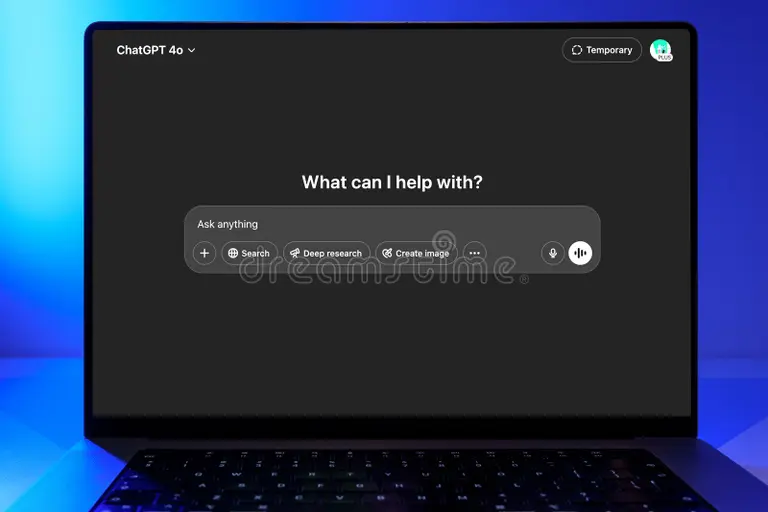
ChatGPT Search retrieves live web results when your query needs current information. Open ChatGPT in your browser or app, type a specific question, and hit Enter. The model will display source links when it searches the web.
Use follow-up questions to refine results. A Plus subscription unlocks web search features.
What ChatGPT Search Actually Does (and What It Doesn't)
ChatGPT Search is a feature within OpenAI's ChatGPT platform that lets the AI retrieve and summarize information from the live web, not just from its training data. When you ask a question about something that happened last week, or ask for a product price at this moment, the model can activate its search function to pull current results and cite sources. Think of it as the difference between quizzing a well-read friend and quizzing a well-read friend who has a smartphone in front of them.
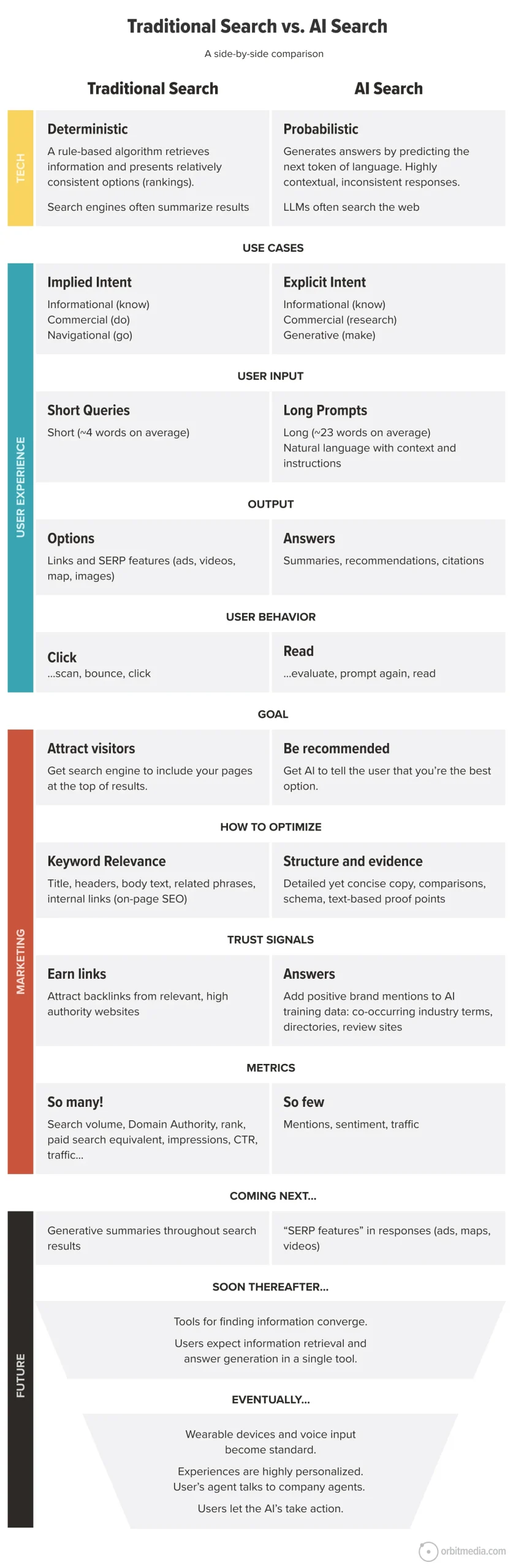
The feature works by sending a version of your query to an external search index (powered primarily through Microsoft Bing) and then synthesizing the results into a coherent answer. Model specs and feature behavior are outlined in OpenAI's official technical documentation. What makes this different from just opening Google is that ChatGPT doesn't show you links and ask you to read them, it reads them for you and gives you a synthesized answer based on what it found.
Here's what ChatGPT Search does well:
- Answers time-sensitive questions with current data
- Summarizes multiple sources in a single response
- Lets you follow up conversationally to narrow the search
- Provides source attribution when it retrieves web content
- Handles multi-part questions that would take several traditional searches
Here's where it falls short:
- Results depend on prompt quality and specificity
- Source reliability varies based on what the search index returns
- The model can still misinterpret or overconfuse synthesized information
- Complex follow-up chains sometimes lose context in the search retrieval
- Search is still slower than a direct Google search for simple lookups
Understanding this distinction matters because many users conflate ChatGPT's training knowledge with live search results. If you ask "What is the capital of France?" ChatGPT doesn't need a web search, it knows the answer from training data. But if you ask "What was the top news story in France this morning?" it needs to search.
Knowing which scenario you're in changes how you should phrase your query.

How ChatGPT Search Works Under the Hood
The architecture behind ChatGPT Search is what's known as Retrieval-Augmented Generation, or RAG. Behind the scenes, your query gets sent to a search layer (powered by Bing) before the model formulates an answer. The retrieval step grabs relevant URLs, snippets, or documents.
Then the generation step synthesizes that retrieved material into a readable response.
This two-step process happens fast enough to feel seamless, but it's worth understanding because it affects result quality. If the retrieval step grabs bad or irrelevant sources, the generated answer suffers no matter how smart the model is. This is why a poorly worded prompt often produces a decent-sounding but ultimately hollow response.
ChatGPT Search vs. Regular ChatGPT: Key Differences
| Aspect | Regular ChatGPT (no search) | ChatGPT with Search |
|---|---|---|
| What feeds the answer | Model's training data (cutoff date) | Live web results + training data |
| Source citations | No (model-generated summaries) | Yes (links to web sources) |
| Accuracy on current events | Limited by training cutoff | Reflects what's online right now |
| Speed | Faster (no external lookup) | Slightly slower (retrieval step) |
| Best for | General knowledge, creative tasks, coding | News, prices, recent research, live data |
The model decides whether to search based on your query. OpenAI's system prompts guide this decision, but it's not always transparent to the user. If you want to force a search, you can include phrases like "search the web for" or "find recent information about" in your prompt.
This nudges the model toward retrieval rather than relying on its internal knowledge.
When to Use ChatGPT Search vs. Regular ChatGPT
Not every question needs a web search. Knowing when to rely on the model's built-in knowledge versus when to trigger live search saves you time and gets you better answers.
Use ChatGPT Search when:
- You need information from the last few days, weeks, or months
- You're comparing prices, availability, or current specifications
- You want the model to summarize recent news or research
- You're looking for a specific fact that might have changed recently
- You need source citations for verification
Stick with regular ChatGPT (no search) when:
- You're asking about well-established facts (historical dates, scientific constants)
- You want creative output like writing, brainstorming, or code generation
- You're working through a logical problem or math question
- Speed matters more than source verification
- The topic is well-covered in the model's training data
The practical difference shows up in edge cases. If you ask "What's the best laptop for video editing?" without search, ChatGPT gives you a solid general answer based on what it knows up to its training cutoff. With search, it can pull current prices, recent reviews, and newly released models.
Both answers are useful, but they serve different needs.
Step-by-Step: How to Use ChatGPT Search
Here's the practical workflow for getting live search results from ChatGPT, whether you're on desktop or mobile.
Step 1: Open ChatGPT and check your account tier.
ChatGPT Search is available to Plus ($20/month), Team ($25/user/month), and Enterprise subscribers. Free-tier users historically did not have access to web search, though OpenAI has experimented with limited access at various points. If you're on a paid plan and don't see search behavior, check that your account is active and your app is updated.
Step 2: Type a specific, time-sensitive query.
Vague prompts get vague results. Instead of "Tell me about electric cars," try "What are the top-rated electric cars under $40,000 as of late 2025, with range and charging speed comparisons?" The more specific your question, the better the retrieval step works.
Step 3: Look for source citations in the response.
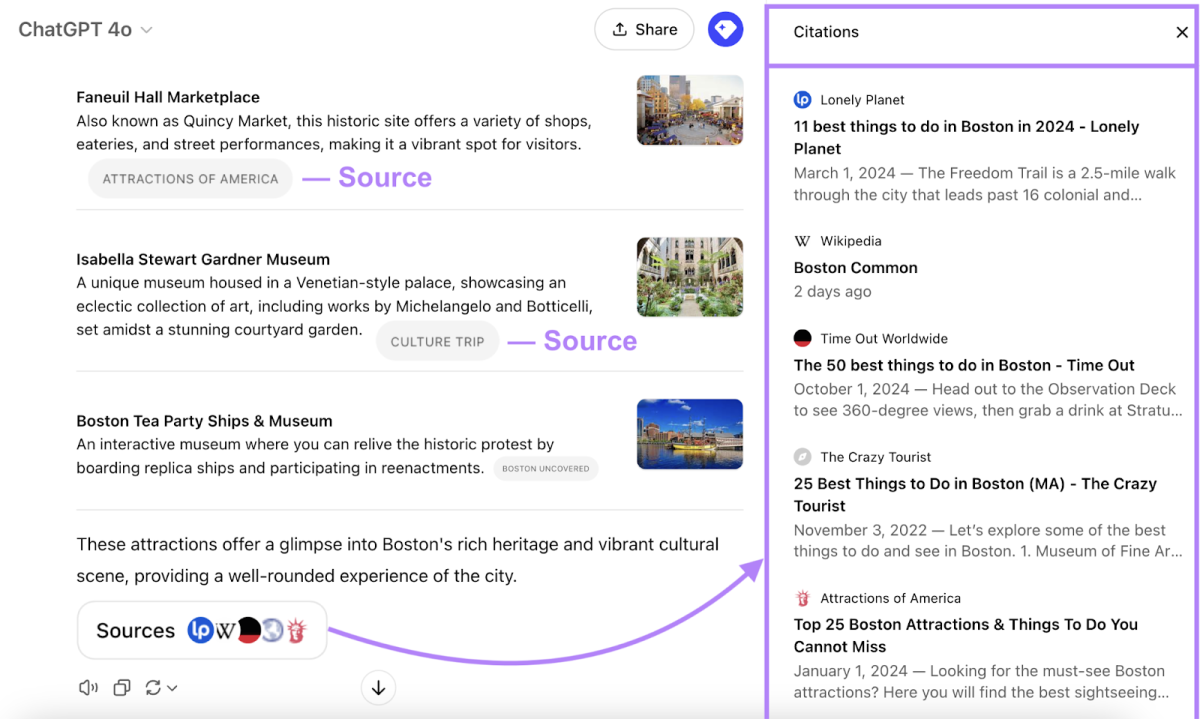
When ChatGPT Search activates, you'll typically see source links or references at the bottom of the response. These indicate the model pulled from live web content. If you don't see sources, the answer likely came from training data alone.
Step 4: Ask follow-up questions to refine.
This is where ChatGPT Search shines over traditional search engines. You can say "Which of those has the best safety rating?" or "Find me a cheaper alternative with similar specs" and the model maintains context from the previous search. Each follow-up can trigger a new retrieval or refine the existing results.
Step 5: Verify critical information independently.
For anything involving health, finance, legal decisions, or safety, cross-check the answer against primary sources. ChatGPT Search retrieves and summarizes, but it can misinterpret or overstate what a source actually says.

Getting Better Results: Prompt Tips That Work
The quality of your ChatGPT Search results depends heavily on how you phrase your query. Here are practical prompt strategies that consistently produce better outcomes.
Be explicit about recency.
Phrases like "as of 2025," "most recent," or "latest available data" signal to the model that it needs current information. Without these cues, the model may default to training data even when a web search would be more accurate.
Specify the format you want.
If you want a comparison table, say so. If you want a ranked list, ask for it. Prompts like "Give me a table comparing X, Y, and Z with columns for price, features, and user rating" produce more structured, useful outputs than open-ended questions.
Break complex questions into parts.
Instead of one massive multi-part question, try sequential prompts. Start broad, then narrow down. "What are the main factors to consider when choosing a home solar installer?" followed by "Which of those factors matter most in Arizona?" produces better results than cramming everything into a single query.
Use the "search for" trigger phrase.
If you want to force a web search, start your prompt with "Search the web for…" or "Find recent articles about…" This nudges the model toward retrieval mode rather than relying on its internal knowledge base.
Iterate based on what you get.
If the first result is too general, ask for more specificity. If it's too narrow, broaden the scope. The conversational nature of ChatGPT means you can refine in real time without starting over.
Common Mistakes People Make with ChatGPT Search
Most problems with ChatGPT Search come down to how users phrase their queries or misunderstand what the tool is doing. Here are the patterns that consistently produce weak results.
Treating it like Google with extra steps.
If you type "weather" or "flights to Chicago" into ChatGPT, you're using the wrong tool for the job. ChatGPT Search isn't designed for quick factual lookups where a direct API or traditional search engine gives you a faster, more accurate answer. It's built for questions that benefit from synthesis across multiple sources.
Writing vague or overly broad prompts.
A prompt like "Tell me about solar panels" gives you a general overview that could've come from a 2022 textbook. "Compare monocrystalline vs polycrystalline solar panel efficiency ratings from independent lab tests in 2025" gives the retrieval layer something specific to work with. The narrower your query, the better the search results.
Ignoring source citations.
When ChatGPT Search returns sources, those links are your reality check. Many users skip past them and treat the model's summary as truth. The summary is only as good as what the search index returned, and search indexes don't always surface the most authoritative source first.
Assuming every answer uses live search.
The model doesn't always tell you when it's searching versus relying on training data. If you're asking about a recent event and the response sounds generic or outdated, try adding "search for recent information" or "as of this week" to force retrieval. When in doubt, check for source citations at the bottom of the response.
Stacking too many follow-up questions.
ChatGPT maintains context across a conversation, but that context window has limits. After several rounds of follow-ups, the model can lose track of earlier search results or blend them with newer ones in confusing ways. If a follow-up produces a noticeably worse answer, start a fresh conversation and re-ask the question with full context included.
Using it for high-stakes decisions without verification.
ChatGPT Search is a research aid, not a substitute for professional judgment. Medical advice, legal interpretations, financial decisions, and safety-critical information should always be verified against primary sources or qualified professionals. The model can summarize a medical journal article, but it can't examine you.
ChatGPT Search vs. Google vs. Perplexity: When to Use Each
These three tools overlap, but they're optimized for different workflows. Picking the right one depends on what you need at the moment.
Best for quick factual queries: Google.
If you need a phone number, a store hours listing, a conversion calculator, or the score from last night's game, Google is still faster. It gives you direct answers without synthesis or interpretation. You get what you asked for in under a second.
Best for research synthesis: ChatGPT Search.
When your question requires pulling together information from multiple sources and making sense of tradeoffs, ChatGPT Search is the stronger choice. Questions like "What are the pros and cons of heat pumps vs gas furnaces for a cold climate home?" benefit from the model's ability to weigh factors and present a balanced summary.
Best for academic or citation-heavy research: Perplexity AI.
Perplexity structures its responses around numbered citations and often surfaces academic sources more readily than ChatGPT. If your workflow depends on tracking exactly which study or dataset supports each claim, Perplexity's inline citation format can be more practical.
How they compare on everyday tasks:
| Task | Best Tool | Why |
|---|---|---|
| Quick fact lookup | Speed and directness | |
| Multi-source comparison | ChatGPT Search | Synthesis and follow-up dialogue |
| Academic research with citations | Perplexity AI | Structured source attribution |
| Creative brainstorming | ChatGPT (no search) | Model reasoning without retrieval |
| Current news summary | ChatGPT Search or Perplexity | Both pull live results |
The real answer is that most people end up using two or three of these depending on the task. ChatGPT Search fills a specific gap between "I want the fastest answer" and "I want a researched summary with conversation follow-ups."
Who Benefits Most from ChatGPT Search
ChatGPT Search isn't equally useful for everyone. Some workflows gain dramatically from the synthesis-and-follow-up model, while others are barely affected.
Researchers and students benefit because they need to pull together sources, compare perspectives, and refine questions over multiple rounds. A student writing a paper on climate policy can ask for recent developments, then narrow to specific regions, then ask for counterarguments, all within one conversation.
Content creators and marketers use it to quickly gather background information, find statistics, and get summaries of competitor content without opening fifteen browser tabs.
Professionals doing due diligence (legal, financial, consulting) find value in the ability to ask layered questions about companies, regulations, or market conditions and get synthesized answers with source links for verification.
Everyday users with complex questions get the most bang for their buck when their question isn't a simple lookup. "What should I consider before refinancing my mortgage?" is a better ChatGPT Search query than "What's the current mortgage rate?"
Who it's less useful for:
- People who need instant answers (use Google)
- Users on the free tier without search access
- Anyone looking for visual or spatial information, since ChatGPT Search returns text-based results
- Tasks requiring real-time data feeds (stock tickers, live sports scores) where APIs or dedicated tools are faster
The common thread is that ChatGPT Search rewards users who think in terms of conversations rather than single queries. If your research process involves asking a question, getting an answer, then asking a more targeted follow-up, this tool fits your workflow.
Limitations, Risks, and What to Watch Out For
ChatGPT Search is genuinely useful, but several limitations are worth keeping in mind before you rely on it for important work.
Source quality varies.
The search index pulls from whatever is publicly available and well-ranked. That means reputable sources show up alongside less reliable ones, and the model doesn't always weight them correctly. A well-written blog post with confident claims can get equal footing with a peer-reviewed study if the search algorithm surfaces both.
Hallucination risk doesn't disappear with search.
Some users assume that web search eliminates the model's tendency to fabricate. It doesn't. The model can misinterpret a retrieved source, conflate two sources, or present a source's claim more strongly than the original text supports.
Always click through to sources when the information matters.
Context window limits affect long conversations.
ChatGPT has a finite context window, measured in tokens. Long search-heavy conversations can push against this limit, causing the model to drop earlier context or produce lower-quality responses. Starting fresh when answers degrade is usually faster than trying to recover a wandering conversation.
Search isn't available in all regions or plans equally.
OpenAI has rolled out features at different times across regions and account types. Some users report inconsistent access to search depending on their location, subscription tier, or whether they're using the mobile app versus desktop browser.
Privacy considerations matter.
Your search queries and conversation history are processed by OpenAI's systems. For sensitive business information, legal matters, or anything involving personal data, review OpenAI's data handling policies. Enterprise plans offer more control over data retention and model training opt-outs.
The model can sound confident when it shouldn't.
This is the biggest practical risk. ChatGPT Search produces fluent, well-structured answers that feel authoritative even when the underlying sources are thin or contradictory. Treat the output as a starting point for research, not the final word.
Costs, Access, and Account Requirements
ChatGPT Search isn't free, and the access model has shifted over time. Here's the current landscape as of 2025.
ChatGPT Plus: $20/month.
This is the entry point for search access. Plus subscribers get web search, faster response times, and priority access to new features. For individual users who want search regularly, this is the standard plan.
ChatGPT Team: $25/user/month.
Designed for small teams, this plan includes search plus administrative controls, workspace management, and higher usage limits. It's the right fit if multiple people in an organization need search-enabled ChatGPT.
ChatGPT Enterprise: Custom pricing.
Large organizations get dedicated support, enhanced security, longer context windows, and admin-level controls over data handling. Enterprise customers can configure search access and data retention policies.
Free tier access has been limited.
OpenAI has experimented with offering limited search to free users at various points, but consistent, reliable search access requires a paid plan. If you're on the free tier and need search, upgrading to Plus is the straightforward path.
Token costs are built into the subscription.
Unlike API usage where you pay per token, ChatGPT Search on Plus and Team plans operates under a usage cap included in the subscription. Heavy search users may occasionally hit rate limits during peak times, but most standard research workflows stay well within bounds.
Mobile and desktop access.
Search works across the ChatGPT web interface, desktop app, and mobile app (iOS and Android). Voice input on mobile can trigger search, though typed queries tend to produce more precise results since the model has clearer text to work with.
Real-World Examples: ChatGPT Search in Action
Here are practical scenarios where ChatGPT Search delivers noticeably better results than either a standard ChatGPT query or a traditional search engine.
Example 1: Comparing recent product launches.
A user asks "What are the key differences between the iPhone 16 and Samsung Galaxy S25, focusing on camera quality and battery life based on reviews from the last two months?" ChatGPT Search pulls recent review summaries, compares specs side by side, and cites the sources. A regular Google search would require the user to open multiple review tabs and synthesize the information themselves.
Example 2: Researching a company before an interview.
A job seeker asks "What are the latest developments at [Company X] in 2025, including recent product launches, leadership changes, and any controversies?" The search function retrieves news articles, press releases, and forum discussions, then summarizes them in a structured format. The user gets a briefing that would've taken 30 minutes of manual searching in about 30 seconds.
Example 3: Understanding a new regulation.
A small business owner asks "What are the key requirements of the new EU data privacy updates affecting US-based e-commerce businesses in 2025?" ChatGPT Search retrieves regulatory summaries, legal analyses, and compliance guides, then explains the practical implications in plain language. The owner still needs a lawyer for final decisions, but they walk into that conversation informed.
Example 4: Planning a trip with current conditions.
A traveler asks "What's the best time to visit Kyoto in early 2025, considering current cherry blossom forecasts, average hotel prices, and any travel advisories?" The search pulls weather forecasts, tourism board updates, and recent traveler reports. The result is a more useful answer than a generic "best time to visit Kyoto" article written two years ago.
The pattern across all these examples is the same: the question requires current information from multiple sources, and the user benefits from synthesis rather than a list of links.
Frequently Asked Questions
Do I need a paid plan to use ChatGPT Search?
Yes. ChatGPT Search is available to Plus ($20/month), Team ($25/user/month), and Enterprise subscribers. Free-tier users have historically had limited or no access to web search features, though OpenAI has tested occasional limited access.
How do I know if ChatGPT is searching the web or using training data?
Look for source citations at the bottom of the response. When ChatGPT Search retrieves live web content, it typically includes links to the sources it used. If you don't see citations, the answer likely came from the model's internal training data.
Can ChatGPT Search access any website?
No. ChatGPT Search pulls from the search index (primarily Bing), which doesn't include every page on the internet. Paywalled content, private databases, and sites that block crawlers won't appear in results.
The model can also browse specific URLs if you provide them directly.
Is ChatGPT Search better than Google?
It depends on the task. Google is faster for simple factual lookups. ChatGPT Search is better for questions that require synthesizing information from multiple sources, comparing options, or refining your understanding through follow-up questions.
Does ChatGPT Search work in languages other than English?
Yes, though results are generally more accurate and comprehensive in English. The search index and model performance are strongest for English-language queries, but major languages like Spanish, French, German, and Japanese are supported with varying quality.
Can I use ChatGPT Search on my mobile phone?
Yes. The ChatGPT mobile app (iOS and Android) supports search for paid subscribers. You can type queries or use voice input, though typed prompts tend to produce more precise results since the model has clearer text to interpret.
Final Verdict: Should You Use ChatGPT Search?
ChatGPT Search is worth using if your research process involves multi-source synthesis, follow-up questions, or time-sensitive information. It's not a replacement for Google, and it's not a replacement for expert judgment on high-stakes decisions. It's a tool that fills a specific gap between raw search results and fully synthesized analysis.
Use it if:
- You regularly research topics that require pulling together multiple sources
- You want conversational follow-ups without re-explaining your context
- You need current information with source citations
- You're willing to verify critical answers against primary sources
Skip it if:
- You only need quick factual lookups (use Google)
- You're on the free tier and don't want to upgrade
- You need visual, spatial, or real-time data feeds
- You're making high-stakes decisions without professional oversight
The bottom line is that ChatGPT Search works best as part of a broader research workflow, not as a standalone answer machine. When you treat it as a starting point and verify what matters, it saves you real time and effort. When you treat it as an authority, you'll eventually get burned by a confident-sounding answer that doesn't hold up.
Use it smartly, and it's one of the more practical AI tools available right now.

Similar Posts