Is ChatGPT Projects Free

Is ChatGPT Projects free? It's one of those questions that sounds like it should have a simple answer, but the reality depends on what you're trying to do and which account you're sitting on. Some people get full access at no cost, while others find Projects barely functional without a subscription.
The difference comes down to usage limits, feature availability, and which plan you land on.
Let's walk through exactly how Projects work across every tier, what you actually get for free, and when upgrading starts to make sense. By the time we're done, you'll know exactly where your account falls and whether you need to spend anything at all.
Quick Answer
Yes, ChatGPT Projects is free to use on the free tier, but with significant limitations. Free users get access to the Projects feature, including file uploads and custom instructions, but they face tight usage caps on messages and files. Upgrading to ChatGPT Plus ($20 per month) unlocks full Projects functionality with higher limits and faster response times.
Projects are included in every paid plan from Plus through Enterprise, with no extra per-project charge. The feature sits behind the regular subscription model, not a separate fee.
The Quick Answer: Is ChatGPT Projects Free?
Here's the straightforward take: ChatGPT Projects IS available on the free tier, but it comes with caps that hit fast if you're doing real work. You can create projects, upload a limited number of files, and set custom instructions. That's genuine functionality, not a demo mode.
The catch is that free-tier accounts run on a usage quota system. You'll hit message limits quickly during extended sessions, and file storage is restricted. Think of it as a working preview rather than a full workspace.
- Free tier: Projects access with usage caps and slower model priority
- ChatGPT Plus ($20/month): Full Projects access with higher limits
- ChatGPT Pro ($200/month): Unrestricted Projects with unlimited file handling
- Team and Enterprise: Projects included with organizational management tools
Nobody pays a separate line item for Projects. The feature is bundled into whatever plan you're already on.
How ChatGPT Projects Actually Work
ChatGPT Projects is a workspace feature inside OpenAI's platform. It lets you create a dedicated container for a specific topic, client, course, or workflow. Inside that container, you get persistent files, custom instructions that apply to every conversation in the project, and a clean conversation history that stays separate from your main ChatGPT feed.
The practical difference is huge. Without Projects, every conversation floats in one endless thread. You re-upload the same PDF three times.
You re-paste the same project brief into every new chat. Projects eliminate that repetitive groundwork.
Here's what a project holds:
- Custom instructions (applied to every conversation inside the project)
- Uploaded files (PDFs, spreadsheets, images, code files)
- Conversation threads (each chat stays within the project workspace)
- Model selection (you can choose which AI model powers conversations)
- Tools toggles (web search, code interpreter, image generation)

When you open a project and start chatting, ChatGPT pulls from everything in that workspace automatically. It reads your uploaded files. It follows your custom instructions without you retyping them.
The context stays persistent across multiple sessions, which is the core value proposition.
This isn't the same as Custom GPTs, which we'll cover in detail later. Projects are workspace organizers. They don't create standalone AI agents that other people use.
They just make your own sessions dramatically more efficient.
What You Get on the Free Tier
The free tier gives you genuine access to Projects, not a stripped-down teaser. You can create multiple projects, upload files, write custom instructions, and have organized conversations. The tools work.
The logic works. The feature is real.
What changes is scale and speed. Here's the actual breakdown:
- Message limits: Free accounts use a rolling quota system. You get a set number of messages per period, and once you hit that cap, you're throttled until it resets. The exact number varies based on OpenAI's current capacity load and model availability, but expect roughly 10 to 15 conversations per day on GPT-4o, with heavier limits on advanced models like o1 or o3.
- File uploads: You can upload files to projects on the free tier, but total storage is limited. Reports indicate free accounts get around 2 to 3 files per project, with file size caps between 10MB and 512MB depending on file type.
- Model access: Free users get GPT-4o mini as the default model, with limited bursts of GPT-4o. Advanced reasoning models (o1, o3) are either unavailable or severely capped.
- Response speed: Free-tier requests get lower priority during peak hours. Expect slower replies when demand is high.
If you're a casual user organizing a personal project or experimenting with the setup, the free tier is genuinely sufficient. If you're running client work, managing a business workflow, or anything time-sensitive, you'll feel those caps fast.
What Changes When You Upgrade to Plus
ChatGPT Plus at $20 per month is where Projects start to feel like the feature OpenAI actually designed. The usage caps lift dramatically, and you get priority access during peak hours. Your projects stop stuttering mid-task.
Here's what Plus unlocks for Projects specifically:
- 5x message limits compared to the free tier (the exact multiplier fluctuates with OpenAI's capacity)
- Full GPT-4o access rather than mini by default, with access to o1 and o3 reasoning models
- Higher file upload limits with more storage per project
- Priority processing so your requests don't queue behind free users during busy periods
- Custom GPTs integration from within projects, letting you deploy specialized agents inside your workspace
The jump from free to Plus is the most significant one in the entire pricing ladder. You get maybe 10 times the usable capacity, faster responses, and access to OpenAI's best models.
For anyone who would lose productive hours waiting on rate limits, and these are not small amounts, the math on the subscription becomes hard to argue against.
The Pro plan at $200 per month is a different beast entirely. It's designed for users who hit the ceiling even on Plus. Pro gives you unlimited or near-unlimited usage of every model, including the full o3 and deep research variants.
Your projects run without caps, queues, or model restrictions.
ChatGPT Projects on Pro, Team, and Enterprise
Beyond Plus, the plans target different use cases. Projects are included in all of them, but the surrounding features shift.
| Plan | Price | Projects Access | Key Difference |
|---|---|---|---|
| Free | $0 | Limited (caps apply) | GPT-4o mini, tight message limits |
| Plus | $20/month | Full access | GPT-4o default, higher caps |
| Pro | $200/month | Unlimited | All models, no throttling |
| Team | $25/user/month | Full access + sharing | Centralized billing, shared projects |
| Enterprise | Custom pricing | Full access + admin | SSO, data isolation, compliance tools |
Team adds shared project workspaces. Multiple members can collaborate within the same project, making it useful for marketing teams, development groups, or any small business using ChatGPT as a shared tool.
Enterprise is where compliance and security come in. Admins get centralized management, single sign-on, audit logs, and data isolation guarantees. If your company has legal or regulatory requirements around AI usage, Enterprise is the only plan that addresses them.
For most individual users and freelancers, Plus covers everything. The tier you choose should match how much you rely on Projects as a daily workspace. Casual users stay on free.
Heavy daily users move to Plus. Power users and teams go higher.

How to Create and Use a ChatGPT Project (Step by Step)
Setting up a project takes about 60 seconds. The interface keeps it simple, and once you've done it once, the logic becomes second nature.
Here's the exact flow:
- Open the sidebar in ChatGPT (web or mobile). Look for the project icon or your profile name at the top left.
- Click "New Project" (or the plus icon). You'll be prompted to name it something descriptive.
- Set custom instructions. This is where you tell ChatGPT how to behave inside this workspace. Write your role, tone, formatting rules, or any context that applies across every conversation.
- Upload files. Drag and drop PDFs, spreadsheets, images, or code files directly into the project. These become reference material for every chat inside the project.
- Choose your model. Pick GPT-4o, GPT-4o mini, o1, or whichever model fits the task. Your selection persists across conversations in that project.
- Start chatting. Your first message kicks off a conversation thread that lives inside the project workspace.
You can switch between projects from the sidebar at any time. Each project maintains its own files, instructions, and conversation history. Nothing bleeds between them unless you manually copy something over.
A few practical tips:
- Name projects by client, topic, or purpose (not "Project 1"). You'll thank yourself when you have eight of them.
- Keep custom instructions concise. Three to five sentences work better than a wall of text.
- Delete old files you no longer reference. Storage limits add up faster than you'd expect on free and Plus tiers.
ChatGPT Projects vs. Custom GPTs: What's the Difference?
People mix these up constantly. They sound similar, they live in the same product, and OpenAI doesn't exactly make the distinction obvious. But they solve completely different problems.
ChatGPT Projects are workspace organizers. They keep your files, instructions, and conversations tidy within your own account. Nobody else sees them.
They don't create a new AI agent. They just make your existing ChatGPT sessions smarter and more persistent.
Custom GPTs are configurable AI agents that you can publish and share with other people. You give them a name, a description, custom behavior, and optionally connect them to external tools via APIs. Other ChatGPT users can discover and use custom GPTs through the GPT Store.
Here's a side-by-side breakdown:
| Feature | ChatGPT Projects | Custom GPTs |
|---|---|---|
| Purpose | Organize your own work | Build shareable AI agents |
| Audience | Just you (or your team) | Anyone on ChatGPT |
| File uploads | Yes, per project | Yes, as knowledge files |
| Custom instructions | Yes, per project | Yes, as system instructions |
| API / tool connections | No | Yes |
| Publishing | No | Yes, to GPT Store |
| Included in free tier | Yes (limited) | Plus and above |
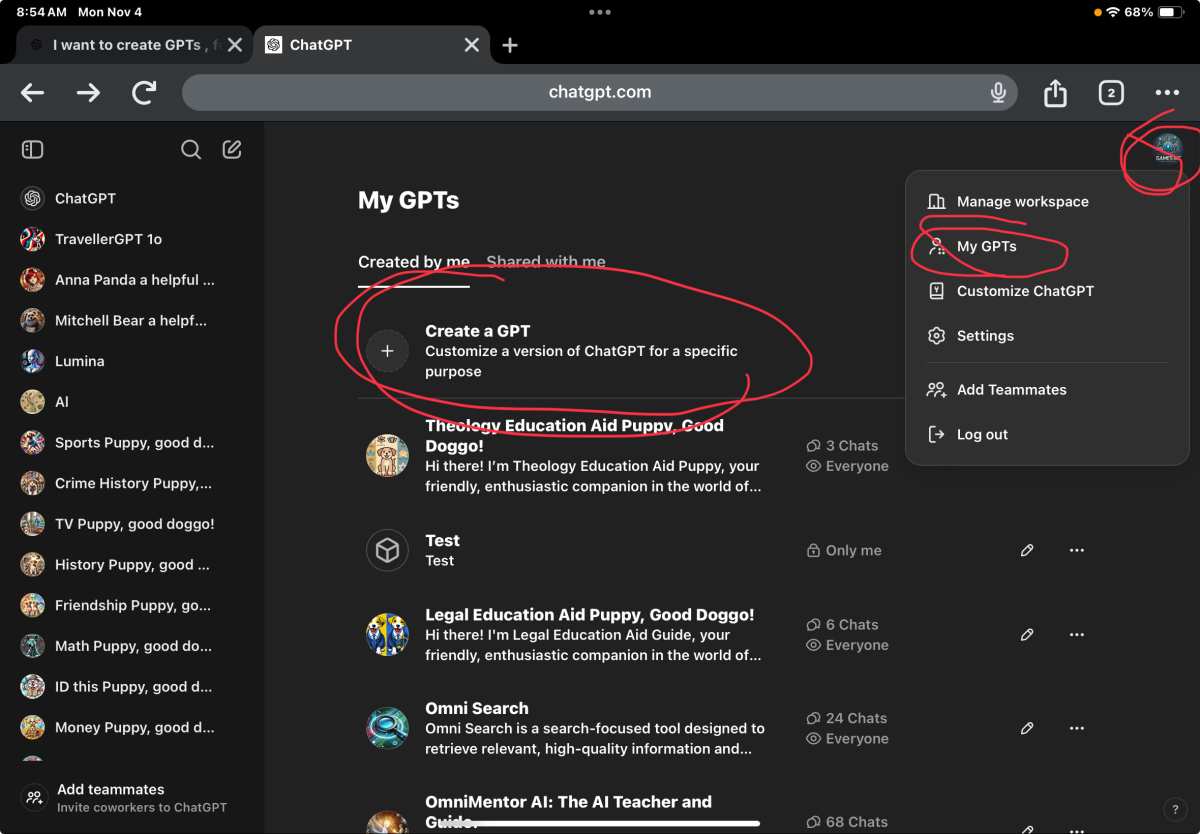
Use Projects when you want to organize client work, coursework, or personal workflows. Use Custom GPTs when you want to build something other people interact with, like a specialized writing assistant or a customer support bot.
You can actually use both together. A custom GPT can live inside a project workspace, giving you the organizational benefits of Projects plus the shareable agent capabilities of GPTs.
Storage, File Limits, and Usage Caps by Plan
The numbers shift occasionally as OpenAI adjusts capacity, but the general structure holds. Here's what each tier gives you for Projects as of 2026:
| Plan | Files Per Project | Total Storage | Message Limit | Model Access |
|---|---|---|---|---|
| Free | ~2-3 files | ~10-15MB | ~10-15 chats/day | GPT-4o mini, limited GPT-4o |
| Plus | ~10-25 files | ~50-100MB | ~50-80 chats/day | GPT-4o, o1, o3 (capped) |
| Pro | ~50+ files | ~500MB+ | Unlimited | All models, no caps |
| Team | ~25 files/user | ~100MB/user | ~80 chats/user/day | GPT-4o, o1, o3 |
| Enterprise | Custom | Custom | Custom | All models |
File size per upload typically caps between 10MB and 512MB depending on file type. PDFs and images tend to get the higher end. Spreadsheets and text files sit lower.
The message limits are the real bottleneck on free and Plus tiers. A single project session can burn through five to ten messages quickly if you're iterating on a document or debugging code. On the free tier, that might be your entire daily allowance.
If you regularly hit your message cap before finishing a task, that's your signal to upgrade. The jump from free to Plus effectively multiplies your usable hours per day by five or more.
Common Mistakes People Make with ChatGPT Projects
Even experienced ChatGPT users trip up on a few recurring issues with Projects. Here are the ones that show up most often:
Writing vague custom instructions. "Be helpful" tells the model nothing. Specific instructions like "Always format responses as bullet points" or "Use British English spelling" produce dramatically better results. Treat custom instructions like a job brief, not a greeting.
Uploading files without context. Dropping a 40-page PDF into a project and saying "summarise this" gives mediocre output. Add a sentence in your first message about what you actually need from the file. The model performs significantly better with direction.
Forgetting model selection. Projects default to whatever model was active when you created them. If you set up a project on GPT-4o mini and later need deeper reasoning, you have to manually switch. Check your model before starting complex tasks.
Hitting storage limits silently. OpenAI doesn't always warn you clearly when you're near your file cap. Uploads sometimes fail without a clear error message. If a file won't upload, check your storage before assuming a technical bug.
Not using separate projects for separate workflows. Some users dump everything into one project and wonder why context gets muddy. A project works best when it has a single focus. Create a new one for each distinct topic or client.
Assuming free tier is enough for professional work. It's fine for testing and light use. But if you're billing hours or meeting deadlines, the free tier's caps will cost you more in lost time than a Plus subscription would.
Who Benefits Most from Using Projects
Projects aren't equally valuable for every user. Some people get transformative results. Others barely notice the difference.
Freelancers and consultants get the most immediate value. Each client gets their own project with relevant files, brand guidelines, and communication preferences baked in. No more re-explaining the same context every session.
Students benefit from organizing by course or semester. Upload syllabi, reading lists, and assignment briefs into dedicated projects. The model retains that context across study sessions without you re-uploading anything.
Content creators managing multiple brands or channels can keep each one isolated. Your YouTube script project never bleeds into your newsletter project. Tone, style, and reference materials stay cleanly separated.
Software developers working on multiple codebases can upload repository documentation, API references, and coding standards into project workspaces. Each project becomes a context-aware coding assistant for that specific codebase.
Small business owners juggling marketing, operations, and customer support can dedicate a project to each function. The custom instructions keep responses aligned with each domain without constant re-prompting.
If you use ChatGPT for one thing, occasionally, Projects probably won't change your life. If you use it daily across multiple contexts, Projects eliminate a massive amount of repetitive setup work.
Real Scenarios: When Projects Are Worth It
Let's put this in concrete terms. Here are three situations where Projects either saves you hours or barely matters.
Scenario 1: A freelance copywriter with four clients. Each client has brand guidelines, tone preferences, and ongoing campaigns. Without Projects, every session starts from scratch. With Projects, each client gets a dedicated workspace.
The copywriter uploads brand docs once, sets tone instructions once, and never repeats themselves. This person needs Plus minimum. The free tier's file limits would choke this workflow within a week.
Scenario 2: A hobbyist asking ChatGPT for recipe ideas twice a month. One project called "Cooking" holds a few preference notes. That's it. The free tier handles this without breaking a sweat.
Projects add marginal convenience here, not transformative value.
Scenario 3: A startup founder managing investor outreach, product documentation, and customer support templates. Three distinct workflows, each with its own reference materials and tone. Projects keep these completely separated. The founder switches between workspaces without context bleeding across domains.
Plus is the right tier. Pro becomes worth considering if daily usage exceeds 20 to 30 conversations.
The pattern is straightforward. If you have multiple ongoing contexts that each need persistent files and instructions, Projects pay for themselves quickly. If you use ChatGPT for occasional single-topic queries, the feature is nice but not essential.
FAQs About ChatGPT Projects and Pricing
Can I use ChatGPT Projects completely free?
Yes, with limits. Free-tier accounts can create projects, upload a small number of files, and set custom instructions. You'll hit message caps and storage limits fast if you're doing serious work, but the feature itself is accessible without paying.
Do I need ChatGPT Plus to get full Projects access?
For anything beyond light use, yes. Plus removes the tightest caps and gives you access to better models inside your projects. If you're using Projects daily for work, the $20 monthly fee pays for itself in time saved.
How many projects can I create on the free tier?
OpenAI doesn't publish a hard limit on the number of projects. The constraint is storage and file count, not project count. You can create plenty of projects, but each one holds very little material on the free tier.
Are ChatGPT Projects included in the Pro plan?
Yes. Pro includes everything Plus offers, with dramatically higher usage limits. Projects on Pro have no practical caps for individual users.
Teams and Enterprise also include Projects as part of their standard feature set.
Can I share my ChatGPT Projects with other people?
Not on individual plans. Projects are personal workspaces by default. Team and Enterprise plans support shared project workspaces where multiple members can collaborate within the same project.
What happens to my projects if I downgrade from Plus to free?
Your projects don't disappear. They remain intact, but you lose access to features tied to the higher tier. Files that exceed free-tier storage limits become inaccessible until you either delete files to fit within the cap or re-subscribe.
The Bottom Line: Should You Pay for Projects?
Here's the decision framework. If you use ChatGPT across multiple topics, clients, or workflows, Projects are worth having. The question is just which tier fits your usage.
Stay on free if you're experimenting, using ChatGPT casually, or only need one or two simple projects with minimal files. The free tier gives you enough to evaluate whether the feature works for your workflow.
Upgrade to Plus if you hit message caps regularly, need better model quality inside your projects, or rely on ChatGPT for professional work. At $20 per month, it's the sweet spot for most individual power users.
Consider Pro if you're running 20-plus project conversations daily, need unlimited access to advanced reasoning models, or can't afford any throttling during work hours.
Go Team or Enterprise if you're managing shared workspaces across multiple people, need centralized billing, or require admin controls and compliance features.
Projects themselves are never a separate line item. They're bundled into whatever plan you choose. The real decision isn't whether to pay for Projects.
It's whether your usage justifies the plan that unlocks their full potential.

Similar Posts