Why Does My Sound Box Beep While Charging?
You plug in your sound box for the night, and then it starts. A beep. Another beep.
You lie there wondering why does sound box beep while charging when you just want some quiet. It's a common frustration, and the answer is usually simpler than you think.
Manufacturer specifications indicate that the beeping sound is a deliberate signal from the battery management system (BMS) inside the speaker. As of 2026, most portable speakers use this same core technology. The beep is not a defect.
It's a communication tool. Let's walk through what those beeps actually mean and how to stop them.
The Quick Answer: It Depends on the Beep Pattern
The beep is a status report. A single beep when you plug the cable in means charging has started. Repeated beeps every few seconds mean the battery is critically low.
A continuous tone often signals an error. Listen to the pattern first. It tells you everything.
How the Charging and Beeper System Works
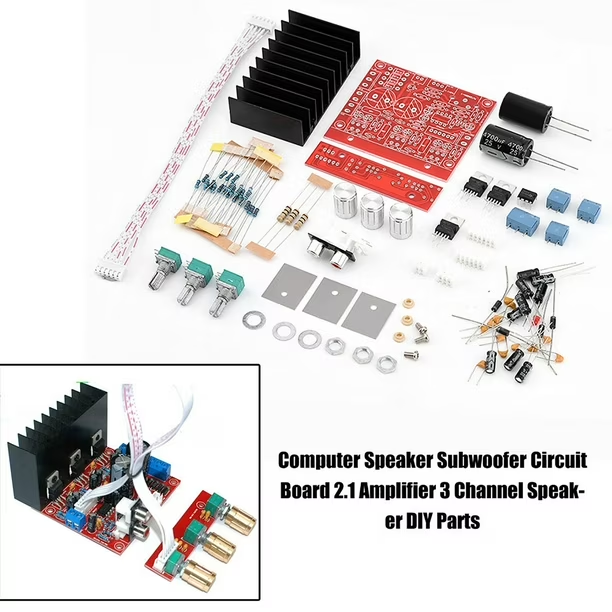
Inside every portable speaker sits a small circuit board. This board manages the battery. It monitors voltage, temperature, and current.
When something changes, the board triggers a beep. This is not a defect. It is a feature designed to keep you informed.
The Battery Management System (BMS) is the brain of the charging circuit. It protects the battery from overcharging and overheating. It also prevents over-discharge, which can permanently damage the cells.
Without the BMS, your speaker could become a fire risk.
The beeper itself is a small piezoelectric buzzer. It is the same component that makes the power-on sound. The BMS sends a signal to the buzzer when a specific condition is met.
That condition could be a low battery voltage, a full charge, or a fault in the circuit.
Many users wonder about checking the battery level when a beep appears. The BMS is the same system that reports the battery percentage to your phone. It is a reliable indicator of what is happening inside.
The official Bose support documentation for the SoundLink Micro LED indicator confirms that the beep and LED work together to communicate battery status.
What Each Beep Pattern Means (Single, Double, Repeating, Continuous)

Not all beeps are the same. The pattern tells you the specific condition. Here is a quick breakdown:
| Beep Pattern | What It Means | What To Do |
|---|---|---|
| Single beep on plug-in | Charging started normally | Nothing, it is working correctly |
| Double beep on plug-in | Battery is full, charging stopped | Unplug if you want to save power |
| Repeating beeps every 5-10 seconds | Battery is critically low (below 10-20%) | Charge the speaker as soon as possible |
| Rapid repeating beeps | Overheating or short circuit detected | Unplug immediately and let it cool |
| Continuous single tone | Hardware error or internal fault | Check the manual or contact support |
The LED indicator on your speaker often confirms the beep pattern. A red light blinking with the beeps means low battery. A green or blue light means charging is complete.
Pay attention to both signals together.
Some brands use a different number of beeps. For example, three beeps every 30 seconds may indicate a connection fault with the charger. Check your user manual for the exact pattern.
If you are unsure, a simple test with a different cable can rule out the most common causes.
How to Diagnose the Beep by Checking the Charger, Port, and Battery

If the beep is unexpected, start with the charger. Use the original charger that came with the speaker. Third-party chargers can deliver the wrong voltage.
This confuses the BMS and triggers a beep.
Next, check the cable. A damaged cable can cause intermittent connection. The BMS sees the power cutting in and out.
It beeps every time the connection drops. Try a different cable. If the beeping stops, the old cable was the problem.
Inspect the charging port. Dirt and debris can block the connection. Use a toothpick or compressed air to clean it gently.
If your speaker has been near water, moisture in the port can cause a short circuit. The beep is a warning sign. Do not ignore it.
Finally, test the battery. If the speaker has been stored for months without use, the battery may have dropped to a critically low voltage. The BMS enters a protection mode.
It beeps but will not accept a charge. Leave the speaker plugged in for several hours. Sometimes the BMS needs time to wake up.
If you are still having trouble, consider troubleshooting a speaker that won't turn on. A dead battery can sometimes trigger a false alarm. The same approach works for repairing a charging port if the physical connection is loose.
Mistakes That Can Make the Beeping Worse (Like Using the Wrong Charger)
One of the most common mistakes is using a fast charger. A fast charger delivers more current than your speaker expects. The BMS detects this and may beep repeatedly to warn you.
Stick to a standard 5V/1A charger for best results.
Another mistake is ignoring water damage. Even a small amount of moisture can cause the BMS to trigger a safety beep. If your speaker is not rated for water, keep it dry.
If it is waterproof, still make sure the port cover is sealed before charging.
Using a damaged cable is also a common error. Frayed wires cause power fluctuations. The BMS beeps with every fluctuation.
Replace the cable and see if the beeping stops. A $5 cable is cheaper than a new speaker.
Do not ignore the beep. It is a safety warning. If you hear a continuous tone, unplug the speaker and let it cool.
Do not force a charge. The fixing of a charging issue often requires patience and a careful approach.
Finally, avoid using a power bank with unstable output. Some budget power banks deliver uneven voltage. The BMS interprets this as a fault.
Use a wall outlet whenever possible. If you must use a power bank, choose one from a reputable brand.
When the Beep Means Danger: Safety Warnings You Shouldn't Ignore
Most beeps are harmless. Some are not. A continuous tone that does not stop is a safety warning.
The BMS has detected a condition it cannot fix. Unplug the speaker immediately.
Overheating is the most common danger. If the speaker feels hot to the touch, the battery may be swelling. This is a fire risk.
Do not leave it plugged in. Move it to a fireproof surface and let it cool. If the beeping continues after cooling, stop using the speaker.
A short circuit in the charging port is another danger. Water or metal debris can bridge the contacts. The BMS beeps to warn you.
Do not ignore this. A short circuit can damage the battery permanently. It can also cause a fire.
If you smell burning plastic or see smoke, do not try to charge the speaker again. Dispose of the battery according to local regulations. Lithium-ion batteries require special handling.
Do not throw them in the trash.
The same safety concerns apply to many portable devices. The BMS is a standard safety feature across most electronics. Pay attention to what it tells you.
Real Scenarios: What That Beep Probably Means for You
Scenario 1: You just bought the speaker
You unbox it and plug it in. A single beep sounds. The LED turns red.
This is normal. The speaker shipped with a partial charge. The beep confirms charging has started.
Let it charge fully before first use.
Scenario 2: You are charging overnight
You wake up to a beeping speaker. The battery is full. Many speakers beep when they reach 100% charge.
This is a feature, not a bug. If it bothers you, plug the speaker in during the day instead. You can also check the best practices for daily use to extend battery life.
Scenario 3: You used a different charger
You grabbed a phone charger from the drawer. The speaker beeps every few seconds. This is a voltage mismatch.
The BMS is warning you. Switch to the original charger. The beeping should stop within a few seconds.
Scenario 4: Your speaker got wet
You used it at the pool. Now it beeps when you plug it in. The charging port may have moisture inside.
Do not charge it. Let the speaker dry for 24 to 48 hours in a warm, dry place. If the beeping continues after drying, the water damage may be permanent.
Repairing a waterproof speaker is possible, but only if the internal circuits are intact.
Scenario 5: The speaker is several years old
The battery has degraded. The BMS may beep at random times. This is a sign that the battery is near the end of its life.
Replace the speaker or have the battery professionally replaced. Do not ignore a degraded battery. It can swell and become dangerous.
Frequently Asked Questions About Sound Box Beeping
Why does my sound box beep once when I plug it in?
A single beep on plug-in is normal. It confirms that the charging circuit has detected power. The speaker is now charging.
No action is needed.
Why does my sound box beep every few seconds while charging?
Repeated beeps every few seconds usually mean the battery is critically low. The BMS is warning you that the battery is below 10 to 20 percent. Leave it plugged in.
The beeping should stop once the battery reaches a safe level.
Why does my sound box beep continuously when charging?
A continuous beep is a safety warning. It indicates a fault condition. Unplug the speaker immediately.
Check the charging port for damage or moisture. If the problem persists, contact the manufacturer.
Can I stop my sound box from beeping while charging?
Some speakers have a mute switch for charging sounds. Check your user manual. If not, charging during the day is the easiest solution.
You can also try a different charger that delivers a stable voltage.
Does the beep mean my speaker is damaged?
Not always. A single beep is normal. A double beep at full charge is also normal.
Repeated or continuous beeping may indicate a problem. Start with the simplest fix: try a different cable and charger. The solution for a distorted sound follows a similar troubleshooting path.
Why does my speaker beep when I unplug it?
Some speakers beep when the charging cable is removed. This is a normal acknowledgment that the charge cycle has ended. No action is needed.
Your Beep-to-Action Decision Guide
Here is a simple decision guide. Use it the next time your speaker beeps.
| What You Hear | What To Do First |
|---|---|
| Single beep on plug-in | Nothing. It is normal. |
| Double beep on plug-in | Battery is full. Unplug to save power. |
| Repeating beeps every 5-10 seconds | Charge the speaker. Battery is low. |
| Rapid repeating beeps | Unplug immediately. Let it cool. Check for damage. |
| Continuous single tone | Unplug. Inspect for damage. Contact support. |
| Beep when unplugging | Normal. Ignore it. |
The beep is your speaker's way of talking to you. Listen to the pattern. Check the cable and charger first.
Inspect the port for dirt or moisture. If the beeping stops, you have found the problem. If it does not, the BMS may be protecting the battery from a serious issue.
Understanding the connection reliability of your speaker can also help you rule out other causes. A speaker that disconnects frequently may beep when the Bluetooth connection drops. This is a different issue entirely.
Most of the time, the beep is a friendly reminder. Your battery needs a charge. Your charger is not compatible.
Your speaker is fully charged. Treat it as a helpful signal, not a problem. And if you ever need to pair your speaker with a new device, the beep will confirm a successful connection.
The Consumer Product Safety Commission (CPSC) outlines safety standards for lithium-ion batteries in portable electronics. The beep is part of that safety system. It is there to protect you.
Trust it.
How to Reset Your Speaker to Stop the Beeping
Sometimes a simple reset is all it takes. The BMS can get stuck in a warning loop. A reset clears the error state and lets the system start fresh.
Find the reset button on your speaker. It is usually a small pinhole or a dedicated button. Press and hold it for 10 seconds.
Some speakers require you to press the power button and volume up button simultaneously. Check your manual for the exact method.
After the reset, plug the speaker back in. If the beeping stops, the issue was a temporary glitch. If it returns, the problem is hardware related.
A reset is free and takes 30 seconds. It is always worth trying before you do anything else.
When to Replace the Battery Instead of the Speaker
A degraded battery triggers false beeps. The BMS detects voltage drops that are not real. The speaker beeps even when the battery shows a full charge.
Replacing the battery is cheaper than buying a new speaker. Many portable speakers use standard 18650 lithium-ion cells. You can find them online for under $10.
If you are comfortable with basic soldering, it is a 20 minute job.
If the speaker is glued shut, replacement is harder. Some brands make it impossible to open without damage. In that case, a new speaker is the practical choice.
Compare the cost of a budget sound box against the repair cost before you decide.
Understanding Brand-Specific Beep Behaviors
Not all speakers beep the same way. Different brands use different patterns. Knowing your brand helps you diagnose faster.
| Brand | Typical Beep Behavior |
|---|---|
| JBL | Single beep on power on, double beep on charge complete |
| Bose | Single beep on plug-in, no beep at full charge |
| Anker / Soundcore | Single beep on plug-in, three beeps at low battery |
| Sony | Single beep on plug-in, repeated beeps every 30 seconds at low battery |
| Ultimate Ears | No charging beep, only LED indicator |
Check your manual or the manufacturer's website for the exact behavior. If you have paired your speaker with a phone, the app often shows the battery percentage directly. That eliminates the need to decode beeps.
How to Test Your Speaker's Battery Health
A healthy battery holds a charge and delivers stable voltage. An unhealthy battery causes random beeps. Testing is simple.
Charge the speaker fully. Note the time. Use it normally until it dies.
A healthy speaker should last 80 to 100 percent of its rated battery life. If it dies in half the time, the battery is degrading.
Use a multimeter to test the battery voltage directly. A fully charged lithium-ion cell reads 4.2 volts. A dead cell reads 3.0 volts.
If the voltage drops below 3.0 volts when idle, the cell is damaged. Replace it.
The same testing method works for outdoor speakers. A multimeter costs $15 and gives you a definitive answer. No more guessing.
The Bottom Line on Beeps and Battery Safety
The beep is your speaker's way of keeping you safe. It warns you about low battery, incompatible chargers, and internal faults. Listen to it.
Diagnose it. Fix the cause.
Most beeps are normal. A single beep on plug-in means charging started. A double beep means full charge.
Repeated beeps mean low battery. A continuous tone means danger. Use the decision guide above to act quickly.
If you are unsure, start with the simplest fix. Change the cable. Clean the port.
Use the original charger. Reset the speaker. Nine times out of ten, one of these steps stops the beeping.
If the beeping continues after all these steps, the BMS may have detected a real fault. Stop using the speaker. Contact the manufacturer.
A damaged lithium-ion battery is not worth the risk. Replace the speaker and enjoy your music without the nuisance.

Similar Posts





















