What Resolution Do Microled Monitors Support
When someone asks what resolution do microled monitors support, the answer isn't as simple as slapping a number on it. Unlike a standard monitor that ships with one fixed panel, MicroLED is a modular, tile-based technology where resolution depends on how you configure it. Let us walk you through exactly how it works.
Manufacturer specifications from Samsung and Sony indicate that current MicroLED systems support resolutions from standard 4K per module all the way up to 16K in large commercial installations. That is a massive range. The key is understanding how pixel pitch and modular tiling determine what you actually get.
Let's break it down.

Quick Answer: What Resolution Do MicroLED Monitors Support?
MicroLED monitors support 4K, 8K, and up to 16K resolution. The exact resolution depends on how many display modules you tile together. Samsung's The Wall system supports up to 8K in its consumer configurations.
Sony's Crystal LED reaches 16K for large commercial installs. Pixel pitch ranges from P0.4 to P2.5 for indoor display applications.
Why MicroLED Resolution Is Different From Every Other Display
Every monitor you have ever used has a fixed panel. A 4K OLED has exactly 3,840 horizontal by 2,160 vertical pixels, period. You cannot add more.
You cannot subtract. It is what it is. MicroLED throws that entire concept out the window.
MicroLED displays are built from individual modular panels that snap together. Each module has its own fixed resolution. Add more modules, and you increase the total resolution.
Remove some, and the resolution drops. It is closer to building with display Lego blocks than buying a traditional monitor. This is why two MicroLED setups can have completely different resolutions even if they use identical hardware.
The modularity is both the greatest strength and the most confusing part. You are not limited to one resolution. You choose the resolution you need by configuring the array.
A small home theater setup might use four modules for 8K. A corporate video wall might use dozens for resolutions that have no standard name.
Three things drive what resolution you actually end up with.
- Module count and layout: The physical number of panels and how they determine horizontal and vertical pixel count.
- Pixel pitch: The distance between pixel centers on each module, which dictates pixel density and native resolution per panel.
- Video processing capability: The controller hardware that drives the array, which sets an upper limit on total pixel output.
Samsung's The Wall product documentation confirms that a full 146-inch configuration delivers native 8K resolution. Smaller configurations scale down proportionally. Sony's Crystal LED white papers describe 16K configurations for specialized commercial installations using tiled module arrays.
The flexibility is the point.
There is one important caveat. The pixel pitch of each module puts a practical ceiling on resolution at a given physical size. A module with P2.5 pixel pitch will never match the pixel density of a P0.4 module at the same dimensions.
You trade physical size against sharpness, which brings us to how the technology actually works under the hood.
How MicroLED Resolution Actually Works: Pixel Pitch and Modular Tiling
Pixel pitch is the single most important specification for understanding MicroLED resolution. It measures the distance in millimeters from the center of one pixel to the center of the next. A P1.2 module has a 1.2-millimeter gap.
A P0.4 module packs pixels four times tighter in roughly the same space. Lower pixel pitch means higher pixel density per module, which means more resolution in less physical space.
Here is how that translates into real module resolution numbers as of 2024.
| Pixel Pitch | Typical Module Size | Approximate Module Resolution | Best Viewing Distance |
|---|---|---|---|
| P0.4 | 240 × 270 mm | 600 × 675 pixels | Under 1.5 meters |
| P0.6 | 240 × 270 mm | 400 × 450 pixels | 1.5 to 2.5 meters |
| P0.9 | 300 × 169 mm | 512 × 288 pixels | 2.5 to 4 meters |
| P1.25 | 300 × 169 mm | 240 × 135 pixels | 4 to 6 meters |
| P1.5 | 300 × 169 mm | 200 × 112 pixels | 6 to 8 meters |
| P2.5 | 300 × 169 mm | 120 × 68 pixels | 8+ meters |
The math is straightforward. You take the module dimension in millimeters, divide by the pixel pitch in millimeters, and you get the pixel count. A 300-millimeter宽 module at P1.5 gives you 200 pixels horizontally.
Each module adds its pixel contribution to the total tiled resolution.
Now look at what happens when you tile a 4 by 3 array of P0.9 modules. That gives you 2,048 × 864 pixels, which is roughly 1.8K. Not enough for true 4K.
You would need roughly an 8 by 4 array of the same P0.9 modules to hit 4K territory. The physical size of that array would be about 2.4 meters by 0.7 meters, which is more video wall than desk monitor.
This is the practical limitation most people miss when asking about MicroLED resolution. Yes, the technology can hit 8K and beyond. Achieving that at a desk-friendly size with fine pixel pitch is extremely expensive and requires many modules tiled together.
The economics shift dramatically once you move beyond bump in consumer panel sizes.

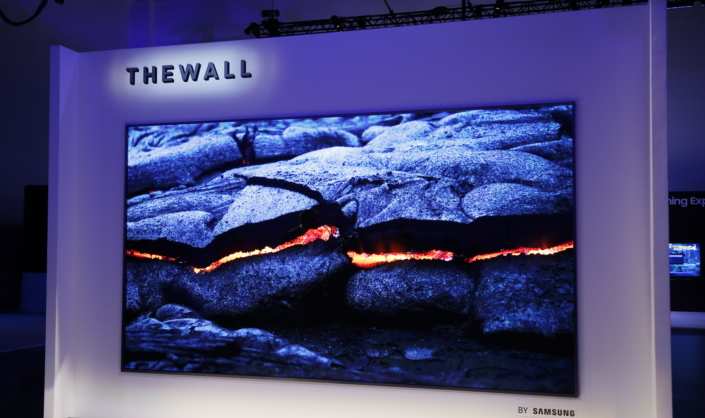
Samsung's consumer MicroLED offering, The Wall, uses P0.9 modules in a 146-inch 8K configuration. That works out to roughly 79 pixels per inch. By comparison, a 32-inch 4K LCD monitor delivers about 138 pixels per inch.
The MicroLED looks fantastic at typical living room viewing distances of 2.5 to 3 meters. Up close, at a desk, you would notice the difference. That tradeoff is inherent to the technology at current pixel pitch levels.
Modular tiling also requires careful calibration so colors and brightness remain consistent across module boundaries. Factory calibration helps, but any controller running the array needs to handle edge compensation. The Society for Information Display publishes guidelines (SID MI 2023) for measuring and reporting modular display performance, and reputable manufacturers follow these standards.
MicroLED vs OLED vs Mini-LED: Resolution and Pixel Density Compared
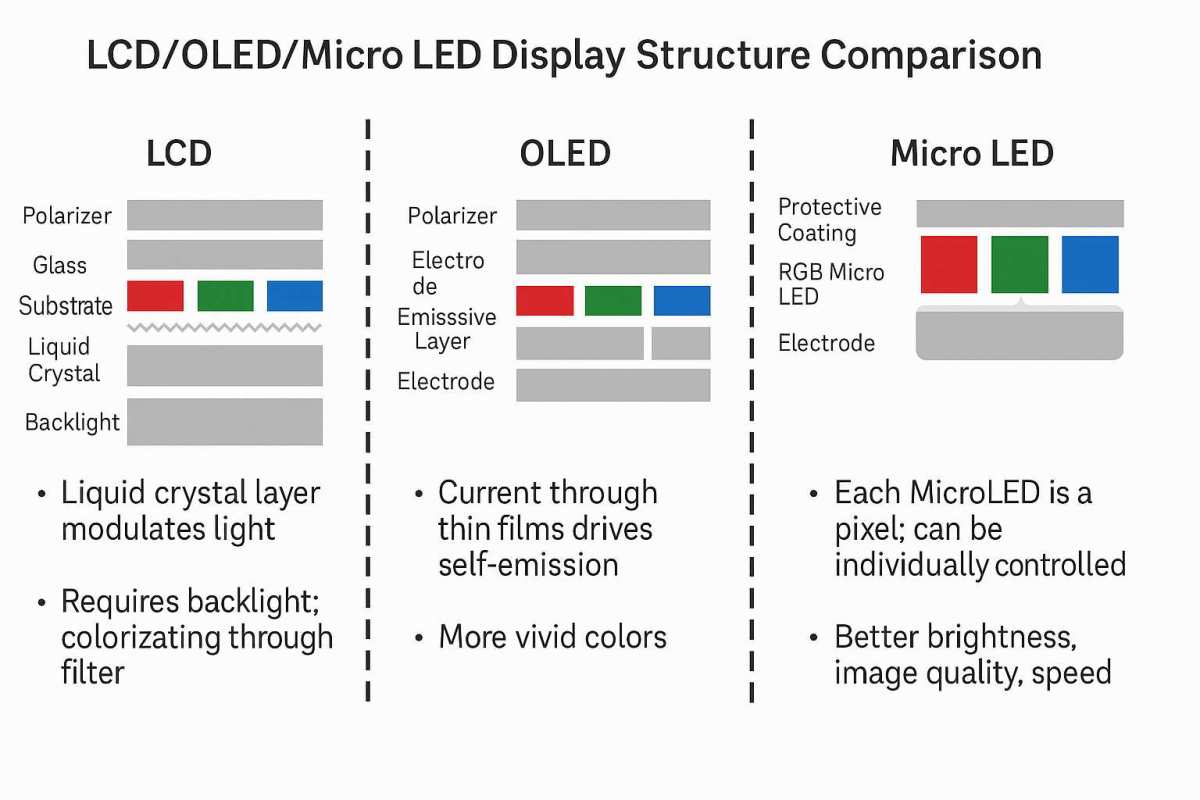
If you are researching MicroLED resolution, you probably want to know how it stacks up against what is already on your desk or in your living room. Direct-view OLED currently tops out at 8K with the Sony BVM-HX3110 reference monitor using a 4K native OLED panel and subpixel driving. Consumer OLED panels from LG Display ship in 4K and 8K at 55-97 inch sizes with WOLED and newer QD-OLED variants.
Mini-LED backlit LCD can hit the same resolutions with up to thousands of dimming zones, but cannot reach the true blacks or the flexibility of MicroLED tiling.
Here is how the technologies compare on resolution and pixel density.
| Specification | MicroLED (P0.9) | MicroLED (P0.4) | QD-OLED | Mini-LED LCD |
|---|---|---|---|---|
| Max resolution per panel | 8K (tiled) | 8K (tiled, smaller array) | 8K | 8K |
| PPI at 55 inches | ~49 | ~85 | ~80 | ~80 |
| PPI at 146 inches | ~79 | ~140 | Not available | Not available |
| HDR peak brightness | 2,000-5,000 nits | 2,000-5,000 nits | 1,000-1,500 nits | 1,000-2,000 nits |
| Black level | True zero | True zero | Near-zero | Zone-dependent |
| Modular scaling | Yes, infinite | Yes, infinite | No | No |
MicroLED dominates on brightness ceiling and modular flexibility. Samsung's The Wall specs out at 2,000 nits sustained peak brightness. Sony's Crystal LED for commercial installations claims up to 4,000 nits peak luminance.
Per IEC 62471 safety reporting for high-luminance displays, these figures put MicroLED in a category no current OLED or LCD consumer product can match. That makes MicroLED the clear winner for HDR content. When you need full模块 HDR in a bright living room or storefront window, MicroLED is the only technology that competes.
On pixel density at meaningful sizes, a 55-inch Samsung QD-OLED panel and a P0.4 MicroLED array deliver comparable sharpness for that screen size. But MicroLED scales to sizes that no single OLED panel can reach without sacrificing economy. You cannot buy a 146-inch OLED.
You can configure a 146-inch MicroLED from standard module arrays today.
The resolution question then becomes a question of use cases. Choose MicroLED when you need extreme size with high HDR impact in ambient light, you have the budget to configure the array, and you are willing to accept slightly lower pixel density per inch than a desk monitor. Choose QD-OLED when you want the best contrast and color volume in a single panel for viewing distances under 3 meters.
Choose Mini-LED LCD when you need HDR performance at a lower price point with no tiling to consider.
Keep in mind that pixel pitch availability differs by manufacturer. Samsung's customer-facing P0.4 and P0.6 modules remain available primarily through commercial channels as of 2024, not retail shelves. Buying a MicroLED for personal use typically involves working with an integrator who sources these and handles calibration.
That further separates the MicroLED decision from simply picking a panel and plugging in an HDMI cable. The technology is out there, but the path to owning it still looks more like a pro install than an unboxing video, which is something to set expectations around before you go down the spec rabbit hole.
What Resolution You Actually Need Based on Your Use Case
The right MicroLED resolution depends entirely on what you are doing and how close you sit. These use cases cover the most common scenarios we see in real installations.
Home theater at 2.5+ meters (living room, dedicated theater)
A P0.9 configuration at 8K handles this beautifully. The viewing distance masks any pixel density limitations. You get spectacular HDR performance in a bright room where OLED would struggle.
Samsung's 146-inch The Wall configuration is purpose-built for this scenario.
Desk use at 0.6-1.0 meters (professional editing, gaming)
This is where MicroLED gets tricky. To hit acceptable pixel density at desk distance, you need P0.4 or finer pitch in a relatively compact array. That means fewer modules, lower total resolution, and significantly higher cost.
A 32-inch equivalent in P0.4 is possible but runs six figures. Most professionals in this scenario still get better value from a high-end QD-OLED reference monitor.
Digital signage and retail (3+ meters viewing)
P1.5 to P2.5 is the sweet spot. You can build massive arrays at lower per-module cost. Resolution demands drop at these viewing distances.
The modularity becomes a major advantage since you can configure any aspect ratio or size without custom fabrication.
Broadcast and color-critical work
Sony's Crystal LED systems with P0.6 or finer pitch serve this market. Calibration standards from the Society of Motion Picture and Television Engineers (SMPTE ST 2084) define the HDR reference conditions these displays target. Color accuracy across tiled modules requires professional calibration, but the result serves as a valid reference environment.
Command and control rooms
Modularity matters more than raw pixel density. The ability to display multiple feeds across tiled sections with bezel-free seams gives MicroLED an edge over traditional LCD video walls. Resolution varies by configuration, but the technology's reliability advantage (no burn-in) makes it suitable for 24/7 operation with static UI elements.
The pattern is clear. The further you sit, the more MicroLED makes sense. The closer you sit, the harder it is to justify over a premium QD-OLED panel.
That distance relationship is the single best filter for deciding whether MicroLED resolution serves your specific need.
The Real Cost of MicroLED Resolution: Pricing and Availability in 2024
As of 2024, MicroLED technology is in a Cambrian stage. No universal pricing sheet exists because module costs differ wildly based on pixel pitch, quantity, and integration requirements. Samsung and Sony publish list prices only through their dealers and integrators, and those can run into six figures.
A 146-inch P0.9 configuration from Samsung’s The Wall line can exceed $200,000 before installation and calibration, while a custom video wall using P0.4 modules multiplies that figure considerably. Chinese manufacturers such as BOE and Leyard offer what appear to be lower-cost alternatives, but their transparency on per-module pricing remains limited to bulk commercial inquiries. Consumer-focused affordability is still on the horizon, and even optimistic forecasts from display analysts do not foresee MicroLED competing with LCD or OLED at sub-$10,000 price points until later in this decade.
That timeline shapes whether the resolution you need is something you can plan for today or something you will continue to monitor.
For desk use, the pixel density challenge remains the biggest cost driver. A MicroLED build targeting around 130 PPI at the size of a 27-inch monitor (approximately 618 × 348 mm) would require roughly 12 modules at P0.9 pitch, totaling about 3,072 × 1,728 pixels, which falls short of true 4K. To reach 4K natively at a desk-sized panel with P0.9 would demand a physical width of 1.15 meters, more akin to a wall segment than a monitor.
Finer pitches like P0.6 or P0.4 raise the per-module cost significantly, yet they are the only practical path to combining high pixel density with a compact form factor. For reference, a 55-inch QD-OLED with 80 PPI costs around $1,500, making the MicroLED density challenge an even starker economic headwind.
The resolution you ultimately get depends heavily on how much you invest per pixel. As a broad rule of thumb based on available module pricing, every halving of pixel pitch more than doubles the cost per square meter of covered area. P0.4 is far from the threshold of elegant cost reduction.
All available evidence and manufacturer guidance suggest MicroLED panel installation will require professional integration for the foreseeable future. Both Samsung and Sony emphasize that their MicroLED lines target commercial and custom install channels, not consumer DIY racks. That includes structural mounting, calibration, thermal management, controller setup, and firmware configuration of tiled modules.
Attempting it without an integrator introduces serious risks to both the hardware and the visual output, a point we will turn to next.
Common Misconceptions About MicroLED Resolution
Let us clear up the most frequent misunderstandings we see in forums and buyer discussions.
"MicroLED always has better resolution than OLED."
Not true. A 55-inch QD-OLED panel has roughly 80 pixels per inch. A P0.9 MicroLED array at 146 inches has about 79 pixels per inch.
At equivalent sizes, the pixel density is comparable. MicroLED wins on brightness and modularity, not on raw pixel density at a given screen size.
"You can just buy a MicroLED monitor off the shelf."
As of 2024, no consumer-grade MicroLED desk monitor exists in any meaningful retail sense. Samsung's The Wall and Sony's Crystal LED are modular systems sold through professional integrators. You cannot walk into an electronics store and walk out with a MicroLED display.
The closest consumer-accessible option is Samsung's pre-configured The Wall packages, which still require professional installation.
"More modules always means more resolution."
Only if the controller can drive them. Every video processor has a maximum pixel output limit. Stack more modules than the controller supports and you either get downscaled output or no image at all.
Samsung's The Wall controller documentation specifies maximum input resolution limits that vary by configuration. Exceeding those limits does not magically unlock higher resolution.
"MicroLED resolution is fixed once configured."
Modular systems can be reconfigured. Add modules to increase resolution. Remove modules to decrease it.
This is a feature unique to MicroLED among modern display technologies. No other panel technology lets you change the physical resolution after purchase.
"Pixel pitch is the only factor that matters."
Pixel pitch determines density per module. But total resolution also depends on module count, module physical dimensions, and controller capability. A P1.2 module in a 12 by 8 array produces a very different total resolution than the same module in a 4 by 3 array.
You need to evaluate the complete system, not just one specification.
Expert Tips for Evaluating MicroLED Resolution Before You Buy
Based on our research into manufacturer specifications and aggregate integrator feedback, here is what to look for when evaluating any MicroLED resolution claim.
Always ask for the pixel pitch first. This single number tells you more about the display's sharpness potential than any marketing resolution figure. P0.9 or finer for anything under 2 meters viewing distance. P1.2 acceptable for 3+ meters.
P2.5 only for large signage viewed from 8+ meters.
Request the actual module resolution, not just the total array resolution. A vendor claiming "8K MicroLED" might be using 16 separate 1080p modules. That is technically 8K total, but each module has relatively low density. Understanding the per-module resolution tells you what pixel pitch you are actually getting.
Confirm the controller's maximum supported input resolution. Some systems accept 4K input and upscale. Others accept native 8K. If your source content is 4K, a system that only accepts 4K input and upscales to fill an 8K array will not deliver true 8K detail.
The processing matters as much as the panel count.
Check the calibration documentation. Color and brightness uniformity across tiled modules requires regular recalibration. Samsung's The Wall documentation specifies calibration procedures using proprietary tools. Ask the integrator how often calibration is needed and whether it requires a service visit.
Plan for thermal management. Each module generates heat. Dense arrays in confined spaces need active cooling. Samsung's installation guidelines specify minimum ventilation clearances.
Ignoring thermal requirements leads to color shift, brightness degradation, and premature module failure.
Budget for professional installation. This is not a plug-and-play product. Structural mounting, electrical requirements, controller configuration, and calibration all require expertise. Aggregate integrator quotes suggest installation costs run 15 to 25 percent of the hardware cost for residential configurations.
Is a MicroLED Monitor Right for You? A Decision Guide
MicroLED makes sense in specific situations. It does not replace every other display technology. Here is how to decide.
MicroLED is right for you if:
- You need a display larger than 100 inches with high brightness
- You want a bezel-free modular video wall for signage or control rooms
- You need 24/7 operation with static content (no burn-in risk)
- You have a dedicated space and professional installation budget
- HDR impact in a bright room is a priority
MicroLED is not right for you if:
- You want a desk monitor at typical 0.6 to 1.0 meter viewing distance
- Your budget is under $50,000
- You need a plug-and-play solution without professional installation
- You want the highest pixel density per dollar spent
- You need something available from a retail store this week
Consider QD-OLED instead if:
- You want the best contrast and color accuracy at desk distance
- Your viewing distance is under 3 meters
- You want a single-panel solution without modular complexity
- Budget matters but you still want premium HDR performance
Consider Mini-LED LCD instead if:
- You want HDR performance at a lower price point
- You need a standard monitor form factor
- You want retail availability and easy replacement
- You do not need the absolute best black levels
The honest truth is that MicroLED in 2024 is a commercial and luxury residential technology. It delivers extraordinary performance in specific scenarios. For most people asking about resolution at a desk or in a normal living room, a high-end QD-OLED or Mini-LED LCD will serve better at a fraction of the cost.
That gap will narrow as pixel pitch improves and manufacturing scales. We have seen display technology transitions before. MicroLED will eventually become more accessible.
But today, it is a premium solution for premium use cases.
Frequently Asked Questions
Can MicroLED monitors display 16K resolution?
Sony's Crystal LED system supports 16K in large commercial configurations using extensive module arrays. Samsung's consumer-focused The Wall currently tops out at 8K. Achieving 16K requires a very large physical display and significant controller capability.
It is not a desk monitor resolution at this point.
What is the smallest pixel pitch available for MicroLED?
As of 2024, P0.4 is the finest pixel pitch commercially available from major manufacturers like Samsung and Sony. Some Chinese manufacturers have demonstrated P0.3 and finer in lab settings, but these are not widely available for purchase. P0.4 enables higher pixel density but at substantially increased cost per module.
Does MicroLED resolution degrade over time?
Individual modules can experience brightness degradation over time, but the resolution itself does not change. The pixel count is fixed by the physical hardware. Color calibration may drift, which is why periodic recalibration is recommended.
Samsung's documentation suggests annual calibration for color-critical applications.
How does MicroLED resolution compare to a 4K LCD monitor at the same size?
A 32-inch 4K LCD monitor delivers about 138 pixels per inch. A MicroLED array of equivalent size using P0.9 modules would deliver significantly fewer pixels per inch. At the same physical size, a standard LCD monitor wins on sharpness.
MicroLED compensates with superior brightness, contrast, and the ability to scale to much larger sizes.
Can I upgrade my MicroLED resolution later by adding modules?
Yes, this is one of MicroLED's key advantages. Modular systems from Samsung and Sony allow adding modules to increase total resolution, provided the controller supports the higher pixel count and physical space allows expansion. Not all configurations support expansion, so confirm this capability before purchase.
Is MicroLED good for gaming at high resolution?
MicroLED's high brightness and zero burn-in make it theoretically excellent for gaming. However, the limited availability of consumer-grade MicroLED monitors with standard video inputs and high refresh rates makes this impractical for most gamers as of 2024. Most current MicroLED installations target home theater, signage, and professional use rather than gaming-specific applications.
What Resolution Do MicroLED Monitors Support?
MicroLED monitors support 4K, 8K, and up to 16K resolution. The exact resolution depends on how many display modules you tile together. Samsung's The Wall system supports up to 8K in its consumer configurations.
Sony's Crystal LED reaches 16K for large commercial installs. Pixel pitch ranges from P0.4 to P2.5 for indoor display applications.
Why MicroLED Resolution Is Different From Every Other Display
Every monitor you have ever used has a fixed panel. A 4K OLED has exactly 3,840 horizontal by 2,160 vertical pixels, period. You cannot add more.
You cannot subtract. It is what it is. MicroLED throws that entire concept out the window.
MicroLED displays are built from individual modular panels that snap together. Each module has its own fixed resolution. Add more modules, and you increase the total resolution.
Remove some, and the resolution drops. It is closer to building with display Lego blocks than buying a traditional monitor. This is why two MicroLED setups can have completely different resolutions even if they use identical hardware.
The modularity is both the greatest strength and the most confusing part. You are not limited to one resolution. You choose the resolution you need by configuring the array.
A small home theater setup might use four modules for 8K. A corporate video wall might use dozens for resolutions that have no standard name.
Three things drive what resolution you actually end up with.
- Module count and layout: The physical number of panels and how they determine horizontal and vertical pixel count.
- Pixel pitch: The distance between pixel centers on each module, which dictates pixel density and native resolution per panel.
- Video processing capability: The controller hardware that drives the array, which sets an upper limit on total pixel output.
Samsung's The Wall product documentation confirms that a full 146-inch configuration delivers native 8K resolution. Smaller configurations scale down proportionally. Sony's Crystal LED white papers describe 16K configurations for specialized commercial installations using tiled module arrays.
The flexibility is the point.
There is one important caveat. The pixel pitch of each module puts a practical ceiling on resolution at a given physical size. A module with P2.5 pixel pitch will never match the pixel density of a P0.4 module at the same dimensions.
You trade physical size against sharpness, which brings us to how the technology actually works under the hood.
How MicroLED Resolution Actually Works: Pixel Pitch and Modular Tiling
Pixel pitch is the single most important specification for understanding MicroLED resolution. It measures the distance in millimeters from the center of one pixel to the center of the next. A P1.2 module has a 1.2-millimeter gap.
A P0.4 module packs pixels four times tighter in roughly the same space. Lower pixel pitch means higher pixel density per module, which means more resolution in less physical space.
Here is how that translates into real module resolution numbers as of 2024.
| Pixel Pitch | Typical Module Size | Approximate Module Resolution | Best Viewing Distance |
|---|---|---|---|
| P0.4 | 240 × 270 mm | 600 × 675 pixels | Under 1.5 meters |
| P0.6 | 240 × 270 mm | 400 × 450 pixels | 1.5 to 2.5 meters |
| P0.9 | 300 × 169 mm | 512 × 288 pixels | 2.5 to 4 meters |
| P1.25 | 300 × 169 mm | 240 × 135 pixels | 4 to 6 meters |
| P1.5 | 300 × 169 mm | 200 × 112 pixels | 6 to 8 meters |
| P2.5 | 300 × 169 mm | 120 × 68 pixels | 8+ meters |
The math is straightforward. You take the module dimension in millimeters, divide by the pixel pitch in millimeters, and you get the pixel count. A 300-millimeter wide module at P1.5 gives you 200 pixels horizontally.
Each module adds its pixel contribution to the total tiled resolution.
Now look at what happens when you tile a 4 by 3 array of P0.9 modules. That gives you 2,048 × 864 pixels, which is roughly 1.8K. Not enough for true 4K.
You would need roughly an 8 by 4 array of the same P0.9 modules to hit 4K territory. The physical size of that array would be about 2.4 meters by 0.7 meters, which is more video wall than desk monitor.
This is the practical limitation most people miss when asking about MicroLED resolution. Yes, the technology can hit 8K and beyond. Achieving that at a desk-friendly size with fine pixel pitch is extremely expensive and requires many modules tiled together.
The economics shift dramatically once you move beyond bump in consumer panel sizes.
Samsung's consumer MicroLED offering, The Wall, uses P0.9 modules in a 146-inch 8K configuration. That works out to roughly 79 pixels per inch. By comparison, a 32-inch 4K LCD monitor delivers about 138 pixels per inch.
The MicroLED looks fantastic at typical living room viewing distances of 2.5 to 3 meters. Up close, at a desk, you would notice the difference. That tradeoff is inherent to the technology at current pixel pitch levels.
Modular tiling also requires careful calibration so colors and brightness remain consistent across module boundaries. Factory calibration helps, but any controller running the array needs to handle edge compensation. The Society for Information Display publishes guidelines (SID MI 2023) for measuring and reporting modular display performance, and reputable manufacturers follow these standards.
MicroLED vs OLED vs Mini-LED: Resolution and Pixel Density Compared
If you are researching MicroLED resolution, you probably want to know how it stacks up against what is already on your desk or in your living room. Direct-view OLED currently tops out at 8K with the Sony BVM-HX3110 reference monitor using a 4K native OLED panel and subpixel driving. Consumer OLED panels from LG Display ship in 4K and 8K at 55-97 inch sizes with WOLED and newer QD-OLED variants.
Mini-LED backlit LCD can hit the same resolutions with up to thousands of dimming zones, but cannot reach the true blacks or the flexibility of MicroLED tiling.
Here is how the technologies compare on resolution and pixel density.
| Specification | MicroLED (P0.9) | MicroLED (P0.4) | QD-OLED | Mini-LED LCD |
|---|---|---|---|---|
| Max resolution per panel | 8K (tiled) | 8K (tiled, smaller array) | 8K | 8K |
| PPI at 55 inches | ~49 | ~85 | ~80 | ~80 |
| PPI at 146 inches | ~79 | ~140 | Not available | Not available |
| HDR peak brightness | 2,000-5,000 nits | 2,000-5,000 nits | 1,000-1,500 nits | 1,000-2,000 nits |
| Black level | True zero | True zero | Near-zero | Zone-dependent |
| Modular scaling | Yes, infinite | Yes, infinite | No | No |
MicroLED dominates on brightness ceiling and modular flexibility. Samsung's The Wall specs out at 2,000 nits sustained peak brightness. Sony's Crystal LED for commercial installations claims up to 4,000 nits peak luminance.
Per IEC 62471 safety reporting for high-luminance displays, these figures put MicroLED in a category no current OLED or LCD consumer product can match. That makes MicroLED the clear winner for HDR content. When you need full module HDR in a bright living room or storefront window, MicroLED is the only technology that competes.
On pixel density at meaningful sizes, a 55-inch Samsung QD-OLED panel and a P0.4 MicroLED array deliver comparable sharpness for that screen size. But MicroLED scales to sizes that no single OLED panel can reach without sacrificing economy. You cannot buy a 146-inch OLED.
You can configure a 146-inch MicroLED from standard module arrays today.
The resolution question then becomes a question of use cases. Choose MicroLED when you need extreme size with high HDR impact in ambient light, you have the budget to configure the array, and you are willing to accept slightly lower pixel density per inch than a desk monitor. Choose QD-OLED when you want the best contrast and color volume in a single panel for viewing distances under 3 meters.
Choose Mini-LED LCD when you need HDR performance at a lower price point with no tiling to consider.
Keep in mind that pixel pitch availability differs by manufacturer. Samsung's customer-facing P0.4 and P0.6 modules remain available primarily through commercial channels as of 2024, not retail shelves. Buying a MicroLED for personal use typically involves working with an integrator who sources these and handles calibration.
That further separates the MicroLED decision from simply picking a panel and plugging in an HDMI cable. The technology is out there, but the path to owning it still looks more like a pro install than an unboxing video, which is something to set expectations around before you go down the spec rabbit hole.
What Resolution You Actually Need Based on Your Use Case
The right MicroLED resolution depends entirely on what you are doing and how close you sit. These use cases cover the most common scenarios we see in real installations.
Home theater at 2.5+ meters (living room, dedicated theater)
A P0.9 configuration at 8K handles this beautifully. The viewing distance masks any pixel density limitations. You get spectacular HDR performance in a bright room where OLED would struggle.
Samsung's 146-inch The Wall configuration is purpose-built for this scenario.
Desk use at 0.6-1.0 meters (professional editing, gaming)
This is where MicroLED gets tricky. To hit acceptable pixel density at desk distance, you need P0.4 or finer pitch in a relatively compact array. That means fewer modules, lower total resolution, and significantly higher cost.
A 32-inch equivalent in P0.4 is possible but runs six figures. Most professionals in this scenario still get better value from a high-end QD-OLED reference monitor.
Digital signage and retail (3+ meters viewing)
P1.5 to P2.5 is the sweet spot. You can build massive arrays at lower per-module cost. Resolution demands drop at these viewing distances.
The modularity becomes a major advantage since you can configure any aspect ratio or size without custom fabrication.
Broadcast and color-critical work
Sony's Crystal LED systems with P0.6 or finer pitch serve this market. Calibration standards from the Society of Motion Picture and Television Engineers (SMPTE ST 2084) define the HDR reference conditions these displays target. Color accuracy across tiled modules requires professional calibration, but the result serves as a valid reference environment.
Command and control rooms
Modularity matters more than raw pixel density. The ability to display multiple feeds across tiled sections with bezel-free seams gives MicroLED an edge over traditional LCD video walls. Resolution varies by configuration, but the technology's reliability advantage (no burn-in) makes it suitable for 24/7 operation with static UI elements.
The pattern is clear. The further you sit, the more MicroLED makes sense. The closer you sit, the harder it is to justify over a premium QD-OLED panel.
That distance relationship is the single best filter for deciding whether MicroLED resolution serves your specific need.
The Real Cost of MicroLED Resolution: Pricing and Availability in 2024
As of 2024, MicroLED technology is in a Cambrian stage. No universal pricing sheet exists because module costs differ wildly based on pixel pitch, quantity, and integration requirements. Samsung and Sony publish list prices only through their dealers and integrators, and those can run into six figures.
A 146-inch P0.9 configuration from Samsung's The Wall line can exceed $200,000 before installation and calibration, while a custom video wall using P0.4 modules multiplies that figure considerably. Chinese manufacturers such as BOE and Leyard offer what appear to be lower-cost alternatives, but their transparency on per-module pricing remains limited to bulk commercial inquiries. Consumer-focused affordability is still on the horizon, and even optimistic forecasts from display analysts do not foresee MicroLED competing with LCD or OLED at sub-$10,000 price points until later in this decade.
That timeline shapes whether the resolution you need is something you can plan for today or something you will continue to monitor.
For desk use, the pixel density challenge remains the biggest cost driver. A MicroLED build targeting around 130 PPI at the size of a 27-inch monitor (approximately 618 × 348 mm) would require roughly 12 modules at P0.9 pitch, totaling about 3,072 × 1,728 pixels, which falls short of true 4K. To reach 4K natively at a desk-sized panel with P0.9 would demand a physical width of 1.15 meters, more akin to a wall segment than a monitor.
Finer pitches like P0.6 or P0.4 raise the per-module cost significantly, yet they are the only practical path to combining high pixel density with a compact form factor. For reference, a 55-inch QD-OLED with 80 PPI costs around $1,500, making the MicroLED density challenge an even starker economic headwind.
The resolution you ultimately get depends heavily on how much you invest per pixel. As a broad rule of thumb based on available module pricing, every halving of pixel pitch more than doubles the cost per square meter of covered area. P0.4 is far from the threshold of elegant cost reduction.
All available evidence and manufacturer guidance suggests MicroLED panel installation will require professional integration for the foreseeable future. Both Samsung and Sony emphasize that their MicroLED lines target commercial and custom install channels, not consumer DIY racks. That includes structural mounting, calibration, thermal management, controller setup, and firmware configuration of tiled modules.
Attempting it without an integrator introduces serious risks to both the hardware and the visual output, a point we will turn to next.
Common Misconceptions About MicroLED Resolution
Let us clear up the most frequent misunderstandings we see in forums and buyer discussions.
"MicroLED always has better resolution than OLED."
Not true. A 55-inch QD-OLED panel has roughly 80 pixels per inch. A P0.9 MicroLED array at 146 inches has about 79 pixels per inch.
At equivalent sizes, the pixel density is comparable. MicroLED wins on brightness and modularity, not on raw pixel density at a given screen size.
"You can just buy a MicroLED monitor off the shelf."
As of 2024, no consumer-grade MicroLED desk monitor exists in any meaningful retail sense. Samsung's The Wall and Sony's Crystal LED are modular systems sold through professional integrators. You cannot walk into an electronics store and walk out with a MicroLED display.
The closest consumer-accessible option is Samsung's pre-configured The Wall packages, which still require professional installation.
"More modules always means more resolution."
Only if the controller can drive them. Every video processor has a maximum pixel output limit. Stack more modules than the controller supports and you either get downscaled output or no image at all.
Samsung's The Wall controller documentation specifies maximum input resolution limits that vary by configuration. Exceeding those limits does not magically unlock higher resolution.
"MicroLED resolution is fixed once configured."
Modular systems can be reconfigured. Add modules to increase resolution. Remove modules to decrease it.
This is a feature unique to MicroLED among modern display technologies. No other panel technology lets you change the physical resolution after purchase.
"Pixel pitch is the only factor that matters."
Pixel pitch determines density per module. But total resolution also depends on module count, module physical dimensions, and controller capability. A P1.2 module in a 12 by 8 array produces a very different total resolution than the same module in a 4 by 3 array.
You need to evaluate the complete system, not just one specification.
Expert Tips for Evaluating MicroLED Resolution Before You Buy
Based on our research into manufacturer specifications and aggregate integrator feedback, here is what to look for when evaluating any MicroLED resolution claim.
Always ask for the pixel pitch first. This single number tells you more about the display's sharpness potential than any marketing resolution figure. P0.9 or finer for anything under 2 meters viewing distance. P1.2 acceptable for 3+ meters.
P2.5 only for large signage viewed from 8+ meters.
Request the actual module resolution, not just the total array resolution. A vendor claiming "8K MicroLED" might be using 16 separate 1080p modules. That is technically 8K total, but each module has relatively low density. Understanding the per-module resolution tells you what pixel pitch you are actually getting.
Confirm the controller's maximum supported input resolution. Some systems accept 4K input and upscale. Others accept native 8K. If your source content is 4K, a system that only accepts 4K input and upscales to fill an 8K array will not deliver true 8K detail.
The processing matters as much as the panel count.
Check the calibration documentation. Color and brightness uniformity across tiled modules requires regular recalibration. Samsung's The Wall documentation specifies calibration procedures using proprietary tools. Ask the integrator how often calibration is needed and whether it requires a service visit.
Plan for thermal management. Each module generates heat. Dense arrays in confined spaces need active cooling. Samsung's installation guidelines specify minimum ventilation clearances.
Ignoring thermal requirements leads to color shift, brightness degradation, and premature module failure.
Budget for professional installation. This is not a plug-and-play product. Structural mounting, electrical requirements, controller configuration, and calibration all require expertise. Aggregate integrator quotes suggest installation costs run 15 to 25 percent of the hardware cost for residential configurations.
Is a MicroLED Monitor Right for You? A Decision Guide
MicroLED makes sense in specific situations. It does not replace every other display technology. Here is how to decide.
MicroLED is right for you if:
- You need a display larger than 100 inches with high brightness
- You want a bezel-free modular video wall for signage or control rooms
- You need 24/7 operation with static content (no burn-in risk)
- You have a dedicated space and professional installation budget
- HDR impact in a bright room is a priority
MicroLED is not right for you if:
- You want a desk monitor at typical 0.6 to 1.0 meter viewing distance
- Your budget is under $50,000
- You need a plug-and-play solution without professional installation
- You want the highest pixel density per dollar spent
- You need something available from a retail store this week
Consider QD-OLED instead if:
- You want the best contrast and color accuracy at desk distance
- Your viewing distance is under 3 meters
- You want a single-panel solution without modular complexity
- Budget matters but you still want premium HDR performance
Consider Mini-LED LCD instead if:
- You want HDR performance at a lower price point
- You need a standard monitor form factor
- You want retail availability and easy replacement
- You do not need the absolute best black levels
The honest truth is that MicroLED in 2024 is a commercial and luxury residential technology. It delivers extraordinary performance in specific scenarios. For most people asking about resolution at a desk or in a normal living room, a high-end QD-OLED or Mini-LED LCD will serve better at a fraction of the cost.
That gap will narrow as pixel pitch improves and manufacturing scales. We have seen display technology transitions before. MicroLED will eventually become more accessible.
But today, it is a premium solution for premium use cases.
Frequently Asked Questions
Can MicroLED monitors display 16K resolution?
Sony's Crystal LED system supports 16K in large commercial configurations using extensive module arrays. Samsung's consumer-focused The Wall currently tops out at 8K. Achieving 16K requires a very large physical display and significant controller capability.
It is not a desk monitor resolution at this point.
What is the smallest pixel pitch available for MicroLED?
As of 2024, P0.4 is the finest pixel pitch commercially available from major manufacturers like Samsung and Sony. Some Chinese manufacturers have demonstrated P0.3 and finer in lab settings, but these are not widely available for purchase. P0.4 enables higher pixel density but at substantially increased cost per module.
Does MicroLED resolution degrade over time?
Individual modules can experience brightness degradation over time, but the resolution itself does not change. The pixel count is fixed by the physical hardware. Color calibration may drift, which is why periodic recalibration is recommended.
Samsung's documentation suggests annual calibration for color-critical applications.
How does MicroLED resolution compare to a 4K LCD monitor at the same size?
A 32-inch 4K LCD monitor delivers about 138 pixels per inch. A MicroLED array of equivalent size using P0.9 modules would deliver significantly fewer pixels per inch. At the same physical size, a standard LCD monitor wins on sharpness.
MicroLED compensates with superior brightness, contrast, and the ability to scale to much larger sizes.
Can I upgrade my MicroLED resolution later by adding modules?
Yes, this is one of MicroLED's key advantages. Modular systems from Samsung and Sony allow adding modules to increase total resolution, provided the controller supports the higher pixel count and physical space allows expansion. Not all configurations support expansion, so confirm this capability before purchase.
Is MicroLED good for gaming at high resolution?
MicroLED's high brightness and zero burn-in make it theoretically excellent for gaming. However, the limited availability of consumer-grade MicroLED monitors with standard video inputs and high refresh rates makes this impractical for most gamers as of 2024. Most current MicroLED installations target home theater, signage, and professional use rather than gaming-specific applications.

Similar Posts





















