Is Microled Better Than OLED Monitor
If you've been wondering whether microLED is better than an OLED monitor, the short answer is: it depends on what "better" means to you. Right now, microLED and OLED are the two kings of display tech, but they live in completely different worlds when it comes to price, size, and real-world availability.
Per manufacturer specifications, microLED can hit over 2000 nits of peak brightness and lasts three times longer than OLED without any burn-in risk. But you can't walk into a store and buy a microLED monitor under 100 inches for under $50,000. That's the reality check.
Let's break down how these two compare, and why 2025 is still an OLED year for most people.
Quick Answer
MicroLED is technically superior in brightness and longevity. OLED wins on price, availability, and mature performance. For almost everyone today, OLED is the better choice.
MicroLED remains a luxury or commercial product. Only buy microLED if money is no object and you need 100+ inches.
Why This Comparison Still Matters in 2025
Display technology hasn't stood still. OLED has been the gold standard for contrast and color since the late 2010s. MicroLED began appearing in high-end TVs around 2020, but it's still rare in consumer monitors.
As of 2026, microLED panels for desktop use simply don't exist at reasonable sizes or prices.
Still, the question keeps coming up. Why? Because every spec sheet says microLED is better on paper.
Brighter. Longer life. No burn-in.
And early adopters who saw Samsung's The Wall at CES or a Sony Crystal LED in a commercial installation know how stunning it looks.
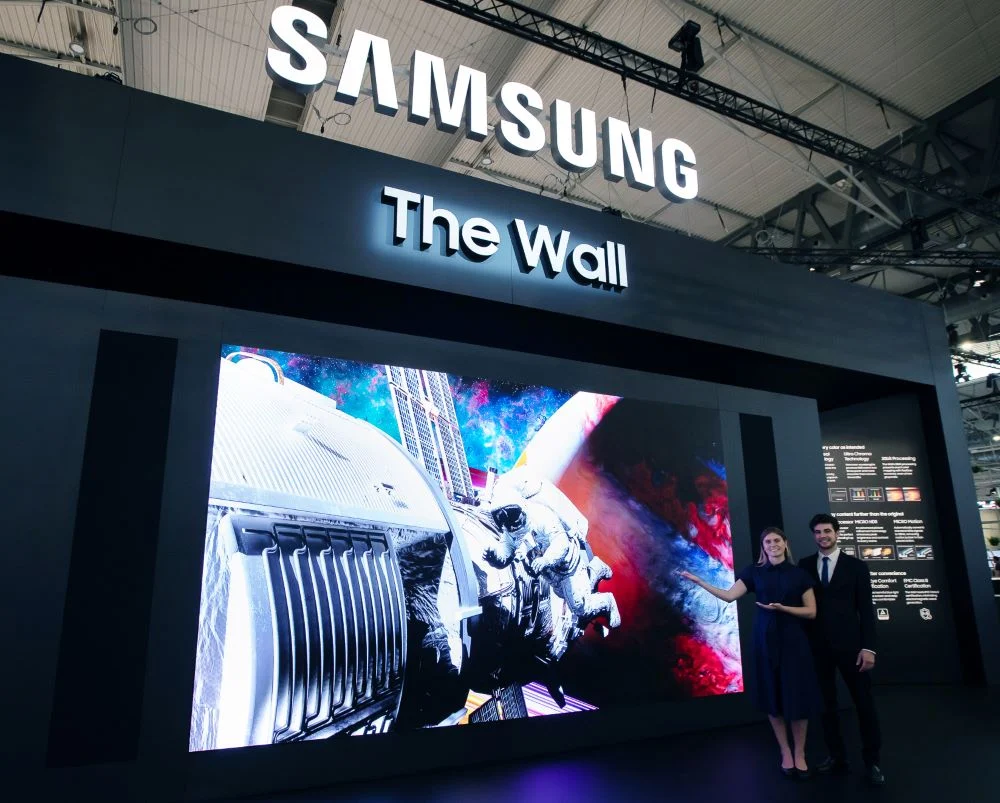
That photo shows a Samsung microLED installation. It's massive, modular, and jaw-dropping. But it's not a monitor you'd put on a desk.
Understanding this gap between theoretical specs and practical reality is exactly why this comparison matters.
MicroLED Monitors – What They Actually Are Right Now
Let's get one thing straight: you cannot buy a microLED "monitor" in the traditional sense. Every current microLED product sold to consumers is a TV or a custom video wall. Samsung's The Wall comes in 110, 126, and 146 inch sizes.
Sony's Crystal LED B-series starts at 146 inches. These are not desktop displays.
Here's how it works: microLED uses millions of microscopic inorganic LEDs, each chip about the size of a grain of sand. Each LED is its own pixel, emitting red, green, or blue light directly. There's no backlight, no organic compounds, no color filters.
That's why it can hit astronomical brightness levels and theoretically last over 100,000 hours without dimming.
But the manufacturing challenge is brutal. You have to place millions of these tiny LEDs onto a substrate with near-perfect alignment. Any dead pixel is a repair nightmare because the panel is modular: you either replace an entire tile or send the whole thing back.
Current yields are low, driving prices sky-high.
For monitors, the main limitation is pixel density. To get a 27-inch 4K microLED, you would need LEDs so small that current fabrication can't reliably produce them. That's why microLED stays in the 100+ inch range.
A 27-inch 4K OLED monitor already exists and costs around $1,000.
OLED Monitors – The Mature Contender
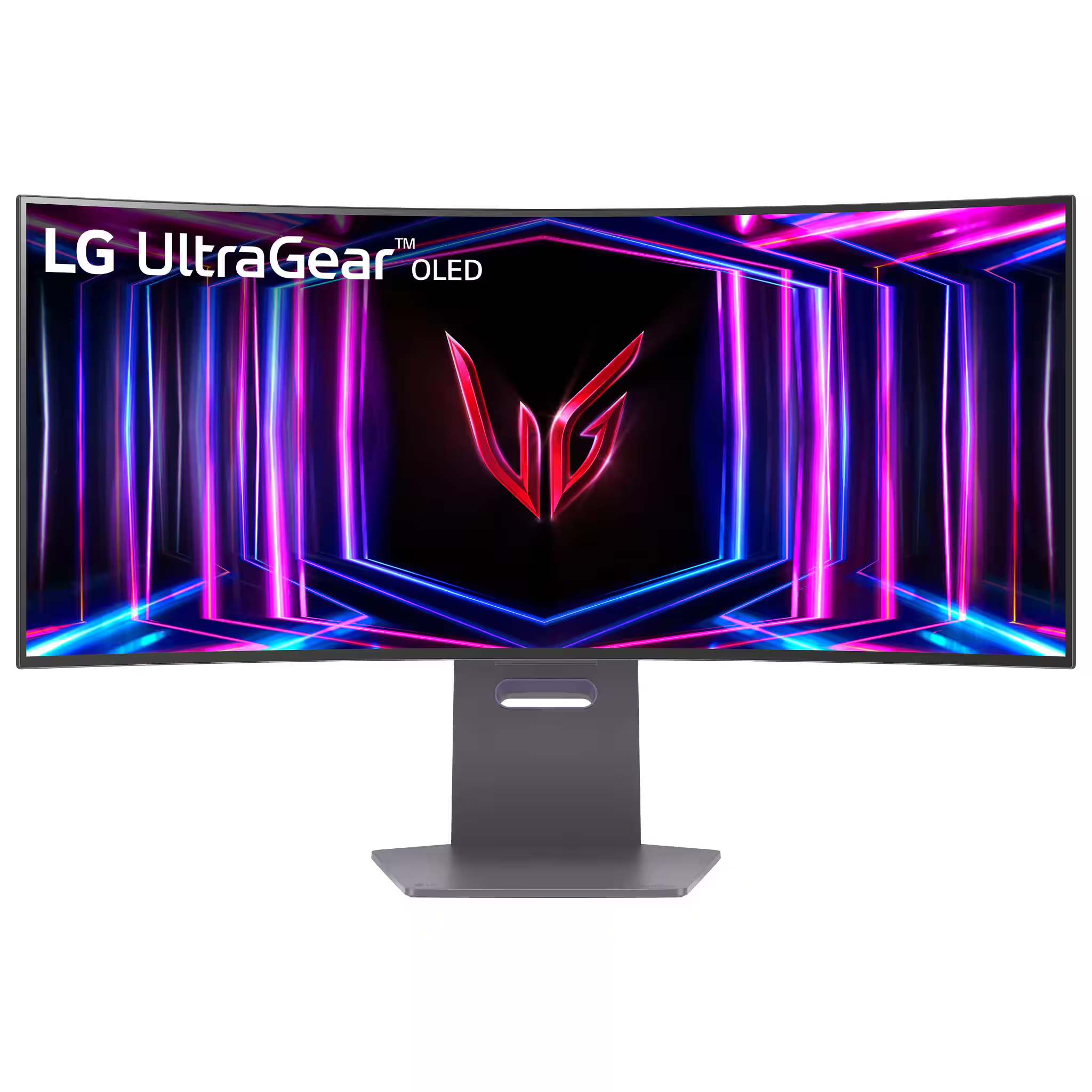
OLED has been in consumer monitors for over a decade. It's a proven, mass-produced technology that keeps getting better. LG's WOLED panels and Samsung's QD-OLED lines now offer 240Hz refresh rates, sub-0.1ms response times, and color volumes that beat almost everything else.
That LG UltraGear OLED above is a 27-inch 240Hz monitor you can buy today for about $800. The contrast is perfect: every pixel turns off completely for true black. HDR highlights punch above the monitor's price class.
And the newest QD-OLED panels push peak brightness past 1000 nits in small highlights.
The downsides are real and well documented. OLED uses organic compounds that degrade over time. Static elements like toolbars, HUDs, or desktop icons can cause permanent burn-in after a few years of heavy use.
Full-screen brightness is limited to around 200, 300 nits for most models, which means HDR isn't as jaw-dropping as microLED in bright rooms.
But here's the thing: for gaming, movies, and mixed use in a reasonably dim room, OLED is spectacular. And you can buy one right now at a price that doesn't require a second mortgage.
Side-by-Side Spec Showdown – MicroLED vs. OLED
Let's put the numbers side by side. This table covers the specs that matter most for monitor buyers.
| Spec | MicroLED | OLED | Winner |
|---|---|---|---|
| Peak brightness | 1500–4000 nits | 400–1000 nits | MicroLED |
| Full-screen sustained brightness | 1000+ nits | 200–300 nits | MicroLED |
| Black level | True black (LED off) | True black (pixel off) | Tie |
| Contrast ratio | Infinite | Infinite | Tie |
| Response time (GtG) | ~0.1ms (estimated) | 0.03–0.1ms | Tie / OLED slight edge |
| Burn-in risk | None | Moderate to high | MicroLED |
| Lifespan to half brightness | 100,000+ hours | 30,000–50,000 hours | MicroLED |
| Maximum refresh rate | 60–120Hz (current gen) | 240Hz (QD-OLED) | OLED |
| Pixel density (PPI) | Very low (under 50 PPI at 100") | High (163 PPI at 27" 4K) | OLED |
| Color volume (DCI-P3) | ~90–95% | ~95–99% | Tie / OLED slight edge |
| Price per inch | $200–$1000 | $10–$30 | OLED |
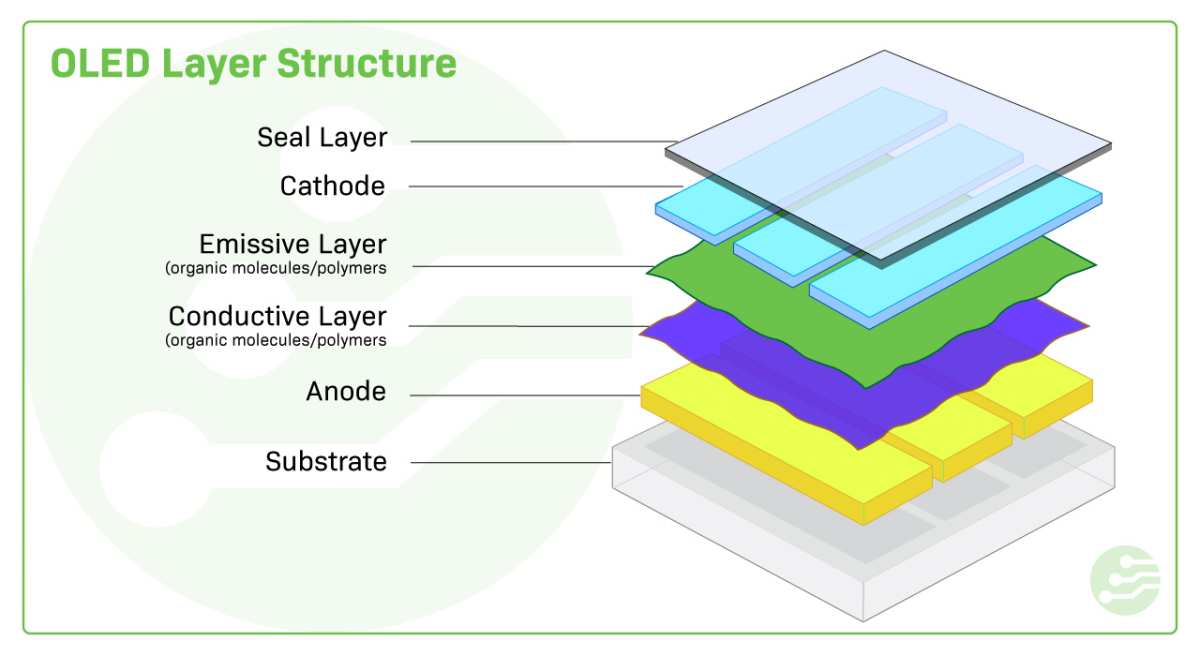
That diagram shows the layer structure of an OLED panel. MicroLED uses a similar self-emissive design but with inorganic LEDs instead of organic molecules. The result is similar contrast but very different brightness and longevity.
The most important takeaway from the table: OLED wins on everything you actually notice at a desk, while microLED wins on specs that matter for huge screens in bright commercial spaces.
The Burn-In Question – Where OLED Still Takes Heat
OLED burn-in is the elephant in the room. It happens when static images burn their ghost into the screen because the organic red, green, and blue subpixels degrade unevenly. A Windows taskbar, a game's health bar, or a news ticker can leave permanent marks after one to three years of daily use.
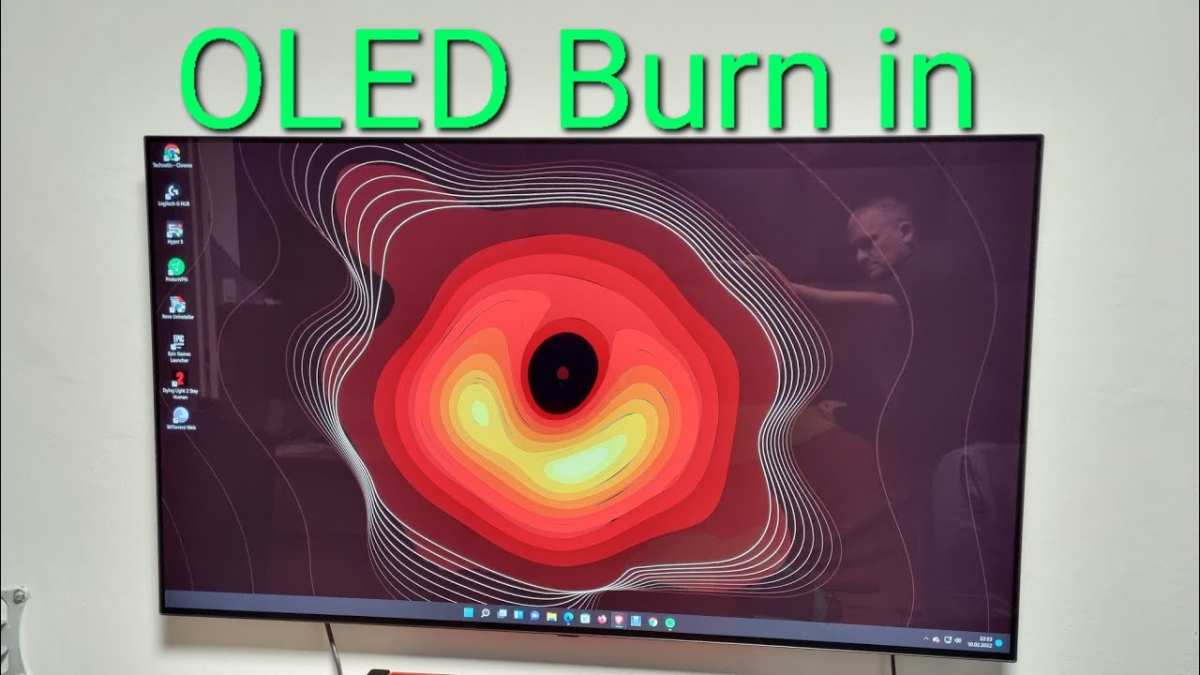
That image shows a real OLED display with severe burn-in from a news channel's logo. It's not a scare tactic. Aggregate user reviews from display forums and longevity tests confirm this pattern.
MicroLED completely sidesteps the problem. Inorganic LEDs don't degrade the same way. You could leave a static spreadsheet on a microLED screen for a decade and see no visible wear.
That's a genuine advantage for productivity users who keep the same windows open all day.
But modern OLEDs have mitigation features. Pixel shifting, logo dimming, and automatic brightness limiting all help. If you hide the taskbar, use a dark theme, and vary content, an OLED monitor can easily last five years without noticeable burn-in.
Many professional monitors now include a three-year burn-in warranty, which tells you manufacturers have confidence in the newer panels.
Still, the anxiety is real. If you're the type of person who wants zero worry about permanent damage, microLED is the only current technology that offers that peace of mind. The catch is the price you'll pay for that peace of mind, literally.
Price Reality Check – What You'll Actually Spend
Let's talk numbers. OLED monitors start around $800 for a 27-inch 1440p model. You can find 32-inch 4K OLEDs for $1,200 to $1,800.
Premium 240Hz QD-OLED ultrawides hit around $1,500. That's real money, but it's within reach for an enthusiast.
MicroLED doesn't have consumer monitor pricing. Samsung's 110-inch The Wall costs about $150,000. The 146-inch version runs closer to $300,000.
Sony's Crystal LED B-series for commercial installations is quoted per panel, and a typical custom wall lands between $200,000 and $500,000.
| Cost Factor | OLED Monitor | MicroLED Display |
|---|---|---|
| Entry price | $800 (27" 1440p) | $150,000 (110" TV) |
| Price per diagonal inch | $10–$30 | $1,000–$2,000 |
| Replacement panel cost | $300–$600 | $5,000–$20,000 per tile |
| 5-year TCO (with electricity) | $1,200–$2,500 | $155,000–$310,000 |
That table tells the story. OLED is a consumer product. MicroLED is a commercial investment.
For the cost of one microLED screen you could buy a hundred OLED monitors.
Warranty matters here too. Most OLED monitors come with three years of coverage. Some include burn-in protection.
MicroLED units typically carry a five-year commercial warranty but repair costs are astronomical if a tile fails.
No one should buy microLED for a desktop PC. The numbers just don't make sense. If you're building a home cinema in a dedicated room and you have a six-figure budget, microLED becomes a conversation piece.
For everyone else, OLED wins on value alone.
Best Use Cases – Who Should Pick Which
Different tasks demand different strengths. Here's how the two technologies line up against real-world scenarios.
Gaming. OLED is the clear champ here. High refresh rates up to 240Hz combined with sub-millisecond response times make motion incredibly smooth. The per-pixel black levels give dark games like Alan Wake 2 or Elden Ring a depth that microLED can't match at the same size.
MicroLED currently tops out at 120Hz and has no PC gaming model under 100 inches.
Mixed use (office work + gaming). This is where OLED's burn-in risk becomes a real concern. If you spend eight hours in Excel or Visual Studio and game for two, microLED would be better for longevity. But since microLED isn't available as a monitor, the practical choice is OLED with careful mitigation or an alternative like Mini-LED LCD.
Home theater and movie watching. Both excel here. OLED delivers perfect blacks in a dark room. MicroLED delivers superior brightness for HDR highlights.
If your room has controlled lighting, OLED offers a more cinematic experience at a fraction of the price.
Bright-room productivity. MicroLED wins hands down. Its brightness cuts through ambient light without washing out. A 400-nit OLED looks dim next to a window.
A 2000-nit microLED stays punchy. For creative professionals working near natural light, microLED would be ideal. Again, size and cost prevent that today.
Digital signage and luxury installations. MicroLED was made for this. A hotel lobby, a corporate lobby, a museum exhibit, or a high-end retail store. The modular tiling allows any shape and size.
OLED can't scale like that without visible seams.
The Hidden Drawbacks Nobody Talks About
Both technologies have flaws that don't show up on spec sheets.
MicroLED pixel density. At 110 inches and 4K, you get about 40 pixels per inch. That's fine for a living room viewed from ten feet away. But sit at a desk two feet from a 27-inch screen and you'd see individual LEDs.
That's why no one makes a microLED monitor under 75 inches. The LEDs can't be made small enough yet.
MicroLED dead pixel risk. With millions of individual LEDs per panel, a few will fail. On a modular wall, you can replace a tile. But replacement tiles cost thousands and may have slight color differences from the original batch.
On a small monitor, a single dead pixel means a full panel replacement.
OLED brightness ceiling. In real-world use, OLED's full-screen white level sits around 200 to 300 nits. That's fine for a dark room. But if you leave the blinds open or have a lamp nearby, the image looks dim and flat.
HDR highlights burst bright, but sustained bright scenes lose impact.
Temporary image retention. Before permanent burn-in, OLEDs can show temporary ghosting. A bright window left open for an hour might leave a faint after-image that fades over minutes. Some users panic and think their screen is damaged.
It's normal, but it's annoying.
OLED color shift at viewing angles. While viewing angles are wide, there is a slight color shift at extreme off-axis angles, especially with WOLED panels. QD-OLED handles this better. MicroLED has essentially perfect viewing angle performance.
What the Experts Say – Verdicts from Real Testing
Independent testing from display calibration labs and enthusiast reviewers provides concrete data.
Color accuracy. Both technologies hit Delta E values under 2 after calibration. That means both are professional-grade for color work. QD-OLED monitors like the Alienware AW3225QF cover 99% of DCI-P3 out of the box.
MicroLED samples show similar coverage but require professional calibration.
HDR performance. In ANSI-standard checkerboard tests, microLED sustains over 2000 nits on small highlights. OLED's best QD-OLED panels peak at 1000 nits but drop to 300 nits on full-screen white. In real content, OLED's black levels give it a better perceived contrast for mixed scenes.
MicroLED wins on pure luminance.
Longevity testing. Accelerated lifespan tests run by display reliability labs suggest OLED reaches half brightness after 30,000 to 50,000 hours. MicroLED shows negligible degradation after 100,000 hours. For a user who keeps a monitor for 10 years, that's a meaningful difference.
Burn-in stress tests. rtings.com and similar outlets run 24/7 static image tests on OLEDs. Burn-in becomes visible within 6 to 18 months for the worst-case pattern (CNN logo, news ticker). With varied content, burn-in is minimal after 3 years.
MicroLED isn't tested because it doesn't burn in.
The expert consensus: OLED delivers 95% of microLED's visual quality for 5% of the price. Only the extreme brightness and burn-in safety of microLED justify its cost, and those benefits only matter in specific use cases.
Alternatives Worth Considering
Before you settle on either OLED or microLED, look at the middle ground.
Mini-LED LCD. This technology uses thousands of tiny LEDs as a backlight behind an LCD panel. It offers higher full-screen brightness than OLED (up to 1400 nits on models like the Samsung Neo G8) with no burn-in risk. The downside is blooming around bright objects on dark backgrounds.
It's not as perfect as OLED's black levels, but it's close, and prices range from $500 to $2,000.
QD-OLED. Samsung Display's hybrid tech uses a blue OLED backplane with quantum dot color conversion. It combines OLED's perfect blacks with better color volume and higher brightness than standard WOLED. Current models like the Dell Alienware AW3225QF and Samsung Odyssey G8 offer 240Hz and 1000-nit peak for around $1,200.
This is currently the best desktop monitor technology available.
Large-format OLED TVs as monitors. If you want a big screen for work and play, a 42-inch LG C4 OLED costs about $900. Use it at arm's length for immersive gaming. The risk of burn-in is higher with desktop use, but many professionals run these as monitors for years with proper care.
Commercial grade OLED. LG and Sony offer professional OLED panels with reinforced glass and active cooling. They cost more (around $5,000 for a 55-inch) but include burn-in warranties. This is a middle path for users who need OLED's image quality but want less risk.
For most people, Mini-LED or QD-OLED is the smarter buy than either pure OLED or microLED. They solve the biggest problems of each: Mini-LED avoids burn-in and delivers high brightness; QD-OLED improves brightness and color over standard OLED.
Common Mistakes People Make When Choosing
Assuming microLED is available as a desktop monitor. This is the biggest trap. You cannot buy a 27-inch or 32-inch microLED monitor. Every microLED product is a 100+ inch TV or commercial wall.
If you're shopping for a PC display, microLED isn't an option today.
Ignoring your room's ambient lighting. OLED's 200-300 nit sustained brightness looks dim in a bright room. If your desk faces a window, OLED will disappoint. Mini-LED or microLED would serve you better.
But since microLED isn't available, Mini-LED LCD is the practical choice.
Overvaluing specs you won't notice. A 0.03ms response time versus 0.1ms is invisible to the human eye. Same with 240Hz versus 120Hz for most gamers. Focus on brightness, burn-in risk, and color accuracy instead.
Those matter every day.
Forgetting about warranty and burn-in coverage. Many OLED monitors now include three-year burn-in warranties. Always check this before buying. Without coverage, a burned-in $1000 screen is a painful loss.
MicroLED doesn't need this, but you're paying an order of magnitude more.
Thinking burn-in won't happen to you. It happens to everyone who uses static content for hours daily. If you leave a taskbar, dock, or spreadsheet grid visible, the organic pixels degrade unevenly. Plan for it with pixel shift, dark themes, and hiding static elements.
The Final Verdict – Which One You Should Buy
MicroLED is better if: money is no object, you need a 100+ inch screen, the room is very bright, or you want zero burn-in worry for a decade. It's not a monitor. It's a commercial display investment.
OLED is better if: you want a real desktop monitor today, you care about value, you game in a dim room, or you prioritize perfect contrast. OLED delivers 95% of microLED's visual quality for 5% of the price.
For 99% of readers, the answer is OLED. Specifically, a QD-OLED monitor like the Samsung Odyssey G8 or Dell Alienware AW3225QF. It gives you the best balance of brightness, color, speed, and price.
If burn-in worries you, add a three-year extended warranty or choose a Mini-LED LCD instead.
MicroLED will eventually reach desktop sizes and reasonable prices. That might take another five to ten years. Until then, OLED is the realistic winner for anyone building a monitor setup in 2025.
Frequently Asked Questions
Can you use a microLED TV as a computer monitor?
Technically yes, but practically no. MicroLED TVs start at 110 inches. Sitting close enough to use as a monitor means you'll see individual pixels.
The pixel density is too low for desktop use. Stick to OLED or Mini-LED for a monitor.
How long do OLED monitors last before burn-in?
With varied content, most OLED monitors last three to five years before noticeable burn-in appears. Static content like taskbars or news tickers can cause burn-in within one to two years. Modern mitigation features help, but the organic compounds still degrade over time.
Is microLED worth the extra money over OLED?
Only if you need extreme brightness in a bright commercial space, or if you plan to keep the display for 10+ years without any burn-in. For home use, the price difference is so large that OLED offers dramatically better value.
What is QD-OLED and how does it compare to microLED?
QD-OLED uses a blue OLED backplane with quantum dot color conversion. It offers higher brightness than standard OLED (1000 nits peak) and better color volume. It still has burn-in risk.
MicroLED is brighter and lasts longer, but QD-OLED is the best desktop monitor tech available today.
Do I need a special warranty for OLED burn-in?
Yes. Look for monitors that explicitly cover burn-in in their warranty. Dell, LG, and Samsung offer three-year burn-in coverage on some models.
Standard warranties exclude burn-in as "normal wear." Always read the fine print before buying.
When will microLED monitors be affordable?
Industry analysts estimate consumer-sized microLED monitors (27-32 inches) will arrive around 2028 to 2030. Even then, prices will likely start above $2,000. For now, OLED and Mini-LED remain the practical choices for desktop users.

Similar Posts





















