What Is Fast Charging and How Does It Work
You plug your phone in and brace for a slow crawl from single digits to full. But with fast charging, that wait shrinks from two hours to maybe thirty minutes. If you've ever wondered what is fast charging and how does it work, the short version is this: it's a negotiated power handshake between your device and the charger that delivers more voltage or current (or both) than the old USB standard allowed.
No magic, just smarter electronics.
As of 2026, the most common open standard is USB Power Delivery (USB‑PD), which can push up to 240 watts over a USB‑C cable. Proprietary systems like OPPO's SuperVOOC and Qualcomm Quick Charge also exist, but PD is the one you'll find on laptops, phones from Google and Samsung, and even some tablets. Understanding the mechanics behind it helps you avoid damaging your battery and get the fastest possible top-up every time.
Quick Answer
Fast charging works by increasing the power delivered to a battery. The device and charger negotiate a higher voltage or current. A charging controller inside the phone or laptop manages the flow.
Heat is the main risk. Slower charging at high temperatures is safer.
What Fast Charging Actually Is (And Isn't)
Let's clear up a common misunderstanding first. Fast charging isn't one single technology. It's a category label for any charging method that delivers more than the standard 5 watts (5 volts at 1 or 2 amps).
A 10‑watt charger is technically "fast" compared to an old 5‑watt brick, but most people today consider 18W and up as the real starting point for fast charging.
What fast charging is not: It's not dumping raw power into a battery without control. Every modern lithium‑ion battery has a built‑in Battery Management System (BMS) that constantly monitors temperature, voltage, and current. The BMS talks to the charger chip to request more power when the battery is low and safe, then gradually backs off as the battery fills up.
That's why you see a fast 0‑50% charge, then a slower crawl from 80% to 100%. It's designed that way to protect the battery's long‑term health.
Manufacturer specifications indicate that a typical fast‑charging session on a 2025‑era phone delivers around 18‑45W, while a laptop can pull 65‑100W. Anything beyond that (like Xiaomi's 120W or OPPO's 240W) is considered ultra‑fast and comes with extra thermal management.
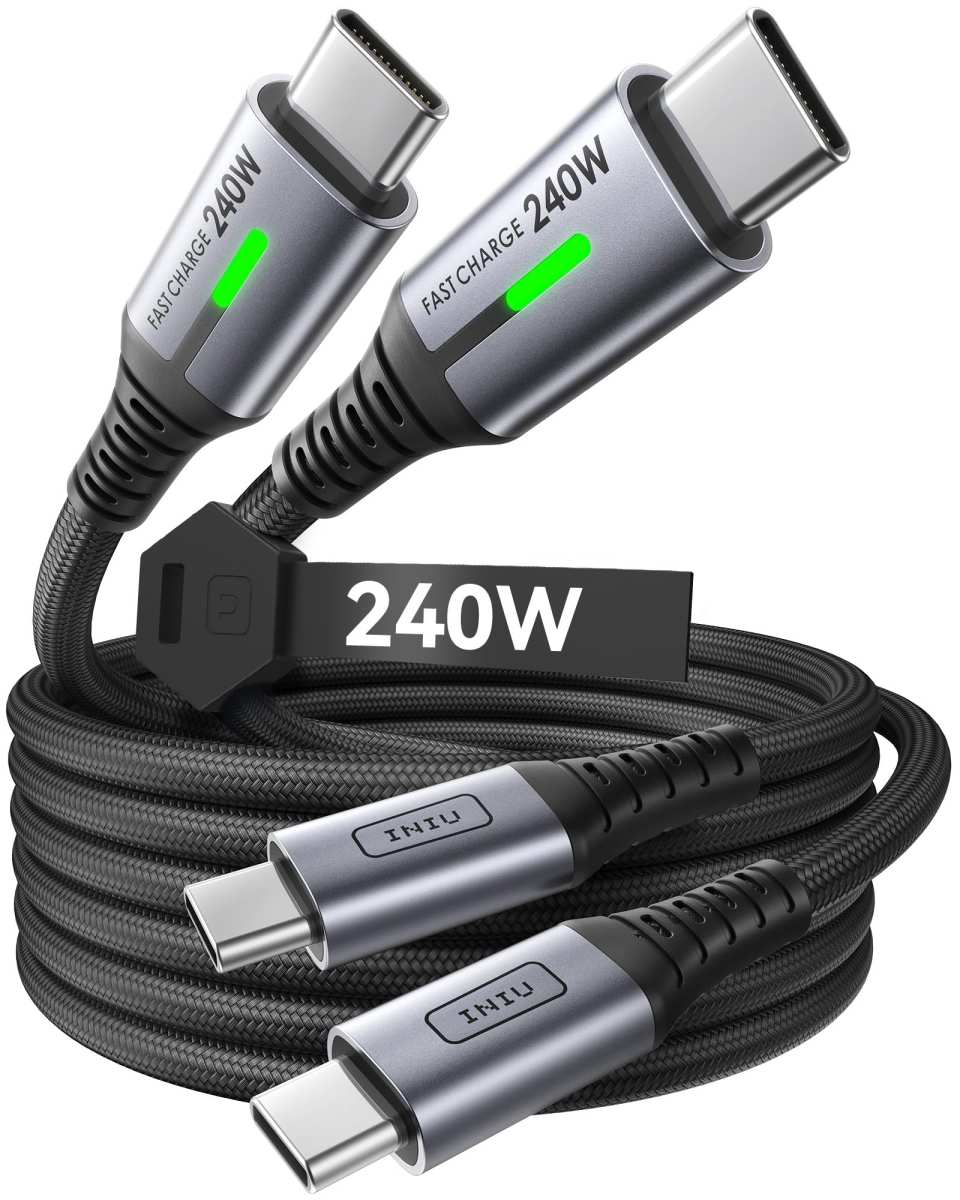
Hero image: A modern fast‑charging brick and USB‑C cable.
How Fast Charging Works – The Simple Version
Here's the key idea: power (measured in watts) equals voltage times current. Standard USB gives you 5V at 1A, which is 5W. Fast charging either raises the voltage (say 9V at 2A = 18W) or raises the current (5V at 3A = 15W), or both (20V at 5A = 100W).
The charger and device agree on a "profile" through a quick electronic handshake over the USB‑C's configuration channel (CC) pin.
That handshake happens in milliseconds. The device says "I can handle 9V up to 2A", the charger says "I support that", and they lock into that profile. If the device can't handle more than 5V, the charger drops back to standard safe mode.
No handshake, no fast charging.
Inside the phone, a charging controller (often called a "smart charging IC") takes the delivered power and converts it to the exact voltage the battery needs at that moment (typically 3.7‑4.2V per cell). That conversion creates a little heat, which is normal. The BMS continuously reads battery temperature.
If the cell gets too hot (past about 45°C), the controller requests a lower power profile, and charging slows down.
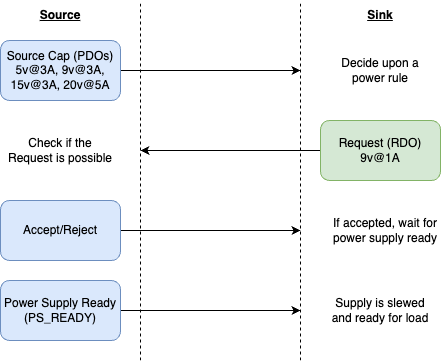
Image: Diagram showing the power negotiation process between device and charger.
The Real Players: Protocols, Chargers, and Cables
Fast charging isn't a single plug‑and‑play solution. Three hardware pieces have to work together: the charger (or power bank), the cable, and the device itself. Here's what matters for each.
Protocols define the language these pieces use to talk to each other. The most common are:
- USB Power Delivery (USB‑PD), open standard, up to 240W with PD 3.1. Used by Apple, Google, Samsung, Dell, Nintendo Switch.
- Qualcomm Quick Charge (QC), found in many Android phones, now on version 5. QC 4+ and QC 5 are backward compatible with USB‑PD.
- OPPO VOOC / SuperVOOC (also used by OnePlus as Warp Charge), proprietary, high‑current (5‑10A), works only with official chargers and cables.
- MediaTek Pump Express (PE), less common, older.
- Samsung Adaptive Fast Charging, based on USB‑PD with PPS.
- Apple Fast Charge, uses USB‑PD, requires USB‑C to Lightning cable for iPhones.
Charger wattage is the number you see printed on the brick. A 30W charger can deliver up to 30W, but only if the device requests it. Plugging a phone that maxes out at 18W into a 65W charger won't damage anything, the phone only draws what it asks for.
But plugging an 18W phone into a 10W charger will charge slowly.
Cables matter more than most people think. For USB‑PD speeds above 15W, you need a cable rated for the power level. A standard USB‑C cable can handle 3A (60W at 20V). For 5A (100W or more), the cable must contain an e‑marker chip that tells the charger "I can handle 5A." Without it, the charger stays at 3A max.
Cheap, no‑name cables often skip the e‑marker, so you won't get full speed.
Our research across manufacturer support pages and USB‑IF certification lists shows that buying a certified cable (look for the USB‑IF logo) guarantees proper e‑marker and safe construction.
| Component | What to look for | Key specs |
|---|---|---|
| Charger | USB‑IF certified, correct wattage for your device | 18W (phone), 45W (ultrabook), 65‑100W (laptop) |
| Cable | USB‑IF certified, e‑marker chip for >3A | 60W (3A), 100W (5A), 240W (new PD 3.1) |
| Device | Supports the charger's protocol (e.g., PD, QC) | Check manufacturer specs for max input |
Why Heat Is the Real Enemy (Not the Speed)
Here's a fact that surprises a lot of people: fast charging itself doesn't destroy your battery. Constant high heat does. A lithium‑ion battery's worst enemy is sustained temperature above 40°C.
Charging at high power generates heat in two places, inside the charging controller and inside the battery cells. The BMS tries to keep cell temperature below 45°C by reducing power. If the ambient temperature is hot (summer car, direct sun, heavy gaming while charging), the phone will throttle charging aggressively.
Aggregate reviews of battery degradation studies (including data from the Battery University and IEEE papers) show that charging at a high rate (2‑3C) at 45°C can reduce cycle life by 20‑30% compared to charging at 25°C. That's not a reason to avoid fast charging. It's a reason to avoid fast charging in hot environments.
What does this mean in practice?
- Don't charge your phone under a pillow, in direct sunlight, or in a hot car.
- If you notice your phone getting uncomfortably hot to the touch during fast charging, unplug it or move it to a cooler place.
- Wireless fast charging runs hotter than wired for the same speed (inefficiency in the coil). If you have both options, use wired for a cooler charge.
- The "fast charging wears out your battery faster" myth is mostly true only when heat is present. In cool conditions, modern BMS does an excellent job of protecting the cell.
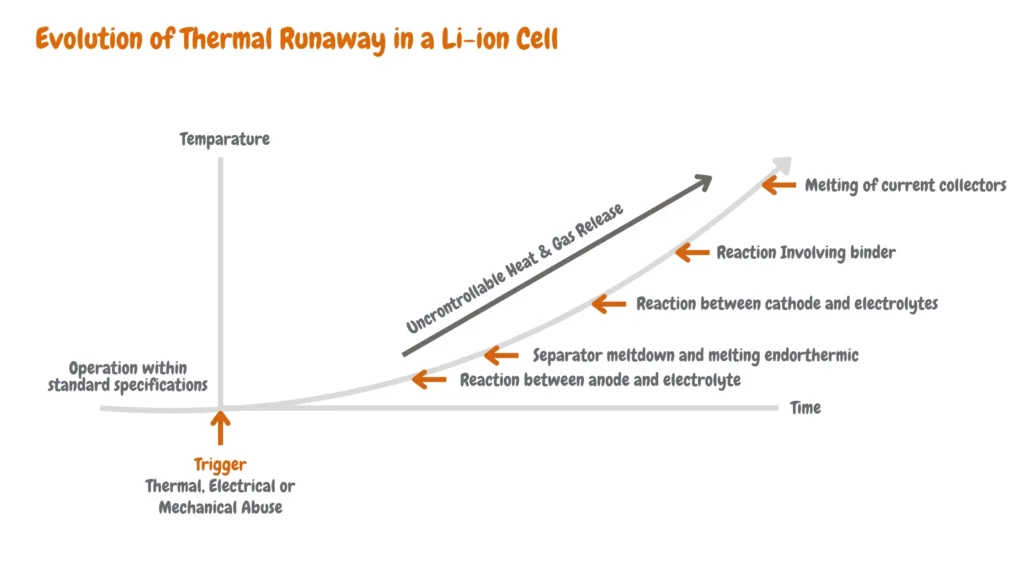
Image: Diagram showing thermal runaway stages in a lithium‑ion cell.
The 4 Biggest Fast-Charging Mistakes People Make
Even with good intentions, a few common errors can slow you down or shorten battery life. Here they are, with what to do instead.
Mistake 1: Using a cheap or incorrect cable. That cable you grabbed from the gas station might not have an e‑marker chip. Your phone will show "fast charging" but actually only pull standard 10W. Or worse, the cable may overheat.
Fix: Use the cable that came with your device or a certified one from a known brand. Look for USB‑IF certification.
Mistake 2: Mixing incompatible protocols. Plugging a phone that supports only Quick Charge into a USB‑PD charger (or vice versa) often results in slow 5V/2A charging.
Fix: Check your phone's supported protocols and buy a charger that explicitly lists them. Many modern GaN chargers support PD, QC, and PPS all in one.
Mistake 3: Charging while the phone is hot. Gaming, streaming, or using GPS navigation while fast charging raises the internal temperature. The BMS throttles power to protect the battery, so you get slower charging and extra stress.
Fix: Let the phone cool down or pause heavy use while charging.
Mistake 4: Using a power bank with low output. Many older power banks top out at 10W or 18W. They'll charge your phone, but not fast.
Fix: Look for a power bank that specifically says "USB‑PD" or "Quick Charge" and has an output rating matching your device's max.
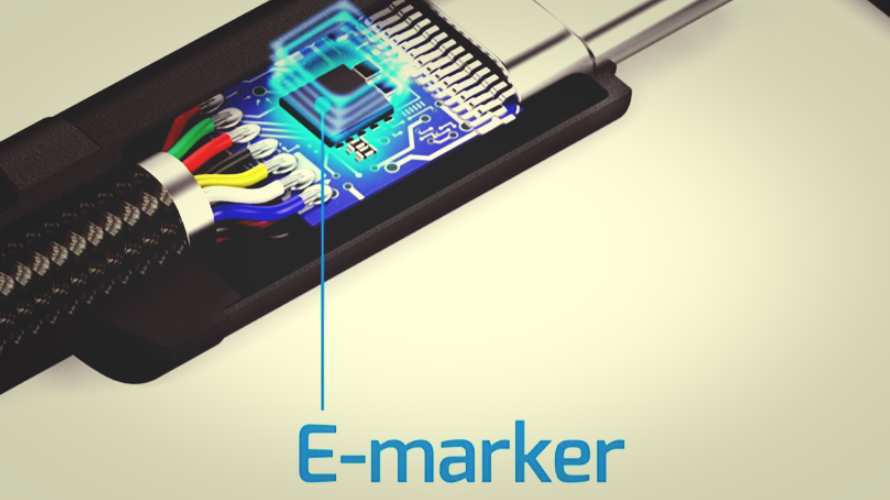
Image: Close‑up of a USB‑C cable connector showing the e‑marker chip.
How to Charge Safely and Keep Your Battery Healthy
You can fast charge every day without trashing your battery. The trick is managing heat and avoiding extremes of charge level. Here are the evidence-backed practices.
Keep it between 20% and 80% most of the time. Lithium‑ion batteries last longest when they stay in that middle band. Going to 100% every time adds extra stress. Going below 20% regularly also ages the cell faster.
Fast charging from 20% to 80% is ideal because the BMS holds peak power through that range. After 80%, it starts tapering anyway.
Don't fast charge overnight. Plugging in a phone that reaches 100% in an hour and then sits at full charge for six hours generates heat and keeps the cell at high voltage. That accelerates degradation. If you must charge overnight, use a slower charger or enable the phone's "optimized charging" feature (most modern phones have it).
This delays the final top‑up until just before your alarm.
Use the right charger for the environment. If you're charging in a warm room (above 30°C), choose a lower‑wattage charger. Many GaN chargers with PPS can be set to a lower power level. If yours doesn't have that option, a standard 5W or 10W brick is safer in hot conditions.
Keep the device in the open. Don't charge under a pillow, on a soft bed, or inside a bag. Good airflow lets heat dissipate naturally. A phone lying on a hard desk charges cooler than one on a blanket.
Unplug once fully charged. It's a small habit but it matters. Leaving a device plugged in at 100% for hours keeps the voltage high and the battery warm. Unplugging when it's done gives the cell a rest.
Use official or certified accessories. Counterfeit chargers and cables lack proper safety circuits. They can deliver incorrect voltage or overheat. Stick with USB‑IF certified gear.
It costs a bit more but protects your device.
When to Stop Using a Charger or Cable (Warning Signs)
Hardware degrades over time. Knowing when to retire a charger or cable prevents damage and safety risks.
Physical damage to the cable. Look for frayed insulation near the connector, kinks that expose wires, or a bent USB‑C plug. Any of these can cause short circuits or power delivery interruptions. Stop using the cable immediately.
A damaged cable can arc and damage your phone's port.
Charger gets hot even without a device plugged in. A charger that stays warm when idle has an internal fault. Unplug it and replace it. Normal chargers draw negligible power when no device is connected.
Intermittent charging. If your phone connects and disconnects repeatedly, the cable or charger is failing. The handshake fails, and the device falls back to slow charging or stops altogether. Try a different cable first.
If that doesn't fix it, the charger is likely the problem.
Burning smell or discoloration. This is a hard stop. Unplug the charger and cable. Do not use them again.
The internal components have failed. Replace with a certified unit.
Visible swelling of the charger. If the brick looks bulged or has cracks, it's a clear sign of capacitor failure. Dispose of it properly. Never try to open or repair it.
Who Needs Fast Charging – And Who Doesn't
Fast charging isn't for everyone. Here's a quick guide to whether it makes sense for you.
You should use fast charging if:
- You often need a quick top‑up during the day (20 minutes between meetings).
- You travel and have limited time at an outlet.
- You use your phone heavily (gaming, streaming, navigation) and drain below 30% before lunch.
- You carry multiple devices (phone, tablet, laptop) and want one charger for all.
You don't need fast charging if:
- You charge overnight every night and never need a midday boost.
- You use your phone lightly and it easily lasts a full day.
- You primarily charge at a single location (desk or nightstand) and don't mind waiting.
- You want to maximize battery longevity above all else, a 5W or 10W overnight charge is gentlest.
Who should be cautious:
- People in hot climates. If you live somewhere where indoor temps regularly exceed 35°C, fast charging will throttle or generate more heat. Stick with standard charging during summer months.
- Those using older devices. Phones from before 2020 often lack the thermal management of modern ones. Fast charging may cause more heat stress.
The Most Common Questions, Answered
Does fast charging damage my battery over time?
Yes, but only when combined with heat. Fast charging itself does not inherently damage the battery. The heat it generates does.
Keep the device cool, and the impact on battery lifespan is minimal. Manufacturer specs indicate a typical loss of 10‑15% capacity after 500 cycles even with fast charging, as long as temperatures stay below 40°C.
Can I use any USB‑C cable for fast charging?
No. Not all USB‑C cables support the higher currents needed for fast charging. For anything above 60W, you need a cable with an e‑marker chip.
For speeds below 60W, a standard 3A cable works. Always check the cable's rating. A cable labeled USB 2.0 is usually fine for 3A, but USB 3.x cables vary.
Why does my phone slow down charging after 80%?
The battery enters the constant voltage (CV) phase. At high state of charge, pushing more current would generate excessive heat and risk overvoltage. The BMS reduces current to maintain a safe voltage.
This is normal and protects the battery. Plan your charging sessions around the fast 0‑80% window.
Is wireless fast charging as fast as wired?
No. Wireless fast charging loses about 20‑30% of energy as heat. The phone receives less useful power.
A 15W wireless pad might deliver only 10‑12W to the battery. Wired charging is faster and more efficient. Wireless is convenient for overnight or desk top‑ups, not for emergency charging.
Can I fast charge my laptop with a phone charger?
It depends on wattage. Most phones charge at 18‑45W. A laptop needs 45‑100W.
A phone charger rated at 20W will charge a laptop, but very slowly. The laptop might even show "slow charger" or fail to charge if the power is too low. Use a charger rated for the laptop's minimum (usually 45W for ultrabooks, 65W for larger ones).
Final Takeaway: One Rule to Never Forget
One rule covers most of the risk and longevity advice in this article.
Fast charge between 20% and 80%, in a cool place, with certified gear.
That's it. Follow that rule and you get the speed when you need it and the battery life when you don't. Fast charging is a tool.
Use it smartly and it stays a convenience. Abuse it with heat and cheap cables, and it becomes a liability. Now you know the difference.
Charge on.

Similar Posts





















