How Does a Microled Monitor Work
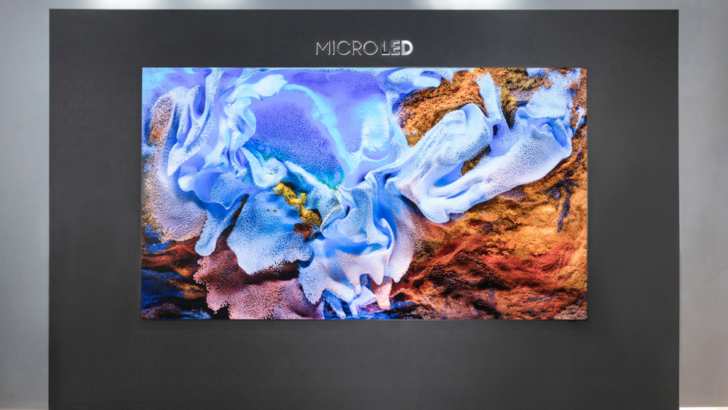
If you've been eyeing the next wave of display tech, you've probably asked yourself: how does a microLED monitor work, and is it actually worth the hype? The short answer is that MicroLED monitors use millions of tiny individual inorganic LEDs as self-emissive pixels, each producing its own light and color without needing a backlight or organic materials. That's where the similarity to anything you currently own ends, because the engineering behind it is unlike anything in the consumer display market today.
Here's the reality check though. As of 2026, you can't actually buy a true MicroLED monitor. Samsung's MicroLED products are massive TV-sized panels starting around $150,000.
The technology works, the physics checks out, and the performance numbers are extraordinary. But the manufacturing challenges keep it out of reach for anyone who just wants a better screen for their desk. Let's walk through exactly how it works, what makes it special, and where things stand right now.
Quick Answer
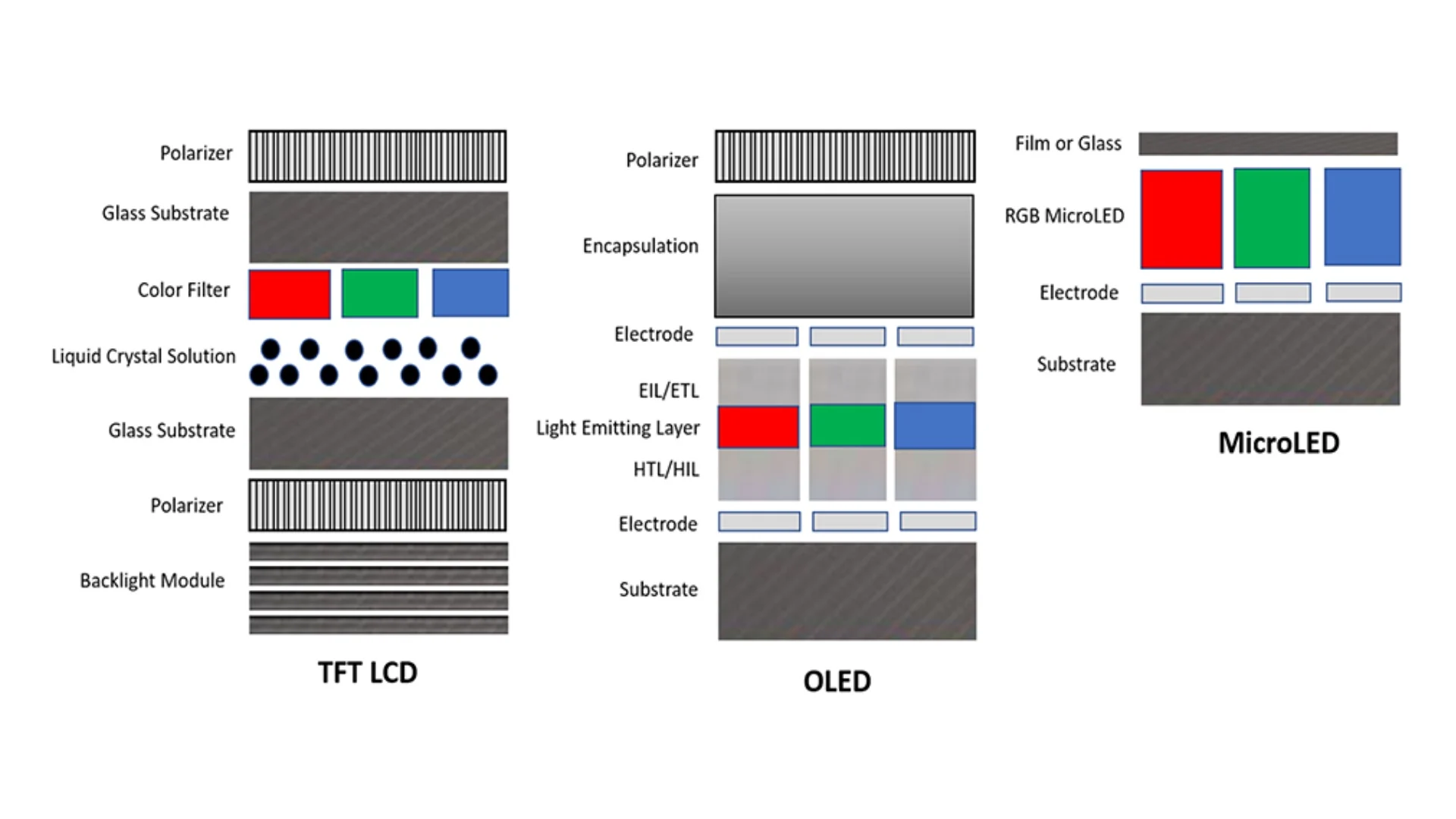
A MicroLED monitor uses millions of microscopic gallium nitride (GaN) LED chips as individual pixels. Each pixel emits its own red, green, and blue light. No backlight is needed.
The chips are inorganic, so they don't degrade like OLED materials. Manufacturing places each tiny chip onto a thin-film transistor backplane with extreme precision.
The Core Technology: Self-Emissive Inorganic Pixels
.jpg)
Image source: Bing (Web (fair-use with source credit))
What Makes Each Pixel Emit Its Own Light
Every pixel on a MicroLED display is its own tiny light source. We're talking about individual LED chips smaller than 50 micrometers across, each one capable of turning on and off independently. That means when you see black on screen, those pixels are genuinely off.
Not dimmed. Not blocked by a backlight. Actually off.
This is the same fundamental principle behind OLED, but with one critical difference. OLED uses organic compounds that degrade over time. MicroLED uses inorganic gallium nitride semiconductors.
The result is per-pixel lighting without the burn-in anxiety.
Think of it this way. A traditional LCD monitor is like a flashlight shining through colored stickers. An OLED monitor is like millions of tiny organic glow sticks.
A MicroLED monitor is like millions of tiny, incredibly durable light bulbs that never burn out the way organic materials do.
Why Inorganic GaN Changes Everything
Gallium nitride is the secret sauce here. It's a semiconductor material that's been used in LED lighting for years, but shrinking it down to pixel scale is where things get interesting. GaN LEDs can hit peak brightness levels of 2,000 to 5,000 nits in theory.
Your current monitor probably tops out around 350 to 600 nits.
The inorganic nature of GaN also means these pixels don't suffer from the degradation mechanisms that plague OLED. No organic compounds breaking down under sustained high brightness. No uneven aging between blue, green, and red sub-pixels.
The lifespan estimates run upward of 100,000 hours to half-brightness, though real-world long-term data is still limited since the technology is so new.
.jpg)
The TFT Backplane: The Hidden Brain Behind Every Pixel
Every MicroLED pixel needs a transistor to control it, and that's where the thin-film transistor backplane comes in. This layer sits behind the LED array and acts as the control system, delivering precise electrical signals to each individual pixel. Without it, you'd just have a pile of tiny LEDs with no way to tell them what to do.
The backplane typically uses one of three technologies: low-temperature polysilicon (LTPS), amorphous silicon (a-Si), or indium gallium zinc oxide (IGZO). Each has trade-offs in terms of electron mobility, manufacturing cost, and scalability. For high-resolution monitor applications, IGZO has become a popular choice because it offers good electron mobility while being scalable to larger substrate sizes.
The challenge is that this backplane needs to be perfectly aligned with the LED array. We're talking about millions of connection points, each one needing to function flawlessly. A single failed connection means a dead pixel, and at the densities we're discussing for monitor-class displays, the tolerance for error is essentially zero.
Inside the Panel: The Layer-by-Layer Stack-Up
Epitaxial Wafer: Where MicroLEDs Are Born
Before any assembly happens, the LED chips themselves need to be created. This starts with an epitaxial wafer, typically made of sapphire, through a process called metal-organic chemical vapor deposition (MOCVD). During MOCVD, gaseous precursors are introduced into a reaction chamber at temperatures around 1,000°C, depositing thin layers of gallium nitride and other semiconductor materials onto the wafer.
The quality of this epitaxial layer determines everything downstream. Any defects in the crystal structure will show up as brightness or color inconsistencies in the final display. Manufacturers need extraordinarily precise control over layer thickness, doping concentrations, and material composition.
Even minor variations across the wafer can lead to visible uniformity issues in the finished panel.
The Chip Fabrication Process
Once the epitaxial wafer is ready, it goes through standard semiconductor fabrication steps. Photolithography defines the individual chip patterns. Etching removes unwanted material.
Metal contacts are deposited to create the electrical connection points. The result is a wafer covered in thousands of tiny MicroLED chips, each one a complete semiconductor device capable of emitting light when current flows through it.
After fabrication, the chips are tested and sorted. This binning process separates chips by brightness, wavelength, and forward voltage. Consistency matters enormously here because every chip on a single display panel needs to behave identically.
Mixing chips with different characteristics would create visible color and brightness variations across the screen.
Mass Transfer: The Hardest Part of the Whole Process
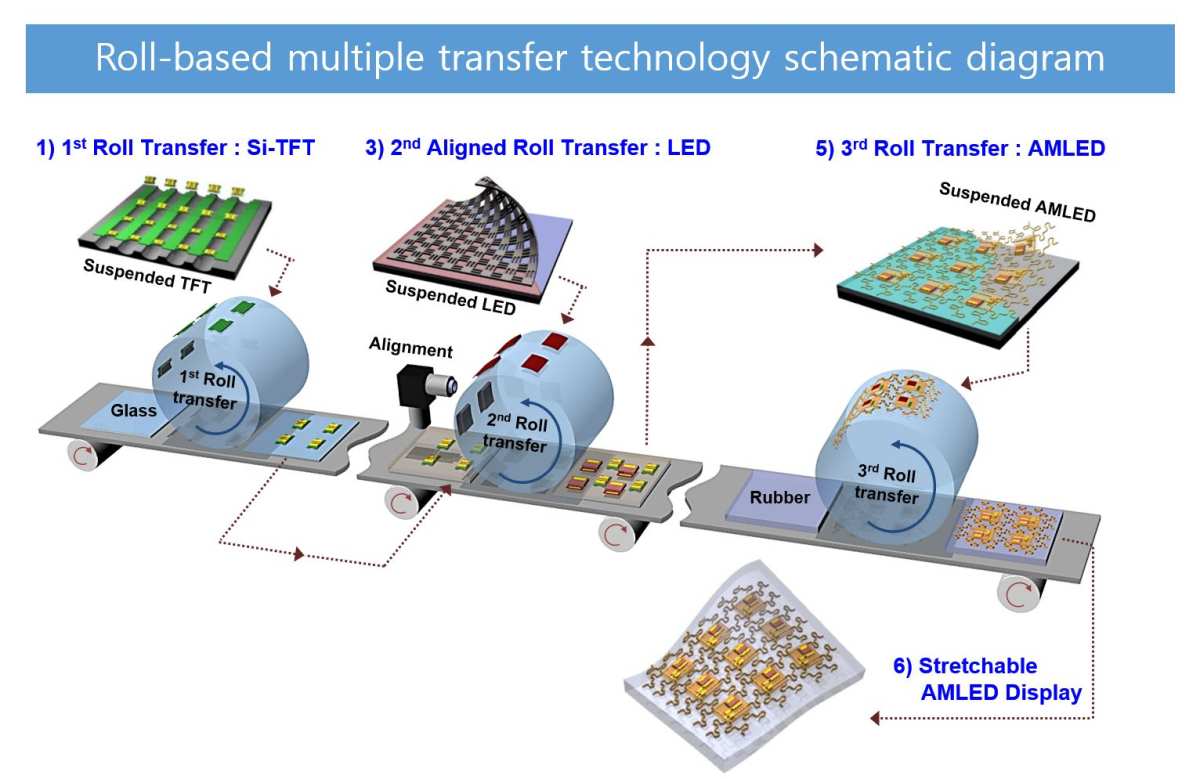
Here's where MicroLED manufacturing hits its biggest wall. You need to pick up millions of LED chips, each smaller than a human hair, and place them onto the backplane with sub-micron accuracy. This is the mass transfer process, and it's the primary reason MicroLED monitors don't exist yet.
There are several approaches being developed. Elastomer stamp transfer uses a soft polymer stamp to pick up chips from the wafer and stamp them onto the substrate. Laser-assisted transfer uses a laser to release chips from the carrier substrate at precise locations.
Fluidic self-assembly suspends chips in a fluid and flows them across a substrate with receptor sites that trap chips in the right positions.
Each method has trade-offs in speed, accuracy, and yield. The target is transferring millions of chips per hour with a yield of 99.9999%, meaning no more than one defective pixel per million. Current processes are getting closer but haven't consistently hit that target at consumer-viable throughput rates.
Bonding to the Backplane
Once the chips are transferred, they need to be permanently bonded to the TFT backplane. This involves creating reliable electrical connections between each chip's contacts and the corresponding transistor on the backplane. The bonding process needs to be thermally compatible with both materials, mechanically robust, and electrically consistent across millions of connections.
Laser bonding and soldering are the two primary approaches. Laser bonding uses focused heat to create connections at specific points without heating the entire assembly. Soldering creates more traditional metallic joints.
Both need to maintain connection integrity across thermal cycling, since displays heat up and cool down during operation.
Color Conversion and Red Sub-Pixel Challenges
Blue and green MicroLEDs are relatively efficient with gallium nitride. Red is the problem. GaN-based red LEDs suffer from significantly lower efficiency compared to their blue and green counterparts.
This is a fundamental materials science challenge that hasn't been fully solved.
Most current MicroLED displays work around this by using blue or ultraviolet MicroLED chips with quantum dot color conversion layers. A blue chip with a red quantum dot converter produces red light. A blue chip with a green quantum dot converter produces green.
This approach works but introduces efficiency losses in the conversion process.
Some manufacturers are pursuing native red MicroLEDs using different semiconductor materials like aluminum indium gallium phosphide (AlInGaP). The challenge is integrating two different semiconductor material systems on the same substrate, which adds complexity to an already difficult manufacturing process.
Encapsulation and Final Protection
The final layer protects the delicate LED chips and backplane from environmental damage. Moisture, dust, and physical contact can all destroy MicroLED pixels. The encapsulation layer needs to be optically transparent, thermally stable, and impermeable to contaminants.
Thin-film encapsulation using alternating layers of silicon nitride and organic polymers is the standard approach. This creates a barrier that prevents moisture and oxygen from reaching the semiconductor devices. The encapsulation also needs to be thin enough not to affect optical performance while being robust enough to last the lifetime of the display.
How MicroLED Compares to OLED, LCD, and Mini-LED
MicroLED vs. OLED: The Burn-In Question
OLED is MicroLED's most direct competitor, and the comparison comes down to a few key factors. Both are self-emissive technologies with per-pixel lighting. Both deliver perfect black levels and infinite contrast.
Both offer wide viewing angles and fast response times.
The difference is longevity and brightness. OLED's organic materials degrade over time, and the degradation rates differ between colors, leading to potential color shifts and burn-in. MicroLED's inorganic GaN doesn't have this problem.
OLED also tops out around 1,000 to 1,500 nits in real-world content, while MicroLED can theoretically hit 5,000 nits or more.
The trade-off is that OLED has a decade of manufacturing refinement behind it. It's mature, it's available, and it keeps getting cheaper. MicroLED is still fighting to get out of the lab for monitor-sized displays.
MicroLED vs. Mini-LED: Not as Similar as You Think
People confuse these two constantly, and the names don't help. Mini-LED is an LCD backlight technology. It uses thousands of small LED zones behind an LCD panel to improve local dimming.
The LCD layer still controls the light. Mini-LED is an evolution of existing LCD technology, not a new display type.
MicroLED is fundamentally different. There's no LCD layer. Each pixel is its own emitter.
Mini-LED can have hundreds or thousands of dimming zones. MicroLED has millions of them, one per pixel. The performance gap is enormous, but so is the cost and manufacturing difficulty.
If you see a product marketed as "Mini-LED," it's an LCD with a better backlight. If you see "MicroLED," it's an entirely different technology that happens to also use LEDs.
MicroLED vs. QD-OLED: Where the Real Competition Lives
QD-OLED combines OLED's self-emissive nature with quantum dot color conversion for improved color gamut and brightness. Samsung Display and Sony both manufacture QD-OLED panels, and they're currently the premium choice for high-end monitors.
QD-OLED hits over 97% of the DCI-P3 color gamut and offers peak brightness around 1,000 nits in real content. It's available today in monitor sizes from 27 to 34 inches. It costs significantly less than OLED alternatives from LG Display while offering comparable or better color performance.
MicroLED would surpass QD-OLED in brightness, color gamut, and lifespan. But QD-OLED is here now, it's getting cheaper, and it's good enough for virtually every professional use case. MicroLED needs to solve its manufacturing problems before it can compete with QD-OLED on anything other than spec sheets.
Side-by-Side Comparison Table
| Feature | MicroLED | OLED | QD-OLED | Mini-LED LCD |
|---|---|---|---|---|
| Display type | Self-emissive inorganic | Self-emissive organic | Self-emissive + QD | LCD with LED backlight |
| Backlight required | No | No | No | Yes |
| Peak brightness (nits) | 2,000–5,000 (theoretical) | 800–1,500 | 1,000–1,500 | 500–2,000 |
| Black level | True zero | True zero | True zero | Near-black (blooming) |
| Burn-in risk | None | Yes | Reduced vs. OLED | None |
| Response time | <1 microsecond | ~0.1 ms | ~0.1 ms | 1–5 ms |
| Color gamut | Near Rec. 2020 | ~98% DCI-P3 | >97% DCI-P3 | ~95% DCI-P3 |
| Lifespan | 100,000+ hrs (estimated) | 30,000–60,000 hrs | 30,000–50,000 hrs | 50,000+ hrs |
| Current monitor availability | None | Yes | Yes | Yes |
| Price range (monitors) | N/A | $800–$4,000 | $900–$1,300 | $300–$2,000 |
Why You Can't Buy a MicroLED Monitor Yet
The Yield Problem (Millions of Chips, Zero Room for Error)
Let's put the yield challenge in perspective. A 4K monitor has roughly 8.3 million pixels, each with three sub-pixels. That's about 25 million individual MicroLED chips that need to be transferred and bonded correctly.
If your transfer process has a 99.99% yield rate, you'd have 2,500 dead sub-pixels per panel. That's unacceptable.
Manufacturers need yields approaching 99.9999% to produce panels with acceptable defect rates. Current mass transfer processes are in the 99.9% to 99.99% range, which sounds close but represents an order of magnitude gap in practical terms. Every fraction of a percent improvement requires significant process refinement.
The repair process helps but adds cost. Dead pixels can sometimes be replaced using laser-based repair systems, but each repair takes time and adds a potential point of failure. The economics only work if the initial yield is high enough that repair is the exception, not the norm.
Cost Reality: Why Samsung's 110" TV Costs 0,000
Samsung's MicroLED TVs start at around $150,000 for a 110-inch model. That's not a typo. The cost comes from the combination of low yields, slow transfer rates, expensive equipment, and the sheer number of chips involved.
A single 4K MicroLED TV contains roughly 25 million LED chips.
The equipment for mass transfer is still being developed and refined. There's no mature supply chain the way there is for LCD or OLED manufacturing. Every step requires custom equipment and processes that haven't been optimized for volume production.
Until the industry reaches scale, costs will remain prohibitive for consumer products.
Pixel Pitch: Why Monitors Are Harder Than TVs
TVs have pixel pitches around 1.0mm to 2.0mm because you're viewing them from several feet away. Monitors need pixel pitches below 0.7mm, ideally around 0.4mm, because you're sitting inches from the screen. Smaller pixel pitch means smaller chips, which means harder transfer, harder bonding, and harder repair.
The physics of making reliable LED chips below 30 micrometers gets increasingly difficult. Surface effects become more significant relative to volume. Edge defects have a larger impact on performance.
The chips become more fragile during handling and transfer. All of these factors compound the yield problem at the pixel densities monitors require.
The Manufacturing Equipment Bottleneck
There's no off-the-shelf equipment for MicroLED mass transfer the way there is for OLED deposition or LCD assembly. Companies like PlayNitride, AUO, and BOE are developing their own processes, but the equipment ecosystem is still in its early stages. Each manufacturer is essentially building custom production lines from scratch.
The semiconductor industry has equipment for handling small chips, but not at the speeds and precision required for display manufacturing. Pick-and-place equipment used in electronics assembly can handle thousands of components per hour. MicroLED transfer needs to handle millions per hour.
That's a fundamentally different problem requiring fundamentally different solutions.
What MicroLED Monitors Will Actually Be Good For
Professional Color Grading and Reference Displays
When MicroLED monitors do arrive, professional color grading will be the first real application. The combination of extreme peak brightness, wide color gamut, and perfect black levels makes MicroLED ideal for HDR mastering. Content creators working on Dolby Vision and HDR10+ material need displays that can hit the brightness levels these formats demand.
Medical imaging is another early adopter candidate. Radiologists need displays with high brightness, perfect contrast, and no risk of burn-in from static UI elements. MicroLED delivers on all three.
The longevity advantage over OLED matters in medical settings where displays run 24/7 and replacement costs include downtime, not just hardware.
Medical and Broadcast Environments
Broadcast studios use reference monitors to evaluate content quality. These displays need to maintain calibration over long periods and handle high-brightness HDR content without artifacts. MicroLED's inorganic pixels won't shift color over time the way OLED's organic materials do, making them attractive for environments where calibration consistency is critical.
Command and control rooms represent another niche. These facilities often use video walls made from tiled displays, and MicroLED's modular nature makes it ideal for this application. The bezeless tiling capability means you can create seamless walls of any size without the bezel gaps that plague LCD video walls.
Gaming: The Promise vs. The Timeline
Gamers want MicroLED for the response times and HDR performance. Nanosecond response times eliminate motion blur. Per-pixel dimming eliminates blooming around bright objects on dark backgrounds.
Peak brightness levels that make HDR content look genuinely impressive rather than mildly brighter.
The problem is timeline. Gaming monitors need to be affordable, and MicroLED won't hit gaming-monitor price points for years after it reaches professional markets. By the time MicroLED gaming monitors exist, OLED will likely have improved significantly and dropped in price.
The window of advantage may be narrower than enthusiasts hope.
AR/VR and Wearables: Where MicroLED Ships First
The first commercial MicroLED products aren't monitors at all. They're microdisplays for AR glasses and VR headsets. These applications use MicroLED arrays built directly on silicon wafers, a process called MicroLED-on-silicon or LCoS replacement.
The pixel densities are extreme, but the total chip count is much lower than a full-size display.
Apple invested heavily in MicroLED for Apple Watch Ultra before reportedly scaling back those plans. Samsung and other companies continue developing MicroLED microdisplays for AR applications. These smaller displays will drive manufacturing improvements that eventually benefit larger products.
What the Timeline Actually Looks Like
Current State (2024): What Exists Right Now
As of 2024, Samsung sells MicroLED TVs in sizes from 76 to 116 inches, priced from $80,000 to over $200,000. Sony offers its Crystal LED (CLEDIS) system for commercial installations. BOE and various Chinese manufacturers have demonstrated MicroLED prototypes at trade shows.
No company sells a MicroLED monitor in any standard size.
The technology demonstrably works. Samsung's MicroLED TVs deliver on the promise of high brightness, perfect blacks, and no burn-in. The problem is entirely about manufacturing scale and cost, not about whether the technology functions.
Near-Term Outlook (2025–2027)
Industry projections suggest MicroLED will first appear in premium mobile devices and wearables around 2025 to 2026. Larger displays for automotive and high-end residential use should follow. Monitor-sized products likely won't appear until 2027 at the earliest, and even then only in very limited quantities at professional price points.
The key milestone to watch for is transfer yield improvement. When manufacturers consistently hit 99.999% yields at commercially viable speeds, costs will start dropping rapidly. Until then, MicroLED remains a technology in search of a manufacturing breakthrough.
The Consumer Monitor Reality Check
Here's the honest assessment. If you're shopping for a monitor in the next two years, MicroLED isn't going to be an option. OLED and QD-OLED are the best self-emissive technologies available now.
Mini-LED LCD offers excellent performance at lower prices. Both technologies continue improving and getting cheaper.
MicroLED will eventually reach the consumer monitor market, but the timeline is measured in years, not months. The manufacturing challenges are real, and the industry has been working on them for over a decade. When it does arrive, it will start in professional applications where the cost is justified, and trickle down from there.
Common Misconceptions That Need Correcting
"MicroLED Is Just Mini-LED With a Smaller Name"
This is the most common confusion, and it's completely wrong. Mini-LED is a backlight technology for LCD panels. The LCD layer still controls the light.
MicroLED is a self-emissive display technology where each pixel produces its own light. They share "LED" in the name but are fundamentally different technologies.
"MicroLED Will Replace OLED Next Year"
People have been predicting MicroLED's imminent arrival for years. The technology works in the lab and in limited production. The problem is manufacturing millions of displays per year at consumer price points.
That's an engineering and economics challenge that hasn't been solved yet, and there's no guarantee it will be solved on any particular timeline.
"MicroLED and MicroOLED Are the Same Thing"
MicroOLED is OLED built on a silicon wafer instead of glass. It's designed for tiny displays in AR glasses and camera viewfinders. MicroLED is a completely different technology using inorganic LEDs.
Both are "micro" in scale, but the materials, manufacturing, and applications are distinct.
"You Can Buy a MicroLED Monitor Today"
You cannot. Samsung sells MicroLED TVs, not monitors. Sony sells Crystal LED for commercial installations.
Various companies have shown prototypes. But if you go to a retailer looking for a MicroLED monitor in 27 or 32 inches, you won't find one. Anyone claiming otherwise is either confused or selling something that isn't actually MicroLED.
Should You Wait for MicroLED or Buy OLED Now?
If You Need a Monitor This Year
Buy OLED or QD-OLED. These technologies deliver excellent performance today, with proven reliability and established warranty support. The LG Display WOLED panels and Samsung Display QD-OLED panels in current monitors represent the best self-emissive performance you can actually purchase.
Mini-LED LCD is also worth considering if burn-in concerns you or if you work with lots of static content. The local dimming performance has improved dramatically, and you get high brightness without organic material degradation.
If You Can Wait 3–5 Years
Keep an eye on MicroLED development, but don't plan your purchase around it. The technology will arrive when the manufacturing challenges are solved, not before. In the meantime, OLED and QD-OLED will continue improving.
The monitor you buy today will serve you well for years.
The most likely first consumer MicroLED products will be in mobile or wearable devices, not monitors. When MicroLED does reach the monitor market, expect professional pricing initially. Consumer-grade MicroLED monitors are probably a decade away at minimum.
The Honest Verdict
MicroLED is genuinely the most promising display technology in development. It combines the best aspects of OLED (self-emissive pixels, perfect blacks) with the best aspects of LCD (no burn-in, high brightness) and adds capabilities neither can match. The physics is sound.
The engineering is progressing.
But promising technology and available products are different things. As of 2026, MicroLED monitors don't exist for consumers. The manufacturing challenges are real, the costs are enormous, and the timeline is uncertain.
If you're researching this topic to make a buying decision, the answer is simple: buy the best OLED or LCD monitor you can afford today, and revisit MicroLED when it's actually available.
Frequently Asked Questions
When will MicroLED monitors be available?
True MicroLED monitors likely won't be commercially available before 2027 at the earliest, and even then only in limited professional applications. Consumer-grade MicroLED monitors are probably a decade or more away. The manufacturing challenges for monitor-sized panels with acceptable pixel pitches haven't been solved yet.
Is MicroLED better than OLED?
On paper, yes. MicroLED offers higher peak brightness, longer lifespan, wider color gamut potential, and zero burn-in risk. In practice, OLED is available now, keeps improving, and delivers excellent performance.
MicroLED is better in theory. OLED is better in your shopping cart.
Why is MicroLED so expensive?
The mass transfer process that places millions of microscopic LED chips onto a backplane has low yields and slow throughput. Each chip must be placed with extreme precision, and any defects create dead pixels. The equipment is custom, the supply chain is immature, and the economics only work at very high price points currently.
Can MicroLED be used for gaming?
Eventually, yes. MicroLED's nanosecond response times and per-pixel dimming would make it excellent for gaming. But gaming monitors need to be affordable, and MicroLED won't hit gaming price points for many years.
Current OLED gaming monitors offer excellent performance without the wait.
What's the difference between MicroLED and Mini-LED?
Mini-LED is an LCD backlight with thousands of local dimming zones. MicroLED is a self-emissive display where each pixel is its own light source. Mini-LED improves LCD.
MicroLED replaces it entirely. The names are similar, but the technologies are fundamentally different.
Will MicroLED replace OLED?
Eventually MicroLED could replace OLED in many applications, but "eventually" is doing a lot of work in that sentence. OLED has a massive head start in manufacturing maturity and cost reduction. MicroLED will need to solve significant production challenges before it can compete on price, and by then OLED will have continued improving.
Frequently Asked Questions
When will MicroLED monitors be available?
True MicroLED monitors likely won't be commercially available before 2027 at the earliest, and even then only in limited professional applications. Consumer-grade MicroLED monitors are probably a decade or more away. The manufacturing challenges for monitor-sized panels with acceptable pixel pitches haven't been solved yet.
Is MicroLED better than OLED?
On paper, yes. MicroLED offers higher peak brightness, longer lifespan, wider color gamut potential, and zero burn-in risk. In practice, OLED is available now, keeps improving, and delivers excellent performance.
MicroLED is better in theory. OLED is better in your shopping cart.
Why is MicroLED so expensive?
The mass transfer process that places millions of microscopic LED chips onto a backplane has low yields and slow throughput. Each chip must be placed with extreme precision, and any defects create dead pixels. The equipment is custom, the supply chain is immature, and the economics only work at very high price points currently.
Can MicroLED be used for gaming?
Eventually, yes. MicroLED's nanosecond response times and per-pixel dimming would make it excellent for gaming. But gaming monitors need to be affordable, and MicroLED won't hit gaming price points for many years.
Current OLED gaming monitors offer excellent performance without the wait.
What's the difference between MicroLED and Mini-LED?
Mini-LED is an LCD backlight with thousands of local dimming zones. MicroLED is a self-emissive display where each pixel is its own light source. Mini-LED improves LCD.
MicroLED replaces it entirely. The names are similar, but the technologies are fundamentally different.
Will MicroLED replace OLED?
Eventually MicroLED could replace OLED in many applications, but "eventually" is doing a lot of work in that sentence. OLED has a massive head start in manufacturing maturity and cost reduction. MicroLED will need to solve significant production challenges before it can compete on price, and by then OLED will have continued improving.

Similar Posts