What Is Wireless Charging Technology
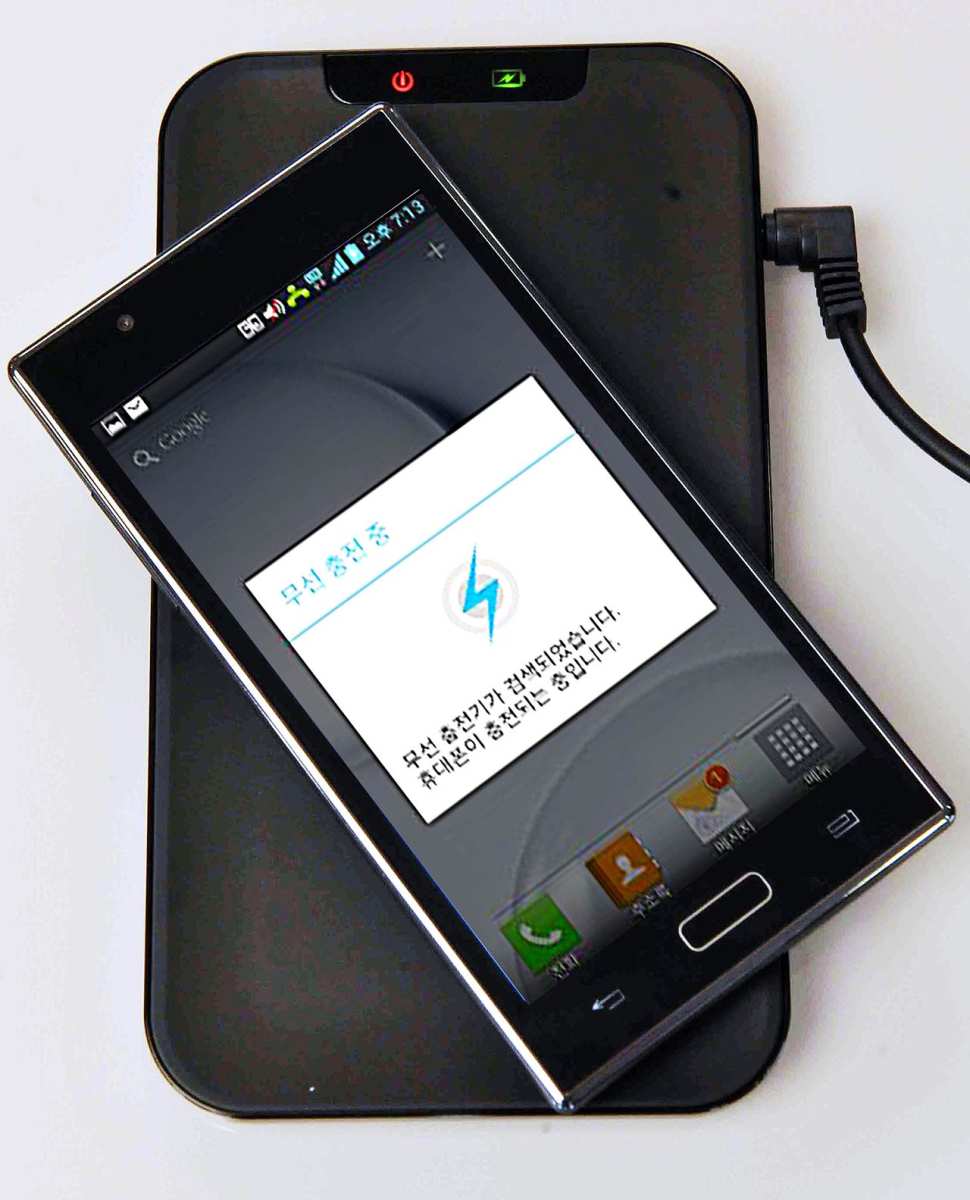
You’ve probably seen those circular pads on nightstands and wondered if they really work without a cord. The truth is, understanding what is wireless charging technology is simpler than you think: it’s a way to transfer power through the air using magnetic fields. No plugging, no worn-out cables, no hunting for a USB port in the dark.
In our research, the most widely used standard is Qi, developed by the Wireless Power Consortium. As of 2026, Qi supports up to 15 watts for phones and as much as 30 watts for laptops under the Extended Power Profile. That means you can charge a dead iPhone to 50% in about 45 minutes without ever touching a cable.
But here’s the catch: not every charger works the same way, and picking the wrong one wastes time and money.
Image source: Wikimedia Commons / LG전자 (CC BY)
Quick Answer / What Is Wireless Charging (In One Sentence)
Wireless charging technology uses electromagnetic induction to transfer power from a pad to a device. A coil in the pad creates a magnetic field. A matching coil in your phone turns that field into electricity.
No cables required. Qi is the universal standard.
Why You’d Even Bother: The Real Pain Point
Cable wear is a real headache. The constant plugging and unplugging eventually breaks the charging port on your phone, and replacement repairs cost anywhere from $50 to $150. Wireless charging eliminates that physical stress entirely.
You just set the device down and walk away.
There’s also the everyday irritation of fumbling with a cable in low light. Whether it’s a bedside table at 2 AM or a cluttered desk during a meeting, a pad lets you drop your phone and go. Aggregate user reviews across major retailers consistently rate wireless charging pads higher than standard cables for convenience.
That’s not a sales pitch, it’s what thousands of buyers report.
How Wireless Charging Actually Works (Induction vs. Resonance)
Two technologies sit under the wireless charging umbrella: inductive and resonant inductive. Most consumer chargers use the first type, but the second matters for specific scenarios.
Inductive charging relies on two copper coils placed very close together, usually less than 5 mm apart. The pad’s coil (the transmitter) creates an alternating magnetic field. The phone’s coil (the receiver) converts that field back into electrical current.
Think of it as a transformer with the air gap serving as the core. Efficiency ranges from 70% to 85%, which is lower than a cable but improving with newer chips.
Resonant inductive charging uses the same principle but adds a capacitor to each coil, tuning them to the same frequency. This resonance allows power to travel a bit farther, up to 4 cm in some AirFuel certified products. It’s less common in phones today but appears in industrial sensors, medical implants, and some electric vehicle pads.
The tradeoff is even lower efficiency, often below 70%, and stricter shielding requirements.
The table below sums up the main differences for the average buyer.
| Feature | Inductive (Qi) | Resonant (AirFuel) |
|---|---|---|
| Typical distance | 0–5 mm | 5–40 mm |
| Max phone power | 15 W (30 W laptop) | ~10 W (limited adoption) |
| Device support | Most phones, watches, earbuds | Niche devices, EVs |
| Charging speed | Fast, matches wired | Slower, lower efficiency |
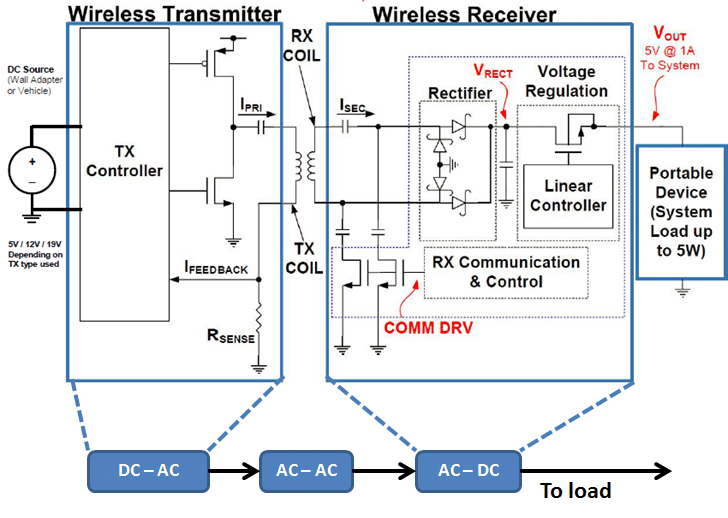
Image source: Bing (Web (fair-use with source credit))
The Three Big Variables That Change Your Choice
Your perfect charger depends on three factors. Answer these honestly, and you’ll avoid buying a pad that frustrates you.
What Device Are You Charging?
A phone-only user has different needs from someone with a phone, smartwatch, and earbuds. Single-device pads start around $15, while three-in-one stands cost $40 to $80. If you own a MagSafe compatible iPhone, you gain the benefit of magnetic alignment, which boosts charging reliability.
Android users should check for Samsung Fast Wireless or OnePlus Warp Wireless support, since proprietary fast charging often requires the manufacturer’s own pad.
How Fast Do You Need It to Be?
Standard Qi pads deliver 5 to 7.5 watts. That’s fine for overnight charging but painfully slow for a top-up before a meeting. For quicker refills, look for “Fast Wireless” labeling: 15 watts for most phones, 30 watts for some Galaxy Notes and laptops.
Be aware that the phone must support the faster speed, or it will default to 5 watts. Manufacturer specifications confirm that heat generation also increases at higher wattages, so good thermal management matters.
Where Will You Be Charging Most Often?
Bedside charging calls for a stand that props your phone up so you can see the time or notifications. Car charging needs a mount with a built-in pad that holds the phone in place. Office desks benefit from a multi-device pad that covers a phone and earbuds at the same time.
Public wireless chargers (found in some hotel lobbies and airport lounges) are usually standard 5‑watt Qi pads, so don’t expect fast top-ups there.
Decision Tree: Which Wireless Charger Fits Your Situation
Follow these branches based on your answers above. Choose the path that matches your devices, speed needs, and location.
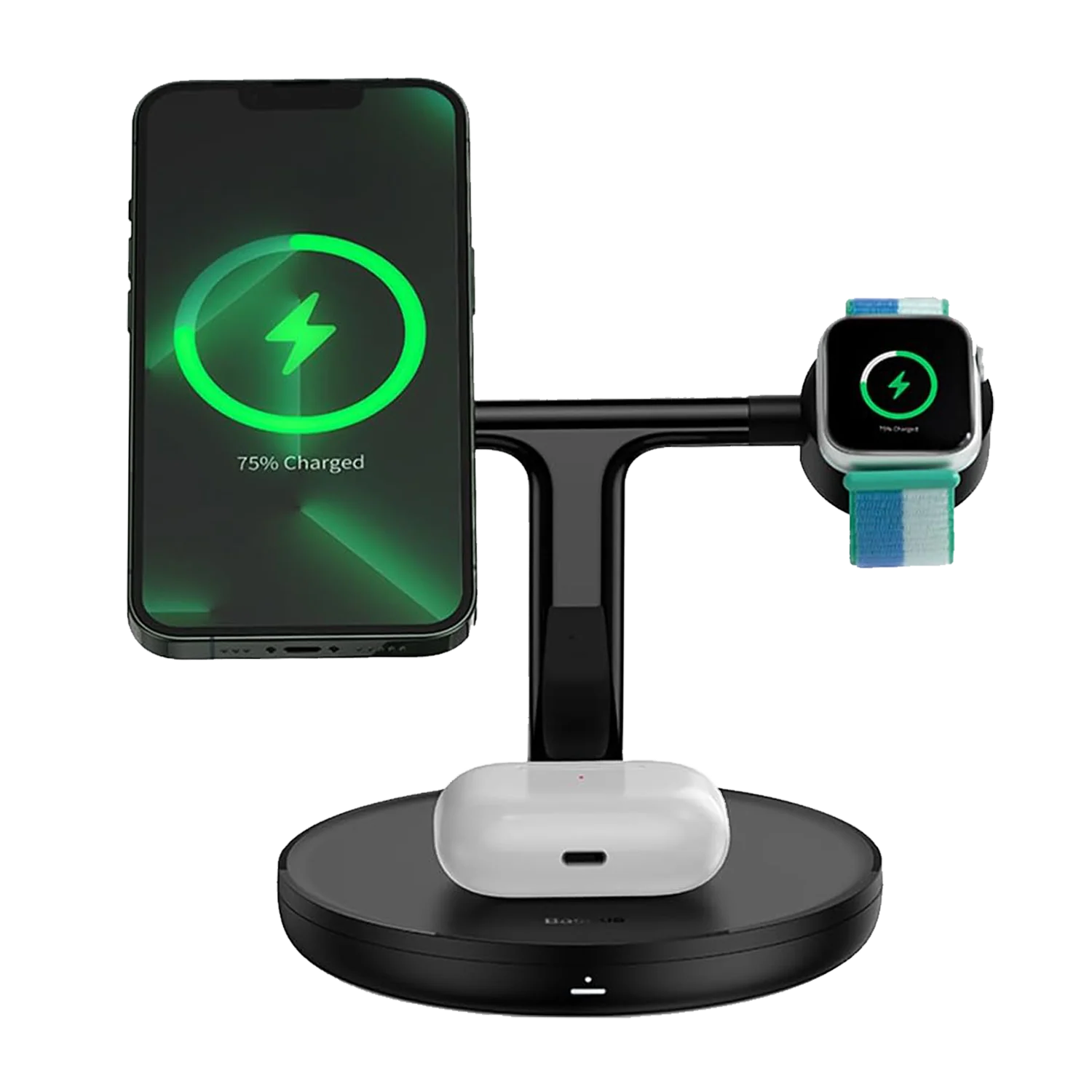
Image source: Bing (Web (fair-use with source credit))
Branch 1: Phone Only, Bedside or Desk
If you charge one phone in a fixed spot and don’t need watch or earbud support, a standard single-coil Qi pad is your best bet. Look for a 10‑watt or 15‑watt model with a non‑slip surface. Expect to pay $15 to $30.
Brands like Anker and Belkin dominate this category in user reviews, but any Qi‑certified pad works.
Branch 2: Phone, Watch, and Earbuds
A three‑in‑one stand with separate coils for each device saves you from buying three pads. The phone sits vertically, the watch hangs off the back, and the earbuds fit in a designated spot. These typically max out at 15 watts for the phone and 5 watts for the accessories.
Prices range from $40 to $80. Ensure the stand supports your specific watch model, as some older Series models require a different alignment.
Branch 3: Car Mount
A magnetic or clamp style mount that includes a charging pad lets you navigate and charge simultaneously. Look for models with a vent clip or adhesive base, a 15‑watt output, and auto‑locking features so your phone doesn’t bounce off while driving. Expect $25 to $50.
Some mounts require a magnetic ring attached to the case, so check compatibility.
Branch 4: Fastest Possible Wireless
For the absolute fastest wireless charging, you need the phone manufacturer’s own pad or a MagSafe certified model. Apple’s MagSafe charger delivers 15 watts to iPhone 12 through 16. Samsung’s Super Fast Wireless Charging Pad offers up to 15 watts for the Galaxy S series.
These pads cost $35 to $60 and include alignment magnets or guides that prevent misplacement.
Branch 5: Longer Range or Non‑Phone Devices
If you charge medical implants, industrial sensors, or an electric vehicle wirelessly, resonant inductive charging is the only option. AirFuel certified products exist for these niches, but adoption remains sparse. For consumers, this branch applies mostly to power tool batteries with resonant pads, though those are still rare in 2026.
Stick with wired charging for EVs unless you live in a city with dedicated wireless charging lanes.
What to Look For in a Charger: Specs That Matter
Not all charging pads are created equal. The specs that separate a good pad from a frustrating one come down to a handful of numbers and features.
Power output is the first check. A 5‑watt pad works for overnight charging but takes over three hours to fill a modern phone. A 10‑watt or 15‑watt pad cuts that time in half.
Look for the wattage listed on the box or product page. Keep in mind that your phone must support that speed. An iPhone 12 plugged into a 15‑watt Samsung pad will still charge at 7.5 watts unless it’s MagSafe certified.
Coil count matters more than most people realize. Single‑coil pads have a small sweet spot. If your phone is off‑center by a centimeter, charging stops or slows.
Multi‑coil pads use two or three overlapping coils to create a larger active area. Aggregate reviews on retailer sites report significantly fewer “not charging” complaints on multi‑coil models.
Foreign object detection (FOD) is a safety feature you should not skip. It detects metal objects like coins or keys on the pad and shuts off power to prevent overheating. Qi certification requires FOD for all pads sold after 2020.
Uncertified pads often omit it.
Standby power consumption is a small but real cost. A typical pad draws 0.1 to 0.5 watts when idle with no device. That adds about 50 cents to $2 to your annual electricity bill per pad.
Not a dealbreaker, but something to know.
Common Mistakes That Waste Your Time or Break Your Battery
The biggest frustration with wireless charging is when it doesn’t work. Most of the time, the culprit is something simple.
Thick or metal‑reinforced cases block the magnetic field. A case thicker than 3 mm or one with a magnetic mount plate, a pop socket, or a credit card holder significantly reduces charging speed. In some cases, it stops charging entirely.
Take the case off and test the naked phone before blaming the pad.
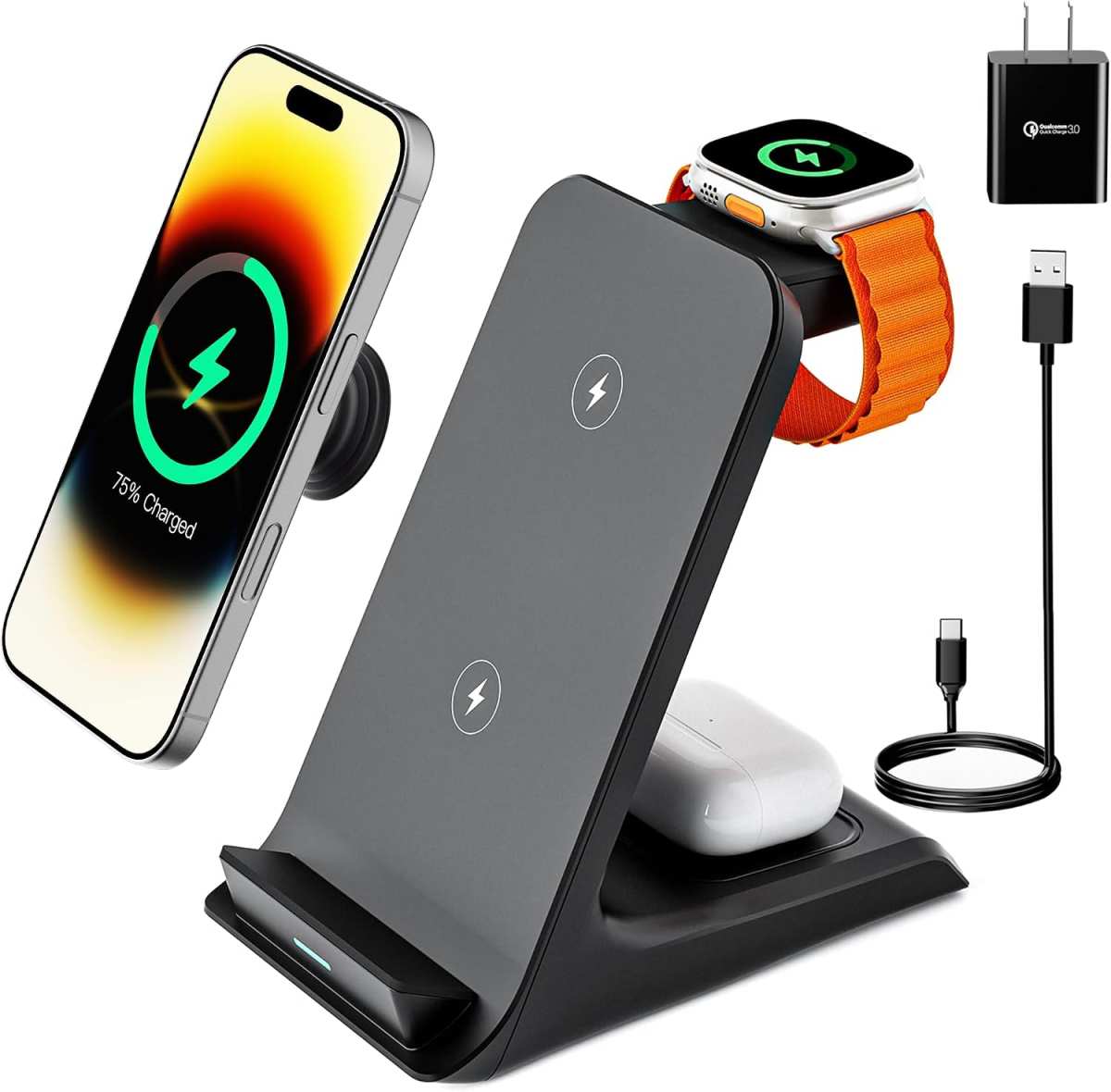
Image source: Bing (Web (fair-use with source credit))
Alignment issues are the second most common failure. People drop their phone on the pad and walk away, only to return to a flat battery. Multi‑coil pads help, but the best solution is a pad with a visible alignment guide or a magnetic attachment system like MagSafe.
If your phone charges intermittently, check the position first.
Heat buildup shortens battery lifespan. Wireless charging generates more heat than wired charging. That’s physics.
Fast wireless charging adds even more heat. Avoid using your phone while it’s on the pad for gaming or video streaming. If the phone feels hot to the touch after charging, remove it and let it cool.
Some pads include a cooling fan. They are worth the extra $10.
Using the wrong power adapter is a hidden problem. Many pads require a USB‑C Power Delivery adapter rated at 18 watts or higher. Plugging them into an old 5‑watt phone charger gives you a slow trickle or no charge at all.
Check the pad’s required input before buying.
Safety & Certification: Why Qi Matters Here
Qi certification is not just a logo. It is a guarantee that the pad meets minimum safety and performance standards set by the Wireless Power Consortium. Pads with the Qi mark have passed tests for foreign object detection, thermal protection, and electromagnetic interference limits.
Uncertified pads are cheaper, often under $10 on discount sites. They save you money upfront but carry real risks. Aggregate reports from consumer safety groups document incidents of uncertified pads overheating, melting, or damaging phone batteries.
The savings are not worth the danger.
Other certifications to look for: FCC Part 18 for US market compliance, CE for Europe, and UL listing for North American electrical safety. If a pad lacks any of these, be cautious. Manufacturer specs should list them clearly.
What about AirFuel certification? AirFuel is the other major standard, focused on resonant charging. It is less common in consumer electronics. If you buy a pad that only supports AirFuel, it will not charge a Qi‑certified phone.
Stick with Qi for nearly all modern devices.
Step by Step: Setting Up Your First Wireless Charger
Setting up a wireless charger is straightforward, but missing one step can cause problems. Here is the process in four steps.
Step 1: Pick the right power adapter. Most pads do not include one. You need a USB‑C wall adapter that supplies at least the pad’s rated input. For a 15‑watt pad, that means an 18‑watt or higher Power Delivery adapter.
Check the pad’s manual for the exact requirement.
Step 2: Connect the pad. Plug the included cable into the pad and the adapter. Plug the adapter into a wall outlet. Avoid using a computer USB port.
Most computer ports cannot deliver enough power for fast wireless charging.
Step 3: Place the device. Remove any thick case. Place the phone face up on the center of the pad. Watch for a charging indicator.
Most pads show a solid green or blue light. Flashing lights usually mean misalignment or a foreign object. Adjust the position until the light stays solid.
Step 4: Test fast charging (optional). If your phone supports fast wireless charging, you may need to enable it in the settings. On Samsung phones, go to Settings > Battery and device care > Battery > More battery settings > Fast wireless charging. On iPhones, fast wireless charging activates automatically with a MagSafe pad.
Nothing extra to toggle.
Pro advice from research: Keep the pad on a hard, flat surface. Soft surfaces like beds or sofas block airflow and increase heat.
Who Should Probably Stick With a Cable
Wireless charging is convenient, but it is not the best choice for everyone. If any of these points describe you, a cable might serve you better.
You need the fastest possible charge. Wired charging still wins on speed by a wide margin. A 30‑watt USB‑C Power Delivery charger can top up a phone from empty to 50% in 20 minutes. Even the fastest wireless pad takes 30 to 40 minutes for the same charge.
You charge while using your phone actively. If you stream video, play games, or run GPS navigation while charging, a cable is better. Wireless charging generates more heat under load, which slows charging and degrades the battery over time. A cable keeps the phone cool and the power flowing.
You travel frequently. Carrying a wireless pad adds bulk. Public wireless charging spots are still rare. A small high‑speed cable and a power bank are more reliable on the road.
You own an older phone without Qi support. iPhones before the iPhone 8, many Android models from before 2015, and budget phones do not have a built‑in receiver coil. You can add a Qi receiver sticker that plugs into the charging port, but the experience is clunky. A cable is simpler for these devices.
FAQs: Alignment, Cases, Heat, and Reverse Charging
Why does my phone stop charging if I move it slightly?
Wireless charging requires precise coil alignment. Most single‑coil pads have a sweet spot only about 2 cm wide. If your phone shifts even a little, the magnetic field weakens and charging stops.
Multi‑coil pads solve this with overlapping coils that create a larger active zone.
Can I leave my phone on the charger all night?
Yes, with modern phones and Qi‑certified pads. The phone stops drawing power once it hits 100%. It then maintains the charge by drawing a tiny trickle.
Heat is the real concern. If the pad or phone feels hot in the morning, the airflow is blocked. Move the pad to a hard surface.
Do I need to remove my phone case?
It depends on the case. Thin plastic or silicone cases under 3 mm work fine. Thick cases, metal cases, or cases with magnet mounts, credit card slots, or pop sockets block the signal.
Test your phone naked first. If it charges, put the case back on and test again. Check the pad’s indicator light.
Does reverse wireless charging work on any phone?
Reverse wireless charging lets one phone charge another phone or earbuds on its back. It works on Samsung Galaxy S10 and newer, Huawei P30 Pro and newer, and other select models. The feature is slow, usually 4.5 to 5 watts.
It drains the host phone’s battery quickly. Use it only for emergency top‑ups.
How much heat is too much?
If the phone feels uncomfortably hot to hold after charging, that is too much. Sustained heat above 40°C (104°F) accelerates battery degradation. Avoid using the phone while it sits on the pad.
Skip fast wireless charging if you live in a hot climate. A fan‑cooled pad helps.
Your Decision Guide: Quick Pick by Device and Budget
Here is a simple breakdown based on what we covered.
| Device setup | Recommended charger | Approximate cost | Key spec |
|---|---|---|---|
| Single phone, bedside or desk | Single‑coil Qi pad | $15–$30 | 10–15 watts |
| Phone + watch + earbuds | Three‑in‑one stand | $40–$80 | 15W phone, 5W each accessory |
| Phone, car mount | Magnetic car charger | $25–$50 | 15W, auto‑lock |
| Fastest wireless (iPhone) | MagSafe pad | $35–$60 | 15W, magnetic alignment |
| Fastest wireless (Samsung) | Samsung Super Fast pad | $35–$50 | 15W, proprietary fast charging |
If you want the simplest answer: A 15‑watt Qi‑certified single‑coil pad from a trusted brand is the safest bet for anyone with a modern phone. It works at home and on the desk. It costs under $30.
It will not damage your battery. And you can upgrade to a multi‑device stand later if you need it.
If you still think you need wired charging: Keep a cable in your bag for emergencies. Use the pad for daily convenience. That combo gives you the best of both worlds.

Similar Posts