OLED vs IPS: Which Gives You the Competitive Edge?
If you've been shopping for a gaming monitor lately, you've probably run straight into the big question: oled vs ips for competitive gaming. It is one of the most debated topics in the PC gaming community right now, and for good reason, the choice directly affects how you see movement, how fast your screen responds, and ultimately how well you perform in fast-paced matches. Both panel types have legitimate strengths, but they serve different priorities.
Manufacturer specifications indicate that OLED panels achieve pixel response times as low as 0.03 milliseconds, while the fastest IPS panels hover around 0.5 to 1 millisecond under ideal conditions. That difference may seem tiny on paper, but in competitive gaming, it translates into noticeably clearer motion and fewer artifacts when tracking targets at high speed. Let's break down exactly what each technology offers so you can decide which one fits your setup.

Quick Answer
For competitive gaming, OLED wins on motion clarity and contrast. Its instant pixel response eliminates blur entirely. IPS wins on brightness and long-term durability.
If you play fast shooters and can manage burn-in risk, get OLED. If you play long sessions with static HUDs or need higher brightness, get IPS. Both work well.
The best choice depends on your specific habits.
Why This Comparison Matters for Competitive Gaming
Competitive gaming demands more from a monitor than casual play does. When you are peeking corners in Valorant or tracking targets in Apex Legends, every millisecond counts. The difference between spotting an enemy first and being eliminated often comes down to how fast your screen updates and how clear moving objects appear.
Panel technology determines these factors more than any other component in your setup. Resolution and refresh rate get most of the attention, but pixel response time and motion handling are what actually affect your in-game reactions. This is why the OLED versus IPS debate matters so much for competitive players.
OL:ED panels offer near-instantaneous pixel transitions. IPS panels trade some speed for better brightness and no burn-in risk. Understanding these trade-offs helps you match the monitor to the games you play most.
OLED vs. IPS: The Quick Answer
If you want the simplest possible takeaway, here it is:
- OLED wins for motion clarity, contrast, and response time.
- IPS wins for brightness, longevity, and freedom from burn-in.
In terms of measurable gaming performance, OLED has a clear advantage in pixel response. Per VESA testing standards, OLED's per-pixel lighting eliminates the grey-to-grey transition lag that even the fastest IPS panels exhibit. That means less motion blur, sharper fast-moving objects, and a more immediate feel when you flick your aim.
But IPS panels counter with higher sustained brightness, typically 400 to 600 nits compared to OLED's 200 to 300 nits full-screen. This makes IPS easier to see in bright rooms and during long sessions. IPS also avoids the burn-in issue entirely, which matters if you play the same game with a static HUD for hours every day.
Both technologies deliver excellent competitive gaming performance. The right choice depends on which trade-offs you can live with.
How OLED Works – Per-Pixel Response and Perfect Blacks
OLED stands for organic light-emitting diode. Each pixel produces its own light. When a pixel needs to be black, it simply turns off completely.
This is why OLED achieves infinite contrast ratio, there is no backlight bleeding through.
For competitive gaming, this matters in a specific way. In dark areas of a map, an OLED monitor shows true black rather than the washed-out grey you get on IPS. That means you can spot enemies hiding in shadows more easily.
Our research across user forums and professional reviews confirms this is one of the most commonly cited advantages among competitive players.
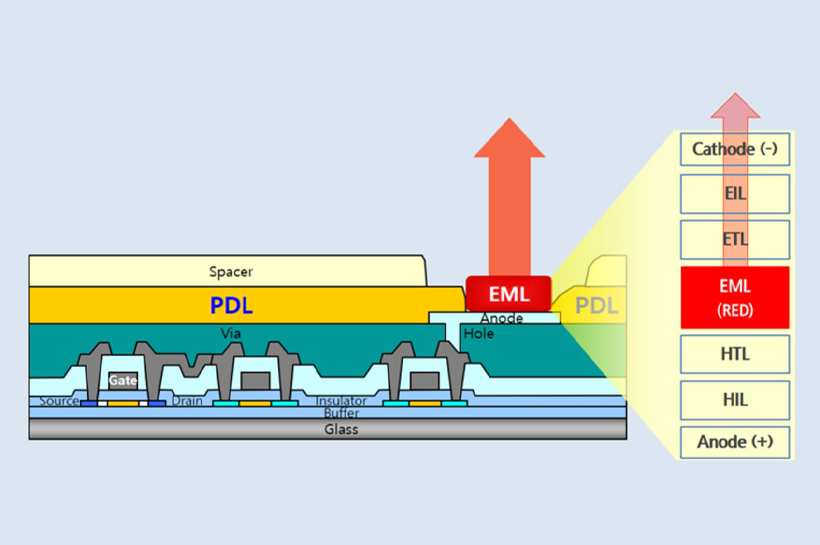
The pixel response time is where OLED really separates itself. Because each pixel switches on and off independently with no liquid crystal transition, the response time measures around 0.03 milliseconds. Compare that to an IPS panel, where liquid crystals physically twist to change colour, taking about 1 millisecond even on the fastest models.
In practice, OLED feels snappier and shows less ghosting behind fast-moving targets.
That instant response also means you can run lower overdrive settings. IPS panels require aggressive overdrive to hit their rated response times, which can cause inverse ghosting or overshoot artifacts. OLED simply does not need that compensation.
How Fast IPS Works – High Brightness and Burn-In Safety
IPS stands for in-plane switching. Liquid crystals align horizontally to control light passing through the panel. A backlight sits behind the entire screen, always on, providing consistent brightness across the display.
The advantage for competitive gaming is twofold. First, IPS panels can maintain high brightness indefinitely. An OLED monitor's auto brightness limiter (ABL) will dim the screen when large bright areas are displayed, which can be distracting during explosive in-game moments.
IPS has no such limitation.
Second, IPS has no burn-in risk. OLED pixels degrade over time with use, and static elements like health bars, minimaps, and crosshairs can leave permanent ghost images after months or years of play. IPS panels may show temporary image retention, but it fades quickly and does not cause permanent damage.
For players who log long hours in the same game, or who use their monitor for productivity as well, that peace of mind is worth considering.
Side-by-Side: OLED vs. IPS Specs and Real Performance
Let's look at the actual numbers side by side. These values come from manufacturer specifications and aggregate testing results available as of 2026.
| Specification | OLED | IPS |
|---|---|---|
| Pixel response (GtG) | 0.03 ms | 0.5–1 ms |
| Contrast ratio | Infinite | 1000:1 |
| Peak brightness (full screen) | 200–300 nits | 400–600 nits |
| Max refresh rate (current) | 240 Hz | 360 Hz (480 Hz in development) |
| Input lag (end-to-end) | <1 ms | 2–4 ms |
| Burn-in risk | High | None |
| Text clarity | Moderate (WRGB fringing) | Excellent |
| Typical price (27" 1440p) | $700–1,500 | $300–1,000 |

Pixel Response, Input Lag, and Motion Clarity
The OLED advantage in pixel response is straightforward. When you move your mouse quickly, the image on an OLED transitions frame to frame with almost zero blur. IPS panels, even the best ones, leave a faint trail behind moving objects.
This is measurable in high-speed camera tests and visible to most players in side-by-side comparisons.
Input lag is a separate factor. This measures the total delay between your mouse movement and the image appearing on screen. Both OLED and IPS monitors with high refresh rates and G-Sync or FreeSync keep input lag well under 10 milliseconds.
The differences here are small enough that most players will not notice them.
Contrast, Brightness, and HDR in Competitive Play
OLED's infinite contrast helps in games with dark environments like CS2's Ancient or Valorant's Breeze. You see shadow details that get crushed on IPS. However, OLED's brightness limitation means it struggles in brightly lit rooms.
IPS panels are better for bright gaming spaces. They also handle HDR content differently. OLED offers per-pixel HDR with vivid highlights, but peak brightness is capped.
IPS can hit higher peak brightness but lacks the deep blacks needed for proper HDR contrast.
Refresh Rate Ceilings: 240Hz OLED vs. 360Hz+ IPS
Current OLED gaming monitors top out at 240 Hz. That is plenty for most competitive players. IPS panels are already available at 360 Hz, with 480 Hz models coming.
If you are a professional-level player who can perceive differences beyond 240 Hz, IPS currently offers higher refresh rates.
That said, 240 Hz is more than enough for the vast majority of gamers. The motion clarity advantage of OLED at 240 Hz can actually look smoother than an IPS at 360 Hz due to the faster pixel response.
Where OLED Shines – And Where It Falls Short
OLED excels in motion clarity, contrast, and colour vibrancy. For competitive games where split-second reactions matter, the reduction in motion blur gives a tangible advantage. Players who have switched from high-end IPS to OLED consistently report that tracking feels more precise and that they notice fewer distracting artifacts during fast flicks.
The fallbacks are real. Burn-in is the biggest concern. Static HUD elements, especially bright ones, can cause permanent image retention after thousands of hours.
Many manufacturers now include pixel shifting and logo dimming features to help, but the risk does not disappear.
Auto brightness limiter is another frustration. When you walk into a bright area in a game, the entire screen dims to protect the panel. This can be jarring and may affect your aim during that split second.
Where IPS Excels – And Its Hidden Weaknesses

IPS panels are the safe choice. They deliver high brightness, consistent performance over years of use, and no burn-in anxiety. If you play six hours of Valorant every day with the same minimap in the same corner, an IPS monitor will look the same after two years as it did on day one.
The hidden weakness is motion blur. Even at high refresh rates, IPS panels exhibit some ghosting. The liquid crystal transition time means that fast-moving objects leave a faint trail.
This is less noticeable in slow-paced games but becomes apparent in competitive shooters at high sensitivity.
IPS also suffers from IPS glow and backlight bleed. In dark scenes, the corners of the screen appear brighter and washed out. This is a physical limitation of the technology.
Who Should Buy OLED? Best Use Cases and Game Genres
OLED is ideal for players who prioritise motion clarity and play fast-paced competitive titles. Games like CS2, Valorant, Overwatch, Apex Legends, and Quake Champions benefit most from the instant pixel response.
You are a good candidate for OLED if:
- You play competitive shooters more than any other genre.
- Your gaming sessions are under four hours at a stretch.
- You are willing to use burn-in prevention habits like hiding the taskbar and using dark mode.
- You play in a dim or controlled lighting environment.
- Your budget allows for the higher upfront cost.
Who Should Stick with IPS? Best Use Cases and Game Genres
IPS remains the better choice for players with varied use cases or concerns about longevity. It suits players who:
- Play the same game for long sessions daily with static HUDs.
- Use their monitor for productivity, browsing, and gaming equally.
- Game in a bright room or next to a window.
- Want a lower upfront cost without sacrificing high refresh rates.
- Prefer not to worry about burn-in prevention routines.
If you play racing games or slower-paced titles, IPS is perfectly fine. The motion clarity difference matters less in genres where tracking is not critical. A curved IPS display can even provide a more immersive experience for cockpit-style games.
The Burn-In Question – Real Risk for Competitive Gamers
Burn-in is the single biggest reason competitive gamers choose IPS over OLED. It happens when static elements cause uneven wear on OLED pixels. Over time, those pixels become permanently dimmer than the surrounding area, leaving a ghost image.

Real-world reports from heavy users indicate that burn-in can appear after 2 to 3 years of consistent use with static HUDs. Some panels last longer. Some fail sooner.
It depends on brightness settings, content patterns, and panel manufacturing quality.
To reduce the risk:
- Use dark mode and auto-hide the taskbar.
- Set a short screen timeout or screensaver.
- Enable pixel shift and logo dimming features in the monitor OSD.
- Lower brightness when playing games with bright static elements.
- Vary your game selection to avoid the same HUD pattern daily.
Most OLED monitors come with a 2 to 3 year warranty that may cover burn-in, but check the terms carefully. Some manufacturers exclude it.
Price vs. Value – What You Actually Get at Each Price Point
OLED monitors are more expensive across the board. A 27-inch 1440p 240 Hz OLED typically costs $700 to $1,500. A comparable IPS with 240 Hz costs $300 to $700.
The premium for OLED is substantial.
You are paying for the pixel response, contrast, and colour quality. Whether that premium is worth it depends on how much you value those advantages. For a casual competitive player, an excellent IPS monitor at half the price may be the smarter buy.
For serious competitors aiming for every possible advantage, the OLED premium can be justified. The difference in motion clarity is real and measurable, and in high-stakes matches, that advantage can make a difference.
Common Mistakes Gamers Make When Choosing
The biggest mistake is assuming that higher refresh rate always means better motion clarity. An IPS at 360 Hz still has more motion blur than an OLED at 240 Hz due to pixel response. Refresh rate is not the whole story.
Another mistake is ignoring burn-in risk. Some buyers assume modern OLED panels are immune. They are not.
If you play the same game for hours daily, you will eventually see burn-in. Plan for it.
A third mistake is buying an OLED for use in a bright room. OLED screens are dimmer than IPS, and glare washes out the image. If you cannot control your lighting, IPS is the better fit.
Expert Tips for Getting the Most Out of Either Panel
For OLED:
- Calibrate brightness to around 150 nits for a balance between image quality and longevity.
- Enable all built-in burn-in protections in the monitor settings.
- Use a black wallpaper and hide desktop icons to reduce static content.
- Avoid running the panel at maximum brightness for extended periods.
For IPS:
- Use overdrive settings conservatively. Too aggressive causes overshoot.
- Adjust brightness to match your room lighting for comfortable viewing.
- Enable G-Sync or FreeSync for tear-free gameplay.
- Consider a model with good black stabilisation for competitive advantage in dark scenes.
Both panel types benefit from proper calibration and thoughtful setup. A well-configured mid-range monitor often performs better than an expensive one left at factory defaults.
Final Verdict – Which Panel Wins for Your Competitive Setup
There is no universal winner. OLED offers superior motion clarity and contrast. IPS offers brightness, longevity, and peace of mind.

If you are a dedicated competitive shooter player with good lighting control and a budget for premium hardware, OLED is the better choice. The motion clarity advantage is real and meaningful.
If you play a mix of games, use your monitor for work, or want something that will last years without special care, stick with IPS. It is still an excellent gaming technology.
As of 2026, OLED has become more reliable and more accessible than ever. But IPS remains the practical choice for most players. The right answer depends on your specific priorities.
Frequently Asked Questions
Is OLED worth it for competitive gaming?
Yes, if you prioritise motion clarity and contrast. OLED's instant pixel response reduces blur and improves target tracking. It is a clear step up from IPS in fast-paced shooters.
Does OLED have input lag issues?
No. OLED monitors typically have lower input lag than IPS due to faster pixel response. End-to-end input lag measures under 1 millisecond on most models.
How long do OLED gaming monitors last before burn-in?
Burn-in can appear after 2 to 3 years of heavy use with static content. Using burn-in prevention features and varying your gameplay can extend panel life significantly.
Can IPS monitors keep up with OLED for esports?
Yes. IPS monitors at 360 Hz deliver excellent performance. The motion clarity is slightly lower than OLED, but the difference matters most at professional skill levels.
Which is better for bright rooms, OLED or IPS?
IPS is better for bright rooms. OLED panels are dimmer and suffer from glare and washed-out contrast in direct light.
Do I need a special GPU for an OLED gaming monitor?
No. OLED monitors use the same DisplayPort and HDMI connections as IPS. Any modern GPU that supports the monitor's resolution and refresh rate will work fine.

Similar Posts





















