Claude vs Gemini
Picking between Claude and Gemini shouldn't require a PhD or reading a dozen benchmark papers. You just need to know which one handles your specific workload better, because they're honestly built for different strengths.
Both models are genuinely impressive in 2026, but they shine in different areas. Your best choice depends entirely on what you're doing day to day. Let me break it down so you can skip the guesswork.
Quick Answer
Claude excels at reasoning, nuanced writing, and careful analysis. Gemini leads in multimodal tasks, real-time information, and Google ecosystem integration. Choose Claude for deep text work.
Pick Gemini for mixed media and live data. Both offer competitive pricing and strong API access.
Why This Comparison Actually Matters
Here's the thing: "which AI is better" is the wrong question. The right question is "which AI fails less at the specific task I care about most." Claude from Anthropic and Gemini from Google DeepMind take fundamentally different approaches to training and output style, and that shows up in daily use.
Claude's training emphasizes careful reasoning, fewer hallucinations, and a more measured tone. Google built Gemini to process images, audio, video, and text natively within a single architecture. Neither is universally superior.
The differences become obvious once you actually put them to work.
Aggregate reviews and independent benchmarks consistently show Claude winning on nuanced writing and ethical reasoning. Gemini pulls ahead on multimodal benchmarks and real-world data access. Your pick should match your actual workflow, not a headline score.
Quick Verdict: Which One Should You Pick?
If you need the fastest answer: choose Claude for writing, analysis, and coding tasks where accuracy matters. Choose Gemini when you're working with images, need live web data, or operate inside Google's ecosystem.
For most text-heavy professionals like writers, researchers, and developers, Claude feels more reliable out of the box. For visual creators, multimedia teams, and anyone who needs data that's current as of today, Gemini is the stronger starting point.
The real answer gets more nuanced once we dig into specific use cases, so keep reading to find where each one actually pulls ahead.
What Claude Does Best
Claude was built by Anthropic around a principle called Constitutional AI. That basically means it's trained to reason through problems step by step rather than guessing. The result shows up in a few concrete ways.
Deep reasoning and analysis. Claude consistently ranks among the top models on benchmarks measuring logical reasoning, mathematical problem solving, and multi-step inference. If you're asking it to analyze a contract, work through a complex debugging issue, or compare opposing arguments in a research paper, Claude tends to hold its logic together better across long responses.
Writing quality and nuance. Claude's output style is often described as more thoughtful and less generic. It handles subtle tone adjustments well. Need something that sounds professional but not stiff?
Claude nails that more consistently than most alternatives, including Gemini.
Large context handling. Claude offers a 200K token context window, which translates to roughly 150,000 words or about 500 pages of text. That's genuinely useful for analyzing entire book manuscripts, lengthy legal documents, or massive codebases in a single pass.
Careful safety alignment. Claude is notably cautious about providing harmful information. For many professional users that's a feature, not a bug. For some use cases it can feel overly careful.
Where Claude struggles is anything requiring live data, native image or audio generation, and Google Workspace integration. It's fundamentally a text-first model that handles other modalities through workarounds rather than native processing.
What Gemini Does Best
Gemini is Google's flagship multimodal model family, and its standout strengths come directly from how DeepMind built it.
Native multimodal processing. Unlike models that bolt vision capabilities on afterward, Gemini was trained on text, images, audio, and video from the ground up. That means it genuinely understands relationships between modalities without converting everything to text first. Feed it a chart, a screenshot, or a short video clip, and it processes those elements together rather than in isolation.
Real-time information access. Gemini connects to Google's search infrastructure, so it can pull current information about events, prices, and data that's hours old rather than months. For any task grounded in the present moment, this is a massive advantage.
Google ecosystem integration. If your organization runs on Google Workspace, Gemini integrates with Docs, Sheets, Gmail, and Drive in ways that Claude simply can't match without third-party tools. That native connectivity saves real time for teams already living in that ecosystem.
Variety of model sizes. Google offers Gemini in multiple tiers from the lightweight Flash version up through Pro and Ultra, letting you match model capability to task complexity and budget.
Gemini's writing style sometimes feels slightly more generic or blunt compared to Claude's measured tone. Its reasoning on very complex multi-step problems occasionally skips steps that Claude would explicitly walk through. Those gaps matter more for analytical work than for quick tasks.
Head-to-Head: Key Differences That Affect Your Work
The surface-level specs tell part of the story. The real differences show up when you're actually trying to get something done. Here's where the two models diverge in ways that matter day to day.
| Factor | Claude | Gemini |
|---|---|---|
| Context window | 200K tokens | 1M+ tokens (Pro/Ultra) |
| Multimodal handling | Text-first, limited image support | Native text, image, audio, video |
| Code generation | Strong, methodical | Fast, sometimes skips edge cases |
| Writing tone | Measured, nuanced | Direct, occasionally generic |
| Real-time web access | Limited, plugin-dependent | Built-in via Google search |
| API pricing | Per-token, competitive | Per-token, free tier available |
| Speed (mid-tier) | Moderate | Faster on Flash tier |
| Safety behavior | More cautious refusals | More permissive, fewer refusals |
The context window difference is worth highlighting. Gemini's 1M+ token capacity on higher tiers means you can feed it an entire codebase or a full book series in one go. Claude's 200K is still generous, but you'll hit the ceiling sooner on truly massive documents.
On the safety side, Claude's caution is a double-edged sword. It won't generate harmful content, which is great. But it also refuses legitimate requests more often than Gemini does, especially around topics like security research or competitive analysis.
Best for Writing and Content Creation
Claude is the stronger pick for most writing tasks. Its output tends to sound more human, more considered, and less like it was assembled from a template.
If you're drafting blog posts, marketing copy, or long-form articles, Claude handles tone shifts better. Ask it to sound conversational and it actually sounds conversational, not like a corporate memo trying to be casual. Ask it to be formal and it tightens up without becoming stiff.
Gemini can produce solid writing, but it leans toward a more neutral, sometimes bland style. It's perfectly usable for drafts and first passes. For polished content that needs personality or nuance, Claude consistently delivers better first drafts.
That said, if your content workflow involves pulling in live data, current events, or real-time statistics, Gemini's web access gives it a practical edge. You get fresher content without manually feeding in context.
Best for Coding and Technical Tasks
Both models handle code well, but they approach it differently. Claude tends to explain its reasoning step by step, which makes it easier to catch logic errors before they compound. Gemini generates code faster and handles boilerplate efficiently, but occasionally skips edge cases that Claude would flag.
For debugging complex issues, Claude's methodical approach wins. It walks through what it thinks is happening, why the error occurs, and what the fix should be. That transparency matters when you're dealing with production code.
For rapid prototyping or generating standard patterns, Gemini's speed is genuinely useful. If you need a REST API scaffold or a standard CRUD operation, Gemini gets you there quickly.
Aggregate developer reviews suggest Claude produces fewer hallucinated library names and API methods. That might seem minor, but it saves real time when you're not constantly verifying whether a suggested package actually exists.
Best for Research and Long Documents
This is where the context window difference really matters. Gemini's 1M+ token capacity lets you load enormous document sets and query across them. Think entire legal case files, multi-volume research collections, or massive technical documentation libraries.
Claude's 200K tokens still covers most practical use cases. A typical novel runs around 80K to 100K tokens. Most research papers come in under 15K.
For the majority of professional document analysis, Claude handles the workload comfortably.
Where Claude pulls ahead is in the quality of its analysis across long documents. It's better at maintaining coherence when synthesizing information from a 300-page report. Gemini sometimes loses the thread on very long inputs, especially when asked to compare sections that are far apart in the document.
If your research involves images, charts, or scanned documents alongside text, Gemini's native multimodal processing is the clear winner. It reads charts and diagrams as naturally as it reads words.
Best for Multimodal Work (Images, Audio, Video)
Gemini dominates this category, and it's not particularly close. Its native multimodal architecture means it processes images, audio clips, and video frames as first-class inputs rather than afterthoughts.
Need to analyze a chart and explain its trends in context? Gemini handles that natively. Want to feed it a screenshot of a UI bug and get debugging suggestions?
Gemini processes the visual and text together. Working with audio transcripts alongside meeting notes? Same deal.
Claude can handle image inputs in some configurations, but it's fundamentally a text model with vision bolted on. The integration isn't as smooth, and the analysis tends to be more surface-level compared to Gemini's native processing.
For creative workflows involving mood boards, visual references, or design feedback, Gemini is the practical choice. For text-only analysis, this category doesn't apply, and Claude remains competitive.
Best for Enterprise and Business Use
Enterprise adoption comes down to three things: integration, compliance, and total cost. Both models have serious enterprise offerings, but they pull ahead in different areas.
Google Workspace integration gives Gemini a natural edge. If your company runs on Gmail, Google Docs, Sheets, and Drive, Gemini plugs in natively. Employees can summarize emails, draft documents, and analyze spreadsheets without leaving their existing workflow. That kind of seamless integration drives adoption faster than any feature comparison.
Claude appeals to organizations prioritizing safety and auditability. Anthropic's Constitutional AI framework provides more transparent reasoning about why the model made specific choices. For regulated industries like healthcare, finance, and legal services, that transparency matters during audits and compliance reviews.
Data handling policies differ in practice. Both offer enterprise tiers with data processing controls. Google's enterprise options include data residency controls and zero data retention for API calls. Anthropic similarly offers data isolation for enterprise customers.
Review the specific terms for your region and industry before committing.
Pricing at scale can vary significantly. Volume discounts, committed use contracts, and enterprise agreements change the math considerably. Get quotes from both providers based on your expected usage rather than comparing list prices.
Pricing Breakdown: What You'll Actually Pay
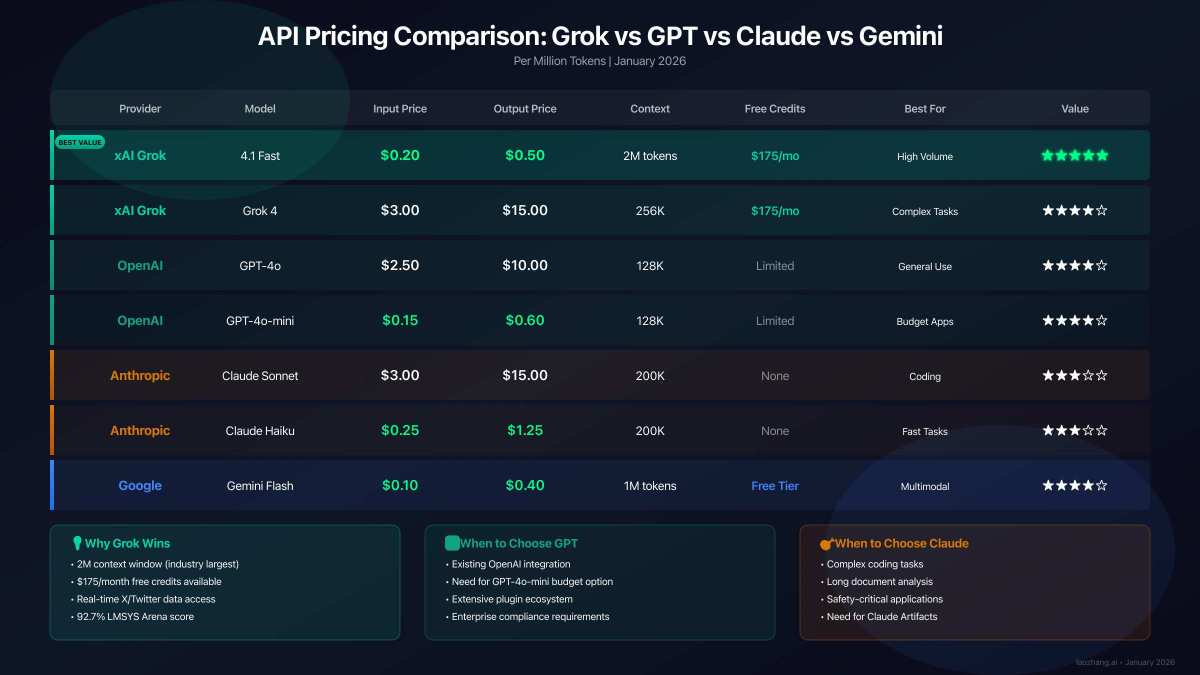
Both providers use per-token pricing for API access, but the tiers and free options differ enough to matter.
Claude pricing (as of 2026):
- Haiku: cheapest tier, best for high-volume simple tasks
- Sonnet: mid-range, balances cost and capability
- Opus: premium tier, highest reasoning quality
- Input and output tokens are priced separately, with output costing more
Gemini pricing (as of 2026):
- Flash: fastest and cheapest, good for straightforward tasks
- Pro: mid-range, handles most professional workloads
- Ultra: top tier for complex reasoning
- Free tier available through Google AI Studio for testing
For most small to medium workloads, expect to spend roughly comparable amounts on either platform. Gemini's free tier makes it easier to experiment without committing budget. Claude's Haiku tier offers aggressive pricing for high-volume, lower-complexity tasks.
The real cost driver isn't the per-token rate. It's how efficiently each model handles your specific task. A model that gives you the right answer in one prompt saves money over a model that takes three attempts to get there.
Common Mistakes People Make When Choosing
The biggest mistake is picking based on benchmark headlines rather than your actual workload. A model that tops the leaderboard might still be wrong for your specific use case.
Ignoring integration costs. If your team lives in Google Workspace, forcing them to use Claude means context switching, manual data transfers, and lower adoption. The "better" model on paper becomes the worse model in practice.
Overpaying for capability you don't need. Not every task requires the top-tier model. Gemini Flash or Claude Haiku handles plenty of daily tasks at a fraction of the cost. Reserve premium tiers for work that genuinely demands deeper reasoning.
Not testing with your own data. Generic benchmarks don't reflect how a model handles your specific documents, codebases, or content style. Run both models on real samples from your workflow before committing.
Assuming one model does everything well. Some teams get better results using both: Gemini for multimodal tasks and real-time data, Claude for writing and deep analysis. The either/or framing is often a false choice.
Expert Tips for Getting More Out of Either Model
Prompt quality matters more than model choice. A well-structured prompt on the "weaker" model often beats a vague prompt on the "stronger" one.
Be specific about format and audience. Instead of "write a summary," try "write a three-paragraph summary for a non-technical executive audience, focusing on financial impact." Both models respond dramatically better to specific instructions.
Use system prompts to set behavior. Claude especially benefits from a system prompt that defines its role, tone, and constraints. Gemini responds well to this too, though it sometimes requires more explicit instruction to maintain consistency across long sessions.
Break complex tasks into steps. Rather than asking for a complete analysis in one prompt, guide the model through stages: first identify key themes, then analyze each theme, then synthesize findings. You'll get better results from either model.
Monitor your token usage. It's easy to burn through budget on verbose outputs. Set explicit length constraints when you don't need lengthy responses. Both models respect instructions like "answer in under 200 words."
Iterate on your prompts. Save prompts that work well and refine them over time. The difference between a mediocre prompt and a great one is often just a few words of clarification.
Final Recommendation: Your Decision Framework
Here's a straightforward way to choose based on your situation.
Pick Claude if:
- Your work is primarily text-based writing, analysis, or coding
- You value nuanced, carefully reasoned outputs
- You need strong safety alignment and fewer hallucinations
- You're working with long documents under 150,000 words
Pick Gemini if:
- You work with images, audio, or video alongside text
- You need real-time information and web access
- Your team operates within Google Workspace
- You're processing extremely large documents or datasets
Use both if:
- Your workflow spans multiple modalities and task types
- You have the budget for multiple API integrations
- You want to A/B test outputs for quality comparison
Neither choice is wrong. The best setup is the one that fits how you actually work, not how a benchmark says you should work.

Similar Posts





















