Claude for Research
Using Claude for research isn't about typing a question and trusting whatever comes back. It's about building a repeatable workflow where Claude handles the heavy lifting of reading, organizing, and synthesizing, while you stay in control of accuracy and judgment. When it's set up right, it can cut the time you spend on first drafts, literature reviews, and data sense-making by a wide margin.
The key is understanding what Claude actually does well, where it needs guardrails, and how to structure your prompts and files so the output is genuinely useful. Claude's 200K token context window means you can feed it dozens of papers or reports in a single session, but that power comes with a catch: the quality of your output depends almost entirely on how you prepare and verify. Let's walk through how to make that work in practice.

Quick Answer
Claude is Anthropic's AI model family, and it works well for research tasks like literature reviews, competitive analysis, and qualitative coding. Its 200K token context window lets you upload many documents at once. You still need to verify every citation and statistic it produces.
Used as part of a structured workflow, it can significantly reduce research time.
What "Claude for Research" Actually Means Right Now
When people talk about using Claude for research, they're usually describing one of three things. First, there's document analysis: uploading PDFs, reports, or datasets and asking Claude to summarize, compare, or extract key findings. Second, there's synthesis work: feeding it multiple sources and asking it to identify themes, contradictions, or gaps across the literature.
Third, there's drafting: using Claude to write up research plans, grant proposals, or report sections based on your source material.
What makes Claude different from a general-purpose chatbot is the context window. At 200K tokens, you can drop in roughly 150 pages of text or a large batch of shorter documents and have the model reason across all of them in one go. That's a meaningful advantage over tools that force you to work in smaller chunks.
But here's what trips people up. Claude doesn't have live access to academic databases like PubMed or JSTOR. It can't pull a paper on demand unless you provide it or it's publicly available through web search.
So the workflow always starts with you gathering the documents, then bringing them into Claude for processing.
The #1 Mistake People Make When Using Claude for Research
The biggest mistake is treating Claude like a search engine and accepting its output without verification. Claude can and does hallucinate citations. It will generate a plausible-sounding reference with an author name, journal, and year that doesn't actually exist.
Aggregate user reports and Anthropic's own documentation confirm this is a known limitation, not a rare edge case.
This doesn't mean Claude is unreliable. It means you need a verification step built into your workflow, just like you'd fact-check a research assistant's work. Every citation, every statistic, every specific claim needs to be traced back to your source documents before you use it in anything formal.
The second most common mistake is uploading documents without giving Claude any structure. If you drop in 30 papers and say "summarize these," you'll get a generic summary that misses what you actually care about. The fix is simple: tell Claude exactly what you're looking for before it starts reading.
How Claude Fits Into a Real Research Workflow (Not Just a Prompt)
A solid research workflow with Claude has four phases: preparation, input, processing, and verification. Each one matters, and skipping any of them leads to weaker results.
Preparation is where you gather your documents and define your research question. Clean PDFs work best. If your files are scanned images or have heavy formatting, Claude may struggle to parse them.
Decide what you want before you start: a thematic summary, a comparison table, a gap analysis, or something else.
Input is how you load documents and frame your prompts. Upload files in logical batches rather than all at once if you're working with a large corpus. Start with a clear instruction that sets the role, the task, and the output format.
Processing is where Claude does the work. This might be a single prompt or a chain of prompts that build on each other. For example, you might first ask for individual summaries, then ask for a cross-document comparison, then ask for a synthesized narrative.
Verification is where you check everything. Go back to your source documents and confirm that claims match. This step is non-negotiable for any research that will be published, submitted, or shared with decision-makers.
What Claude Does Well in Research (And Where It Falls Short)
Claude has genuine strengths that make it worth using, and real limitations you need to plan around. Here's the honest breakdown.
Where Claude excels:
- Cross-document synthesis. Feed it 10 or 20 papers and it will identify common themes, contradictions, and gaps faster than reading them all yourself.
- Structured output. Ask for a table, a bulleted comparison, or a specific format, and Claude will deliver clean, organized results.
- Explaining complex material. It's good at taking a dense academic paper and summarizing it in plain language, which is useful when you're entering an unfamiliar field.
- Drafting support. Research plans, grant proposals, IRB applications, and report outlines are all areas where Claude can produce a strong first draft based on your inputs.
- Data extraction. Pulling specific figures, methods, or findings from a large set of documents is something Claude handles well, as long as you specify exactly what you need.
Where Claude falls short:
- Citation accuracy. It will fabricate references. Always verify.
- Statistical interpretation. Claude can misread or misinterpret statistical results, especially in complex quantitative studies. Don't rely on it for meta-analysis calculations.
- No live database access. It can't pull papers from subscription journals unless you provide them.
- Qualitative nuance. It can flatten subtle themes into overly neat categories. You'll need to refine its coding outputs.
- Cost at scale. Heavy research use through the API or higher subscription tiers adds up, especially with large document batches.
How to Set Up Claude for Different Types of Research
The setup changes depending on what kind of research you're doing. Here's how to approach the most common scenarios.
Literature Reviews and Academic Synthesis
This is where Claude shines brightest. Start by gathering your papers as clean PDFs. Upload them in batches of 5 to 10 if you have a large corpus, and give Claude a specific framework to work within.
A good prompt structure looks like this: tell Claude its role (e.g., "You are a research assistant conducting a literature review on X"), specify the research question, define the output format (thematic summary, chronological overview, methodological comparison), and ask it to note any gaps or contradictions it finds.

For systematic reviews, Claude can help with screening and organizing, but it should not be the sole tool for inclusion or exclusion decisions. Use it to speed up the initial pass, then apply your own criteria.
Market Research and Competitive Intelligence
Claude works well for synthesizing competitor reports, market analyses, and industry news. Upload your source materials and ask for a structured comparison: pricing, positioning, strengths, weaknesses, and gaps in the market.
The web search tool is useful here for pulling current information, but treat it as a starting point. Verify any figures or claims against primary sources before they go into a report or presentation.
Qualitative Research and Thematic Analysis
If you're working with interview transcripts, open-ended survey responses, or field notes, Claude can help with initial coding and theme identification. Upload your data and ask it to identify recurring patterns, grouping them into themes with supporting quotes.
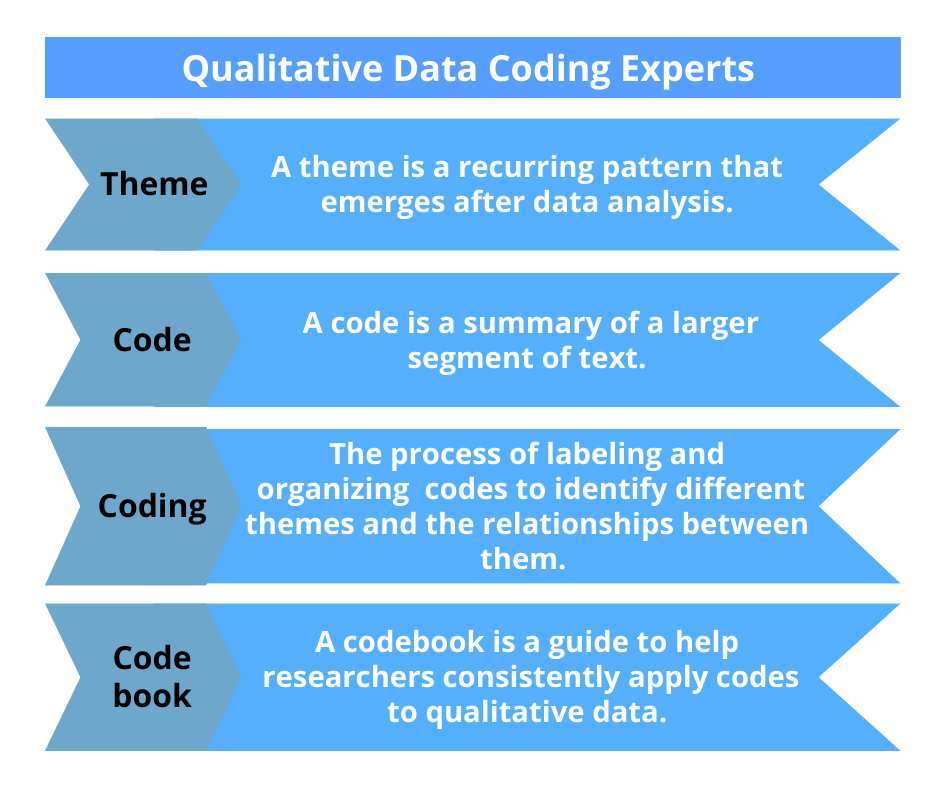
Be aware that Claude tends to create cleaner categories than the data actually supports. Real qualitative research is messy, and themes often overlap. Use Claude's output as a starting framework, then refine it yourself.
Quantitative Data Analysis and Survey Coding
Claude can help with descriptive statistics, survey coding, and data cleaning when you use its code execution tool. Upload a spreadsheet or dataset and ask it to generate summary statistics, cross-tabulations, or visualizations.
For anything beyond basic descriptive work, like regression analysis or hypothesis testing, you're better off using dedicated statistical software. Claude is a helper here, not a replacement for R, SPSS, or Python.
Step-by-Step: Running a Full Research Workflow in Claude
Here's a concrete workflow you can follow for a literature review or synthesis project. It works for academic, market, and policy research alike.
Step 1: Gather and prepare your documents. Collect your PDFs, reports, or transcripts. Make sure they're text-selectable, not scanned images. Rename them consistently so you can reference them easily.
Step 2: Define your research question in one or two sentences. Write it down before you open Claude. A clear question leads to a clear output. "What does the research say about remote work productivity in knowledge industries" is better than "summarize these papers."
Step 3: Upload documents in logical batches. If you have 20 papers, group them by theme or methodology. Upload the first batch and ask Claude to summarize each one in a consistent format: research question, method, key findings, limitations.
Step 4: Chain your prompts. Once you have individual summaries, ask Claude to compare them. Then ask it to synthesize themes. Then ask it to identify gaps.
Each prompt builds on the last.
Step 5: Request structured output. Ask for a table, a thematic map, or a formatted narrative. Structured output is easier to verify and easier to turn into a draft.
Step 6: Verify every claim. Go back to your source documents and check citations, statistics, and specific findings. This is the step that separates reliable research from a polished-sounding draft full of errors.
The Verification Step Most People Skip (Don't Skip This)
Verification isn't optional. It's the part of the workflow that makes everything else trustworthy. Claude will produce output that reads confidently and looks well-sourced, even when it's wrong.
Here's a practical verification checklist:
- Check every citation. Search for the paper or report Claude references. Confirm it exists and says what Claude claims.
- Verify statistics. If Claude reports a percentage, a sample size, or a finding, trace it back to the original source.
- Spot-check paraphrases. Read the original passage and compare it to Claude's summary. Make sure the meaning hasn't shifted.
- Flag anything that seems too neat. If a theme or finding sounds suspiciously clean, double-check it. Real research is usually messier than Claude's output suggests.
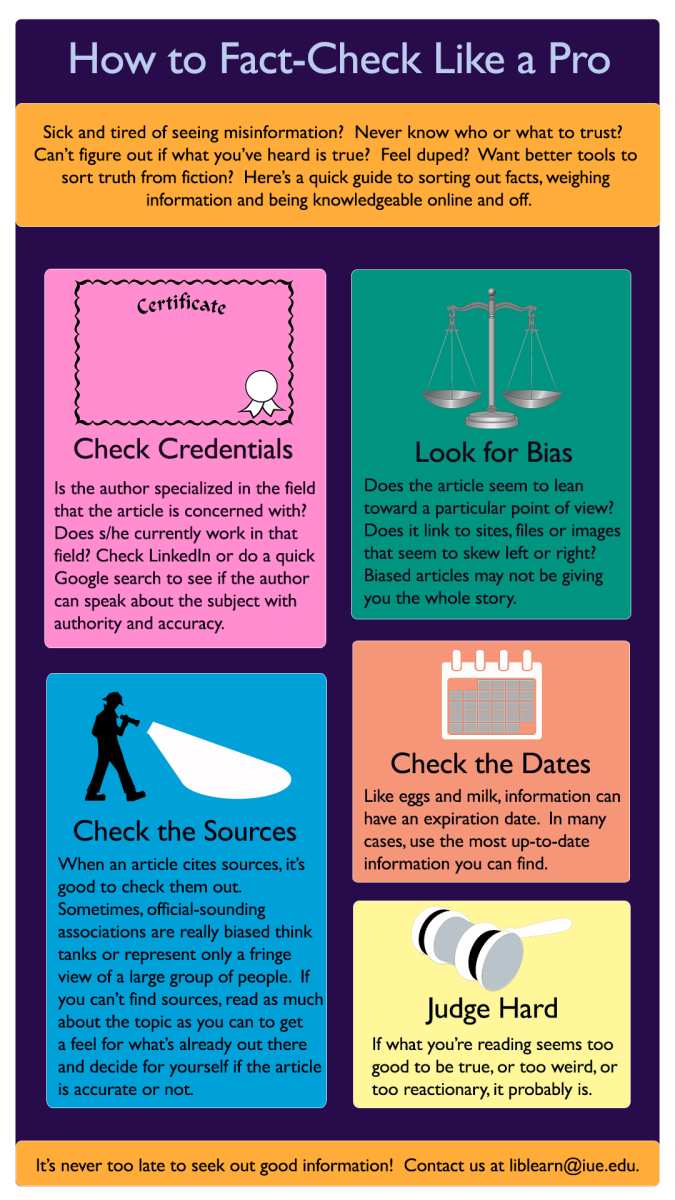
This step takes time, but it's far less time than retracting a paper, correcting a report, or explaining to a client why the data was wrong.
Best Practices That Actually Improve Claude's Research Output
Small changes in how you set up your workflow make a big difference in output quality.
- Give Claude a role. Start your prompt with "You are a research assistant specializing in X." This shapes the tone and depth of the response.
- Specify the output format. Tell Claude whether you want a table, a narrative, a bulleted list, or a specific citation style. Vague instructions produce vague output.
- Break complex tasks into steps. Don't ask Claude to summarize, compare, synthesize, and critique in one prompt. Chain them instead.
- Use Projects for ongoing work. Claude's Projects feature lets you organize documents and conversations around a specific research topic. It keeps everything in one place.
- Iterate on the output. If the first response isn't quite right, refine your prompt and ask again. The second or third iteration is usually much stronger.
- Save your prompts. If a prompt structure works well, save it as a template. You'll use it again.
Real Numbers: What to Expect in Terms of Workload Reduction
Let's talk about what this actually saves you. Based on aggregate user reports and documented use cases across academic and professional settings, here's what the research workflow looks like with and without Claude.
| Task | Without Claude | With Claude | Time Saved |
|---|---|---|---|
| First-draft literature review (20 papers) | 2 to 3 weeks | 3 to 5 days | 50 to 70% |
| Competitive analysis (10 companies) | 1 week | 2 to 3 days | 50 to 60% |
| Thematic coding (50 interview transcripts) | 2 weeks | 4 to 6 days | 60 to 70% |
| Grant proposal first draft | 1 to 2 weeks | 3 to 5 days | 50 to 60% |
These numbers assume you're following the full workflow, including verification. If you skip verification, the time savings are higher, but so is the risk of errors making it into your final output.
The biggest time savings come from the initial synthesis and drafting phases. Claude can read and organize a large body of material in minutes. The verification and refinement phases still take real time, and you shouldn't rush them.
When to Use Claude vs. NotebookLM vs. ChatGPT for Research
Each tool has a different strength. Here's how to think about choosing between them.
Claude is best when you need to work with a large set of documents in one session, want structured output like tables and comparisons, or need help with drafting long-form content. Its 200K context window is the largest of the three, which matters for big research projects.
NotebookLM is best when you want a tool that's specifically designed around document analysis and citation tracking. It generates summaries with inline citations that link back to specific passages in your sources, which makes verification easier. It's a strong choice for academic work where citation accuracy is paramount.
ChatGPT is best when you need access to the broader internet through browsing, want to use custom GPTs for specialized tasks, or are already working within the Microsoft ecosystem with Copilot integration.
| Feature | Claude | NotebookLM | ChatGPT |
|---|---|---|---|
| Context window | 200K tokens | Varies by source | 128K to 200K tokens |
| Citation tracking | Manual verification needed | Inline citations built in | Manual verification needed |
| Web search | Yes (web_search tool) | Limited to uploaded sources | Yes (browsing mode) |
| Structured output | Strong | Moderate | Strong |
| Best for | Synthesis and drafting | Academic document analysis | General research and browsing |
The honest answer is that many researchers use more than one tool. They might use NotebookLM for initial document analysis, Claude for synthesis and drafting, and ChatGPT for quick lookups. The right tool depends on the task, not on brand loyalty.
Common Mistakes That Produce Flawed Research Outputs
Even experienced researchers run into these issues when they start using Claude. Here are the ones that cause the most problems.
Asking for too much in one prompt. If you ask Claude to summarize, compare, synthesize, and critique 30 papers in a single prompt, you'll get a shallow result. Break it into steps.
Ignoring the hallucination problem. Claude doesn't flag uncertainty the way you might expect. It will state a fabricated citation with the same confidence as a real one. Always verify.
Uploading messy documents. Scanned PDFs, image-heavy reports, and poorly formatted files lead to garbled input and unreliable output. Clean files in, clean results out.
Skipping the role and format instructions. A prompt like "analyze these papers" gives you a generic response. A prompt like "You are a policy analyst. Summarize each paper's findings in a table with columns for methodology, sample size, and key conclusion" gives you something you can actually use.
Using Claude for final drafts without human review. Claude is a drafting tool, not a final author. Its output needs your judgment, your voice, and your quality control.
Prompting Templates That Work for Research Tasks
Here are three templates that consistently produce strong results. Adapt them to your specific project.
For literature synthesis:
"You are a research assistant conducting a literature review on [topic]. I will upload [number] papers. For each paper, provide: (1) the research question, (2) methodology, (3) key findings, (4) limitations.
Then provide a thematic synthesis across all papers, noting areas of agreement, disagreement, and gaps."
For competitive analysis:
"You are a market research analyst. I will upload reports on [number] companies. Create a comparison table with columns for: company name, target market, pricing model, key differentiators, and notable weaknesses.
Then write a 300-word summary of the overall competitive landscape."
For qualitative coding:
"You are a qualitative researcher. I will upload interview transcripts. Identify recurring themes across the transcripts.
For each theme, provide: (1) a label, (2) a one-sentence description, (3) two supporting quotes with transcript line numbers. Flag any themes that appear in fewer than 20% of transcripts as minor."
Safety and Sensitive Data Considerations
If you're working with unpublished research, proprietary data, or sensitive personal information, you need to think carefully about what you upload.
Claude's consumer tiers (Free, Pro, Max) may use conversation data for model improvement unless you opt out. That means unpublished findings, confidential business data, or identifiable personal information should not be entered into standard chat sessions.
For sensitive work, use the API with appropriate data handling agreements, or work with Anthropic's enterprise team to set up a compliant environment. If you're in a regulated field like healthcare or education, check whether your organization has specific policies around AI tool use.
When in doubt, anonymize your data before uploading. Remove names, identifiers, and any information that could be traced back to individuals.
Frequently Asked Questions
Can Claude replace a systematic review tool like Covidence?
No. Claude can help with screening and organizing, but it shouldn't be the sole tool for inclusion or exclusion decisions in a systematic review. Use it to speed up the initial pass, then apply your own criteria with dedicated software.
Does Claude have access to academic journals?
Not directly. Claude can't pull papers from subscription databases like JSTOR or PubMed on its own. You need to provide the documents or rely on publicly available sources through web search.
How accurate are Claude's summaries of research papers?
They're generally solid for capturing main findings and arguments, but they can miss nuance and occasionally misrepresent details. Always verify against the original, especially for methodology and results sections.
Is it safe to upload confidential research data?
Not on standard consumer tiers without checking your data handling settings. For confidential or proprietary work, use the API with appropriate agreements or consult your organization's data governance team.
Which Claude model is best for research tasks?
Claude Sonnet 4 offers the best balance of speed and capability for most research workflows. Claude Opus 4 is stronger for complex analysis but costs more. Haiku 4 is fine for simple summarization tasks where speed matters more than depth.

Similar Posts





















