Best Iphone Screen Fix: Top Solutions For A Clear Display
If your iPhone screen is cracked or unresponsive, the **best iPhone screen fix** is usually a professional repair service. Quick repair options can often save your device from further damage and cost less in the long run.
Whether you prefer visiting a store or trying a DIY fix, knowing your options makes the process easier. Choosing the right solution ensures your iPhone looks and functions like new in no time.

The Best iPhone Screen Fix: Your Complete Guide to Restoring Your Device’s Clarity
Getting your iPhone screen fixed can feel overwhelming, especially when you’re unsure about the best options available. Whether your screen is cracked, shattered, unresponsive, or just looks dull, knowing how to fix it properly is essential. This guide will walk you through everything you need to know about the best iPhone screen fix—from DIY repairs to professional services, and tips to keep your screen healthy in the future.
Understanding Why Screens Break or Malfunction
Before diving into repair methods, it’s important to understand why iPhone screens get damaged. Most issues stem from the following causes:
- Accidental drops or impacts that cause cracks or shattering
- Pressure applied to the screen, leading to internal damage
- Exposure to water or moisture, resulting in corrosion or display issues
- Manufacturing defects or hardware failures over time
Knowing the cause helps you choose the right fix method and prevents future problems.
Assessing the Damage: Is a Screen Fix Necessary?
When your iPhone screen gets damaged, check the extent of the problem:
- Minor cracks or scratches: These don’t necessarily affect functionality but might look unsightly.
- Cracks spreading across the display: This can compromise touch sensitivity and display quality, needing replacement.
- Unresponsive touchscreen: The screen doesn’t respond to taps or swipes, often pointing to internal damage or malfunction.
- Black or distorted display: Colors appear wrong or parts of the screen are blank, indicating a deeper hardware issue.
If you notice any of these issues, it’s best to explore repair options swiftly to prevent further damage.
DIY iPhone Screen Fix: Can You Do It Yourself?
Many users prefer fixing their iPhone screens at home to save money and time. However, DIY repairs require patience, proper tools, and careful handling.
Tools You Need for DIY Repairs
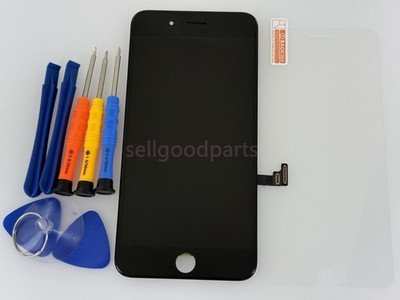
- Small Phillips and Pentalobe screwdrivers
- Plastic prying tools and opening picks
- Suctions cup to lift the screen gently
- Adhesive strips or glue for reassembling
- Replacement screen compatible with your iPhone model
- Anti-static wrist strap to avoid static damage
Steps for Replacing an iPhone Screen on Your Own
- Power off the device and remove the SIM tray.
- Use the pentalobe screwdriver to remove the bottom screws near the charging port.
- Gently apply the suction cup above the home button or near the edge to lift the screen.
- Insert the opening pick around the edge, carefully detaching the screen from the casing.
- Disconnect the flex cables attaching the screen to the motherboard, avoiding tearing these delicate parts.
- Remove the damaged screen and connect the new display, confirming that all connectors fit securely.
- Reassemble your iPhone by reversing these steps, ensuring all screws and cables are secured.
**Note:** DIY fixes can save money but carry risks, such as damaging internal components or voiding the warranty.
When to Seek Professional Screen Fix Services
For most users, especially those unfamiliar with delicate electronics, professional repair services offer a safer and more reliable solution.
Benefits of Choosing Professional Repair Centers
- Expert technicians with experience handling various iPhone models
- Access to high-quality, original replacement parts
- Guaranteed repairs with warranty options
- Safe handling that reduces the risk of further damage
- Speedy service—often same-day repairs
How to Choose the Best Repair Service
- Read customer reviews and feedback
- Check if they use genuine Apple parts
- Inquire about repair warranties or guarantees
- Compare prices across different service providers
- Ensure they have certified technicians
Cost Comparison: DIY vs. Professional Fix
| Repair Method | Average Cost | Pros | Cons |
|—|—|—|—|
| DIY Repair | $20 – $100 (depending on screen quality) | Cheaper, satisfying experience | Risk of further damage, voiding warranty, technical difficulty |
| Professional Repair | $70 – $200, depending on model and damage severity | Reliable, warranty included, quick turnaround | Higher cost, dependent on service availability |
Choosing the right option depends on your comfort level with repairs, budget, and the damage’s complexity.
Finding the Right Replacement Screen
The quality of the replacement screen significantly impacts your device’s display clarity, touch sensitivity, and overall performance.
Genuine vs. Aftermarket Screens
- Genuine Apple parts: Offer the best fit, display quality, and longevity. Usually more expensive.
- Aftermarket parts: Cost less but vary in quality. Some may have lower resolution or less touch accuracy.
Compatibility and Quality Checks
– Ensure the replacement screen matches your iPhone model exactly.
– Look for reviews on the quality and durability of the specific parts.
– Opt for suppliers who guarantee compatibility and offer return policies.
Protecting Your iPhone Screen in the Future
Prevention plays a crucial role in avoiding future screen damages.
Use Screen Protectors
– Tempered glass protectors add an extra layer of defense against scratches and impacts.
– Matte or privacy screen protectors reduce glare and prevent peeping.
Invest in a Durable Case
– Shockproof or bumper cases absorb shock and prevent screen cracks.
– Choose cases with raised edges to shield the screen when placed face down.
Handle Your Device Carefully
– Avoid dropping your phone by holding it firmly.
– Be cautious when putting your phone in pockets or bags with keys or other objects.
Additional Tips for Maintaining Your iPhone Screen
- Clean your screen regularly with a soft, lint-free cloth.
- Avoid using harsh chemicals or abrasive materials that can scratch the surface.
- Keep your device away from extreme temperatures that could cause internal damage.
- Regularly update your iPhone’s software to ensure optimal responsiveness and security.
Summary
Choosing the best iPhone screen fix depends on the severity of damage, your technical skills, and budget. For minor scratches or cracks, a DIY fix can be effective if you have the right tools and patience. However, for more serious damages, working with professional repair services provides peace of mind and guarantees quality. Always opt for genuine replacement parts when possible, and take preventive measures to safeguard your device.
Remember, acting quickly when your screen shows signs of damage prolongs its lifespan and ensures your iPhone continues to serve you well without interruptions. Proper maintenance and careful handling will keep your screen looking fresh and responsive for a long time.
Frequently Asked Questions
What are the key factors to consider when choosing the best iPhone screen repair service?
When selecting a repair service for your iPhone screen, focus on their reputation for quality work, the use of genuine parts, and their adherence to manufacturer standards. Check reviews and customer feedback, ensure they offer a warranty on repairs, and verify their experience with your specific iPhone model. A reputable repair shop provides transparent pricing and quick turnaround times to ensure your device is fixed efficiently and reliably.
How do professional repair shops ensure the quality of an iPhone screen replacement?
Professional repair shops use high-quality, genuine replacement parts that match the original screen specifications. They follow precise repair protocols and utilize specialized tools to prevent further damage during the process. Skilled technicians perform thorough testing after the repair to confirm the screen’s responsiveness, touch accuracy, and display clarity. Many shops also offer warranties to guarantee the durability of their work.
What are the advantages of choosing a certified repair center over DIY repair kits?
Certified repair centers employ trained technicians who handle your iPhone with care, ensuring a proper and safe repair. They use authentic parts and professional tools, which reduces the risk of further damage. In contrast, DIY kits may lead to improper installation, residual issues, or void your warranty. Additionally, certified centers often provide post-repair support and guarantees, giving you peace of mind.
Can a damaged iPhone screen be fixed without replacing the entire display?
Yes, in many cases, a cracked or malfunctioning screen can be repaired by replacing only the damaged components, such as the glass or digitizer, rather than the entire display assembly. This approach can save time and cost. However, if the internal LCD or other components are also compromised, replacing the full display might be necessary to restore full functionality and clarity.
How long does a typical iPhone screen repair process take?
The duration of an iPhone screen repair varies depending on the shop’s workload and the specific model. Most repairs are completed within 30 minutes to a few hours if parts are readily available. Some services offer same-day repairs, while others may require a day or two, especially if they need to order genuine parts or if the device requires additional diagnostics.
Final Thoughts
The best iPhone screen fix options depend on your needs and skill level. DIY kits can be effective for those comfortable with small repairs, but professional services ensure quality and safety.
Choosing the right solution guarantees your device stays in top condition and prolongs its lifespan. For quick, reliable results, professional repair remains the best iPhone screen fix. Prioritize quality to avoid future issues and keep your iPhone looking new.

Similar Posts