Is Ips Monitor Good for Console Gaming
So you're wondering is ips monitor good for console gaming, and honestly, the answer is a solid yes with a few caveats worth knowing upfront. IPS panels deliver excellent color accuracy and wide viewing angles, which makes them a strong match for the visual experience most console games are designed around.
But here's the thing. Not every IPS panel is created equal, and console gaming has different demands than PC gaming. PS5 and Xbox Series X output up to 4K at 120Hz over HDMI 2.1, so you need a monitor that actually supports those specs.
Let's break down exactly where IPS shines and where it falls short for console use.
Image source: Bing (Web (fair-use with source credit))
Quick Answer
Yes, an IPS monitor is good for console gaming. IPS panels offer excellent color accuracy and wide viewing angles. They perform well in bright rooms and handle cinematic games beautifully.
However, they have lower contrast than VA panels. IPS glow can be noticeable in dark scenes. For most console gamers, IPS remains a strong choice.
Why This Comparison Matters for Console Gamers
Console gaming is different from PC gaming in ways that actually change which panel type makes sense. Most console titles are optimized for 30 or 60 frames per second, so chasing a 240Hz refresh rate is pointless. You're paying for spec headroom you'll never use.
What matters more is how the panel handles the console's output. PS5 and Xbox Series X support 4K resolution, HDR, and Variable Refresh Rate over HDMI 2.1. If your IPS monitor lacks HDMI 2.1, you're leaving performance on the table.
You'd be capped at 4K/60Hz or dropping down to 1440p/120Hz with chroma subsampling.
The panel type also affects how games actually look. Console games are built with living room TVs in mind, which means rich colors, cinematic lighting, and dark atmospheric scenes. An IPS panel handles the color part beautifully.
But those dark scenes? That's where things get complicated.
IPS Panel Strengths That Matter for Console Gaming
IPS technology has several genuine advantages for console use. These aren't marketing bullet points. They're real, measurable differences that affect your experience every time you sit down to play.
Color accuracy and consistency. IPS panels typically cover 95-100% of sRGB and many hit 95% or higher DCI-P3. That means games look the way developers intended. Colors stay consistent across the entire screen, even at the edges.
Wide viewing angles. This is huge if you're not sitting dead center. IPS maintains color and contrast at angles up to 178 degrees. Great for couch co-op or if your desk setup puts you slightly off-axis.
Bright room performance. IPS panels don't wash out the way some VA or TN panels do when ambient light hits the screen. If your gaming space has windows or bright lighting, IPS handles it better than most alternatives.
Strong match for cinematic games. Story-driven titles, open-world adventures, and anything with rich art direction benefit from IPS color performance. Think God of War, Horizon Forbidden West, or Elden Ring. Those games look stunning on a good IPS display.
Where IPS Falls Short on Console
Here's where we need to be honest. IPS panels have real weaknesses that matter for console gaming, and ignoring them is how people end up disappointed with their purchase.
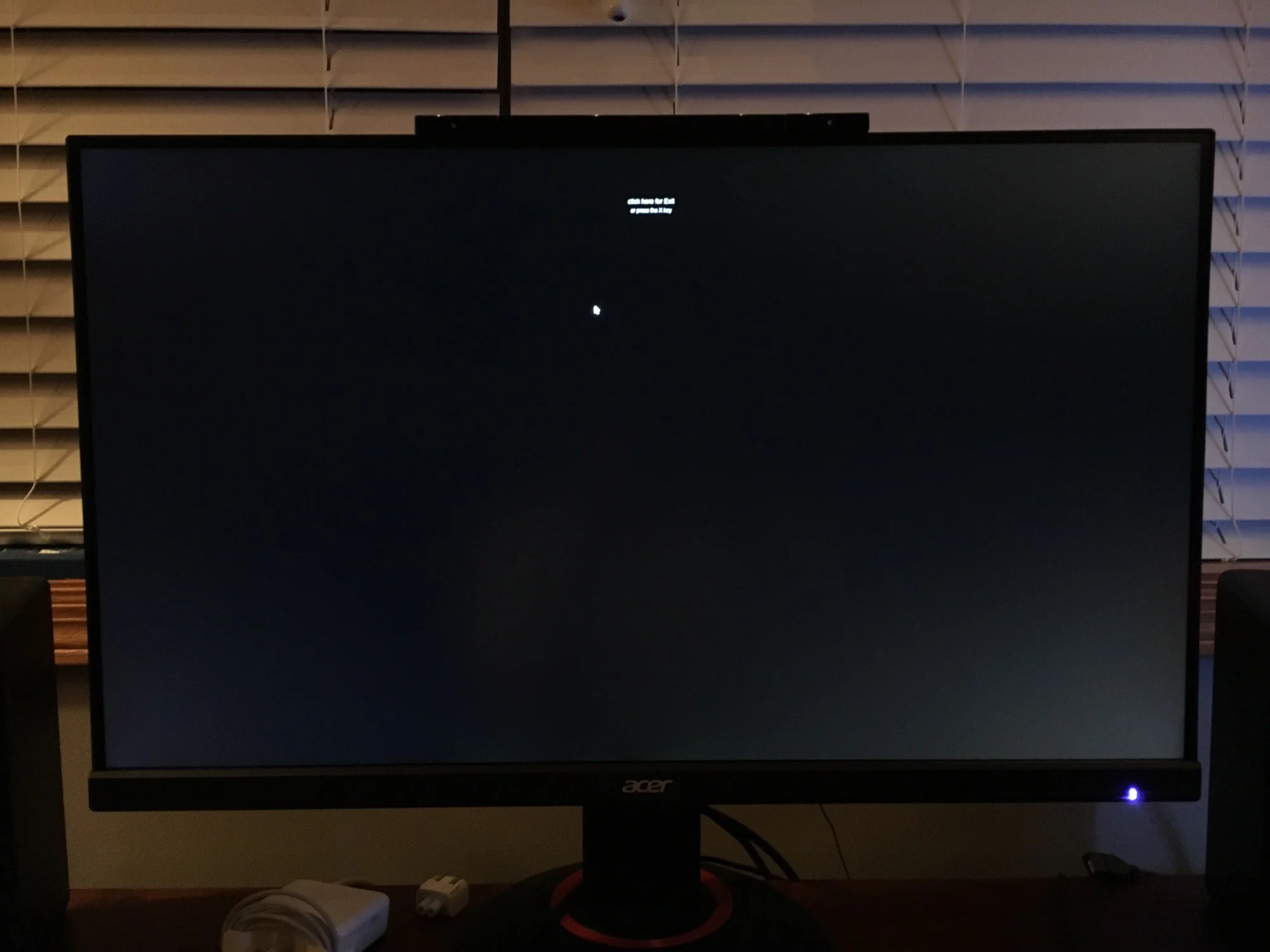
IPS glow. This is the big one. IPS panels exhibit a glow or light bleed around the corners and edges, especially visible on dark screens. In a dark room playing a horror game or exploring dimly lit areas, it's noticeable.
It's not a defect. It's inherent to how IPS technology works.
Image source: Bing (Web (fair-use with source credit))
Lower native contrast. Most IPS panels sit around 1000:1 to 1300:1 contrast ratio. VA panels hit 3000:1 or higher. That means blacks look more gray on IPS, and dark scenes lack the depth you'd get on VA or OLED.
Response time variability. Manufacturer specs claim 1ms MPRT on some IPS models, but real-world gray-to-gray performance often lands between 4-8ms. That's fine for most console gaming, but fast-paced shooters can show visible smearing. Not all IPS panels are equal here.
Budget models tend to be slower.
HDR limitations. True HDR needs deep blacks and high peak brightness. IPS struggles with the black part. DisplayHDR 400 IPS monitors exist, but the HDR experience is underwhelming compared to VA with local dimming or OLED.
IPS vs VA vs TN vs OLED: Side-by-Side Comparison
Let's put the main panel types head to head so you can see exactly how IPS stacks up for console gaming.
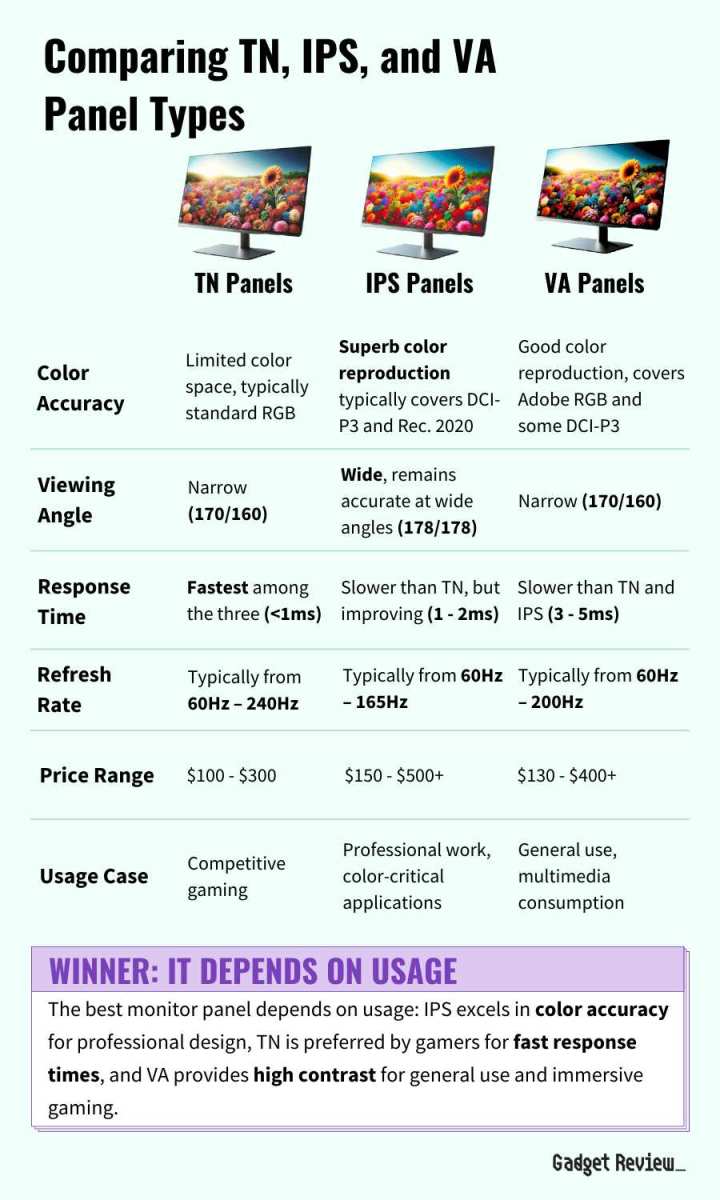
Image source: Bing (Web (fair-use with source credit))
| Panel Type | Colors & Viewing Angles | Response Time | Contrast & Blacks | Best For | Price Range |
|---|---|---|---|---|---|
| IPS | Excellent | Good-Variable (1-5ms) | Mediocre, IPS glow issues | Bright rooms, cinematic games | $$-$$$ |
| VA | Good | Slower (4-8ms) | Excellent deep blacks | Dark rooms, HDR content | $-$$ |
| TN | Poor | Fastest (1ms) | Weak | Competitive shooters | $ |
| OLED | Best overall | Near-instant | Perfect blacks | Everything, if budget allows | $$$$-$$$$ |
IPS hits the sweet spot for most console gamers who want great color without breaking the bank. It's the safe, versatile choice.
VA wins for dark room gaming and HDR content. The contrast advantage is real. Response times have improved on newer VA panels, though some smearing remains.
TN is basically dead for console gaming in 2026. The fast response time doesn't justify the terrible colors and viewing angles when console games prioritize visuals over competitive frame rates.
OLED is the gold standard if budget allows. Perfect blacks, instant response, incredible color. The catch is price and potential burn-in risk with static HUD elements over long periods.
What Console Specs Actually Change the Game
Your console's capabilities should drive your monitor choice more than panel type. Here's what PS5 and Xbox Series X actually support as of 2026.
Maximum output. Both consoles support 4K at 120Hz and 1440p at 120Hz over HDMI 2.1. Some titles also support 1080p at 120Hz. Without HDMI 2.1 on your monitor, you're limited to 4K/60Hz or 1440p/60Hz.
VRR support. Variable Refresh Rate is supported by both PS5 and Xbox Series X. This eliminates screen tearing without the input lag penalty of traditional VSync. Make sure your IPS monitor supports FreeSync or is G-Sync Compatible.
HDR. Both consoles support HDR10. The monitor needs to actually display HDR well though. A DisplayHDR 400 IPS monitor technically supports HDR, but the experience is mediocre.
DisplayHDR 600 or higher is where HDR starts looking meaningful.
Refresh rate reality check. Most console games run at 30 or 60fps. A 120Hz monitor helps with VRR smoothness and reduced input lag, but a 144Hz or 240Hz monitor offers zero additional benefit over 120Hz for console use. Don't pay extra for refresh rate headroom you won't use.
The HDMI 2.1 requirement. This is non-negotiable for full console performance. Your IPS monitor needs at least one HDMI 2.1 port with 40Gbps bandwidth. Some monitors advertise HDMI 2.1 but only support 24Gbps.
Check the actual specs before buying.
Best IPS Monitors for Console Gaming by Use Case
Not every console gamer needs the same thing. Here's which IPS monitors make the most sense for different priorities.
Best Overall for PS5 and Xbox Series X
Look for a 27-32 inch 4K IPS panel with HDMI 2.1 and 120Hz support. Models like the LG 27GP950-B or Gigabyte M28U hit this sweet spot. You get full 4K/120Hz output with VRR support and solid color performance.
Price range typically sits around $350-500.
Best Budget IPS Option for Console
A 27 inch 1440p IPS at 144Hz or 165Hz gives you excellent value. The Dell S2721DGF and LG 27GL83A-B are frequently recommended. You won't get 4K or HDMI 2.1 at this price point, but 1440p looks very sharp on a 27 inch screen.
Expect to pay $180-280.
Best for Competitive Console Gaming
If you're playing Call of Duty, Apex Legends, or Fortnite on console, response time matters more. A 24-25 inch Fast IPS panel at 1080p or 1440p with 1ms GTG and low input lag is ideal. The BenQ ZOWIE XL2546K is popular for competitive play.
You sacrifice resolution for speed here.
Best for Single-Player Cinematic Games
Go big and go 4K. A 32 inch IPS panel with good HDR (DisplayHDR 600 or higher) and wide color gamut will make story-driven games look incredible. The Philips 328M1R and Acer Predator X32 fit this category.
Color accuracy and resolution take priority over response time. Budget around $500-800.
Common Mistakes People Make When Buying an IPS for Console
Our research into buyer feedback and reviews shows these repeat across monitor forums and retail sites.
Overpaying for high refresh rates the console can't use. A 240Hz IPS monitor gives you zero advantage over a 120Hz model on PS5 or Xbox Series X. The console caps at 120fps in games that even support it. You're literally burning money on unused refresh rate headroom.
Ignoring IPS glow entirely until it's too late. If you game in a dark or dimly lit room, IPS glow will bother you. Corner glow on dark loading screens, cutscenes, and horror games is consistently the number one complaint about IPS panels in user reviews. Know this going in.
Skipping HDMI 2.1 and missing out on 4K/120Hz. Some IPS monitors advertise 4K and 144Hz but only over DisplayPort. Console GPUs output over HDMI exclusively. If the monitor lacks HDMI 2.1, you're stuck at 4K/60Hz or dropping resolution to get 120Hz with chroma subsampling.
Assuming all IPS panels perform the same. Panel quality varies massively between budget and premium IPS monitors. A $150 IPS and a $600 IPS both use IPS technology, but response times, color accuracy, and build quality differ significantly. Read actual response time measurements, not just the marketing spec sheet.
Not checking console-specific firmware compatibility. Some monitors require firmware updates to properly support VRR or 4K/120Hz on PS5 or Xbox Series X. Check the manufacturer's support page and user forums before buying. A monitor that works perfectly with a PC might need a firmware patch for console compatibility.
Is IPS Right for Your Setup? A Decision Guide
Let's cut through the noise and figure out which panel type fits your actual situation.
Choose IPS if:
- You game in a brightly lit room or with a window behind you
- You prioritize color accuracy and image quality
- You play mostly cinematic, story-driven, or open-world games
- You want good viewing angles for off-axis seating
- You're balancing gaming and creative work like photo editing
Choose VA instead if:
- You game in a dark room and want deeper blacks
- HDR performance matters more than color accuracy
- You don't mind slightly slower response times
- Contrast ratio is a priority for atmospheric games
Choose OLED instead if:
- Budget isn't a major concern
- You want the absolute best image quality available
- You play a mix of bright and dark content
- You're willing to manage potential burn-in risk over time
Choose TN only if:
- You're on an extremely tight budget
- You only play competitive shooters
- Color quality and viewing angles don't matter to you
- You need the absolute fastest response time possible
Setting Up Your IPS Monitor for Best Console Performance
Buying a good IPS monitor is only half the battle. You need to configure it correctly to actually get what you paid for.
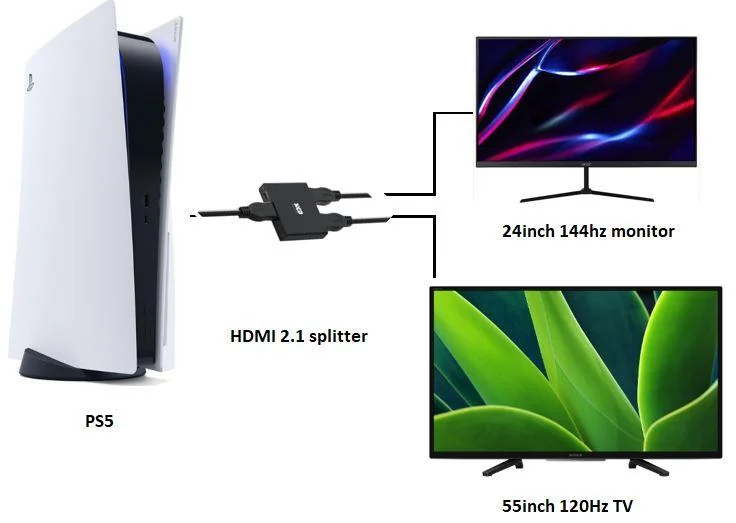
Image source: Bing (Web (fair-use with source credit))
Step 1: Use the Right HDMI Cable and Port
Use the HDMI cable that came with your console or a certified Ultra High Speed HDMI cable. Plug it into the HDMI 2.1 port on the monitor, not just any HDMI port. Many monitors have multiple ports with different capabilities.
Step 2: Enable 120Hz Output on Your Console
On PS5, go to Settings > Screen and Video > Video Output > Enable 120Hz Output. On Xbox Series X, go to Settings > General > TV & Display Options > Refresh Rate > 120Hz. Without this setting enabled, your console won't output above 60Hz even if the monitor supports it.
Step 3: Turn On VRR
Enable Variable Refresh Rate in your console settings. On PS5, it's under Settings > Screen and Video > Video Output > VRR. On Xbox, it's under Advanced Settings > Variable Refresh Rate.
Make sure your monitor's FreeSync or Adaptive Sync is also turned on in its OSD menu.
Step 4: Calibrate HDR Through the Console
Both PS5 and Xbox have built-in HDR calibration tools in their display settings. Run through the calibration prompts. This adjusts the HDR signal specifically for your monitor's capabilities.
It makes a noticeable difference.
Step 5: Enable Game Mode
Most IPS monitors have a "Game Mode" or "Response Time" setting in their on-screen display. This bypasses unnecessary image processing to reduce input lag. Enable it.
You might also want to disable dynamic contrast and motion smoothing if those options exist.
Step 6: Check for Firmware Updates
Visit the manufacturer's support page and check for firmware updates. Monitor manufacturers frequently release updates that improve console compatibility, fix VRR issues, or improve HDMI 2.1 performance. A quick update can solve problems you didn't even know you had.
Final Verdict: Who Should Get an IPS Monitor for Console
IPS is the right choice for most console gamers. It delivers strong color, wide viewing angles, and solid all-around performance at reasonable prices. If you game in a bright room or play cinematic titles, IPS is a great fit.
But it's not perfect for everyone. Dark room gamers should seriously consider VA or OLED instead. The contrast and IPS glow issues are real and noticeable.
If deep blacks and HDR matter more to you than color accuracy, look elsewhere.
For everyone else, a good IPS monitor with HDMI 2.1, 4K resolution, and 120Hz support will serve you well. Just make sure you configure it properly and don't pay for refresh rate headroom you'll never use.
Frequently Asked Questions
Is IPS or VA better for console gaming?
IPS is better for bright rooms and color accuracy. VA is better for dark rooms and contrast. For most console gamers in typical room lighting, IPS is the more versatile choice.
VA wins if you primarily game in the dark.
Does IPS response time matter on console?
It matters less than on PC. Most console games run at 30 or 60fps, so even a 5ms IPS panel handles that without noticeable issues. Fast-paced competitive shooters benefit from faster response times, but the difference between 1ms and 5ms is subtle on console.
Can I use a 144Hz IPS monitor for PS5?
Yes, but you won't see above 120fps on PS5. A 144Hz monitor will work fine, but you're paying for 24Hz of unused headroom. A 120Hz monitor gives you everything the console can output at a potentially lower price.
Is IPS glow a dealbreaker?
It depends on your room lighting and what you play. In a bright room, IPS glow is barely noticeable. In a dark room playing horror games or watching movies, it can be distracting.
If you game in the dark regularly, consider VA or OLED instead.
Do I need HDMI 2.1 on my IPS monitor for console?
Yes, if you want 4K at 120Hz. Without HDMI 2.1, you're limited to 4K/60Hz or 1440p/60Hz. HDMI 2.1 is essential for getting the full performance out of PS5 and Xbox Series X.
Is a 4K IPS monitor worth it for console gaming?
Absolutely. 4K looks noticeably sharper than 1440p or 1080p on screen sizes 27 inches and above. Both PS5 and Xbox Series X are designed for 4K output. It's the resolution these consoles were built around.

Similar Posts





















