Is Ips Monitor Good for Gaming
Is IPS monitor good for gaming? Yes, for most gamers in 2026, an IPS panel is the best all-around choice you can make. The color accuracy, wide viewing angles, and modern response times make them excellent for everything from story-driven AAA titles to competitive shooters.
That said, "good" depends on what you're comparing it to and what kind of gamer you are. Let's break down exactly where IPS panels stand, where they fall short, and whether one deserves a spot on your desk.
Quick Answer
Yes, IPS monitors are good for gaming. Modern IPS panels deliver fast response times and high refresh rates. They offer better colors and viewing angles than TN panels.
Competitive players should consider OLED as an alternative. For most gamers, IPS hits the sweet spot.
How IPS Panels Actually Work (And Why It Matters for Gaming)
IPS stands for In-Plane Switching. It's a type of LCD panel technology where the liquid crystals align parallel to the glass substrate. When voltage is applied, they rotate in-plane to control how much light passes through.
Why does this matter? Because that arrangement is what gives IPS panels their signature strength: color consistency. Unlike TN panels that shift colors when you tilt your head, an IPS display looks the same from almost any angle.
We're talking 178-degree horizontal and vertical viewing angles, which is the standard spec across the board.
The trade-off historically was speed. Early IPS panels had slow pixel transitions, which meant motion blur and ghosting in fast-paced games. That's changed dramatically.
Manufacturer specifications for current Fast-IPS and Nano-IPS panels now list 1ms gray-to-gray response times, putting them on par with TN panels in raw speed.
Here's the thing most people miss. Response time numbers on the box don't tell the whole story. A "1ms" rating is usually the best-case scenario under aggressive overdrive settings.
Real-world performance often sits between 3ms and 5ms, which is still perfectly fine for gaming at 144Hz or 240Hz.
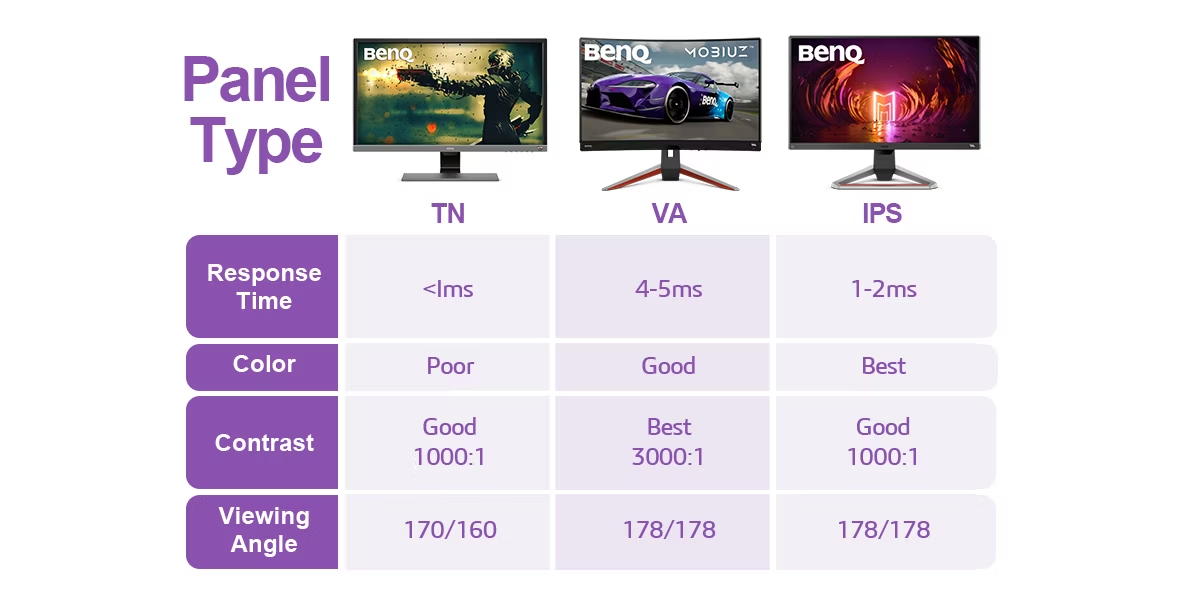
IPS vs TN vs VA vs OLED: The Real Comparison
This is where most buying decisions happen. Each panel type has distinct strengths, and the right choice depends entirely on your priorities.
| Feature | IPS | TN | VA | OLED |
|---|---|---|---|---|
| Color Accuracy | Excellent | Poor to decent | Good | Outstanding |
| Viewing Angles | 178°/178° | Poor (color shift) | Moderate | Outstanding |
| Response Time | 1-4ms (Fast-IPS) | 1-2ms | 4-8ms | 0.1ms |
| Contrast Ratio | ~1000:1 | ~1000:1 | ~3000:1 | ~1,000,000:1 |
| Peak Brightness | 300-600 nits | 250-400 nits | 300-600 nits | 600-1000+ nits |
| Price Range | $150-$800+ | $100-$300 | $150-$600 | $500-$2000+ |
| Burn-in Risk | None | None | None | Low to moderate |
| Best For | All-around gaming | Esports/competitive | Media/dark rooms | Premium everything |
TN (Twisted Nematic) used to be the only option for competitive gaming. It's cheap and fast. But the washed-out colors and terrible viewing angles make it hard to recommend in 2026 unless you're on a strict budget and only play esports titles.
VA (Vertical Alignment) panels offer the best contrast ratios among LCD options. Blacks look actually black, not gray. The downside is slower pixel response in dark transitions, which causes dark smearing in games.
Great for horror games and movie watching. Not ideal for fast competitive play.
OLED is the new gold standard. Perfect blacks, near-instant response times, incredible color. The catch is price and the small risk of burn-in from static HUD elements.
If your budget allows it, OLED beats everything. But IPS remains the value king.
Where IPS Panels Shine for Gaming
Let's talk about what makes IPS genuinely great for gaming. These aren't marketing claims. They're measurable, observable advantages.
- Color reproduction. Most IPS panels cover 95-100% of sRGB and 85-98% of DCI-P3 out of the box. Games look vibrant and accurate without calibration. TN panels typically only hit 60-70% of DCI-P3.
- Viewing angle stability. If you game with friends watching, or if you sit close to a large monitor, colors stay consistent from edge to edge. No more washed-out look when you shift in your chair.
- Versatility. An IPS gaming monitor doubles as a decent photo editing or content creation display. You don't need two monitors unless you're a professional.
- No burn-in. LCD panels don't suffer from image retention. Leave a static HUD on screen for hours and you won't have a ghost image the next day.
- Mature manufacturing. IPS has been around since the 1990s. The technology is refined, reliable, and available at every price point from budget to premium.
For single-player games, RPGs, open-world adventures, and anything where visual fidelity matters, IPS is arguably the best LCD choice you can make. The colors pop, the image is clean, and you're not fighting your display.
Where IPS Panels Fall Short
IPS isn't perfect. There are real compromises you should know about before spending your money.
IPS glow. This is the most common complaint. In dark scenes, you'll notice a silvery or golden glow in the corners of the screen, especially visible in a dark room. It's a characteristic of how IPS panels handle backlight.
Some units have it worse than others. This is partly the "panel lottery" problem.
Lower contrast ratio. A typical IPS panel has a contrast ratio around 1000:1. VA panels hit 3000:1 or higher. That means blacks on an IPS look more like dark gray, especially in a dim room.
If you play a lot of horror games or atmospheric titles in the dark, this is noticeable.
Not the fastest for esports. While Fast-IPS panels have closed the gap, TN and OLED still edge ahead in pure pixel response. If you're playing Valorant or CS2 at the highest competitive level and every millisecond counts, you might want to look elsewhere.
Power consumption. IPS panels generally draw more power than equivalent TN displays. Not a dealbreaker, but worth noting for laptop users or anyone running multiple monitors.
Price premium. You'll pay 10-30% more for an IPS gaming monitor compared to a TN with similar specs. The gap has narrowed over the years, but it's still there.
Best IPS Gaming Monitor Specs by Use Case
Not every gamer needs the same display. Here's what to look for based on how you actually play.
1080p 144Hz IPS is the sweet spot for budget and mid-range gaming. You get smooth motion without taxing your GPU. This setup works great with an RTX 4060 or RX 7600.
Expect to pay $150-$250.
1440p 165Hz IPS is arguably the best value in gaming right now. The resolution bump from 1080p is noticeable on 27-inch panels. Modern Fast-IPS panels at this tier hit 1ms GtG.
Budget $250-$450.
4K 144Hz IPS is for enthusiasts with high-end GPUs. You'll want an RTX 4080 or better to push frames. These panels deliver stunning clarity in single-player games.
Prices run $500-$900+.
1080p 240Hz+ IPS targets competitive players. The higher refresh rate reduces input lag and motion blur. Response times matter more than resolution here.
Budget $200-$400.
Competitive Gaming: Is IPS Fast Enough?
Yes, IPS is fast enough for competitive gaming in 2026. The gap between IPS and TN has essentially closed at the mainstream level.
Modern Fast-IPS panels achieve 1ms GtG response times. Aggregate testing data shows input lag measurements under 4ms at 240Hz. That's within the margin of TN panels that were the competitive standard just a few years ago.
Here's the nuance. If you're playing ranked Valorant, CS2, or Apex at the highest tiers, every fraction of a millisecond matters. In that scenario, a 360Hz TN or a OLED display might give you a measurable edge.
But for the vast majority of competitive gamers, a 144Hz or 240Hz IPS panel is more than fast enough.
The bigger factor is your system's frame rate. A monitor can only display what your GPU outputs. If you're getting 180fps in CS2 on a 144Hz monitor, you're still dealing with screen tearing or VSync input lag.
Match your monitor refresh rate to what your system can consistently deliver.
Single-Player and Casual Gaming: Where IPS Wins
If you play story-driven games, RPGs, open-world titles, or anything where atmosphere matters, IPS is the clear winner among LCD options.
Games like Cyberpunk 2077, Elden Ring, and Baldur's Gate 3 are built around visual immersion. The wide color gamut and consistent viewing angles of an IPS panel make these experiences look as the developers intended. You're seeing accurate lighting, rich environments, and proper shadow detail.
Contrast is the one weakness here. Dark dungeons and night scenes won't look as deep as they would on a VA or OLED panel. But the trade-off in color accuracy and viewing angle stability is worth it for most people.
If you game in a well-lit room, IPS is a no-brainer. The colors pop, the image is sharp from any angle, and you don't have to worry about burn-in from static HUD elements during marathon sessions.
Console Gaming (PS5/Xbox): Is IPS the Right Choice?
For console gamers, IPS is an excellent choice. Both the PS5 and Xbox Series X support 4K output at up to 120Hz, and many IPS monitors handle these specs natively.
The PS5 in particular benefits from IPS color accuracy. Sony's first-party titles are color-graded for wide gamuts, and an IPS panel reproduces that faithfully. You'll notice the difference in games like Horizon Forbidden West or Spider-Man 2.
One thing to check is HDMI 2.1 support. Not all IPS monitors have it, and you need HDMI 2.1 for 4K 120Hz on consoles without compression. Look for monitors that explicitly list HDMI 2.1 if you want the full console experience.
HDR is trickier. Many IPS monitors carry DisplayHDR 400 certification, which is barely HDR at all. For meaningful HDR on console, you want DisplayHDR 600 or higher, or you're better off with a Mini-LED or OLED display.
Common Mistakes People Make When Buying an IPS Gaming Monitor
Chasing the "1ms" claim. Manufacturer response time specs are measured under ideal conditions with maximum overdrive. Real-world performance varies. Read independent reviews that measure actual GtG transitions before buying.
Ignoring the panel lottery. Two identical monitor models can have different levels of IPS glow and backlight bleed. Some units are better than others. Check return policies before buying, and be prepared to exchange if you get a bad panel.
Buying HDR400 and calling it HDR. DisplayHDR 400 offers minimal brightness and no local dimming. It's barely an upgrade over SDR. If HDR matters to you, aim for DisplayHDR 600 at minimum, or save up for OLED.
Overlooking adaptive sync compatibility. Make sure your monitor supports FreeSync if you have an AMD GPU or G-Sync Compatible if you have NVIDIA. Some budget IPS monitors lack adaptive sync entirely, which means screen tearing.
Choosing size over resolution. A 32-inch 1080p IPS panel looks pixelic. At that size, you want 1440p or 4K for a sharp image. Stick to 24-27 inches for 1080p, 27 inches for 1440p, and 32 inches or larger only for 4K.
Expert Tips to Get the Most Out of an IPS Gaming Monitor
Once you've got your IPS gaming monitor set up, a few tweaks can make a noticeable difference in your experience.
Enable adaptive sync. Turn on FreeSync or G-Sync Compatible in your monitor's OSD, then activate it in your GPU's control panel. This eliminates screen tearing without the input lag penalty of traditional VSync.
Calibrate your overdrive setting. Most monitors offer overdrive levels (Off, Low, Medium, High, Extreme). Medium or High is usually the sweet spot. Extreme often causes inverse ghosting, where bright trails appear behind moving objects.
Start at Medium and test with a motion blur test pattern.
Set your refresh rate correctly. Windows doesn't always default to the maximum refresh rate. Right-click your desktop, go to Display Settings, then Advanced Display, and confirm you're running at the monitor's rated Hz. You'd be surprised how many people game at 60Hz on a 144Hz panel without realizing it.
Adjust brightness for your room. IPS panels are bright, often 350-400 nits. In a dark room, that's blinding. Drop brightness to 30-50% for comfortable gaming.
In a bright room, you may need 70-100% to maintain contrast.
Use the sRGB mode for accurate colors. Many gaming monitors ship with oversaturated "vivid" or "gaming" presets. Switch to sRGB mode for accurate colors in most games. Some monitors have a dedicated sRGB clamp in the OSD.
IPS Glow, Backlight Bleed, and Panel Lottery: What to Know
IPS glow is a silvery or golden shimmer visible in the corners of the screen during dark scenes. It's caused by light from the backlight escaping around the edges of the panel. Every IPS monitor has it to some degree.
The question is how much.
Backlight bleed is different. It's uneven patches of light, usually along the edges, caused by pressure on the panel during manufacturing. Some bleed is normal.
Excessive bleed, where light splashes across a large portion of the screen, is a defect worth exchanging.
The "panel lottery" refers to the reality that two identical monitor models can have different levels of glow and bleed. Manufacturing tolerances vary. One unit might have minimal glow while another from the same batch has noticeable bleed in every dark scene.
Here's what you can do. Check return policies before buying. Amazon, Best Buy, and most major retailers accept returns within 30 days.
Test your monitor with dark scenes in the first week. If the glow or bleed is distracting, exchange it. Most people get an acceptable unit on the first try, but it helps to be prepared.

Final Verdict: Who Should Buy an IPS Gaming Monitor
For most gamers in 2026, an IPS monitor is the best overall choice. It balances color accuracy, response time, viewing angles, and price better than any other LCD technology.
Buy IPS if you: play a mix of game types, value visual quality, game in a well-lit room, want one monitor for gaming and productivity, or don't want to worry about burn-in.
Consider OLED if you: have a higher budget ($500+), want the best possible image quality, play in a dark room, and are comfortable with the small long-term risk of burn-in.
Consider VA if you: primarily play atmospheric or horror games, game in a dark room, and prioritize contrast over speed.
Consider TN only if: you're on a very tight budget or exclusively play competitive esports at the highest level.
The IPS vs TN debate is essentially over. Modern IPS panels are fast enough for competitive play and look significantly better. Unless you have a specific reason to choose otherwise, an IPS gaming monitor is the safe, smart pick.
Frequently Asked Questions
Is IPS good for competitive gaming?
Yes. Modern Fast-IPS panels with 1ms response times and 240Hz refresh rates are fast enough for competitive play. Only elite-level players might notice a difference compared to TN or OLED.
Is IPS better than VA for gaming?
For speed, yes. IPS has faster pixel response and less dark smearing. VA wins on contrast and deeper blacks.
Choose IPS for fast-paced games. Choose VA for atmospheric titles in dark rooms.
Does IPS glow affect gaming?
In dark scenes, yes, you'll notice it. In bright or normal gaming content, it's usually invisible. IPS glow is a characteristic of the technology, not a defect, though excessive glow on a specific unit may warrant an exchange.
How long do IPS gaming monitors last?
IPS panels typically last 30,000 to 60,000 hours before significant brightness degradation. That's roughly 10-20 years of normal gaming use. There's no burn-in risk, making them very durable for long-term use.
Is IPS good for PS5 gaming?
Yes. IPS works great with PS5, especially at 1440p or 4K with HDMI 2.1 support. The color accuracy enhances Sony's visually rich first-party titles.
Just make sure the monitor has HDMI 2.1 for 4K 120Hz output.
Should I choose IPS or OLED for gaming?
If budget allows, OLED is the better performer overall. If you want the best value and zero burn-in risk, IPS is the smarter choice. Both are excellent in 2026.

Similar Posts





















