Do Ips Monitors Have Better Colors
Do IPS monitors have better colors? It's one of the most common questions people ask when shopping for a display, and the answer is more nuanced than the marketing suggests. If you've been browsing monitor specs, you've probably seen IPS recommended as the default choice for "good color." There's solid reasoning behind that reputation, but it's not the whole story.
IPS panels do offer excellent color accuracy and viewing angles that most competing technologies struggle to match. A good IPS monitor covers 99-100% of the sRGB color gamut and maintains color consistency across the entire screen. But panel type alone doesn't guarantee great color performance.
Calibration, bit depth, and backlighting matter just as much, sometimes more.
Quick Answer
IPS monitors generally offer better color accuracy and wider viewing angles than VA or TN panels. They maintain consistent color when viewed from different angles. However, modern VA and OLED panels have narrowed the gap significantly.
Panel type alone does not guarantee great color performance. Calibration and specific specs matter more than the label.
Why IPS Became the "Good Color" Standard
IPS technology earned its reputation for good reason. Before IPS became mainstream, most monitors used TN panels that shifted colors the moment you moved your head even slightly. IPS changed that by aligning liquid crystals horizontally and rotating them in-plane when voltage is applied.
This design keeps color and brightness consistent whether you're looking at the center of the screen or the edges.
The viewing angle advantage is real and measurable. Most IPS panels deliver 178-degree horizontal and vertical viewing angles. That means someone sitting next to you sees roughly the same image as you do head-on.
For collaborative work, this matters a lot.
Color consistency across the display surface is another strength. On a decent IPS panel, the blue in the top-left corner looks the same as the blue in the bottom-right. VA panels, by comparison, often show slight color shifts toward the edges even at normal viewing distances.
Professional monitor lines leaned heavily on IPS for years. Dell UltraSharp, ASUS ProArt, BenQ SW, and Eizo ColorEdge all use IPS or IPS-type panels as their foundation. That industry adoption reinforced the perception that IPS equals good color, and for most of the 2010s, that was largely true.
But here's the thing. The gap has narrowed. Modern VA panels from Samsung and others now hit 95%+ sRGB coverage with Delta E values under 2.
OLED has entered the monitor space with near-perfect color and contrast. IPS still holds advantages, but it's no longer the only option for color-critical work.
How IPS Technology Works (The Simple Version)
Understanding why IPS behaves the way it does helps you evaluate whether it's actually what you need. The "in-plane switching" name comes from how the liquid crystals move. In a TN panel, crystals twist vertically when voltage is applied.
In an IPS panel, they rotate horizontally while staying parallel to the substrate.
This horizontal rotation is the key to everything. Light passes through the crystal layer more uniformly regardless of your viewing angle. That's why you don't see the color shift or brightness drop that plagues TN panels when you're not sitting dead center.
The trade-off is that this arrangement requires more power and can be slower to transition between states. That's where the response time limitations come from. Early IPS panels had 6-8ms gray-to-gray response times, which was noticeable in fast-moving content.
Modern Nano-IPS and Fast IPS panels have brought that down to 1ms on paper, though real-world performance varies.
Backlighting also plays a huge role in how IPS looks. Most current IPS monitors use LED backlighting, but the arrangement matters. Direct-lit arrays with local dimming zones improve contrast significantly.
Edge-lit designs are thinner but often show uneven brightness and IPS glow in dark scenes.
The liquid crystal alignment also affects contrast ratio. IPS panels typically max out around 1000:1 to 1300:1 static contrast. That's adequate for most work but noticeably lower than VA panels, which commonly hit 3000:1 or higher.
In practical terms, blacks on an IPS look slightly grayish in a dark room compared to VA.
IPS vs. VA vs. TN vs. OLED: Color Performance Breakdown
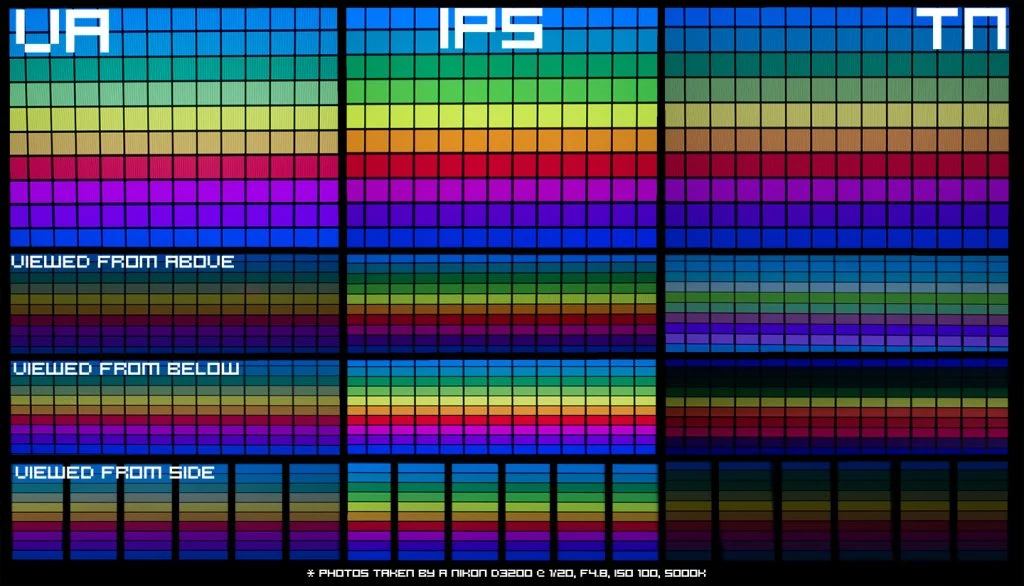
Let's put the main panel types head-to-head so you can see where each one stands. The table below covers the key color-related characteristics you'll actually notice in daily use.
| Panel Type | Color Gamut (Typical) | Color Accuracy (Delta E) | Viewing Angles | Contrast Ratio | Best For |
|---|---|---|---|---|---|
| IPS | 95-100% sRGB, 85-98% DCI-P3 | < 2 (good models) | 178°/178° | 1000:1 | Color-critical work, design |
| VA | 95-100% sRGB, 80-95% DCI-P3 | 2-4 (good models) | 178°/178° (slight shift) | 3000:1+ | Movies, HDR content |
| TN | 90-95% sRGB | 3-6 (rarely calibrated) | 170°/160° (color shift) | 800-1000:1 | Competitive gaming (speed) |
| OLED | 100% sRGB, 98-99% DCI-P3 | < 1 (reference grade) | 178°/178°+ | ~1,000,000:1 | Professional color, HDR |
IPS wins on viewing angles and color consistency across the screen. If multiple people need to see the same display, or if you're doing work where color accuracy from edge to edge matters, IPS is still the safest bet.
VA wins on contrast and HDR impact. Those deep blacks make movies and games look more cinematic. Color accuracy has improved dramatically, though you'll still notice slight shifts if you're viewing from extreme angles.
TN is the budget speed king. Response times are genuinely faster, but color performance lags behind. Unless you're a competitive gamer chasing every millisecond, TN is hard to recommend in 2026.
OLED is the new benchmark for overall image quality. Perfect blacks, instant response times, and wide gamut coverage make it the best option for color-critical work and HDR. The downsides are price, burn-in risk with static elements, and lower peak brightness on some models.
Where IPS Falls Short Despite the Hype
IPS isn't perfect, and the marketing often glosses over its weaknesses. If you only look at spec sheets, you might miss the issues that actually affect your daily experience.
IPS glow is the most common complaint. In dark scenes, you'll see a silvery or golden glow bleeding in from the corners of the screen. It's a byproduct of the in-plane switching design and how light interacts with the liquid crystal layer.
Some panels have it worse than others, and it's visible on virtually every IPS monitor in a dark room. If you watch a lot of movies or play atmospheric games at night, it can be genuinely distracting.
Contrast ratio is the other big limitation. That 1000:1 spec means blacks aren't truly black. They're dark gray.
In a lit room, you won't notice. In a dim room watching a movie with letterbox bars, those bars look washed out instead of black. VA panels handle this much better, and OLED obliterates both.
Response time has improved but still lags behind TN in some cases. Fast IPS and Nano-IPS panels advertise 1ms GtG, but that's often a best-case overdrive setting that introduces inverse ghosting. Real-world average response times on IPS tend to be 3-5ms, which is fine for most gaming but not ideal for competitive esports.
Backlight bleed is a quality control issue rather than a technology limitation, but it's common enough to mention. Uneven brightness around the edges, especially on cheaper IPS panels, can be annoying on solid dark backgrounds. This is part of the "panel lottery" where two identical models can look different.
Power consumption runs higher than equivalent TN or VA panels. The in-plane switching requires more energy to drive. For laptop users considering an external monitor, this can impact battery life if you're running off battery power.
The bottom line is that IPS is a strong all-rounder, not a specialist. If your primary use case demands deep blacks or the fastest possible response, other technologies serve you better.
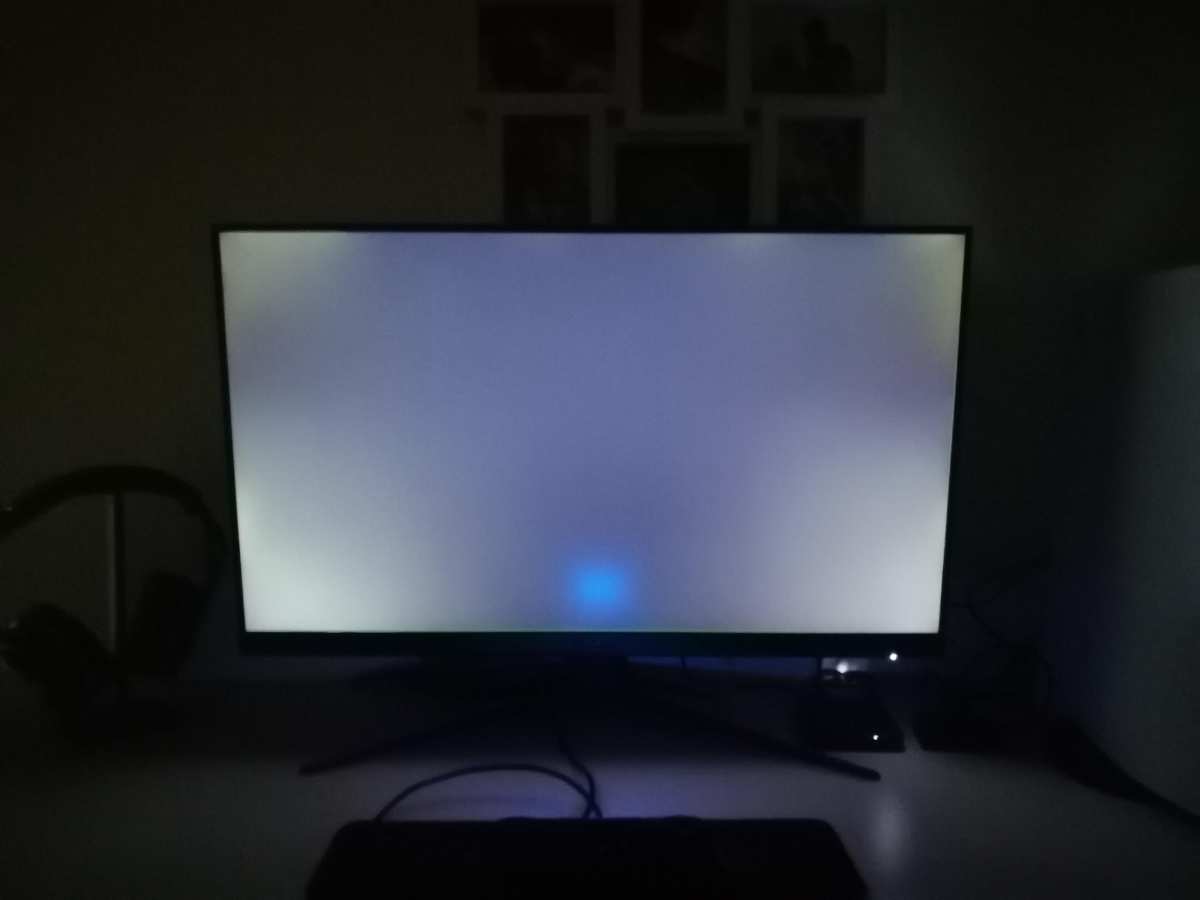
Image source: Bing (Web (fair-use with source credit))
What Actually Matters More Than Panel Type

Here's where a lot of buying advice goes wrong. People fixate on IPS vs. VA vs.
TN when the panel type is just one piece of the color quality puzzle. Several other factors have equal or bigger impact on what you actually see.
Factory calibration separates a good color monitor from a mediocre one. Two IPS panels can use the same base technology but look completely different out of the box. Professional lines like the ASUS ProArt PA279CRV or BenQ SW272U come individually calibrated with Delta E < 2 guaranteed.
Budget IPS monitors might ship with Delta E averaging 4-6, which means visible color errors.
Bit depth determines how smoothly colors transition. A true 10-bit panel can display 1.07 billion colors. An 8-bit panel shows 16.7 million.
Many monitors use 8-bit plus FRC (frame rate control) to simulate 10-bit, which works well enough but isn't the same. For gradient-heavy work like photo editing or sky replacements, true 10-bit matters.
Color gamut coverage needs to match your workflow. If you're working in sRGB for web content, a monitor covering 99% sRGB is perfect. If you're editing video for HDR delivery, you need 95%+ DCI-P3.
A wide gamut monitor without proper clamping actually oversaturates sRGB content, making colors look wrong.
Hardware calibration is the secret weapon for consistent color. Using a colorimeter like the Calibrite ColorChecker Display or X-Rite i1Display to create an ICC profile corrects the panel's output to known standards. This matters more than panel type for professional work.
A well-calibrated VA panel can outperform a poorly calibrated IPS panel.
Backlight technology is evolving fast. Mini-LED backlighting with hundreds or thousands of local dimming zones dramatically improves IPS contrast. Apple's Pro Display XDR and various high-end monitors use this approach.
The result is IPS color accuracy with contrast approaching OLED territory.
When you're evaluating a monitor for color quality, look at the complete picture. Panel type, factory calibration, bit depth, gamut coverage, and backlight design all contribute. A $300 IPS with poor calibration will look worse than a $500 IPS that's been individually calibrated and verified.
Best Monitor Type for Your Specific Needs
The right choice depends entirely on what you actually do with your monitor. Here's a breakdown by use case so you can match the technology to your workflow.
Photo editing and color grading: IPS is still the safest recommendation. The viewing angle consistency means your edits look the same no matter where you're sitting. Look for factory-calibrated models with Delta E under 2 and hardware LUT support.
The ASUS ProArt PA279CRV and BenQ SW272U are solid options in the $400-700 range.
Gaming priority: It depends on your style. Competitive FPS players still benefit from TN's faster response times, though Fast IPS has closed the gap significantly. For single-player and atmospheric games, VA's contrast or OLED's overall image quality provides a better experience than IPS.
If you game in a bright room and want decent color, a mid-range IPS with 1ms advertised response time works fine.
Movie watching and HDR content: VA or OLED. The contrast advantage is immediately visible. Those deep blacks in dark scenes make IPS look washed out by comparison.
Mini-LED IPS with good local dimming can compete, but you'll pay more for similar performance.
General use and office work: IPS or VA both work well. IPS has a slight edge if you're viewing the screen from different angles throughout the day. VA is better if your office has lots of windows and you deal with glare, since the higher contrast helps with perceived image quality.
Budget constraints under $250: A decent IPS monitor gives you the best overall experience at this price point. VA options exist but often have slower response times. Avoid TN unless you're specifically buying for competitive gaming.
Common Mistakes People Make When Choosing a Color Monitor
Assuming all IPS panels are equal: This is the biggest mistake. Panel quality varies enormously between manufacturers and even between production runs of the same model. A budget IPS from a no-name brand can look worse than a good VA panel.
Always check independent reviews with actual measurements, not just spec sheets.
Ignoring contrast if you consume dark content: If you watch movies, play horror games, or edit night photography, that 1000:1 contrast ratio will bother you. IPS glow and grayish blacks become obvious in dark scenes. VA or OLED serves this use case much better.
Overpaying for specs you won't use: A monitor covering 98% DCI-P3 is wasted money if you only work in sRGB. True 10-bit depth matters for professional video work but is invisible for gaming or general use. Match the specs to your actual workflow.
Not calibrating at all: Factory calibration drifts over time. Even a professional monitor benefits from recalibration every few months. Budget monitors often ship with poor calibration that a $150 colorimeter can fix.
This single step improves color accuracy more than upgrading panel types.
Chasing advertised response times: That "1ms GtG" on the box is a best-case measurement. Real-world average response times are usually 3-5ms on IPS. If you're not playing competitive games, this difference is invisible to you.
Buying based on panel type alone: The panel is the foundation, but the electronics, backlighting, and processing behind it matter just as much. A well-engineered VA panel can outperform a poorly engineered IPS panel in almost every metric.
Final Decision Guide: Is IPS Right for You?
Here's a quick way to figure out which panel type actually fits your situation.
Choose IPS if:
- Color accuracy across the entire screen matters for your work
- Multiple people view the screen from different angles
- You do photo editing, design, or color-critical creative work
- You work in a bright room and need wide viewing angles
- You want the safest all-rounder choice
Choose VA if:
- You watch a lot of movies or play atmospheric games
- Deep blacks and high contrast are priorities to you
- You work in a dim or dark room regularly
- You want better HDR impact without paying OLED prices
Choose OLED if:
- Budget allows for premium pricing ($800+ for monitors)
- You need the absolute best image quality available
- Color accuracy and contrast are both critical
- You're comfortable managing burn-in risk with varied content
Choose TN only if:
- You play competitive esports at the highest level
- Response time is your single highest priority
- Budget is very tight and you're buying a high-refresh gaming monitor
For most people asking whether IPS has better colors, the answer is yes, with caveats. IPS remains the most reliable choice for consistent, accurate color across viewing angles. But it's not the only option anymore, and it's not automatically the best for every situation.
Match the technology to what you actually do, check independent reviews with real measurements, and don't skip calibration regardless of which panel type you choose.
Frequently Asked Questions
Is IPS better than VA for photo editing?
Yes, IPS is generally better for photo editing. The color consistency across the screen and superior viewing angles make it easier to trust what you're seeing. VA panels have improved, but slight color shifts toward the edges can affect editing decisions on larger screens.
Does IPS have worse contrast than VA?
Yes. IPS typically runs 1000:1 to 1300:1 static contrast. VA panels commonly hit 3000:1 or higher.
This means VA produces deeper blacks and more impactful dark scenes. In a dim room, the difference is immediately noticeable.
Can a VA panel be color-accurate enough for professional work?
Absolutely. Modern VA panels with factory calibration can achieve Delta E under 2. They're used in professional monitors and handle color-critical work well.
The main limitation is slight color shift at extreme viewing angles, which matters less for a single user sitting centered.
Is OLED better than IPS for color?
OLED outperforms IPS in almost every color metric. It offers wider gamut coverage, perfect blacks, and faster response times. The trade-offs are higher price, burn-in risk with static UI elements, and lower peak brightness on some models.
For pure image quality, OLED wins.
How often should I calibrate my monitor?
Every 2 to 4 months for color-critical work. Once or twice a year for general use. Calibration corrects the gradual drift that happens as backlights age.
A hardware colorimeter makes this process quick and straightforward.
Do I need an IPS monitor if I only game?
Not necessarily. If you play competitive games, a high-refresh TN or Fast IPS makes more sense. If you play cinematic single-player games, VA or OLED provides a more immersive experience with better contrast.
IPS is a good middle ground if you game and do other tasks on the same monitor.

Similar Posts





















