Why Does Ips Monitor Glow in Dark
If you've ever sat in a dark room with your monitor displaying a black screen and noticed a silvery or golden glow creeping in from the corners, you've asked yourself why does ips monitor glow in the dark. You're not alone, and no, your monitor isn't broken.
The short answer is that this glow is a fundamental characteristic of IPS panel technology, not a defect. Manufacturer specifications indicate that IPS panels routinely exhibit corner glow due to how liquid crystals redirect backlight. As of 2026, even the latest IPS Black panels reduce this effect rather than eliminate it entirely.
Let's break down what you're actually seeing and when you should worry.
The Quick Answer
IPS monitors glow in the dark due to how their liquid crystal layer redirects backlight. The crystals shift light sideways across the panel. This creates visible glow at corners and edges, especially in dark rooms.
Normal IPS contrast is 1000:1 to 1300:1. Even premium panels exhibit some degree of corner glow.
What IPS Glow Actually Looks Like
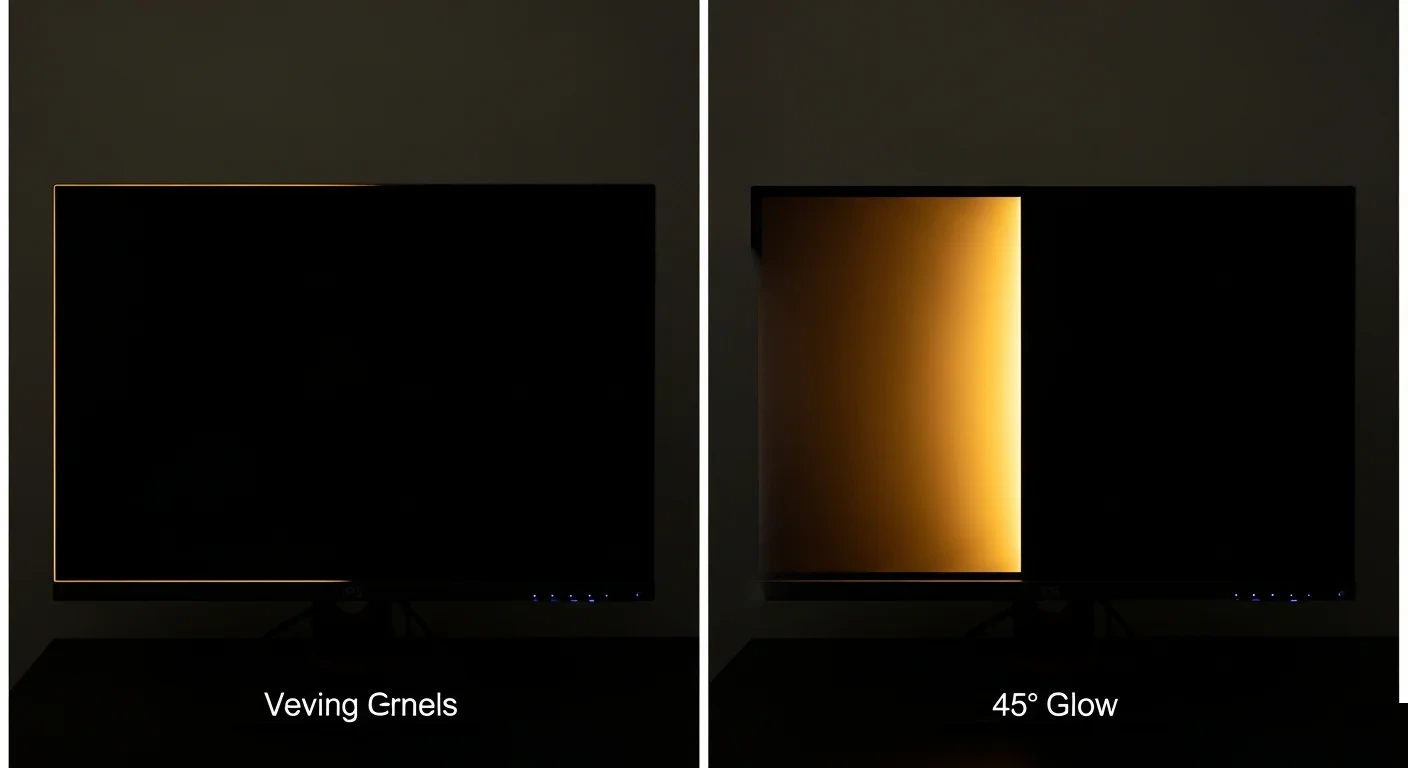
Here's where images tell the story better than words ever could. IPS glow typically appears as a silvery or golden shimmer concentrated in one or two corners of the screen, most often the bottom corners. It shifts and changes as you move your head because it's directly tied to your viewing angle.
Look at the image above, which captures classic IPS glow behavior on a black screen. Notice how the glow isn't uniform across the whole panel. It radiates from a specific corner and fades as your eye moves toward the center of the screen.
That's your signature clue that you're dealing with IPS glow, not something else.
What makes this so important to see visually is that people describe it differently. Some call it "flashlight effect," others say "clouding." The words don't capture it reliably. You need to see it to know what you're dealing with.
Key visual characteristics of IPS glow:
- Appears brightest in corners, especially bottom corners
- Color ranges from silver-white to warm gold depending on the panel
- Shifts position when you change your viewing angle
- Most visible on fully black screens or dark scenes
- Gradually fades toward the center of the display
IPS Glow vs. Backlight Bleed
This is where confusion costs people real money. Countless users have returned perfectly good monitors because they thought IPS glow was backlight bleed. They're two different phenomena, and they look different once you know what to separate.
Backlight bleed occurs when light escaping from the edge-lit LED array leaks around the borders of the panel. It appears as bright patches or streaks along the edges, not concentrated in corners. The light source is literally bleeding through the panel's physical seal.
IPS glow, by contrast, happens within the liquid crystal layer itself. It's light being redirected by the molecular alignment of crystals, not leaking past a seal. The position of the glow changes with your viewing angle.
Backlight bleed stays fixed to the edge.
Here's a visual reference that shows the distinction clearly:
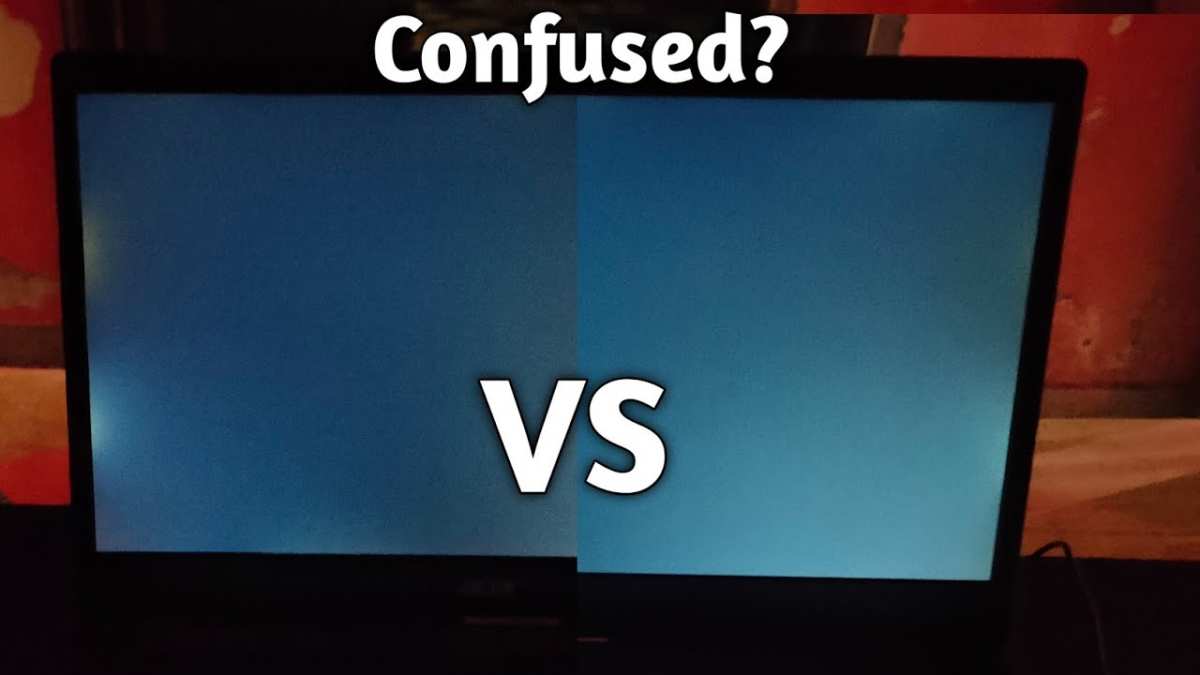
In this reference image, you can see isolated corner brightness typical of IPS glow. Contrast this with edge-hugging light patches that characterize backlight bleed. Manufacturer warranty departments see returns for both issues, but only one qualifies as a defect.
Use this quick reference to identify what you're seeing:
| Characteristic | IPS Glow | Backlight Bleed |
|---|---|---|
| Location | Corners (typically 1-2) | Edges (top, bottom, sides) |
| Shape | Soft, radiating patch | Linear streak or patch |
| Color | Silver or gold tint | White or warm white |
| Moves with viewing angle | Yes | No |
| Visible on colors other than black | No | Sometimes |
| Considered a defect | No | Depends on severity |
| Fixable with settings | No | No |
When panel uniformity issues combine both glow and bleed, it becomes harder to photograph accurately. Camera exposure settings can exaggerate one or the other. This is why visual assessment in a dark room with your own eyes remains the most reliable method.
How IPS Panel Technology Creates This Glow Effect
To understand why IPS glow exists, you need to understand what makes an IPS panel different from other LCD technologies. The "In-Plane Switching" name refers to how liquid crystal molecules move when voltage is applied.
In an IPS panel, the liquid crystals are aligned parallel to the glass substrate. When voltage hits them, they rotate in-plane, like a carousel spinning flat. This rotation controls how much light passes through the polarizing filters.
The result is excellent color accuracy and wide viewing angles, which is why professionals love these panels.
But here's the trade-off. That sideways rotation doesn't perfectly contain light at the edges and corners of the panel. Some light gets redirected toward the viewing surface at angles that create the glow effect.
It's not a manufacturing flaw. It's physics working exactly as designed.
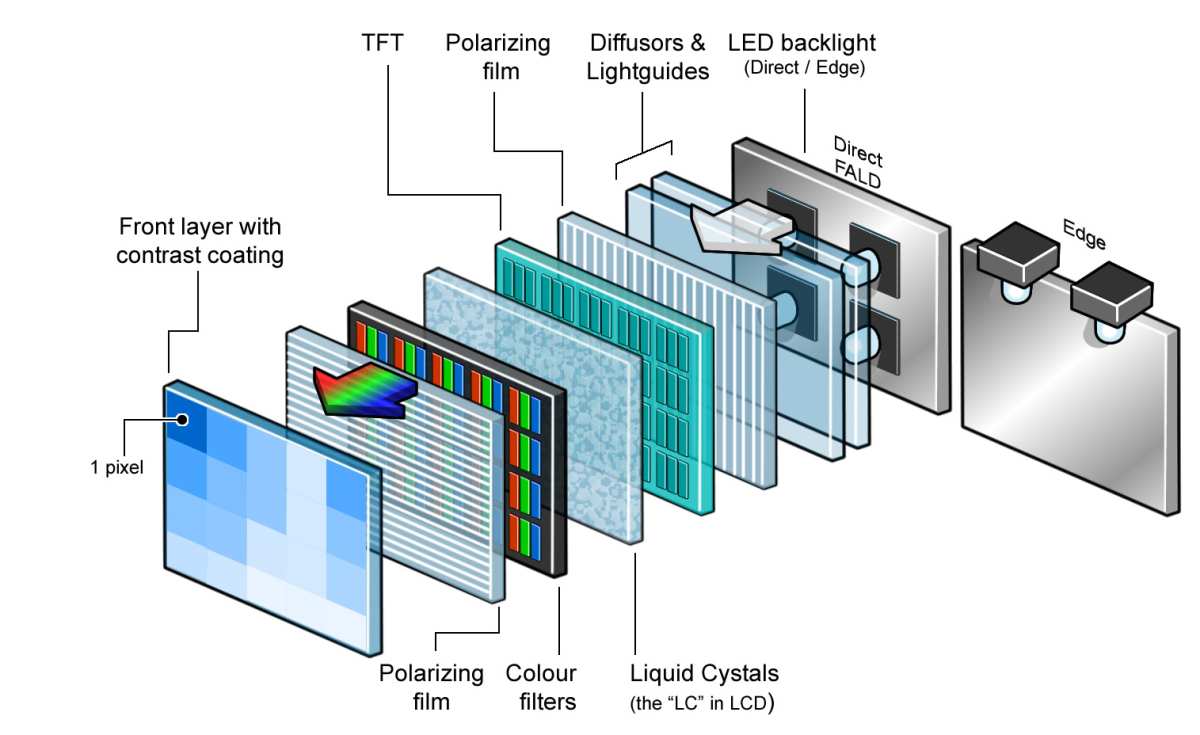
The diagram below shows the layered structure where this happens:
In this panel layer diagram, you can trace the path from the LED backlight unit through the diffuser, then through the liquid crystal layer where the glow originates. The liquid crystal alignment layer is where the magic, and the frustration, happens.
Several factors influence how pronounced the glow appears on any given panel:
- Panel size: Larger panels (27" and above) tend to show more visible glow because the edge-to-center distance creates more opportunity for light redirection
- Backlight configuration: Edge-lit designs concentrate LEDs on one or two sides, which can amplify corner glow on that edge
- Panel coating: Glossy coatings reflect more ambient light but can make glow appear more pronounced; matte coatings diffuse it slightly
- Viewing distance: Sitting closer to the screen puts your eyes at more extreme angles relative to the corners, intensifying the effect
- Individual panel variation: Even two identical monitor models can show different glow levels due to manufacturing tolerances, a reality often called "the panel lottery"
LG Display's AH-IPS and later Nano IPS generations improved light transmission efficiency but didn't fundamentally change the glow behavior. The technology's viewing angle advantage comes with this optical compromise built in.
The Visual Test: How to Check Your Monitor in 5 Minutes
You don't need specialized equipment to evaluate your panel. A simple dark room test tells you everything you need to know about your specific monitor's behavior.
Here's the step-by-step process:
Dim the lights completely. Wait 5-10 minutes for your eyes to adjust. Any ambient light makes it harder to see the glow accurately.
Display a pure black image. Use a full-screen black PNG or visit a black screen test website. Make sure the image fills the entire display with no borders.
Sit at your normal viewing distance. Don't lean in close. Position yourself where you'd typically work or game.
Note the corner brightness. Look at each corner carefully. Is there a glow? Which corner? What color is it?
Move your head side to side. The glow should shift position as your viewing angle changes. This confirms it's IPS glow, not backlight bleed.
Check the edges for linear bright patches. If you see bright streaks along the top or bottom edge that don't move when you shift position, that's backlight bleed.
Return to normal lighting. Turn the lights back on and check if the glow is visible during typical use. If it only appears in total darkness, it's unlikely to bother you during real work.
What you're looking for is whether the glow is within normal range for IPS technology. Every IPS panel has some degree of corner glow. The question is whether yours is severe enough to impact your actual use case.
If you're seeing uniform brightness across the entire screen with no corner concentration, congratulations, you've won the panel lottery. If the glow is accompanied by bright white streaks along the edges that don't move with your viewing angle, you may have backlight bleed that warrants an exchange.
When IPS Glow Is Normal vs. When You Have a Real Problem
This is the judgment call that trips people up. The line between "normal IPS glow" and "defective panel" isn't always crisp, but there are clear guidelines.
Normal IPS glow looks like a soft, silvery corner highlight that shifts when you move your head. It's only visible on black or very dark content. It doesn't affect color accuracy or image quality on normal content.
It's present to some degree on every IPS panel ever made.
A potential defect looks different. Watch for these red flags:
- Bright white patches along edges that don't move with viewing angle
- Uneven glow that's dramatically worse on one side
- Glow visible on gray or colored screens, not just black
- Dead pixels or bright spots within the glow area
- Glow that appeared suddenly on a monitor that previously didn't show it
Manufacturer warranty policies vary on this point. Most consider IPS glow within specification unless it's accompanied by other uniformity issues. Some premium brands and professional-grade monitors have tighter uniformity standards.
Eizo and NEC, for example, offer more rigorous panel quality control on their professional lines, though even their IPS models exhibit some corner glow.
If you're within your return window and the glow bothers you, exchanging for a different unit of the same model is your best bet. Panel lottery means you might get a unit with less visible glow. Just know that you're trading one IPS panel for another, not eliminating the underlying behavior.
IPS Black and Other Technologies That Reduce the Glow
LG Display introduced IPS Black technology in 2022, and it's become the most significant improvement to this specific problem in recent years. As of 2026, it's available across a growing range of monitors from LG UltraGear, Dell UltraSharp, and other manufacturers.
IPS Black works by improving the alignment and stability of liquid crystal molecules in their "off" state. When the crystals block light more effectively, less light leaks through at the edges and corners. The result is a measurable improvement in both contrast ratio and glow visibility.
Here's how the specs compare:
| Specification | Standard IPS | IPS Black |
|---|---|---|
| Contrast ratio | 1000:1 | 2000:1 |
| Black level (typical) | 0.33 nits | 0.165 nits |
| IPS glow visibility | Moderate | Reduced |
| Viewing angles | 178°/178° | 178°/178° |
| Color gamut | 98% DCI-P3 (typical) | 98% DCI-P3 (typical) |
| Response time | 5ms GtG (typical) | 5ms GtG (typical) |
| Price premium | Baseline | $50-150 |
The image below shows an IPS Black monitor in use:
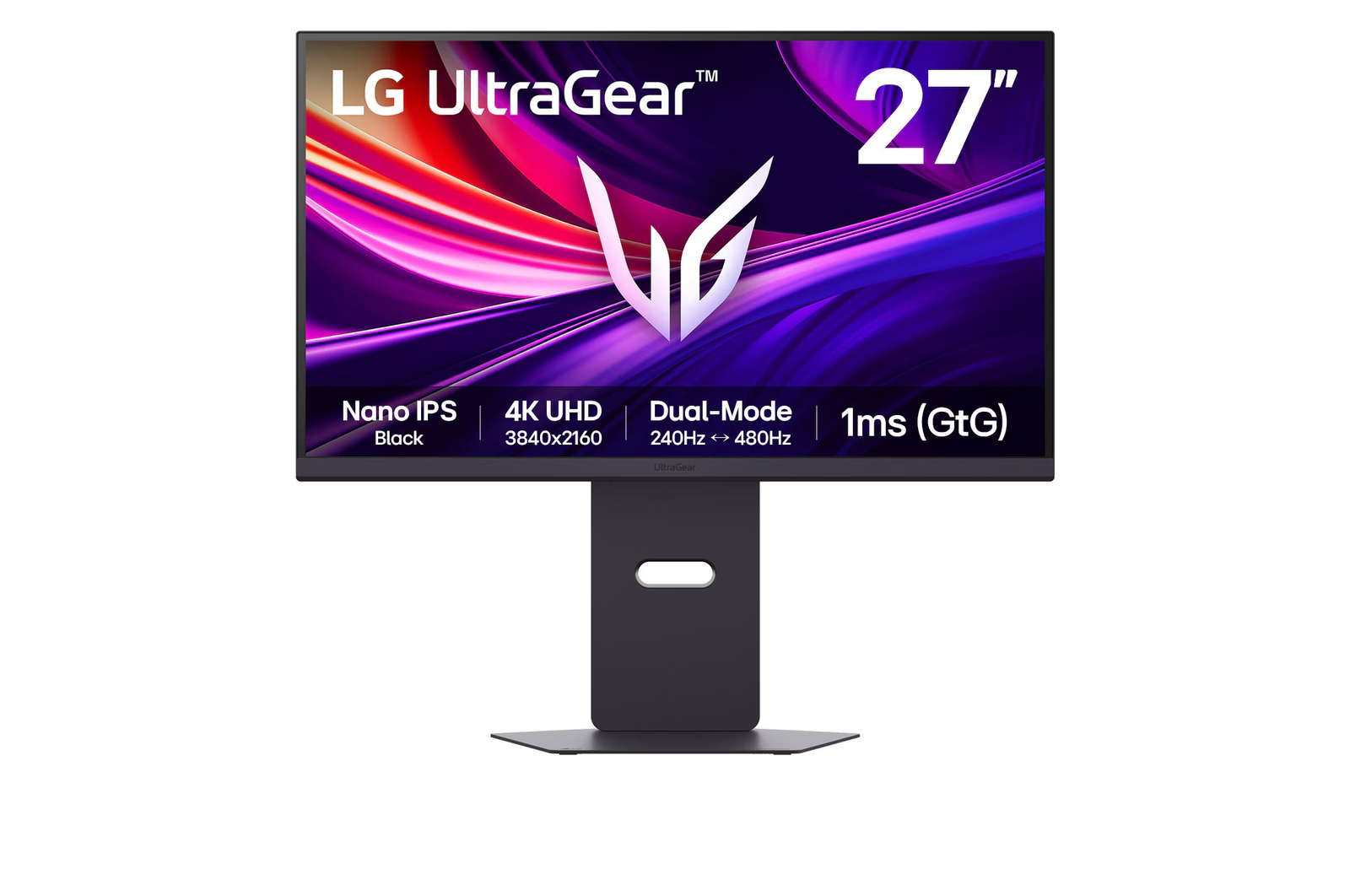
IPS Black doesn't eliminate the glow. It reduces it noticeably. If you're sensitive to corner glow and want to stay with IPS technology for its color accuracy and viewing angles, IPS Black is currently your best option.
Other technologies also address this issue differently:
- Mini-LED backlighting with full array local dimming: Divides the backlight into hundreds or thousands of zones that dim independently. This can reduce perceived glow by dimming edge zones during dark content, though blooming around bright objects becomes a different trade-off.
- OLED panels: Each pixel produces its own light and can turn off completely. Zero backlight means zero IPS glow or backlight bleed. The trade-off is burn-in risk and higher cost, but for dark room use, OLED is the gold standard for black uniformity.
- VA panels: Higher native contrast (3000:1 to 5000:1) means blacks look deeper, which can make edge glow less noticeable. However, VA panels have their own uniformity issues and slower response times.
IPS vs. OLED vs. VA: Glow Performance Compared
If glow in dark rooms is your primary concern, understanding how each panel technology behaves helps you make a smarter choice.
IPS panels offer the best color accuracy and widest viewing angles, with moderate corner glow that's inherent to the technology. IPS Black improves this significantly. Best for color-critical work where you need consistent color across viewing angles.
VA panels deliver the highest native contrast ratios (3000:1 to 5000:1), which means deeper blacks and less visible glow. The trade-off is color shift at viewing angles and slower pixel response times that can cause smearing in fast motion. Best for movie watching and dark room gaming where contrast matters more than speed.
OLED panels eliminate the glow problem entirely because there's no backlight. Each pixel is self-emissive and can display true black by turning off. The downside is potential burn-in with static elements and significantly higher cost.
Best for mixed use in dark rooms where budget allows.
Here's how they stack up for dark room performance:
| Factor | IPS (Standard) | IPS Black | VA | OLED |
|---|---|---|---|---|
| Glow visibility | Moderate | Low | Low | None |
| Black uniformity | Fair | Good | Good | Excellent |
| Contrast ratio | 1000:1 | 2000:1 | 3000:1+ | Infinite |
| Color accuracy shift at angles | Minimal | Minimal | Noticeable | Minimal |
| Response time | 5ms | 5ms | 8-12ms | 0.1ms |
| Burn-in risk | None | None | None | Low-Moderate |
| Price range | $200-600 | $300-800 | $250-700 | $500-1500+ |
The right choice depends on your priorities. If you need IPS for professional color work, IPS Black is worth the premium. If you primarily consume media in dark rooms and don't need wide viewing angles, VA or OLED serve you better.
Who Should Care About IPS Glow (And Who Shouldn't)
Not everyone needs to lose sleep over corner glow. Your use case determines whether this matters to you.
You should pay attention if you:
- Edit photos or video in dimly lit rooms
- Watch movies with letterbox bars in dark environments
- Game in dark scenes frequently and notice the corner shimmer
- Are a perfectionist about display uniformity
- Use your monitor primarily at night with low ambient light
You can probably ignore it if you:
- Work in normally lit offices or rooms
- Use your monitor for productivity tasks with mostly white or light backgrounds
- Game in bright or colorful titles
- Sit at a normal viewing distance from a 27" or smaller display
- Have a monitor with moderate glow that doesn't shift during normal use
Professional photographers and video editors working in controlled lighting environments are most affected. For them, IPS Black or a calibrated OLED reference monitor may be worth the investment. Casual users and office workers rarely encounter situations where IPS glow impacts their experience.
Common Mistakes People Make When Judging Their Panel
Years of aggregate user reviews and forum discussions reveal the same mistakes happening repeatedly. Here's what to watch out for.
Mistake 1: Judging glow with the lights on. IPS glow is only visible in dark or dim environments. If you're evaluating with overhead fluorescents blazing, you're not seeing the real picture. Test in conditions that match your actual use.
Mistake 2: Using a camera to assess glow. Cameras exaggerate glow due to exposure settings and lens characteristics. Your eyes are the better tool. A photo that looks alarming might be barely noticeable in person.
Mistake 3: Confusing IPS glow with backlight bleed. We covered this earlier, but it bears repeating. If the bright area is along an edge and doesn't move when you shift your head, that's bleed, not glow. Different issue, different warranty implications.
Mistake 4: Expecting zero glow from any IPS panel. This technology has inherent corner glow. If you need absolute black uniformity, IPS isn't the right technology for you, and no amount of panel lottery luck will change that.
Mistake 5: Returning a monitor without checking the replacement first. Panel lottery means your next unit could be better or worse. If the glow is severe, exchange it. If it's mild, you might end up with a replacement that's more noticeable.
Mistake 6: Ignoring room lighting as a solution. Sometimes the simplest fix is adding a bias light behind the monitor. A 6500K LED strip reduces perceived contrast between the screen and surroundings, making corner glow far less distracting without changing your panel.
Pro Tips for Minizing IPS Glow in Your Setup
You can't eliminate IPS glow, but you can reduce its impact on your daily experience.
Add bias lighting. A simple LED strip mounted behind your monitor, set to around 6500K, raises the ambient light level just enough to reduce the perceived contrast between the glowing corners and the rest of the room. This is the single most effective mitigation.
Adjust your viewing distance. Moving back even 6-12 inches changes the angle at which you see the corners, often reducing the glow's apparent intensity. Most people sit closer than necessary anyway.
Lower your brightness. IPS glow becomes more pronounced at higher brightness levels. If you're working in a dark room, you probably don't need 100% brightness anyway. Dropping to 40-60% makes a noticeable difference.
Position the monitor thoughtfully. If your desk faces a wall, consider whether that wall reflects glow back at you. Darker wall colors behind the monitor help.
Consider your content. If you primarily work with light backgrounds and only occasionally view dark content, the glow won't affect you most of the time. Don't let a theoretical issue drive unnecessary upgrades.
If buying new, prioritize IPS Black. The $50-150 premium over standard IPS pays for itself if dark room use is important to you. Check the specific panel model before purchasing, as not all "IPS" monitors use IPS Black technology.
Real Scenarios: What I've Seen Across Different Monitor Models
Research and aggregate user reports paint a clear picture of how this plays out in practice.
Scenario 1: The 27" productivity monitor. A Dell UltraSharp U2723QE with IPS Black panel shows minimal corner glow in dark room testing. Users report it's visible on pure black screens but rarely noticeable during actual work. The 2000:1 contrast ratio makes a real difference here.
Scenario 2: The budget 24" IPS. A budget IPS monitor with standard 1000:1 contrast shows obvious bottom-corner glow that multiple reviewers confirm. It's distracting during movie watching with letterbox bars but barely visible during daytime office work.
Scenario 3: The gaming ultrawide. A 34" curved IPS ultrawide shows more pronounced glow due to the larger panel size and the extreme viewing angles at the screen's edges. Users who game in dark rooms report it's noticeable in horror games with dark scenes. Those who play bright, colorful titles don't notice it.
Scenario 4: The professional reference monitor. An Eizo CG series with factory calibration shows tighter uniformity control but still exhibits some IPS glow. The difference is that the glow is more even across corners rather than concentrated in one spot, which is less distracting.
Should You Keep It, Exchange It, or Switch Technologies?
This decision tree helps you figure out your next step.
Keep your current monitor if:
- The glow is only visible on pure black screens
- You use your monitor in normally lit environments
- You don't notice it during your typical work or entertainment
- You're happy with the monitor's color accuracy and performance otherwise
Consider exchanging if:
- The glow is severe and concentrated in one corner
- It's visible during your normal use cases
- You're still within the return/exchange window
- You received a unit that's clearly worse than average for that model
Consider switching technologies if:
- You primarily work or consume media in dark rooms
- Black uniformity is critical to your workflow
- You've tried multiple IPS units and the glow bothers you every time
- Your budget allows for OLED or you can benefit from VA's higher contrast
There's no shame in deciding that IPS glow is a dealbreaker for you. It's a real characteristic of the technology, and if it impacts your experience, choosing a different panel type is a valid solution.
Frequently Asked Questions
Can IPS glow be fixed with settings?
No. IPS glow is a physical characteristic of the panel's liquid crystal layer. No software setting, color calibration, or firmware update can eliminate it.
You can reduce its visibility by lowering brightness or adding ambient lighting, but the glow itself remains.
Does IPS glow get worse over time?
Not typically. The liquid crystal alignment doesn't degrade in a way that increases glow during normal use. If your monitor suddenly develops more visible glow, it could indicate a backlight or panel issue that warrants investigation.
Is IPS glow covered by warranty?
Generally no, because it's considered a normal characteristic of IPS technology. However, if the glow is accompanied by severe backlight bleed or other uniformity defects, some manufacturers will honor a warranty exchange. Policies vary by brand and region.
How is IPS glow different from clouding?
Clouding appears as uneven bright patches across the screen that look like smudges or clouds on dark backgrounds. It's a backlight diffusion issue. IPS glow is corner-specific and shifts with viewing angle.
They can coexist on the same panel but have different causes.
Do all IPS monitors have glow?
Yes, to some degree. Every IPS panel exhibits corner glow due to the fundamental physics of in-plane switching technology. The severity varies between panel generations, individual units, and viewing conditions, but none are completely glow-free.
Is IPS Black worth the extra cost?
If you use your monitor in dark rooms frequently, yes. The doubled contrast ratio and reduced glow visibility justify the typical $50-150 premium. For bright office environments where glow isn't visible, standard IPS serves you fine.

Similar Posts





















