Is Ips Monitor Worth It for Designers
Image source: Bing (Web (fair-use with source credit))
Is IPS monitor worth it for designers? For most design work, yes, an IPS (In-Plane Switching) panel remains the safest and most reliable choice for color-accurate work. But the answer shifts depending on what kind of design you do, your budget, and whether you actually need professional-grade color or just a solid everyday display.
Manufacturer specifications indicate that modern IPS panels deliver 178-degree viewing angles, consistent color across the screen, and wide gamut coverage that competing technologies struggle to match at similar price points. That said, not all IPS monitors are created equal, and buying the wrong one can leave you with worse accuracy than a good VA panel. Let's break down what actually matters.
Quick Answer
Yes, IPS monitors are worth it for most designers. They offer the best balance of color accuracy, viewing angles, and price for design work. Professional-grade IPS displays deliver factory-calibrated accuracy with Delta E below 2.
Consumer IPS panels need calibration to reach that level. Consider VA or OLED if you prioritize contrast or HDR over color precision.
How IPS Technology Actually Works for Design
IPS technology twists liquid crystals horizontally when voltage applies. This lets light pass through at consistent angles across the entire panel. The result is stable color even when you view the screen from sharp angles.
For designers, this matters more than you might think. When you're working on a layout, colors stay uniform from edge to edge. A TN panel shifts hue when you move your head slightly.
An IPS panel keeps things consistent.
But IPS has real weaknesses too. The horizontal crystal arrangement blocks some light, which limits native contrast. Most IPS panels hit around 1000:1 contrast ratio.
VA panels reach 3000:1 or higher. That means blacks look more gray on IPS, especially in dark rooms.
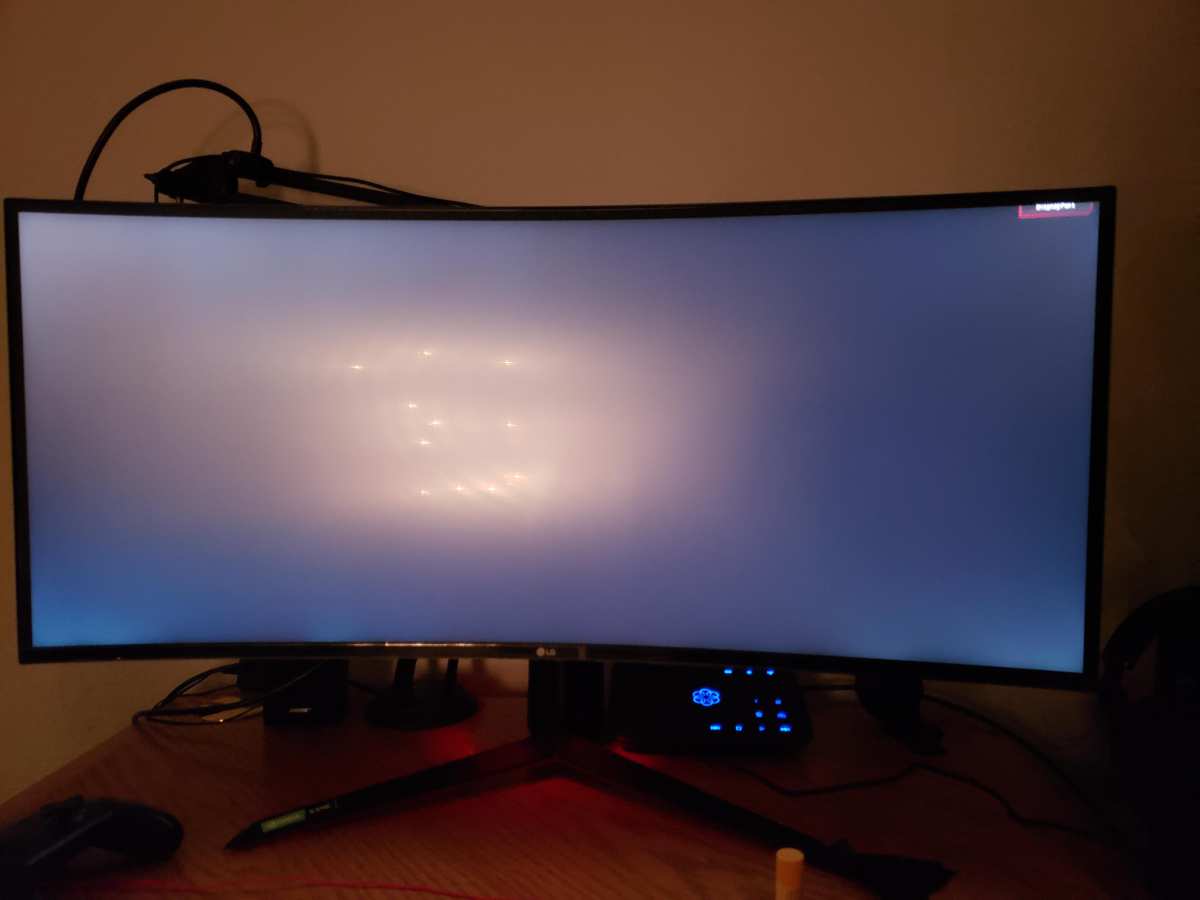
Image source: Bing (Web (fair-use with source credit))
IPS glow is another issue. You'll notice a silvery or purple glow in the corners when viewing dark content in dim environments. It's a physical limitation of the panel structure.
Professional monitors minimize it, but consumer models often show noticeable glow.
Response times on IPS typically run 4-8ms gray-to-gray. That's fine for static design work. Video editors and motion graphics artists may notice smearing during fast playback.
For pure photo editing and graphic design, it's a non-issue.
IPS vs. TN vs. VA vs. OLED: Real Differences for Designers
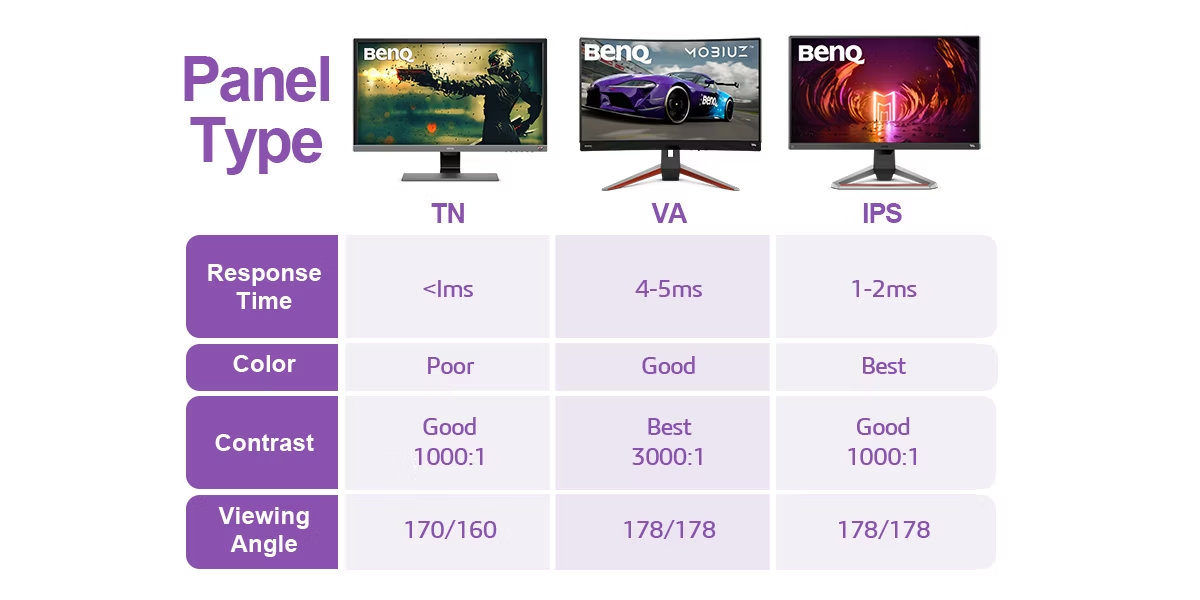
Choosing the right panel type means understanding what each technology does well and where it fails. Here's how the four main options compare for design work.
| Feature | IPS | VA | TN | OLED |
|---|---|---|---|---|
| Color accuracy | Excellent | Good to Very Good | Poor to Good | Excellent |
| Viewing angles | 178°/178° | 178°/178° (some shift) | 160°/160° (significant shift) | 178°/178° |
| Contrast ratio | 1000:1 | 3000:1 to 5000:1 | 1000:1 | 1,000,000:1+ |
| Response time | 4-8ms | 4-12ms | 1-5ms | 0.1ms |
| HDR capability | Limited | Moderate | Limited | Excellent |
| Burn-in risk | None | None | None | Yes |
| Price range | $200-$5,000+ | $200-$3,000+ | $100-$500 | $800-$5,000+ |
| Best for design? | Yes, most cases | Good for dark rooms | No | Yes, if budget allows |
TN panels are the cheapest option but show obvious color shift when you tilt the screen. They typically cover only 95-98% of sRGB. For casual web design they work.
For print or brand work, they're not accurate enough.
VA panels offer much deeper blacks and better contrast. They're popular with designers who work in dim environments or do a lot of dark UI design. Color accuracy has improved significantly in recent years.
Some high-end VA panels now cover 95%+ of DCI-P3. The downside is slight color shift at angles, though modern VA panels have narrowed this gap.
OLED delivers perfect blacks, infinite contrast, and excellent color accuracy. It's the ideal display technology on paper. But OLED monitors carry a higher price tag and face long-term concerns about burn-in with static UI elements.
As of 2026, OLED is excellent for video and photo work but requires careful usage habits for general design.
IPS sits in the middle. It won't give you OLED's contrast or TN's speed, but it provides the most consistent and predictable color for the price. That's why it remains the default recommendation for design work.
Best IPS Monitors for Designers by Use Case
Not all IPS monitors serve designers equally. Here's what to look for at different price points and for different workflows.
Budget-Friendly Options Under $500
At this price, you're looking at consumer IPS panels with good color coverage but limited calibration features. Look for 99% sRGB coverage as a minimum. Factory calibration is a bonus but not guaranteed.
Good options include 27-inch 4K IPS monitors from brands like Dell, LG, and ASUS. These work well for web design, UI work, and hobby photo editing. You'll want to add a calibration tool to get accurate results.
Mid-Range Workhorses ($500-$1,000)
This is the sweet spot for most professional designers. Monitors in this range typically offer 95%+ DCI-P3 coverage, hardware calibration support, and better panel uniformity. Brands like BenQ DesignVue, ASUS ProArt, and Dell UltraSharp dominate here.
These displays often include USB-C connectivity with power delivery, which simplifies laptop docking. Build quality improves too, with better stands and more adjustment options.
Professional Reference-Grade Displays
Above $1,500, you enter true professional territory. Eizo ColorEdge and NEC MultiSync monitors offer built-in calibration sensors, guaranteed Delta E below 2, and extended warranties. These are designed for print proofing, broadcast color work, and medical imaging.
For most freelance designers and agency work, a mid-range monitor with regular calibration delivers results close to these reference displays at a fraction of the cost.
Ultrawide and High-Resolution Alternatives
Ultrawide IPS panels (34" and above) suit video editors and motion graphics artists who need timeline space. 5K and 6K displays offer extreme detail for illustration and photo retouching. Just verify that your computer can drive these resolutions at full color depth.
Who Should Skip IPS Altogether
IPS isn't the right choice for every designer. Here's when you should look elsewhere.
Motion-heavy video editors should consider OLED or high-refresh IPS panels. Standard 60Hz IPS displays can show visible smearing during fast motion. If your work involves lots of timeline scrubbing and motion graphics, prioritize response time and refresh rate.
HDR content creators will find IPS limiting. Without local dimming, IPS panels can't deliver true HDR impact. Mini-LED backlit IPS monitors help, but OLED still leads for HDR mastering.
Budget-first buyers with specific needs might get more value from a good VA panel. If you primarily design dark interfaces or work in dim environments, VA's superior contrast improves your daily experience more than IPS's color accuracy advantage.
Print designers on tight budgets can start with a consumer IPS and a calibration tool. But if color accuracy is critical to your work, investing in a professional-grade IPS with hardware calibration support will save time and frustration in the long run.

Similar Posts





















