Is Ips Monitor Good for Programming
So you're wondering whether an IPS monitor is actually good for programming, and honestly, it's a fair question. Not all display panels are created equal, and when you're staring at code for eight or more hours a day, the wrong choice can genuinely affect your eyes, your comfort, and even your productivity.
The short answer is that IPS panels are among the best choices for most programmers, but they're not perfect for every single situation. Let's break down exactly why, where they fall short, and how they stack up against the alternatives so you can make the right call for your setup.
Quick Answer
Yes, an IPS monitor is good for programming. IPS panels deliver wide viewing angles and accurate colors. They work well for long coding sessions.
However, they have lower contrast than VA panels. IPS glow can bother dark-room coders. Pick IPS for color-critical or multi-angle work if that's your situation.
Why Panel Type Actually Matters for Programming
Here's something most people don't think about until they're neck-deep in a monitor purchase. The panel type isn't just about "good image" versus "bad image." It determines how text looks at the edges of your screen, how your eyes feel after a 10-hour coding sprint, and whether colors render consistently when you lean back in your chair.
IPS (In-Plane Switching) technology works by aligning liquid crystals parallel to the glass substrate and rotating them in-plane when voltage is applied. That's a mouthful, but what it means for you is simple. Colors stay accurate even when you're viewing the screen from extreme angles.
Think about how you actually sit at a desk. You're not always dead-center. You shift, you lean, you grab a second screen.
With an IPS panel, the code on the far right of your monitor looks just as accurate as the code in the middle.
Contrast that with a cheap TN panel, where the moment you move your head slightly to the left, the colors invert and brightness shifts. It's subtle, but over hours of reading code, that inconsistency adds up. Your eyes are constantly micro-adjusting, and you don't even realize it until you get a headache at 3pm.
Manufacturer specifications confirm that typical IPS panels offer 178°/178° viewing angles with contrast ratios around 1000:1 to 1300:1. That's comfortable for sustained reading work.
IPS vs. TN vs. VA vs. OLED: How They Compare for Programming
This is where the real decision lives. Let's walk through each technology and see how it holds up for actual coding work.
Text Clarity and Reading Comfort
Text clarity depends on three things: resolution, subpixel rendering, and how consistently the panel displays fine detail. IPS panels generally have a standard RGB subpixel layout, which means operating systems like Windows (ClearType) and macOS handle font rendering cleanly without weird fringing.
TN panels also use RGB stripes, so text sharpness is comparable at the same resolution. But TN's color shift means that even if the text looks crisp dead-center, the glyphs on the edges of the screen can appear slightly washed out or tinted.
VA panels are a mixed bag. They use RGB stripes too, but because of their pixel structure, some VA panels exhibit slight color fringing on high-contrast text edges, especially at lower pixel densities. It's not a dealbreaker, but it's noticeable if you're a pixel perfectionist.
OLED wins on raw contrast for text rendering (those perfect black backgrounds make white pop), but OLED subpixel layouts vary by manufacturer. Some use diamond pentile arrangements, which can produce subtle color fringing on small text.
For pure text clarity at equivalent resolution: IPS and TN are the safest bets, with IPS having the edge in overall consistency.
Color Accuracy and Consistency
If your programming work involves any color-sensitive tasks, IPS dominates. sRGB coverage of 95% to 99% is standard on mid-range IPS monitors, and professional-grade models hit 98% DCI-P3 or wider.
| Panel Type | Typical sRGB Coverage | Color Shift Off-Angle |
|---|---|---|
| IPS | 95–100% | Minimal |
| TN | 92–98% | Significant |
| VA | 95–100% | Moderate |
| OLED | 99%+ | Minimal to moderate (depends on subpixel layout) |
For developers working on front-end code, UI dashboards, or any project where color matters, IPS gives you confidence that what you're seeing is accurate. That's hard to put a price on when you're validating design implementations.
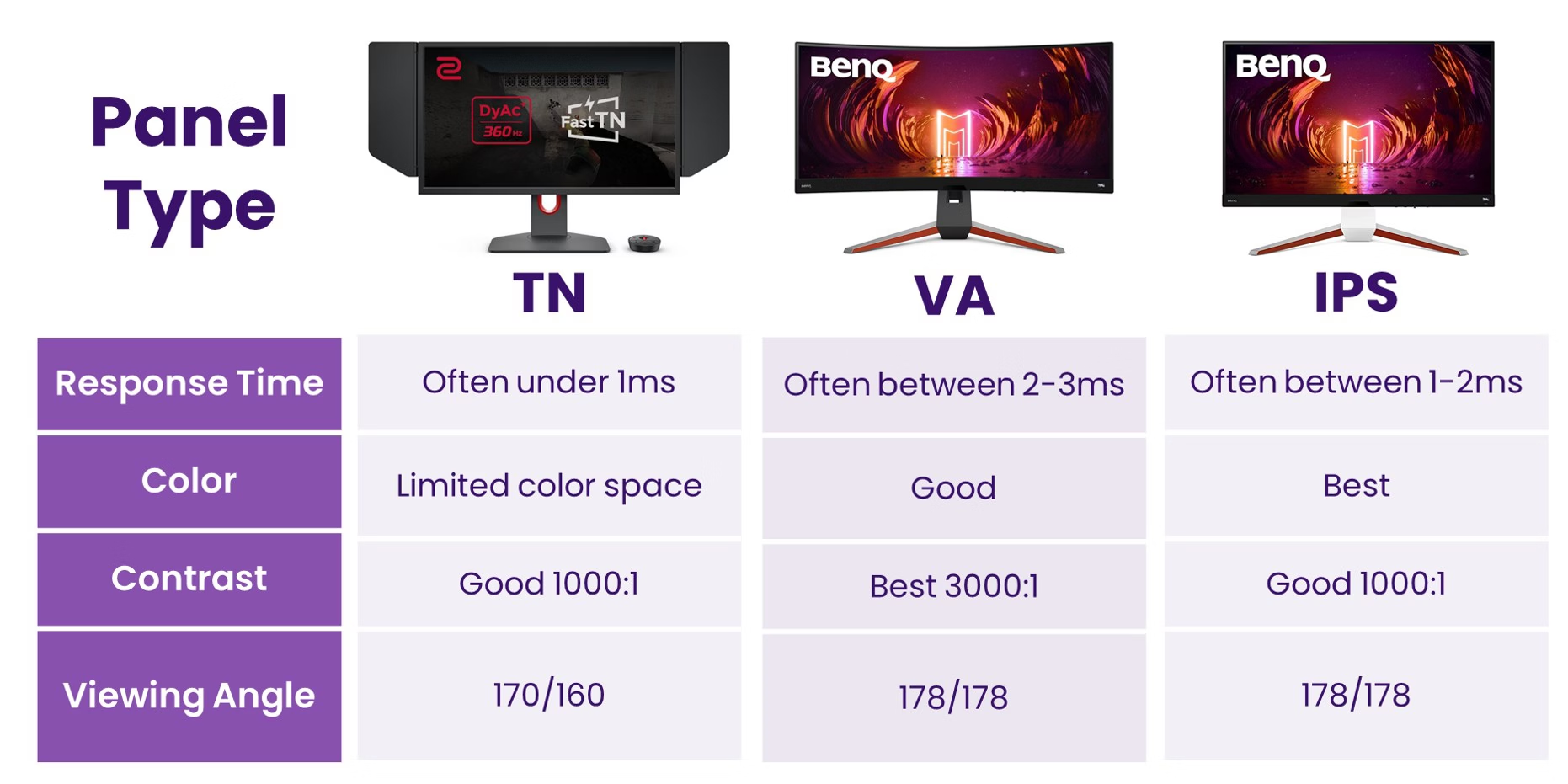
Image source: BenQ
Contrast and Dark Room Performance
Here's where IPS doesn't win every category. Standard IPS contrast sits around 1000:1 to 1300:1. VA panels, on the other hand, typically deliver 3000:1 to 5000:1.
That's a massive difference.
Why does this matter for programming? If you code in a dark room with a dark theme editor (and plenty of developers do), those grayish blacks on an IPS panel can look washed out. You're staring at dark gray characters on a slightly lighter gray background.
It's not awful, but it's noticeably less crisp than what a VA or OLED panel would show.
VA panels produce deeper, inky blacks that make dark-themed IDEs look significantly better. OLED goes further with true blacks. If you're a dedicated dark-mode coder, this is a legitimate tradeoff to consider.
Response Time and Motion Clarity
Nobody buys a monitor for programming based on response time. But it still matters more than you'd think. When you're rapidly scrolling through thousands of lines of code, slower response times produce a subtle ghosting effect.
Text trails slightly behind your movement.
Most IPS panels run 4ms to 5ms gray-to-gray (GTG). Some newer models advertise 1ms, though that's usually with aggressive overdrive enabled. TN panels have traditionally led here at 1ms to 2ms.
VA panels are often the slowest at 4ms to 8ms.
For coding specifically, this ghosting is more of an annoyance than a showstopper. But if you also game on the same monitor, or if you're extremely sensitive to motion blur, it's worth keeping in mind. Higher refresh rate IPS panels (120Hz or 144Hz) mitigate some of this.
The smoother cursor movement and scrolling feel noticeably better than 60Hz.
Side-by-Side Comparison Table
| Feature | IPS | TN | VA | OLED |
|---|---|---|---|---|
| Text Clarity | Excellent | Good (center) / Fair (edges) | Good | Excellent (varies by subpixel layout) |
| Viewing Angles | Excellent (178°/178°) | Poor | Moderate | Good to Excellent |
| Color Accuracy | Very Good to Excellent | Fair to Good | Good to Very Good | Excellent |
| Contrast Ratio | 1000:1–1300:1 | 800:1–1000:1 | 3000:1–5000:1 | Effectively infinite |
| Response Time | 4–5ms (1ms on newer) | 1–2ms | 4–8ms | <1ms |
| Dark Room Coding | Good (IPS glow risk) | Poor (washed out) | Excellent | Excellent |
| Burn-in Risk | None | None | None | Low to Moderate |
| Price Range | $150–$1000+ | $100–$300 | $150–$800 | $500–$2500+ |
What Type of Programmer Are You? Matching Panel to Workflow
Not every developer needs the same thing. Let's match the panel to the person.
The Full-Stack Developer Who Also Designs
You're writing backend APIs in the morning and checking CSS color values in the afternoon. You need consistent, accurate colors and reliable text rendering. IPS is your sweet spot. You get color accuracy that's good enough for design validation without the burn-in risk or price premium of OLED.
The Night Owl Coder
You do your best work at 11pm in a dark room with VS Code set to Dracula theme. You'll notice IPS glow in the corners on a pure black screen. A VA panel will give you richer darks.
OLED will give you the best contrast if your budget allows and you can manage static UI element concerns.
The Budget-Conscious Student
You need something reliable under $250. A TN panel gets the job done if you only care about raw function. But a budget IPS from brands like AOC, ASUS, or LG in the $150 to $200 range gives you noticeably better comfort and viewing angles for minimal extra cost.
The Multi-Monitor Power User
You run two or three screens side by side, often at slight angles. IPS viewing angles keep colors consistent across all monitors no matter your head position. TN panels would show color shift on the outer edges of your array.
This is where IPS earns its keep.
The Game Developer or Creative Coder
You're working with game engines, color grading, or visual tools. OLED or a high-end IPS with wide color gamut (DCI-P3 95%+) is what you're after. Standard sRGB IPS won't give you the dynamic range you need for this kind of work.
Common Complaints About IPS Monitors (and Which Ones Are Legit)
Let's address the grievances you'll find in forums. Some are real, some are overblown.
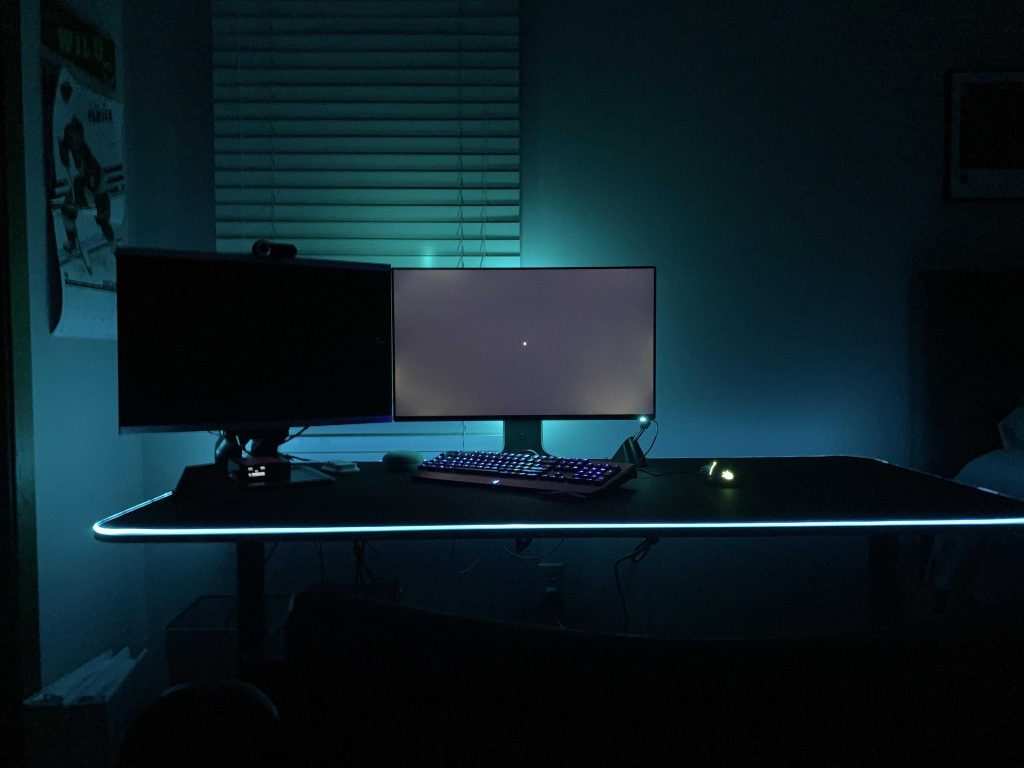
Image source: Bing (Web)
IPS Glow in Dark Rooms
This is the number one complaint, and it's legitimate. IPS glow is a soft, silvery light visible at the corners of the screen when displaying dark content in a dark room. It happens because of how the liquid crystals direct light.
How much glow you get varies from unit to unit. Some people barely notice it. Others find it maddening.
If you code in the dark with a dark theme, go into a store and look at the monitor in a dim environment before buying, if that's possible. IPS glow is a factor of the technology, not a defect. Every IPS panel has some.
The question is how much.
Slower Response Times and Ghosting
For a programmer, this is usually a non-issue. That said, if you're scrolling through a 50,000-line codebase at high speed and you see faint trails behind text, you're experiencing pixel response ghosting. It's more visible on 60Hz IPS panels than on higher refresh rate models.
Moving to a 75Hz or 120Hz IPS largely eliminates the perception of ghosting during fast scrolling.
The "IPS Tax" — Are You Overpaying?
Partially, yes. A decent 27-inch IPS with 1440p resolution can be found for $200 to $300. Meanwhile, a comparable TN panel might run $150 to $200.
That $50 to $100 premium buys you significantly better viewing angles and color reproduction, which most programmers feel is worth the upcharge.
Where it gets questionable is at the premium end. A $600+ professional IPS with factory calibration and a wide color gamut is overkill for 90% of pure coding work. You're paying for color accuracy features that only matter for design, photo editing, or video work.
A $300 IPS serves programmers just as well if coding is the primary purpose.
Backlight Bleed and Panel Lottery
IPS panels can exhibit backlight bleed, where light leaks around the edges or corners of the screen, especially on dark content. Manufacturing quality varies between models and even between individual units of the same model. This is often called "panel lottery" because you can't perfectly predict what you'll get.
Higher-quality models from reputable lines (like Dell UltraSwift U-series or LG's higher-end panels) tend to have fewer bleed issues. Reading reviews that specifically call out uniformity is your best bet here, since it's not something spec sheets tell you.
What Specs Actually Matter Beyond Panel Type
Panel type is just the starting point. Several other specs determine how comfortable and productive your coding setup actually feels.
Resolution and PPI for Sharp Text
Pixels per inch (PPI) is arguably the single most important spec for programming comfort. Higher PPI means sharper text, cleaner font rendering, and less eye strain during long sessions.
Here's a quick reference for common monitor sizes and their PPI at different resolutions:
| Size | 1080p (PPI) | 1440p (PPI) | 4K (PPI) |
|---|---|---|---|
| 24" | 91.8 | N/A | 183.6 |
| 27" | 81.6 | 108.8 | 163.2 |
| 32" | 68.8 | 91.5 | 137.7 |
At 27 inches, 1440p hits a sweet spot around 109 PPI. Text is sharp without requiring display scaling that can introduce blurriness in older applications. 4K at 27 inches is even sharper, but you'll likely need 125% to 150% scaling in Windows, which some developers love and others find cramped.
At 27 inches with 1080p, you're only at about 82 PPI. Text looks noticeably softer, and if you're sensitive to jagged edges on fonts, it can be fatiguing over a full workday. For programming specifically, 1440p at 27 inches is the recommendation most experienced developers land on.
Refresh Rate — Does It Matter for Coding?
More than people think. A 60Hz monitor refreshes the screen 60 times per second. A 120Hz monitor doubles that.
The difference shows up when you're scrolling through code, dragging windows, or moving the cursor. Everything feels smoother and more responsive.
You don't need 144Hz or 240Hz for programming. Those are gaming territory. But jumping from 60Hz to 75Hz or 120Hz is a quality-of-life improvement that's hard to go back from once you've experienced it.
Many mid-range IPS monitors now offer 75Hz or 100Hz as a modest upgrade over the baseline 60Hz.
Color Gamut — When It's Relevant and When It's Not
If you're writing backend APIs and never touching front-end code, color gamut doesn't matter much. sRGB is fine. But if you're doing any UI work, design validation, or front-end development, a wide color gamut (DCI-P3 90% or higher) lets you see colors that standard sRGB panels can't display.
For most programmers, a panel covering 95% to 100% of sRGB is perfectly sufficient. You only need DCI-P3 or Adobe RGB coverage if your workflow includes color-accurate design work alongside coding.
Connectivity and Ergonomics
Don't overlook the physical setup. USB-C connectivity with power delivery lets you connect a laptop with a single cable, which is incredibly convenient for developers who dock and undock regularly. Thunderbolt 4 ports offer even more bandwidth for daisy-chaining multiple displays.
Ergonomic adjustability matters more than specs on paper. A stand that offers height, tilt, swivel, and pivot adjustment lets you position the monitor at the right angle for your posture. Fixed-height monitors often sit too low, forcing you to hunch forward.
VESA mount compatibility gives you the freedom to use a monitor arm, which frees up desk space and offers better positioning flexibility.
Best IPS Monitors for Programming by Budget
Here are solid options across price ranges. These aren't exhaustive, but they represent well-reviewed choices as of 2026.
Budget-Friendly ($150–$250)
- LG 27QN600-B: 27-inch, 1440p, 75Hz, IPS. Covers 99% sRGB. A solid entry point with good color accuracy for the price.
- ASUS VY249HGE: 24-inch, 1080p, IPS with an anti-glare coating. Compact and affordable for smaller desks.
Mid-Range ($250–$500)
- Dell UltraSharp U2723QE: 27-inch, 4K, IPS Black technology (improved contrast over standard IPS). USB-C hub with 90W power delivery. Factory calibrated. One of the most recommended monitors for professional developers.
- LG 27UL850-W: 27-inch, 4K, IPS with HDR400. Good all-rounder with USB-C connectivity.
Premium ($500+)
- BenQ PD2725U: 27-inch, 4K, IPS with 95% DCI-P3 coverage. Designed for creative professionals who also code. Hardware calibration support.
- Apple Studio Display: 27-inch, 5K, IPS-equivalent panel. Excellent text clarity at 218 PPI. Premium price, but unmatched pixel density for macOS users.
How to Set Up Your IPS Monitor for Maximum Coding Comfort
Getting the hardware is half the battle. Setting it up correctly makes a real difference in daily comfort.
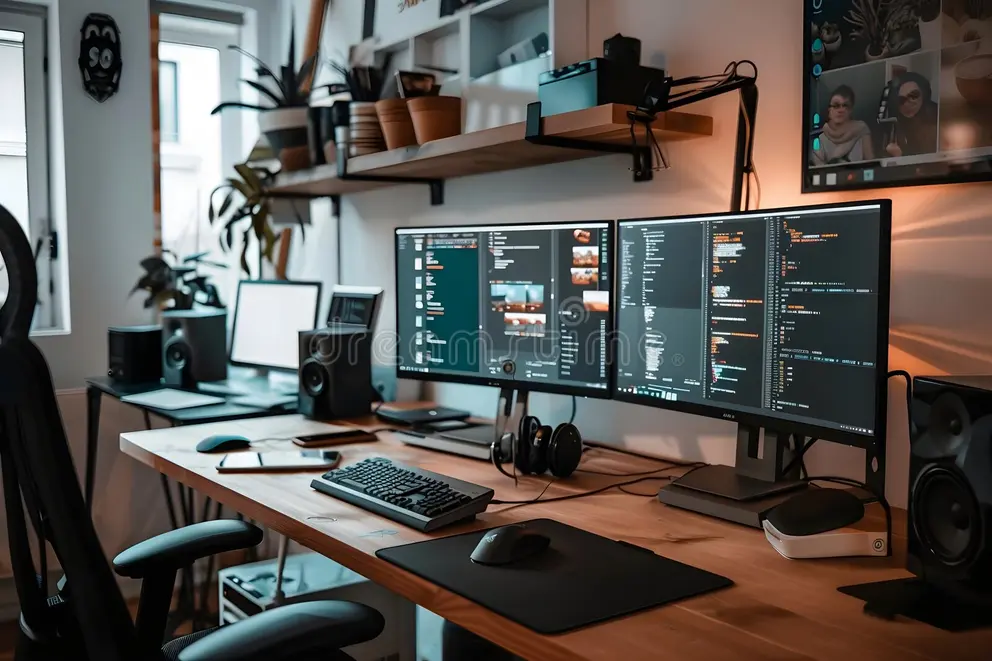
Image source: Bing (Web)
Calibration Basics
Most IPS monitors ship with reasonable factory calibration, but a few tweaks go a long way. Set brightness to match your ambient room lighting. A common rule of thumb: if your monitor looks like a light source in the room, it's too bright.
Aim for roughly 120 to 140 nits in a normal office environment.
For color accuracy, use your operating system's built-in calibration tools. Windows has a Display Color Calibration utility, and macOS has the Displays preference panel. For more precision, a hardware colorimeter like a Calibrite Display Plus provides accurate results.
Dark Mode vs. Light Mode
This is personal preference, but there are tradeoffs. Dark mode reduces eye strain in dim environments and looks great on OLED and VA panels. On IPS panels, dark mode can make IPS glow more visible in the corners.
Light mode (white background, dark text) mimics paper and many developers find it easier to read for extended periods. It also avoids the IPS glow issue entirely. If you code in a well-lit room, light mode on an IPS panel is arguably the most comfortable combination.
Ergonomic Positioning
Position the top of your screen at or slightly below eye level. The monitor should be about an arm's length away. If you're using a laptop with an external IPS monitor, a laptop stand paired with an external keyboard keeps your neck in a neutral position.
For dual monitor setups, place the primary monitor directly in front of you and the secondary at the same height and angle to one side. If you use both monitors equally, center them symmetrically so you're turning your head equally in both directions.
Blue Light and Eye Strain Management
Most modern IPS monitors include a low blue light mode, often labeled as "Reader" or "Eye Care" in the on-screen display settings. This reduces blue light emission by shifting the color temperature warmer. It's useful for evening coding sessions.
Beyond monitor settings, follow the 20-20-20 rule. Every 20 minutes, look at something 20 feet away for 20 seconds. It sounds simple, but it genuinely reduces eye fatigue during long coding sessions.
Your eyes need breaks from the fixed focal distance of a screen.
Frequently Asked Questions
Is IPS or VA better for programming?
IPS is better for most programmers due to superior viewing angles and consistent text rendering. VA is better if you code in a dark room and prioritize deep blacks over viewing angles.
Does IPS glow go away?
No, IPS glow is inherent to the technology. It varies between individual units. Some panels have minimal glow, others are more noticeable.
You can reduce its impact by adding ambient lighting behind the monitor.
Is 4K necessary for programming?
Not necessary, but very nice. 1440p at 27 inches is the practical sweet spot. 4K gives you sharper text and more screen real estate, but requires display scaling that can occasionally cause issues with older applications.
Can I use an IPS monitor for coding in a bright office?
Yes, IPS handles bright environments well. Look for a monitor with at least 300 nits of brightness and a matte anti-glare coating. Glossy screens reflect overhead lighting, which causes eye strain over time.
How long do IPS monitors last?
IPS panels typically last 30,000 to 60,000 hours before noticeable brightness degradation. That's roughly 10 to 20 years of typical daily use. They're a long-term investment that outlasts most hardware upgrade cycles.
The Bottom Line: Should You Buy an IPS Monitor for Programming?
For most developers, an IPS monitor is the best all-around choice. You get excellent text clarity, wide viewing angles, accurate colors, and comfortable performance for long coding sessions. The technology is mature, widely available, and comes at every price point from budget to premium.
The exceptions are worth noting. If you exclusively code in dark rooms with dark themes and IPS glow bothers you, a VA panel serves you better. If you need perfect contrast for creative work alongside coding, OLED is worth the premium and the burn-in management.
If you're on a very tight budget and only need basic functionality, a TN panel gets the job done.
But for the broad majority of programmers, a good IPS monitor in the $200 to $400 range with 1440p resolution at 27 inches hits the ideal balance of comfort, clarity, and value. Pair it with proper ergonomic positioning and sensible brightness settings, and your eyes will thank you at the end of every long coding session.
The Bottom Line: Should You Buy an IPS Monitor for Programming?
For most developers, an IPS monitor is the best all-around choice. You get excellent text clarity, wide viewing angles, accurate colors, and comfortable performance for long coding sessions. The technology is mature, widely available, and comes at every price point from budget to premium.
The exceptions are worth noting. If you exclusively code in dark rooms with dark themes and IPS glow bothers you, a VA panel serves you better. If you need perfect contrast for creative work alongside coding, OLED is worth the premium and the burn-in management.
If you're on a very tight budget and only need basic functionality, a TN panel gets the job done.
But for the broad majority of programmers, a good IPS monitor in the $200 to $400 range with 1440p resolution at 27 inches hits the ideal balance of comfort, clarity, and value. Pair it with proper ergonomic positioning and sensible brightness settings, and your eyes will thank you at the end of every long coding session.

Similar Posts





















