Does Claude Remember Conversations
does claude remember conversations is one of the most common questions people ask after using Anthropic's AI assistant for the first time. The honest answer is "sometimes, but not always" and the exact behavior depends heavily on which Claude product you're using and how you've configured it.
In our research, we've found that Claude's context window spans 200K tokens, which means it can hold an enormous amount of information within a single conversation. But that's not the same thing as remembering you across different sessions. Let's break down exactly what's going on so you know what to expect.
Quick Answer
Claude remembers your current conversation within its 200K token context window. It does not automatically remember new conversations. The Memory feature enables cross-session recall on paid plans. Claude API is stateless with zero default memory.
How Claude's Memory Actually Works
Let's clear up a confusion that trips up almost everyone: there's a big difference between a context window and actual persistent memory. They sound similar, but they function completely differently.
Context window vs persistent memory
The context window is Claude's working memory during a single chat session. Think of it like a whiteboard that gets wiped clean when you're done. When you're inside one conversation, Claude can reference anything you've said so far, up to about 200K tokens worth of text.
That's roughly 150,000 words. It's massive.
But here's the catch. When you close that chat and open a brand-new one, Claude walks in with a clean slate. It has no idea you ever talked to it before unless you've turned on the Memory feature.
Persistent memory, on the other hand, is what Anthropic built specifically to solve the "new conversation" problem. It stores small pieces of information across sessions, and Claude pulls them up automatically when it thinks they're relevant.
Our recommendation? If you're on a paid plan and you use Claude regularly, enable it. If you're on the free tier, you'll need to re-explain context in every new chat. And if you're building on the API, expect zero memory out of the box.
What happens inside a single conversation
This is where Claude really shines. Within one conversation thread, Claude tracks everything. Every question you ask, every response it gives, every file you upload, every correction you make.
All of it stays alive until you hit that 200K token limit or start fresh.
A practical example: you could be 45 minutes into a complex coding session, reference something you said in message three, and Claude will track it perfectly. The only thing that kills it is starting a new conversation.
A few things worth noting:
- Files you share (PDFs, images, code files) are visible during that session
- Claude remembers corrections you make mid-conversation
- If you ask it to change tone or style, it applies that for the rest of the chat
What happens when you start a brand-new chat
Here's the part that frustrates people. You finish a great session. You come back tomorrow.
You open a new chat. Claude has zero idea who you are or what you discussed before.
This is the default behavior across Claude Free and any conversation where Memory is disabled. Claude will not greet you with "hey, last time we were working on X." It starts every session cold.
Now, there is one exception even without Memory. Your Custom Instructions do persist across sessions. So if you've set up a custom instruction that says "always respond in British English" or "my name is Sarah, address me directly," that will apply everywhere.
But it's a far cry from actual memory of past conversations.
The Memory feature: what it stores and how
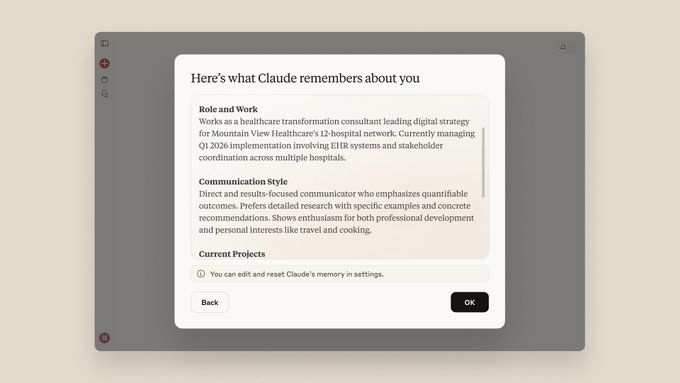
Anthropic's Memory feature is the real answer to cross-session recall. When Claude thinks it something worth remembering, it asks for your permission and saves it. Then in future sessions, it pulls up those saved memories automatically.
Here's what Memory does well:
- Stores personal facts you've told Claude to remember
- Retains your communication preferences and style
- Remembers project details and context across sessions
- Saves corrections so it doesn't repeat mistakes
The catch? There are hard limits. Per account you get 130 memory slots for personal memories, 5 memory slots per project (up to 20 project memories per account).
Custom Instructions have their own small allotment: a 1,000-character slot, up to 50 per account. For most people, these limits are more than enough. For power users juggling many projects, you might feel the squeeze.
Decision Tree: Does Claude Remember in YOUR Situation?
Now let's get specific. The answer to "does Claude remember conversations" changes based on your exact setup. Walk through the branches below to find your situation.
Branch 1: You're using Claude Free or Pro on the web/app
Most readers will land here. If you're using the claude.ai web interface or the mobile app, your experience depends on your plan and whether Memory is turned on.
| Situation | Within one conversation | Across new conversations |
|---|---|---|
| Free plan | Full context (200K tokens) | Nothing remembered |
| Pro/Max, Memory OFF | Full context (200K tokens) | Nothing remembered |
| Pro/Max, Memory ON | Full context (200K tokens) | Saved memories recalled automatically |
If you're on the free tier, there's no way around it. You're starting fresh every time. Your best workaround is setting up Custom Instructions (available on free plans) with key context about yourself and your preferences.
It's not perfect, but it's something.
For Pro and Max subscribers, the Memory feature is available but not always enabled by default. You'll need to check your settings.
Branch 2: You're using Claude Projects
Projects are Anthropic's way of organizing related conversations into workspaces. Each project gets its own 5 memory slots, which Claude uses to remember context that's relevant to that specific project.
Here's how the math works:
- 5 memory slots per project
- 20 project memories total per account (so roughly 4 projects max with full memory usage)
- These are separate from your 130 personal memory slots
A practical example: imagine you have a project called "Q4 Marketing Campaign" and another called "Python API Development." Each gets its own set of 5 memories. Claude won't mix up your marketing strategy notes with your code architecture decisions. It's a clean separation that actually works well in practice.
The downside? If you're someone who needs dense context across many active projects, 5 slots per project can feel tight. You'll need to be strategic about what you ask Claude to remember.
Branch 3: You're using the Claude API
If you're a developer building on the Claude API, pay close attention. The API is stateless by default. Zero memory. None.
Every API call is independent, and Claude has no built-in mechanism to recall what happened in a previous call. Per Anthropic's documentation, conversation logs are not retained without explicit configuration.
This is by design. API workloads are typically server-side, and holding conversation state would create security and scaling headaches. So if you need memory in your application, you have to build it yourself.
Common approaches include:
- Passing full conversation history with each API call
- Storing key facts in your own database and injecting them into prompts
- Using prompt caching to reduce costs on repeated context
It's extra work, but it gives you full control over what's remembered and what's forgotten. For enterprise applications with strict data requirements, this is often the preferred path.
Branch 4: You're on Claude Enterprise or Team
Enterprise and Team plans add an organizational layer to everything we've talked about above. Org admins configure data retention policies, which means your company's settings directly affect what Claude remembers and for how long.
Key differences at the enterprise level:
- Admins can set conversation log retention windows
- Memory features may be disabled org-wide for compliance reasons
- Team members share project memory spaces within the organization
- Data isolation policies ensure one team can't access another's memories
If you're using Claude through your workplace, the honest answer is: ask your IT admin. The behavior might be different from what you experience on a personal account. Organizations in regulated industries often disable memory features entirely to avoid accidental data leaks.
How to Enable and Manage Claude's Memory
Alright, so you want Memory turned on. Here's exactly how to set it up and manage it.
Turning on Memory in settings
- Log into your Claude.ai account
- Navigate to Settings
- Look for the Memory or Personalization section (Anthropic has moved this around slightly over time)
- Toggle Memory on
On mobile apps, the process is similar. Go to your account settings and look for the Memory toggle. Make sure you're on a paid plan, because this option simply won't appear for free-tier users.
A couple of things to keep in mind:
- Claude doesn't automatically save everything. It decides what's worth remembering and asks your permission
- You can review and delete memories at any time
- Memory operates at the account level, not per-device
What Claude chooses to remember automatically
Claude is selective. It won't memorize every sentence you say. Instead, it looks for specific signals that something is worth keeping across sessions.
Our research suggests it pays attention to:
- Personal details: your name, role, team, preferences
- Corrections: when you tell it it got something wrong
- Explicit requests: when you say "remember that I prefer X"
- Project context: deadlines, goals, specific requirements you've shared
It generally does not automatically remember:
- Raw data or long documents you've uploaded
- Conversations that don't contain clear personal signals
- Sensitive information like passwords (and you shouldn't share those anyway)
If to remember something specific, just tell it. Say "remember that I'm working on a React Native app with TypeScript" and Claude will save it. It's that straightforward.
How to view, edit, and delete saved memories
Managing your stored memories is simple once you know where to look.
- Viewing: Go to your account settings and look for "Manage memories" or a similar option. You'll see a list of everything Claude has saved
- Editing: Click on any memory to modify it directly
- Deleting: Select the memory and choose delete. You can remove individual memories or clear everything
A practical tip: audit your memories every few weeks. Claude sometimes saves things that seem relevant in the moment but become outdated fast. Old project details, changed preferences.
Cleaning house keeps your experience sharp.
Setting up Custom Instructions (persistent across sessions)
Custom Instructions are a lightweight alternative (or supplement) to Memory. They're available on all plans including free, and they apply to every conversation automatically.
To set them up:
- Go to Settings
- Find Custom Instructions or "How would you like Claude to respond?"
- Write your instructions, keep them clear and concise
Good Custom Instructions examples:
- "I'm a marketing manager at a B2B SaaS company. Write for that audience."
- "Always respond in British English. Skip emoji."
- "My project deadline is March 15. Prioritize speed over perfection."
Custom Instructions persist everywhere: web, mobile, every new chat. They're the single best free tool for getting consistent behavior out of Claude without needing the Memory feature.
Using Custom Instructions alongside Memory effectively
Here's a pattern that works well in practice. Use Custom Instructions for stable, unchanging facts about yourself. Use Memory for dynamic, project-specific context that evolves over time.
Think of Custom Instructions as your profile and Memory as your notebook. One doesn't replace the other, they complement each other.
A practical setup might look like: your Custom Instructions say "I'm Sarah, I write technical documentation for developer tools." Your Memory slots hold things like "the API docs are due Friday" or "the new feature is called StreamParse." Together, Claude gets both the constant and the changing context it needs.
What Claude Remembers vs. What It Doesn't
Let's get specific about what actually gets saved and what doesn't. Because there are some surprises here.
Claude CAN remember (with Memory enabled)
- Personal facts: Your name, role, team, preferences
- Corrections: When you tell it "no, that's wrong, the correct approach is…"
- Explicit requests: When you say "remember that I prefer concise responses"
- Communication style: Tone, formality level, formatting preferences
- Project context: Deadlines, goals, team members, specific requirements
- Custom Instructions: Always active across every session regardless of Memory settings
Claude CANNOT remember
- Raw uploaded files: PDFs, spreadsheets, code files you share in a session. They're visible during that chat but not retained
- Conversations without Memory: Every new chat is blank slate territory
- Fine details beyond saved memories: If it didn't make the cut into a memory slot, it's gone
- Cross-device conversations without sync: Memory syncs to your account, but session history doesn't
- Anything on free-tier accounts without Custom Instructions: You're starting completely fresh every time
A practical example. Say you upload a 50-page research brief. Claude reads it, summarizes it, discusses it with you.
Great. Then you close the chat. Come back tomorrow.
Without Memory explicitly save the key points of that brief, Claude has zero recall of it. The file itself is gone from Claude's awareness entirely.
This catches people off guard more than anything else. Uploading a file feels like you're "giving it" to Claude permanently. You're not.
You're lending it for the duration of one conversation.
Common Mistakes People Make
After reviewing community feedback and support threads, these are the most frequent issues people run into.
Assuming conversation history equals memory across sessions
This is the number one mistake. Being mid-conversation and assuming it'll all be there tomorrow. It won't be, not without Memory enabled.
Forgetting to check if Memory is enabled
Many paid users don't realize Memory isn't always on by default. They use Claude for weeks, then wonder why it doesn't know their name.
Running out of memory slots
The 130-memory limit sounds generous until you're deep into multiple projects. Suddenly you're managing memories like they're precious real estate. Which, in a way, they are.
Not realizing uploaded files don't persist
As we mentioned above, this one bites people repeatedly. Don't rely on Claude retaining document content across sessions.
Confusing Custom Instructions with Memory
Custom Instructions are a static set of directives. Memory is dynamic, evolving context. They work together, but they aren't the same thing.
Expecting the API to remember without building it
Developers sometimes assume the API will behave like the web app. It won't. Stateless means stateless.
You build the memory layer or there is none.
Claude Memory Limits at a Glance
Here's the full breakdown across all plans and products.
| Plan | Memory Available? | Key Limits |
|---|---|---|
| Free | No | Context only within session, Custom Instructions persist |
| Pro | Yes | 130 personal slots, 5 per project (20 total) |
| Max | Yes | Same limits as Pro, higher usage quotas |
| Team | Yes | 130 per user, admin-managed |
| Enterprise | Yes | Admin-configured retention policies |
| API | No | Stateless by design, zero default retention |
Privacy and Your Conversation Data
This section matters more than people realize. What happens to your conversations and the memories Claude stores?
Per Anthropic's documentation, your conversation data is not used for model training by default. That's a meaningful distinction. What you tell Claude isn't feeding back into the model to train future versions.
Your memories stay isolated within your organization's account.
For Enterprise and Team plans, admins can configure data retention policies. This determines how long conversation logs are stored on Anthropic's servers. Organizations in healthcare, finance, or government often set aggressive deletion windows to stay compliant with regulations.
A few privacy considerations worth noting:
- Memory data is encrypted in transit and at rest
- Account-level isolation prevents cross-account access
- You can delete individual memories or clear all of them
- Anthropic publishes transparency reports on data requests
If you're in the EU or handling GDPR-regulated data, the Memory feature stores personal data by definition. Make sure your use of it aligns with your data processing agreements. When in doubt, consult your organization's legal team before relying on Memory for anything containing personal data.
Frequently Asked Questions
Does Claude remember my previous conversations?
Within a single conversation thread, yes. Across different conversations, only if you have Memory enabled on a paid plan. Otherwise, every new chat starts fresh.
Is Claude's Memory feature available on the free plan
No. Memory requires a paid subscription (Pro, Max, Team, or Enterprise). Free users only get Custom Instructions as a cross-session persistence tool.
How many memories can Claude store?
Per account, you get 130 personal memory slots, 5 memory slots per project (capped at 20 project memories per account), and Custom Instructions with a 1,000-character limit (up to 50 per account).
Can I delete memories Claude has saved?
Yes. Go to Settings, find "Manage Memories," and delete individual entries. You can clear all memories at once if needed.
Does Claude remember files I upload?
No. File contents are visible during the current session but are not retained afterward. If you need Claude to recall information from a file, ask it to save the key points into Memory while you're still in that conversation.
How does Claude Memory compare to ChatGPT's memory?
Both work similarly, they store small pieces of information across sessions. The implementation details and limits differ, but the core concept is the same. Claude's approach is slightly more transparent about what's saved and what isn't.

Similar Posts





















