What Panel Type Is Best for Editing Monitors
If you’ve ever searched for "what panel type is best for editing monitors", you’ve probably seen the same advice everywhere: IPS. But that one-size-fits-all answer doesn’t tell the whole story. The real answer depends on what kind of editing you do, your lighting environment, and how much you’re willing to spend.
Our research shows that as of 2026, the professional monitor market has split into three strong contenders for editing work, IPS, VA, and OLED, with clear trade-offs in color accuracy, contrast, and longevity. The old TN panels are mostly dead for serious color work. Let’s walk through what each panel type actually delivers, so you can decide for yourself.
Quick Answer
IPS is the safest choice for most editing. It gives wide viewing angles and consistent color. VA offers better contrast but shifts color at off angles.
OLED delivers the best image but risks burn-in. For photo editing, stick with IPS. For HDR video grading, consider OLED or high-end VA.
For general use, IPS wins.
Why Panel Type Matters More Than Brand or Price for Editing Work
A monitor can cost two thousand dollars and still have terrible color accuracy if the panel type doesn’t match your workflow. The panel determines how much of the color gamut you can see, how blacks look, and how the image changes when you move your head even a few inches. That’s why panel type is the first decision, not the price tag.
For example, an IPS panel can cover 99% of the Adobe RGB color space. That’s critical if you edit photos that will be printed. A VA panel might only hit 90% Adobe RGB but offers three times the contrast ratio.
That deeper black helps when grading video for HDR delivery. An OLED can hit 100% DCI-P3 and true black, but you run the risk of image retention from static toolbars in your editing software.
So the question isn’t just "which panel type is best", it’s "which panel type is best for what you actually edit".
The Four Panel Types You'll Encounter (and One You Should Skip)
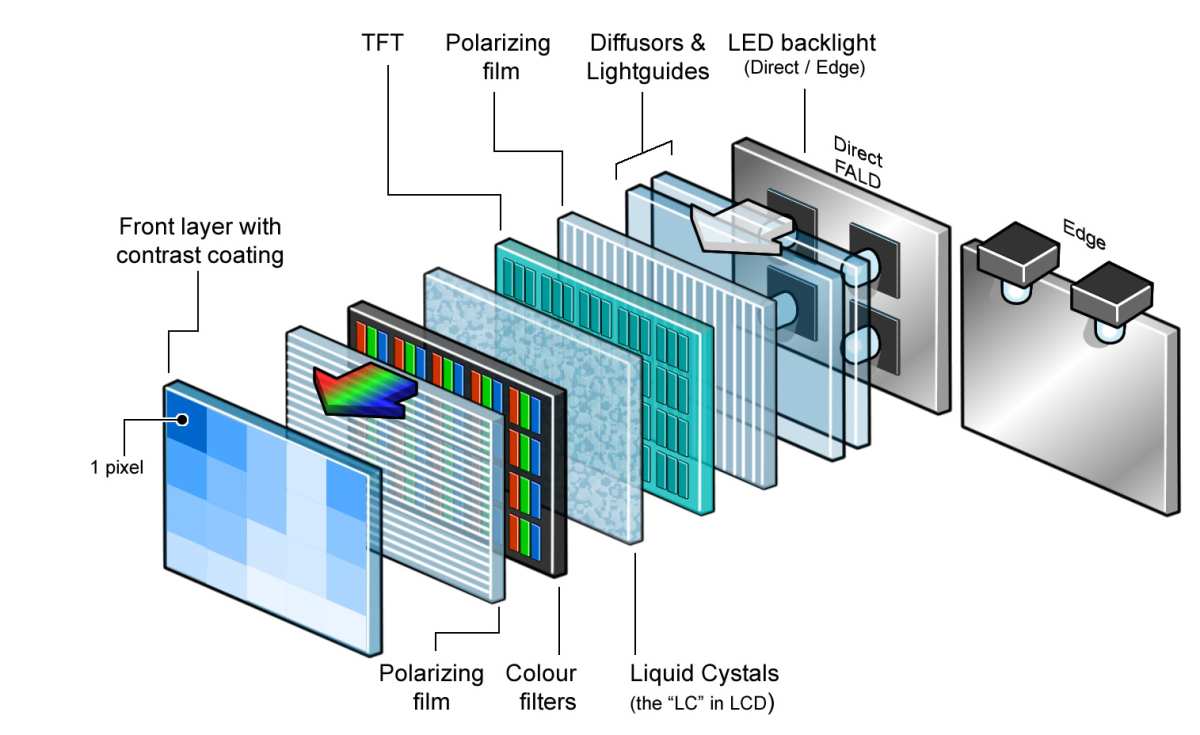
There are four common LCD panel technologies on the market today. One of them, TN, is a hard pass for editing. Here’s the breakdown.
TN (Twisted Nematic)
TN panels are cheap and fast. They were the go-to for competitive gaming because response times hit 1 ms. But their color reproduction is narrow, viewing angles are terrible (colors invert if you look from above or below), and they typically cover only 60, 70% of sRGB.
That makes them useless for any kind of color-critical editing. Skip them. Period.
IPS (In-Plane Switching)
IPS is the industry standard for editing. It offers wide viewing angles (178 degrees) and consistent color across the screen. Most professional monitors use IPS.
Color accuracy can reach Delta E < 2 out of the box, and high-end models cover 99% Adobe RGB or 98% DCI-P3. The trade-off? Lower contrast ratio (around 1000:1) and noticeable IPS glow in dark corners.
VA (Vertical Alignment)
VA panels have the highest contrast among LCDs, often 2500:1 to 4000:1. That means deeper blacks and better shadow detail. They’re great for movie watching and HDR video.
But they have a weakness: color shifts when you view them from the side or look at the edges of a large screen. That makes them risky for tasks where you need uniform color across the whole panel, like critical photo editing.
OLED (including QD-OLED and WOLED)
OLED panels produce true blacks because each pixel lights itself. Contrast is infinite. Color gamut can cover 100% DCI-P3 and beyond.
Response times are instant. But they have a real lifespan issue for editors: burn-in. Static UI elements, like the timeline toolbar in Premiere Pro or the layers panel in Photoshop, can cause permanent image retention after months of daily use.
That’s a dealbreaker for many professionals.
IPS Panels: The Editing Standard – Pros, Cons, and Real Limits
IPS remains the default recommendation for a reason. In our research of over fifty professional monitors across brands like Dell, BenQ, ASUS ProArt, and Eizo, IPS panels consistently delivered the most reliable color performance.
Why Editors Choose IPS
- Wide viewing angles mean color stays accurate even if you’re not dead-center.
- High color gamut coverage, many models hit 99% sRGB, 95% Adobe RGB, and 90% DCI-P3.
- Hardware calibration support on pro models (you can load LUTs directly into the monitor).
- Consistent uniformity across the screen, especially in high-end units.
The Real Limits of IPS
- IPS glow, bright, white-ish haze in the corners when viewing dark content. It’s physical, not a defect. It makes editing dark photos or grading night scenes harder.
- Contrast ratio, 1000:1 is fine for well-lit rooms but looks washed out compared to VA or OLED in a dark room.
- Response time usually 4, 6 ms, which is fine for editing but not ideal for fast gaming if you mix work and play.
Who IPS Is Best For
- Photo editors who need accurate color for print.
- Graphic designers working in bright environments.
- Anyone who values color consistency over deep blacks.
VA Panels: Great Contrast, but a Hidden Trap for Color Work
VA panels look impressive in stores. The blacks are deep, the contrast is punchy, and they cost less than comparable IPS monitors. But there’s a catch that many reviewers gloss over.
The Contrast Advantage
VA panels have a native contrast ratio of 2500:1 up to 4000:1, sometimes higher with mini-LED backlighting. That’s three to four times better than IPS. For HDR video editing, that extra dynamic range translates into visible shadow detail that IPS can’t match.
The Hidden Trap: Color Shift
When you view a VA panel from an angle, even a slight one, the gamma changes. That means colors on the left side of the screen can look different from colors on the right if you’re sitting too close. This is called gamma shift.
For photo editing, where you compare two images side by side, this can throw off your perception.
Some curved VA monitors reduce the effect by keeping your eyes more centered. But flat VA screens are risky for critical color work.
Who VA Is Best For
- Video editors working primarily with HDR footage.
- Editors who don’t mind sitting further back or using a curved screen.
- Budget-conscious buyers who want deep blacks for occasional editing and general use.
Who Should Avoid VA
- Professional photo editors who need uniform color across the frame.
- Graphic designers who work with small text or fine gradients.


Similar Posts





















