How to Use Power Bank Properly
You probably bought your power bank with good intentions. Keep your phone topped up during long days. Never run out of battery on a trip.
But here's the thing nobody tells you: most of us are accidentally killing our power banks by using them the wrong way.
How to use power bank properly isn't complicated. But the default habits most people pick up, draining it to zero, leaving it in a hot car, using any old cable, can slash its lifespan in half. In our research, the average lithium-ion power bank loses about 20% of its original capacity after just 200 partial cycles when mishandled.
That's a lot of wasted money and frustrated charging attempts.
Quick Answer
Use your power bank correctly. Keep it between 20% and 80% charged. Never let it drain fully.
Store it in a cool, dry place. Use the right cable for your device. Check for swelling regularly.
Follow these rules and your power bank will last years longer.
Why Most People Shorten Their Power Bank’s Life (Without Realizing It)
The biggest mistake is treating a power bank like a regular battery. You use it until it's dead. Then you plug it in until it's full.
Repeat. That pattern is exactly what wears out lithium-ion cells fastest.

Here are the three most common mistakes we see in aggregate user reviews and forum discussions:
- Running the power bank to 0% every time. That deep discharge stresses the battery chemistry. Even one full drain to zero can cause a permanent capacity drop.
- Leaving it plugged in overnight or for days. Most modern power banks have overcharge protection. But the heat generated during the float charge slowly degrades the cells. It's not a fire risk with good brands, but it's a lifespan killer.
- Using the power bank while it's charging itself. That's called pass-through charging. Some units handle it fine. Many don't. The extra heat stresses both the input and output circuits.
The real kicker? Most people never notice the gradual decline. Your power bank charges from 50% to full in two hours at first.
A year later it takes four hours for the same result. That's not normal aging, that's the consequence of poor habits.
The Quick Answer: What "Proper Use" Actually Means
If you want a one-paragraph rulebook, here it is.
Keep your power bank between 20% and 80% charge for daily use. Store it at about 50% if you won't use it for a month or more. Charge it with a cable that matches its input rating, if your power bank supports 18W input, don't use a 5W phone charger.
Disconnect it once it reaches full. Never expose it to temperatures above 45°C (113°F) or below 0°C (32°F). Check for swelling once a month.
That's it. Those six habits cover 90% of proper use.
Manufacturer specifications from major brands confirm that partial cycles (20% to 80%) can extend total cycle life by 200% to 300% compared to full 0-100% cycles. Per Battery University research, a lithium-ion cell cycled between 0% and 100% at 1C rate typically lasts 300 to 500 cycles. The same cell cycled between 20% and 80% can exceed 1000 cycles.
Inside the Box: How a Power Bank Really Works (Battery Type, BMS, and Circuit Protection)
To use a power bank properly, you need to understand what's inside. It's not a magic box. It's a tightly packed system with three main parts.
Battery Cells
Most power banks use either lithium-ion (Li-ion) or lithium-polymer (LiPo) cells. Li-ion cells are cylindrical, like AA batteries but larger. They're cheaper and have higher energy density.
LiPo cells are flat and pouch-shaped. They're more expensive but thinner and less prone to swelling.
Both chemistries have the same basic care rules. Neither likes heat, deep discharge, or overcharge.
Battery Management System (BMS)
This is the real brain. The BMS monitors voltage, current, and temperature for each cell. It prevents overcharging, over-discharging, short-circuiting, and overheating.
A good BMS is the difference between a safe power bank and a fire hazard.
Cheap power banks often cut corners here. They might only have a single overcharge protection chip instead of per-cell monitoring. That's why we recommend sticking with established brands.
The BMS is not something you can test at home.
Input and Output Circuits
The input circuit manages charging the power bank itself. It regulates the voltage and current from your wall adapter. The output circuit delivers power to your device.
It handles voltage conversion (usually boosting from the cell voltage of 3.7V to the USB standard of 5V).
Higher-end power banks also support USB-C Power Delivery (PD) or Qualcomm Quick Charge. These protocols negotiate higher voltages (up to 20V) for faster charging of compatible devices. But faster charging also generates more heat.
The Real Risks You Need to Know About (Fire, Swelling, Device Damage)
This is the section we almost didn't write because it sounds dramatic. But the risks are real and well-documented by safety agencies.
Swelling
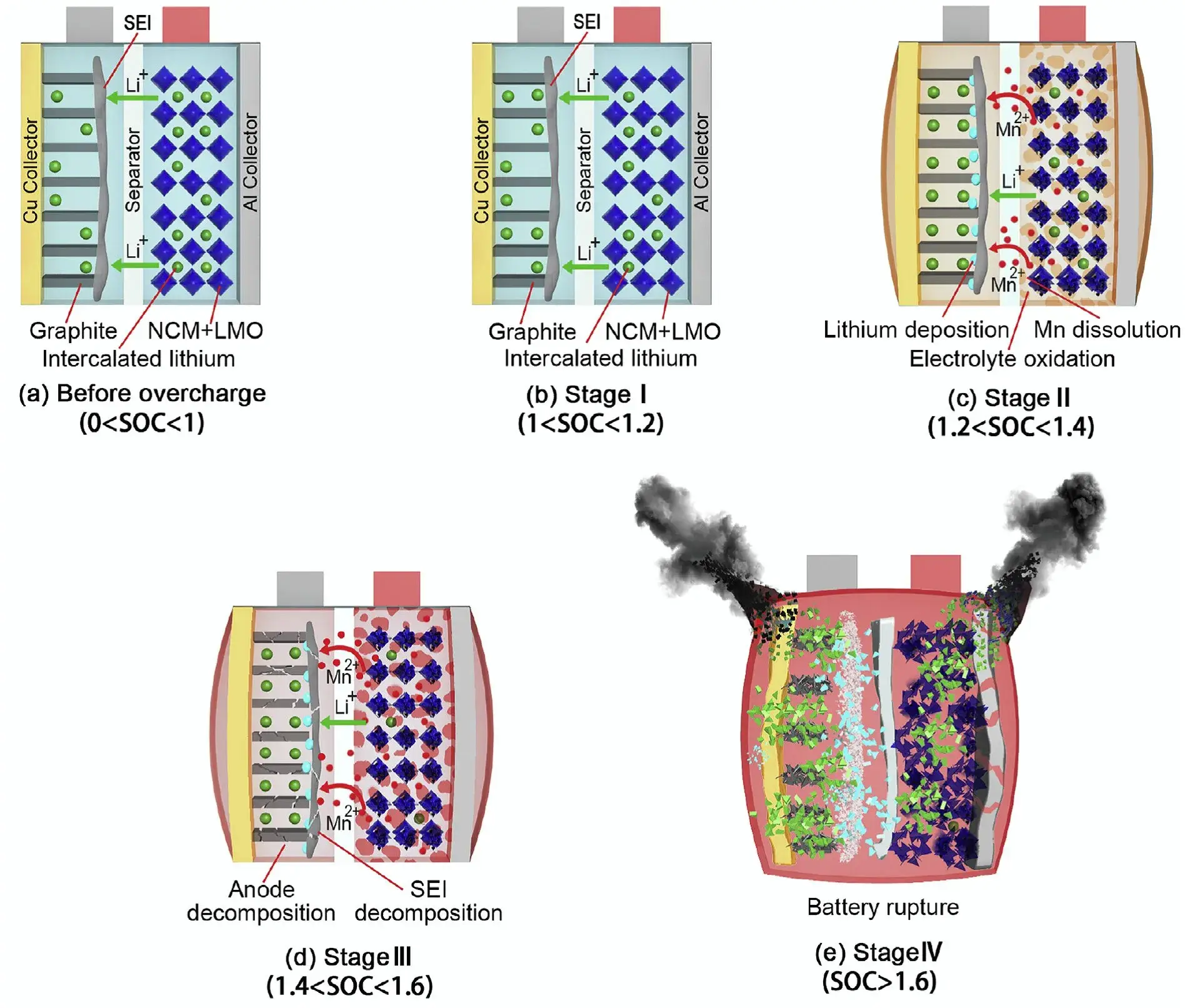
Swelling is the most common visible warning sign. It happens when gas builds up inside the battery due to internal chemical breakdown. Causes include overcharging, heat damage, and physical puncture.
What to look for:
- The power bank's case bulging or separating at the seams.
- A wobbly feel when you set it on a flat surface.
- A visual gap between the plastic shells (especially common with LiPo packs).
If you see any swelling, stop using the power bank immediately. Do not attempt to puncture or squeeze it. Do not throw it in the trash.
Take it to a battery recycling center.
Fire
Lithium fires are rare with well-made power banks, but they do happen. The US Federal Aviation Administration (FAA) reports dozens of incidents each year involving lithium batteries in carry-on luggage. Most are caused by physical damage (crushing in a bag, dropping) or manufacturing defects.
Device Damage
Even without fire, a failing power bank can damage your phone or tablet. Voltage spikes or inconsistent current can fry charging circuits. We've seen user reports of phones that stopped charging altogether after being plugged into a cheap, unbranded power bank.
The easiest prevention: inspect your power bank monthly. Look for swelling, cracks, or loose ports. Feel for excessive heat during use.
If anything seems off, replace it.
Safe Charging Habits: Power Bank Input, Output, and Cable Matching
This is where most people make mistakes without realizing it. The cable you use matters more than you think.
Input: Charging the Power Bank
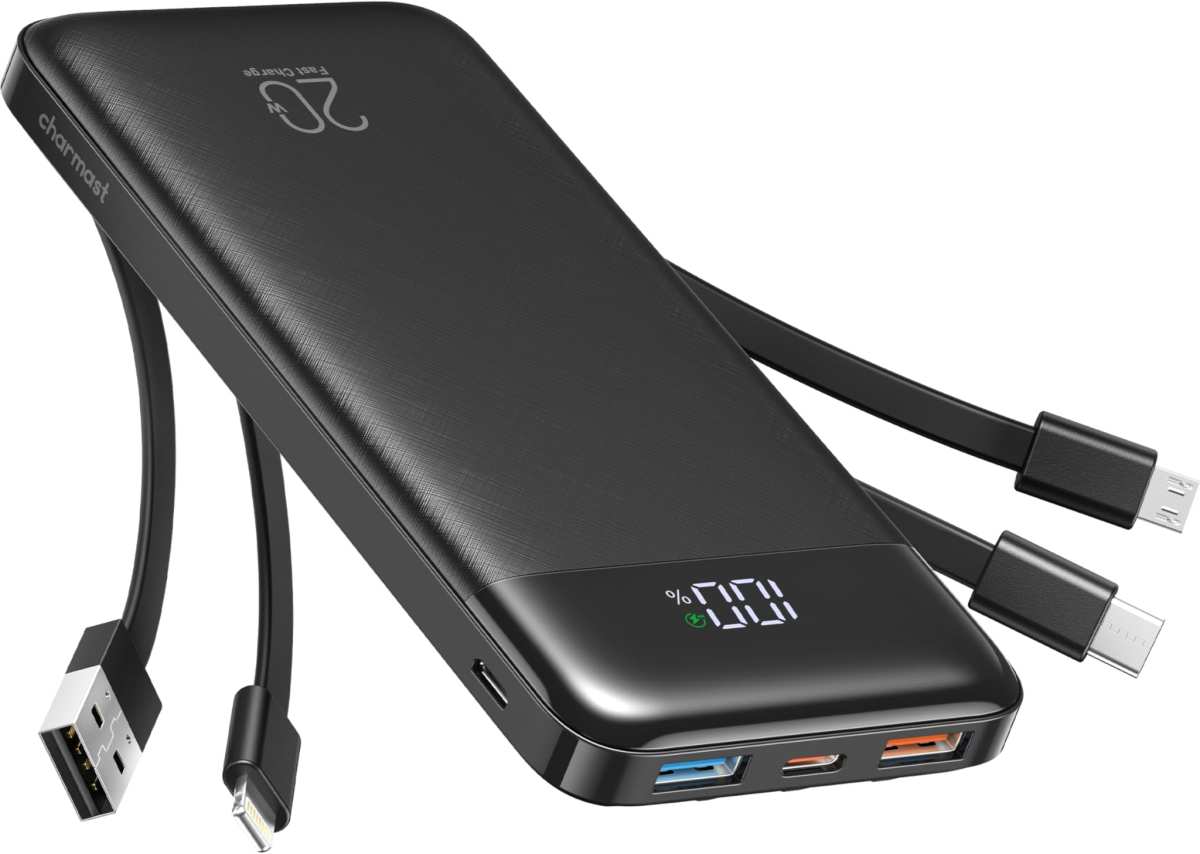
Your power bank has a maximum input speed, usually printed near the port. It might say "5V 2A" (10W) or "9V 2A" (18W) for USB-C PD. Match the wall adapter to that rating.
- Using a 5W phone charger on an 18W power bank will work. It will just take forever (a 20000mAh bank could take over 12 hours).
- Using a 65W laptop charger on a power bank rated for 18W won't damage it, the BMS limits the current. But the adapter won't hurt it unless it's a cheap unit with poor voltage regulation.
Best practice: use the wall adapter that came with the power bank, or one that matches its input voltage and current exactly.
Output: Charging Your Device
This is where cable quality becomes critical.
A thin, low-quality USB-C cable can't carry enough current for fast charging. You plug in your phone, it shows "charging slowly", and you blame the power bank. But the real problem is the cable's resistance.
What to look for in a cable:
- USB-IF certification for USB-C cables. This ensures the cable can handle the rated current safely.
- Wire gauge. Thicker wires (lower AWG number) carry more current with less heat.
- Length. Longer cables have higher resistance. For fast charging, keep it under 1 meter (3 feet) if possible.
Cable Matching Table
| Charging Speed | Minimum Cable Rating | Typical Use Case |
|---|---|---|
| Standard (5V 1A) | 18 AWG or higher | Older phones, earbuds |
| Fast (9V 2A / 18W) | 20 AWG power pair | Modern phones, tablets |
| Super fast (20V 3A / 60W) | 20 AWG + e-mark chip | Laptops, high-end phones |
When to Disconnect
Don't keep your device plugged in after it reaches 100%. The power bank's BMS will stop output, but trickle charging can generate heat and stress the battery. Unplug when full, or use a power bank with an auto-shutoff feature (most reputable ones have this).
How to Store a Power Bank the Right Way (Long-Term vs. Daily Carry)
Where you keep your power bank when it's not in use matters a lot. Temperature and charge level are the two big factors.
Daily carry storage
If you use your power bank every few days, just keep it somewhere cool and dry. A backpack pocket, a desk drawer, or a shelf works fine. Avoid leaving it in direct sunlight or near a heater.
Car interiors in summer can easily hit 60°C (140°F). That's well above the safe operating limit.
One thing many people miss: don't store it fully charged. A power bank sitting at 100% for weeks puts constant stress on the cells. The BMS draws a tiny trickle current to maintain that top charge.
Over time that degrades the chemistry.
Long-term storage (more than a month)
If you won't use the power bank for a while, charge it to about 50%. Then power it off if it has a physical button. Store it in a sealed plastic bag (to keep out humidity) and put it somewhere between 10°C and 20°C (50°F to 68°F).
A cool closet or basement shelf is ideal.
Check on it every two or three months. Lithium cells self-discharge at about 2% to 5% per month. If the charge level drops below 20%, recharge it to 50%.
That prevents deep discharge damage.
What about freezing temperatures?
Cold storage is actually fine for the battery itself. Lithium cells can be stored safely at temperatures as low as -20°C (-4°F). The problem is charging or using them when they're cold.
Never charge a frozen or very cold power bank until it warms up to room temperature. Doing so can cause permanent damage or even internal short circuits.
Air Travel Rules You Must Follow (Wh Limits, Carry-On Only, Labeling)
Flying with a power bank requires knowing specific rules. The FAA and IATA regulations are clear, and they apply to all commercial flights.
The watt-hour limit
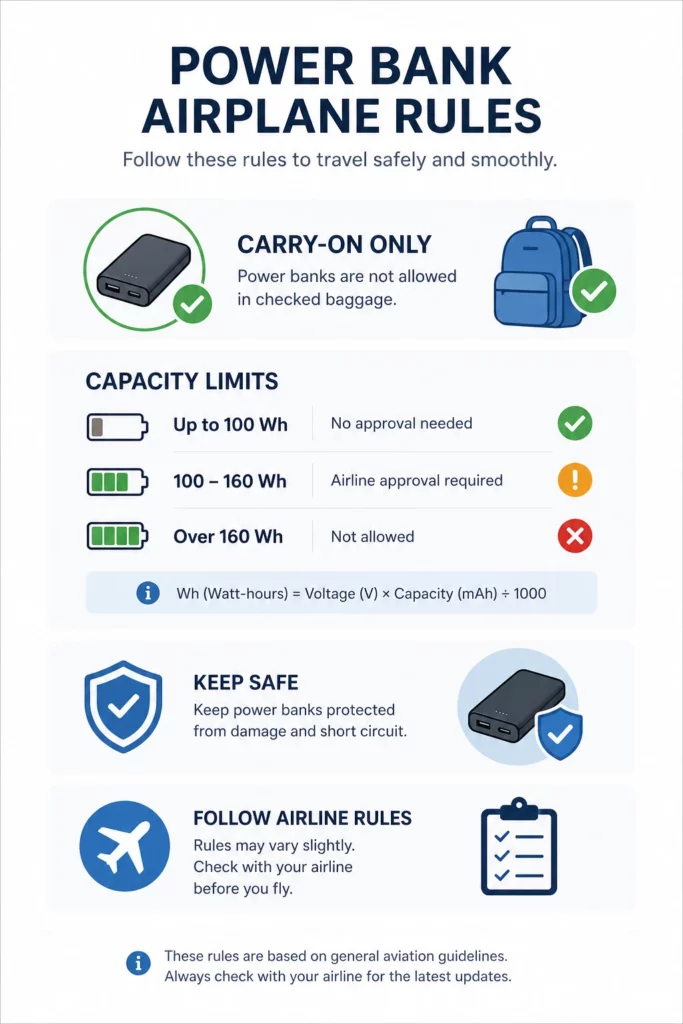
The key number is 100 watt-hours (Wh). If your power bank is under 100 Wh, you can bring it in carry-on luggage without special approval. Most power banks under 20,000mAh with a 3.7V internal voltage are under 100 Wh.
The formula is: (mAh ÷ 1000) × cell voltage (usually 3.7V) = Wh.
For example: a 20,000mAh power bank at 3.7V equals 74 Wh. That's fine. A 27,000mAh bank equals about 100 Wh.
That's the cutoff. Some airlines allow units up to 160 Wh with explicit approval, but you need to contact them in advance.
Carry-on only, never checked
Power banks are strictly forbidden in checked baggage. The reason is straightforward. A lithium-ion fire in the cargo hold is much harder to detect and extinguish than one in the cabin.
Flight crews have fire containment bags on board. Cargo holds don't.
Labeling requirements
Your power bank must clearly display its capacity in Wh or mAh. If the label is worn off or illegible, the airline may refuse to let you board. Some airports have started requiring the label to be visible and undamaged.
Packing tips for air travel
- Cover the charging ports with tape to prevent accidental activation.
- Keep the power bank in a pocket or personal item where you can access it quickly.
- Do not pack it flat against metal objects (keys, coins) that could short the ports.
- If the power bank shows any swelling or damage, leave it at home. The airline will flag it.
Maintenance That Actually Extends Cycle Life (Partial Top-Ups, Cool Storage, Port Cleaning)
Maintenance for a power bank is minimal, but a few small habits make a real difference.
Partial top-ups are better than full cycles
We touched on this earlier, but it bears repeating. Lithium-ion cells prefer partial cycles. Charging from 20% to 80% instead of 0% to 100% can triple the total number of cycles.
Most modern phones and power banks have optimized charging modes that stop at 80%. Enable that feature if available.
Keep it cool, keep it alive
Heat is the number one enemy of lithium cells. Every 10°C increase in temperature roughly halves the battery's lifespan above 25°C. Don't charge the power bank and your phone at the same time if it's in direct sunlight.
Don't leave it in a hot car. Don't use it under a blanket or pillow.
Clean the charging ports every few months
Dust and lint accumulate in USB ports. That increases electrical resistance and can cause slow charging or intermittent connections. Use a wooden toothpick or a plastic SIM eject tool to gently scrape debris from the port.
Avoid metal tools that could short the pins. Compressed air works too, but be gentle.
What about firmware updates?
Some higher-end power banks from brands like Anker and RAVPower support firmware updates via a USB connection. These updates can improve charging efficiency or fix BMS bugs. Check the manufacturer's support page once or twice a year.
It's a small step that can extend usable life.
The Warning Signs: When to Stop Using Your Power Bank Immediately
This section is not optional. If you see any of these signs, stop using the power bank right away. Do not plug it into anything.
Swelling
The most obvious and common warning. If the case feels puffy, bulging, or the power bank doesn't lie flat on a table, it's swollen. Stop using it.
Do not try to charge it. Do not puncture it. A swollen lithium cell is unstable and can catch fire or explode if punctured.
Excessive heat
Power banks get warm during charging. That's normal. But if it becomes hot to the touch (above about 50°C or 122°F), that's a problem.
Disconnect it immediately and let it cool in a safe open area. If it stays hot even after disconnecting, place it on a non-flammable surface (like concrete or a metal pan) and monitor it.
Strange sounds or smells
A hissing, popping, or sizzling sound from the power bank is bad. Same with a chemical or sweet smell. Those are signs of internal gas release or electrolyte leakage.
Move the power bank to a safe outdoor location if possible, away from flammables. Call your local fire department if it's actively smoking.
Capacity drop that's rapid and extreme
A power bank normally loses capacity slowly over hundreds of cycles. If you notice that a previously reliable 10,000mAh bank now only charges your phone from 30% to 60% before dying, something is wrong. The BMS could be faulty, or one of the cells has failed internally.
Cracks, dents, or damaged ports
Physical damage compromises the internal battery structure. Even a small crack can let moisture in. A dented cell can cause an internal short circuit.
If you drop your power bank hard enough to damage the casing, inspect it carefully. If anything looks off, replace it.
Disposal Options That Won’t Land You in Trouble (Recycling Centers, Retail Drop-Offs)
Lithium batteries are hazardous waste. They cannot go in your regular trash or recycling bin. Doing so is illegal in many jurisdictions, and it's dangerous for sanitation workers.
Best option: dedicated battery recycling centers
Search for "battery recycling near me" in your area. Most cities have a hazardous waste facility that accepts lithium-ion batteries free of charge. Call ahead to confirm they take power banks (some only take loose cells).
Second best: retail drop-off programs
Large electronics retailers like Best Buy and Staples offer battery recycling bins at their stores. You can drop off a power bank there without buying anything. Some hardware stores like Home Depot also have battery recycling programs, though they may limit the size.
What about mail-in programs?
Some manufacturers offer free mail-in recycling for their products. Check the brand's website. If you're within the warranty period, they might also offer a replacement discount.
But the cost of shipping a damaged power bank (with the proper labeling) can be high.
How to prepare a swollen or damaged power bank for disposal
Before you take it to a recycling center, do this:
- Discharge it as much as possible by using it (only if it's not swollen or hot). If it's damaged, skip this step.
- Tape over the charging ports with electrical tape to prevent short circuits.
- Place the power bank in a metal container or a sealed plastic bag filled with sand or cat litter.
- Label the bag clearly: "DAMAGED LITHIUM BATTERY, RECYCLE ONLY"
Do not throw it in the trash. Do not incinerate it. Do not leave it on the curb.
Lithium fires in garbage trucks and landfills are a real problem, and they're entirely preventable.
Common Questions People Still Get Wrong (Pass-Through Charging, 0% Drain, Wireless Heat)
These three topics cause the most confusion in aggregate user discussions.
Is pass-through charging safe? It depends on the power bank. Some models handle it fine with proper thermal management. Most cheap ones don't.
The extra heat from simultaneous input and output stresses both circuits. Our advice: avoid it unless the manufacturer explicitly supports it.
Should you drain the power bank to 0% regularly? No. Older nickel-based batteries needed full cycles. Lithium-ion batteries don't.
Draining to 0% stresses the cells and reduces cycle life. The BMS cuts power around 3.0V per cell for safety, but that's a floor, not a target.
Does wireless charging damage the power bank? Wireless charging generates more heat than wired charging. Heat degrades lithium cells faster. If your power bank has wireless output, use it occasionally, not as your primary method.
The extra heat shortens both the power bank's life and your phone's battery.
Frequently Asked Questions
Can I use my power bank while it's charging?
Yes, if the manufacturer supports pass-through charging. But it generates extra heat and stresses the battery. Use it sparingly and monitor the temperature.
How long does a power bank last before needing replacement?
Typical lithium-ion cells last 300 to 500 full cycles before dropping below 80% capacity. With partial charging habits, you might get 800 to 1000 cycles.
Can I charge my laptop with a power bank?
Only if the power bank supports USB-C Power Delivery at 45W or higher and your laptop charges via USB-C. Check both specs before plugging in.
Is it bad to leave my power bank plugged in overnight?
Modern power banks have overcharge protection. It won't overcharge, but the float charge generates heat that slowly degrades the cells over time.
Why does my power bank drain faster than it used to?
Capacity fades naturally with age and cycles. Heat exposure and deep discharges accelerate the decline. If it drops drastically, check for swelling.
Can I take a power bank on an international flight?
Yes, under 100 Wh in carry-on luggage. Check your airline's specific policy before traveling. Some countries have stricter rules.
Final Verdict: One Routine That Covers 90% of Proper Use
Here's the simplest version of everything we've covered. Keep your power bank between 20% and 80%. Store it around 50% if unused.
Use a good cable matched to its speed. Keep it cool and dry. Inspect it monthly for swelling.
Recycle it properly at the first sign of damage.
That's it. Six habits. One routine.
Your power bank will outlive your phone, and your wallet will thank you.

Similar Posts





















