Can Outdoor Sound Box Connect to Power Bank
So you've got a big outdoor party coming up, and you're wondering: can outdoor sound box connect to power bank? It's a smart question. You want to keep the music going without hunting for a wall plug or dragging a generator out.
Maybe you're camping, tailgating, or just have the nearest outlet fifty feet away.
In our research, we found that most outdoor Bluetooth speakers need between 5V and 24V DC input. A standard USB power bank outputs 5V through its USB-A port. That's a common mismatch.
As of 2026, many newer power banks support USB-C Power Delivery, which can deliver 9V, 12V, or even 20V. That changes things, but only if your speaker's input matches. Let's walk through the three things you need to check before you plug anything in.
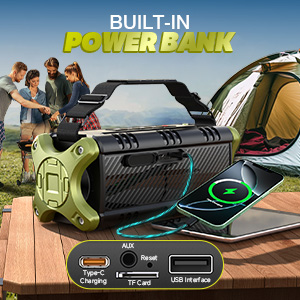
Quick Answer
Yes, you can. But it depends on three things: voltage, current, and the connector. Your speaker needs the right voltage.
Your power bank must deliver enough current. The plug has to fit correctly. Most outdoor sound boxes run on 12V DC.
A standard power bank outputs 5V. That's the main hurdle. You can overcome it with the right cable or adapter.
The Core Problem – Voltage, Current, and Connectors
Here's why this isn't as simple as plugging in a USB cable. Your outdoor sound box is designed to run on a specific DC voltage. That's usually printed right on the back panel or in the manual.
Common values are 5V, 9V, 12V, or 18V. If you supply the wrong voltage, you risk damaging the speaker's internal circuits.
Current is the second piece of the puzzle. Your power bank needs to deliver enough amps to run the speaker at full volume. If it can't supply enough current, the speaker might shut down or distort.
You might also notice excessive heat buildup in the cable or power bank.
The connector itself is the third hurdle. It's not just about the plug size. The polarity matters too.
Most speakers use a barrel connector with center positive wiring. But not all. Get the polarity wrong, and you can fry the speaker instantly.
Let's look at these one at a time.

Step 1: Find Your Speaker's Input Voltage and Current
First things first: grab your speaker's manual. Or look at the label on the back or bottom of the unit. You're looking for a line that says "DC IN" or "Power Input".
It should show a voltage like 12V or 15V and a current rating like 2A or 3A.
If you can't find the manual, search online for the model number. Most manufacturers post spec sheets on their website. You can also check the label near the power port.
It's usually small text, but it's there.
Here's a quick reference table of common outdoor speaker power requirements:
| Speaker Type | Typical Voltage | Typical Current | Connector Type |
|---|---|---|---|
| Small portable (10–20W) | 5V | 2A | USB-C or micro USB |
| Medium party speaker (30–50W) | 12V | 2–3A | 5.5mm x 2.1mm barrel |
| Large PA speaker (50–100W) | 18V–24V | 3–5A | 5.5mm x 2.5mm barrel |
Write down your speaker's numbers. You'll need them for the next step. If you're not sure about the connectors, look at the manual for details on its wireless features and how to pair it properly.
Step 2: Check Your Power Bank's Output Specs
Now look at your power bank. You need to know what it can output. Turn it over and read the label.
Look for "Output" or "USB Output". Most power banks have multiple ports, each with different ratings.
Here's what you'll typically see on a power bank label:
- USB-A port: 5V / 2.4A (12W max)
- USB-C port: 5V / 3A or 5V / 2.4A (if it's a charging-only port)
- USB-C Power Delivery (PD) port: 5V/3A, 9V/3A, 12V/2.5A, 15V/2A, 20V/1.5A (higher voltages)
If your speaker runs on 5V, you're in luck. Most power banks can power a 5V speaker directly. If your speaker needs 12V or higher, you need a power bank with USB-C PD that can output that voltage.
Many modern power banks can do this. Per the USB-C Power Delivery specification, the power bank and device negotiate voltage before any power flows.
Check the power bank's capacity too. Capacity is measured in milliampere-hours (mAh) or watt-hours (Wh). A 10,000mAh power bank can run a 12V 2A speaker for about 30, 40 minutes at full volume.
A 50,000mAh unit can run it for several hours. If you're building a portable setup for outdoor events, also consider how you'll keep the speaker secure while in transit.
Step 3: Identify the Connector Type and Polarity
This is where most people get stuck. You have the right voltage and enough current, but the plug doesn't fit. Or worse, it fits but the polarity is wrong.
Outdoor sound boxes almost always use a DC barrel connector. The two most common sizes are 5.5mm x 2.1mm and 5.5mm x 2.5mm. The difference is the inner pin diameter.
A 2.1mm plug won't fit snugly into a 2.5mm jack, and vice versa. You can measure the inner diameter with a ruler or calipers.
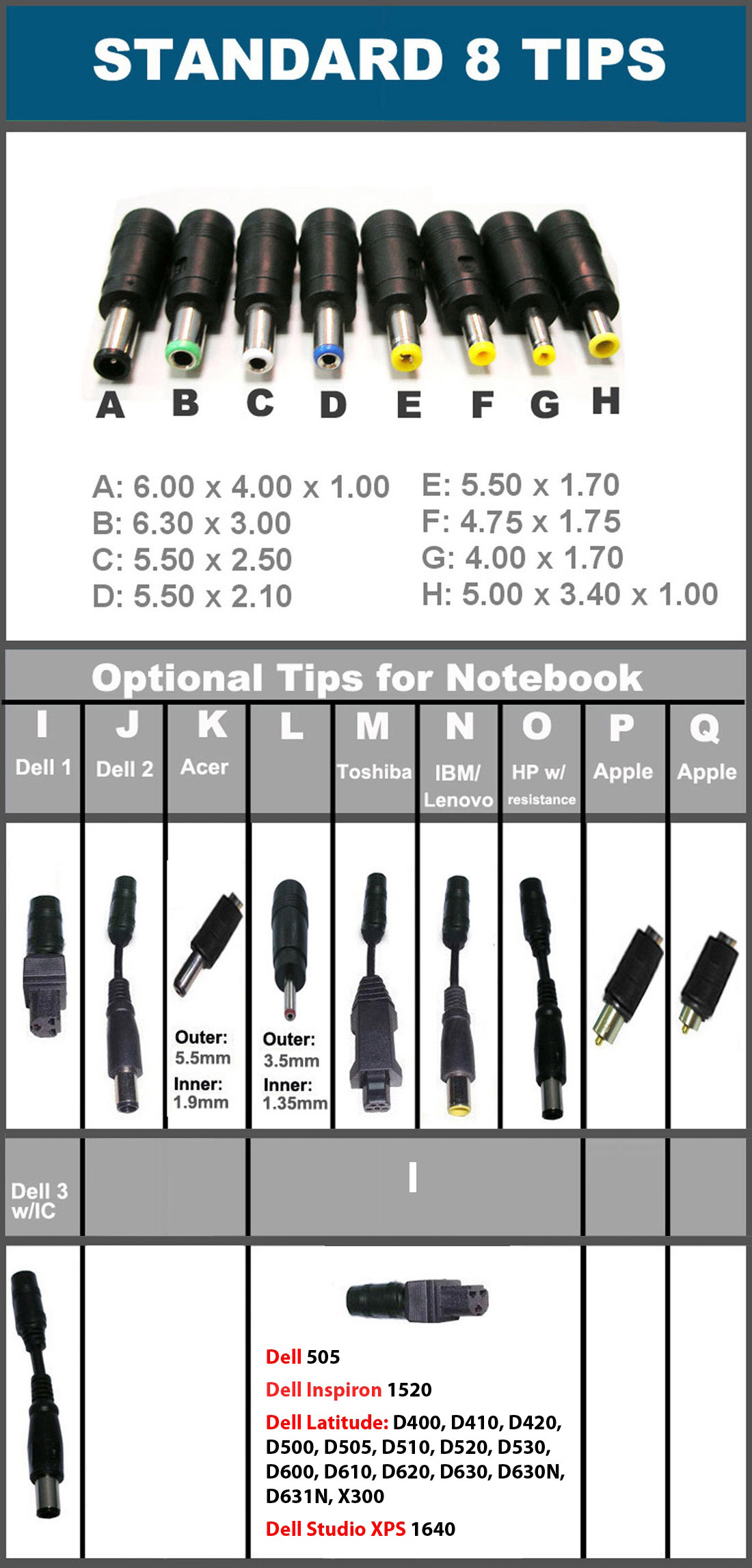
Polarity is just as critical. Most speakers use center positive polarity. That means the center pin is positive and the outer sleeve is negative.
Some older or less common speakers use center negative. If you reverse the polarity, you can damage the speaker's electronics.
How to check: look for a symbol near the power port. It looks like a circle with a dot in the center and plus and minus signs. The dot (center) will be marked with either a plus or minus.
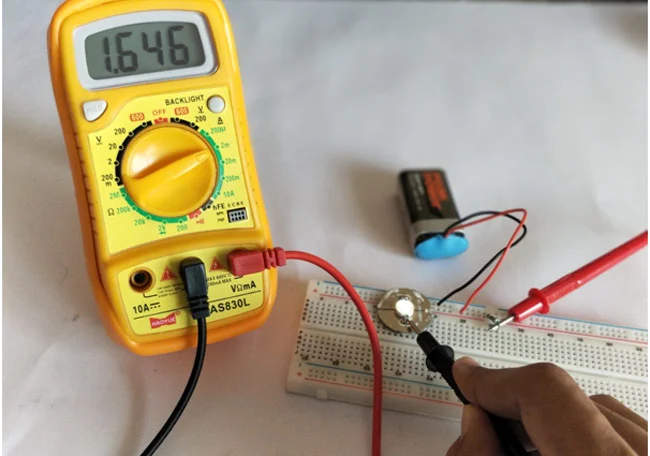
If you can't find the symbol, use a multimeter to confirm. Or check the manual.
If your speaker uses a USB-C port for power, you're in a better position. USB-C handles voltage negotiation automatically. But not all USB-C ports on speakers support power input.
Some are only for data or charging the speaker's internal battery. Check the manual. And if you plan to use the speaker outdoors, make sure you're protecting the connection from moisture and rain.
The Decision Tree – Which Power Bank Works for Your Speaker
Here's how to figure out if your setup will work. This is a simple yes or no check based on three conditions.
If your speaker runs on 5V DC (USB input): You're set. Any standard power bank with a USB-A or USB-C port will work. Just plug in a USB cable.
No special adapter needed. This covers most small Bluetooth speakers under 20W.
If your speaker runs on 9V, 12V, 15V, or 20V DC: You need a power bank with USB-C Power Delivery. The power bank must support that specific voltage. Check the label or the manufacturer's specs.
Not all USB-C PD power banks support every voltage level. Some only do 5V and 9V. Others go up to 20V.
If your speaker runs on a voltage your power bank can't deliver: You have two options. Buy a power bank that supports the right voltage. Or use a step-up converter.
A step-up converter boosts 5V to 12V or higher. But these add bulk, cost, and inefficiency. Aggregate user feedback reports that step-up converters work best for low-power speakers under 30W.
For anything bigger, get a proper power bank.
Here's a quick reference table:
| Speaker Voltage | Power Bank Needed | Cable Type | Works? |
|---|---|---|---|
| 5V | Any USB power bank | USB-A to USB-C or micro USB | Yes, directly |
| 9V | USB-C PD (9V profile) | USB-C to USB-C or trigger cable | Yes, with right cable |
| 12V | USB-C PD (12V profile) or 12V output bank | USB-C PD trigger cable or DC cable | Yes, if PD supports 12V |
| 18V–24V | USB-C PD (20V profile) | USB-C PD trigger cable | Maybe, check voltage tolerance |
| 12V (no PD support) | Power bank with 12V DC output | Barrel connector cable | Yes, if connector matches |
If your speaker needs 12V but your power bank only outputs 5V, you're stuck. That's the most common mismatch. You can't fix it with a cable alone.
You need a different power source.
Cable Options – USB-C PD, Trigger Cables, and Barrel Adapters
Getting the right cable is just as important as getting the right voltage. The wrong cable won't deliver power at all. Here's what you need to know.
USB-C to USB-C cable: Use this if your speaker has a USB-C power input and your power bank supports USB-C PD. The two devices negotiate voltage automatically. This is the cleanest solution.
It works for speakers that accept 5V, 9V, 12V, 15V, or 20V through USB-C. Check your speaker's manual to confirm it accepts power through USB-C. Some USB-C ports are data-only.
USB-C PD trigger cable: This cable has a USB-C plug on one end and a DC barrel connector on the other. It "triggers" the power bank to output a specific voltage. The cable has a built-in chip that requests 12V or 20V from the power bank.
You need to buy the cable for the exact voltage your speaker needs. A 12V trigger cable won't work for a 9V speaker. This is a common solution for medium and large outdoor speakers.

USB-A to DC barrel adapter: This cable converts a standard 5V USB-A port to a DC barrel connector. It only works for 5V speakers. Don't use it for a 12V speaker.
It won't deliver enough voltage. The speaker might turn on but will sound weak or distorted. It can also damage the speaker's internal battery over time.
Power bank with built-in DC output: Some power banks have a dedicated DC barrel output port. These are less common but very convenient. They usually output a fixed voltage like 12V or 16V.
You just need a barrel-to-barrel cable with the right connector size. This is a good option for larger speakers used in outdoor settings where you need reliable power.
Common Mistakes That Can Fry Your Speaker or Kill Your Power Bank
Let's talk about what can go wrong. Most of these mistakes are easy to avoid. But they can be expensive if you make them.
Overvoltage damage: This is the most serious mistake. Plugging a 12V speaker into a 20V power bank can destroy the internal circuits. The speaker's power management board might have a protection circuit.
But many budget speakers don't. One wrong connection and you're shopping for a replacement. Always double check the voltage.
Reverse polarity: You plug in the barrel connector and it fits. But the polarity is wrong. The center pin is negative instead of positive.
This can burn out the speaker's internal fuse or damage the battery management system. Some speakers have reverse polarity protection. Most don't.
Check the polarity symbol near the power port before you plug anything in.
Underpowering the speaker: A 50W speaker needs a certain amount of current. If your power bank can't deliver enough amps, the speaker might shut down at high volume. It might also cause the power bank to overheat and shut off.
Per USB-IF specifications, standard USB-A ports are limited to 5V at 2.4A. That's only 12W. A 50W speaker needs much more than that.
Overheating the power bank: Running a power bank at its maximum output for hours generates heat. If you're using a small 10,000mAh power bank to power a 50W speaker, it will get hot. Heat reduces battery lifespan and can trigger thermal shutdown.
In extreme cases, it's a fire risk. Use a power bank rated for the speaker's continuous power draw.
Ignoring the weather: Outdoor speakers are built to handle rain and dust. Most power banks are not. If you're using a power bank in direct sunlight or light rain, protect it.
Keep it in a dry bag or under a cover. Water damage to the power bank can cause short circuits. And if you're concerned about the speaker itself, check our guide on whether a waterproof sound box is safe in a rainstorm.
Using a damaged cable: A frayed or bent cable can cause intermittent power. The speaker might cut out during a song. Worse, a damaged cable can short circuit and damage both devices.
Inspect your cables before each use. Replace them if the insulation is cracked or the connector is loose.
Real-World Use Cases – What Actually Works
Let's look at some common scenarios. These are based on what actually works in practice.
Camping with a medium party speaker: You have a 12V 40W speaker. You bring a 50,000mAh power bank with USB-C PD that supports 12V output. You use a USB-C PD trigger cable set to 12V.
The power bank runs the speaker for about 4 to 5 hours at moderate volume. That's enough for an evening around the campfire. You can also charge your phone from the same power bank during the day.
Tailgating with a large PA speaker: You have an 18V 80W speaker. Most power banks can't handle this. You need a power station or a dedicated 18V battery pack.
Some brands sell battery adapters that work with their tool batteries. This is a more expensive setup but it's reliable. You can also use a high-capacity power bank with 20V USB-C PD output.
But the runtime will be limited. A 100Wh power bank runs an 80W speaker for about an hour at full volume.
Beach day with a small Bluetooth speaker: You have a 5V 10W speaker. Any power bank works. A 10,000mAh power bank runs it for 10 to 12 hours.
You can leave it plugged in all day. The speaker is small enough to stay in a bag or under a towel. Just keep the power bank out of direct sand and water.
If you're mounting the speaker on a bike, you can strap the power bank to the frame too.
Backyard party without an outlet: You have a 12V 30W speaker. You use a 30,000mAh power bank with 12V DC output. This setup runs for about 6 to 8 hours.
You can place the speaker anywhere in the yard. No extension cords needed. The power bank is small enough to hide behind the speaker or under a table.
Pro Tips for Longer Runtime and Safer Outdoor Use
You've got the right setup. Now let's make it last longer and work better in the real world.
Match the volume to the power budget. Speakers draw more power at higher volumes. At 50% volume, a 40W speaker might only draw 10W. At 90% volume, it draws closer to 40W.
That's a huge difference in runtime. If you need the music to last all evening, keep the volume reasonable. Your ears and your power bank will thank you.
Use a power bank with pass-through charging. Some power banks can charge while they discharge. That means you can plug the power bank into a solar panel during the day and run the speaker at night. This is a great setup for multi-day camping trips.
Not all power banks support this feature. Check the specs before you buy.
Keep the power bank in the shade. Heat kills batteries. Direct sunlight can raise the temperature inside a power bank by 20 degrees or more. If you're using the speaker outdoors, put the power bank under a table, in a bag, or behind the speaker.
If your speaker is overheating in the sun, you might want to check our guide on why sound boxes overheat under sunlight.
Use a short, thick cable. Voltage drops over long cable runs. A 6-foot cable loses more voltage than a 1-foot cable. A thin cable has more resistance.
For a 12V 3A setup, use a 14 AWG or 16 AWG cable. Keep it as short as practical. This is especially important for higher power setups.
Carry a spare power bank. If you're running a speaker for a full day event, one power bank might not be enough. A 20,000mAh power bank runs a 30W speaker for about 3 to 4 hours. Two of them give you a full day.
Swap them out when the first one dies. This is cheaper than buying one giant power bank.
Check the speaker's input tolerance. Some speakers accept a range of voltages. A 12V speaker might work between 10V and 15V. That gives you some flexibility.
Check the manual or the label. If it says "12V DC" with no range, stick to 12V. If it says "12V, 15V", you have more options.
This is useful if your power bank only outputs 9V or 15V.
Final Decision Guide – Should You Do It or Not?
Here's the bottom line. If your speaker runs on 5V, just plug it into any power bank. You're done.
If your speaker needs 12V or higher, check your power bank's specs. A USB-C PD power bank with a trigger cable works for most 12V speakers. For 18V or higher, you might need a power station or a dedicated battery pack.
Don't guess. Check the voltage. Check the connector.
Check the polarity. One wrong connection can cost you a speaker. If you're unsure, stick with the manufacturer's recommended power source.
A power bank is a convenience, not a substitute for the right equipment. Use it wisely and your outdoor setup will run all day.
Frequently Asked Questions
Can I use any USB cable to connect my speaker to a power bank?
No. You need a cable that matches your speaker's input voltage. A standard USB cable only delivers 5V.
If your speaker needs 12V, you need a USB-C PD trigger cable or a power bank with a 12V DC output.
Will a power bank damage my speaker if the voltage is too high?
Yes. Supplying a higher voltage than your speaker's rated input can damage the internal circuits. Always match the voltage exactly.
Check the label on your speaker and the output rating on your power bank before connecting.
How long will a 20,000mAh power bank run my outdoor speaker?
It depends on the speaker's power draw. A 30W speaker at moderate volume draws about 15W. A 20,000mAh power bank at 12V has about 74Wh of usable energy.
That gives you roughly 4 to 5 hours of runtime. Louder volume cuts that time significantly.
Can I charge my phone and run the speaker from the same power bank?
Yes, if the power bank has enough output capacity. Most power banks can handle multiple devices simultaneously. Check the total output rating.
A 30W total output can run a 15W speaker and charge a phone at the same time.
Is it safe to leave a power bank connected to my speaker overnight?
It's generally safe if both devices have overcharge protection. Most modern power banks and speakers do. But it's better to disconnect once the speaker is fully charged.
Continuous trickle charging can reduce battery lifespan over time.

Similar Posts





















