Is Touchscreen Monitor Good for Medical Use
Is touchscreen monitor good for medical use? The honest answer is that it depends entirely on what you're doing with it and which specific monitor you choose. A touchscreen that works perfectly at a patient check-in kiosk could be dangerous in an operating room.
The stakes are higher here than in any other industry. This isn't about convenience or preference. A display failure during surgery, a touchscreen that won't respond to double-gloved hands, or a monitor that can't withstand daily disinfection can directly affect patient outcomes and create serious liability for your facility.
Here's the thing though. IEC 60601-1, the foundational safety standard for medical electrical equipment, sets strict requirements for electrical leakage current, electromagnetic compatibility, and ris
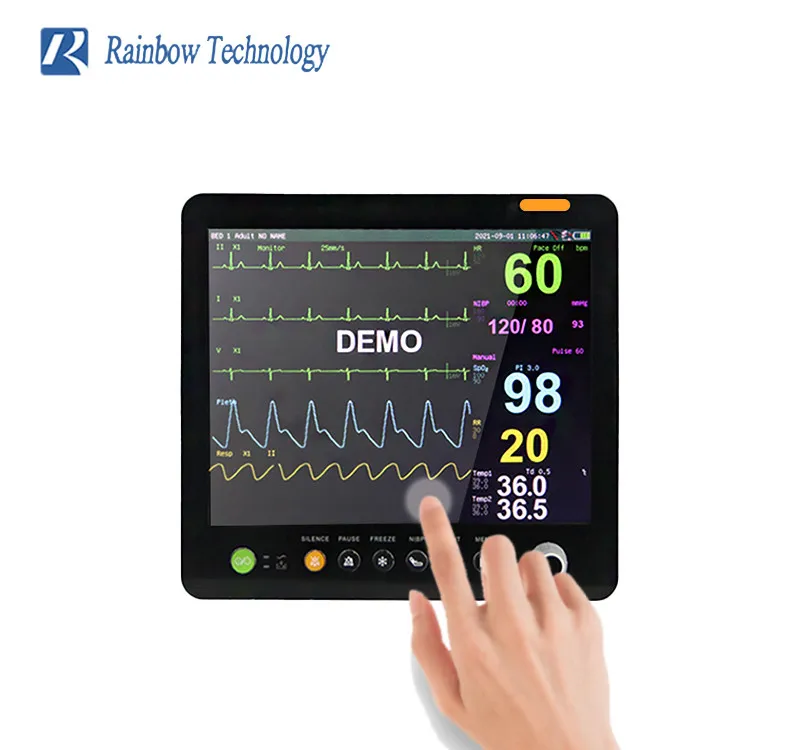
The Quick Answer Most People Miss
Touchscreen monitors are good for medical use when they're purpose-built for clinical environments. Not consumer displays repurposed for healthcare.
Medical-grade touchscreens handle glove input and chemical disinfection. They meet electrical safety standards that protect patients during procedures.
The wrong touchscreen becomes a contamination risk or a workflow bottleneck. The right one saves time and reduces errors.
What Actually Makes a Monitor "Medical-Grade"
That label gets thrown around loosely. Sometimes it means something. Sometimes it's just marketing.
A genuinely medical-grade touchscreen monitor meets specific electrical safety and performance standards. These standards exist because healthcare environments create demands that consumer electronics simply aren't designed to handle.
The physics of a surgical suite or ICU are harsh. Overhead lights blast displays with intense illumination. Staff clean screens with aggressive disinfectants dozens of times per shift.
Equipment runs 24/7 for years without shutdown. Patients lie inches from powered electronics.
If you're evaluating touchscreens for any real clinical application, you need to verify three things. Electrical safety compliance, display calibration standards, and infection control compatibility.
Most vendors will claim all three. The documentation tells the real story.
IEC 60601-1 and Why It's Non-Negotiable
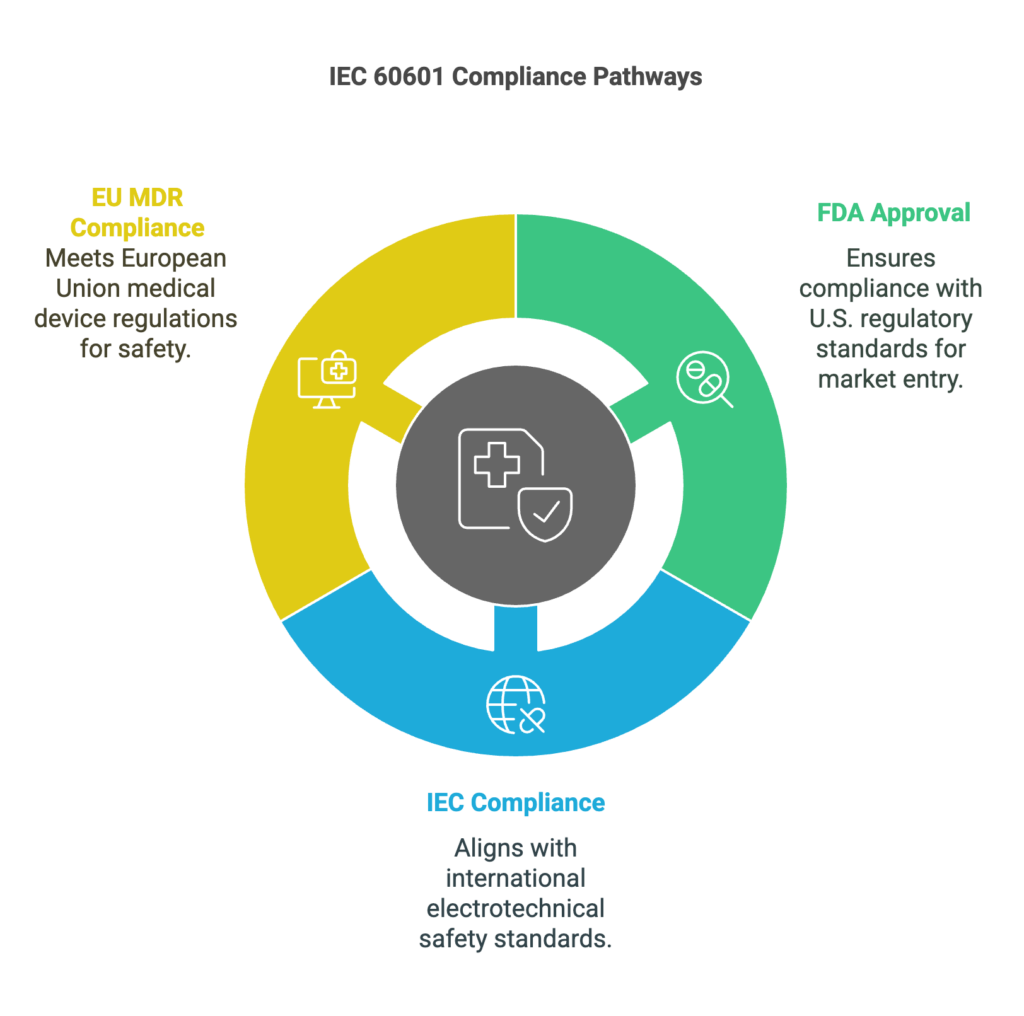
IEC 60601-1 is the international standard for basic safety and essential performance of medical electrical equipment. Every credible medical touchscreen monitor on the market should comply with this standard or its regional equivalent.
In the United States, the adoption is ANSI/AAMI ES60601-1. In Canada, it's CAN/CSA C22.2 No. 60601-1. The European Union references it through harmonized standards under the Medical Device Regulation 2017/745.
These all trace back to the same IEC foundation.
What does this standard actually cover? The critical specifications include:
- Electrical leakage current must stay below 100 µA (microamps) for patient-connected equipment. This protects patients from microshock hazards. Consumer monitors have no such requirement.
- Electromagnetic compatibility per IEC 60601-1-2 ensures neither does the monitor interfere with other medical devices, nor do other devices interfere with the monitor. In an OR packed with electrocautery units, infusion pumps, and anesthesia monitors, this isn't optional.
- Means of patient protection (MOPP) and means of operator protection (MOOP) define insulation requirements between circuits. Medical-grade units provide at least 2 MOOP.
- Hazardous situations and fault conditions testing verifies the monitor fails safely even when something goes wrong internally.
Consumer monitors sold through typical electronics retailers don't undergo this testing. There's no regulatory requirement for them to do so. Using them in patient care areas creates a compliance gap that could surface during accreditation surveys, malpractice litigation, or adverse event reporting.
Why does this matter for decision-makers in critical care units, surgical departments, or outpatient clinics? If your facility is The Joint Commission accredited or participates in CMS programs, medical devices in patient care areas need to meet applicable safety standards. Biomedical engineering departments typically verify this during incoming inspection.
A consumer touchscreen gets flagged and pulled from service. Your procurement timeline blows up.
Check the manufacturer's technical documentation file for test certificates from recognized testing laboratories. UL, TÜV SÜD, Intertek, and CSA Group are the ones to look for. If a vendor can't produce this documentation, that's your answer about whether their product belongs in your facility.
DICOM Part 14 Calibration for Diagnostic Accuracy
If your touchscreen monitor will display any diagnostic imaging, X-rays, CT scans, MRI results, pathology slides, it needs to conform to DICOM Part 14. This standard defines the Grayscale Standard Display Function (GSDF) that ensures consistent grayscale reproduction across different displays.
Without DICOM calibration, the same chest radiograph looks different on every monitor in your facility. Radiologists notice this immediately. More importantly, subtle findings like early-stage nodules or hairline fractures can display differently enough to affect interpretation.
How does DICOM calibration actually work? The display's luminance response curve gets mapped to a standardized lookup table. This ensures that perceived contrast between adjacent gray levels remains constant across the entire luminance range.
Medical-grade monitors from manufacturers like Eizo and Barco include hardware calibration sensors and software suites that maintain this conformance automatically. Some require external colorimeters for periodic recalibration. Consumer monitors typically offer only basic software color adjustment, which isn't the same thing and doesn't achieve DICOM compliance.
A critical distinction exists here. Diagnostic reading requires FDA-cleared medical displays. However, referral and review displays used by surgeons, emergency physicians, or consulting specialists during rounds or pre-operative planning fall into a gray area.
They don't require diagnostic-grade calibration, but they benefit significantly from DICOM consistency.
Several medical touchscreen manufacturers specifically design for this review role. Their panels support wide viewing angles with consistent color and grayscale reproduction. They maintain acceptable luminance levels for reading environments without the extreme brightness that a primary diagnostic display requires.
Knowing which role your touchscreen fulfills helps you avoid either under-specifying and risking missed findings, or overspending on diagnostic-grade hardware where it isn't needed.
Infection Control: Sealed Surfaces and Antimicrobial Coatings
This is where touchscreen monitors actually gain an advantage over traditional keyboard-and-mouse setups in clinical areas. Fewer crevices mean fewer places for pathogens to hide.
Key specifications to verify:
- IP65 or IP54 rated front panel means the display's front face resists dust ingress and water jets. This allows surface disinfection without liquid penetrating internal components.
- Sealed bezel design eliminates the gap between the screen and the housing. Those gaps on consumer monitors harbor moisture, cleaning solution residue, and biological material.
- Antimicrobial coatings infused with silver ions or other agents provide an additional layer of protection between cleanings. These don't replace disinfection protocols but add a measure of continuous surface protection.
- Compatible with common hospital-grade disinfectants including quaternary ammonium compounds, accelerated hydrogen peroxide, and alcohol-based solutions. Manufacturer specifications should list approved cleaning agents explicitly.
A practical cost consideration surfaces here. Medical touchscreen monitors designed with these sealed, disinfection-resistant features cost more, often by 30, 50% compared to consumer panels with similar display quality. However, reducing HAI transmission risk, replacing monitors frequently due to cleaning damage creates its own cost trajectory.
The purpose-built unit typically delivers lower total cost of ownership over a five-year clinical lifecycle.
A critical point about antimicrobial properties. No coating replaces manual disinfection. It simply reduces microbial load between cleaning cycles.
Your infection control protocols remain the primary defense. The monitor material supports those protocols rather than substituting for them.
Contact your facility's infection prevention team before selecting any touchscreen monitors. They can verify compatibility with your specific disinfection products and protocols. This prevents expensive purchasing damage that's discovered after clinical deployment.
Touch Technologies That Work (and Fail) in Clinical Settings
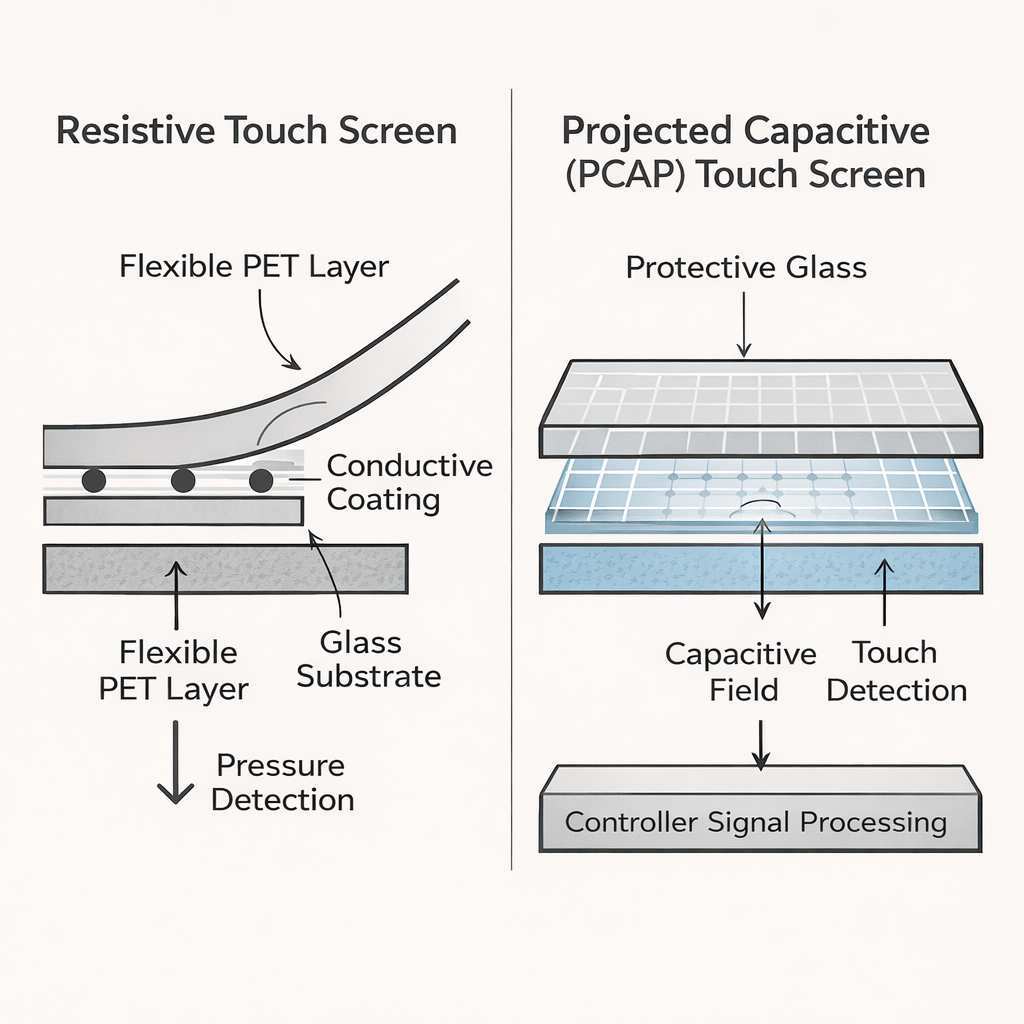
Not all touch technologies are created equal, and the choice between them has real consequences for clinical usability.
Projected Capacitive (PCAP): The OR Standard
PCAP dominates medical touchscreens for good reason. It supports multi-touch gestures, offers excellent optical clarity, and responds to very light touch inputs.
Modern medical-grade PCAP touchscreens handle gloved operation. Some supportinput through latex, nitrile, and even neoprene surgical gloves up to double-glove thickness. However, glove compatibility varies significantly between manufacturers and models.
Touching the screen with alcohol-based hand gel residue on gloves also reduces responsiveness on some models.
PCAP durability is also a strength. The touch sensor layers bond to the cover glass. The surface resists scratching, handles chemical wipe-downs without hazing, and maintains touch accuracy over years of use.
PCAP limitations do exist. Electromagnetic interference from powered surgical instruments, particularly older electrocautery units, causes touch registration errors in poorly shielded models. Rain or condensation directly on wet surgical fields creates false touches on screens without adequate moisture rejection firmware.
Some budget controllers still struggle with very light fingertip touches, requiring firm pressure.
Resistive Touch: Where It Still Makes Sense
Resistive touchscreens respond to pressure rather than electrical capacitance. Register input from any object that presses the flexible top layer against the conductive bottom layer. Surgical gloves don't affect functionality.
Stylus use is natural.
The tradeoffs are substantial, though. Resistive panels reduce image clarity because the flexible top layer and air gap between sensor layers cause reflections and refraction. Colors appear muted and contrast drops noticeably compared to optically-bonded PCAP stacks.
The flexible top layer scratches, and those scratches collect contamination.
In modern medical applications, resistive touch's reasonable use cases are limited. Non-diagnostic areas where users wear heavy protective equipment, such as BSL-3/4 lab hot zones or decontamination stations, benefit from pressure-based input. Situations where stylus signatures are needed on clean forms.
Situations where operators wear welding-type heavy gloves in equipment sterilization areas.
Outside these niches, PCAP delivers a superior experience in healthcare environments. A common mistake involves specifying resistive because "glove-proof" sounds safe, then discovering that reduced display clarity frustrates users and staff continue wiping the flexible screen surface aggressively, leading to degradation far sooner than projected.
Glove Compatibility Isn't Guaranteed
Manufacturers make glove-rated claims liberally. PCAP can't detect touch through thick, non-conductive gloving at some point. Exact dB signal thresholds for touch detection determine model sensitivity.
Independent third-party testing remains scarce. Most manufacturer claims depend on fine-print disclaimers covering specific glove materials tested under controlled laboratory conditions. Your actual clinical environment includes wet, powdered, torn, and re-sterilized gloves.
Best practice is straightforward. Work with prospective suppliers to arrange an in-house trial. Ship sample units to your clinical departments.
Have circulating nurses perform gloved touch tasks using the gloves your facility actually stocks. Track gesture accuracy, response time, any "dead recognition" scenarios. Run parallel trials using multiple supplier models.
This small validation exercise costs nothing but prevents a hospital-wide touchscreen deployment that fails the moment real gloves meet real blood and real clinical chaos. Technology that claims compatibility on paper and technology that works after three hours of simulated surgery are two very different things.
Where Touchscreen Monitors Shine in Healthcare
In our research, the clearest touchscreen advantages appear at point-of-care locations. Physical interfaces meet clinicians where documentation happens.
Surgical Navigation and Intraoperative Imaging
Surgeons manipulate 3D navigation images on screens without delegating control or breaking sterility to circulating staff. Touch-based windowing, zooming, scrolling sequences work faster for visual control than audio commands or trackball delegation.
Medical displays with high brightness (up to 1000+ nits) combat overhead OR lighting. Low input latency avoids hand-tracking lag that distracts during time-sensitive procedures. Fanless designs maintain the quiet that operating room teams depend on.
Manufacturers like Eizo and Barco sell PCAP medical displays with 15" to 32" sizes in this surgical navigation role. Plastic-free front surfaces withstand disinflation while remaining optically clear. DICOM Part 14 calibration supports consistent grayscale for intraoperative fluoroscopy and ultrasound.
Success depends on dedicated touchscreen firmware tested with double-glove wet conditions. Preventing glare from overhead reflectors. Delivering calibration stability across the display lifespan.
VESA mounting that positions the screen within the sterile reach zone.
Point-of-Care Nursing Documentation
Nurses chart at the bedside between medication passes and assessment rounds. Touch-based dropdown menus and checkbox selection function faster than trackball navigation. Screens mount on wall arms or bedside carts accessible during standing documentation.
Medical touchscreens in nursing stations need daylightreadable brightness for open-concept bays, compatibility with standard nitrile exam gloves, and IP65 sealed fronts to handle the hourly wipe-downs that protect patient environments. Integrated smart-card readers for clinician authentication optional. Fanless thermal design ensures quiet at night in semi-ICU and step-down units.
DICOM calibration rarely matters for EHR charts, but IPS panels with wide viewing angles support multi-disciplinary rounds read from any position.
In our research, nurse satisfaction scores rise when screens travel with mobile carts rather than staying fixed in the central station. Medical-cart-integrated touchscreens that lock away during transport and release for bedside documentation deliver consistent workflow benefits.
Radiology PACS Workstations
Radiologists manipulate stacks of CT and MRI images with touch gestures. Pinch-to-zoom, swipe-to-scroll, and drag-to-window feel natural and reduce repetitive strain from mouse-based scrolling through hundreds of images.
DICOM Part 14 calibration is non-negotiable for primary diagnostic reading. Touchscreen monitors used for primary interpretation need FDA 510(k) clearance as Class II medical devices. Not all medical touchscreens carry this clearance.
Some are designated for review or referral use only.
For secondary review workstations, radiology reading rooms, and conference room presentations, medical touchscreens with DICOM calibration but without FDA clearance work well. They deliver consistent grayscale and touch-enabled manipulation without the cost of diagnostic-grade displays.
Patient Bedside Terminals and Check-In Kiosks
Patient-facing touchscreens serve entertainment, education, meal ordering, and communication functions. Check-in kiosks handle registration, insurance verification, and wayfinding.
These applications don't require DICOM calibration or surgical-grade specifications. They do need durable touch surfaces that withstand thousands of finger presses daily, anti-glare coatings for bright lobby lighting, and antimicrobial surfaces for infection control.
Consumer-grade touchscreens often suffice for patient entertainment and check-in kiosks. The lower cost and wider selection make them practical for these non-clinical applications. Just verify that mounting and power options work with your facility infrastructure.
Where Touchscreens Create Problems
Touchscreens aren't automatically better. In some clinical contexts, they introduce friction rather than removing it.
When Calibration Drift Affects Diagnosis
DICOM calibration drifts over time. Backlight LEDs age, color temperature shifts, and luminance decreases. Without periodic recalibration, a display that met DICOM Part 14 at installation may fall out of conformance within 6 to 12 months.
For diagnostic reading displays, this drift matters clinically. Subtle findings become harder to detect. Radiologists may compensate by increasing brightness, which accelerates further drift.
Medical-grade monitors with built-in calibration sensors and automated software maintain conformance between manual calibrations. Budget medical displays require external colorimeter-based calibration on a scheduled basis. Consumer displays lack calibration tools entirely.
Sterile Field Contamination Risks
Touchscreens in sterile fields require careful positioning. The screen itself isn't sterile. Touching it with contaminated gloves spreads pathogens.
Positioning the screen so that sterile team members can interact without breaking technique requires planning.
Some facilities use transparent sterile drapes over touchscreen monitors. This works but reduces touch sensitivity and display clarity. Others position screens outside the sterile field for manipulation by non-sterile personnel.
Voice control and gesture recognition are emerging alternatives that reduce touch contamination. These technologies remain imperfect for surgical environments where misinterpretation carries consequences.
Chemical Disinfection Damage Over Time
Not all touchscreen surfaces tolerate all disinfectants. Ammoniacal window cleaners degrade coatings. Bleach solutions discolor plastics.
Isopropyl alcohol works on some surfaces but cloud others.
Manufacturer specifications should list approved cleaning agents. Deviating from this list voids warranties and may damage the display. Staff need clear, posted cleaning protocols for each touchscreen model in your facility.
A common failure mode involves well-meaning environmental services staff using whatever cleaning product is available that day. This leads to hazing, delamination, and premature display failure. Training and clear protocols prevent this damage.
Medical-Grade vs. Consumer-Grade: The Comparison Nobody Shows You
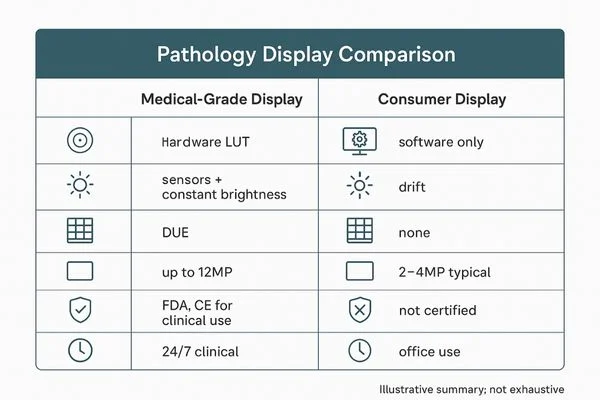
Side-by-Side Specifications
| Specification | Medical-Grade Touchscreen | Consumer-Grade Touchscreen |
|---|---|---|
| Electrical Safety | IEC 60601-1 certified, <100 µA leakage | No medical certification |
| Glove Compatibility | Tested with surgical gloves, often double-glove | Works with bare fingers only |
| Ingress Protection | IP65 front panel (sealed, cleanable) | No IP rating, vented housing |
| DICOM Calibration | Part 14 compliant, hardware-calibrated | No medical calibration |
| Operating Schedule | 24/7 rated, 30,000–50,000 hr backlight life | 8–12 hr daily use, 15,000–30,000 hr |
| Disinfection Compatibility | Tested with hospital-grade agents | Not tested, coatings may degrade |
| Fanless Design | Common (reduces airborne contamination) | Rare (fan-cooled) |
| Warranty | 1–3 years, clinical use covered | 1–3 years, commercial use only |
| Price Range | $800–$3,500+ | $200–$800 |
| Regulatory Clearance | FDA 510(k) where required | None |
What You're Actually Paying For
The price difference between medical-grade and consumer-grade touchscreens reflects real engineering and certification costs. You're paying for:
- Safety testing and certification through recognized testing laboratories. This process takes months and costs manufacturers tens of thousands of dollars per model.
- Higher-quality components rated for continuous operation. Backlight LEDs, power supplies, and touch sensors all carry higher durability ratings.
- Sealed, cleanable construction with gasketed bezels and sealed ports. This manufacturing process costs more than consumer snap-fit assembly.
- Calibration and quality assurance per unit. Medical displays ship with calibration certificates and individual unit testing reports.
- Regulatory documentation that supports your facility's compliance requirements. Accreditation surveys and liability defense both depend on this paperwork.
For non-clinical applications like patient entertainment, check-in kiosks, or administrative workstations, consumer-grade touchscreens deliver adequate performance at lower cost. The key is knowing which applications require medical-grade equipment and which don't.
A hybrid approach works well for many facilities. Medical-grade touchscreens for clinical applications. Consumer-grade for administrative and patient-facing non-clinical uses.
This balances cost with compliance and safety.
How to Evaluate a Touchscreen Monitor for Your Clinical Workflow
Step 1: Define Your Use Case and Environment
Start with the clinical question, not the technology. What task does this touchscreen need to support? Where will it live?
Who will use it?
A surgical navigation display has different requirements than a nursing documentation terminal. A radiology review station differs from a patient check-in kiosk. Each use case drives different specifications.
Document the environmental conditions. Ambient lighting levels, temperature ranges, humidity, proximity to water or chemicals, and mounting location all affect monitor selection.
Step 2: Verify Certifications and Compliance
Request documentation from the manufacturer. Specifically ask for:
- IEC 60601-1 test certificates from a recognized testing laboratory
- IEC 60601-1-2 electromagnetic compatibility documentation
- DICOM Part 14 conformance statements for imaging applications
- FDA 510(k) clearance letters if the display supports diagnostic reading
- IP rating certification for the front panel
If a vendor can't produce these documents, move on. No exceptions.
Step 3: Test Touch Input With Actual Clinical Gloves
Arrange an in-house evaluation with the exact glove types your facility uses. Latex, nitrile, neoprene, and sterile surgical gloves all interact differently with touchscreen sensors.
Test single-glove and double-glove scenarios. Test with wet gloves and dry gloves. Test with hand gel residue on gloves.
These real-world conditions differ from manufacturer test reports.
Step 4: Assess Cleaning and Disinfection Compatibility
Work with your infection prevention team to identify the disinfectants used in your facility. Verify that the touchscreen manufacturer approves these specific products.
Test cleaning protocols on a sample unit. Wipe the screen 100 times with your standard disinfectant. Check for hazing, discoloration, or coating degradation.
This simulates months of clinical cleaning in a controlled test.
Step 5: Confirm EHR and Software Integration
Touch input must work with your clinical software. Some EHR interfaces don't support touch well. Buttons may be too small.
Scroll gestures may conflict with application shortcuts.
Test the touchscreen with your actual software before committing to a purchase. Verify that all critical functions work via touch input alone.
Step 6: Plan for Mounting, Ergonomics, and Cable Management
Medical touchscreens mount on walls, ceiling booms, mobile carts, or articulated arms. Each mounting option has different requirements for VESA patterns, weight capacity, and cable routing.
Plan power and data cable paths before installation. Exposed cables create trip hazards and infection control risks. Integrated cable management keeps installations clean and safe.
Common Mistakes Hospitals Make When Buying Medical Touchscreens
Mistake 1: Buying consumer monitors for clinical use. The upfront cost savings disappear when biomedical engineering rejects the units, infection control raises concerns, or a patient safety event triggers regulatory scrutiny.
Mistake 2: Assuming all "medical-grade" claims are equal. Some manufacturers self-certify without independent testing. Verify third-party certification from UL, TÜV SÜD, Intertek, or CSA Group.
Mistake 3: Skipping the glove compatibility test. Manufacturer claims don't always match real-world performance. Always test with your actual clinical gloves before purchasing.
Mistake 4: Ignoring disinfection compatibility. A beautiful display that degrades after 50 wipe-downs with your standard disinfectant becomes an expensive paperweight.
Mistake 5: Over-specifying for the application. Not every clinical touchscreen needs DICOM calibration or FDA 510(k) clearance. A nursing documentation terminal doesn't need diagnostic-grade imaging performance. Overspending wastes capital budget.
Mistake 6: Under-specifying for the application. Conversely, deploying a non-medical display for diagnostic reading creates liability and may affect diagnostic accuracy.
Mistake 7: Neglecting long-term calibration planning. DICOM calibration drifts. Budget for calibration equipment and ongoing maintenance from day one.
Mistake 8: Failing to involve clinical end users. Nurses, physicians, and surgeons know their workflows. A touchscreen that looks great in a conference room may frustrate the people who use it 12 hours a day.
What Medical-Grade Touchscreen Monitors Actually Cost
Pricing varies significantly based on size, features, and certification level. Here's what to expect as of 2026:
| Category | Size Range | Price Range | Typical Features |
|---|---|---|---|
| Entry-level medical touchscreen | 15"–19" | $500–$1,200 | PCAP touch, IP65 front, fanless, basic brightness |
| Mid-range medical touchscreen | 21"–24" | $1,200–$2,500 | High brightness, DICOM calibrated, antimicrobial, wide viewing angle |
| Premium surgical display | 24"–32" | $2,500–$5,000+ | 1000+ nits, DICOM, PCAP, FDA 510(k), optical bonding |
| Consumer alternative (non-clinical) | 21"–27" | $200–$600 | Basic touch, no medical certification, vented housing |
Total cost of ownership includes more than purchase price. Factor in:
- Calibration equipment and maintenance ($200, $2,000 annually depending on display grade)
- Mounting hardware and installation ($100, $500 per unit)
- Extended warranty or service contracts (10, 20% of purchase price annually)
- Replacement timeline (medical-grade units last 5, 7 years, consumer units 2, 3 years in clinical use)
Expert Tips From Clinical IT and Biomedical Engineering
Tip 1: Request a demo unit for clinical evaluation. Most medical display manufacturers loan units for 30, 60 day evaluations. Use this time to test in real clinical conditions, not just the IT department.
Tip 2: Standardize on one or two models. Standardization simplifies training, maintenance, spare parts inventory, and calibration procedures. Resist the temptation to let every department choose independently.
Tip 3: Plan for end-of-life disposal. Medical displays contain electronic waste. Manufacturer take-back programs or certified e-waste recyclers handle disposal properly.
Tip 4: Document everything. Keep certificates, calibration records, cleaning protocols, and maintenance logs organized. Accreditation surveys and liability defense both depend on thorough documentation.
Tip 5: Budget for accessories. Mounting arms, cable management, calibration sensors, and spare power supplies add 15, 25% to the base monitor cost. Include these in your capital request.
Tip 6: Involve biomedical engineering early. These professionals understand medical device safety standards and can evaluate technical specifications before you commit to a purchase. Their input prevents costly mistakes.
Tip 7: Consider future needs. Clinical technology evolves. Choose displays with connectivity options that support potential future applications. USB-C with DisplayPort Alt Mode and power delivery offers flexibility for emerging medical devices.
Final Decision Guide: Should You Use a Touchscreen Monitor in Your Facility?
The answer depends on your specific situation. Here's a framework for deciding:
Yes, invest in medical-grade touchscreens if:
- Clinical staff need hands-on interaction with patient data at the point of care
- Surgical teams benefit from direct image manipulation without delegating control
- Infection control priorities favor sealed, cleanable surfaces over keyboard-and-mouse setups
- Your facility requires IEC 60601-1 compliance for displays in patient care areas
Consider consumer-grade touchscreens if:
- The application is non-clinical (administrative, patient entertainment, check-in)
- No patient safety or diagnostic accuracy concerns exist
- Budget constraints are severe and the application is low-risk
- You accept the compliance gap and document the risk acceptance
Reconsider touchscreen entirely if:
- Voice control or other input methods better serve the workflow
- Sterile field constraints make touch interaction impractical
- Staff resistance to touch interfaces is high and training resources are limited
- The physical environment (vibration, moisture, temperature) exceeds display ratings
The right choice protects patients, supports clinicians, and respects your facility's budget. Take the time to evaluate properly. The wrong choice costs more than the right one ever would.
Frequently Asked Questions
Can I use a regular touchscreen monitor in a hospital?
You can, but only in non-clinical areas. Patient care environments require medical-grade displays that meet IEC 60601-1 electrical safety standards. Consumer monitors lack this certification and may not support gloved touch or chemical disinfection.
What is the best touchscreen type for surgical use?
Projected capacitive (PCAP) is the standard for surgical applications. It supports multi-touch gestures, works with gloved hands, and offers excellent optical clarity. Verify glove compatibility with your specific surgical glove types before purchasing.
How often do medical touchscreens need calibration?
DICOM calibration should be verified every 6 to 12 months for diagnostic displays. Medical-grade monitors with built-in calibration sensors automate this process. Budget displays require manual calibration with external colorimeters.
Are medical touchscreen monitors worth the extra cost?
For clinical applications, yes. The certification, durability, and compliance documentation justify the price premium. For non-clinical uses like patient entertainment or check-in kiosks, consumer-grade displays offer adequate performance at lower cost.
What certifications should a medical touchscreen have?
Minimum certifications include IEC 60601-1 for electrical safety and IEC 60601-1-2 for electromagnetic compatibility. Add DICOM Part 14 for imaging applications and FDA 510(k) clearance for diagnostic reading displays.
Medical touchscreens carry higher upfront costs than consumer alternatives. They deliver lower total cost of ownership in clinical applications.
A consumer touchscreen costs $200, $600 upfront. It typically fails within 2, 3 years under clinical use. Replacement costs add up quickly.
Medical-grade units cost $800, $3,500 depending on size and features. They last 5, 7 years with proper maintenance. The certification, durability, and compliance documentation justify the premium for patient care areas.
For non-clinical applications, consumer-grade displays offer better value. Patient entertainment systems, check-in kiosks, and administrative workstations don't require medical certification. The lower purchase price makes sense when patient safety isn't at stake.
Expert Tips From Clinical IT and Biomedical Engineering
Tip 1: Request a demo unit for clinical evaluation. Most medical display manufacturers loan units for 30, 60 day evaluations. Use this time to test in real clinical conditions, not just the IT department.
Tip 2: Standardize on one or two models. Standardization simplifies training, maintenance, spare parts inventory, and calibration procedures. Resist the temptation to let every department choose independently.
Tip 3: Plan for end-of-life disposal. Medical displays contain electronic waste. Manufacturer take-back programs or certified e-waste recyclers handle disposal properly.
Tip 4: Document everything. Keep certificates, calibration records, cleaning protocols, and maintenance logs organized. Accreditation surveys and liability defense both depend on thorough documentation.
Tip 5: Budget for accessories. Mounting arms, cable management, calibration sensors, and spare power supplies add 15, 25% to the base monitor cost. Include these in your capital request.
Tip 6: Involve biomedical engineering early. These professionals understand medical device safety standards and can evaluate technical specifications before you commit to a purchase. Their input prevents costly mistakes.
Tip 7: Consider future needs. Clinical technology evolves. Choose displays with connectivity options that support potential future applications. USB-C with DisplayPort Alt Mode and power delivery offers flexibility for emerging medical devices.
Final Decision Guide: Should You Use a Touchscreen Monitor in Your Facility?
The answer depends on your specific situation. Here's a framework for deciding:
Yes, invest in medical-grade touchscreens if:
- Clinical staff need hands-on interaction with patient data at the point of care
- Surgical teams benefit from direct image manipulation without delegating control
- Infection control priorities favor sealed, cleanable surfaces over keyboard-and-mouse setups
- Your facility requires IEC 60601-1 compliance for displays in patient care areas
Consider consumer-grade touchscreens if:
- The application is non-clinical (administrative, patient entertainment, check-in)
- No patient safety or diagnostic accuracy concerns exist
- Budget constraints are severe and the application is low-risk
- You accept the compliance gap and document the risk acceptance
Reconsider touchscreen entirely if:
- Voice control or other input methods better serve the workflow
- Sterile field constraints make touch interaction impractical
- Staff resistance to touch interfaces is high and training resources are limited
- The physical environment (vibration, moisture, temperature) exceeds display ratings
The right choice protects patients, supports clinicians, and respects your facility's budget. Take the time to evaluate properly. The wrong choice costs more than the right one ever would.
Frequently Asked Questions
Can I use a regular touchscreen monitor in a hospital?
You can, but only in non-clinical areas. Patient care environments require medical-grade displays that meet IEC 60601-1 electrical safety standards. Consumer monitors lack this certification and may not support gloved touch or chemical disinfection.
What is the best touchscreen type for surgical use?
Projected capacitive (PCAP) is the standard for surgical applications. It supports multi-touch gestures, works with gloved hands, and offers excellent optical clarity. Verify glove compatibility with your specific surgical glove types before purchasing.
How often do medical touchscreens need calibration?
DICOM calibration should be verified every 6 to 12 months for diagnostic displays. Medical-grade monitors with built-in calibration sensors automate this process. Budget displays require manual calibration with external colorimeters.
Are medical touchscreen monitors worth the extra cost?
For clinical applications, yes. The certification, durability, and compliance documentation justify the price premium. For non-clinical uses like patient entertainment or check-in kiosks, consumer-grade displays offer adequate performance at lower cost.
What certifications should a medical touchscreen have?
Minimum certifications include IEC 60601-1 for electrical safety and IEC 60601-1-2 for electromagnetic compatibility. Add DICOM Part 14 for imaging applications and FDA 510(k) clearance for diagnostic reading displays.

Similar Posts





















