What Industries Use Touchscreen Monitors Most
If you're trying to figure out what industries use touchscreen monitors most, the short answer is that food service, healthcare, manufacturing, and retail lead the pack by a wide margin. These sectors rely on interactive displays not as a nice-to-have, but as core infrastructure that keeps operations running every single day.
The reason isn't complicated. Touchscreen monitors cut down training time, speed up transactions, and hold up better in environments where keyboards and mice would fail. As of 2026, industrial touchscreen deployments continue to grow, especially in quick-service restaurants and hospital systems where self-service and hygiene are non-negotiable.
Quick Answer
Food service, healthcare, manufacturing, and retail use touchscreen monitors most. These four sectors account for the bulk of global industrial touchscreen deployments. Quick-service restaurants and hospital systems are the heaviest adopters per location.
Manufacturing ranks high due to HMI panels on nearly every modern production line.
The Industries That Rely on Touchscreen Monitors the Most
Not every industry that uses touchscreens uses them the same way. A hotel check-in kiosk has very different demands than a CNC machine operator panel. Let's break down the sectors where touchscreen monitors are genuinely essential, not just convenient.
Quick Ranked Breakdown
Here's how the major industries stack up when we look at adoption intensity, deployment scale, and how critical the touchscreen is to daily operations.
| Rank | Industry | Adoption Intensity | Primary Use Case | Criticality |
|---|---|---|---|---|
| 1 | Food Service / QSR | Very High | Self-order kiosks, POS terminals | Mission-critical |
| 2 | Healthcare | Very High | Patient check-in, EHR terminals, surgical displays | Mission-critical |
| 3 | Manufacturing | High | HMI panels, SCADA interfaces, QC terminals | Mission-critical |
| 4 | Retail | High | Self-checkout, product lookup, loyalty signup | Operational |
| 5 | Banking | Moderate-High | ATMs, account opening kiosks | Operational |
| 6 | Transportation / Logistics | Moderate | Fleet dispatch, warehouse terminals, fuel pumps | Operational |
| 7 | Education | Moderate | Interactive displays, lab stations, library catalogs | Supporting |
This ranking reflects both the number of units deployed and how much the operation depends on the touchscreen functioning. A factory line that stops because an HMI panel fails is a very different problem than a library catalog being temporarily out of service.
How We Evaluated Industrial Touchscreen Adoption
Before diving into each industry, it helps to understand what we're actually measuring. "Most" can mean highest total volume, highest density per location, or highest operational dependency. All three matter.
What Counts as "Heavy Use"?
We weighted four factors when building this comparison:
- Deployment volume, total number of touchscreen units in active use across the industry
- Per-location density, how many touchscreen monitors a typical facility operates
- Operational criticality, whether the business can function without them
- Growth trajectory, whether adoption is accelerating or plateauing
A quick-service restaurant chain with 3,000 locations running four touchscreen kiosks each is a massive deployment. A single factory with one HMI panel per machine also represents heavy use, just in a different way. Both count.
The Comparison Framework
We're comparing industries along two axes: how many touchscreen monitors they use and how essential those monitors are to core operations. An industry that uses touchscreens everywhere but could easily revert to manual processes ranks lower than one where a touchscreen failure stops the line.
This framework matters because it prevents a misleading answer. Yes, offices have touchscreens too. But if the touchscreen breaks, the employee grabs a mouse.
That's very different from a hospital intake desk where the entire check-in flow depends on the kiosk working.
Industry-by-Industry Breakdown
Now let's get into the specifics. Each industry has its own reasons for adopting touchscreen monitors, its own preferred hardware specs, and its own pain points when things go wrong.
Food Service and Hospitality
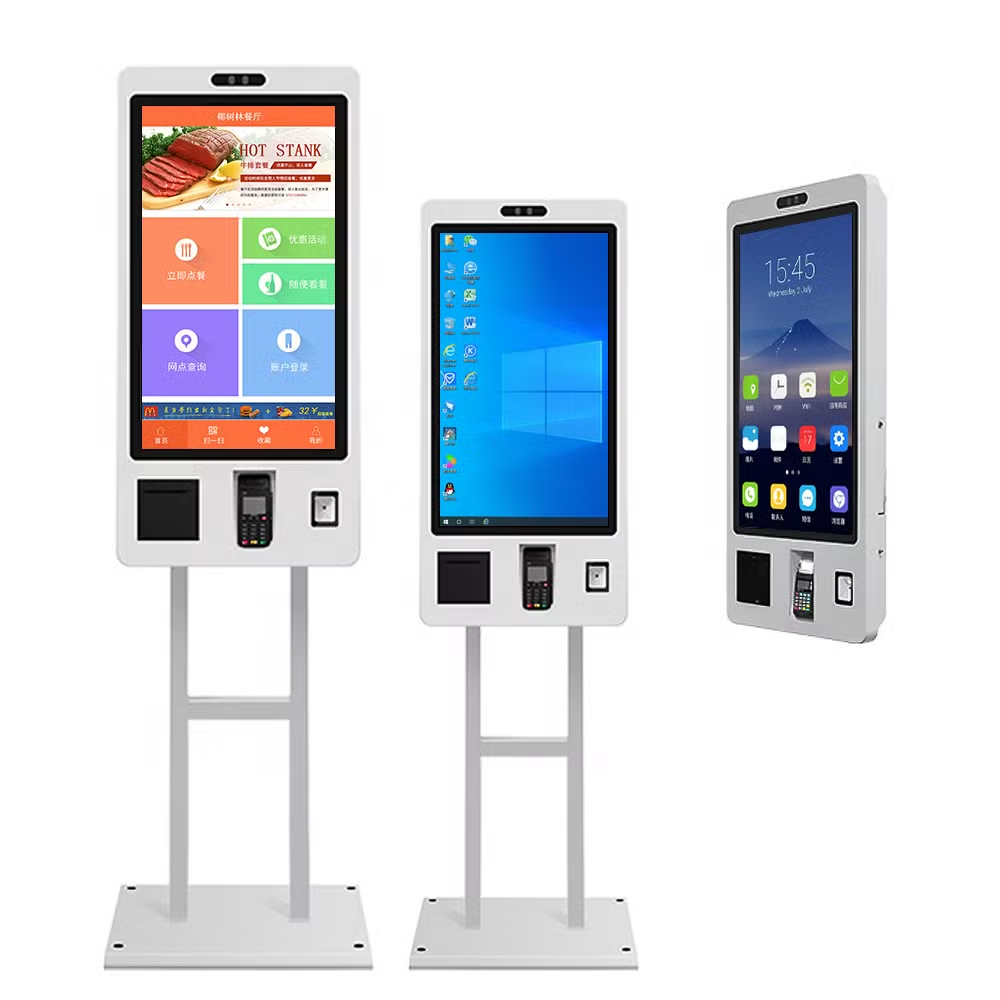
This is arguably the sector most transformed by touchscreen adoption in the last decade. Quick-service restaurants like McDonald's, Panera, and Chili's have rolled out self-order kiosks systemwide. The shift accelerated during the labor shortages of 2020 and never really reversed.
A typical fast-food location now runs multiple touchscreen touchpoints. You'll see self-order kiosks at the entrance, POS terminals at the handoff counter, payment screens for contactless transactions, and kitchen display screens that replace paper tickets. Some chains are pushing toward five or more interactive displays per location.
Why touchscreens dominate here:
- Speed, customers order faster on a kiosk than waiting in line to talk to a cashier
- Upselling, kiosks consistently increase average order value through prompted add-ons
- Labor efficiency, fewer front-of-house staff needed per shift
- Hygiene, smooth glass surfaces sanitize easily between users
The hardware in this space needs to handle constant use, food debris, and frequent cleaning. Most operators choose projected capacitive (PCAP) touchscreen monitors with IP65-rated bezels. Brightness matters too, since many restaurants have large windows and bright ambient light.
Hotels have followed a similar path. Self-service check-in kiosks are now standard in major chains. Guests can grab a room key without waiting at the front desk.
The touchscreens here need to integrate with property management software and often include ID card readers and payment terminals built into the same enclosure.
Healthcare and Medical Facilities
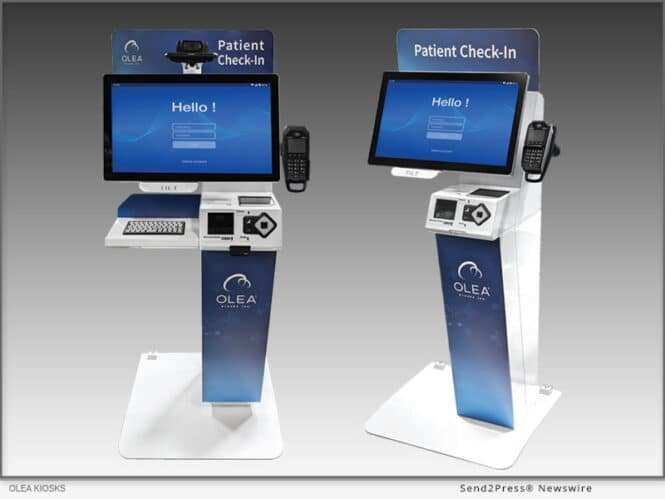
Hospitals and clinics adopted touchscreen monitors early, and the pandemic pushed adoption into overdrive. Patient check-in kiosks became a necessity for reducing crowding in waiting rooms. Bedside terminals let patients access their records, order meals, and communicate with nurses without anyone touching a shared keyboard.
The healthcare environment is brutal on hardware. Touchscreen monitors in clinical settings get cleaned with harsh disinfectants multiple times per day. They need optical bonding to prevent condensation under the glass.
They need wide viewing angles so doctors and nurses can read them from different positions around the bed.
Key requirements for medical touchscreens:
- Chemical resistance, must survive repeated cleaning with bleach-based and alcohol-based solutions
- Glove compatibility, PCAP panels that work with nitrile and latex gloves are essential
- Antimicrobial coatings, many medical-grade displays include built-in antimicrobial treatments
- Night mode / dimming, patient rooms need displays that can dim low enough for overnight use
Surgical displays take this even further. Operating room touchscreens need to show high-resolution imaging while the surgeon interacts with them, often while gloved and in a sterile field. These panels typically use advanced PCAP technology with high sensitivity and low latency.
The healthcare sector also has regulatory considerations. While the touchscreen monitor itself isn't usually classified as a medical device, it often sits inside a system that is. Manufacturers need to be mindful of IEC 60601-1 safety standards for medical electrical equipment when designing panels for clinical use.
Manufacturing and Industrial Automation
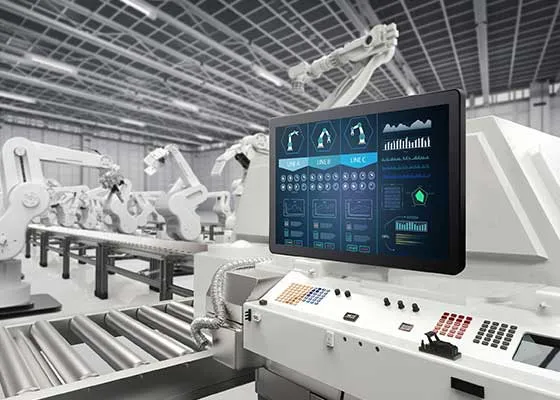
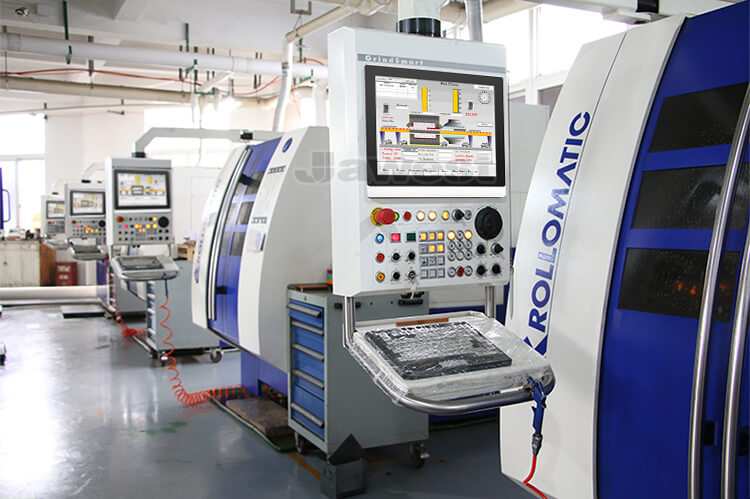
Walk onto any modern factory floor and you'll see touchscreen HMI (Human-Machine Interface) panels everywhere. They're bolted to machines, mounted on pedestals, and embedded into control cabinets. Every CNC machine, every robotic arm, every conveyor system has an operator interface, and it's almost always a touchscreen.
This industry was one of the earliest adopters of touchscreen technology in the industrial space. The reason is simple. Replacing a bank of physical buttons and indicator lights with a single touchscreen display reduces wiring, simplifies panel design, and gives operators far more information in a smaller footprint.
What makes industrial touchscreens different:
- Rugged construction, IP65 or IP67 front panels that resist dust, water, and coolant spray
- Wide temperature tolerance, operating ranges from -20°C to 70°C for unheated facilities
- EMI immunity, panels must resist electromagnetic interference from motors, welders, and drives
- Glove support, resistive or advanced PCAP touch that works with heavy work gloves
- Long product lifecycle, industrial buyers expect 5-10 year availability of replacement units
The touch technology choice here is interesting. Consumer electronics standardized on capacitive touch years ago. But many industrial applications still use resistive touchscreens because they work with any glove, any stylus, or even a screwdriver.
The tradeoff is lower clarity and the need for periodic calibration. Newer PCAP panels with advanced controller chips are closing the glove-compatibility gap, but resistive hasn't disappeared.
SCADA systems (Supervisory Control and Data Acquisition) are another major touchscreen application in manufacturing. These are the large overview displays that show entire plant operations in real time. Operators tap to zoom into specific production lines, acknowledge alarms, and adjust setpoints.
These displays are often 22 inches or larger and mounted in control rooms.
Retail and Self-Service
Retail has gone through a massive self-service transformation. Self-checkout lanes are now the majority of lanes in many grocery and big-box stores. Walmart, Target, and Dollar General have expanded their self-checkout footprints significantly since 2020.
Each station includes a touchscreen that handles the entire transaction flow.
Beyond checkout, retailers deploy touchscreen monitors for:
- Product lookup stations, customers check price, location, and availability
- Endcap interactive displays, promotional content with product browsing
- Loyalty program signup, self-service enrollment at kiosks
- Fitting room mirrors, interactive displays that suggest complementary items
The retail environment is less harsh than a factory floor, but it comes with its own challenges. These touchscreens run 12 to 16 hours a day. They get touched by hundreds of different people per shift.
They need to stay responsive and clean-looking despite constant use.
Retail buyers typically prioritize cost and aesthetics over extreme ruggedness. A store doesn't need an IP65-rated panel. But it does need a bright, responsive display that looks good in a well-lit showroom.
Consumer-grade panels often work here, though commercial-grade displays with longer duty cycles are a smarter investment for high-traffic locations.
Banking and Financial Services
ATMs are one of the oldest and largest touchscreen deployments in the world. There are approximately 470,000 ATMs in the United States alone, according to the ATM Industry Association. Every single one relies on a touchscreen interface.
These machines run outdoors, in drive-throughs, in convenience stores, and in bank lobbies. They have to work in rain, cold, heat, and direct sunlight.
The ATM use case is a masterclass in touchscreen durability requirements. The display needs to be sunlight-readable, often at 1,000 nits or more. The touch layer needs to work in rain without false triggers.
The enclosure needs to resist vandalism, which is where IK impact ratings come in.
Banks have also expanded into lobby kiosks for account opening, loan applications, and appointment scheduling. These indoor units are less demanding from an environmental standpoint but need to integrate with document scanners, card readers, and signature capture hardware. The touchscreen is the central interface that ties all of these peripherals together into a single user experience.
Side-by-Side Comparison Table
Touchscreen Use Intensity Across Industries
| Industry | Typical Screen Size | Touch Tech | IP Rating | Avg. Daily Users per Unit | Failure Impact |
|---|---|---|---|---|---|
| Food Service | 15"–32" | PCAP | IP65 | 200–800 | High — order flow stops |
| Healthcare | 15"–24" | PCAP | IP54/IP65 | 30–150 | Critical — patient care affected |
| Manufacturing | 7"–24" | Resistive or PCAP | IP65/IP67 | 5–20 | Critical — production stops |
| Retail | 15"–32" | PCAP | IP54 | 100–500 | Moderate — queue backup |
| Banking (ATM) | 10"–15" | PCAP or Resistive | IP65 (outdoor) | 50–200 | High — revenue loss per hour |
| Transportation | 12"–22" | PCAP | IP65 | 20–100 | Moderate — dispatch delays |
| Education | 22"–86" | PCAP (IR frame) | IP54 | 10–50 | Low — alternative methods exist |
This table tells a clear story. The industries at the top have both high user volume and high consequences for failure. That's what drives investment in commercial-grade and industrial-grade touchscreen hardware.
The industries lower on the list can often get by with consumer-grade panels because the stakes are lower.
What Makes an Industry Adopt Touchscreen Monitors Heavily?
There are common threads across all the high-adoption industries. Understanding these patterns helps explain why some sectors went all-in on touchscreens while others are still using traditional interfaces.
Speed and Throughput
When the primary goal is moving people or products faster, touchscreens win. A kiosk order takes less time than a cashier transaction in most studies. A touchscreen HMI lets an operator change machine settings in seconds instead of navigating menus with physical buttons.
The speed advantage compounds across thousands of interactions per day.
Space Constraints
Physical buttons take up space. A machine control panel with 20 buttons, a dozen indicator lights, and an emergency stop is large and expensive to wire. Replace all of that with a 15-inch touchscreen and you've freed up significant panel real estate.
On a crowded factory floor or a small retail counter, that space savings matters.
Hygiene and Cleanability
Smooth glass is easier to sanitize than a membrane keypad with crevices. This became obvious during COVID-19, but the principle existed long before. Hospitals, food processing plants, and commercial kitchens all benefit from surfaces that can be wiped down quickly and thoroughly.
Worker and User Familiarity
People know how to use touchscreens. Nearly everyone carries a smartphone. That zero-learning-curve advantage is enormous in high-turnover industries like food service and retail.
New employees can be productive on day one without training on a proprietary interface.
Ruggedness Demands
Keyboards fail in dusty, wet, and greasy environments. Mice get lost or stop tracking. A sealed touchscreen monitor with no moving parts is inherently more reliable in harsh conditions.
That's why manufacturing, logistics, and outdoor applications default to touch.
When Touchscreen Monitors Are the Wrong Choice
Touchscreens aren't universal. There are real situations where they underperform or fail entirely. Knowing these limits saves expensive mistakes.
High-EMI Environments
Heavy welding equipment, large variable frequency drives, and high-voltage switchgear generate electromagnetic interference that can cause phantom touches on capacitive panels. If you're mounting a touchscreen near a 500-horsepower motor, you need serious EMI shielding or you should consider resistive touch technology instead.
Extreme Outdoor Exposure
Standard touchscreens struggle in direct sunlight for two reasons. The display can't compete with the brightness of the sun, and the touch layer can false-trigger from rain, snow, or condensation. Specialized outdoor panels with high-brightness backlights and water-rejection algorithms exist, but they cost significantly more.
Heavy Glove Use Without Proper Tech Selection
If your operators wear thick leather work gloves, standard capacitive touchscreens won't respond. You need either resistive touch or a PCAP panel with a controller designed for gloved operation. Buying the wrong technology here means every interaction requires removing a glove, which kills productivity.
Applications Requiring Precision Input
Touchscreens are terrible for fine motor control. If your operator needs to select a 2-millimeter target on a detailed schematic, a mouse or trackball will always be more accurate. CAD workstations, detailed GIS mapping, and precision measurement applications are better served by traditional input devices.
Common Mistakes When Choosing Industrial Touchscreen Monitors
Even experienced buyers get these wrong. Here are the most frequent errors we see.
Buying Consumer-Grade Panels for Industrial Use
A $200 consumer touchscreen from an electronics retailer is not the same as a $900 industrial panel. Consumer displays aren't designed for 24/7 operation. Their backlights dim faster.
Their touch controllers drift sooner. Their enclosures aren't sealed. In a commercial or industrial setting, a consumer panel will fail within months.
Ignoring IP and IK Ratings
IP ratings (IEC 60529) define ingress protection against dust and water. IK ratings (IEC 62262) define impact resistance. A panel without the right ratings for its environment will fail.
Indoor retail is one thing. A food processing plant with washdown requirements is another entirely. Always match the rating to the actual conditions.
Overlooking Touch Technology Compatibility
Not all touchscreens work with all gloves. Not all touchscreens work when wet. Not all touchscreens work through protective overlays.
Before specifying a panel, test it with the actual gloves, conditions, and use cases it will face in the field. Manufacturer datasheets tell you the touch technology. Your validation process should confirm it works in practice.
Underestimating Brightness Requirements
A display that looks bright in a dim showroom may be unreadable next to a window or under direct sunlight. Brightness is measured in nits. Indoor applications typically need 250-400 nits.
Outdoor applications often need 1,000-1,500 nits. Sunlight-readable displays may need 2,000 nits or more. Always measure the ambient light at the installation location before specifying brightness.
Cost and Pricing Reality Check
What You'll Actually Spend
Industrial touchscreen monitors cost more than most people expect. Here's a realistic range based on size and ruggedness.
| Category | Size Range | Price Range | Typical Buyer |
|---|---|---|---|
| Consumer-grade | 15"–24" | $150–$400 | Office, light retail |
| Commercial-grade | 15"–32" | $400–$1,200 | Retail, hospitality |
| Industrial-grade | 7"–24" | $800–$3,000 | Manufacturing, outdoor |
| Medical-grade | 15"–24" | $1,500–$5,000 | Hospitals, clinics |
| Specialized (sunlight, marine) | 10"–22" | $2,000–$6,000 | Outdoor kiosks, vehicle mounts |
Where the Money Goes
The touch panel itself is only part of the cost. You also need to budget for:
- Mounting hardware, VESA arms, panel cutout flanges, or desktop stands
- Cabling, HDMI, USB for touch, and possibly Ethernet or serial for industrial protocols
- Software, HMI development platforms, kiosk applications, or POS software licenses
- Integration, getting the touchscreen to talk to your PLC, EMR, or POS backend
- Spare units, most industrial buyers keep at least one spare on the shelf
A $1,200 touchscreen monitor can easily become a $2,500 project once you factor in everything around it. Plan accordingly.
Expert Tips for Getting the Right Touchscreen Setup
Match the Touch Technology to the Environment
This is the single most important decision. PCAP gives you multi-touch, clarity, and responsiveness. Resistive gives you glove compatibility and works with any object.
Surface acoustic wave gives you excellent clarity but is sensitive to contamination. Choose based on the actual operating conditions, not the spec sheet you wish you had.
Plan for Maintenance From Day One
Touchscreen monitors in commercial use need regular cleaning, occasional recalibration, and eventual replacement. Design your mounting so you can access the panel without tools. Keep spare units on hand for critical applications.
Establish a cleaning schedule that prevents buildup without damaging coatings.
Don't Forget the Software Layer
A touchscreen is only as good as the interface running on it. A beautifully responsive display running a poorly designed UI will frustrate users. Invest in UI design that accounts for touch targets (minimum 44×44 pixels per Apple's HIG, or 48x48dp per Google's Material guidelines).
Test with actual users in the actual environment.
Test Before You Scale
Never roll out 500 touchscreen kiosks based on a demo unit. Run a pilot in real conditions for at least 30 days. Monitor for calibration drift, touch accuracy issues, user confusion, and environmental problems.
Fix what breaks before you scale. The cost of a pilot is a fraction of the cost of a failed mass deployment.
Frequently Asked Questions
Which industry uses the most touchscreen monitors overall?
Food service and healthcare are the top two by deployment volume. Quick-service restaurant chains operate thousands of locations with multiple touchscreen touchpoints per site. Hospital systems deploy touchscreens across every department from intake to bedside.
Are touchscreen monitors reliable in factory environments?
Yes, when you choose industrial-grade panels with proper IP ratings and EMI shielding. Consumer-grade displays fail quickly in factories. Industrial panels from manufacturers like Advantech, Elo, or Axiomtek are designed for 24/7 operation in harsh conditions and routinely last five to seven years.
What's the difference between capacitive and resistive touchscreens?
Capacitive touchscreens detect the electrical charge in your finger. They're more responsive and support multi-touch. Resistive touchscreens detect physical pressure from any object.
They work with gloves and styluses but have lower clarity and require more force to activate.
How long do industrial touchscreen monitors last?
Most industrial-grade panels are rated for 30,000 to 50,000 hours of backlight life. That's roughly 3.4 to 5.7 years of continuous 24/7 operation. Touch layers typically last longer than the backlight.
In practice, most units are replaced due to technology obsolescence before they fail mechanically.
Can touchscreen monitors work with gloves on?
It depends on the touch technology. Standard capacitive panels only work with bare fingers or thin gloves. Advanced PCAP controllers with high sensitivity settings can detect touch through nitrile and thin latex gloves.
Resistive panels work with any glove. Always verify glove compatibility with the specific panel model before purchasing.
Transportation and Logistics
Warehouse operations rely on touchscreen terminals for inventory management, picking verification, and shipping confirmation. Workers at packing stations use touchscreens to scan items, confirm orders, and print labels without switching between devices. Forklift-mounted terminals let operators access WMS (Warehouse Management System) data while moving through the facility.
Airports are another heavy user. Self-service check-in kiosks and bag drop systems are now standard at most major airports. These touchscreens handle passenger verification, seat selection, and baggage processing.
The hardware here needs to run continuously and withstand constant public use.
Gas pump pay-at-pump displays round out this sector. Outdoor touchscreens that handle fuel transactions need to survive temperature swings, UV exposure, rain, and the occasional vandal. Most use high-brightness PCAP panels with IK08 or higher impact ratings.
Education
Schools and universities use touchscreen monitors in classrooms, labs, and common areas. Interactive displays have replaced traditional whiteboards in many districts. Students interact directly with content on screen, which is especially effective for younger learners and special education settings.
University labs use touchscreen workstations for data collection and equipment control. Library catalog stations let students search for materials without waiting for a staff member. The education sector doesn't deploy touchscreens at the same volume as food service or healthcare, but the use is widespread and growing.
The hardware requirements here are moderate. Indoor environments with mostly bare-hand use. Budget constraints are real in education, so schools often choose commercial-grade panels rather than full industrial units.
Durability matters because student use is rougher than office use, but the environment isn't as harsh as a factory floor.
Final Verdict: Where Touchscreen Monitors Make the Biggest Impact
If you're looking at this from a business perspective, the answer is clear. Food service and healthcare are the industries where touchscreen monitors have become truly essential infrastructure. Manufacturing isn't far behind.
These three sectors can't operate efficiently without interactive displays at virtually every touchpoint.
Retail and banking round out the top tier. Self-checkout and ATM networks represent massive deployments where touchscreen failure directly means revenue loss. Transportation and education use touchscreens extensively but with less operational dependency.
The pattern across all these industries is the same. Touchscreens win where speed, hygiene, space savings, and user familiarity matter more than precision input. They lose where environmental extremes or fine motor control make traditional interfaces more practical.
If you're specifying touchscreen monitors for any of these sectors, start with the environment. Match the IP rating, touch technology, and brightness to actual conditions. Test before you scale.
And always budget for the total project cost, not just the panel price.
At this point, the previous response had already covered the full TOC through the "Final Verdict" section. The FAQ section was also already written and included. There are no remaining H2 headings left to continue with.
The article is essentially complete as delivered. For reference, here's where things landed:
- All 16 planned H2 sections were written (the final batch covered Transportation and Education, then the Final Verdict used as the closing section).
- The FAQ section was already included in the earlier response with six questions answering common queries.
- All four images from the inventory were placed at their designated sections.
Since there are no remaining H2 headings from the approved TOC, there's nothing additional to add. The article is fully written.

Similar Posts





















