Claude vs Perplexity
When you're trying to figure out claude vs perplexity, the answer isn't as simple as picking a winner. These two tools solve fundamentally different problems, and the right choice depends entirely on what you're actually trying to get done.
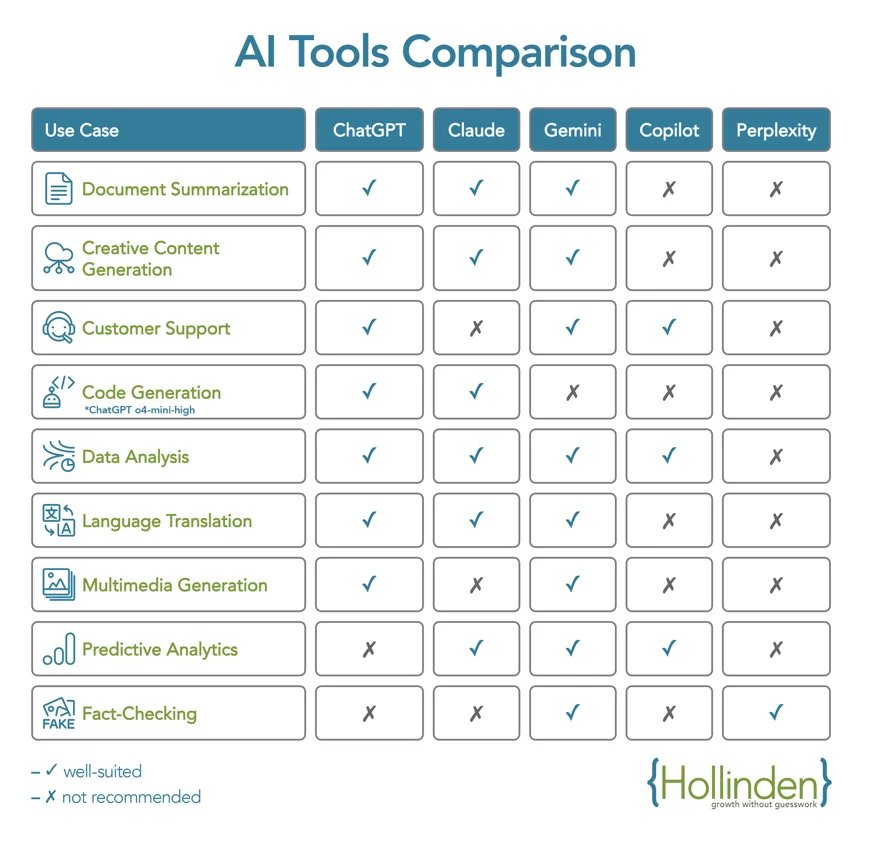
Here's what the research shows. Claude (from Anthropic) excels at deep reasoning, long-form writing, and holding context across massive documents with its 200k token window. Perplexity, on the other hand, is purpose-built for fast, cited research by pulling from live web sources in real time.
Let's break down what each one does well, where they fall short, and which one deserves a spot in your workflow.
The Quick Answer
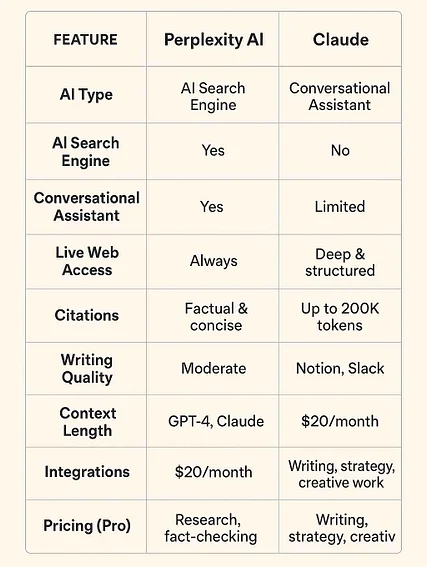
Claude is an AI assistant built for deep thinking, writing, and analysis. Perplexity is an AI search engine designed for fast, cited answers from live sources. Use Claude for complex projects that require reasoning.
Use Perplexity for quick research with verifiable sources. Many professionals use both.
A Foundation: What These Tools Actually Are
Before we go further, we need to clear up a common mistake. People compare Claude and Perplexity like they're direct competitors. They're really not.
Claude is a large language model created by Anthropic. It's designed to reason through problems, write long-form content, analyze documents, and follow complex instructions. Think of it as a thinking partner.
Perplexity is an AI-powered search engine. It uses various LLMs (including Claude and GPT-4 under the hood) but wraps them in a retrieval system that crawls the web, aggregates sources, and gives you cited answers in real time. Think of it as a research assistant.
This distinction matters because it shapes everything about how each tool performs. One is built for depth. The other is built for breadth and speed.
Claude: Your Deep-Thinking AI Partner
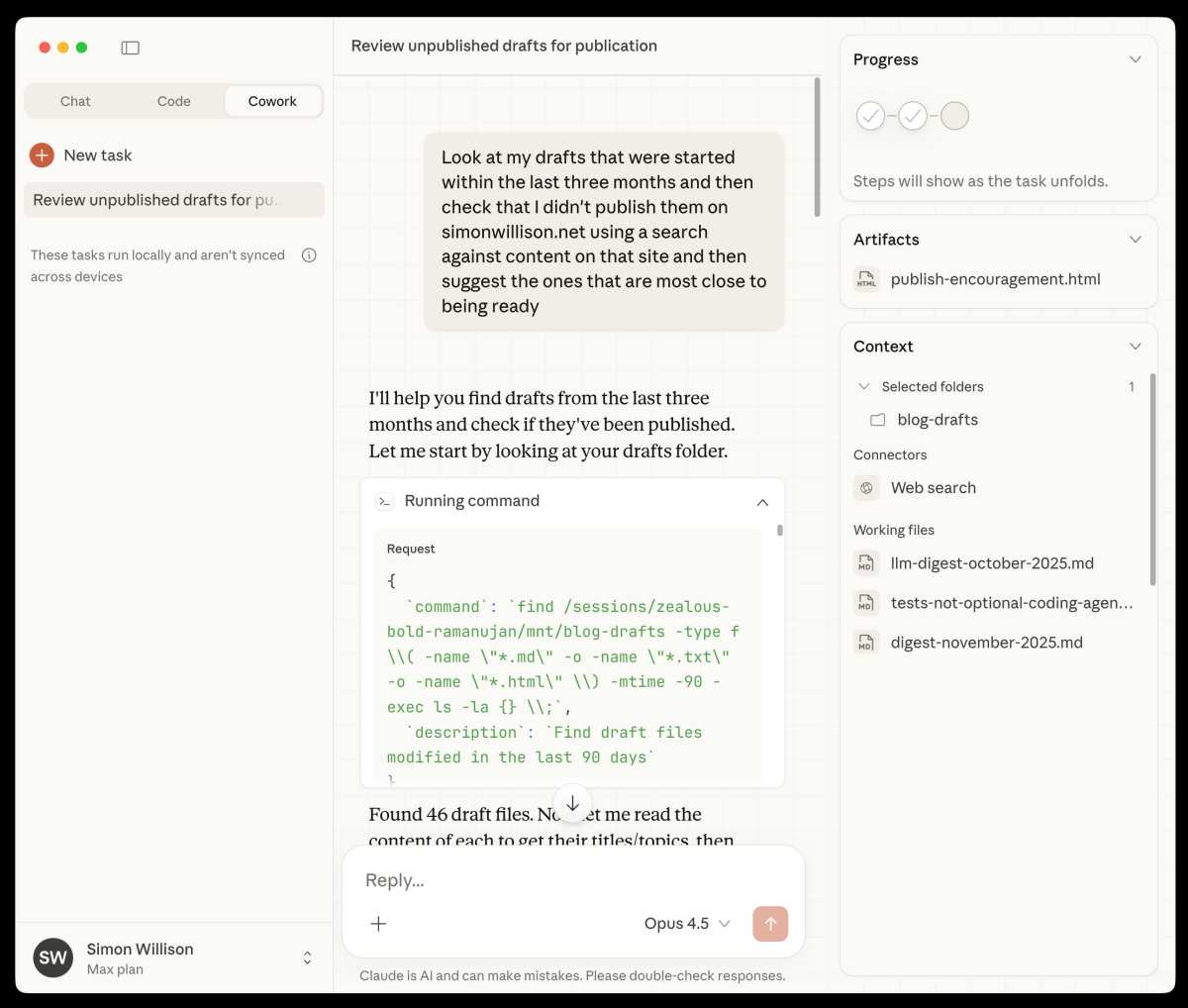
Anthropic's Claude family includes three main tiers: Haiku (fastest and cheapest), Sonnet (balanced), and Opus (most powerful). As of Q1 2025, Claude 3.5 Sonnet has become the default workhorse for most users, offering an excellent balance of speed and capability.
The standout feature is the 200k token context window. That's roughly equivalent to processing a 600-page book in a single conversation. For professionals who work with lengthy documents, legal contracts, codebases, or research papers, this is a game-changer.
Claude also offers what Anthropic calls "extended thinking" (sometimes labeled "brainstorming" in the UI). This allows the model to work through problems step by step before delivering its answer. The result is noticeably better performance on complex reasoning tasks, mathematical proofs, and multi-step logic problems.
What Claude Does Exceptionally Well
Long-form writing and editing: Claude produces some of the most natural, nuanced prose of any LLM. It understands tone, handles subtle instructions, and rarely produces the stiff, robotic output other models generate.
Code generation and debugging: Claude 3.5 Sonnet scores competitively on coding benchmarks. It handles Python, JavaScript, and other major languages well, and the extended thinking mode helps it reason through complex debugging scenarios.
Document analysis: Upload a 50-page PDF and Claude can summarize it, extract key data, answer specific questions, and even critique the arguments presented.
Instruction following: Claude is remarkably good at adhering to specific formatting rules, stylistic guidelines, and multi-step prompts without drifting.
Where Claude Hits Limits
Claude lacks real-time web access as a native feature (the standard chat interface doesn't browse). That means it can't pull current stock prices, breaking news, or recent research papers unless you use a workaround or a third-party integration.
The free tier also has usage limits that heavy users will bump into quickly. Longer conversations can degrade in quality as you approach the context ceiling. And while Claude's safety guardrails are generally a positive, they occasionally refuse prompts that other models would handle without issue.
Perplexity: Your AI-Powered Research Engine
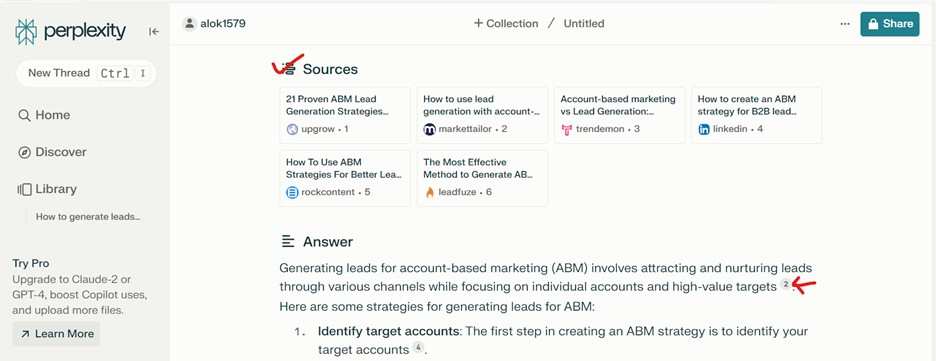
Perplexity launched in 2022 with a simple but powerful idea. What if you could ask a question and get an AI-generated answer with actual citations to the sources it pulled from? That core promise still defines the product today.
The platform offers several search modes. The standard "General" mode handles most queries well. "Academic" mode focuses on scholarly sources.
"Writing" mode generates more polished, essay-style responses. And "Computer Math" mode prioritizes calculations and data analysis.
One thing that sets Perplexity apart is multi-model access. Even on the free tier, you can tap into different LLMs for different conversations. The default Perplexity model is solid for most tasks, but having options is useful when one model handles a specific topic better than another.
What Perplexity Does Exceptionally Well
Source aggregation: Perplexity pulls from multiple sources simultaneously, synthesizes the information, and provides clickable citations. This saves enormous time compared to opening ten browser tabs.
Fact-checking and verification: Because every claim links back to a source, you can verify information instantly. For professional work where accuracy matters, this is invaluable.
Real-time information: Perplexity accesses current events, recent publications, and live data. It's not limited by a training cutoff.
Spaces: This feature lets you organize research into collections. If you're working on a project with multiple subtopics, Spaces keeps everything tidy and searchable.
Where Perplexity Hits Limits
Perplexity's reasoning depth can't match Claude's for complex, open-ended problems. The answers are great for factual lookups and synthesized summaries, but they lack the nuance and original analysis that Claude excels at.
Source quality varies. Perplexity sometimes surfaces low-quality or outdated sources, and the AI can hallucinate when source information conflicts or is ambiguous. Pro Search and other advanced features require a paid subscription. And while the model access is a strength, it can also lead to inconsistency across conversations.
Claude vs Perplexity: Side-by-Side Comparison
Here's a clear breakdown of how these two tools compare across the features that matter most.
| Feature | Claude (Anthropic) | Perplexity AI |
|---|---|---|
| Primary Strength | Deep reasoning and writing | Fast, cited research from live sources |
| Real-Time Web Access | Limited (Requires specific integrations) | Yes (native, core feature) |
| Source Citations | Not standard | Yes, with clickable links |
| Context Window | 200k tokens | Up to 32k tokens (varies by model) |
| Document Analysis | Excellent for long files (PDFs, etc.) | Good, but more limited on very large files |
| Extended Reasoning | Yes ("extended thinking" mode) | No equivalent |
| Writing Quality | Top-tier, natural prose | Good, but more utilitarian |
| Code Capabilities | Excellent, especially with Opus/Sonnet | Decent, but not primary focus |
| Multi-Model Access | No (Claude models only) | Yes (including Claude, GPT-4, Gemini) |
| Organizational Features | Claude Projects (workspaces) | Spaces (research collections) |
| Offline/Plugin Support | Limited | N/A (web-dependent) |
| Best For | Deep thinking, writing, coding | Quick facts, research, verification |
| Free Tier | Yes (with usage limits) | Yes (with search limits) |
| Paid Tier | From $20/month (Claude Pro) | From $20/month (Perplexity Pro) |
The table makes it clear. These tools aren't really competing in the same category on the same terms. They overlap in some areas, but they shine in different contexts.
What Each Tool Does Best
This is where the practical decision-making starts. Let's look at specific scenarios and which tool wins in each.
Deep Analysis, Writing, and Coding
Winner: Claude
If you need to write a detailed report, draft complex emails, analyze a contract, or debug a tricky piece of code, Claude is the better choice. The extended thinking mode means it will work through problems methodically rather than jumping to conclusions.
Claude's ability to maintain context over long documents means you can paste in an entire project brief and have a coherent conversation about it without repeating yourself. For professional writers, developers, and analysts, this is the tool you'll reach for most.
Fast, Sourced Answers and Research
Winner: Perplexity
When you need to know a fact, verify a claim, or get a quick overview of a topic with reliable sources, Perplexity is faster and more practical. You don't need to sift through search results or cross-reference multiple tabs. Perplexity does the aggregation for you, and the citations let you verify everything.
For students working on papers, journalists on deadline, or anyone who needs to research a topic quickly, Perplexity is the obvious pick.
Handling Long Documents and Files
Winner: Claude
Claude's 200k token context window gives it a massive advantage here. You can upload lengthy documents, legal agreements, or entire codebases and work with them meaningfully. Perplexity can handle file uploads, but it's not designed for the kind of sustained, deep analysis that Claude manages.
If document processing is a core part of your workflow, Claude is the stronger tool.
Real-Time Information
Winner: Perplexity
This is Perlexity's home turf. Because it's built on web retrieval, it has access to current events, live data, and recent publications. Claude's knowledge has a training cutoff, so it can't answer questions about things that happened after its last update model-time (current models target mid-2025 knowledge).
For anything time-sensitive, Perplexity wins by default.
Multi-Model Flexibility
Winner: Perplexity
Perplexity gives you access to multiple LLMs within a single interface. If one model isn't giving you the results you need, you can switch to another without leaving the platform. Claude only offers Anthropic's own models.
If model diversity matters to your workflow, Perplexity has the edge.
 ✓
✓Chris Nolan
Senior Hardware & Tech Editor · Lead Benchmark SpecialistChris Nolan leads consumer electronics benchmarking and hardware diagnostics at TechBink. With over 15 years of laboratory stress-testing experience across mobile silicon, PC computing architectures, and cutting-edge gadgetry, Chris provides objective, data-backed hardware reviews and teardowns.

Similar Posts