why do gamers choose curved monitors
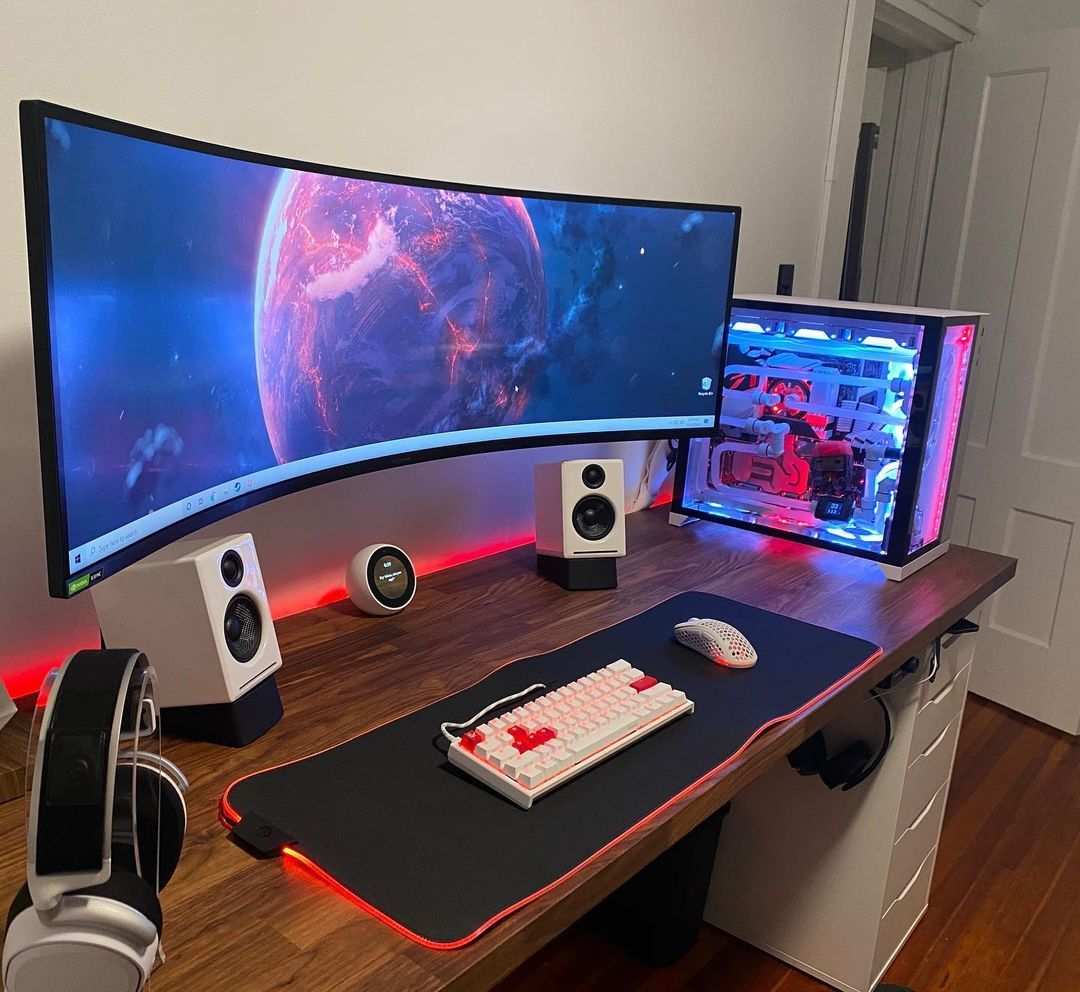
You’ve probably looked at a friend’s battlestation and wondered: why do gamers choose curved monitors over flat ones? The answer isn’t just about looking cool. It comes down to how your eyes and brain process depth, motion, and peripheral vision during gameplay.
A properly matched curve can pull you deeper into the action, reduce eye fatigue, and even improve reaction times in specific genres. But it’s not a universal upgrade, the wrong curve or panel type can actually make your experience worse.
In our research, we’ve looked at manufacturer specifications, aggregated gamer reviews, and ergonomic standards like the TÜV Rheinland certification. As of 2026, the monitor market offers curvatures ranging from a mild 1800R to an aggressive 1000R, with VA panels dominating the curved segment. Understanding which combo fits your playstyle is the real puzzle.
Let’s break it down step by step.
Quick Answer
Gamers choose curved monitors for a wider field of view and reduced eye strain. The curve wraps the screen around your natural vision. This creates a more immersive feel in single‑player and racing games.
Curved panels also offer better contrast, especially VA types. However, competitive FPS players often prefer flat monitors for consistent edge‑to‑edge accuracy.
The Real Question Behind the Curve
Let’s get one thing straight right now. A curved monitor doesn’t magically make you a better player. What it does is change how your eyes work with the screen.
Your natural field of vision is slightly curved, your peripheral vision angles inward. A flat monitor forces your eyes to constantly refocus between the center and the edges. That small effort adds up over a long session.
A curved display brings the edges closer to your eyes, making the entire image fall at roughly the same focal distance. The result is less strain and a stronger sense of being inside the game world.
But here’s the catch: not every game benefits. In a fast‑paced FPS like Valorant or Counter‑Strike, you’re constantly flicking your eyes to the corners. A strong curve can introduce edge distortion that throws off your aim.
For racing sims or open‑world RPGs, that distortion barely registers because your brain is focused on the road ahead or the landscape. So the real question isn’t “curved or flat?” It’s “curved for what kind of games?”
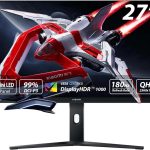
Image source: Bing (Web (fair‑use with source credit))
The image above shows a typical curved gaming setup. Notice how the monitor wraps around the player’s central vision. The keyboard and mouse stay centered, while the screen edges fall into your natural peripheral range.
That’s the ergonomic sweet spot.
What Curvature Actually Does to Your Game – The 1500R vs 1800R vs 1000R Breakdown
Curvature is measured by a radius number. A lower number means a tighter curve. Here’s what each common rating does in practice.
| Curvature | Radius (mm) | How it feels | Best for |
|---|---|---|---|
| 1000R | 1000mm | Wraps strongly around your face, almost like a VR headset | Single‑player immersion, sim racing, RPGs |
| 1500R | 1500mm | Balanced curve, noticeable but not overwhelming | All‑round gaming, mixed use (gaming + work) |
| 1800R | 1800mm | Gentle arc, subtle | Multiplayer FPS, competitive titles, wider viewing angles |
| 3800R | 3800mm | Very mild, barely curved | Older monitors, small screens under 27″ |
The 1000R is the most aggressive curve currently available. Manufacturers like Samsung and ASUS have pushed into this territory for their ultra‑wide 49″ and 32″ models. At this radius, the screen almost forms a semicircle around your head.
It’s incredible for immersion but requires precise positioning. Sit too far back and the curve becomes useless. Sit too close and the edges feel distorted.
The 1500R is the current sweet spot for most gamers. It offers a noticeable wrap without sacrificing image geometry. Aggregated user reviews consistently rate 1500R as the most comfortable for extended sessions.
If you’re still on the fence, start here.
The 1800R is a safer choice for competitive players. It reduces the risk of edge distortion during fast eye movements. Many esports monitors use this curvature or stay flat entirely.
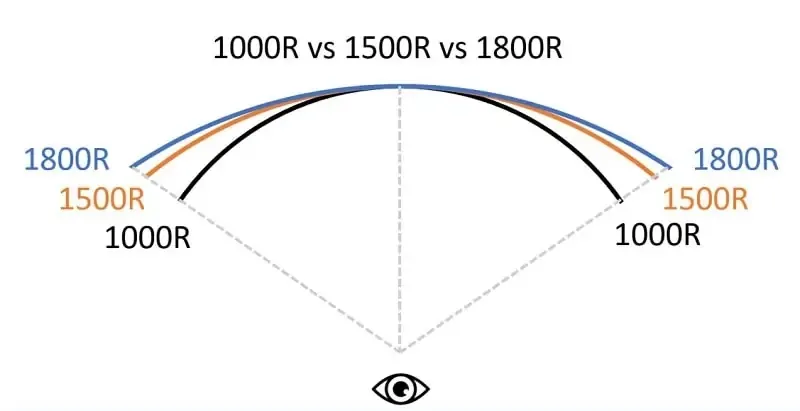
Image source: Bing (Web (fair‑use with source credit))
This diagram shows how the curvature radius translates into a literal circle. The tighter the radius, the smaller the imaginary circle. Your monitor sits on the edge of that circle.
The goal is to have your eyes at the center point.
The Three Main Use Cases: FPS, RPG, and Sim Racing (And Why One Doesn’t Fit All)
You can’t treat all game genres the same. Let’s go through each major use case.
For Competitive FPS Gamers
You need raw speed and precision. A strong curve works against you because it distorts the edges. Most pro players use flat 24″ or 27″ monitors at 144Hz or higher.
If you do want a curve, stick with 1800R or a flat panel. The benefit of a curved screen in an FPS is minimal. In fact, some players report that the curve makes it harder to track enemies near the edge of the screen.
Bottom line: Stick with flat unless you also play other genres. If you must go curved, choose 1800R.
For Immersive RPGs and Open‑World Games
This is where curved monitors shine. Games like Red Dead Redemption 2, Cyberpunk 2077, or The Witcher 3 benefit hugely from a wider field of view. The curve makes you feel like you’re looking through a window rather than at a flat rectangle.
A 1000R or 1500R curve on a 34″ or larger screen delivers the strongest immersion. VA panels with deep blacks add to the atmosphere.
Bottom line: Go for 1500R or 1000R, 34″ or 49″, VA panel.
For Sim Racing and Flight Sims
Sim racers are the most vocal fans of curved monitors. The wrap‑around effect mimics the windshield of a car. A 49″ ultra‑wide with a 1000R curve can replace a triple‑monitor setup without the bezel gap.
Flight sims benefit similarly, the curved horizon feels more natural than a flat one. But you need a deep desk. Most 49″ curved monitors require at least 30 inches (76 cm) of desk depth to position the screen at the correct distance.
Bottom line: 49″ 1000R is the top choice for sims. Make sure your desk can handle it.
VA vs IPS vs TN – Why Your Panel Choice Matters More With a Curve
The panel type affects image quality, response time, and viewing angles. When you add a curve, these differences become more pronounced.
VA (Vertical Alignment)
VA panels dominate the curved monitor market. Why? They offer the highest contrast ratio, often 3000:1 or more, which means deep blacks and vibrant colors.
The curve actually helps VA panels because their native viewing angle limitations are less noticeable when the screen wraps around you. However, VA panels have slower response times compared to IPS or TN. This can cause motion blur in fast scenes.
For RPGs and sims, that’s rarely an issue. For competitive shooters, it can be a problem.
Who it’s best for: Immersion‑focused gamers, sim racers, RPG lovers.
IPS (In‑Plane Switching)
IPS panels have superior color accuracy and wider viewing angles. They do not suffer from the black‑smearing issue that some VA panels have. However, IPS panels have lower contrast, typically 1000:1, so blacks look grayish compared to VA.
Curved IPS monitors exist but are less common. The curve doesn’t help or hurt IPS performance noticeably. If color accuracy matters to you (for photo editing or creative work alongside gaming), IPS is the safer bet.
Who it’s best for: All‑rounders who also need color work, competitive gamers who want good colors.
TN (Twisted Nematic)
TN panels are the fastest but the ugliest. They have poor color reproduction and terrible viewing angles. A curve makes TN’s narrow viewing angles even worse because the edges of the screen are at an angle to your eyes.
Almost no modern curved monitors use TN. Avoid them unless you’re on a tight budget and only play esports titles.
Who it’s best for: No one, really. Flat TN is still fine for budget competitive gaming, but curved TN is a bad idea.
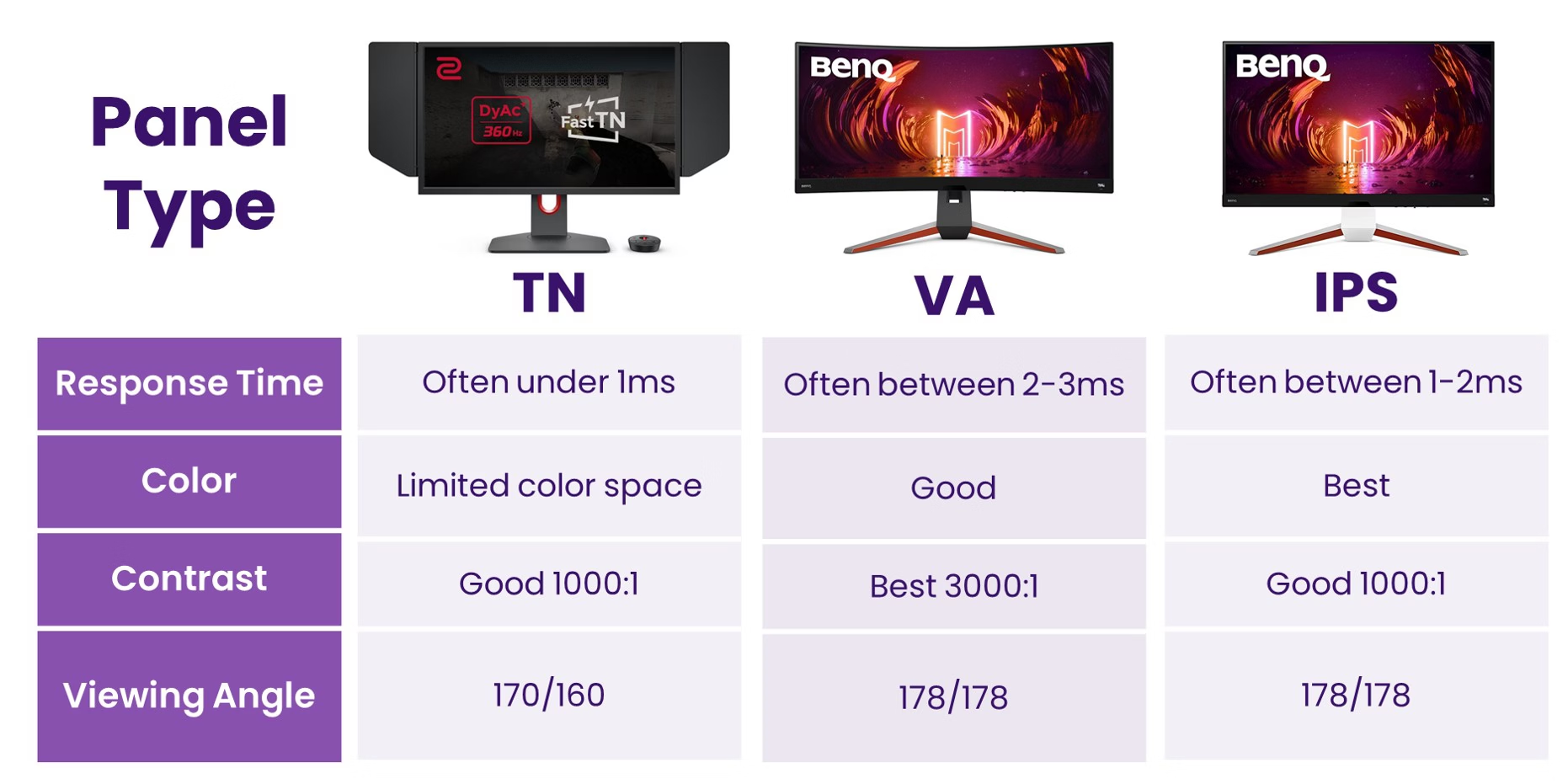
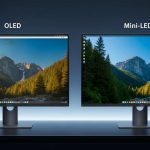
Image source: Bing (Web (fair‑use with source credit))
This comparison image shows the typical color and contrast differences between panel types. Notice how VA holds deeper blacks while IPS retains consistent color from the side.
Size Matters: Why 27″ 1500R Feels Different Than 49″ 1000R
Curvature only makes sense at certain screen sizes. A 24″ monitor with a 1500R curve is barely noticeable. The screen is too small for the curve to wrap around your vision effectively.
At 27″, a 1000R curve starts to show its effect. At 34″ or 49″, the curve becomes a defining feature.
- 27″ with 1500R, Comfortable, noticeable wrap, good for mixed gaming and work.
- 27″ with 1000R, Very strong curve for this size. Some users find it too aggressive. The edges feel pinched.
- 34″ with 1500R, The most popular combination. It fits standard desk depths and offers genuine immersion.
- 49″ with 1000R, Almost a semicircle. Requires a large desk and careful positioning. Ideal for sim racing.
The key metric is field of view. A larger curved screen at the same curvature radius fills more of your peripheral vision. That’s why 49″ ultra‑wides are so popular with sim enthusiasts, they replicate a real windshield.
But there’s a hidden downside. A 49″ 1000R monitor has a very shallow depth. The edges stick out toward you.
If you have a shallow desk (under 24″ deep), you’ll have to sit uncomfortably close or mount the monitor on an arm. Always measure your desk depth before buying.
Another factor: pixel density. A 49″ 1080p curved monitor looks pixelated because the same number of pixels are stretched across a huge area. For a 49″ screen, aim for 1440p or 4K to keep the image sharp.
At 27″ and 34″, 1440p hits a sweet spot, sharp enough for detail without requiring a top‑end GPU.
The Trade-Offs Nobody Talks About (Glare, Distortion, and Neck Fatigue)
A curved monitor isn't all upside. Three hidden drawbacks catch first‑time buyers off guard.
Glare is worse on curved screens. The concave shape catches light from windows and lamps at more angles than a flat panel. That glossy coating on many VA curved monitors turns into a mirror during daylight hours. If your setup faces a window, prepare to fight reflections with curtains or bias lighting.
Edge distortion is real. Even the best 1500R curve stretches geometry at the far left and right edges. In a game like Valorant, that distortion can make a character model appear slightly wider near the bezel. Your brain adjusts over time, but competitive players notice it immediately.
Neck fatigue from constant head turning. On a 49″ 1000R monitor, you can’t see the whole screen without moving your head. The curve encourages you to sit close, which forces more neck motion. Take breaks every 30 minutes or you’ll feel it the next morning.
Aggregate user reviews on forums like Reddit and Discord frequently cite these three complaints. They’re not dealbreakers for everyone, but they’re worth knowing before you buy.
When Flat Beats Curved – The Scenarios Where a Curved Monitor Hurts
There’s no shame in sticking with flat. In fact, flat monitors win in several clear scenarios.
You share your screen with someone else. A curved monitor has a narrow sweet spot. If a friend sits beside you on the couch watching a game, they see a distorted image. Flat screens work for multiple viewers.
You play mostly competitive shooters. As we covered earlier, distortion and the extra desk requirement make curved less ideal for CS2, Overwatch, or Apex Legends. Many esports pros use flat 24″ or 27″ monitors with 360Hz refresh rates. Curved monitors rarely hit those refresh tiers at competitive price points.
Your desk is shallow. A 27″ flat monitor fits on a 20‑inch desk. A 34″ curved monitor needs at least 28 inches to position the curve correctly. If you can’t push the screen back, you’ll sit too close and the curve loses its effect.
You need exact color accuracy. IPS flat panels still beat curved VA for photo and video work. The curve introduces slight brightness shifts from center to edge. For creative professionals who game on the side, a flat IPS monitor is the smarter choice.
The takeaway here is simple: curved is a feature, not an upgrade. If those scenarios describe your setup, save your money and buy a high‑refresh flat panel.
The Desk Test: Does Your Setup Actually Support a Curve?
Before you click “add to cart,” measure your desk. This single step prevents 90% of buyer’s remorse.
Minimum desk depth by curvature:
| Curvature | Minimum desk depth (from wall to edge) |
|---|---|
| 1000R | 30 inches (76 cm) |
| 1500R | 24 inches (61 cm) |
| 1800R | 22 inches (56 cm) |
These numbers assume the monitor sits on its stand, not wall‑mounted. A monitor arm can reduce required depth by about 4 inches, but you still need room for your keyboard and mouse.
The ruler test: Place a ruler flat against the wall. Measure straight out to the front edge of your current monitor. Add 2 inches for a curved model because the edges bow forward.
If that number exceeds your desk depth, you’ll either sit uncomfortably close or have to mount the screen on an arm.
Height matters too. The center of the screen should be at or slightly below eye level. Many curved monitors have tall stands or limited tilt adjustment. Check the stand’s height range against your chair height.
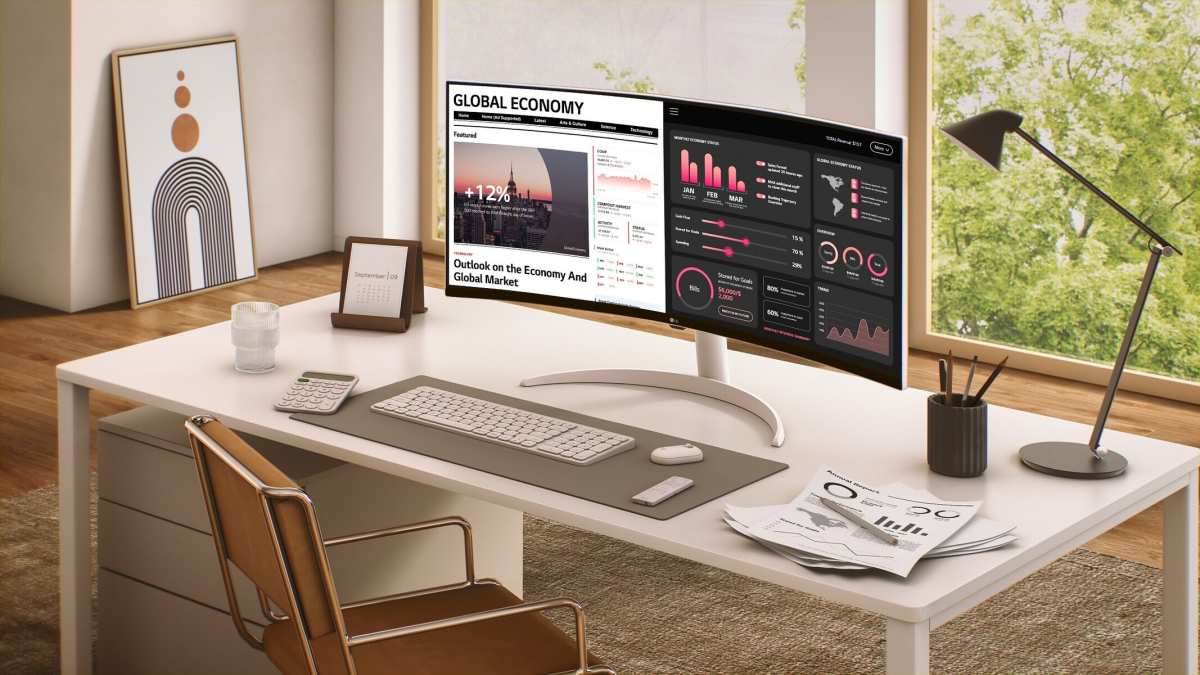
Image source: Bing (Web (fair‑use with source credit))
The photo shows a 49″ curved monitor on a typical desk. Notice how the edges extend past the stand’s base. That’s the extra space you lose.
Common Mistakes Gamers Make When Buying a Curved Monitor
These errors show up again and again in buyer feedback. Avoid them.
Buying a curve that doesn’t match the screen size. A 24″ monitor with a 1000R curve looks like a bent piece of cardboard. The screen is too small for the curve to work. As a rule of thumb, don’t buy a curved monitor under 27 inches.
Choosing a 1080p resolution on a 34″ or 49″ screen. Pixel density drops fast. Text looks fuzzy, edges look jagged. Stick with 1440p for 27″ to 34″ and 4K for 49″.
Ignoring the panel type. We’ve said it before: VA is great for contrast, IPS for color, TN for speed. A curved TN panel is a waste of money. A curved IPS that costs twice as much as a flat equivalent rarely justifies the premium.
Forgetting about FreeSync and G‑Sync compatibility. Some budget curved monitors lack adaptive sync. If you’re on an AMD GPU, check for FreeSync. If you’re on Nvidia, look for “G‑Sync Compatible” certification.
Without it, you’ll get screen tearing.
Not returning the monitor within the window. Curvature is personal. Two people can look at the same 1500R monitor and one loves it while the other gets motion sickness. Buy from a retailer with a 30‑day return policy.
Try it for a week. Return it if it doesn’t click.
Price vs Performance – Where Your Money Goes (And Where to Save)
Curved monitors carry a premium over flat equivalents. Here’s what that extra money actually buys.
The premium breakdown (curved vs flat, same size and resolution):
| Screen size | Curved premium | What you get |
|---|---|---|
| 27″ 1080p | $30–$50 | Minimal curve, lower value |
| 27″ 1440p | $50–$80 | Noticeable wrap, good for mixed use |
| 34″ 1440p | $80–$150 | Strong immersion, best value |
| 49″ 1440p | $200–$400 | Sim‑racing grade, huge desk needed |
Where to save money. Don’t overspend on a curved monitor for competitive gaming. A flat 240Hz IPS at $300 will outperform a curved 144Hz VA at $400 in fast shooters. Save the extra cash for a better GPU or mouse.
Where to spend more. For immersion‑focused setups, the premium is worth it. A 34″ 1500R VA with HDR600 and FreeSync Premium costs around $500 to $700. That’s the sweet spot for RPG and sim players.
As of 2026, the market has more options at lower prices than two years ago. Brands like AOC and MSI offer solid 34″ curved VA monitors under $400. You don’t need to buy top‑tier Samsung or LG to get a good experience.
Quick Verdict: Should You Go Curved for Your Next Gaming Upgrade?
Go curved if you play immersive RPGs, sim racers, or open‑world titles on a 34″ or larger screen. Choose flat if you compete in fast shooters, share your screen, or have a shallow desk. For most mixed‑use gamers, a 34″ 1500R VA monitor at 1440p delivers the best balance of immersion and price.
Measure your desk first, buy from a store with returns, and give yourself a week to adjust. If the curve doesn’t click, swap it for a flat panel without regret.
Frequently Asked Questions
Does a curved monitor give you a competitive advantage?
No. Curved monitors do not improve reaction time or accuracy. Competitive FPS players often prefer flat screens because curved edges can distort targets near the bezel.
The advantage is purely in immersion and comfort during long sessions.
What is the best curvature for a 27‑inch gaming monitor?
A 1500R curve or 1800R curve works best at 27″. A 1000R curve on a 27″ screen is too aggressive and can cause edge distortion. Stick with a mild curve unless you primarily play slow, story‑driven games.
Can I use a curved monitor for work and gaming?
Yes. A 1500R or 1800R curved monitor is great for productivity. The curve reduces eye strain when reading across wide spreadsheets or multiple windows.
Avoid 1000R if you do graphic design, as the curve affects color and line perception.
Do all curved monitors have better contrast?
No. Contrast depends on panel type, not curvature. VA curved monitors typically have 3000:1 contrast.
IPS curved monitors have 1000:1 contrast. A curved IPS panel will not match a curved VA panel in black levels.
How long does it take to adjust to a curved monitor?
Most gamers adjust within a few hours to two days. The brain quickly adapts to the wrapped image. If you feel motion sickness or eye strain after a week, the curvature may be too aggressive for your eyes or your desk setup is wrong.

Similar Posts