Why Should I Choose a Mini LED Monitor Over OLED
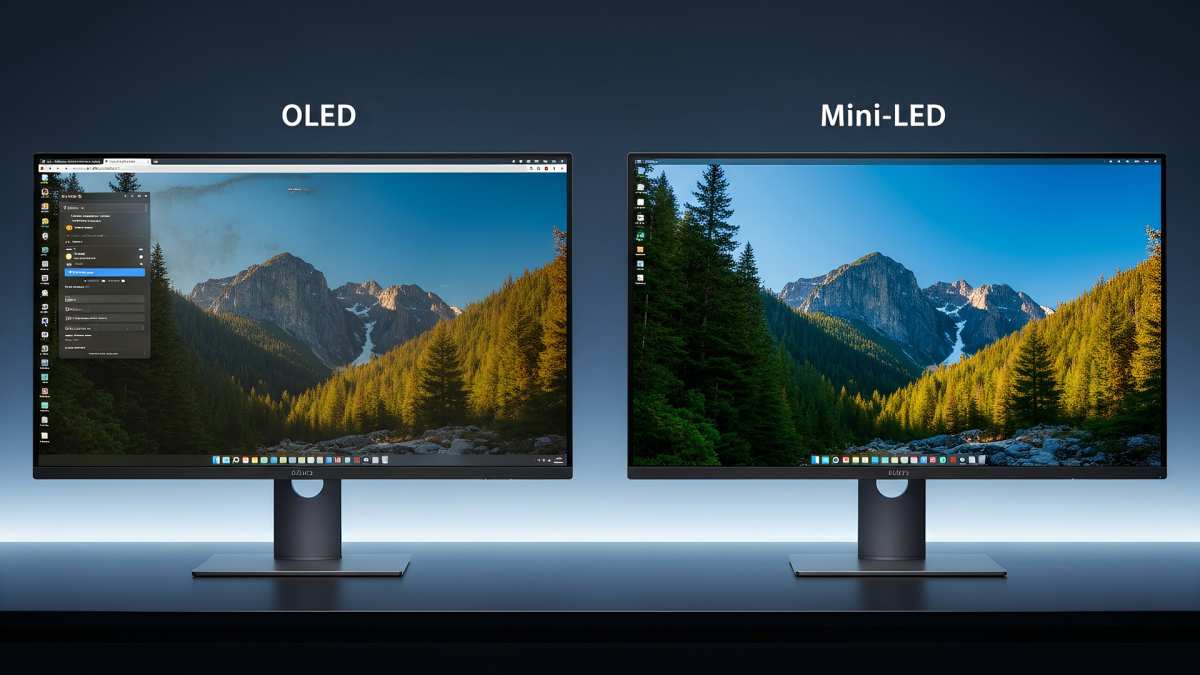
If you're wondering why should I choose a mini led monitor over oled, the short answer comes down to three things: brightness, burn-in risk, and value. Mini LED tech has matured fast. As of 2026, it closes the gap on picture quality while staying ahead on longevity and peak HDR punch.
That matters if you leave static elements on screen or just don't want to worry down the road.
But picture quality isn't one spec. Each technology wins in different areas and serves different users. Let's walk through the real trade-offs so you can pick the right panel for how you actually use your monitor.
Image source: Bing (Web (fair-use with source credit))
Quick Answer
Mini LED monitors offer higher sustained peak brightness for HDR content. They carry zero risk of permanent burn-in over time. They typically cost less per inch at larger screen sizes.
You gain durability for static-heavy workloads. You trade away the perfect blacks and near-instant pixel response of OLED.
The Real Difference Between Mini LED and OLED (And Why It Matters)
Mini LED and OLED take fundamentally different approaches to making an image. Understanding that difference explains every trade-off you'll see on a spec sheet.
OLED (Organic Light Emitting Diode) panels are self-emissive. Each pixel produces its own light and can turn off completely. That's how OLED delivers its signature "infinite contrast ratio." Black pixels are genuinely off.
The result in a dark room is stunning. No backlight bleed. No halo around bright objects on a dark background.
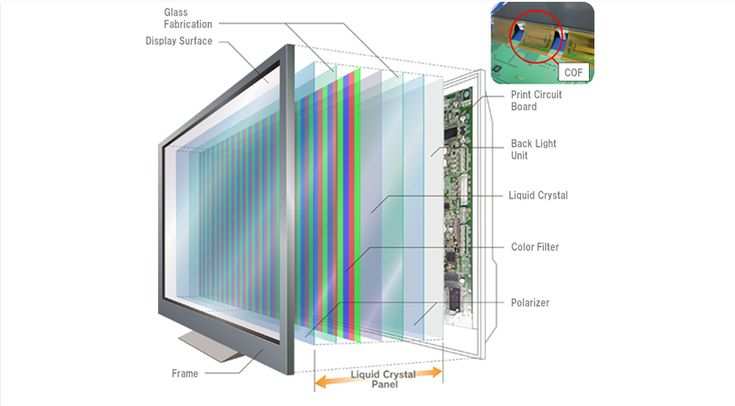
Mini LED is still LCD technology at its core. It uses a full array of thousands of tiny LED zones behind the panel that dim and brighten independently. This is Full Array Local Dimming (FALD).
More zones mean more precise control over which parts of the screen are bright and which are dark. But it's still a backlight behind a liquid crystal layer. It can't match per-pixel precision.
Here's where things have shifted. Mini LED monitors as of 2026 pack anywhere from 384 to over 2,000 dimming zones into a single display. At the high end, zone density gets close enough to per-pixel dimming that blooming (that bright halo around white text on black) has become far less distracting than it was even two years ago.
Panels like the Samsung Odyssey Neo G9 with 2,088 zones or the ASUS ROG Swift PG32UQX with 1,152 zones show how far the tech has come.
That doesn't mean mini LED matches OLED in a dark room at midnight. It doesn't. Side by side in a pitch-black space, OLED still looks better for movie watching because those blacks are truly black.
But most people don't use their monitor in a total cave. In a room with some ambient light, the brightness advantage of mini LED starts to dominate the perceived contrast. And perceived contrast is what your eyes actually see.
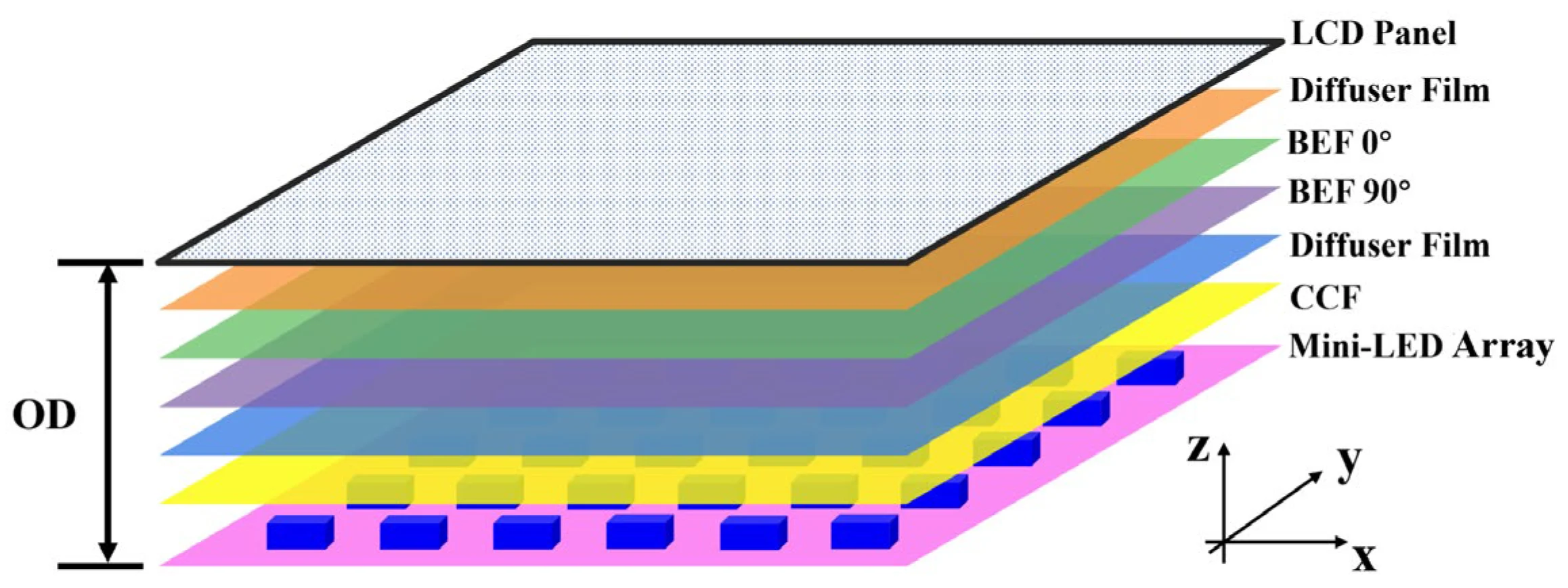
Image source: Bing (Web (fair-use with source credit))
Side-by-Side: How Mini LED and OLED Actually Compare
Let's break this down by the specs and performance characteristics that actually affect your experience day to day.
Brightness and HDR Performance
Mini LED wins on raw brightness, and it's not close at the high end. Mini LED monitors regularly hit 1,000 to 2,000 nits of sustained peak brightness in HDR mode. Some flagship models push past 4,000 nits in peak measurements.
That matters massively for HDR content. Bright highlights in games, movies, and edited footage pop with a realism that lower-brightness panels simply can't replicate.
OLED monitors have improved here. LG's WOLED panels and Samsung's QD-OLED technology have pushed peak brightness higher. MLA (Micro Lens Array) technology in newer WOLED panels boosts brightness roughly 30% over previous generations.
But sustained brightness on OLED is limited by ABL (Automatic Brightness Limiter). When a large bright area fills the screen, the panel dials back total brightness to manage heat and power. A full-white screen on a 27" OLED might only sustain 200 to 250 nits.
A mini LED panel of the same size can sustain 600 to 1,000+ nits across the full screen.
Per VESA DisplayHDR certification standards, true HDR performance requires meaningful peak brightness. A DisplayHDR 1000 certification means the panel hits 1,000 nits. Most high-end mini LED monitors clear that bar.
OLED monitors typically achieve DisplayHDR True Black 400 or True Black 600 certifications. The True Black standard prioritizes contrast over brightness, which makes sense for the tech's strengths. But for HDR impact, brightness drives the wow factor.
Contrast and Black Levels
This is OLED's home turf. Each pixel on an OLED panel can switch off independently. The result is a contrast ratio that effectively reads as infinite.
Black is truly black. In a dark room watching a movie or playing a game with dark scenes, the depth and richness of OLED's image is visibly superior to any LCD-based technology.
Mini LED has narrowed the gap, but physics is physics. With 1,152 or 2,088 dimming zones, a mini LED monitor can get very dark in large black areas. The problem is precision at the edges.
A single zone covers hundreds or thousands of pixels. When a bright white cursor moves across a black background, you'll see a faint halo around it. This is blooming.
Higher zone counts reduce it, but they don't eliminate it entirely.
Per SID (Society for Information Display) research, perceived contrast in real-world mixed content depends on both black level and peak brightness. Mini LED's higher brightness can make its contrast feel punchier in lit rooms even though its absolute black level is worse. Your environment changes which technology "looks better" more than most reviewers admit.
For color-critical work in video editing and color grading, both technologies now cover 95-99% of DCI-P3. Color volume can be higher on OLED. Mini LED depends on the LCD layer's color filter, but quantum dot enhancement films on premium models have closed this gap significantly.
For professional color work, calibrating either technology with a hardware colorimeter delivers accurate results.
Response Time and Motion Clarity
OLED's pixel response times are roughly 0.1 milliseconds. That's an order of magnitude faster than the best mini LED IPS panels at around 1ms GtG (gray to gray). For competitive gaming and fast-paced motion, OLED's near-instantaneous pixel transitions produce cleaner motion with less smearing.
Mini LED with a VA panel can offer better contrast than IPS but slower response times in dark transitions. IPS-based mini LED monitors have improved dramatically. At 1ms GtG, they're fast enough for competitive play.
But they don't match OLED's motion clarity in side-by-side comparison. For esports players and competitive FPS gamers, OLED maintains a real edge here.
Mini LED monitors often offer higher maximum refresh rates. 500Hz IPS mini LED panels exist for competitive gaming. OLED monitor refresh rates as of 2026 top out at 240Hz to 360Hz for most models. If you prioritize absolute refresh rate for competitive advantage, mini LED gives you options that OLED doesn't yet match.
Burn-In: The Elephant in the Room
This is arguably the single biggest reason people choose mini LED over OLED. OLED panels can suffer from burn-in. Static elements that stay on screen for hours (taskbars, channel logos, game HUDs, spreadsheet grids) can leave a permanent ghost image.
Individual pixels degrade at different rates depending on how often and how brightly they're used.
Modern OLED monitors include burn-in mitigation features. Pixel refresh cycles, pixel shifting, and screen savers all help delay the onset. Manufacturers like LG and Samsung now include burn-in coverage in their warranties for monitor products.
But the risk never fully goes away. It's an inherent property of organic materials degrading unevenly over time.
Mini LED uses a traditional LCD layer with LED backlighting. The LCD pixels themselves don't emit light and don't degrade in the same way. Burn-in is effectively not a concern.
You can leave your desktop taskbar on screen eight hours a day for five years and the panel will look the same as day one. The LED backlight may dim slightly over tens of thousands of hours, but that's a gradual and uniform shift. Not a permanent burned-in image.
If you use your monitor for work eight or more hours a day with static UI elements, burn-in anxiety is a real quality-of-life consideration. Mini LED gives you peace of mind that OLED simply cannot match.
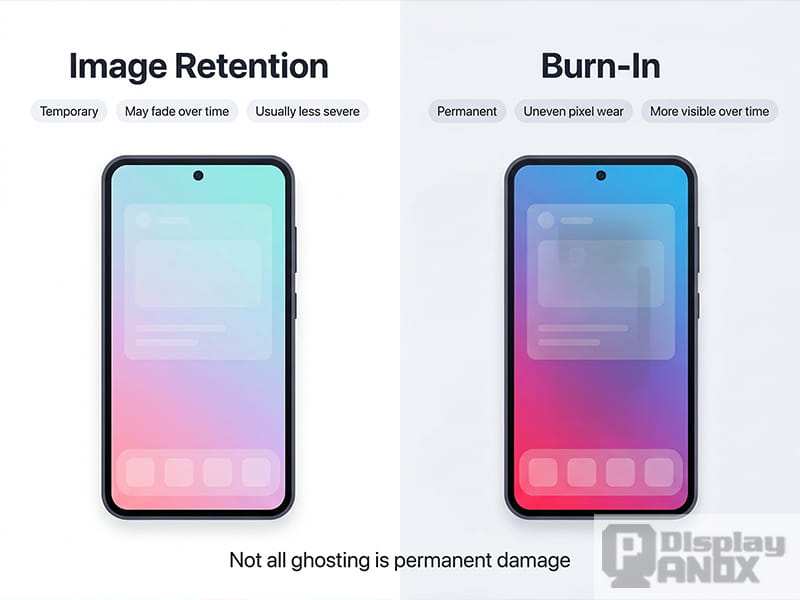
Image source: Bing (Web (fair-use with source credit))
Mini LED vs OLED: Spec Sheet Comparison
Here's the quick-reference table. Use it as your at-a-glance decision framework.
| Feature | Mini LED | OLED |
|---|---|---|
| Peak Brightness (Sustained) | 1,000-2,000+ nits | 200-250 nits (full screen) |
| Peak Brightness (Small Highlight) | Up to 4,000+ nits | 800-1,000 nits |
| Contrast Ratio | ~1,000,000:1 | Effectively infinite |
| Black Level | Near-black (depends on zone count) | True zero (pixel off) |
| Burn-in Risk | None | Present (mitigated by features) |
| Full-Screen Brightness | 600-1,200+ nits | 200-250 nits |
| Response Time | ~1ms GtG | ~0.1ms |
| Max Refresh Rate (2026) | Up to 500Hz | Up to 360Hz |
| HDR Certification | DisplayHDR 1000, 1400, 4000 | True Black 400, 600 |
| Color Gamut (DCI-P3) | 95-99% | 98-99.9% |
| Thickness | Thicker (backlight array) | Very thin (no backlight) |
| Power Consumption | Higher (backlight zones) | Lower (dark content) |
| Thermal Output | Higher (requires cooling) | Lower |
| Price Range (27" 4K) | $400-$800 | $800-$1,500+ |
| Price Range (32" 4K) | $600-$1,200 | $700-$1,200 |
| Best For | Bright rooms, long sessions, mixed use | Dark rooms, movies, single use |
Who Should Pick Mini LED (And Who Shouldn't)
Not everyone benefits from choosing mini LED. The right pick depends entirely on how and where you use your monitor. Here's who stands to gain the most from going this route.
Competitive and Esports Gamers
Mini LED makes strong sense here for two reasons. First, the highest refresh rates available in monitors as of 2026 belong to mini LED. You can get 500Hz panels for competitive FPS play.
OLED tops out lower for most models. Second, competitive games often have static HUD elements, scoreboards, and minimaps that stay in the same position for hours. Burn-in risk on OLED is real for this use case.
Mini LED eliminates that concern entirely.
The trade-off is motion clarity. OLED's 0.1ms response time produces cleaner motion than mini LED's ~1ms. If you play competitively at the highest level and every millisecond matters, OLED still has an edge.
For the vast majority of competitive gamers, mini LED's speed is more than sufficient and the burn-in peace of mind is worth it.
Content Creators and Color Professionals
This one's nuanced. For video editing and color grading, OLED's per-pixel precision and true blacks give it an advantage in dark scene evaluation. If you grade footage in a controlled dark environment, OLED lets you see shadow detail with absolute accuracy.
Mini LED's blooming can obscure subtle gradations near the edge of bright and dark zones.
For photography editing and graphic design, mini LED works well. Most of these workflows involve lighter interfaces and full-screen content where blooming is less noticeable. Both technologies cover 95%+ of DCI-P3.
With proper hardware calibration, either delivers professional-grade color accuracy. If your work spans both video and print, mini LED's brightness advantage for HDR content creation is a genuine benefit.
Office and Productivity Users
Mini LED is the clear winner here. Office work means static taskbars, toolbars, spreadsheet grids, and document windows sitting in fixed positions for eight-plus hours a day. This is exactly the scenario where OLED burn-in risk is highest.
Mini LED panels don't care. You can run the same layout for years with zero image retention concerns.
Brightness matters too. Most offices have ambient lighting. Mini LED's higher sustained brightness keeps text crisp and readable in well-lit environments.
You won't be fighting glare the way you might with an OLED panel that can't push as much light.
Mixed-Use and Bright Room Setups
If your monitor sits in a room with windows or overhead lighting, mini LED's brightness advantage becomes the dominant factor. Perceived contrast in a lit room depends more on peak brightness than on absolute black level. A mini LED panel pushing 1,000+ nits will look punchier and more vivid than an OLED struggling to overcome ambient light.
This also applies to users who don't want to control their room lighting. If you game with the lights on or watch HDR content during the day, mini LED handles it better. You get the full HDR impact without needing to darken the room.
Image source: Bing (Web (fair-use with source credit))
Who Should Stick With OLED Instead
OLED remains the better choice for specific users. If you primarily watch movies and play single-player games in a dark or dimly lit room, OLED's picture quality is visibly superior. True blacks, infinite contrast, and per-pixel dimming create an image that mini LED can't match in that environment.
Users who prioritize form factor should consider OLED too. Without a backlight array, OLED monitors are remarkably thin and light. Some models are under 4mm at their thinnest point.
If aesthetics and desk space matter to you, OLED's slim profile is a real advantage.
Response-time-sensitive competitive gamers at the highest level may still prefer OLED. The 0.1ms pixel response produces measurably cleaner motion in fast pans and tracking scenarios. For casual and most competitive players, the difference is minor.
For professional esports athletes chasing every advantage, it's worth considering.
Common Mistakes People Make When Choosing Between These Two
The biggest mistake is assuming OLED is automatically better because it's the newer, more expensive technology. That's not how display tech works. Each technology optimizes for different strengths.
Picking OLED for a bright office with eight-hour static workloads ignores the burn-in risk entirely.
Another common error is ignoring zone count when evaluating mini LED monitors. A 384-zone mini LED panel will show noticeably more blooming than a 1,152-zone model. Not all mini LED monitors are equal.
The zone count and dimming algorithm matter as much as the "mini LED" label itself. Always check the specific zone count for the model you're considering.
People also overlook ABL on OLED. Manufacturer specs might cite 1,000-nit peak brightness. That's typically only achievable on a small bright window covering 10-25% of the screen.
Full-screen sustained brightness on OLED drops dramatically. If you use full-screen HDR content regularly, check the sustained brightness numbers, not just the peak.
Finally, don't ignore warranty terms. Burn-in coverage varies by manufacturer. Some include it in the standard warranty.
Others exclude it or limit coverage. Read the fine print before you buy, especially if you're leaning toward OLED for a mixed-use setup.
What You'll Actually Pay: Pricing Reality Check
Pricing has shifted significantly. As of 2026, mini LED monitors offer better value at most price points, especially at larger sizes.
| Size & Resolution | Mini LED Price Range | OLED Price Range |
|---|---|---|
| 27" 4K | $400-$700 | $800-$1,500 |
| 27" 1440p (High Refresh) | $250-$500 | $600-$900 |
| 32" 4K | $600-$1,200 | $700-$1,200 |
| 34" Ultrawide 3440×1440 | $500-$900 | $800-$1,400 |
| 49" Super Ultrawide 5120×1440 | $800-$1,500 | $1,200-$2,500+ |
| 4K High-End HDR (2000+ zones) | $1,000-$2,000 | $1,500-$3,000+ |
At 27 inches, mini LED is substantially cheaper. A solid 4K mini LED monitor costs roughly half what an equivalent OLED costs. At 32 inches, the gap narrows.
Some 32" 4K OLED models from LG and Samsung have dropped into the $700 range, making them competitive with mid-range mini LED options.
The sweet spot for value is the 27" to 32" 4K mini LED range. You get strong HDR performance, high brightness, and no burn-in risk at $500 to $900. For ultrawide formats, mini LED pricing is more competitive at equivalent feature levels.
OLED ultrawide monitors carry a premium that's harder to justify unless you specifically need the form factor and contrast advantages.
My Honest Recommendation Based on Your Situation
Here's the decision framework distilled down to the essentials.
Pick mini LED if you:
- Use your monitor for six or more hours daily with static UI elements
- Work or game in a room with ambient light
- Want HDR impact without needing a pitch-black room
- Prioritize longevity and zero burn-in risk
- Want the highest available refresh rates for competitive play
- Are buying a 27" monitor and want to stay under $700
Pick OLED if you:
- Primarily use your monitor in a dark or controlled lighting environment
- Watch movies and play cinematic single-player games as your main use case
- Want the thinnest possible monitor profile
- Need the absolute best motion clarity for competitive esports
- Do color-critical video grading in a dark room
- Are willing to accept some burn-in risk for superior picture quality
For most people buying a monitor in 2026 for mixed daily use, mini LED is the safer and more practical recommendation. The brightness advantage, burn-in immunity, and better pricing make it the better all-around choice for the way people actually use their monitors day to day. OLED remains the premium pick for dedicated dark-room enthusiasts who prioritize picture quality above all else and understand the care requirements.
Frequently Asked Questions
Is mini LED better than OLED for gaming?
It depends on the type of gaming. Mini LED wins for competitive gaming with static HUDs and long sessions due to burn-in immunity and higher refresh rate options. OLED wins for cinematic single-player gaming in dark rooms due to superior contrast and motion clarity.
Will OLED burn in if I use it as a monitor?
It can, especially with static elements like taskbars and toolbars visible for hours daily. Modern OLED monitors include mitigation features and improved panel longevity, but the risk never fully disappears. Manufacturer warranties increasingly cover burn-in, but it's still a consideration.
How many dimming zones should I look for in a mini LED monitor?
For a 27" to 32" monitor, look for at least 576 zones for acceptable blooming control. 1,152 zones or more provides a noticeably better experience. Budget models with 384 zones will show more visible blooming around bright objects on dark backgrounds.
Can mini LED monitors do HDR as well as OLED?
Mini LED actually delivers more impactful HDR in most real-world scenarios due to higher sustained peak brightness. HDR content relies on bright highlights to pop, and mini LED's 1,000 to 2,000+ nit output creates a more dramatic effect than OLED's lower sustained brightness.
Is OLED worth the extra cost over mini LED?
For dedicated dark-room movie watching and cinematic gaming, yes, OLED's picture quality justifies the premium. For mixed-use setups, bright rooms, and productivity workloads, mini LED's practical advantages typically make it the better value proposition.

Similar Posts