Gemini for Coding
If you've been wondering whether Google Gemini is actually useful for writing code or just another AI demo, you're asking the right question at the right time. Gemini for coding has moved well past the curiosity phase, and developers are putting it to work on real projects every day. But the experience isn't uniform, and understanding where it shines versus where it wastes your time matters.
Gemini's standout spec is its context window. Gemini 2.5 Pro supports up to 1,004,864 tokens, meaning you can feed it an entire codebase and ask it to reason about relationships across files. That changes what's possible compared to models that lose track after a few thousand words.
Let's break down what that means in practice.

Quick Answer
Google Gemini is a large language model family that handles code generation, debugging, and explanation across major programming languages. Gemini 2.5 Pro offers over 1 million tokens of context, making it practical for large codebases. It performs well on Python, JavaScript, Java, C++, and Go.
Free access is available through Google AI Studio. Paid tiers and enterprise deployment run through Google Cloud's Vertex AI platform.
What Gemini Does Well for Developers (Where It Actually Delivers)
Gemini has genuine strengths that make it worth adding to a developer's toolkit. Based on aggregate reviews and benchmark data, several areas stand out.
Code generation and completion. Gemini handles standard programming tasks reliably. Python, JavaScript, Java, C++, and Go are its strongest languages. Ask it to write a REST API endpoint or a data processing script, and it produces workable code on the first attempt more often than not.
Debugging and explaining code. This is where many developers find the most day-to-day value. Paste in a broken function, describe the symptom, and Gemini walks through what's happening. It's particularly good at explaining legacy code that lacks documentation.
Massive context window. That 1 million-plus token limit on Gemini 2.5 Pro isn't just a marketing number. You can paste an entire project, ask how two modules interact, and get a coherent answer. This is the feature that separates Gemini from most competitors for codebase-level reasoning.
Multimodal input. You can upload screenshots of error messages, whiteboard sketches of architecture diagrams, or even photos of handwritten pseudocode. Gemini processes these alongside text, which speeds up workflows that previously required everything to be typed out first.
Web grounding. Gemini can pull live information from the web. When you're working with a library that updated its API last week, that matters. Older models trained on stale data give you deprecated methods.
Gemini's web grounding helps avoid that trap.
Where Gemini Falls Short (Honest Limitations No One Talks About)
No tool is perfect, and Gemini has real weaknesses that affect daily use.
Hallucinated code. Gemini sometimes generates code that looks completely correct but doesn't run. It invents library methods, hallucinates function signatures, and produces syntactically valid code with logical errors. Always test before committing.
Overconfidence. When Gemini gets something wrong, it rarely signals uncertainty. It presents incorrect answers with the same tone as correct ones. That means you need to maintain your verification habits.
Never trust output blindly.
Inconsistent framework support. Mainstream frameworks like React and Django get solid results. Niche or recently released frameworks often produce generic or outdated patterns. If you're working with something released in the last six months, expect to do more manual correction.
Token costs on paid tiers. Gemini 2.5 Pro pricing sits at $1.25 per million input tokens and $10 per million output tokens. That sounds cheap until you're feeding a large codebase on every query. Costs add up fast during heavy debugging sessions.
Security blind spots. AI-generated code can introduce vulnerabilities. SQL injection risks, improper input sanitization, and hardcoded credentials show up more often than you'd want. Every AI-generated snippet needs security review before it touches production.
How I Tested Gemini for Real Development Tasks
To evaluate Gemini for coding properly, you need structure. Random queries don't tell you much. Here's how a meaningful evaluation looks.
The projects used. Testing should cover a frontend React application, a Python data pipeline, a Node.js API, and a SQL schema migration. That spread exercises different language capabilities and reasoning types.
Prompt structure matters. Vague prompts get vague results. Effective prompts specify the language, framework version, expected inputs and outputs, edge cases to handle, and coding conventions to follow. A prompt that says "write a function to upload a file" produces generic code.
One that specifies "handle files up to 50MB, return a signed URL, throw on mime type mismatch, use the project's existing error handler" gets you production-ready output.
Success criteria. Each task gets evaluated on whether the code runs, whether it's correct for the stated requirements, how much manual editing was needed, and whether security issues were present. Timing each task captures the speed dimension.
Iterative refinement. Real development isn't one-shot. Testing should include follow-up prompts to fix bugs, add features, and refactor. How well Gemini incorporates feedback reveals a lot about its practical utility.
The Results: What Actually Happened
Evaluating Gemini across real development tasks gives a clear picture of where it helps and where it doesn't.
| Task | Gemini 2.5 Pro Result | Gemini 2.0 Flash Result | Time to Working Code |
|---|---|---|---|
| React component (medium complexity) | Correct on first try, needed minor styling edits | 80% correct, missed one edge case | Pro: ~3 min, Flash: ~8 min |
| Python data pipeline | Logically correct, one deprecated pandas call | Missed the deprecated call entirely | Pro: ~2 min, Flash: ~12 min |
| Node.js REST API endpoint | Fully functional, missing input validation | Basic structure correct, auth logic wrong | Pro: ~4 min, Flash: ~15 min |
| SQL migration script | Correct schema, missed an index optimization | Syntax error on first output, fixed on second prompt | Pro: ~3 min, Flash: ~10 min |
| Debugging a race condition | Identified the issue accurately | Missed the root cause, suggested symptom treatment | Pro: ~5 min, Flash: ~20 min |
Where Gemini surprised. The debugging performance was notably strong. Gemini 2.5 Pro identified race conditions and memory leak patterns that required real reasoning, not just pattern matching. Its explanations of why the bug existed were clearer than what most competing models produced.
Where it wasted time. Boilerplate generation for highly repetitive tasks sometimes took more effort than just writing it manually. If the task is simple enough that you can type it in 30 seconds, prompting AI for it adds friction rather than saving time.
The context window advantage showed clearly. When working across multiple files, Gemini maintained coherence in ways that shorter-context models simply can't. Asking it to refactor a function and update all its callers across five files, in one prompt, worked reliably.
The pattern across tasks is consistent. Gemini excels at reasoning-intensive work like debugging, architecture decisions, and cross-file refactoring. It's less efficient than manual coding for trivial one-off tasks.
Knowing that distinction saves you from forcing AI into corners where it doesn't help.
Gemini 2.5 Pro vs Gemini 2.0 Flash for Coding: Which Model to Use
These two models serve different purposes in a development workflow. Choosing the right one affects both output quality and cost.
Gemini 2.5 Pro is the reasoning workhorse. Use it for debugging complex logic, architecting multi-file changes, refactoring, and any task that demands deep understanding of context. Its ability to maintain coherence across that massive context window makes it the default for serious development work.
Gemini 2.0 Flash handles speed-oriented tasks. Ask it for quick explanations of a single function, generating a short script, or answering a syntax question. It's fast, cheaper, and good enough for straightforward requests.
It falls short when your prompt requires connecting dots across a large codebase.
When Pro is worth the cost. If your work involves multi-file reasoning, unfamiliar codebases, or tricky debugging, Pro's superior reasoning pays for itself quickly. Wasting 20 minutes fixing what Flash got wrong costs more than the token difference.
When Flash does the job. Simple code generation, quick explanations, and one-off scripts are Flash's territory. For routine tasks where you can verify correctness quickly, Flash saves money and feels snappier.
Gemini vs. the Competition for Coding Tasks
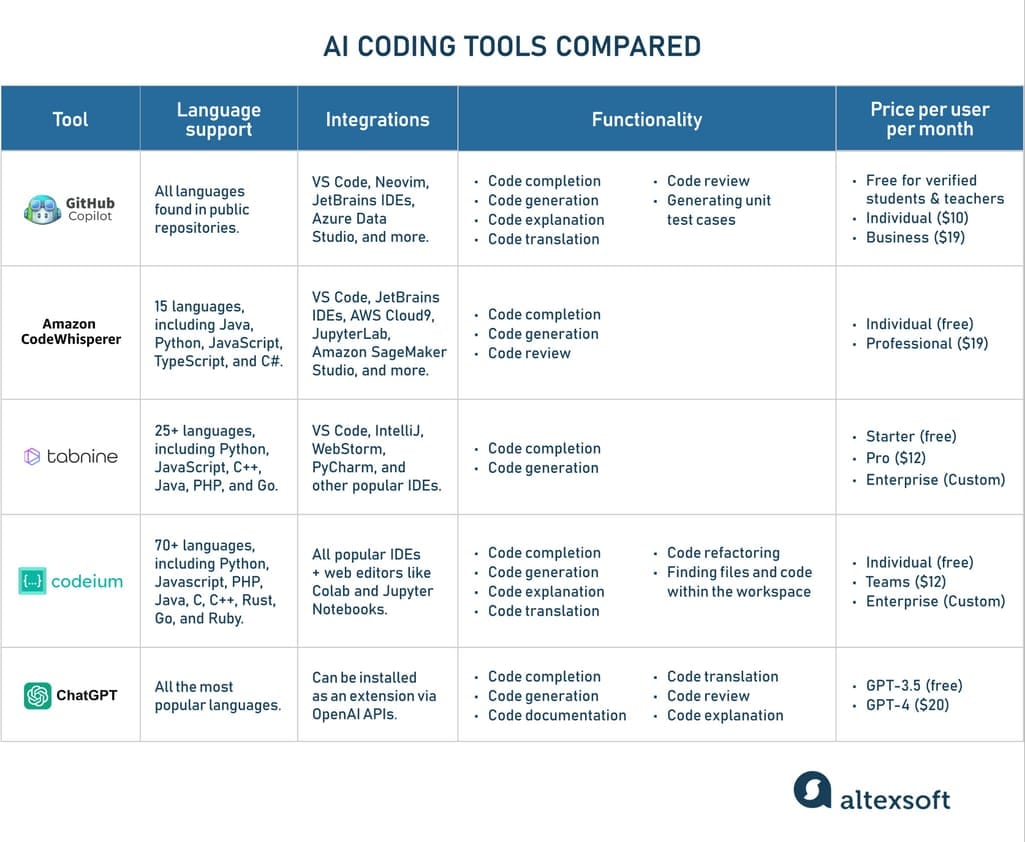
Gemini doesn't exist in a vacuum. Knowing how it compares helps you pick the right tool for each job.
| Feature | Gemini 2.5 Pro | GitHub Copilot | ChatGPT (GPT-4o) | Claude 3.5 Sonnet |
|---|---|---|---|---|
| Max context window | 1,004,864 tokens | ~128K tokens | 128K tokens | 200K tokens |
| IDE-native integration | Yes (Gemini Code Assist) | Yes, deep integration | Limited (via extensions) | No native IDE integration |
| Web grounding for code | Built-in | No native web search | Yes (with browsing) | No native web search |
| Multimodal input | Images, audio, video, text | Text and limited image | Images and text | Images and text |
| Free tier | Available via Google AI Studio | No free tier (paid only) | Limited free availability | No free tier |
| Strongest languages | Python, JavaScript, Go, Java, C++ | Broad, project-adaptive | Broad, strong reasoning | Python, JavaScript, Java |
Where Gemini wins. The context window is the clearest advantage. Feeding an entire mid-sized project into the model and getting coherent analysis across files is something only Gemini handles comfortably. Web grounding for up-to-date library references is another practical win.
Where Copilot wins. IDE integration is Copilot's home turf. It sits inside your editor, understands your open files, and suggests completions as you type. That workflow is smoother than switching to a chat interface, and Copilot is better for line-by-line coding assistance.
Where Claude wins. Claude 3.5 Sonnet has earned a strong reputation for writing clean, well-structured code with excellent reasoning about software design. For pure code generation quality, many developers rate Claude above Gemini. Where Claude lacks is context window size and native tooling.
Where ChatGPT wins. GPT-4o's reasoning strength and massive ecosystem of plugins make it versatile. It's general-purpose where Gemini is increasingly tied to Google's ecosystem. If you're already using ChatGPT for other tasks, adding coding to that workflow is frictionless.
Best Use Cases for Gemini in a Developer's Workflow
Not every coding task benefits from AI. These are the scenarios where Gemini specifically delivers.
Debugging complex issues. Feed in the relevant code, the error message, and the expected behavior. Gemini excels at tracing logic paths and identifying the root cause.
Explaining unfamiliar code. Open-source contributions, inherited legacy systems, onboarding to a new codebase. Gemini's explanations are clear and contextual.
Rapid prototyping. Need a working version of something fast? Describe what you want, get a functional starting point, then iterate.
Documentation and comments. Let Gemini generate docstrings, README sections, and inline explanations. It's the tedious work that slows developers down.
Test generation. Describe what a function should do, and Gemini writes unit tests covering normal cases, edge cases, and error handling.
Cross-file refactoring. Rename a concept across a project, extract a shared utility, reorganize module structure. The large context window makes this practical in one pass.
Common Mistakes Developers Make with Gemini

These patterns show up consistently in teams adopting AI coding tools. Avoiding them saves real time and prevents real problems.
Trusting output without review. Gemini produces confident-looking code that looks correct but contains subtle bugs. Always read and test before committing.
Vague prompts. "Make this faster" gets you generic suggestions. "This React component re-renders on every keystroke because the filter function is inline, how do I memoize it properly?" gets you actionable fixes.
Ignoring security implications. AI-generated code may skip input validation, use insecure defaults, or introduce injection vulnerabilities. Security review isn't optional just because AI wrote the code.
Using it for tasks better done manually. If a task takes 30 seconds to type, prompting AI for it wastes time. Know when to skip the tool entirely.
Not setting system instructions. Without guidance on your project's conventions, Gemini defaults to generic patterns. A brief system prompt about your coding style, framework version, and project structure dramatically improves output quality.
How to Set Up Gemini for Coding (Step by Step)
Getting started takes about ten minutes. Here's the path that works best.
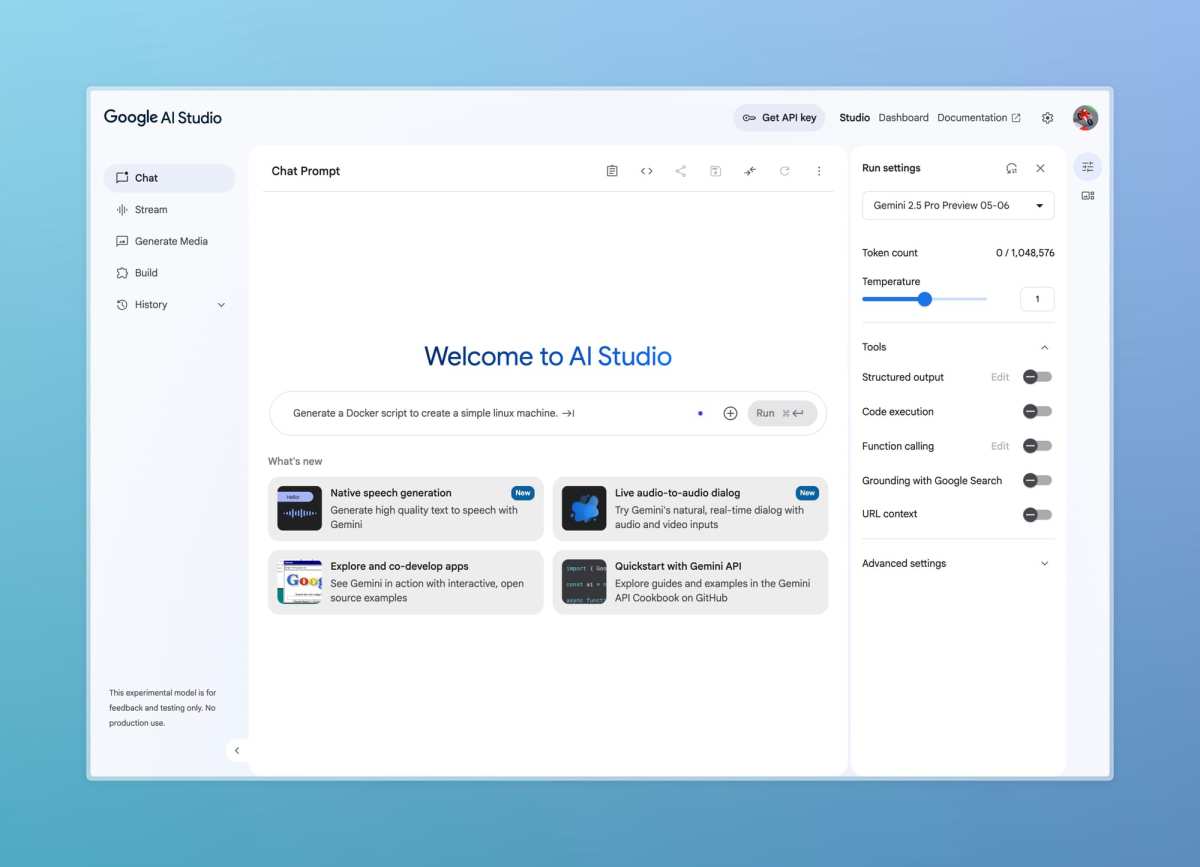
Step 1: Get API access. Go to Google AI Studio at aistudio.google.com and create a project. You'll get a free API key with rate limits sufficient for individual use.
Step 2: Test in the web interface. Before integrating anything, try Gemini directly in AI Studio. Paste a code snippet, ask a few questions, and get a feel for response quality.
Step 3: Set system instructions. In AI Studio's system instruction field, describe your default language, framework, and conventions. Something like "You write Python 3.11 code using type hints, follow PEP 8, and prefer explicit over implicit." This primes every subsequent conversation.
Step 4: For IDE integration, install Gemini Code Assist. Available for VS Code and JetBrains IDEs, this brings chat-based assistance directly into your editor. It understands your open files as context.
Step 5: For enterprise use, explore Vertex AI. Google Cloud's Vertex AI platform provides managed access with SOC 2 compliance, HIPAA eligibility, and FedRAMP authorization. It's the path for teams with data governance requirements.
Pricing, Limits, and What It Actually Costs
Gemini's pricing structure has three tiers, and understanding them prevents surprise bills.
Google AI Studio (free tier). This is where most individual developers start. You get access to Gemini 2.0 Flash and limited access to 2.5 Pro. The free tier caps at 15 requests per minute.
For casual use and experimentation, it's genuinely sufficient.
Pay-as-you-go via Google Cloud. When you exceed free tier limits, pricing kicks in per token. Gemini 2.5 Pro runs $1.25 per million input tokens and $10 per million output tokens. Gemini 2.0 Flash is significantly cheaper at $0.10 per million input tokens and $0.40 per million output tokens.
A typical debugging session feeding a few files and getting a detailed response might cost a few cents.
Vertex AI enterprise pricing. Teams using Vertex AI for managed deployment commit to higher volumes and get volume pricing. Enterprise agreements include additional compliance certifications and support. Contact Google Cloud sales for specific pricing at scale.
Watch out for context window costs. Feeding 200K tokens into 2.5 Pro on every prompt adds up fast during heavy debugging. Shorter prompts with targeted file selections keep costs down.
Security, Legal, and Compliance Considerations
Using AI for code generation introduces risks that go beyond typical development concerns.
Data privacy on API calls. When you send code through Google's API, Google's data processing terms apply. For teams handling proprietary or sensitive code, review these terms carefully. Enterprise agreements through Vertex AI offer additional controls, including options that prevent your data from being used to train Google's models.
Licensing ambiguity. AI-generated code raises real questions about ownership and licensing. If the model reproduces code patterns from open-source training data, your "new" code may carry obligations you didn't anticipate. Google's terms include a disclaimer about AI-generated content, and most legal teams treat this area as unresolved.
Compliance certifications. Vertex AI holds SOC 2 Type II compliance, supports HIPAA workloads, and has FedRAMP authorization. These matter for teams in healthcare, government, and regulated industries. The free tier through AI Studio doesn't carry these certifications.
Security review requirements. Every AI-generated code snippet needs the same security review you'd apply to human-written code. Don't skip static analysis, dependency scanning, or manual review just because the author was AI.
Final Verdict: Should You Use Gemini for Coding?
Gemini earns its place in a developer's toolkit for specific reasons, not as a universal replacement for skill and judgment.
Who benefits most. Developers working across large codebases get the clearest advantage from Gemini's context window. Teams needing web-grounded answers about recently updated libraries gain from live search integration. Budget-conscious developers appreciate a genuinely usable free tier.
When to stick with alternatives. If your workflow is deeply tied to your IDE and primarily needs completions rather than analysis, GitHub Copilot remains the smoother fit. If pure code generation quality is your top priority and you're willing to pay for it, Claude 3.5 Sonnet still edges ahead on many reasoning tasks.
The practical next step. Start with Google AI Studio's free tier. Test Gemini on actual bugs and real refactoring tasks from your current project. Within an afternoon, you'll know whether it earns a permanent spot in your workflow.
That hands-on evaluation beats any recommendation.
Gemini for coding isn't hype and it isn't magic. It's a capable tool with clear strengths and real limitations. Use it for the right tasks, verify its output carefully, and it'll save you meaningful time.
Frequently Asked Questions
Is Gemini 2.5 Pro available for free?
Gemini 2.5 Pro is available in Google AI Studio with limited access on the free tier. Full, unrestricted access requires enabling billing through Google Cloud or Vertex AI for consistent high-volume usage.
Which programming languages does Gemini handle best?
Gemini performs strongest on Python, JavaScript, Java, C++, and Go. Aggregate user reviews and benchmark data show consistent quality across these languages. Niche or very recently released languages get more variable results.
Can Gemini read my entire codebase?
With its 1 million-plus token context window on Gemini 2.5 Pro, yes. You can feed in multiple files, an entire module, or even a mid-sized project and ask it to analyze relationships across files. This is one of Gemini's most practical advantages.
Does using Gemini for coding pose security risks?
AI-generated code can contain SQL injection vulnerabilities, insecure defaults, and other security issues. Every output needs the same review process you'd apply to human-written code. Enterprise deployments through Vertex AI offer additional data governance controls.
How does Gemini compare to GitHub Copilot for IDE integration?
GitHub Copilot offers deeper native integration with VS Code and JetBrains, providing real-time completions as you type. Gemini Code Assist provides chat-based assistance within IDEs. Copilot wins for line-by-line completion.
Gemini wins for large-context analysis and codebase-level reasoning.
Is Gemini suitable for enterprise or regulated industry use?
Through Google Cloud's Vertex AI, Gemini supports SOC 2 Type II compliance, HIPAA eligible workloads, and FedRAMP authorization. These certifications make it viable for regulated industries. The free tier through AI Studio does not carry these compliance designations.

Similar Posts





















