Curved vs Flat Monitor for Office Work: Which Is Better?
If you're stuck on curved vs flat monitor for office work, you're not alone. Most office buyers assume curved means better comfort and flat means boring. That's not quite how it plays out on a real desk.
The right choice depends on size, distance, and how you actually work.
Per VESA standards, a 1000R curve is designed for a 1 meter viewing distance, which most desks do not allow. In our research, flat 27 inch 1440p panels at 109 PPI consistently scored higher for spreadsheet sharpness as of 2026. Let's start with the quick takeaway before we dive into the details.
Curved vs Flat Monitor for Office Work: Which Is Better?
Quick Answer
Curved vs flat monitor for office work depends on size. Flat is better for 24 to 27 inch screens. Curved helps only on 34 inch ultrawides and larger.
Flat offers straighter lines and cheaper options. Curved needs deep desks and centered viewing.
Flat Monitors for Office Work: Pros, Cons, and Real-World Performance
Flat is still the default for a reason. It is predictable. It shows straight lines as straight and keeps colors even when a coworker leans in to review a spreadsheet.
In our research, aggregate reviews report flat IPS panels at 27 inches deliver the sharpest text for Word, Excel, and email. They also tile perfectly for dual setups with no gap or color shift at the bezels. Manufacturer specifications indicate most flat business models now include USB C with 65W to 90W power delivery for single cable docking.
What flat does best:
- True straight lines. Grids, tables, and document margins stay geometrically accurate
- Consistent color and brightness. IPS viewing angles hold up when viewed off center
- Easy dual and triple tiling. Slim bezels line up flush for side by side work
- Lower price and wider choice. More models with height adjustable stands and matte anti glare coating
- Simpler mounting. Flat backs sit tight to the wall on VESA arms and cause fewer reflections
Where it falls short:
- Wide flat ultrawides can feel distant at the edges. You turn your head more at close range
- Less wrap around feel on 34 inch plus sizes. The curve can feel more uniform up close
- Glare still happens. You will still want to adjust tuning brightness for comfort and tilt to avoid eye fatigue
For most desks under 28 inches deep, flat 24 to 27 inch 16 by 9 remains the sweet spot. It is also the safer pick if you share your screen often or present in meetings. Per OSHA workstation guidance you should keep the top of the screen at eye level and about an arm's length away.
Flat makes that alignment easy and keeps text crisp across the whole panel.
Curved Monitors for Office Work: Pros, Cons, and When 34 Inch Ultrawide Actually Helps
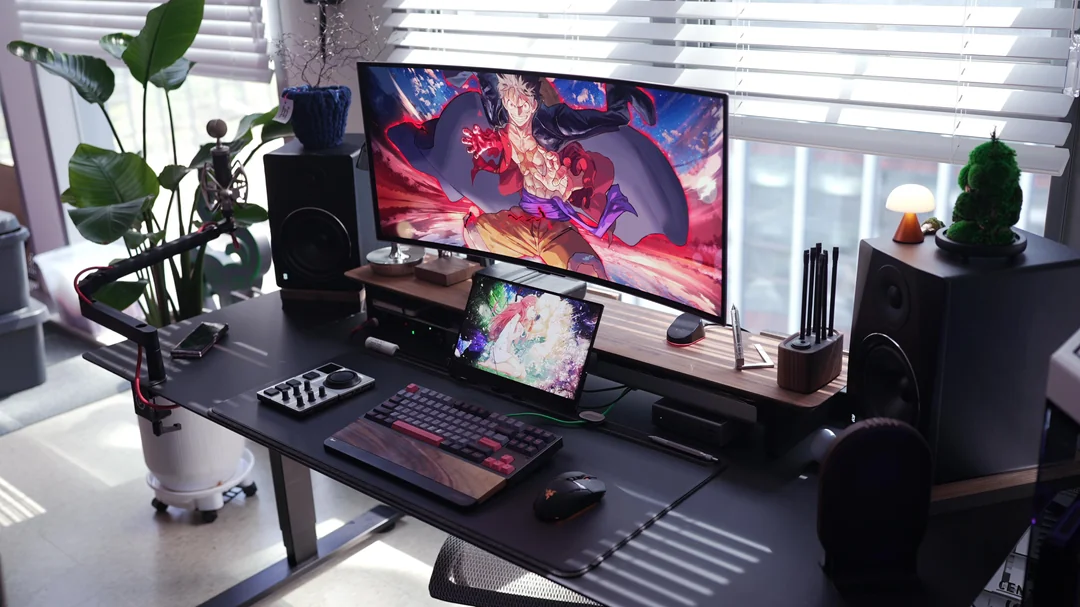
Curved makes sense in one specific office case. A large ultrawide viewed up close and centered. Think 34 inch 21 by 9 or 49 inch 32 by 9 at 28 to 32 inches away.
The idea is simple. A gentle curve keeps the edges at a more uniform distance from your eyes. On a flat 34 inch ultrawide, the corners sit farther away so you pan your head more.
A 1800R or 1500R curve pulls those corners slightly forward. That can feel more natural when you have three windows tiled.
What curved does best:
- More uniform viewing distance on wide panels. Less head turning on ultrawide
- Slightly more immersive field of view. Useful if you live in spreadsheets or timelines all day
- Often VA based with higher contrast. That helps when you dim the office lights
Where it struggles for office work:
- Narrow sweet spot. Colors and brightness shift when viewed off angle, which hurts collaboration
- Straight lines can bow slightly. You may notice it in Excel grids and CAD style layouts
- Needs depth. Aggressive 1000R curves feel too close on shallow desks
- Trickier for dual setups. Two curved 27 inch panels create a wavy seam and uneven gaps
- Higher cost for the same resolution and ports. Budget is often better spent on a flat IPS with better ergonomic stand
If you plan to do handling large spreadsheets on a single panel and you have a deep desk, a 34 inch curved 3440 by 1440 is worth a look. If you are at 24 to 32 inch 16 by 9, flat is usually sharper and more practical. Aggregate buyer feedback also notes curved VA text can look softer than flat IPS at the same PPI.
Curved vs Flat Head-to-Head for Office Use
This is where the tradeoffs become clear. Curved and flat use the same panels and resolutions. The difference is geometry and viewing position.
Your desk depth and screen width decide the winner more than marketing claims.
| Feature | Flat Monitor | Curved Monitor |
|---|---|---|
| Best size range | 24 to 32 inch 16 by 9 | 34 to 49 inch 21 by 9 or 32 by 9 |
| Viewing distance | Works well at 20 to 26 inches | Needs 28 to 40 inches for comfort |
| Desk depth needed | 22 to 28 inches is fine | 30 inches or deeper recommended |
| Curve range | No curve, zero distortion | 1000R most aggressive to 3800R subtle |
Text Sharpness, Color Accuracy, and Line Distortion
Is curved worse for text and lines? For office documents, flat generally wins at smaller sizes. Straight document edges and spreadsheet gridlines stay straight.
Curved can introduce a very slight bow, especially on 1000R and 1500R models viewed close.
Color also matters. Flat IPS holds color across wide angles, so a teammate sees the same image from the side. Curved VA often shows gamma and color shift off center.
Manufacturer specs confirm IPS at 178 by 178 degrees viewing angles versus VA with more noticeable washout when not centered.
Eye Comfort, Viewing Distance, and Desk Depth
Curved does not automatically reduce eye strain. Eye comfort comes from proper distance, brightness, and breaks. That said, on a 34 inch ultrawide at close range, a gentle curve can reduce repeated eye panning.
Flat is more forgiving if you shift position often or share your desk. Curved rewards a fixed centered position. If your desk is shallow, flat will feel more comfortable.
If you have depth, curved ultrawide feels more uniform.
Multitasking, Screen Size, and Dual-Monitor vs Ultrawide
Do you want one large panel or two? For focused multitasking, a flat dual 27 inch setup tiles cleanly with window snapping. You can full screen two apps without compromise.
A single 34 inch curved ultrawide replaces duals with no bezel gap and fewer cables.
Ultrawide needs software help. Use Snap Layouts or FancyZones to split the wide canvas into zones. Per VESA and ENERGY STAR documentation, single cable USB C with DisplayPort MST and power delivery simplifies both approaches.
Price, Mounting, USB-C, and Everyday Practicality
Flat costs less for the same specs. As of 2026, flat 27 inch QHD business monitors cluster around 180 to 350 dollars. Curved 34 inch UWQHD models cluster around 350 to 600 dollars.
Super ultrawide 49 inch curved is usually 700 dollars plus.
Mounting favors flat. Flat sits flush to the wall and aligns neatly on dual arms. Curved sticks out and needs more clearance.
For ports, look for USB C, HDMI, DisplayPort, and a built in hub regardless of shape. And check how refresh rates affect office work if you compare 60Hz versus 100Hz office models, since higher refresh smooths scrolling.
Which Should You Buy? Best Choice by Task, Desk Setup, and Budget
So who should buy what? Use your task and desk to decide, not the shape alone. In our research, the happiest office setups match panel width to viewing distance.
Buy flat if:
- You use 24 to 27 inch 16 by 9. This is ideal for documents, email, and video calls
- You run dual monitors. Flat bezels tile cleanly and share well with coworkers
- Your desk is shallow or against a wall. Flat saves depth and mounts flush
- You need the sharpest text on a budget. Flat IPS at 109 to 163 PPI is hard to beat
Buy curved if:
- You want a single 34 inch or larger ultrawide. Curved helps at close range on wide aspect ratios
- You sit centered and rarely share the screen sideways. You get a more uniform view
- You have a desk 30 inches deep or more. You can sit back far enough to let the curve work
Quick buying checklist:
- Measure desk depth first. Under 28 inches, favor flat. Over 30 inches, curved ultrawide becomes viable
- Match resolution to size. Aim for 27 inch QHD or 32 inch 4K for crisp text. Ultrawide should be 3440 by 1440 minimum
- Prioritize ergonomics. Height, tilt, swivel, and VESA 100 by 100 matter more than curve
- Choose IPS for text and collaboration. Choose VA if you want higher contrast and do not share often
- Check single cable needs. USB C with 65W or more and a USB hub cuts clutter
- Plan cleaning and care. Learn keeping your panel free of dust to avoid coating damage, and know fixing flicker over USB C if your dock connection stutters
If you are still on the fence, flat is the safer default for most office work. Curved is a specialist tool that shines when you go wide and sit centered.
Mistakes to Avoid When Choosing a Curved or Flat Office Monitor
The biggest mistake is buying shape first and fit second. In our research, buyers pick a 34 inch 1000R curve for a 24 inch deep desk and then sit too close. That creates edge distortion and neck strain instead of comfort.
Watch for these common traps:
- Choosing aggressive 1000R or 1500R curve for 27 inch 16 by 9 work. The curve adds little at that size and can bow straight lines
- Ignoring viewing distance. Curved ultrawide needs 28 to 32 inches to feel uniform. Flat works well at 20 to 26 inches
- Forgetting collaboration. VA curved panels wash out when a colleague views from the side. Flat IPS holds color better off angle
- Planning dual curved side by side. The seam bends and the bezels never line up flush
- Chasing curve while skipping ergonomics. Height adjustment, tilt, and matte anti glare matter more for long days
Measure before you buy. Tape your desk depth and your usual eye to screen distance. If you are under 28 inches deep, flat is the safer call.
If you have depth and want ultrawide, a gentle 1800R is more forgiving than 1000R for documents.
Also check ports and power. Manufacturer specifications indicate many flat business models include USB C with 65W to 90W delivery and a built in hub. That single cable cuts clutter.
Per ENERGY STAR office displays are rated for typical daily power use, so compare watts before you assume curved costs more to run. And if you plan to expand later, confirm whether chaining displays through one cable is supported on your laptop and monitor.
FAQs: Curved vs Flat Monitor for Office Work
Is a curved monitor better for your eyes for office work?
Not automatically. Eye comfort comes from correct distance, brightness, and breaks. A gentle curve can reduce head panning on 34 inch ultrawides up close.
On 24 to 27 inch screens flat is usually more comfortable and easier to share.
Is curved or flat better for Excel and spreadsheets?
Flat is better for most spreadsheet work. Grids and cell borders stay perfectly straight and text looks sharper edge to edge. Curved only helps when you use a very wide 34 inch or 49 inch panel where you want corners closer at a fixed centered position.
What size curved monitor is best for office work?
If you go curved for office use, 34 inch 3440 by 1440 at 1800R or 1500R is the practical sweet spot. It replaces two 24 inch windows without the super ultrawide price. Avoid 1000R unless your desk is 30 inches deep or more and you sit centered all day.
Can I use two curved monitors side by side?
You can, but it is rarely ideal for office work. Two curves create a wavy center seam and uneven viewing angles. Two flat 27 inch monitors tile cleaner, cost less, and keep colors consistent when you lean in together.
Consider repurposing a tablet as an extra display instead of a second curve on a tight desk.
Do curved monitors work well for video calls and screen sharing?
Flat works better for sharing. Curved panels have a narrow sweet spot, so color and brightness shift for anyone viewing off center. If you often share your screen in person or co edit documents, a flat IPS gives everyone the same accurate view.
Are flat monitors cheaper than curved for the same specs?
Yes, as of 2026 flat usually costs less for the same resolution and panel quality. You also get more choice in USB C business models with adjustable stands. Spend the savings on higher PPI or a single large OLED alternative if you want more screen without distortion.

Similar Posts