Why Are Ips Monitors More Expensive
If you've shopped for a monitor recently, you've probably noticed that IPS panels cost noticeably more than other options. You're not imagining it. The price gap is real, and there are solid technical reasons behind it.
IPS (In-Plane Switching) monitors deliver superior color accuracy and wide viewing angles, but those benefits come with higher manufacturing costs. Per DisplayMate testing standards, professional IPS panels undergo significantly more rigorous quality control than TN or VA alternatives. Let's break down exactly where that extra money goes and whether it's worth it for your setup.
Quick Answer
IPS monitors cost more because they use complex liquid crystal alignment that requires tighter manufacturing tolerances. Factory calibration and professional certifications add significant overhead. Panel yield rates are lower, meaning more panels get rejected during quality control.
You're paying for color accuracy and consistency that TN and VA panels simply cannot match.
How IPS Technology Actually Drives Up Cost
IPS technology works differently from other LCD panel types. The liquid crystals rotate in-plane (parallel to the glass substrate) rather than twisting perpendicular like TN panels or tilting vertically like VA panels. This horizontal rotation is what gives IPS its legendary viewing angles and color consistency.
But here's the catch. That in-plane alignment requires more precise manufacturing. The electrode design is more complex, and the liquid crystal layer needs tighter tolerances during assembly.
Even minor deviations cause visible color shifts or uniformity problems.
Manufacturer specifications from LG Display indicate that IPS production lines run at lower yield rates compared to TN panels. Industry estimates suggest yield rates around 70-85% for high-grade IPS panels versus 90%+ for standard TN panels. Those rejected panels get sold off as lower-tier units or scrapped entirely.
That cost gets baked into the price of the panels that do pass inspection.
The backlight system also matters. IPS panels typically require brighter, more uniform backlights to maintain consistent viewing angles. This adds component cost and increases power consumption slightly.
It's not a huge difference per unit, but across millions of panels, it adds up.
IPS vs TN vs VA: A Real-World Price Breakdown
Let's look at how the three main LCD panel types stack up in terms of real-world pricing and performance.
| Panel Type | Typical Price Range | Best For | Key Trade-Off |
|---|---|---|---|
| TN (Twisted Nematic) | $100-$250 | Competitive gaming, budget setups | Poor viewing angles, limited color gamut |
| VA (Vertical Alignment) | $150-$400 | Media consumption, general use | Color shift at angles, slower pixel response |
| IPS (In-Plane Switching) | $200-$3,000+ | Color-critical work, professional use | IPS glow, lower native contrast |
| OLED | $800-$5,000+ | HDR content, premium gaming | Burn-in risk, limited size options |
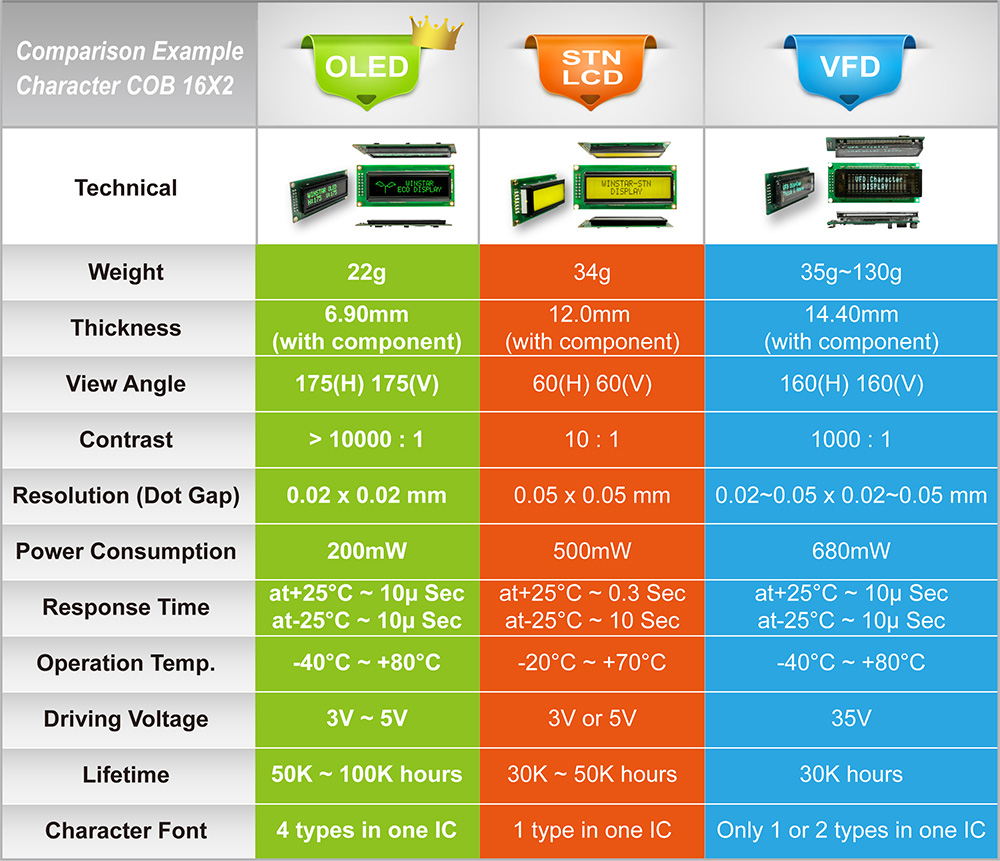
The price ranges above reflect the consumer market as of 2026. Professional-grade IPS monitors with hardware calibration and wide gamut coverage sit at the top of that IPS range. A basic office IPS monitor lands closer to the bottom.
TN panels remain the cheapest option because they've been around the longest and manufacturing is highly optimized. They're fast, which gamers love, but colors wash out the moment you view them off-center. VA panels split the difference with better contrast than IPS but noticeable color shift when you move your head.
IPS sits in the middle-to-high range because it does more things well. You get good color, decent speed, and wide viewing angles all in one package. That versatility costs money to manufacture consistently.
Where Your Money Actually Goes

When you pay extra for an IPS monitor, you're not just paying for the panel technology itself. Several hidden costs contribute to the final price.
Factory calibration and color profiling. Professional IPS monitors come with individual calibration reports. Each unit gets tested and adjusted at the factory to hit specific color accuracy targets (typically Delta E < 2). This takes time and specialized equipment.
Consumer monitors skip this step, which is why they're cheaper out of the box.
Panel binning and quality sorting. Not all IPS panels are created equal. During manufacturing, panels get sorted into bins based on performance. Units with perfect uniformity and zero dead pixels go into the professional tier.
Panels with minor imperfections get sold as consumer-grade. The best panels command premium prices.
Hardware calibration chips and 3D LUTs. High-end IPS monitors include built-in calibration processors. These 3D lookup tables allow the monitor to maintain accurate colors across the entire gamut without relying on your graphics card. This hardware adds $20-$50 to the bill of materials per unit.
Professional certifications. Monitors marketed for color-critical work carry certifications like CalMAN Verified or Pantone Validated. Obtaining these certifications requires testing and licensing fees. Manufacturers pass those costs along to buyers.
Build quality and warranty support. Professional IPS monitors typically feature better stands, more robust housings, and longer warranties (often 3-5 years). Replacement policies for dead pixels are also stricter. Dell UltraSharp and ASUS ProArt lines, for example, guarantee zero bright-pixel defects.
When the IPS Premium Is Worth It
Not everyone needs an IPS monitor. But for certain workflows, the extra cost pays for itself quickly.
Photo editing and retouching. If you're working in Lightroom, Capture One, or Photoshop, color accuracy matters. An IPS panel ensures that the colors you see match what prints or clients will see on calibrated displays. A cheap TN panel might show you completely wrong skin tones.
Video editing and color grading. Colorists and video editors rely on accurate scopes and consistent color reproduction. IPS panels maintain color accuracy across the entire screen, which is critical when you're making fine adjustments to shadows and highlights.
Print design and proofing. Designers preparing files for print need to trust that their on-screen preview matches the final output. IPS panels with wide Adobe RGB or DCI-P3 coverage provide that confidence. VA and TN panels simply can't cover those gamuts as accurately.
Medical and scientific imaging. Radiologists and researchers need displays that maintain consistency across viewing angles and over time. Professional IPS panels meet DICOM standards for medical imaging. This isn't optional.
It's a regulatory requirement.
Multi-monitor collaborative work. When multiple people need to view the same screen from different angles, IPS excels. Design reviews, trading desks, and control rooms all benefit from the wide viewing angles that IPS provides.
If your work falls into any of these categories, the IPS premium isn't a luxury. It's a necessity.

Similar Posts





















