How to Fix Ips Monitor Backlight Bleed
How to fix IPS monitor backlight bleed depends on what's actually causing it, how bad it is, and whether your monitor is still under warranty. The good news is that some bleed issues respond to simple adjustments. The bad news is that others are baked into the panel and can't be fixed without replacing hardware.
Manufacturer specifications and aggregate user reports indicate that most IPS panels ship with some degree of light leakage, especially on edge-lit models. ISO 9241-307 defines display quality tolerances, but backlight bleed thresholds vary by manufacturer. Let's figure out what you're dealing with and what you can actually do about it.
Quick Answer
You can reduce IPS monitor backlight bleed by loosening bezel screws, applying gentle pressure to affected areas, or adjusting panel mounting tension. If your monitor is under warranty and the bleed is severe, file an RMA claim first. DIY fixes work for pressure-related bleed but won't help with inherent IPS glow.
Why Your IPS Monitor Has Backlight Bleed (And Whether You Can Actually Fix It)
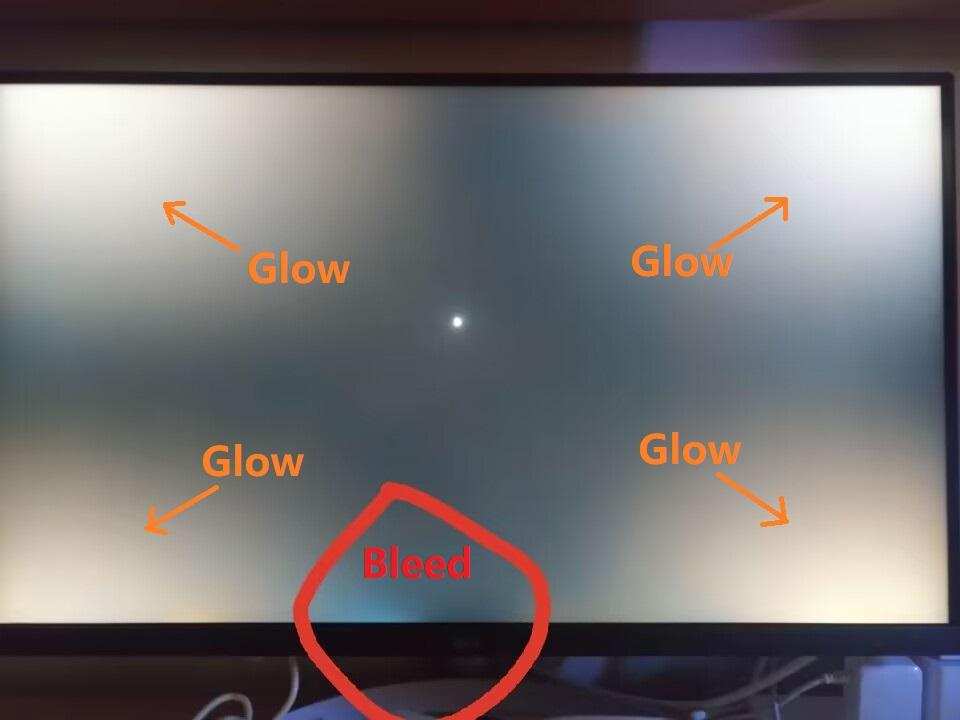
Backlight bleed happens when light from the LED array escapes around the edges or corners of the LCD panel instead of passing evenly through it. On IPS panels, this shows up as bright patches, usually along the bottom edge or in the corners, visible against dark backgrounds.
Not all bleed is created equal. Some units have minor leakage that's only visible in a pitch-black room. Others have obvious flashlighting that bleeds into normal viewing.
The severity comes down to how the panel is mounted, how tight the bezel framing is, and the quality of the diffuser layers inside.
Here's what matters: if the bleed is caused by physical pressure on the panel, you can often reduce it. If it's a design limitation of the panel itself, you're mostly stuck with it.
The Difference Between IPS Glow and Backlight Bleed (Most People Mix These Up)
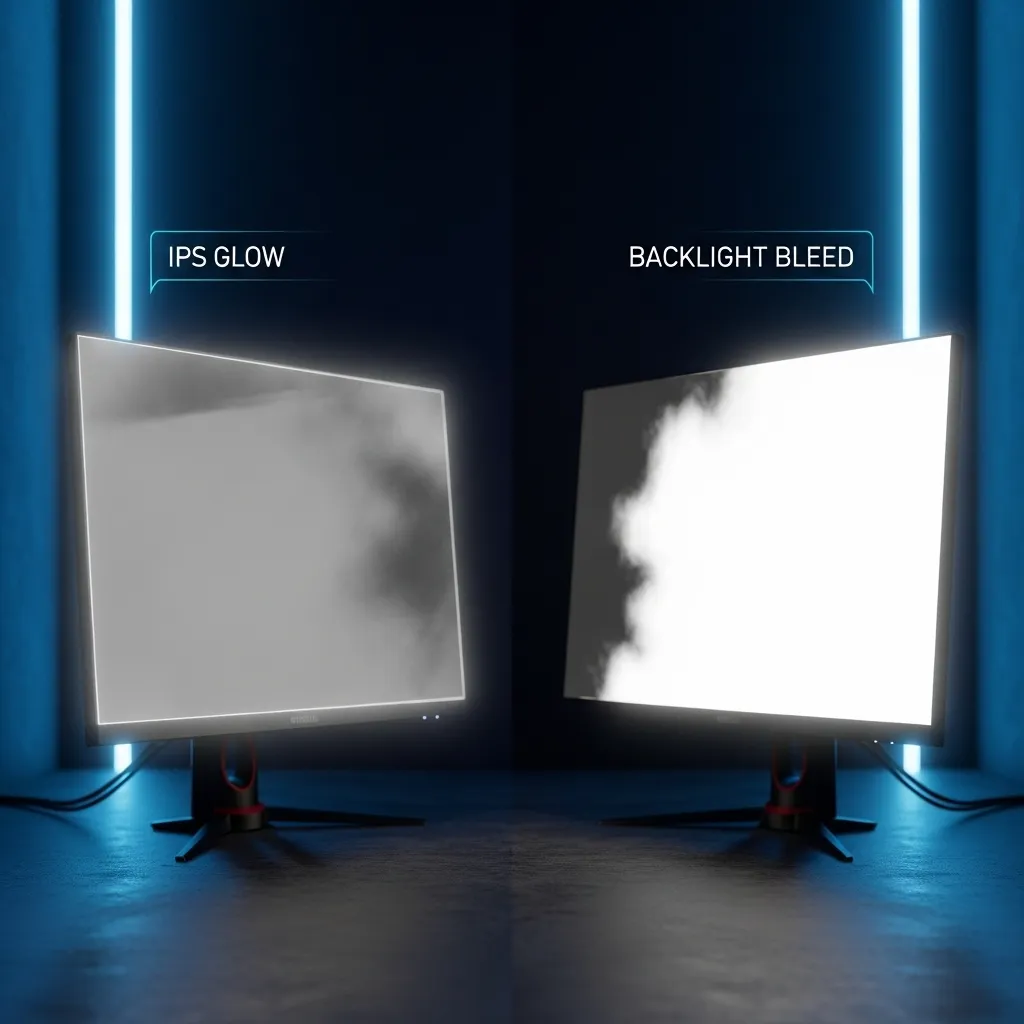
These two issues look similar but have completely different causes. Confusing them leads to frustration because one is fixable and the other isn't.
IPS glow is a characteristic of the panel technology itself. It appears as a silvery or golden sheen in the corners when you view the screen in a dark room, and it shifts depending on your viewing angle. You can't fix IPS glow because it's how IPS liquid crystals behave when light passes through them at oblique angles.
Backlight bleed is light leaking from the edges of the backlight array where it shouldn't. It appears as uneven bright spots, typically along one edge or in the corners, and it stays in the same place regardless of viewing angle. This is often caused by bezel pressure, loose mounting, or misaligned diffuser layers.
| Feature | IPS Glow | Backlight Bleed |
|---|---|---|
| Cause | Panel technology | Physical pressure or assembly |
| Appearance | Shifting sheen in corners | Fixed bright spots at edges |
| Changes with viewing angle | Yes | No |
| Fixable with adjustment | No | Sometimes |
| Visible in normal room | Rarely | Depends on severity |
If you can move your head and the bright area moves with you, that's IPS glow. If it stays put, you're looking at backlight bleed.
How to Tell If Your Bleed Is Normal, Fixable, or a Warranty Claim
You need to assess three things before deciding what to do. The severity, the location, and your warranty status all point toward different actions.
The Dark Room Test
Turn off all lights in your room. Display a full-black image on the monitor at about 50% brightness. Sit about 12 to 18 inches from the screen and look at each edge and corner.
Take a photo with your phone. You'll need this documentation if you pursue a warranty claim. The camera picks up bleed patterns that your eyes might normalize.
What You're Actually Looking At
Corner bleed is the most common type. It shows up as bright patches in one or more corners, usually the bottom two. This is often caused by the bezel pressing too hard on the panel at those points.
It's the most likely type to respond to DIY fixes.
Edge bleed runs along one side of the screen, typically the bottom on monitors with bottom-edge LED arrays. This is usually from the light guide plate or diffuser sitting slightly out of position. It's harder to fix at home.
Flashlighting is a concentrated beam of light coming from one edge, often the bottom center. It's caused by the LED backlight not being properly shielded. This is a manufacturing defect and worth a warranty claim.
When It's Within Spec vs. When It's Not
Most manufacturers consider some backlight bleed normal. Their warranty policies typically cover dead pixels more clearly than bleed. Dell's pixel policy, for example, specifies thresholds for bright and dead pixels under ISO 9241-307, but backlight uniformity is often left to "acceptable variation."
If the bleed is visible during normal use in a lit room, that's beyond typical spec. If it only shows up in a dark room during dark content, most manufacturers will consider it within tolerance. This is frustrating but it's the reality of IPS panel quality control.
Decision Time: Fix It Yourself, RMA It, or Live With It
Your next step depends on where you sit in this flowchart. Each branch leads to a different action.
Branch 1: Your Monitor Is Still Under Warranty
If you bought the monitor within the standard warranty period (typically three years for most brands), document the bleed with photos and contact manufacturer support. Be specific in your description. Mention that the bleed is visible during normal use, not just in a dark room.
Some manufacturers are more lenient than others. Dell, ASUS, and LG have historically been more responsive to uniformity complaints. Smaller brands may push back harder.
Don't open the monitor. Opening it almost certainly voids your warranty. If the manufacturer denies the claim, you can revisit DIY options afterward.
Branch 2: You're Out of Warranty and the Bleed Is Mild
Mild bleed that only shows up in dark scenes is common and often not worth aggressive fixes. You can try loosening the bezel screws on the back of the monitor slightly. Sometimes the factory torques them too tight, pressing the bezel into the panel and causing localized bleed.
Use a Phillips-head screwdriver and turn each screw about a quarter turn counterclockwise. Test after each adjustment. Don't loosen them too much or the bezel will rattle.
Branch 3: You're Out of Warranty and the Bleed Is Severe
Severe bleed that's visible during normal use is worth attempting a more involved fix. You can try carefully removing the bezel, checking that the panel sits evenly in its frame, and reassembling with adjusted tension.
This requires patience and comfort with delicate electronics. The bezel is usually held on by plastic clips and sometimes adhesive. A plastic spudger or guitar pick works well for prying without scratching.
If you're not comfortable with disassembly, it may be time to consider whether the monitor still meets your needs. Severe bleed on an out-of-warranty unit is a common reason people upgrade.
DIY Fixes That Actually Work (And Ones That Don't)
Let's walk through the methods that have the best track record based on community feedback and repair forums.
Loosening the Bezel Screws
This is the safest first step. Most monitors have four to six screws on the back panel near the edges. These screws hold the rear housing and bezel assembly together.
Loosen each screw by a quarter turn. The goal is to reduce the clamping pressure on the panel without making the housing loose. Test with a black screen after each round of adjustments.
This works best for corner bleed where the bezel is pressing directly on the panel edge. It won't help with edge bleed caused by internal diffuser issues.
Applying Controlled Pressure to the Bezel
For persistent corner bleed, you can try applying gentle pressure to the affected area with your thumb. Use a soft cloth between your finger and the bezel to avoid scratching.
Press firmly but not hard. You're trying to reseat the panel slightly in its frame, not crush anything. Hold for 10 to 15 seconds and check if the bleed reduces.
Some people have success with placing a small piece of felt or foam pad between the bezel and the panel edge at the problem spot. This distributes pressure more evenly.
Adjusting Panel Mounting Tension
If loosening the bezel screws doesn't help, the issue may be how the panel itself is mounted to the internal frame. This requires partial disassembly.
Remove the bezel carefully. You'll see the LCD panel held in place by small brackets or screws along the edges. These brackets can sometimes be bent slightly to adjust how the panel sits.
This is delicate work. The LCD panel is fragile and expensive to replace. If you feel unsure at any point, stop and reconsider.
What Not to Do (Permanent Damage Risks)
Don't use sharp tools near the panel. Don't apply pressure directly to the LCD surface itself. Don't overtighten anything when reassembling.
Avoid the common advice of using electrical tape on the inside edges of the bezel. While some people report success, the adhesive can outgas over time and leave residue on internal components. It also makes future disassembly harder.
Don't attempt to open the LCD panel itself. The layers inside (diffuser, reflector, light guide plate) are extremely delicate and not user-serviceable. Once you break the seal, the panel is essentially ruined.
When to Just Replace the Monitor Instead
Sometimes the cost of fixing the problem outweighs the benefit. If your monitor is five or more years old, out of warranty, and the bleed is severe, your money is probably better put toward a replacement.
Monitor technology has improved significantly. Newer IPS panels from LG Display and AUO tend to have better uniformity control than units from even three years ago. If backlight bleed is a dealbreaker for you, look for monitors that specifically advertise "black uniformity" in their specs.
OLED monitors eliminate backlight bleed entirely since each pixel produces its own light. The tradeoff is higher cost and potential burn-in risk for static content. As of 2026, OLED monitor prices have dropped considerably, making them viable for more use cases.
Common Mistakes That Make Backlight Bleed Worse
The most common mistake is overtightening screws during reassembly. People fix the bleed, put everything back together, and crank the screws down hard. The pressure returns immediately.
Another mistake is using rigid materials to apply pressure or pad edges. Hard plastic shims or folded paper can create pressure points that actually make the bleed worse over time. Stick to soft materials like felt or thin foam if you're padding anything.
Some people try to "massage" the bleed away by pressing directly on the LCD surface. Don't do this. You can permanently damage the liquid crystal layer, creating dead spots that look far worse than the original bleed.
Opening the LCD panel itself is the biggest risk. The internal films are layered with precise alignment. Even if you get them back together, you'll likely introduce dust, fingerprints, or new pressure points.
The panel is effectively destroyed once you break that seal.
Realistic Outcomes: What Each Method Actually Achievable
Managing expectations is important here. Most DIY fixes reduce bleed by 30 to 50 percent. They rarely eliminate it completely.
| Method | Expected Improvement | Risk Level | Best For |
|---|---|---|---|
| Loosening bezel screws | 20-40% reduction | Very low | Corner bleed from bezel pressure |
| Gentle bezel pressure | 10-30% reduction | Low | Minor corner unevenness |
| Panel remounting | 30-60% reduction | Moderate | Edge bleed from misalignment |
| Felt/foam padding | 15-25% reduction | Low | Persistent corner pressure points |
Warranty replacement gives you the best outcome if approved. You get a new unit with no risk on your part. The downside is downtime and the possibility of receiving a replacement with similar issues.
This is the "monitor lottery" that enthusiasts talk about.
Living with mild bleed is a legitimate choice. If it only shows up during dark movie scenes or in a completely dark room, it may not be worth the effort. Raising your room ambient light slightly or bumping monitor brightness up a few ticks can make minor bleed invisible during actual use.
Frequently Asked Questions
Can you completely eliminate backlight bleed on an IPS monitor?
Not usually. Most fixes reduce it rather than eliminate it. The panel's physical structure and edge-lit design inherently allow some light leakage.
Severe cases are best addressed through warranty replacement.
Does IPS glow get better over time?
No. IPS glow is a fixed property of the panel's liquid crystal alignment. It doesn't improve or worsen with age.
Backlight bleed can change if bezel pressure shifts over time, but IPS glow stays constant.
Will opening my monitor void the warranty?
Almost certainly. Most manufacturers use warranty stickers over screw holes or require unbroken seals for warranty service. If your monitor is still covered, pursue an RMA before attempting any disassembly.
Is backlight bleed covered by warranty?
It depends on the manufacturer and severity. Dead pixel policies are usually clearly defined. Backlight bleed coverage is often at the manufacturer's discretion.
Document the bleed thoroughly and be persistent with support.
Should I buy a monitor with known IPS glow issues?
IPS glow is present on virtually every IPS panel to some degree. If you primarily view content in dark rooms and need perfect blacks, consider VA panels or OLED instead. If you value color accuracy and viewing angles, IPS glow is the tradeoff you accept.
How long does it take to fix backlight bleed?
Simple fixes like loosening screws take about 10 minutes. More involved disassembly and adjustment can take 30 to 60 minutes. Warranty claims typically take one to three weeks depending on the manufacturer's process.
Final Verdict: The Right Move Based on Your Situation
If your monitor is under warranty and the bleed is visible during normal use, file a claim. That's your best outcome with zero risk.
If you're out of warranty and the bleed is mild, try loosening the bezel screws slightly. It takes minutes and often helps. Don't expect miracles, but a quarter-turn on each screw can make a noticeable difference.
If the bleed is severe and you're out of warranty, you have two real options. Attempt a careful disassembly and panel remounting if you're comfortable with delicate electronics. Or put that effort and money toward a replacement, especially if your monitor is more than four years old.
The honest truth is that IPS backlight bleed is a panel lottery. Some units are perfect, most have minor bleed, and a few are bad. The fixes here can improve things, but they can't overcome a fundamentally flawed panel.
Know when to fight it and know when to move on.

Similar Posts





















