How to Fix an Apple iPhone: Troubleshooting Guide
Your iPhone froze, won't charge, or keeps restarting on the Apple logo, and you want it working again today. Learning how to fix apple iphone yourself comes down to one question first: is this software or hardware?
Apple's recovery documentation for current iOS versions lays out a clear ladder, restart, update, restore, then physical repair. That order matters more than most people realize. Pick the wrong step and you can wipe photos and messages you'll never get back.
How to Fix an Apple iPhone: Troubleshooting Guide
Quick Answer
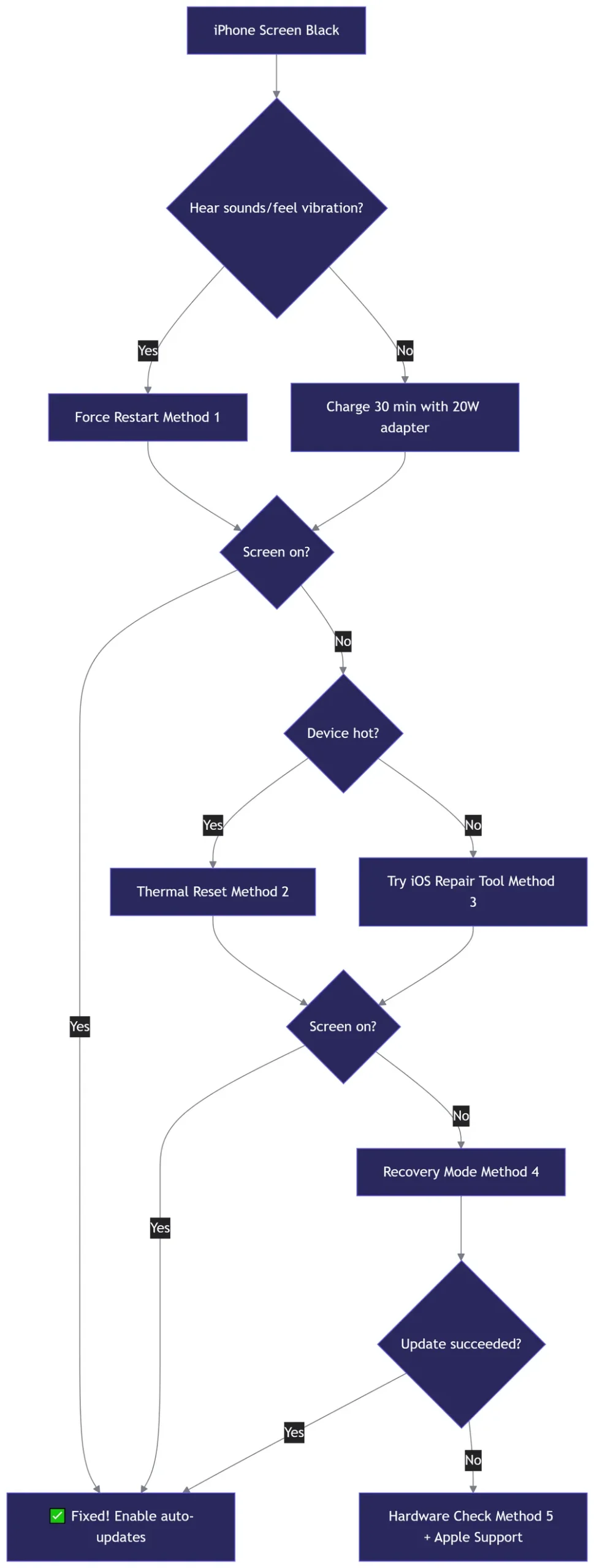
To fix an Apple iPhone, start with the safest step. Force restart the device first. If that fails, charge it for 30 minutes.
Then update iOS or restore through Recovery Mode. Hardware faults like a swollen battery or a dead port need Apple service. Back up before any restore.

iPhone Won't Behave? Start With These 5 Triage Questions
Most iPhone failures land in three buckets: power, software, or physical damage. Naming the bucket first keeps you from erasing a healthy phone or wasting a Genius Bar slot.
Run these five checks in order before you touch a single setting.
Is it power, software, or hardware?
A power problem means the phone won't wake at all. Software problems usually let it boot, then freeze, loop, or misbehave. Hardware problems tend to follow a drop, a splash, or a hot charging session.
Do you have a backup, and is Find My on?
A recent backup turns a risky fix into a safe one. Open Settings, tap your name, then iCloud, then iCloud Backup. Find My being on is fine for repairs.
If it's on and you don't know the Apple ID password, stop there. Activation Lock blocks every restore path.
Which iPhone model and iOS version are you on?
Force restart combos differ by model. iPhone 8 and later use volume and side buttons. iPhone 7 uses volume down plus side. Anything older uses the home or top button.
Is it under AppleCare+, warranty, or out of coverage?
Coverage changes the math completely. A battery swap can cost nothing under AppleCare+ and a flat fee out of warranty. Check your coverage with the serial number or IMEI before booking anything.
Ten minutes of checking can save you a hundred dollars.
Has it been wet, dropped, or repaired before?
These details decide whether a software fix is worth trying. Liquid exposure and previous third-party repairs often point to a board-level fault. In our research, that's the most common reason a DFU restore fails twice in a row.
Match the Symptom to the Right Fix: A Decision Table
Use this table to jump straight to the first fix worth trying. Every row assumes you've confirmed you have a backup.
| Symptom | Likely cause | First fix to try | Escalate when |
|---|---|---|---|
| Black screen, no response | Software stall or dead battery | Force restart, then charge 30 minutes | Screen stays black while charging |
| Stuck on Apple logo, looping | Interrupted update | Recovery Mode update, not restore | Two attempts fail on two computers |
| Won't charge, only at an angle | Lint in the port, or a tired cable | Clean the port, swap cable and adapter | Port feels loose, bent, or wet |
| Overheating, drains fast | Background process or aging cell | Update iOS, check battery health | The battery is swollen |
| Disabled iPhone, forgotten passcode | Security lockout | Erase through Recovery Mode | Activation Lock screen appears |
| No sound, mic, camera, or Face ID | Software bug or failed component | Restart, then check for part warnings | It broke after a drop |
| Error 4013, 9, 4005, 14, 3194, or 21 | Restore environment or hardware fault | Retry with a different cable and Mac | Codes repeat after two cables |
| Accessory won't pair or charge | Pairing or contact fault | Restart both, re-pair, clean contacts | Second device also fails |
Two things trip people up here. Fast battery drain is often a software process, not a dying cell, so it's worth reading up on typical charge complaints before you pay for a replacement. And interface glitches after a big update usually clear with a restart, including the odd iOS 18 menus some users reported.
The Safe Fix Order: Force Restart, Update, Reset, Restore
Work down this ladder and stop the moment the phone behaves. Skipping ahead is how people lose data.
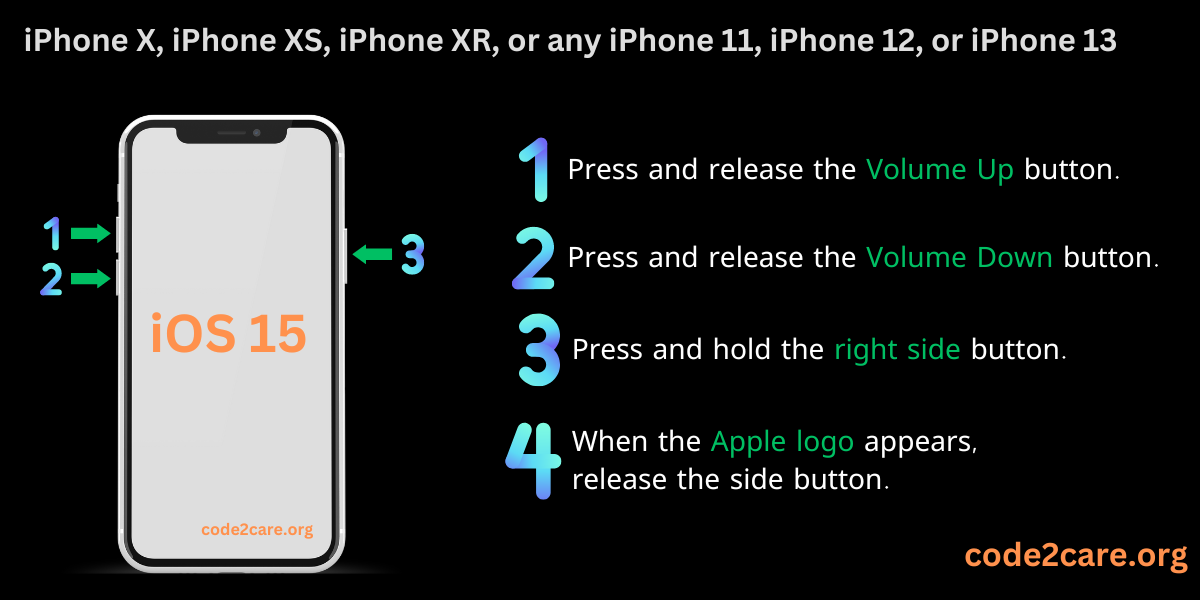
Force restart by model
- iPhone 8 or later, plus iPhone SE 2 and 3: press volume up, press volume down, then hold the side button until the Apple logo shows.
- iPhone 7 and 7 Plus: hold volume down and the side button together.
- iPhone 6s and older: hold the home button and the top or side button together.
Charge 30 minutes, then clean the port
Use a 20W or higher USB Power Delivery adapter. Stick to genuine Apple or MFi-certified cables. Clean the port with a wooden or plastic toothpick, never metal.
Skip the rice myth completely.
Update iOS, or use Recovery Mode to update
Connect to a Mac with Finder, or a PC with the Apple Devices app. Choose Update, never Restore. Update keeps your data intact.
This is the step where older handsets stumble, since a big version jump can leave a device unstable (known behaviour on older models).
Reset settings without erasing anything
Try Reset Network Settings first, then Reset All Settings. Both keep photos and messages. Neither touches your Apple ID.
Erase All Content and Settings, only after a verified backup
Confirm the backup finished and the date looks right. Then erase and set up as new, or restore from that backup.
DFU restore as the last software resort
DFU reinstalls firmware at a deeper level and erases everything. Do it only with a backup, a known Apple ID password, and a stable cable. If it fails twice, you have a hardware problem, not a software one.
Restore failures often surface as specific error codes worth noting before you call Apple.
Hardware Fixes: What You Can Do vs What Needs Apple
Some repairs are genuinely DIY. Others will cost you more if you try.
Swollen battery, cracked screen, water damage, dead charging port
A swollen battery is a fire risk. Stop charging it, don't press on the screen, and get it serviced. For liquid exposure, power off and don't charge the phone.
A cracked display usually needs a full assembly, and a dead port needs a charge port flex.
How to check for liquid damage
Every iPhone has a Liquid Contact Indicator in the SIM tray slot. Red means liquid reached the phone. Standard warranty and even AppleCare+ exclude liquid damage, so an honest assessment saves you a wasted trip.
Genuine parts, parts pairing, and non-genuine warnings
On iPhone 12 and later, Settings, then General, then About shows Parts and Service History. Parts pairing means even a genuine Apple battery from another iPhone can trigger an "Unknown Part" message. Only Apple or an authorized provider can calibrate it properly.
When Self Service Repair makes sense
It suits confident DIYers with an out-of-warranty phone. Apple's Self Service Repair store sells genuine parts and rents tools. If you're not comfortable with adhesive strips and pentalobe screws, this path isn't for you.
When DIY turns into a bigger bill
Prying a display or battery can kill the Taptic Engine, the Face ID array, or the logic board. Face ID is paired to the phone at the factory. Once that module is damaged, no third-party part brings it back.
Repair Paths Compared: AppleCare+, Genius Bar, Authorized Shops, Self Service
Pick the path that matches your coverage, your timeline, and how much risk you'll accept.
| Repair path | Best for | Typical cost | Notes |
|---|---|---|---|
| Apple Store Genius Bar | Same-day diagnosis, coverage claims | Battery around $89 to $99 out of warranty | Genuine parts, keeps Parts and Service History clean |
| Apple Authorized Service Provider | No Apple Store nearby | Same as Apple pricing | Genuine parts, full warranty support |
| Mail-in repair | No travel, flexible timing | Same as Apple pricing | Usually 5 to 9 business days door to door |
| Self Service Repair | Out-of-warranty DIY | Part cost plus tool rental | Genuine parts, System Configuration needed |
| Independent shop | Fastest, cheapest quote | Often 40 to 60 percent less | Non-genuine parts, pairing warnings, no Apple warranty |
Screen repairs on current models run roughly $280 to $380 out of warranty as of 2026, depending on model and display size. AppleCare+ drops most screen and back glass incidents to a $29 service fee, with other damage at $99.
In the US, third-party repairs don't void your warranty on their own. The Federal Trade Commission enforces rules that put the burden on the manufacturer to prove a repair caused the fault. That protection doesn't cover damage a shop actually causes, though.
One more check before you book. A phone bought in another country, or tied to a carrier, can fail a coverage check and get refused at the counter. If that's your situation, it's worth understanding carrier restrictions before you stand in line.
Mistakes That Turn a Small Fix Into Data Loss or a Dead iPhone
Most repair disasters don't come from the fault itself. They come from the order you do things in.
Restoring before checking Activation Lock and backup
Activation Lock is the fastest way a simple fix becomes permanent. If Find My is on and you don't know the Apple ID password, a restore ends at a lock screen you can't pass. Confirm the sign-in before you touch Recovery Mode.
Using counterfeit chargers or rice for water damage
Uncertified adapters can push unstable voltage into the charging IC, and that's an expensive board repair. Rice does nothing except work starch dust into the port. Power the phone off and let it air dry instead.
Forcing a restore on a phone with a failing battery or logic board
A weak cell or a cracked board can drop voltage mid-flash. That's how a stuck logo becomes a brick. If two restores fail on two different cables, stop and treat it as hardware.
Ignoring heat, or charging a swollen battery
Heat accelerates lithium-ion cell damage, so pull the case off during long restores. A swollen battery is a genuine fire risk. Don't charge it, don't press the screen, and store it somewhere cool.
Buying cheap parts without calibration
Non-genuine displays, batteries, and cameras trigger "Unknown Part" warnings on iPhone 12 and later. You can lose True Tone, Battery Health readings, and sometimes Face ID. Genuine parts plus System Configuration avoid that mess.
Skipping diagnostics because the phone seems fine
Parts and Service History and Apple Diagnostics catch faults you can't feel yet. Run them before and after any repair. It's the cheapest insurance you'll buy.
Frequently Asked Questions
How much does an iPhone screen or battery repair cost?
Battery replacement runs roughly $89 to $99 out of warranty on most current models. Screen repair sits near $280 to $380 depending on display size. Under AppleCare+, screens cost $29 and other damage $99.
Pricing varies by country and model, so check your exact quote first.
Can I fix an iPhone with a forgotten passcode without losing data?
No. There's no safe way past the passcode without erasing the device. Your only route is Erase through Recovery Mode, then restoring from a backup made before the lockout.
With no backup, that data is gone for good.
How do I remove Activation Lock?
You need the original Apple ID and password. Sign in during setup, or remove the device from Find My on another Apple device. Apple can only remove it with proof of purchase.
Be careful with tools that promise a remote unlock, since most simply can't deliver.
What does error 4013 mean, and can I fix it at home?
Error 4013 means the restore failed, usually from a bad cable, an unstable USB connection, or faulty hardware. Retry with a genuine cable on a different computer. If it repeats twice, the logic board or NAND storage is the likely cause.
Apple lists restore error codes on its official support site.
How long does Apple mail-in repair take?
Apple quotes roughly 5 to 9 business days door to door. In-store Genius Bar service is often same day for batteries and screens when parts are in stock. Book ahead, because walk-in availability is limited and varies by location.

Similar Posts




















