Fix Apple ID Lock on 3uTools: Step-by-Step Guide
If you're looking up how to fix Apple ID lock on 3uTools, here's the honest starting point. 3uTools can get you past the setup screen on some older iPhones. It cannot remove the lock from Apple's servers. That lock lives on Apple's side, tied to the device serial number.
Manufacturer specifications and the checkm8 bootROM exploit documentation put the cutoff at the A11 Bionic chip. Everything from the A12 Bionic in 2018 onward sits outside the method entirely. So before you download anything, you need to work out which of four situations you're actually in.
That one answer decides whether a fix exists at all.

Quick Answer
3uTools only bypasses Activation Lock on A5 to A11 chips. That covers iPhone 5s through iPhone X. Newer devices cannot use this method.
The bypass is tethered and kills cellular service. You still need proof of ownership. Without a receipt, ask Apple directly instead.
Why Apple ID Lock Is Rarely Just an Apple ID Problem
"Apple ID lock" isn't an Apple term. It's what people type when a device stops at a screen demanding an account they don't have. And that search phrase covers at least four different problems.
Activation Lock is the big one. It's a server-side flag tied to the serial number, armed whenever Find My is switched on. It survives a full erase.
Even a DFU restore won't shift it.
A forgotten Apple ID password is a login problem, not a lock. The device is fine. You just can't prove you own the account.
A Screen Time passcode is a 4 or 6 digit code stored locally. It has nothing to do with iCloud, and 3uTools has no role in it.
Remote Management appears when a device is enrolled in Apple Business Manager or Apple School Manager. Only the organisation that owns the enrolment can release it.
Get the category wrong and you'll waste a weekend. If your phone shows "This iPhone is linked to an Apple ID" during setup, you have Activation Lock. Everything below is written for that case.
The Four Things That Decide Whether 3uTools Can Help You
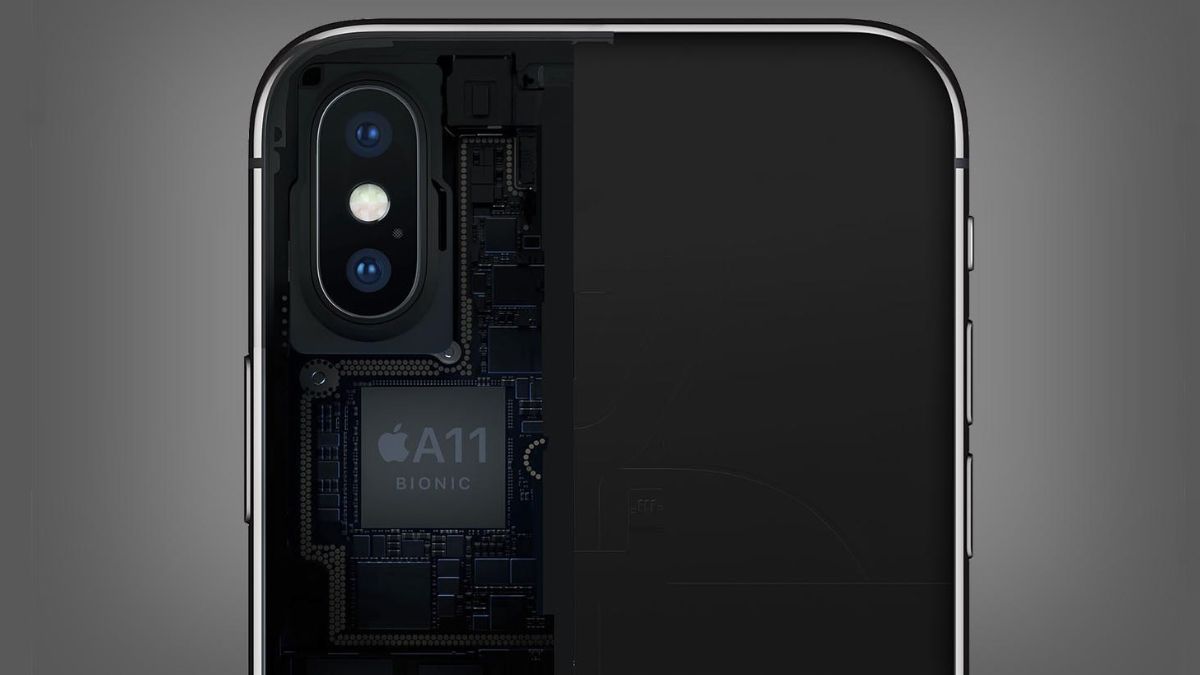
Four variables control the outcome. Change any one of them and the answer flips.
Chip generation: A11 Bionic is the hard wall
The 3uTools bypass rides on checkm8, a bootROM exploit disclosed by axi0mX in 2019. It affects A5 through A11 silicon only, because the flaw sits in immutable boot code. Apple can't patch it on those chips, but it also can't help you on anything newer.
If your device runs an A12 Bionic or later, stop here. No tool, paid or free, changes that as of 2026.
iOS version and the tethered-bypass reality
Success rates are strongest on iOS 12 through iOS 14.x, based on aggregate user reports across iOS forums. Newer firmware within the supported chip range gets patchy. The method is also tethered in practice.
Reboot the phone and you often land straight back at the activation screen, so you'd need to run it again.
Your actual lock type: Activation Lock vs. MDM vs. Screen Time vs. forgotten password
Check the exact wording on screen. "Linked to an Apple ID" means Activation Lock. "Remote Management" means an MDM enrolment, which is an admin problem, not a 3uTools one.
A prompt inside Settings is usually Screen Time. Read it before you assume.
Ownership: the line that decides everything
This is the part most tutorials skip. If you own the device and have a receipt, you have real options. If it's someone else's and you can't reach them, you don't.
Bypassing a device you know is stolen is receiving stolen property in most jurisdictions, and we won't pretend otherwise. When you're checking a secondhand iPad, small signals matter too, like a stylus that won't connect or a port that only charges at an angle.
Your Decision Path: Official Route, 3uTools, or Walk Away
Work down this list in order. Don't skip to step four because it sounds faster.
| Your situation | What to do | Realistic outcome |
|---|---|---|
| Original owner, account recoverable | Reset the password and sign out of Find My | Lock removed permanently |
| Owner with a receipt | Submit an Activation Lock Removal Request | Removed in 1 to 5 business days |
| Owner, A5 to A11 device, no receipt | 3uTools bypass | Tethered Wi-Fi-only use |
| A12 or newer, no receipt | Nothing works | Sell for parts |
| Corporate or school device | Contact the ABM or ASM admin | Full release |
If you're the original owner, the official route is faster than any tool. If you can reach the person who sold you the phone, get them to remove it from icloud.com while you watch. That takes ninety seconds and leaves no trace.
If you own an A5 to A11 device and genuinely can't prove purchase, the 3uTools route is your only option, and it's a compromise. If the device is A12 or newer, there is no route. Walk away, or sell it as parts.
Watch for charging quirks on a used iPad as a sign of deeper hardware trouble before you commit.
The Fixes That Genuinely Remove the Lock
These are the methods that clear the lock at server level. They work on every device, old or new.
Account recovery at iforgot.apple.com
Start here if it's your account. Enter the Apple ID, then work through the recovery options. Apple's own guidance on Activation Lock explains that you'll need access to a trusted phone number or a trusted device.
Recovery times range from a few days to several weeks, depending on how much security info you set up.
Submitting an Activation Lock Removal Request
No password needed, just proof. Apple wants a purchase receipt showing the device's serial number or IMEI. Digital receipts usually work.
Photos of a handwritten note don't. Turnaround is typically one to five business days.
The fastest fix of all: the original owner removing it from iCloud.com
If you can reach the seller, this beats everything else. They sign in, open Find My, select the device, and choose Remove This Device. The lock clears in seconds.
Do it before money changes hands, not after.
MDM and supervised devices
Only an Apple Business Manager or Apple School Manager administrator can release these. Apple Support can't override an organisation's enrolment. If a seller claims a "remote management" screen is the same thing as Activation Lock, they're wrong.
If your lock is only a forgotten account password, check that your accessories still behave first. Something like getting a stylus recognised is a good sanity test that the device is otherwise healthy.
Using 3uTools on a Device You Own (A5 to A11 Only)
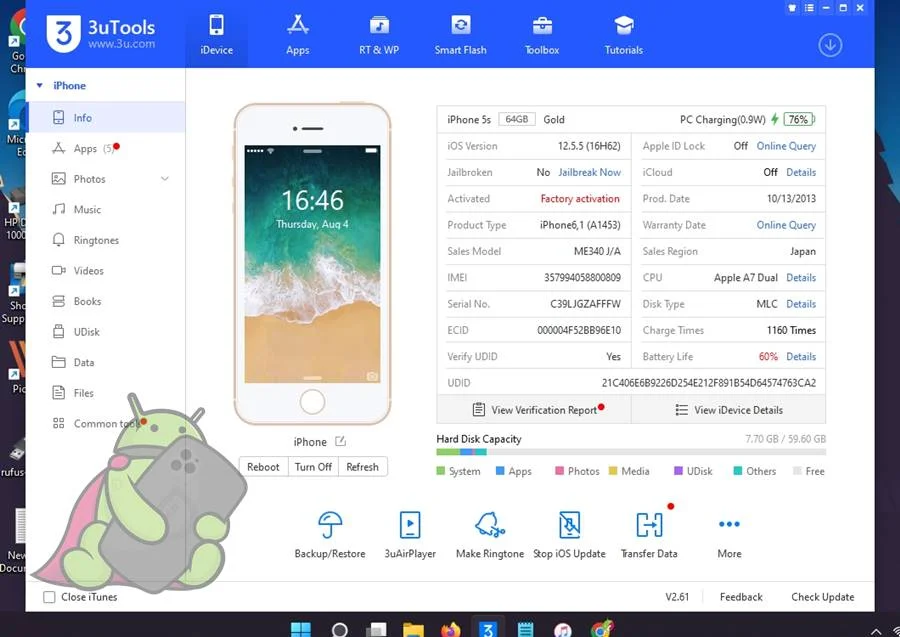
This path applies to hardware you own. It's a bypass, not an unlock. Set your expectations before you start.
What you need before you start
- A Windows PC or Mac, 64-bit, with roughly 2 GB of free disk space
- A genuine Lightning cable, not a charge-only one
- Apple Mobile Device Support or iTunes drivers installed
- 3uTools downloaded only from 3u.com
- A confirmed A5 to A11 chip, checked against the model identifier
Install the drivers first. Most connection failures trace back to that single step. Pause your antivirus during installation if it blocks the driver package.
And if you're prepping an iPad alongside the phone, keeping a stylus topped up is a decent sign the charge port and battery are healthy.
Entering DFU mode and running the bypass
Connect the device, then open 3uTools and head to Toolbox. Select Activation Lock Bypass if your build still includes it. The tool reads the chip and iOS version, downloads what it needs, then prompts you to enter DFU mode with a timed button sequence.
Follow the timing exactly. Expect several reboots and a 15 to 40 minute window, most of it downloads.
The post-bypass rules that keep it working
Once you're through Setup Assistant, treat the device carefully. Don't reboot casually. Don't accept an OTA update.
Don't erase or restore. Any of those can drop you back at the activation screen, and you'll be running the process again.
Errors that stop people cold
- Device not detected: Apple Mobile Device Service isn't running, or the cable is charge-only
- Bypass option missing: your 3uTools build doesn't include it, so check the version notes
- Repeated activation screen: the tethered link dropped, just re-run it
- Stuck on Apple logo: force a restart and try a different USB port
If a stylus that refuses to pair or other basic hardware misbehaves on the same device, you may be dealing with a board-level fault rather than a lock issue.
What You Actually Give Up — and the Scams Waiting for You
A successful bypass feels like a win for about ten minutes. Then you notice the phone has no signal. That's expected, not a fault.
The baseband never activates, so there's no calls, no SMS, and no mobile data. Wi-Fi and Bluetooth usually work, but iMessage and FaceTime need an Apple ID you can't sign in with. App Store downloads stall, iCloud sync is dead, and paid purchases tied to the old account stay locked.
One reboot can wipe the whole thing. Treat a bypassed device as a Wi-Fi-only tablet, and you'll never be disappointed.
Why a $60 permanent unlock for an iPhone 11 is mathematically impossible
An iPhone 11 runs the A13 Bionic, well past the A11 cutoff. No software sold at any price gets around that, because the flaw simply isn't there. Our research into "server-based unlock" sellers found the same two outcomes again and again: your Apple ID password gets harvested, or the payment completes and the device never changes.
The FTC's consumer guidance on tech support scams is blunt about this pattern. Money sent by gift card, crypto, or bank transfer is gone.
| Claimed service | Typical asking price | What actually happens |
|---|---|---|
| A5 to A11 bypass | Free to $25 | Achievable, tethered, Wi-Fi only |
| A12 and newer permanent unlock | $60 to $200+ | Impossible via checkm8 |
| IMEI-based iCloud removal | $30 to $80 | Credential phishing or no delivery |
Legal exposure and the resale trap
Circumventing a technical protection measure runs into DMCA Section 1201 in the US and the Computer Misuse Act 1990 in the UK. It also breaches Apple's iCloud terms and conditions, which you agreed to when the device was set up.
Selling a bypassed phone as "unlocked" or "fully working" is misrepresentation. That's a fraud problem, not a paperwork one. And if the IMEI is blacklisted, no SIM will ever register on it anyway.
Buying or Selling a Locked iPhone: Do This Instead
Meet in person, and do the checks before money moves. Every step below takes under five minutes and saves weeks of grief.
The five-minute seller check
- Ask the seller to power the phone on in front of you, not hand it over already booted
- Watch them open Settings and sign out of their Apple ID
- Confirm Find My is off and the setup screen is gone
- Cross-check the serial number and IMEI against the box and the Settings app
- Run a network blacklist check before you pay
If the seller can't sign out because they "forgot the password", that's your answer. Walk away.
Red flags that mean stop
A price far below market is the loudest one. So is a seller who insists on meeting somewhere without Wi-Fi, or who won't let you connect to a network and load the activation screen.
"Remote Management" on screen means an MDM enrolment, which no individual seller can release. And any seller offering a "certificate" or "server unlock" for an A12 device is either confused or lying.
If you're the one selling
Remove the device from Find My yourself at icloud.com before you list it. Keep the receipt. Buyers will ask, and a receipt with the serial number on it turns an unsellable phone into a clean sale.
For the buyer's side of the transaction, the FTC's consumer advice covers the common payment fraud patterns. Cash in hand at a safe meeting point beats any "secure" transfer a stranger suggests.
Frequently Asked Questions
Can 3uTools remove Activation Lock permanently?
No. It bypasses the setup screen, but Apple's activation servers still show the device as locked. The bypass is tethered, so a reboot, an erase, or an over-the-air update can drop you right back to the activation prompt.
Permanent removal only comes through Apple with proof of purchase.
Which iPhones does the 3uTools bypass work on?
Anything from iPhone 5s through iPhone X, which covers the A5 to A11 chip range affected by checkm8. iPads on the same silicon qualify too, including the iPad Air 1 and 2, iPad mini 2 to 4, and the first-generation iPad Pro. The iPhone XR and everything newer is out.
Will a bypassed iPhone work with a SIM card?
No. The baseband never activates, so the device shows "No SIM" or stays stuck searching. Calls, SMS, and mobile data won't work on any network.
Wi-Fi and Bluetooth generally do work, which is why people repurpose these devices as media players or kids' tablets.
Is there a free way to remove Activation Lock?
Yes, if you own the device. Submit an Activation Lock Removal Request through Apple with a receipt showing the serial number or IMEI. Turnaround is usually one to five business days.
If you can reach the original owner, having them remove it from icloud.com takes seconds and costs nothing.
How long does the 3uTools bypass take?
Plan for 15 to 40 minutes on a supported device, most of it spent downloading firmware. Add extra time if you're installing Apple Mobile Device Support drivers for the first time. If the device isn't detected, that's almost always the driver step or a charge-only cable, not the tool itself.

Similar Posts





















