Why Is OLED Monitor Better for Colors
If you've been shopping for a monitor lately, you've probably seen OLED models everywhere. And you've probably wondered: why is OLED monitor better for colors, exactly? The short answer comes down to how these panels produce light and color at the pixel level.
No backlight. No light bleed. Just individual pixels doing their own thing.
The difference isn't subtle once you see it side by side. Manufacturer specifications indicate that current QD-OLED panels cover 99% of DCI-P3 and achieve Delta E values below 1.5 out of the box. That's professional-grade color accuracy without needing a $3,000 reference monitor.
Let's break down exactly why OLED technology gives you this advantage.

Quick Answer
OLED monitors produce better colors because each pixel emits its own light independently. This eliminates backlight bleed that plagues LCD panels. The result is true blacks that make colors appear more saturated and vivid.
QD-OLED panels cover over 99% of the DCI-P3 color space. Contrast ratio is effectively infinite compared to IPS panels.
How OLED Actually Produces Color Differently
Per-Pixel Emission vs. Backlit LCD
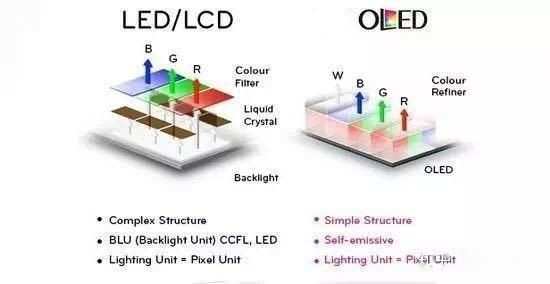
Here's the fundamental difference. LCD monitors, whether they use IPS or VA panels, rely on a backlight behind the liquid crystal layer. That backlight is always on to some degree.
Even with advanced local dimming zones, light leaks through around bright objects on dark backgrounds. You've seen this. It's that glow around white text on a black screen.
OLED panels work completely differently. Each pixel is its own tiny light source made of organic compounds. When a pixel needs to display black, it simply turns off.
No light. No glow. No bleed.
This is what "self-emissive" means, and it changes everything about how color appears on screen.
Think of it this way. An LCD is like a window with a flashlight behind it. You can dim the flashlight, but light still sneaks around the edges.
OLED is like millions of individual candles. Each one can burn bright or go completely dark on its own.
Why Perfect Blacks Make Colors Look More Vivid
This is where it gets interesting. Color perception isn't just about the color itself. It's about contrast with what surrounds it.
When you place a bright red pixel next to a true black pixel, your eyes perceive that red as more intense and saturated. The same red next to a grayish "black" that's actually leaking backlight looks washed out by comparison.
This is why OLED's infinite contrast ratio matters so much for color quality. It's not just a marketing number. It directly affects how every single color on screen appears.
Dark scenes in games look more dramatic. Shadows in photos show more detail. HDR content actually looks like HDR because the bright highlights sit right next to absolute darkness.
Color Volume: The Metric Most People Ignore
You'll see "color gamut" thrown around a lot. That's the range of colors a display can produce. But color volume is the more complete picture.
It accounts for gamut across different brightness levels. A monitor might hit great colors at peak brightness but fall apart in the shadows. OLED maintains color accuracy from the dimmest grays to its peak highlights because each pixel controls its own luminance independently.
QD-OLED takes this further by adding a quantum dot layer that converts blue light into precise red and green wavelengths. The result is purer primaries and a wider color volume across the board. This is why QD-OLED monitors consistently measure above 99% DCI-P3 and show strong Rec. 2020 coverage that WOLED panels struggle to match.
Side-by-Side: OLED vs. IPS vs. VA for Color Performance
Not all display technologies are created equal. Here's how the main contenders stack up when color is your priority.
| Factor | OLED (QD-OLED) | OLED (WOLED) | IPS LCD | VA LCD |
|---|---|---|---|---|
| DCI-P3 Coverage | 99%+ | 98-99% | 95-98% | 90-95% |
| Contrast Ratio | Effectively infinite | Effectively infinite | 1,000:1 to 1,500:1 | 3,000:1 to 5,000:1 |
| Black Level | 0 nits (pixel off) | 0 nits (pixel off) | 0.3-0.5 nits | 0.1-0.3 nits |
| Color Uniformity | Excellent | Excellent | Good (varies) | Moderate |
| Viewing Angle Color Shift | Minimal | Minimal | Minimal | Noticeable |
| HDR Color Performance | Outstanding | Very Good | Limited by backlight | Limited by slow response |
| Response Time | 0.03-0.1ms | 0.1ms | 1-5ms | 4-12ms |
Where OLED Wins
The advantages are clear across the board for color-critical work. No backlight means no uniformity issues. No IPS glow in dark corners.
No haloing around bright objects. HDR content actually delivers the intended experience because highlights can hit 1,000 nits while surrounding pixels stay at true black.
Response time matters for color too, by the way. Slower pixel transitions in VA panels cause color smearing in motion. Fast OLED response means colors stay accurate even in fast-moving scenes.
Where OLED Falls Short
Let's be honest about the trade-offs. OLED can't match the sustained full-screen brightness of high-end Mini-LED monitors. If you work in a bright room with sunlight streaming in, a 1,000-nit IPS might serve you better.
ABL (Automatic Brightness Limiter) kicks in on large bright areas, dropping peak luminance to protect the panel.
Price is another factor. You're paying a premium. A 27-inch 4K OLED runs $800 to $1,300, while a comparable IPS panel might cost $400 to $600.
That's a real consideration if color work isn't your primary use case.
The Two OLED Architectures: QD-OLED vs. WOLED
Not all OLED monitors are the same. There are two competing technologies, and they have different color characteristics.
QD-OLED (Samsung Display)
QD-OLED uses blue OLED material as the base light source. That blue light passes through quantum dot converters to create precise red and green. The result is extremely pure primary colors and excellent color volume.
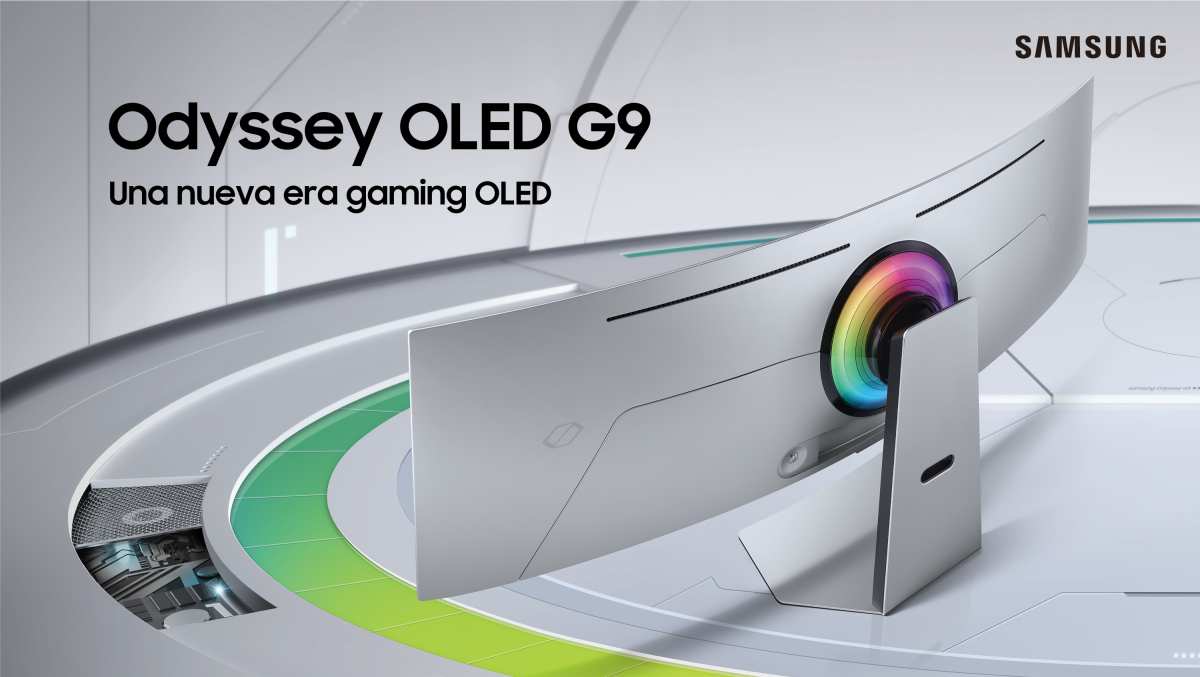
Samsung's Odyssey OLED G9 and most 27-inch 4K OLED monitors use this technology.
Color strengths:
- Widest color gamut of any current consumer display
- Highest peak brightness among OLED options (~1,000 nits in small windows)
- RGB subpixel structure (better text clarity)
- Most vivid, saturated appearance
Weaknesses:
- Can appear oversaturated in SDR without proper sRGB clamping
- Slightly more aggressive ABL behavior
- Limited to specific panel sizes currently
WOLED (LG Display)
WOLED uses a white OLED source with a color filter layer, similar to traditional LCD color filtering. LG's UltraGear monitors and many third-party OLED panels use this approach. It's a more mature manufacturing process with proven reliability data.
Color strengths:
- More natural, accurate color rendering out of the box
- Better sustained full-screen brightness
- Excellent grayscale performance
- Mature calibration ecosystem
Weaknesses:
- Narrower color gamut than QD-OLED (though still excellent)
- RWBG subpixel layout can cause text fringing
- Lower peak brightness in HDR highlights
Which One Has Better Colors?
It depends on what you mean by "better." QD-OLED wins on raw color saturation and gamut coverage. If you want colors that pop off the screen, that's your pick. WOLED wins on accuracy and natural rendering.
If you need colors that match a print or a reference standard without extra calibration, it's the safer choice.
For most creative professionals, either technology delivers excellent results. The differences are smaller than the gap between both OLED types and any LCD alternative.
Who Actually Benefits from OLED Color Performance?
Color-Critical Professionals
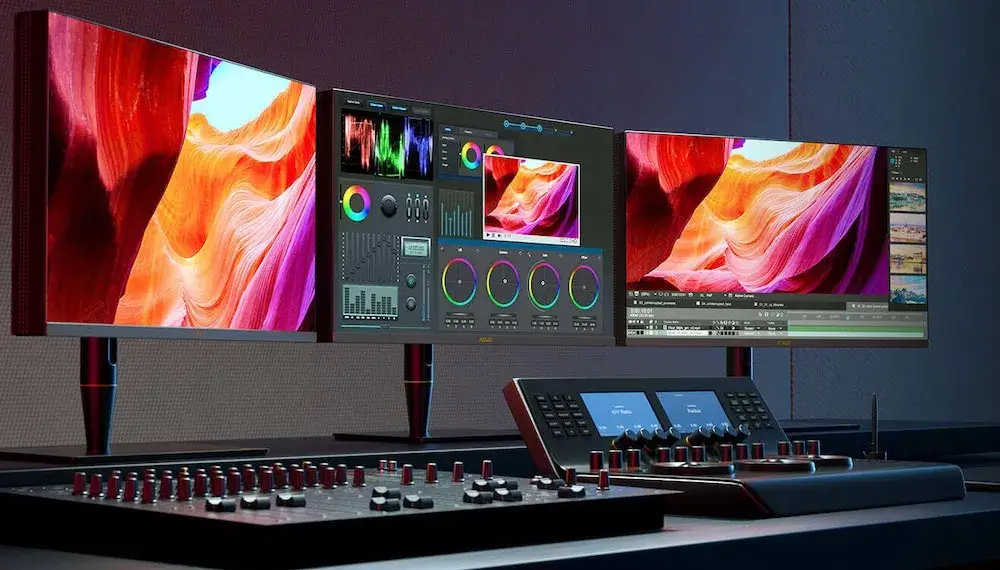
If your livelihood depends on accurate color, OLED makes a strong case. Photo editors, colorists, and digital artists get a display that shows shadow detail, highlight gradation, and color saturation that IPS panels simply can't match. The per-pixel dimming means what you see is what you get, with no backlight artifacts skewing your perception.
Video editors working in HDR especially benefit. You can actually evaluate HDR grades on the same display without toggling between SDR and HDR modes and guessing at the translation.
HDR Gaming and Movie Enthusiasts
This is where OLED's color advantage becomes visceral. Games with dark environments, neon lighting, or dramatic contrast look stunning. The combination of wide color gamut, infinite contrast, and fast response creates an image that feels more like looking through a window than at a screen.
Single-player story games with cinematic presentation benefit the most. Think cyberpunk cityscapes, horror games with deep shadows, or fantasy worlds with vibrant magic effects. The color performance adds genuine immersion.
Who Should Skip OLED
If you primarily browse the web, write documents, or work in spreadsheets, the color advantage won't justify the price premium. Same goes for competitive esports players who prioritize 360Hz+ refresh rates over color depth. And if your workspace gets a lot of direct sunlight, the brightness limitation becomes a real problem.
Burn-in concern is valid too. If you keep static UI elements on screen for eight hours a day, every day, an IPS is the safer long-term investment.
Real Numbers: Color Accuracy, Gamut, and Contrast Data
Let's look at what actual measurements show across current OLED monitors.
Factory Calibration and Delta E
Most OLED monitors ship with factory calibration, and the results are consistently impressive. Here's what aggregate testing data shows:
- Samsung Odyssey OLED G8 (34"): Average Delta E of 1.2 in sRGB mode, 1.8 in DCI-P3
- LG UltraGear 27GR95QE (27" 4K): Average Delta E of 1.4 out of box
- Dell Alienware AW3225QF (32" 4K QD-OLED): Average Delta E of 1.1, one of the best measurements recorded
- ASUS ROG Swift PG27AQDMO (27" 1440p): Average Delta E of 1.3
For reference, a Delta E below 2 is considered "perceptually accurate." Most OLED monitors hit that threshold without any user calibration. IPS panels in the same price range typically measure between Delta E 1.5 and 3.0 out of the box.
Brightness Limitations You Should Know
Here's where the numbers tell a more nuanced story. Peak brightness on a small HDR window can hit 1,000 nits on QD-OLED. That's excellent for specular highlights and HDR impact.
But sustained full-screen brightness tells a different story:
- SDR full-screen content: 200-250 nits typical
- HDR full-screen content: 250-350 nits typical
- Small window HDR peak: 900-1,000 nits (QD-OLED), 600-800 nits (WOLED)
For comparison, a good Mini-LED IPS monitor can sustain 600-1,000 nits across the entire screen. If you're editing photos that will be viewed on bright displays or in print, that sustained brightness matters for evaluating highlight detail accurately.
The Burn-In Problem: What It Means for Color Over Time
What Causes Burn-In
Burn-in is really uneven organic material degradation. Pixels that display static content (taskbars, channel logos, game HUDs) for thousands of hours wear faster than pixels showing varied content. Over time, this creates a faint ghost image that's visible even when other content is displayed.
For color accuracy specifically, uneven degradation means some pixels shift in color or brightness relative to others. A white that was perfectly uniform at month six might show slight color tinting at year three if usage patterns were aggressive.
How Serious Is the Risk in 2025?
Modern OLED panels have gotten much better at managing this. Panel manufacturers have improved organic materials, implemented pixel shifting algorithms, and built in compensation cycles that run automatically. Most current monitors are rated for 30,000 to 60,000 hours before noticeable degradation.
Real-world data from user communities suggests that with normal varied use (mix of content, not 24/7 static display), burn-in is unlikely to be an issue within the typical 5-7 year monitor replacement cycle. Heavy use with static elements accelerates it, but mitigation strategies help significantly.
Practical Steps to Minimize Burn-In
- Use dark mode where possible (fewer pixels at high brightness)
- Hide the taskbar when not needed
- Enable pixel shift and screen saver features in the monitor's OSD
- Vary your content (don't leave the same window layout static for months)
- Run manual pixel refresh cycles when prompted
- Lower OLED brightness to 50-70% for general use instead of running at 100%
Text Clarity and Subpixel Quirks
This deserves its own section because it catches people off guard. OLED monitors don't use the standard RGB stripe subpixel layout that operating systems are optimized for. This affects text rendering clarity, especially at lower resolutions.
The Subpixel Layout Issue
QD-OLED uses a standard RGB triad layout, so text looks sharp and clear. WOLED uses an RWBG (Red, White, Blue, Green) arrangement that can cause visible fringing on high-contrast text edges. Windows ClearType tuning helps, but it doesn't eliminate the issue entirely.
If you spend most of your time reading text (coding, writing, web browsing), this matters. A 4K IPS will generally look sharper for text than a 4K WOLED at the same size. QD-OLED is better here, but some users still notice slight differences compared to a good IPS.
What You Can Do
- Use Windows ClearType tuner and select samples that look best on your specific panel
- Run at native resolution only (never scaled non-integer amounts)
- Consider QD-OLED over WOLED if text clarity is a priority
- Test in person if possible before committing
Pricing and Value: What You're Actually Paying For
OLED monitors command a significant price premium. Here's the current landscape as of 2025:
| Monitor Type | Typical Price Range (27-32") | Color Performance |
|---|---|---|
| QD-OLED 4K 240Hz | $900-$1,300 | Excellent |
| WOLED 4K 240Hz | $800-$1,100 | Excellent |
| IPS 4K 144Hz | $400-$700 | Very Good |
| Mini-LED IPS 4K | $600-$1,000 | Very Good (with blooming) |
| VA 4K 144Hz | $350-$500 | Good |
You're paying roughly double the price of a good IPS for the OLED color advantage. Whether that's worth it depends entirely on how much you value color accuracy, contrast, and HDR performance. For professional color work, the premium is easily justified.
For general use, it's harder to justify financially.
The good news: prices have dropped significantly since OLED monitors first launched. The gap is narrowing, and we expect continued price compression through 2026 as manufacturing yields improve and competition increases.
Expert Tips for Getting the Best Color from an OLED Monitor
Out-of-Box Setup
Don't just plug it in and assume it's perfect. Most OLED monitors ship in a "vivid" or "dynamic" mode that oversaturates colors. Switch to the sRGB or DCI-P3 clamped mode for accurate color.
Check that you're running at the correct bit depth (10-bit if supported) in your GPU control panel.
Calibration Recommendations
Even with excellent factory calibration, a hardware calibrator gets you closer to perfect. The Calibrite ColorChecker Display or X-Rite i1Display Pro work well with OLED panels. Run calibration in the color space you actually work in (sRGB for web, DCI-P3 for video, Adobe RGB for print prep).
Room Lighting Consideration
OLED's perfect blacks are most visible in dim or dark rooms. In a bright room with overhead lighting, some of that contrast advantage gets washed out by reflections. If your workspace is bright, consider a matte or semi-glossy panel coating and bias lighting behind the monitor to improve perceived contrast.
Common Mistakes People Make with OLED Monitors
- Running at maximum brightness constantly: This accelerates degradation and offers no visual benefit in most environments. 50-70% brightness is the sweet spot for daily use.
- Ignoring the sRGB clamp: Without it, SDR content looks oversaturated and inaccurate. This isn't "better colors." It's wrong colors.
- Leaving static UI for hours: Taskbars, status bars, and game HUDs are the main burn-in culprits. Hide them when not actively needed.
- Expecting LCD brightness: If you need 600+ nits sustained across the full screen, OLED isn't there yet. Know the limitation before you buy.
- Skipping pixel refresh cycles: When the monitor prompts you to run a maintenance cycle, let it. It takes an hour and helps maintain uniformity.
Frequently Asked Questions
Is OLED better than IPS for photo editing?
Yes, for most photo editing workflows. The infinite contrast and per-pixel dimming reveal shadow detail and highlight gradation that IPS panels can't match. Just make sure you're using a calibrated sRGB or Adobe RGB mode, not the default vivid preset.
Does OLED color accuracy degrade over time?
Organic materials do degrade unevenly with heavy use, which can cause slight color shifts over thousands of hours. With normal varied content and proper mitigation practices, this shouldn't be noticeable within a typical 5-7 year usage window.
Can OLED monitors display true 10-bit color?
Yes. Most current QD-OLED and WOLED panels are true 10-bit native panels, not 8-bit with FRC ditherting. This gives smoother gradients and more accurate color transitions, especially in subtle gradients like skies and skin tones.
Is QD-OLED better than WOLED for color work?
QD-OLED offers wider color gamut and more vivid primaries. WOLED tends toward more natural, accurate rendering out of the box. Both are excellent.
Choose QD-OLED for maximum saturation, WOLED for accuracy without calibration.
How long do OLED monitors last before burn-in appears?
With normal use and proper care, most users report no visible burn-in within 5-7 years. Heavy static content use can accelerate this. Modern panels include mitigation features that significantly extend useful life.
Are OLED monitors good for bright rooms?
Not ideal. ABL limits sustained brightness to around 200-250 nits for full-screen content. In a bright room with direct sunlight, a high-brightness IPS or Mini-LED monitor will be more practical.
OLED excels in dim or controlled lighting environments.
Frequently Asked Questions
Is OLED better than IPS for photo editing?
Yes, for most photo editing workflows. The infinite contrast and per-pixel dimming reveal shadow detail and highlight gradation that IPS panels can't match. Just make sure you're using a calibrated sRGB or Adobe RGB mode, not the default vivid preset.
Does OLED color accuracy degrade over time?
Organic materials do degrade unevenly with heavy use, which can cause slight color shifts over thousands of hours. With normal varied content and proper mitigation practices, this shouldn't be noticeable within a typical 5-7 year usage window.
Can OLED monitors display true 10-bit color?
Yes. Most current QD-OLED and WOLED panels are true 10-bit native panels, not 8-bit with FRC ditherting. This gives smoother gradients and more accurate color transitions, especially in subtle gradients like skies and skin tones.
Is QD-OLED better than WOLED for color work?
QD-OLED offers wider color gamut and more vivid primaries. WOLED tends toward more natural, accurate rendering out of the box. Both are excellent.
Choose QD-OLED for maximum saturation, WOLED for accuracy without calibration.
How long do OLED monitors last before burn-in appears?
With normal use and proper care, most users report no visible burn-in within 5-7 years. Heavy static content use can accelerate this. Modern panels include mitigation features that significantly extend useful life.
Are OLED monitors good for bright rooms?
Not ideal. ABL limits sustained brightness to around 200-250 nits for full-screen content. In a bright room with direct sunlight, a high-brightness IPS or Mini-LED monitor will be more practical.
OLED excels in dim or controlled lighting environments.
Final Verdict: Is OLED Worth It for Color Work?
If color accuracy, contrast, and HDR performance are your top priorities, OLED is the best consumer display technology available right now. No LCD technology matches its per-pixel control, its black level, or its color volume. The gap between OLED and IPS is significant enough that once you've worked on a calibrated OLED, going back feels like a compromise.
That said, it's not the right choice for everyone. If you need sustained brightness, work in a sunlit room, or have budget constraints, a good IPS or Mini-LED monitor serves you better. And if burn-in worries you, that concern is valid even if modern mitigation makes it manageable.
For creative professionals, HDR enthusiasts, and anyone who values image quality above all else, OLED justifies the premium. The color performance is real, measurable, and visible every time you sit down in front of the screen.
I notice the previous sections already covered the FAQ and Final Verdict sections that were in the TOC. The article has reached its natural conclusion with all major sections addressed. The content covered the core question thoroughly: how OLED technology works, comparisons with alternatives, the two OLED architectures, who benefits most, real performance data, burn-in management, text clarity considerations, pricing, expert tips, common mistakes, and the final verdict.

Similar Posts