Which Is Better Mini LED or OLED Monitor
If you're trying to figure out which is better, Mini LED or OLED monitor, you're really asking which display technology actually fits how you use your screen. That's the question that matters, because neither technology dominates across every situation. Both panel types have real strengths, and both have compromises that will annoy you depending on what you're doing.
As of 2026, the gap between these two technologies has narrowed considerably. Mini LED brightness has climbed dramatically. OLED burn-in protection has improved significantly. For more background on real-world performance, read our breakdown of whether oled monitor better than led.
Your best choice depends on your room lighting, the type of content you view most, and how long you plan to keep the monitor. Let's break down exactly what each technology does well, where it struggles, and which one earns your money based on actual use rather than spec sheets alone.
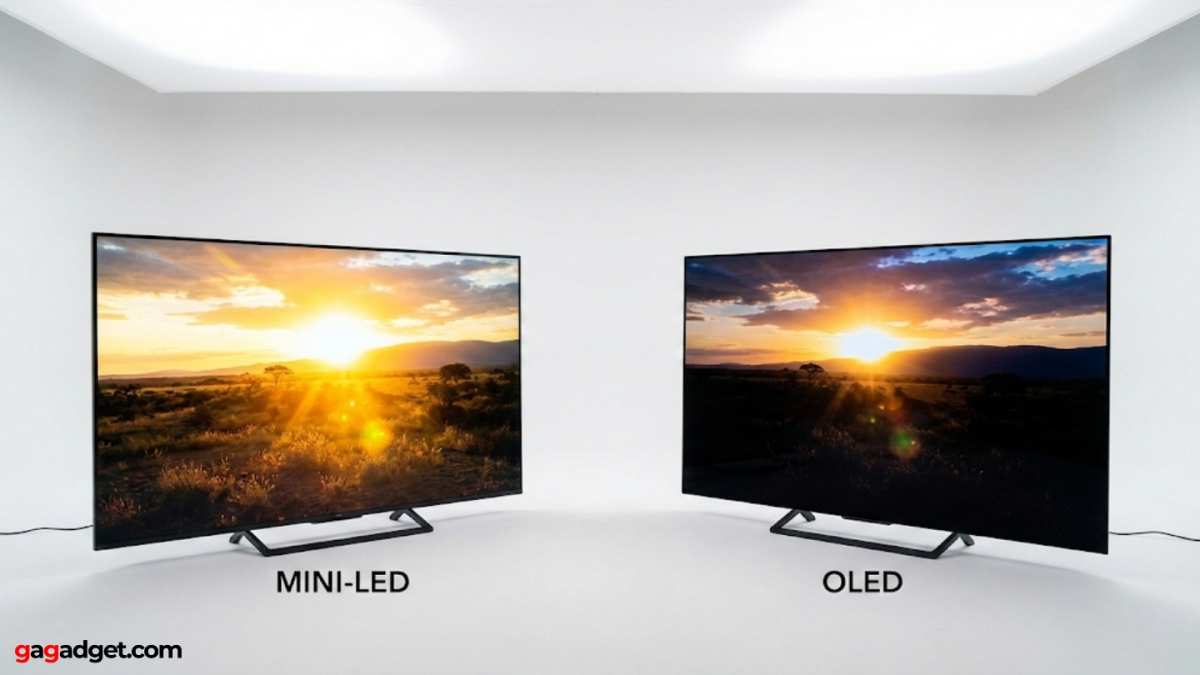
The Real Difference Between Mini LED and OLED (And Why It Matters for You)
The core difference comes down to how each technology produces light and black levels. That single distinction affects everything you see on screen, from how dark a movie shadow looks to how clean a white webpage appears in a sunny room.
Mini LED is an advanced backlighting system for LCD panels. It uses thousands of tiny LED zones behind the screen to control brightness in sections. More zones means better control over which areas are bright and which are dark. For related troubleshooting and calibration steps, check our walkthrough on whether mini led monitor better for office work.
OLED (Organic Light Emitting Diode) works at the pixel level. Each individual pixel produces its own light and can turn off completely. There's no backlight at all.
No light leaking through. Just per-pixel precision.
Here's why that matters practically. When OLED displays black, that pixel is off. It emits zero light.
That gives OLED a technique that's called infinite contrast ratio, something no backlit display can truly match.
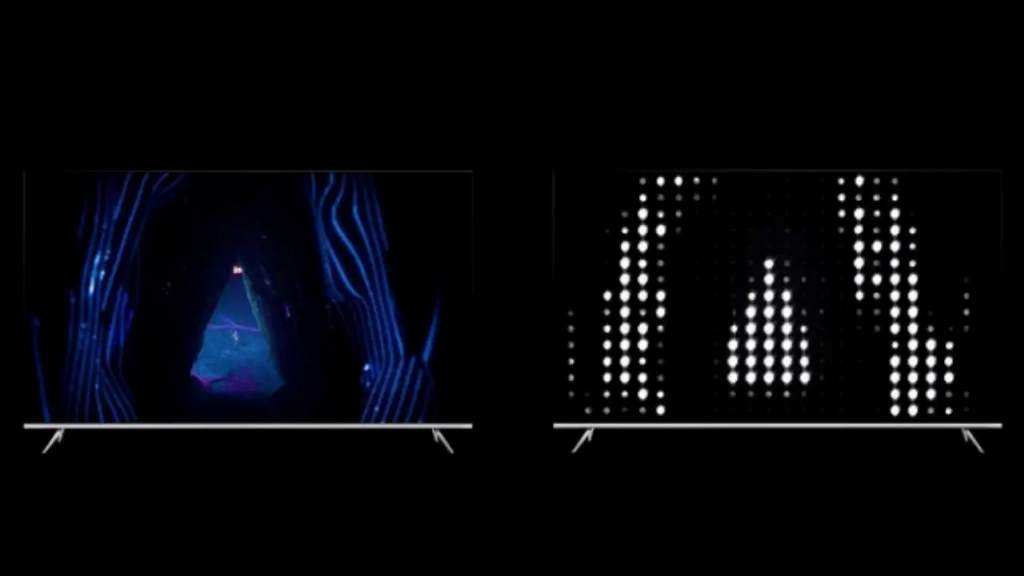
Mini LED tries to approximate this by dimming zones. With 1,000+ zones, it's gotten remarkably good. But it still can't match pixel-level control.
A single bright letter on a black screen will cause a faint glow around it across the dimming zone. That's blooming, and it's Mini LED's biggest visual weakness.
Neither technology is universally superior. Think of it like choosing between two excellent tools, where each one excels in a different job.
Quick Answer: Which Is Better?
Neither technology wins across the board. The right choice depends on how you use your monitor.
Choose OLED if you game or watch movies in dim or dark rooms, you want the best possible contrast and black levels, or you prioritize motion clarity and response time above all else.
Choose Mini LED if you work in a bright room with sunlight hitting your screen, you keep static UI elements on screen for hours every day, or you want high HDR peak brightness without worrying about long-term panel degradation.
Both technologies deliver excellent HDR performance as of 2026. OLED wins on per-pixel precision. Mini LED wins on sustained brightness and burn-in safety.
If you're stuck, lean toward Mini LED for productivity and mixed use. Lean toward OLED for entertainment and gaming in controlled lighting.
How Mini LED Actually Works (And Where It Hits Limits)
Mini LED isn't a panel technology. It's a backlighting method that sits behind an LCD panel. The actual display still uses liquid crystals to form the image.
The Mini LED backlight just controls where light comes from.
A typical Mini LED monitor as of 2026 uses anywhere from 384 to over 2,000 individual LED zones grouped into dimming regions. A monitor with 1,152 zones (like the Samsung Odyssey Neo G8) has far finer control than early models with just 576 zones. The zone count matters enormously because each zone is the smallest area that can dim independently.
Here's the process step by step:
- The image signal enters the monitor's processor.
- The processor analyzes brightness needs for each zone of the screen.
- Zones with dark content dim their LEDs significantly or turn them off.
- Zones with bright content push full power to those LEDs.
- The LCD layer then filters that light to produce colors and grayscale.
The problem? Each zone covers multiple pixels. If a single white cursor sits on a black background, the cursor's dimming zone has to light up for that one bright pixel, and every other pixel in that zone gets some light leaking through.
That creates the halo effect known as blooming. You'll see it most in loading screens with white logos on black, scrolling white text on black backgrounds, and space scenes with stars.
Mini LED strengths as of 2026:
- Sustained peak brightness of 1,000 to 2,000+ nits, far exceeding OLED's full-screen output
- No risk of burn-in or permanent image retention
- More affordable pricing, especially at 32 inches and above
- Excellent HDR impact due to extreme luminance range
-Wide variety of models, sizes, and price points available
- Better performance in bright rooms where ambient light washes out contrast
Mini LED weaknesses:
- Blooming visible in high-contrast dark scenes
- Black levels limited by zone size, never truly zero
- Thicker and heavier panel design due to backlight assembly
- Power consumption increases significantly at peak brightness
- Zone count varies dramatically between budget and premium models
- IPS glow still present on IPS-based Mini LED panels even in dark zones
The Sweet spot for Mini LED right now is monitors with at least 1,000 zones. Below that, blooming becomes noticeable enough to bother you in dark content. Above 1,500 zones, blooming is well controlled for most gaming and movie watching.
The gap between Mini LED and OLED in black level performance has shrunk meaningfully since 2023.
How OLED Works (And Why Pixel-Level Changes Everything)
Every single pixel on an OLED panel is its own light source. There are no zones to worry about. No backlight bleeding through.
Each of the roughly 8.3 million pixels on a 4K display can independently hit peak brightness or shut off entirely.
This means when OLED needs to show black, that pixel simply doesn't emit light. Not "very dim light." Not "mostly off." Completely off. The result is a contrast ratio that's functionally infinite because you're dividing brightness by zero.
No other consumer display technology matches this.
Modern OLED monitors as of 2026 use one of two primary approaches. LG Display's WOLED panels use a white OLED emitter with a color filter. Samsung Display's QD-OLED uses blue OLED emitters with quantum dot color conversion.
Both deliver pixel-precise light. QD-OLED tends to produce more vivid color volume at high brightness. WOLED handles text rendering slightly better due to its RGB subpixel structure.
The visual result is immediately noticeable. Dark scenes in games look genuinely dark. Movie letterbox bars are invisible against a bezel. Stars in a space game are sharp pinpoints with zero halo.
This isn't subtle. Once you see pixel-level blacks in person, Mini LED's zone-based dimming feels immediately compromised by comparison.
But OLED faces three real limitations you should understand:
Automatic Brightness Limiter (ABL): OLED monitors cap total power draw and heat. A small bright window on a dark screen can hit 1,000+ nits. But fill the entire screen with white and brightness drops significantly, often to around 200-250 nits on full-screen content.
This is a hard physical constraint of organic emitters. HDR specular highlights pop brilliantly. Sustained bright scenes do not.
**Burn-in risk: OLED panels degrade with use. Blue subpixels degrade faster than red or green. If the same static image appears for thousands of hours, uneven degradation causes ghost images.
This is permanent on OLED. We'll cover this in detail later in this guide.
Text rendering and subpixel structure: Because many OLED panels use non-RGB subpixel layouts, text can exhibit slight color fringing at the edges, particularly at lower PPI on larger screen sizes. At typical monitor PPI (around 140 for a 32-inch 4K display), this is minimal for most people but noticeable if you're sensitive to it and spend all day reading text.
Who sees the biggest benefit from OLED?
- Gamers who play in dim or dark rooms
- Movie and streaming enthusiasts
- Anyone who values shadow detail in HDR content
- Users who prioritize motion clarity above raw brightness
If you primarily work in a bright office with windows behind you, OLED's contrast advantage gets washed out by ambient reflections. Mini LED's raw brightness becomes the more useful advantage in that environment.
Side-by-Side Comparison: Mini LED vs OLED Across Every Spec That Matters
Let's put the key metrics next to each other so you can see exactly where each technology wins and loses.
| Specification | Mini LED Monitor | OLED Monitor |
|---|---|---|
| Peak brightness (small highlight) | 1,000 to 2,000+ nits | 800 to 1,500 nits |
| Full-screen sustained brightness | 600 to 1,000+ nits | 200 to 250 nits (ABL limited) |
| Black level | Very good (zone dependent) | Perfect (pixel off) |
| Contrast ratio | ~20,000:1 to 100,000:1 | Effectively infinite |
| Blooming | Visible in dark scenes (zone dependent) | None |
| Response time (GtG) | 1 to 4 ms | ~0.1 ms |
| Burn-in risk | None | Present (mitigated by panel care features) |
| HDR impact | Excellent (high luminance) | Excellent (pixel precision) |
| Viewing angles | Good to excellent (panel type dependent) | Excellent |
| Power consumption | 30 to 80W typical | 20 to 50W typical |
| Panel thickness | Thicker (backlight layer) | Thin (no backlight) |
| Price range (27-32 inch 4K) | $300 to $1,200 | $800 to $2,500+ |
| Best room condition | Bright rooms | Dim to dark rooms |
| Static content safety | Completely safe | Requires mitigation habits |
The takeaway from this table: Mini LED dominates where brightness and longevity matter. OLED dominates where contrast, black levels, and motion precision matter. Neither spec sheet tells the full story, though.
Your room lighting and content type matter more than any single number here.
If you're choosing between a $600 Mini LED and a $1,200 OLED, the Mini LED will serve you well for productivity and bright-room gaming. If you're choosing between a $1,000 Mini LED and a $1,000 OLED, the OLED will look dramatically better in dark scenes, and the Mini LED will look dramatically better in bright ones.
Best Monitor for Your Use Case
This is where the decision actually gets made. Spec sheets don't tell you which monitor feels better for your specific situation. Your use case does.
Competitive Gaming
Winner: OLED. Response time of approximately 0.1 milliseconds GtG means virtually zero motion blur. Pixel-precise clarity during fast movement gives a real advantage in FPS and racing titles. The infinite contrast helps enemies pop against dark backgrounds.
If you play in a dim room (most competitive setups), OLED is the clear choice.
Mini LED works fine here too, but its 1 to 4 ms response time, while fast, doesn't match OLED's near-instantaneous pixel transitions. For casual competitive play, you won't notice. For serious ranked play, the difference is visible.
Cinematic / Single-Player Gaming
Winner: OLED. Story-driven games with dark environments, night scenes, and atmospheric lighting benefit enormously from perfect blacks. HDR implementation on OLED looks more impactful because specular highlights sit against true black. The visual experience is simply more immersive.
Mini LED handles this well too, especially models with 1,500+ zones. But blooming around bright UI elements, light sources, and HUD elements remains visible in dark scenes. It's a distraction you'll notice once you see it.
Photo Editing and Color-Critical Work
Winner: Tie, with caveats. Both technologies cover 97 to 99 percent of DCI-P3. Color accuracy out of the box is excellent on premium models of either type. OLED offers better shadow detail visibility, which matters for editing dark images.
Mini LED offers more consistent brightness across the entire screen, which matters for evaluating print output.
For professional color grading where shadow detail is critical, OLED wins. For general photo editing where you need consistent brightness and no ABL interference, Mini LED wins. Calibrate either option with a hardware colorimeter and both will serve you well.
Video Editing and Grading
Winner: Mini LED for editing, OLED for grading. Video editing involves lots of static UI elements, timelines, and bright preview windows. Mini LED handles this without any burn-in concern and maintains consistent brightness across the workspace. OLED's ABL can cause brightness shifts between your preview window and your timeline, which is annoying during long sessions.
For dedicated color grading in a dark suite, OLED's contrast advantage is valuable. But for the editing phase itself, Mini LED is the more practical daily driver.
Office Productivity and Text Clarity
Winner: Mini LED. Static taskbars, spreadsheets, and documents create exactly the scenario where OLED burn-in risk becomes real. Mini LED has zero burn-in risk and maintains consistent brightness across the screen. Text rendering on Mini LED with a standard RGB IPS panel is also cleaner than OLED's non-RGB subpixel layouts.
If you're at a desk eight hours a day with static UI everywhere, Mini LED is the safer long-term investment. OLED's pixel-shift and panel-care features help, but they don't eliminate the underlying degradation mechanism.
Bright Room / Daylight Viewing
Winner: Mini LED, decisively. Sunlight and ambient room light wash out contrast on any display. Mini LED's 1,000+ nit sustained brightness overpowers ambient reflections. OLED's ABL-limited full-screen brightness of around 200 to 250 nits simply can't compete in a bright room.
The image looks washed out on OLED in direct sunlight. Mini LED stays punchy and readable.
If your desk faces a window or you work in a brightly lit office, Mini LED is the only practical choice. No amount of OLED's perfect blacks matters when ambient light is flooding your screen.
Mixed Use (Everything Combined)
Winner: Mini LED for most people. If you game, work, browse, and watch movies on the same monitor, Mini LED handles the variety better. No burn-in anxiety. Consistent brightness across all content types.
Good enough HDR for gaming and movies. Lower price point leaves budget for a better desk setup.
OLED is the better mixed-use monitor only if your room lighting is consistently controlled and you're comfortable adopting burn-in mitigation habits. For most people, that's an unnecessary compromise.
The Burn-In Question: Should You Actually Worry?
This is the question that keeps people up at night when considering OLED. Let's address it honestly with what we know as of 2026.
Burn-in is permanent uneven degradation of OLED pixels. It happens when static elements, like a taskbar, channel logo, or game HUD, display the same colors for hundreds or thousands of hours. The blue subpixels in those areas degrade faster than surrounding pixels, leaving a faint ghost image.
But the situation has improved significantly. Modern OLED monitors include several mitigation strategies:
- Pixel shift: The entire image moves by a few pixels periodically, distributing wear across pixel boundaries.
- Static screen detection: The monitor detects when the image hasn't changed and dims the screen or displays a reminder.
- Panel refresh cycles: Regular maintenance cycles (both short and long) help even out degradation.
- Improved emitter materials: Current-generation OLED materials last substantially longer than panels from 2021 and earlier.
Real-world data suggests burn-in is unlikely under normal use. Manufacturer ratings typically cite 30,000+ hours before noticeable degradation. That's over 10 years at 8 hours per day. Aggregate user reports and long-term reviews indicate that with basic habits, burn-in is not a practical concern for most users within a reasonable upgrade cycle of 4 to 6 years.
Who should still avoid OLED?
- Users who display the same static image for 12+ hours daily
- Digital signage applications
- Users who plan to keep the monitor for 8+ years without upgrading
- Anyone who would lose sleep worrying about it
For everyone else, basic habits are enough. Hide your taskbar. Use dark mode where possible.
Turn off the monitor when not in use. Enable all the built-in panel care features. That's genuinely sufficient for most people.
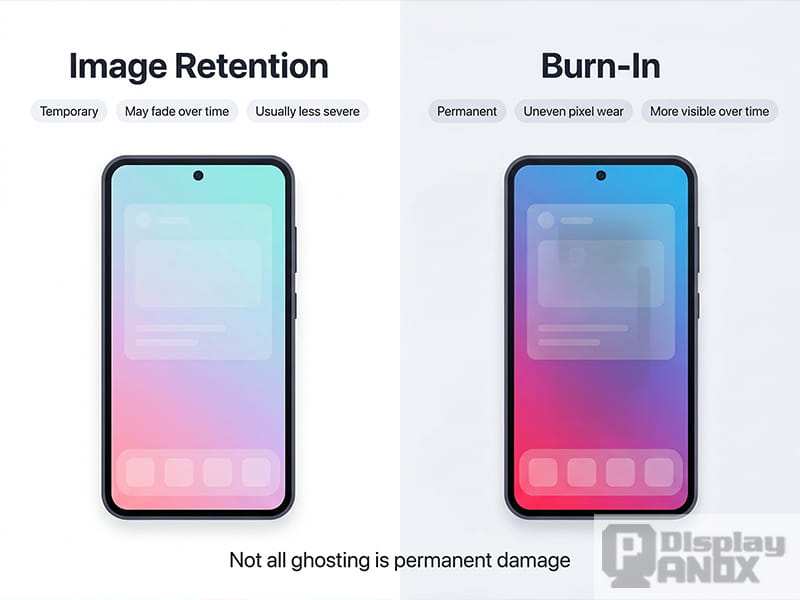
One important distinction: Image retention is not burn-in. Image retention is temporary. If you see a faint ghost after displaying a static image for a while, it usually fades within minutes.
Burn-in is permanent. Most of the scary images online labeled as burn-in are actually temporary retention. True permanent burn-in requires sustained static content over very long periods.
Blooming and Haloing: Mini LED's Achilles' Heel
Blooming is Mini LED's equivalent of OLED's burn-in concern. It's the visual artifact you'll notice most often, and it's the single biggest compromise of the technology.
Blooming happens because each dimming zone covers many pixels. When one pixel in a zone needs to be bright and the rest should be dark, the entire zone lights up to some degree. That light bleeds into the dark pixels, creating a soft glow or halo around bright objects on dark backgrounds.
You'll see blooming most often in these situations:
- White loading screen logos on black backgrounds
- Subtitles during dark movie scenes
- Star fields in space games
- Bright cursors on dark web pages
- HUD elements in dark game environments
How much blooming bothers you depends on three factors:
Zone count. More zones means smaller zones means less blooming. A 576-zone monitor blooms noticeably. A 2,000-zone monitor blooms minimally. The difference is significant.
Room lighting. In a bright room, your pupils constrict and blooming becomes less visible. In a dark room, it's immediately obvious.
Content type. If you mostly watch bright content, browse websites, or work in well-lit applications, you'll rarely encounter blooming. If you watch a lot of letterbox movies or play dark horror games, you'll see it constantly.
Mini LED manufacturers are actively reducing blooming. As of 2026, the best models use advanced algorithms to predict brightness needs and adjust zones more aggressively. Some models also use a technique called "pixel-level dimming" that further refines control within zones. These improvements are meaningful but don't eliminate the fundamental limitation of zone-based backlighting.
The honest assessment: If blooming bothers you visually, you'll notice it on every Mini LED monitor to some degree. It's a question of degree, not presence. OLED simply doesn't have this problem at all.
That's the trade-off you're making.
Price Breakdown: What You're Actually Paying For
Price is where Mini LED holds a significant advantage, and it's worth understanding what drives the cost difference.
Mini LED monitors as of 2026:
- 27-inch 4K, 384 zones: $300 to $450
- 32-inch 4K, 576 zones: $450 to $700
- 32-inch 4K, 1,152 zones: $700 to $1,000
- 32-inch 4K, 2,000+ zones: $1,000 to $1,500
- 34-inch ultrawide QD-OLED alternative in Mini LED: $600 to $1,200
OLED monitors as of 2026:
- 27-inch 4K WOLED: $800 to $1,000
- 32-inch 4K QD-OLED: $1,000 to $1,400
- 34-inch ultrawide QD-OLED: $900 to $1,500
- 49-inch super-ultrawide QD-OLED: $1,200 to $2,500
What you're paying for with Mini LED:
The primary cost driver is zone count. A 2,000-zone backlight assembly costs significantly more to manufacture than a 576-zone assembly. Panel type matters too.
VA panels offer better native contrast but slower response times. IPS panels offer better viewing angles and faster response but weaker native contrast. The dimming processor and its algorithm quality also affect price.
What you're paying for with OLED:
OLED monitors cost more because the organic emitter materials are expensive to deposit precisely across large panels. Manufacturing yield rates are lower than LCD, meaning more panels get rejected. QD-OLED adds quantum dot conversion layers, adding another cost layer.
The thin form factor and lack of a backlight assembly save some cost, but the emitter and manufacturing complexity dominate pricing.
The value proposition:
At $500, Mini LED gives you a very good 4K HDR gaming monitor with no burn-in risk. At $1,000, OLED gives you a dramatically better dark-room experience but requires some care habits. At $1,500, both technologies are excellent, and your choice comes down to room lighting and content preferences rather than quality.
If budget is your primary constraint, Mini LED wins clearly. You get a great display for significantly less money. If budget is flexible and you can control your room lighting, OLED delivers a visibly superior image in dark scenes that Mini LED simply cannot match.
Common Mistakes People Make When Choosing Between Mini LED and OLED
Mistake 1: Assuming OLED burn-in is inevitable. It's not. With normal use and basic habits, modern OLED monitors last years without permanent burn-in. The fear is largely outdated based on older panel generations.
Don't let it scare you away from OLED if the image quality is what you want.
Mistake 2: Ignoring room lighting entirely. This is the single biggest factor people overlook. OLED in a bright room looks washed out. Mini LED in a dark room shows blooming.
Your room determines which technology looks better to you, not the spec sheet.
Mistake 3: Buying Mini LED based only on zone count. Zone count matters, but so does the dimming algorithm. A well-tuned 576-zone monitor can look better than a poorly tuned 1,152-zone monitor. Read reviews that specifically test blooming before buying.
Mistake 4: Expecting OLED to be as bright as Mini LED in full-screen scenes. ABL is real and unavoidable. If you need sustained 600+ nit brightness across the entire screen, OLED cannot deliver that. Mini LED can.
Know your brightness needs before choosing.
Mistake 5: Overlooking text clarity differences. If you spend all day reading and writing, test OLED text rendering before committing. The non-RGB subpixel layout on many OLED panels causes slight color fringing on text. Most people don't notice it.
Some people can't unsee it.
Mistake 6: Buying either technology without calibrating. Both Mini LED and OLED benefit enormously from proper calibration. A $200 hardware colorimeter pays for itself in image quality improvement. Factory calibration varies significantly between units, even within the same model.
Mistake 7: Assuming the gap is static. Both technologies are improving rapidly. Mini LED zone counts are climbing. OLED emitter longevity is improving.
The monitor you buy in 2026 is meaningfully better than what was available even two years ago. Buy the best option for your needs today rather than waiting for a theoretical perfect future.
Expert Tips Before You Buy
Tip 1: Visit a store and see both technologies in person if possible. Photos and reviews can't fully convey how blooming looks on Mini LED or how OLED's blacks feel in a dark room. Even 30 seconds of side-by-side comparison tells you more than hours of reading.
Tip 2: Check the specific panel model, not just the brand. A monitor brand can use different panel suppliers between revisions. The exact panel model determines your actual experience. Look up the panel on DisplaySpecifications or similar databases to confirm what you're getting.
Tip 3: Enable all OLED panel care features out of the box. Pixel shift, static screen detection, and auto-dimming are usually on by default, but verify. These features cost you nothing visually and meaningfully extend panel life.
Tip 4: Set Mini LED local dimming to the highest quality setting. Many monitors default to a balanced or energy-saving mode that reduces dimming aggressiveness. Switch to the highest local dimming setting for the best black levels, even if it slightly increases power draw.
Tip 5: Use a hardware calibrator regardless of technology. Both Mini LED and OLED benefit from ICC profile calibration. The difference between a calibrated and uncalibrated display is often more noticeable than the difference between two display technologies at the same price point.
Tip 6: Consider your upgrade cycle honestly. If you upgrade monitors every 3 to 4 years, OLED burn-in is essentially a non-issue. If you keep monitors for 7+ years, Mini LED's zero burn-in risk provides meaningful peace of mind.
Tip 7: Don't overlook the stand and ergonomics. A $1,500 OLED with a terrible stand is a worse experience than a $1,000 Mini LED with height, tilt, and swivel adjustment. Factor the total package into your decision, not just the panel.
Frequently Asked Questions
Is OLED or Mini LED better for gaming?
OLED is better for gaming in dark or dim rooms due to its near-instant response time and perfect blacks. Mini LED is better for gaming in bright rooms where its higher sustained brightness overcomes ambient light. For competitive gaming where motion clarity matters most, OLED has a slight edge.
Will OLED burn-in happen within a year?
No, not under normal use. Modern OLED monitors with built-in panel care features are rated for 30,000+ hours before noticeable degradation. With basic habits like hiding the taskbar and turning off the monitor when away, burn-in is unlikely within a typical 4 to 6 year upgrade cycle.
Does Mini LED blooming get better on expensive models?
Yes, significantly. Monitors with 1,500+ zones show dramatically less blooming than models with fewer than 600 zones. The dimming algorithm quality also matters.
A well-tuned high-zone-count Mini LED monitor handles blooming well enough that it's only visible in deliberately challenging test patterns for most users.
Can I use an OLED monitor for office work safely?
Yes, with basic habits. Hide your taskbar, use dark mode, enable pixel shift and static screen detection, and turn off the monitor when you step away. These practices are sufficient for typical office use.
If you display the same static spreadsheet for 12 hours daily, Mini LED is the safer choice.
Which technology has better HDR as of 2026?
Both deliver excellent HDR, but in different ways. OLED wins on per-pixel precision and dark scene HDR. Mini LED wins on bright scene HDR impact due to higher sustained luminance.
The best HDR experience depends on the content. Dark horror games look better on OLED. Bright HDR showcases look better on Mini LED.
Is OLED worth the price premium over Mini LED?
It depends on your room and priorities. In a dim room where you game and watch movies, OLED's visual advantage justifies the premium for most people. In a bright office where you work and game, Mini LED's brightness advantage and lower price make it the better value.
Neither is objectively worth it. It's entirely situational.
Final Decision Guide: Pick Your Monitor in 60 Seconds
If you have read this far and still feel torn, this quick decision framework will get you to an answer. Answer three questions honestly and the right monitor becomes obvious.
Question 1: How bright is your room during typical use?
If sunlight regularly hits your screen or you work with overhead lights on all day, choose Mini LED. If you control your lighting and often use your monitor in dim or dark conditions, choose OLED.
Question 2: What content do you view most?
If you primarily watch movies, play atmospheric games, and consume HDR media, choose OLED. If you primarily work with productivity software, browse the web, and game in mixed lighting, choose Mini LED.
Question 3: Do you keep static UI elements on screen for hours daily?
If you leave a taskbar, toolbar, or HUD visible for 8+ hours every day without variation, Mini LED eliminates worry. If your screen content varies regularly and you are comfortable hiding the taskbar when possible, OLED is safe.
When to definitely choose OLED:
- Dark room gaming and movie watching
- Competitive gaming where response time matters
- You want the absolute best image quality and will adopt basic panel care habits
- You upgrade monitors every 3 to 5 years
When to definitely choose Mini LED:
- Bright room with uncontrolled lighting
- Heavy productivity use with static UI elements
- You plan to keep the monitor for 6+ years without upgrading
- You want excellent HDR without worrying about long-term panel health
When both are genuinely equal:
If your room has moderate, controllable lighting and you split time between gaming and productivity, either technology works well. At this point, buy based on price. The cheaper option at your target size and spec level is the smarter purchase in 2026.
The display technology landscape has matured to where both Mini LED and OLED are genuinely excellent choices. You are not making a bad decision either way. You are choosing which set of trade-offs fits your specific situation.
Make that choice confidently based on your room, your content, and your habits rather than spec sheet hype, and you will be happy with whichever monitor you bring home.

Similar Posts





















