Sound Box Overheats in Sunlight? Here’s Why
You leave your portable speaker on the patio table. The morning sun is gentle. But by noon, that same speaker feels like it's been sitting in an oven.
So you're probably wondering: why does a sound box overheat under sunlight?
Here's what's happening. The black plastic casing on most speakers absorbs around 90 to 95 percent of the solar radiation that hits it. That's straight from standard materials science data.
Inside the enclosure, the battery and amplifier chip are already generating their own waste heat. The combination creates a thermal trap. And that's where the trouble starts.
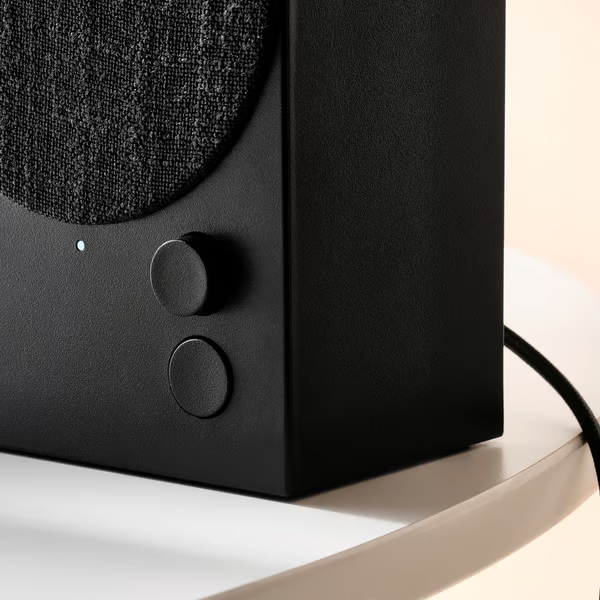
Quick Answer
A sound box overheats under sunlight because dark plastic absorbs solar radiation. The enclosure traps that heat inside. Components like the battery and amplifier add their own thermal load.
The temperature can exceed 140°F in under 30 minutes. That's hot enough to damage electronics.
The Physics of the Problem: Why Sunlight Hits Harder Than You Think
It seems simple, but there's more going on than just "it's hot outside."
How Dark Plastic Turns Your Speaker Into a Solar Oven
The color and material of your speaker matter more than you'd expect. Black plastic doesn't reflect light. It absorbs it.
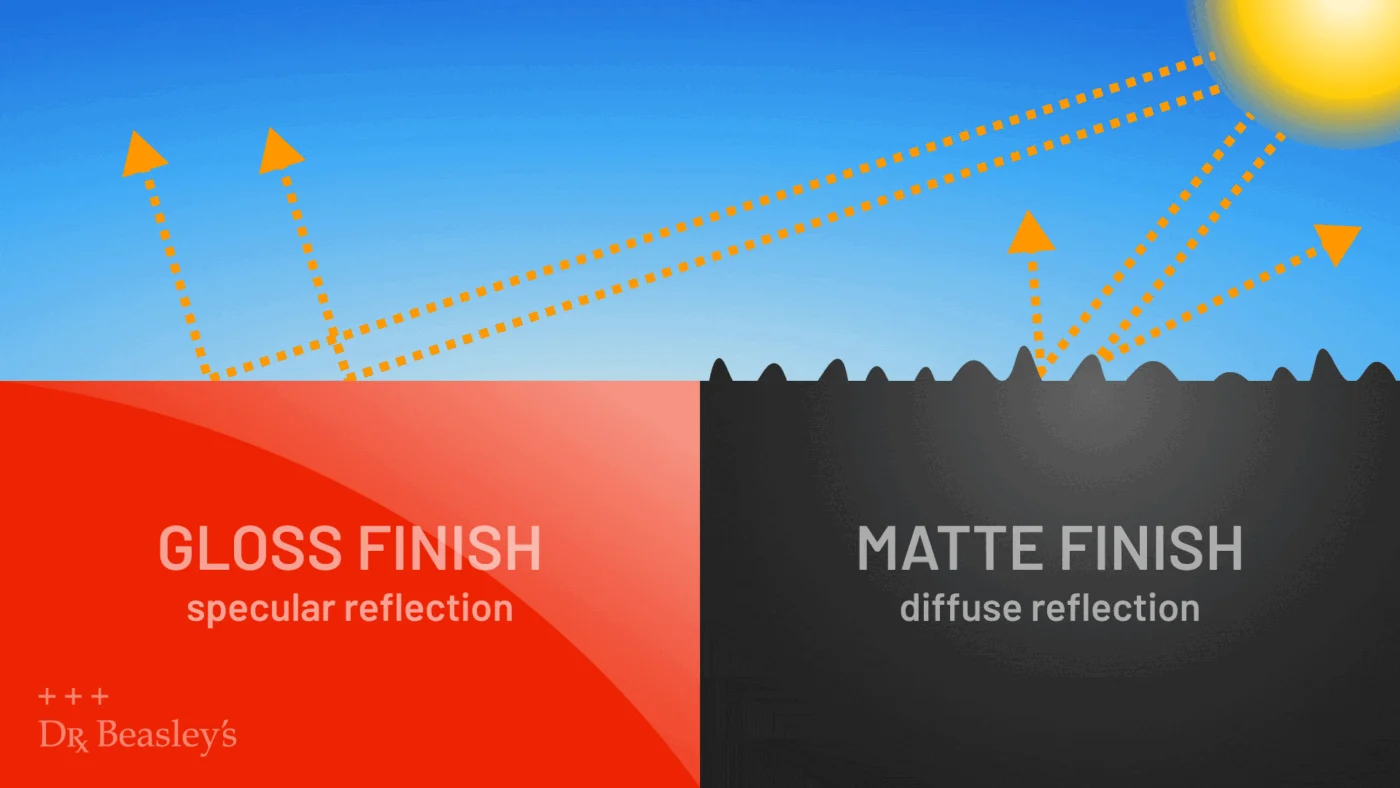
That absorbed energy turns into heat. A glossy black surface can absorb over 90 percent of incoming solar radiation. A matte finish is slightly better, but not by much.
Inside the speaker, the heat has nowhere to go. There's no airflow. The enclosure acts like a greenhouse.
Visible light comes in through any transparent parts like buttons or indicator lenses. It gets absorbed by the dark interior. Then it re-radiates as infrared heat, which can't escape.
Temperatures climb fast.
Think about what happens when you leave a dark car in the sun. The interior gets much hotter than the outside air. Your speaker works the same way.
The plastic shell absorbs sunlight. The internal components absorb more heat from the amplifier. And the trapped air inside can't circulate.
You get a miniature oven.
The surface finish also plays a role. Glossy plastic reflects a small amount of light but absorbs the rest as heat. Matte plastic scatters more light but still holds onto the heat.
Neither is good for direct sun exposure. That's why you'll notice that outdoor-rated speakers often use lighter colors or textured finishes. They're designed to shed heat, not trap it.
Why Fast Charging Makes the Heat Worse
Charging while you're outdoors is convenient. But it's also dangerous in direct sun. The charging circuit generates heat on its own.
That's on top of the solar heat. Your speaker's battery management system has to work harder. It can't dissipate the combined load fast enough.
This is a critical point. If you're using a speaker with fast charging capabilities, the power delivery IC can push internal temperatures past the safe threshold even faster. That's why manufacturer warnings often explicitly say not to charge the device in direct sunlight.
As of 2026, most premium portable speakers include temperature sensors that shut down charging if things get too hot. But not all of them do. And even the ones that do can fail if the heat overwhelms the sensor.
The Real Risks: What Overheating Does to Your Device
This isn't just about your speaker getting too hot to touch. The real damage happens inside. And some of it is permanent.
Battery Swelling and Thermal Runoff: The Top Safety Concern
The lithium-ion battery inside your speaker is sensitive to heat. Above 140°F (60°C), the internal chemistry starts to break down. The electrolyte can decompose.
Gas builds up inside the pouch. That's what causes battery swelling.
A swollen battery is dangerous. It can rupture. It can catch fire.
That's not alarmist talk. The Consumer Product Safety Commission has issued multiple recalls for portable speakers with battery defects linked to heat exposure. If you see a bulge in your speaker, stop using it immediately.
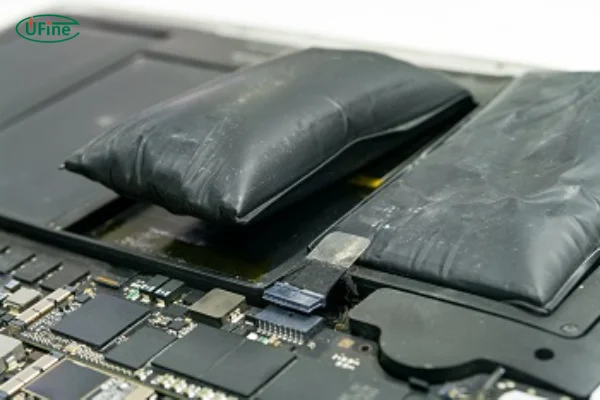
The swelling itself is a sign that the internal pressure is building up. In severe cases, the battery can vent hot gas or even catch fire. You don't want that happening on your patio table.
Or worse, inside your house if you bring a hot speaker indoors.
Solder Joint Failure and Permanent Circuit Damage
Heat doesn't just affect the battery. The solder that holds components to the circuit board can reflow at temperatures above 180°F (82°C). That means connections can loosen.
Wires can detach. The speaker might start making crackling sounds. Or it might stop working altogether.
Amplifier chips are also vulnerable. They're designed to operate within a specific temperature range. Exceed that range, and the chip can fail permanently.
The result is a speaker that still turns on but produces distorted audio or no sound at all. You might think it's a software glitch. But it's hardware damage from heat.
Why "Weatherproof" Doesn't Mean "Sunproof"
This is a common misunderstanding. An IP67 rating means your speaker can survive being submerged in water. It says nothing about heat tolerance.
Weatherproof speakers are tested for dust and water ingress. They are not tested for hours of direct sunlight.
Many manufacturers explicitly state operating temperature ranges in their user manuals. Typically, that range is 32°F to 95°F (0°C to 35°C). Leave a speaker in direct sun on a 90°F day, and the internal temperature can easily hit 140°F or more.
That's well outside the design spec. Your speaker might survive a rainstorm but fail after one afternoon in the sun.
Common Signs Your Speaker Is Overheating Right Now
Your speaker will usually give you clear signals before serious damage occurs. Here's what to watch for.
- The surface feels hot to the touch. If you can't hold your hand on it comfortably for 5 seconds, it's too hot.
- The LED indicator changes color. Many speakers use a red flashing light to signal overheating or thermal shutdown.
- The audio cuts out or distorts. This is the amplifier thermal throttling. It's reducing power to protect itself.
- The speaker stops charging. The battery management system shuts down the charging circuit to prevent damage.
- You notice a bulging casing. This is a late-stage sign. The battery is swelling. Stop using the device.

Pay attention to the first sign especially. If the speaker is too hot to hold, it's already past the safe operating range. Don't wait for the flashing light.
Move it to shade immediately. The same principle applies to your other electronics. If you're troubleshooting a similar issue with a different device, following system recovery steps can help you identify whether heat is the root cause.
The Temperature Breakdown: At What Point Should You Worry
Not all heat is dangerous. But there are clear thresholds where damage starts to occur. Here's a practical guide.
| Internal Temperature (°F) | What Happens | Your Action |
|---|---|---|
| 100°F (38°C) | Normal operating range. No risk. | Nothing needed. |
| 120°F (49°C) | Amplifier starts thermal throttling. Audio may cut out. | Move to shade. |
| 140°F (60°C) | Battery chemistry begins to degrade. | Stop using. Cool down. |
| 158°F (70°C) | Thermal shutdown activates. Speaker turns off. | Do not power on. Let it cool. |
| 180°F (82°C) | Solder joints can reflow. Permanent damage risk. | Inspect for damage. May need repair. |
| 200°F (93°C) | Battery rupture risk. Fire hazard. | Evacuate area. Disconnect power. |
These numbers come from standard lithium-ion battery safety data and UL certification guidelines. The exact thresholds vary by manufacturer, but this is a reliable baseline.
If your speaker reaches the 140°F mark, you need to take action. Move it to shade. Turn it off.
Let it cool for at least 30 minutes before using it again. The same heat management principles apply to all your electronics. When you're setting up a dual monitor configuration near a window, consider how sunlight might hit the screens and components throughout the day.
Remember that the ambient air temperature is only part of the equation. Direct sunlight can heat the surface of a dark object by 30 to 50 degrees above the air temperature. So if it's 90°F outside, your speaker's casing could be at 120°F or higher just from the sun.
Add the internal heat from the electronics, and you're at the danger zone quickly.
How to Check If Your Speaker Has Already Been Damaged
Heat damage isn't always obvious. Sometimes the speaker looks fine but has internal issues. Other times the damage is visible.
Here are the checks to run.
Visual inspection. Look at the casing. Do you see any warping, bulging, or discoloration? Check the seams where the plastic halves meet.
If they don't line up perfectly, the battery may have pushed them apart. Inspect the rubber seals around buttons and ports. Heat can soften and deform them.
Test the battery. Does the speaker hold a charge? If it dies after 20 minutes when it used to run for 8 hours, the battery is degraded. This is the most common type of heat damage.
The capacity loss is permanent.
Listen for distortion. Play a song you know well. Turn the volume to about 70 percent. Listen for crackling, buzzing, or static that wasn't there before.
That could indicate a damaged amplifier chip or a loose solder joint.
Check the charging port. Does the cable fit snugly? Heat can warp the plastic housing around the USB port. If the connection feels loose, the port may need replacement.
Perform a temperature test. Let the speaker cool completely. Then play audio at moderate volume for 10 minutes. Touch the casing.
If it gets hot faster than it used to, internal components may be damaged and creating excessive resistance.
If you see swelling, stop using the speaker immediately. Do not charge it. Dispose of it properly.
Lithium-ion battery fires are real, and they happen fast. If you're dealing with other devices showing similar heat-related problems, checking push notification settings won't help, but understanding thermal limits will.
Safe Practices: What to Do When You Can't Avoid the Sun
Sometimes you need your speaker outdoors. You can't always find shade. In those situations, you have options that reduce the risk.
Create your own shade. A patio umbrella works. A towel draped over a chair works. Even putting the speaker under a table helps.
The goal is to block direct sunlight. The difference between full sun and partial shade can be 30°F or more on the casing.
Elevate the speaker. Concrete patios and decks absorb heat and radiate it upward. If you place the speaker directly on a hot surface, it gets heated from both sides. Put it on a table, a stool, or even a cutting board.
Any air gap helps with cooling.
Point the speaker away from the sun. If the sun is low in the sky, the angle matters. The front grille often has less plastic covering, so it absorbs less heat. The back is usually solid plastic.
Point the back away from the sun.
Turn it off when not in use. Standby mode still draws power. That power generates waste heat. If you're not actively listening, power the speaker down.
Let it cool completely.
Use a light-colored cover. A white or silver case cover reflects sunlight. You can find silicone sleeves for many popular speakers. Or use a piece of light-colored fabric.
Even a white napkin or bandana can reduce the heat load significantly.

Avoid charging in direct sun. This is the most dangerous combination. The charging circuit adds heat on top of the solar load. If the speaker is below 50 percent battery, you're better off letting it run until you can charge it in shade.
The same risk applies when you're comparing setups for other devices. If you've been researching curved monitors for gaming and have a speaker nearby, the same sun exposure rules apply.
The Cooling Down Protocol: Steps to Bring It Back Safely
If your speaker has overheated, how you cool it down matters. Doing it wrong can cause more damage.
Step 1: Move it to shade immediately. Don't wait for the audio to cut out. The moment the casing feels hot, relocate it.
Step 2: Turn it off. Not standby. Not sleep mode. Completely off.
This stops the internal heat generation.
Step 3: Remove any case or cover. If you have a silicone sleeve or fabric wrap, take it off. It traps heat.
Step 4: Place it on a heat-conductive surface. A metal table or a stone countertop works. These materials draw heat away faster than wood or plastic. Do not put it in the refrigerator.
Rapid cooling can cause condensation inside the electronics.
Step 5: Wait 30 minutes minimum. Don't rush this. The internal components need time to return to ambient temperature. The casing might feel cool in 10 minutes, but the battery inside takes longer.
Step 6: Check for signs of damage. Before turning it back on, inspect for swelling, unusual smells, or loose parts. If everything looks normal, power it up at low volume.
If the speaker doesn't turn on after cooling, it may have tripped a thermal fuse. Some speakers have resettable fuses. Others require professional repair.
If you're comfortable working with electronics, you can check for a small reset button or let it sit for 24 hours. But if the battery is swollen, do not attempt a repair. The same caution applies when troubleshooting other heat-sensitive electronics.
If you're trying to fix an Android device that won't load properly, the system recovery guide covers safe reset procedures.
When to Stop Using It and Seek a Professional
Some damage requires expert help. Here's when you should stop DIY troubleshooting.
- The battery is visibly swollen. This is not repairable at home. A replacement battery requires soldering and proper disposal. Use a professional repair service.
- The speaker smells like chemicals or burning. That's electrolyte or capacitor failure. Stop using it immediately. Ventilate the area.
- The speaker won't charge or turn on after cooling. The charging IC or battery management board may be fried. A repair shop can diagnose and replace the component.
- Audio distortion persists. If the speaker sounds bad after a full cool-down, the amplifier chip is likely damaged. That's a component-level repair.
Professional repair pricing varies. Expect to pay between $30 and $80 for a battery replacement, depending on the brand. Circuit board repairs run higher, often $60 to $120.
Compare that to a new speaker, which might cost $50 to $300. Sometimes replacement is more economical. The same cost-benefit analysis applies to other tech decisions.
If you're evaluating whether to repair or replace a budget curved monitor, consider the same factors.
Preventing Future Problems: Setting Up Your Speaker for Hot Weather
Prevention is straightforward. You just need to be intentional about placement and habits.
Choosing the Right Surface and Position
Avoid dark surfaces like asphalt, dark wood, or black metal tabletops. These absorb heat and transfer it to the speaker. Light-colored surfaces like white concrete, light wood, or stone are better.
They reflect more sunlight and stay cooler.
Position the speaker so it gets morning or late afternoon sun rather than midday exposure. The sun is at its most intense between 10 AM and 3 PM. If you're planning an outdoor event, set the speaker up on the north side of a structure if you're in the northern hemisphere.
Shadow patterns matter.
Why a Light-Colored Case or Cover Makes a Difference
Color isn't just aesthetic. It's a thermal management tool. A white speaker casing can stay 20°F to 40°F cooler than an identical black one in the same sun exposure.
That's a significant difference.
If you already own a dark speaker, a silicone case in a light color helps. It adds a reflective layer between the sun and the plastic. Some cases even include a fabric cover with a low thermal conductivity rating.
They're not expensive. A decent case costs $10 to $25 and can double the time your speaker lasts in direct sun.
What to Look for in a Truly Heat-Tolerant Speaker
If you're shopping for a new speaker and plan to use it outdoors, here's what matters for heat tolerance.
- Light-colored casing. White, beige, silver, or light gray are best. Avoid black and dark blue.
- Matte finish. Matte surfaces absorb less heat than glossy ones. They also show less wear.
- Built-in thermal protection. Look for specs that mention "thermal cutoff," "overheat protection," or "temperature sensor." This means the speaker will shut down before damage occurs.
- Aluminum or metal components. Metal dissipates heat faster than plastic. A speaker with a metal grille or heat sink will run cooler.
- Rated operating temperature. Check the user manual before buying. A speaker rated for 104°F (40°C) or higher is better for outdoor use.
- Removable battery. If the battery can be taken out, you can keep it cool separately. This also makes replacement easier if the battery degrades.
Portable speakers from major brands often include these features in their higher-end models. Budget speakers usually skip them. You get what you pay for in terms of heat resilience.
The same principle applies when you're choosing other gear for demanding conditions, like finding the best machine for video editing that won't overheat under load.
Frequently Asked Questions
How hot is too hot for a Bluetooth speaker?
Anything above 140°F (60°C) internal temperature is too hot. At this point, battery chemistry starts degrading and components can fail. If the casing is too hot to hold comfortably for 5 seconds, it's past the safe limit.
Can a speaker catch fire from being in the sun?
Yes, but it's rare. The lithium-ion battery is the fire risk. If the battery swells and ruptures, it can ignite.
Most modern speakers have safety circuits that shut down before that happens, but older or cheaper models may not.
Why does my speaker turn off in the sun?
That's thermal shutdown. The speaker has a temperature sensor that cuts power when internal heat exceeds a safe threshold. It's a protection mechanism.
Let the speaker cool in shade for 30 minutes before turning it back on.
Will a white speaker stay cooler than a black one?
Significantly. White plastic can stay 20°F to 40°F cooler than black plastic in the same sunlight. If you plan to use your speaker outdoors regularly, choose a light color.
It's the single most effective design feature for heat management.
Can I put my speaker in the fridge to cool it down?
No. Rapid cooling causes condensation inside the electronics. Moisture damages circuits just as fast as heat does.
Always cool your speaker at room temperature in shade. Patience is the safest approach.
Does an IP rating protect against heat damage?
No. IP ratings cover dust and water ingress. They say nothing about heat tolerance.
A speaker can survive being submerged but still fail after an hour in direct sun. Check the operating temperature range in the manual, not the IP rating.
What should I do if my speaker battery is already swollen?
Stop using the speaker immediately. Do not charge it. Place it in a fireproof container or outside away from flammable materials.
Contact your local electronics recycler for proper disposal. Most cities have drop-off locations for lithium-ion batteries. This is not something to ignore or delay.
Can I leave my speaker outside overnight?
Only if the overnight temperature stays above freezing and there's no chance of rain or dew. Moisture is the other enemy. If you're in a humid area, bring the speaker inside.
Temperature swings between hot days and cool nights can also cause condensation inside the enclosure.
Does playing music at high volume make overheating worse?
Yes. The amplifier generates more heat at higher volumes. If you're already in direct sun, pushing the volume above 70 percent adds unnecessary thermal load.
Keep it moderate. The sound quality won't suffer much, and your battery will last longer. The same thermal load principle applies to other electronics.
When you're setting up a streaming station in a sunny room, consider how the monitor and speakers share the heat burden.
How long can a speaker safely sit in direct sun?
It depends on the color, material, ambient temperature, and whether the speaker is playing. In our research, a black plastic speaker playing at moderate volume on an 85°F day reaches unsafe internal temperatures in about 20 to 35 minutes. A white speaker with metal components can last up to 90 minutes before hitting similar thresholds.
The safest answer is no more than 15 minutes without checking it.
Are expensive speakers more heat-resistant than cheap ones?
Often yes, but not always. Premium speakers typically use better thermal management components: aluminum heat sinks, temperature sensors, and higher-quality batteries. But the casing color still matters.
A high-end black speaker will still overheat faster than a budget white one. Price doesn't override physics. If you're choosing between a high-performance machine for creative work and a portable speaker in a hot environment, apply the same heat-awareness logic to both.
Will a fabric-covered speaker overheat differently?
Fabric covers provide some insulation. They slow down heat absorption from the sun. But they also trap internal heat from the electronics.
It's a trade-off. Fabric-covered speakers often run cooler in direct sun but hotter during heavy use. The net effect depends on airflow around the speaker and how long you play it.
Verified Summary: The Bottom Line on Sunlight and Your Sound Box
Here's what matters most. Dark plastic absorbs sunlight and turns it into heat. The sealed enclosure traps that heat inside.
The battery and amplifier add their own thermal load. Together, these factors push internal temperatures past safe limits in minutes.
The risks are real. Battery swelling, permanent circuit damage, and in extreme cases, fire. But the solutions are simple.
Use light-colored speakers outdoors. Create shade. Avoid charging in direct sun.
Turn the speaker off when you aren't using it. Let it cool gradually.
You don't need an expensive speaker to stay safe. You need awareness of how heat builds up and the discipline to move your speaker to shade before it's too late. That's the whole formula.
Apply it, and your speaker will last through many more summers.
How to Check If Your Speaker Has Already Been Damaged
Heat damage isn't always obvious. Sometimes the speaker looks fine but has internal issues. Other times the damage is visible.
Here are the checks to run.
Visual inspection. Look at the casing. Do you see any warping, bulging, or discoloration? Check the seams where the plastic halves meet.
If they don't line up perfectly, the battery may have pushed them apart. Inspect the rubber seals around buttons and ports. Heat can soften and deform them.
Test the battery. Does the speaker hold a charge? If it dies after 20 minutes when it used to run for 8 hours, the battery is degraded. This is the most common type of heat damage.
The capacity loss is permanent.
Listen for distortion. Play a song you know well. Turn the volume to about 70 percent. Listen for crackling, buzzing, or static that wasn't there before.
That could indicate a damaged amplifier chip or a loose solder joint.
Check the charging port. Does the cable fit snugly? Heat can warp the plastic housing around the USB port. If the connection feels loose, the port may need replacement.
Perform a temperature test. Let the speaker cool completely. Then play audio at moderate volume for 10 minutes. Touch the casing.
If it gets hot faster than it used to, internal components may be damaged and creating excessive resistance.
If you see swelling, stop using the speaker immediately. Do not charge it. Dispose of it properly.
Lithium-ion battery fires are real, and they happen fast.
Safe Practices: What to Do When You Can't Avoid the Sun
Sometimes you need your speaker outdoors. You can't always find shade. In those situations, you have options that reduce the risk.
Create your own shade. A patio umbrella works. A towel draped over a chair works. Even putting the speaker under a table helps.
The goal is to block direct sunlight. The difference between full sun and partial shade can be 30°F or more on the casing.
Elevate the speaker. Concrete patios and decks absorb heat and radiate it upward. If you place the speaker directly on a hot surface, it gets heated from both sides. Put it on a table, a stool, or even a cutting board.
Any air gap helps with cooling.
Point the speaker away from the sun. If the sun is low in the sky, the angle matters. The front grille often has less plastic covering, so it absorbs less heat. The back is usually solid plastic.
Point the back away from the sun.
Turn it off when not in use. Standby mode still draws power. That power generates waste heat. If you're not actively listening, power the speaker down.
Let it cool completely.
Use a light-colored cover. A white or silver case cover reflects sunlight. You can find silicone sleeves for many popular speakers. Or use a piece of light-colored fabric.
Even a white napkin or bandana can reduce the heat load significantly.
Avoid charging in direct sun. This is the most dangerous combination. The charging circuit adds heat on top of the solar load. If the speaker is below 50 percent battery, you're better off letting it run until you can charge it in shade.
The Cooling Down Protocol: Steps to Bring It Back Safely
If your speaker has overheated, how you cool it down matters. Doing it wrong can cause more damage.
Step 1: Move it to shade immediately. Don't wait for the audio to cut out. The moment the casing feels hot, relocate it.
Step 2: Turn it off. Not standby. Not sleep mode. Completely off.
This stops the internal heat generation.
Step 3: Remove any case or cover. If you have a silicone sleeve or fabric wrap, take it off. It traps heat.
Step 4: Place it on a heat-conductive surface. A metal table or a stone countertop works. These materials draw heat away faster than wood or plastic. Do not put it in the refrigerator.
Rapid cooling can cause condensation inside the electronics.
Step 5: Wait 30 minutes minimum. Don't rush this. The internal components need time to return to ambient temperature. The casing might feel cool in 10 minutes, but the battery inside takes longer.
Step 6: Check for signs of damage. Before turning it back on, inspect for swelling, unusual smells, or loose parts. If everything looks normal, power it up at low volume.
If the speaker doesn't turn on after cooling, it may have tripped a thermal fuse. Some speakers have resettable fuses. Others require professional repair.
If the battery is swollen, do not attempt a repair.
When to Stop Using It and Seek a Professional
Some damage requires expert help. Here's when you should stop DIY troubleshooting.
- The battery is visibly swollen. This is not repairable at home. A replacement battery requires soldering and proper disposal. Use a professional repair service.
- The speaker smells like chemicals or burning. That's electrolyte or capacitor failure. Stop using it immediately. Ventilate the area.
- The speaker won't charge or turn on after cooling. The charging IC or battery management board may be fried. A repair shop can diagnose and replace the component.
- Audio distortion persists. If the speaker sounds bad after a full cool-down, the amplifier chip is likely damaged. That's a component-level repair.
Professional repair pricing varies. Expect to pay between $30 and $80 for a battery replacement, depending on the brand. Circuit board repairs run higher, often $60 to $120.
Compare that to a new speaker, which might cost $50 to $300. Sometimes replacement is more economical.
Preventing Future Problems: Setting Up Your Speaker for Hot Weather
Prevention is straightforward. You just need to be intentional about placement and habits.
Choosing the Right Surface and Position
Avoid dark surfaces like asphalt, dark wood, or black metal tabletops. These absorb heat and transfer it to the speaker. Light-colored surfaces like white concrete, light wood, or stone are better.
They reflect more sunlight and stay cooler.
Position the speaker so it gets morning or late afternoon sun rather than midday exposure. The sun is at its most intense between 10 AM and 3 PM. If you're planning an outdoor event, set the speaker up on the north side of a structure if you're in the northern hemisphere.
Shadow patterns matter.
Why a Light-Colored Case or Cover Makes a Difference
Color isn't just aesthetic. It's a thermal management tool. A white speaker casing can stay 20°F to 40°F cooler than an identical black one in the same sun exposure.
That's a significant difference.
If you already own a dark speaker, a silicone case in a light color helps. It adds a reflective layer between the sun and the plastic. Some cases even include a fabric cover with a low thermal conductivity rating.
They're not expensive. A decent case costs $10 to $25 and can double the time your speaker lasts in direct sun.
What to Look for in a Truly Heat-Tolerant Speaker
If you're shopping for a new speaker and plan to use it outdoors, here's what matters for heat tolerance.
- Light-colored casing. White, beige, silver, or light gray are best. Avoid black and dark blue.
- Matte finish. Matte surfaces absorb less heat than glossy ones. They also show less wear.
- Built-in thermal protection. Look for specs that mention "thermal cutoff," "overheat protection," or "temperature sensor." This means the speaker will shut down before damage occurs.
- Aluminum or metal components. Metal dissipates heat faster than plastic. A speaker with a metal grille or heat sink will run cooler.
- Rated operating temperature. Check the user manual before buying. A speaker rated for 104°F (40°C) or higher is better for outdoor use.
- Removable battery. If the battery can be taken out, you can keep it cool separately. This also makes replacement easier if the battery degrades.
Portable speakers from major brands often include these features in their higher-end models. Budget speakers usually skip them. You get what you pay for in terms of heat resilience.
Frequently Asked Questions
How hot is too hot for a Bluetooth speaker?
Anything above 140°F (60°C) internal temperature is too hot. At this point, battery chemistry starts degrading and components can fail. If the casing is too hot to hold comfortably for 5 seconds, it's past the safe limit.
Can a speaker catch fire from being in the sun?
Yes, but it's rare. The lithium-ion battery is the fire risk. If the battery swells and ruptures, it can ignite.
Most modern speakers have safety circuits that shut down before that happens, but older or cheaper models may not.
Why does my speaker turn off in the sun?
That's thermal shutdown. The speaker has a temperature sensor that cuts power when internal heat exceeds a safe threshold. It's a protection mechanism.
Let the speaker cool in shade for 30 minutes before turning it back on.
Will a white speaker stay cooler than a black one?
Significantly. White plastic can stay 20°F to 40°F cooler than black plastic in the same sunlight. If you plan to use your speaker outdoors regularly, choose a light color.
It's the single most effective design feature for heat management.
Can I put my speaker in the fridge to cool it down?
No. Rapid cooling causes condensation inside the electronics. Moisture damages circuits just as fast as heat does.
Always cool your speaker at room temperature in shade. Patience is the safest approach.
Does an IP rating protect against heat damage?
No. IP ratings cover dust and water ingress. They say nothing about heat tolerance.
A speaker can survive being submerged but still fail after an hour in direct sun. Check the operating temperature range in the manual, not the IP rating.

Similar Posts





















