Why Are Mini LED Monitors So Expensive
If you've been shopping for a high-end monitor recently, you've probably asked yourself why are mini LED monitors so expensive. It's a fair question. You'll see standard LED monitors sitting at $300 or $400, then a mini LED model with a similar screen size jumps to $1,200 or more.
The price gap feels steep, and honestly, it is steep. But there are real engineering and manufacturing reasons behind it that most product listings never bother to explain. This directly compares with our findings on why are mini led monitors better than normal led.
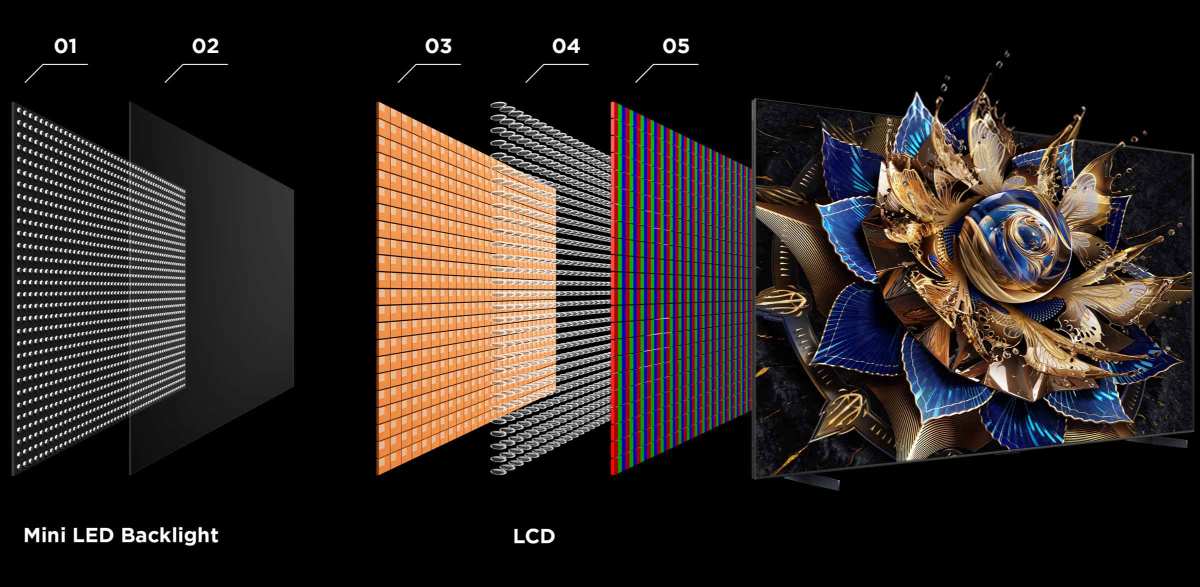
Mini LED technology packs thousands of tiny LED chips behind a single display panel to achieve something standard LED monitors can't: precise local dimming that rivals OLED brightness without the burn-in risk. That precision comes at a cost. Between lower panel yield rates, complex driver IC engineering, and thermal management challenges, every stage of production adds dollars.
Let's break down exactly where your money goes.
Quick Answer
Mini LED monitors cost more because they use thousands of tiny LED chips instead of dozens. Manufacturing complexity increases dramatically with chip density. Panel yield rates are lower, raising per-unit costs.
Driver systems and thermal management also require premium components. These factors combine to create a significantly higher production cost than standard LED monitors. You can also reference our testing on how do mini led monitors work when configuring your display.
The Core Cost Drivers Behind Mini LED Technology
Understanding why mini LED monitors carry premium pricing means looking at what actually goes into building one. It's not one single factor. It's a stack of compounding costs that start at the component level and compound through assembly, calibration, and quality control.
Manufacturing Complexity and LED Chip Density
A standard LED monitor might use 30 to 80 LED chips along the edges or in a few zones behind the panel. A mini LED monitor? It packs anywhere from 10,000 to over 50,000 individual LED chips into the same space.
Each chip measures between 100 and 200 micrometers, which is roughly the width of a human hair.
That density creates immediate manufacturing challenges. Each chip needs to be placed with extreme precision using surface-mount technology (SMT). The placement process has to be accurate to within micrometers, because even slight misalignment causes uneven backlighting, bright spots, or dead zones.
Standard LED monitors don't face this problem because they use far fewer chips placed with much looser tolerances.
The chip count also means more things can go wrong. If one chip in a standard edge-lit display fails, you might barely notice. If one chip fails in a mini LED array with 30,000 chips, the overall effect is still minimal, but the manufacturing tolerance for defects is much tighter.
Manufacturers can't just slap chips on a board and hope for the best. Every unit needs consistent chip performance across the entire array.
Local Dimming Zone Engineering
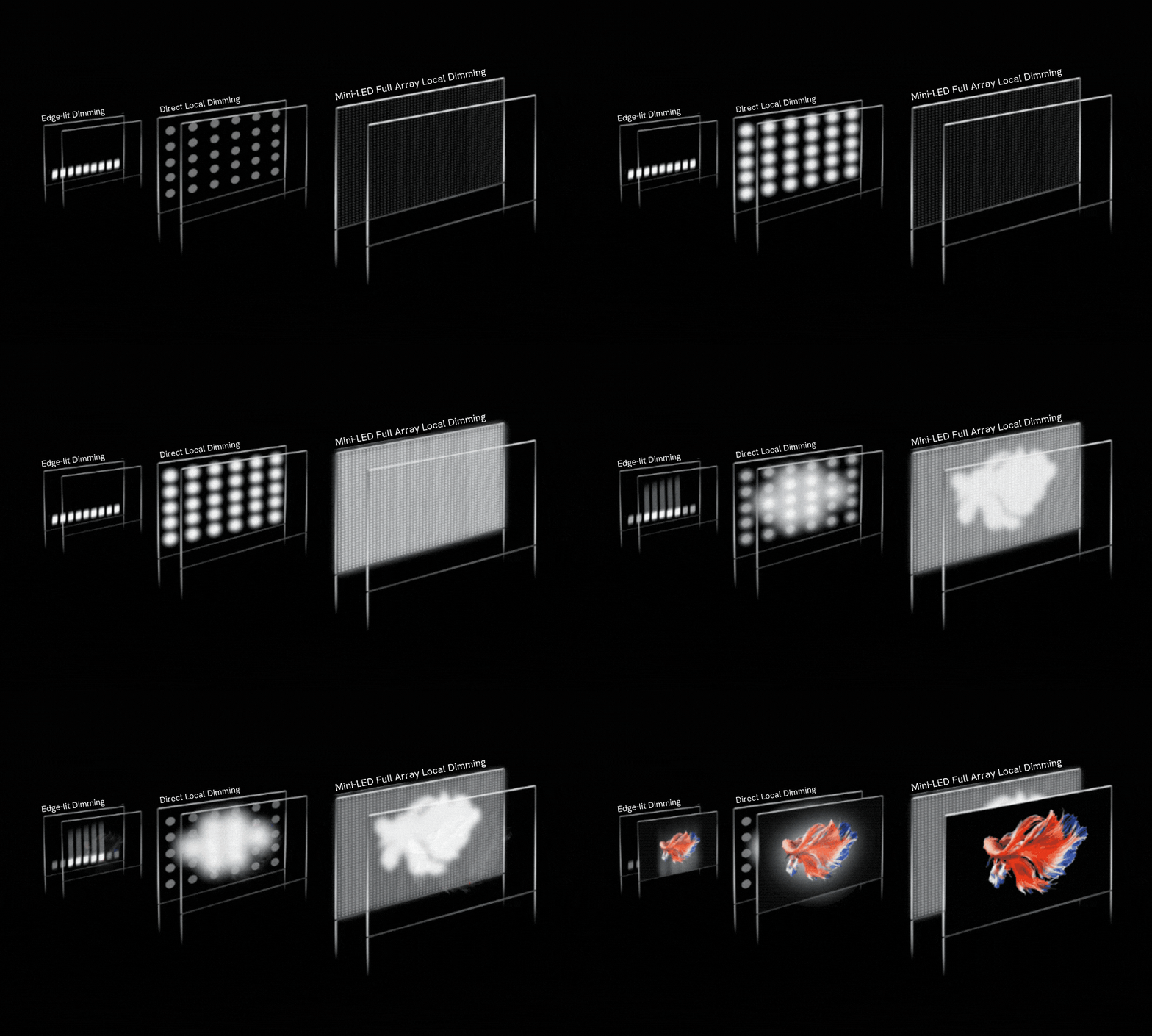
The whole point of mini LED technology is local dimming. Instead of lighting the entire screen uniformly, the monitor divides the backlight into hundreds or thousands of independent zones. Each zone brightens or dims based on what's displayed on screen.
Show a white cursor on a black background? Only the zones behind the cursor light up.
This requires sophisticated zone mapping and dimming algorithms. The monitor's processor has to analyze the incoming video signal in real time and decide how bright each zone should be, dozens of times per second. That processing demands a more powerful and expensive driver IC compared to what a standard LED monitor uses.
Here's where it gets expensive. More zones mean better picture quality but also higher costs. A monitor with 384 zones costs significantly less to produce than one with 2,500 zones.
The zone count directly impacts the complexity of the driver system, the processor requirements, and the calibration time per unit.
| Zone Count | Typical Price Range | Example Use Case |
|---|---|---|
| 115 to 384 zones | $600 to $1,000 | Entry-level HDR gaming |
| 576 to 1,152 zones | $1,000 to $1,800 | Professional content creation |
| 2,000+ zones | $1,800 to $4,000+ | Reference-grade color work |
Driver IC and PCB Complexity
The driver IC is the brain behind the backlight. In a mini LED monitor, it has to manage thousands of individual LED channels simultaneously. Standard LED monitors use simple driver chips that handle a handful of channels.
Mini LED requires advanced driver ICs with far more channels, higher current precision, and faster processing.
The printed circuit board (PCB) also gets more complex. Routing power and data to thousands of LED chips requires more PCB layers, which increases board cost. A standard LED backlight PCB might use 2 layers.
A mini LED backlight PCB can use 6 to 8 layers or more. Each additional layer adds material cost and manufacturing steps.
These driver ICs aren't commodity components either. They're custom-designed or semi-custom chips produced in relatively small volumes compared to standard display drivers. Lower production volumes mean higher per-unit pricing.
It's basic economics, but it hits the final product price hard.
Thermal Management Challenges
Here's something most people don't think about. Thousands of LED chips running simultaneously generate significant heat. In a compact monitor chassis, that heat has nowhere to go without active management.
Mini LED monitors need thermal pads, heat spreaders, and sometimes even small fans or advanced venting designs to keep operating temperatures within safe ranges.
Overheating causes LED color shift, reduced lifespan, and zone performance degradation. Manufacturers can't afford warranty claims on $1,500 monitors because the backlight overheated. So they engineer robust thermal solutions into every unit.
That engineering costs money. The materials cost money. The additional assembly steps cost money.
Panel Yield Rates: The Hidden Price Multiplier
This is the cost factor that most buyers never hear about, and it's arguably the biggest single contributor to the premium pricing. Panel yield rate refers to the percentage of manufactured panels that pass quality control and can actually be sold.
Mini LED panel yields are significantly lower than standard LED panel yields. When you're placing tens of thousands of tiny LED chips behind a glass panel, any defect in any chip, any zone, or any connection can disqualify the entire panel. A single dead zone in a 2,000-zone backlight might be enough to reject the unit.
Industry data suggests that mini LED panel yields can run 20 to 40 percent lower than equivalent standard LED panels, depending on the zone count and manufacturer. That means for every 10 panels produced, 2 to 4 are scrapped or sold at deep discount as lower-tier models. The cost of those rejected panels gets absorbed into the price of the ones that do pass.
This yield problem gets worse as zone counts increase. A monitor with 2,500 zones has far more potential failure points than one with 576 zones. That's why the highest-zone-count monitors command such extreme premiums.
You're not just paying for better performance. You're paying for the manufacturing reality that many units don't make the cut.
Manufacturers like Samsung Display, LG Display, and BOE have invested heavily in improving mini LED yields, but as of 2026, the technology still carries inherent yield penalties compared to mature standard LED production lines. Until yields improve substantially, this cost factor isn't going away.
Mini LED vs. Other Display Technologies
To understand mini LED pricing, you need to see how it stacks up against the alternatives. Each display technology has its own cost structure, performance profile, and trade-offs. Mini LED sits in an interesting middle ground that explains both its appeal and its price.
Mini LED vs. Standard LED/LCD
Standard LED monitors use edge-lit or direct-lit backlighting with a small number of LED chips. They're cheap to produce, energy-efficient, and perfectly fine for everyday use. But they can't achieve true HDR performance because the backlight can't dim specific areas of the screen independently.
Mini LED solves this by adding local dimming zones. The result is dramatically better contrast, deeper blacks, and brighter HDR highlights. But you're paying 2 to 4 times more for that improvement.
For general office work or casual browsing, standard LED remains the smarter buy. For HDR content creation or serious gaming, the upgrade becomes worthwhile.
Mini LED vs. OLED
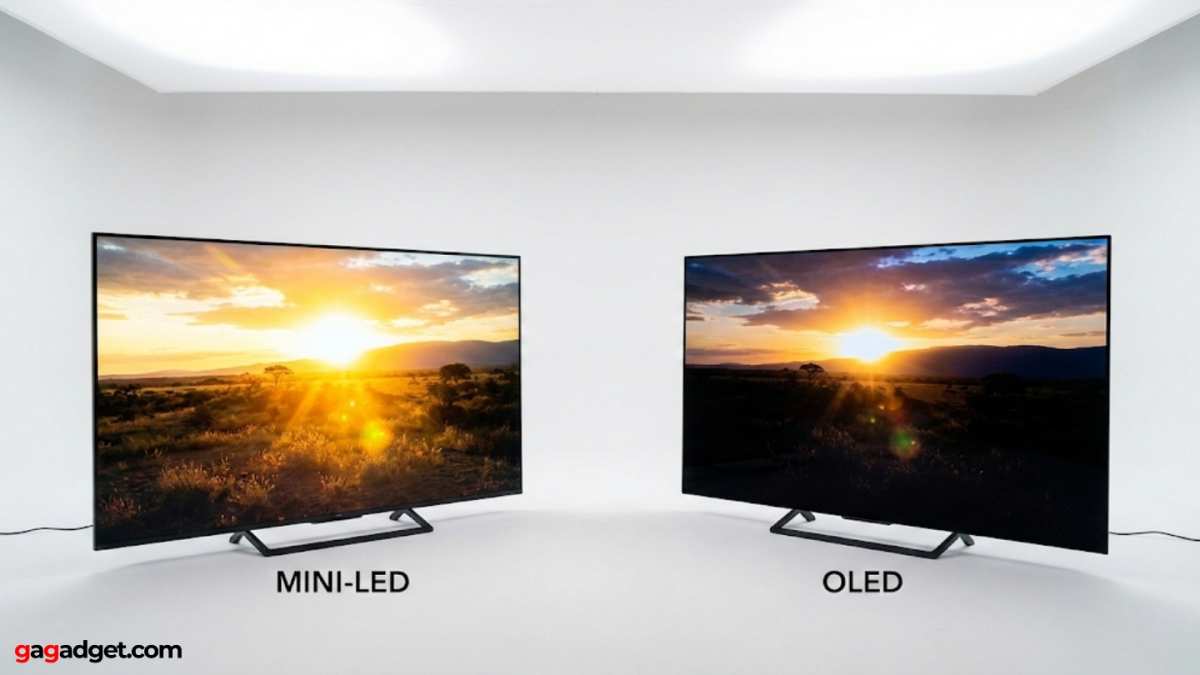
OLED is the elephant in the room. OLED panels produce perfect blacks because each pixel emits its own light and can turn off completely. No blooming, no halo effect, no zone limitations.
So why doesn't everyone just buy OLED?
OLED has real drawbacks. Burn-in remains a concern, especially for users who display static elements like taskbars, channel logos, or game HUDs for hours every day. OLED panels also can't hit the same peak brightness levels as high-end mini LED displays.
And large OLED monitors remain extremely expensive, often costing more than comparable mini LED models.
Mini LED offers a practical middle ground. It gets close to OLED contrast levels while maintaining higher peak brightness and eliminating burn-in risk entirely. For professional users who need reliability over years of daily use, that trade-off makes sense.
Mini LED vs. MicroLED (Don't Confuse These)
People mix these up constantly. Mini LED uses thousands of tiny LED chips as a backlight behind an LCD panel. MicroLED is an entirely different technology where each pixel is its own microscopic LED.
MicroLED is the theoretical future of displays, offering OLED-level blacks with LED-level brightness and zero burn-in.
MicroLED monitors aren't really available to consumers yet in monitor-sized displays. The manufacturing challenges are enormous, and costs are astronomical. When you see a MicroLED display at a trade show, it's usually a massive video wall or a prototype with a five-figure price tag.
Mini LED is the practical, purchasable technology available right now. Don't let marketing blur this distinction.
| Feature | Standard LED | Mini LED | OLED | MicroLED |
|---|---|---|---|---|
| Local Dimming | None to basic | 384 to 2,500+ zones | Per-pixel | Per-pixel |
| Peak Brightness | 300 to 500 nits | 1,000 to 2,000+ nits | 500 to 1,000 nits | 2,000+ nits |
| Burn-in Risk | None | None | Present | None |
| Price Range | $150 to $500 | $600 to $4,000+ | $800 to $5,000+ | Not available (consumer) |
| Availability | Widely available | Growing | Widely available | Prototype / commercial only |
Where the Price Isn't Always Worth It
Mini LED technology is impressive, but it's not flawless. Before you spend $1,000 or more, you should understand the real limitations that come with this technology. Not every mini LED monitor delivers a proportional improvement over cheaper alternatives.
Blooming and Halo Effect
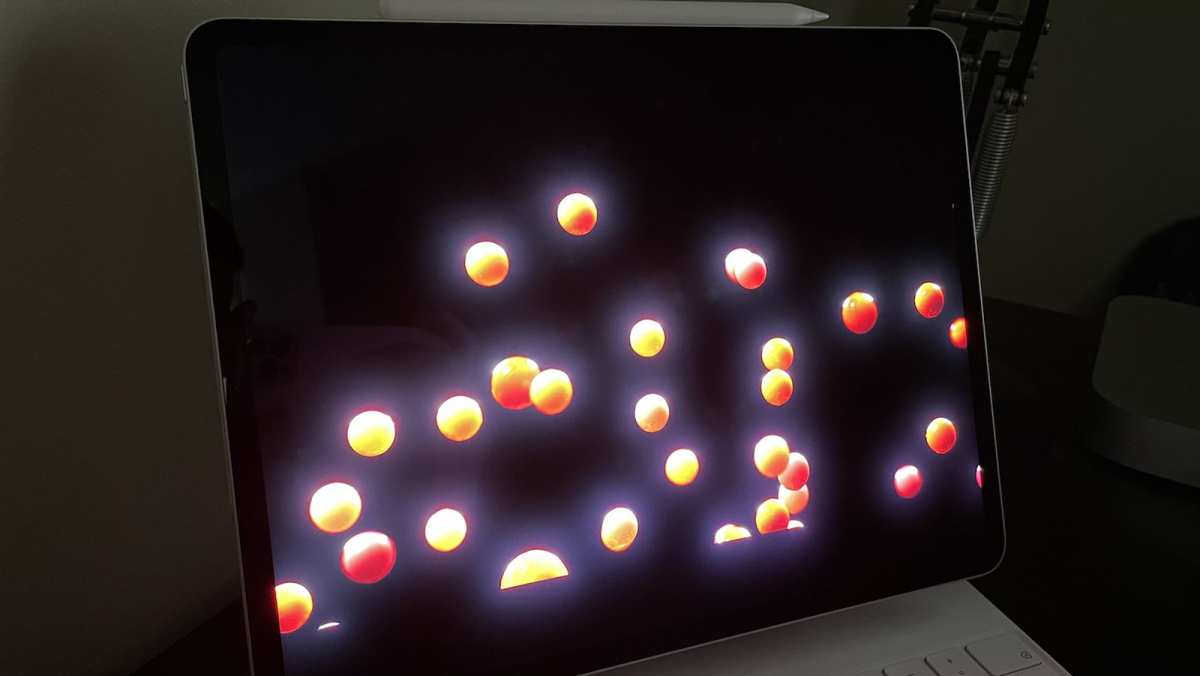
Blooming is the most visible mini LED compromise. When a bright object appears against a dark background, the light from the illuminated zone spills slightly into adjacent zones. You see a soft glow or halo around bright elements.
White text on a black background, movie credits, and game cursors all make this visible.
Higher zone counts reduce blooming, but they don't eliminate it entirely. A 384-zone mini LED monitor will show noticeably more blooming than a 2,500-zone model. The question is whether the difference justifies the price jump.
For many users, a mid-range zone count handles blooming well enough that the extra cost of maximum zones isn't justified.
Dimming Algorithm Quality Varies Wildly
Hardware is only half the story. The dimming algorithm determines how intelligently each zone responds to on-screen content. A well-tuned algorithm on a 576-zone monitor can look better than a poorly tuned algorithm on a 1,152-zone monitor.
Manufacturers guard their algorithm details closely, which makes comparison shopping difficult. Two monitors with identical zone counts can produce noticeably different HDR performance based purely on software tuning. This is one reason reading detailed reviews matters more for mini LED than for other display types.
Not All Mini LED Monitors Are Created Equal
The term "mini LED" describes the backlight technology, not the overall display quality. A mini LED monitor still needs a quality LCD panel, proper factory calibration, and solid build quality. Some manufacturers pair mini LED backlights with mediocre panels to hit lower price points.
You get the local dimming benefit but sacrifice color accuracy, viewing angles, or response times.
This is where spending time on reviews pays off. A $900 mini LED monitor with a poor panel and sluggish response time is a worse buy than a $700 model with better overall engineering. The mini LED backlight is one component of a complete display system.
Judge the whole package, not just the marketing headline.
Who Should Actually Buy a Mini LED Monitor
Not everyone needs mini LED technology. The premium pricing only makes sense if your workflow or usage scenarios actually leverage what it does best. Let's break down who benefits most and who's better off saving their money.
Professional Use Cases That Demand It
Colorists and video editors working in HDR need what mini LED delivers. When you're grading content for streaming platforms or theatrical release, you need to see accurate HDR highlight detail, deep blacks, and consistent color across the screen. Mini LED monitors with 1,000+ nits peak brightness and VESA DisplayHDR 1000 certification give you a reliable reference view that standard LED simply cannot match.
Photographers editing in wide color gamuts benefit too. Mini LED panels covering 99% or more of DCI-PCI and Adobe RGB provide the color volume needed for professional print and digital delivery. Medical imaging professionals also value the contrast and brightness precision that mini LED offers for diagnostic displays where detail visibility matters.
Gaming Scenarios Where It Shines
Serious HDR gamers are a growing market for mini LED monitors. If you've got a GPU capable of pushing HDR content at high frame rates, a mini LED display with low response times (1ms to 4ms on current models) gives you the visual impact that standard gaming monitors lack. The combination of high refresh rates, local dimming, and peak brightness above 1,000 nits creates genuinely immersive dark-scene gaming.
Competitive gamers who prioritize raw response time over picture quality should probably still look at standard IPS or TN panels though. Mini LED's dimming processing can add a small amount of latency that competitive players notice. It's measurable in testing, though imperceptible for most casual and enthusiast gamers.
Who Should Probably Save Their Money
If your daily use is office productivity, web browsing, photo editing for sRGB delivery, or watching YouTube videos, a standard IPS LED monitor at $250 to $400 serves you better. The mini LED premium buys capabilities you simply won't utilize in those scenarios.
Budget-conscious buyers should also consider this. A well-calibrated $400 IPS monitor often delivers better color accuracy out of the box than a poorly calibrated $900 mini LED monitor. Price alone doesn't guarantee better results.
How to Evaluate a Mini LED Monitor Before Buying
Mini LED monitors vary wildly in quality at every price point. Knowing what to look for prevents overpaying for specs that don't translate into real-world performance.
Key Specs That Actually Matter
Zone count is the first number everyone looks at, but it's not the whole story. A 576-zone monitor with excellent dimming algorithms can outperform a 1,152-zone monitor with sloppy processing. Use zone count as a rough quality tier indicator, not a direct performance guarantee.
Peak brightness tells you about HDR capability. Look for sustained brightness measurements, not just peak burst numbers. Some monitors hit 1,600 nits for a fraction of a second but can't sustain 600 nits across the full screen without thermal throttling.
Manufacturer specs and independent reviews help separate marketing numbers from reality.
Color accuracy matters enormously for professional work. Check for factory calibration reports claiming Delta E values below 2. Also verify the specific color gamut coverage.
A monitor advertising "95% DCI-P3" is meaningfully different from one delivering 99%.
Questions to Ask Before Dropping $1,000+
What's the dimming algorithm like? This is hard to answer from specs alone. Search for reviews that specifically test HDR performance with challenging content like star fields, subtitles on dark scenes, and cursor movement on black backgrounds.
How does it handle heat under sustained load? Thermal throttling causes brightness drops and color shifts during long editing or gaming sessions. Reviews that test sustained performance over hours reveal weaknesses that short benchmark runs miss.
Is the panel consistent across units? Manufacturing variance means two identical monitors can look different. For professional color work, check if the manufacturer offers individual unit calibration reports. Some include these, some don't.
The Future of Mini LED Pricing: What to Expect
Mini LED pricing has already dropped significantly since the technology first appeared in consumer monitors. As manufacturing matures and yields improve, expect further price erosion across the range.
Industry forecasts suggest monitor panel costs could decline 15 to 25% over the next two to three years as production scales and chip placement technology improves. Entry-level mini LED with 384 zones could approach $400 to $500 within that timeframe.
Higher-zone-count professional monitors will always command premiums, but the gap should narrow. Quantum dot enhancement film integration and improved driver IC efficiency are also helping reduce costs while maintaining or improving performance.
OLED technology is advancing rapidly too, which puts competitive pressure on mini LED pricing. As OLED monitors become more affordable and burn-in resistance improves, mini LED needs to justify its price with clear performance advantages. That competition ultimately benefits buyers.
Frequently Asked Questions
Is a mini LED monitor better than OLED for office work?
For office use with static elements like taskbars and documents, mini LED is safer long-term. OLED burn-in risk with static content makes it less ideal for eight-hour daily productivity use.
How many dimming zones do I actually need?
For general HDR gaming and content watching, 384 to 576 zones provides a solid experience. For professional color work or diminishing blooming, 1,152 zones or more makes a noticeable difference.
Do mini LED monitors use more power than standard LED?
Yes. The thousands of additional LED chips increase power consumption by roughly 20 to 40% compared to equivalent standard LED monitors, depending on brightness settings and zone activity.
Can I use a mini LED monitor for SDR content?
Absolutely. Mini LED monitors work perfectly fine for SDR content and often look excellent. The local dimming can be set or disabled for SDR use depending on your preference and the monitor's settings.
Final Verdict
Mini LED monitors are expensive because the technology genuinely costs more to produce. Thousands of precise LED chips, complex driver systems, lower yields, and thermal engineering all add real manufacturing cost. That pricing reflects reality, not just brand markup.
Whether the premium is worth it depends entirely on your use case. Professionals who need HDR accuracy, colorists working in wide gamuts, and gamers wanting the best HDR experience will find genuine value. Everyone else is better served by a quality standard IPS monitor and putting the savings toward other gear.
The market is moving in the right direction. Prices are falling, yields are improving, and competition from OLED keeps pushing the technology forward. If the current prices feel too steep, waiting six to twelve months could save you meaningful money without sacrificing performance.

Similar Posts





















