Do Mini LED Monitors Have Burn in Issues
So you've been eyeing a Mini LED monitor, but one question keeps nagging at you. Do mini led monitors have burn in issues? It's a fair worry, especially if you're coming from an older display or you've heard horror stories about OLED panels.
Here's the good news. Mini LED technology uses a fundamentally different approach than self-emissive displays, which changes the burn-in equation entirely. Most people asking this question are really trying to figure out if they can leave a static image on screen without destroying their investment. If you are exploring similar hardware setups, see our detailed guide on whether mini led monitors have wide viewing angles.
Let's break down exactly what's going on under the hood so you can make a confident decision.
The Quick Answer: Mini LED vs. Burn-In
No, Mini LED monitors do not suffer from permanent burn-in. The LCD pixels do not emit their own light. They rely on a separate backlight array.
Organic material degradation is not a factor. Temporary image retention can occur in extreme cases. It fades after the content changes. You can also reference our testing on whether mini led monitors have local dimming when configuring your display.
Why Getting This Right Matters
Burn-in anxiety stops plenty of people from choosing the right display for their needs. They either overpay for a panel technology they don't need or avoid a perfectly good monitor out of misplaced fear. Understanding how Mini LED actually works helps you spend smarter and use your gear without stress.
This matters most if you display static content for long stretches. Think trading dashboards, broadcast monitoring, or gaming HUDs that never move. Knowing the real risks versus the myths means you can set up your workspace properly and avoid problems before they start.
How Mini LED Actually Works (And Why It Changes Everything)
The LCD Foundation: Pixels That Don't Emit Their Own Light
Mini LED monitors are still LCD displays at their core. The liquid crystal pixels don't produce light. They act as shutters that open and close to let light pass through from behind.
This is fundamentally different from OLED, where each pixel is its own tiny light source.
Because the pixels are just filters, they don't degrade from emitting light. There's no organic compound wearing out. The LCD layer itself can last tens of thousands of hours with minimal degradation.
That's the key reason permanent burn-in isn't a concern here.
Local Dimming Zones: Where the Magic Happens
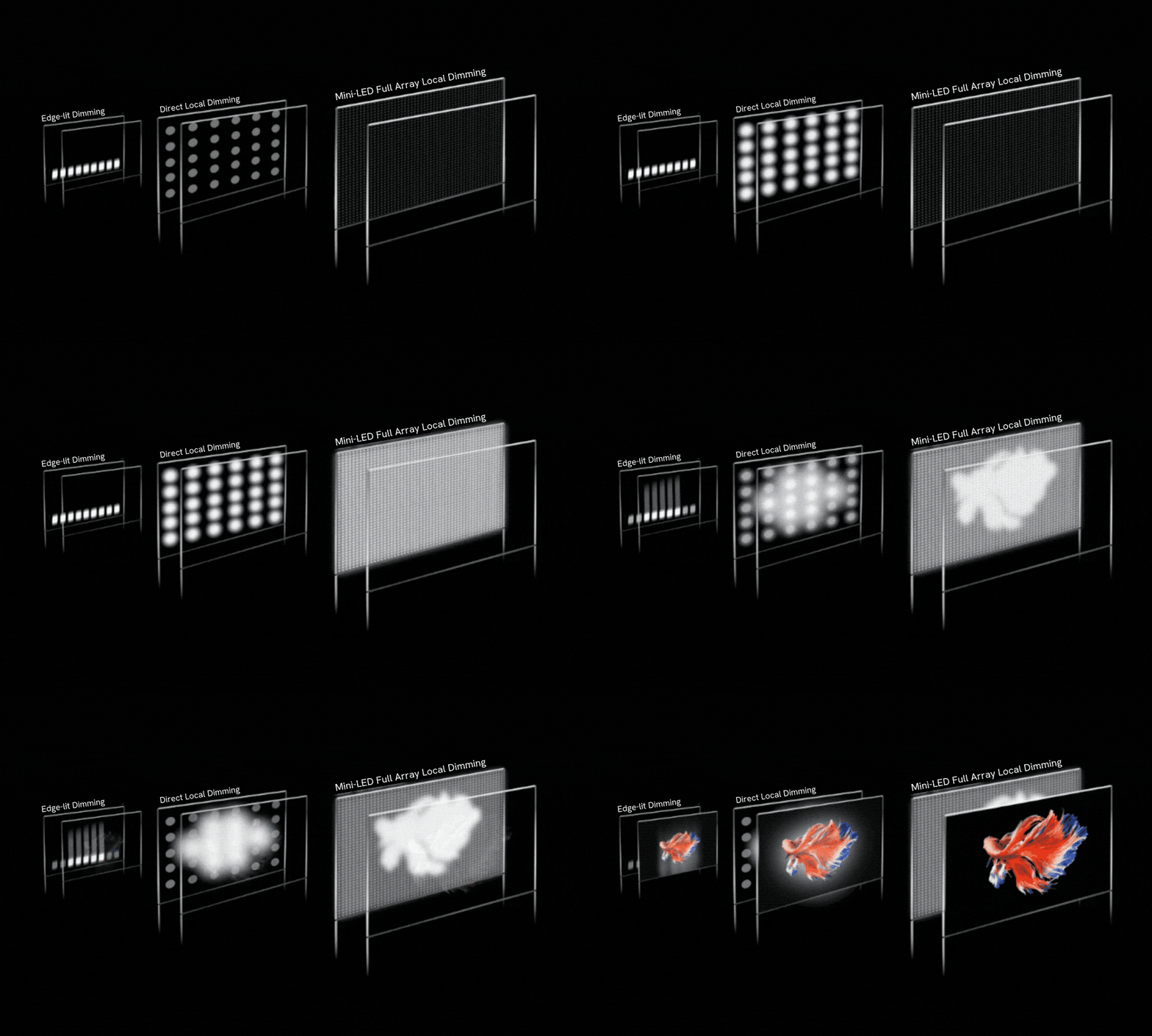
The "Mini LED" part refers to the backlight. Instead of a few dozen large LED edge lights, Mini LED packs thousands of tiny diodes behind the panel. These are grouped into local dimming zones, sometimes hundreds or even thousands of them.
Each zone can dim or brighten independently. This creates deeper blacks and brighter highlights in the same image. It's what gives Mini LED its HDR punch without the risks of self-emissive technology.
Why OLED Burns In and Mini LED Doesn't
The OLED Problem: Organic Compounds That Degrade
OLED pixels use organic materials that emit light when current passes through them. These compounds wear down over time. Blue sub-pixels degrade fastest, then red, then green.
When some pixels age faster than others, you get a permanent ghost image. That's burn-in.
It's not a myth. It's a chemical reality of the technology. Manufacturers use pixel shifting and compensation algorithms to slow it down.
But they can't stop it entirely. Static content accelerates the uneven wear.
Why Mini LED Sidesteps This Entirely
Mini LED backlights use inorganic gallium nitride LEDs. These don't degrade the same way organic compounds do. They lose brightness gradually and uniformly over tens of thousands of hours.
But they don't create permanent ghost images from static content.
The LCD pixels in front of the backlight are just light valves. They either let light through or they don't. There's no light-emitting organic material to wear out unevenly.
That's why permanent burn-in simply doesn't happen on Mini LED displays.
The Real Risks: What Can Actually Happen to a Mini LED Screen
Temporary Image Retention: Rare but Real
Permanent burn-in? No. Temporary image retention?
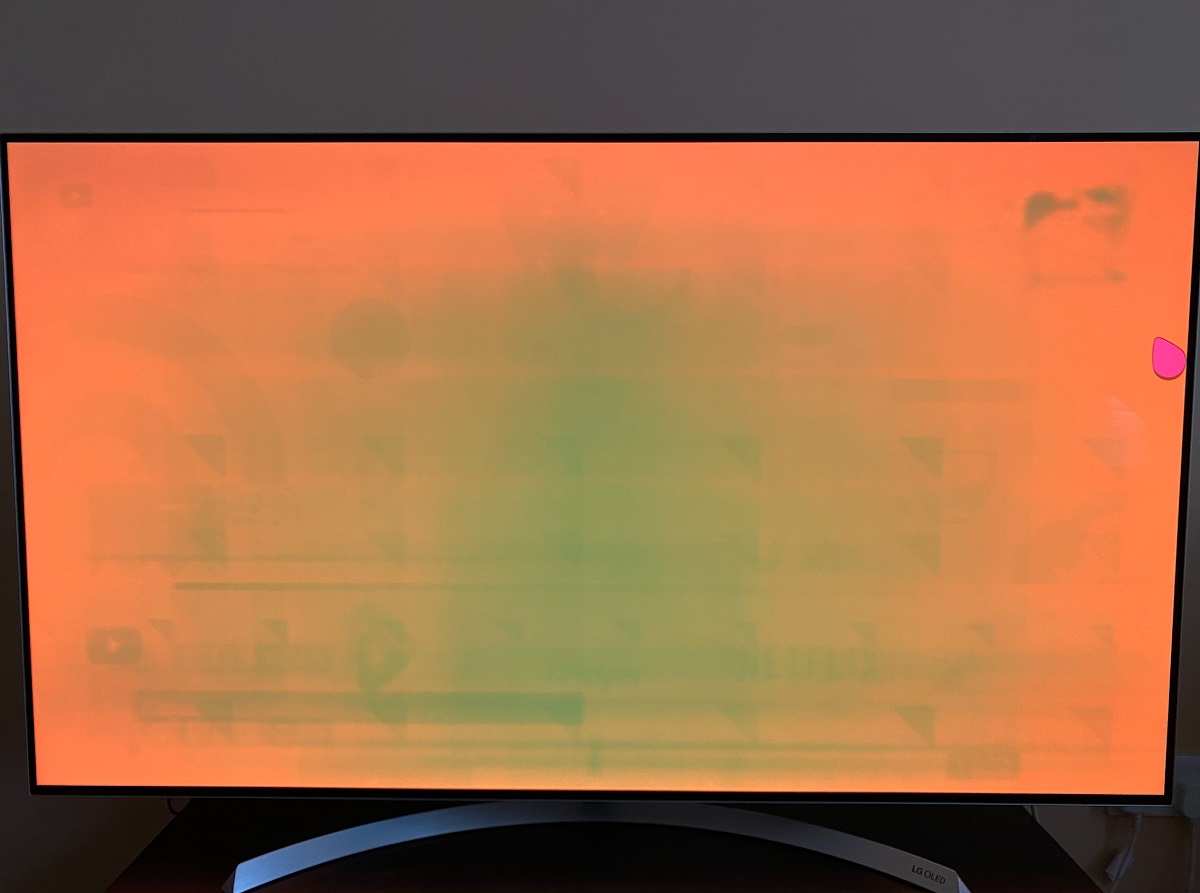
It's possible in extreme cases. If you leave a high-contrast static image on screen for many hours, you might see a faint ghost that lingers for a few minutes. This is not permanent damage.
The LCD layer can develop a slight charge imbalance from prolonged static content. It resolves itself once the image changes. Think of it like your eyes seeing an afterimage after staring at a bright light.
The panel recovers.
Backlight Degradation Over Time
Those thousands of tiny LEDs behind the panel do age. They lose maximum brightness gradually. Manufacturer specifications indicate typical lifespans of 30,000 to 60,000 hours before brightness drops to half.
That's years of heavy use.
The degradation is uniform across the backlight array. You won't get dark spots or ghost images. The whole screen just gets slightly dimmer over many years.
This is normal aging, not a defect.
When Static Content Becomes a Problem
For most users, static content is a non-issue on Mini LED. But if you're running a 24/7 display with the same dashboard or ticker, you might want to take basic precautions. We'll cover those in the protection section below.
The risk profile is completely different from OLED. You're not racing against uneven pixel degradation. You're just managing normal, uniform aging over a very long lifespan.
Mini LED vs OLED: The Burn-In Comparison
Side-by-Side Breakdown
Here's where things get clear. The two technologies approach display completely differently, and the burn-in risk reflects that.
| Factor | Mini LED | OLED |
|---|---|---|
| Permanent burn-in risk | None | Yes, with static content |
| Temporary image retention | Rare, fades quickly | Can become permanent |
| Organic material degradation | Not applicable | Primary cause of burn-in |
| Typical lifespan | 30,000–60,000+ hours | 10,000–30,000 hours to half brightness |
| Static content tolerance | Excellent | Requires mitigation strategies |
| Peak brightness | 1,000–2,000+ nits | 600–1,000 nits typical |
| Best for static-heavy workloads | Yes | No, without precautions |
When OLED Still Wins
OLED has perfect per-pixel dimming since each pixel is its own light source. Blacks are truly infinite because pixels turn off completely. Response times are faster.
Viewing angles can be slightly better on some panels.
If you watch a lot of HDR movies in a dark room and rarely display static content, OLED still delivers a stunning picture. Just know that you're accepting a long-term degradation trade-off that Mini LED doesn't force on you.
Who Should Worry About Burn-In on Mini LED?
Professional Use Cases: Trading Desks, Broadcast, and Control Rooms
If you're running a Bloomberg terminal or security dashboard 24/7, you're displaying the same elements for days on end. Mini LED is actually the better choice here. The risk of permanent damage is essentially zero.
You'll replace the monitor for other reasons long before burn-in becomes a concern.
Broadcast engineers and color graders benefit from the high brightness and HDR capability without worrying about static UI elements destroying the panel. It's a practical, low-stress option for mission-critical displays.
Gamers: HUD Elements and Marathon Sessions
Gamers often leave the same HUD on screen for hours. Health bars, minimaps, ammo counters. On OLED, that's a real concern over time.
On Mini LED, it's not worth losing sleep over. Play your games. The monitor will outlast the hardware requirements of the games themselves.
Everyday Users: Should You Even Think About This?
If you're browsing the web, watching videos, and doing office work, burn-in shouldn't even be on your radar. Your usage pattern changes content constantly. The pixels are never stuck displaying the same thing for long enough to cause any retention.
Buy the monitor. Use it normally. Don't let burn-in anxiety push you toward a more expensive or less suitable display technology.
How to Protect Your Mini LED Monitor
Settings That Actually Matter
You don't need aggressive protection measures on Mini LED. But a few smart settings help maximize panel life.
- Set your brightness to a comfortable level, not maximum. Running at 100% all the time accelerates backlight aging.
- Enable a screen saver or auto-sleep after 15 to 30 minutes of inactivity. This is just good practice.
- Use dark mode where possible. It reduces backlight load and power consumption.
Habits That Extend Panel Life
Rotate your content occasionally if you can. Don't leave a single static window maximized for 16 hours a day, every day. This isn't because of burn-in risk.
It's just general good hardware hygiene.
Keep the monitor in a well-ventilated spot. Heat is the enemy of LED longevity. Good airflow helps the backlight age more gracefully over the years.
What to Ignore (Stop Worrying About This)
You don't need pixel shifting features on Mini LED. You don't need to run compensation cycles. You don't need to obsess over taskbar visibility.
These are OLED mitigation strategies that don't apply here.
Stop watching YouTube videos about OLED burn-in and applying that anxiety to your Mini LED display. The technologies are fundamentally different. What kills an OLED panel won't even register on your LCD.
Cost, Lifespan, and What to Expect Long-Term
Typical Lifespan Metrics
Most Mini LED monitors are rated for 30,000 to 60,000 hours of use. That's roughly 10 to 20 years at four hours a day. The backlight will gradually dim over that period, but you'll likely upgrade before you notice any significant brightness loss.
VESA DisplayHDR certification standards help verify manufacturer claims about brightness and longevity. Look for VESA DisplayHDR 1000 or 1400 badges for higher-end panels with verified performance specs.
Price vs. OLED: Where Your Money Goes
Mini LED monitors range from around $400 for entry-level 4K panels to $3,000+ for professional reference displays. OLED monitors in similar sizes often cost more, especially at larger screen sizes where OLED pricing climbs steeply.
You're paying for the backlight system and local dimming processing. The technology has matured significantly as of 2026, and prices have dropped steadily. The value proposition keeps improving.
Common Mistakes People Make With Mini LED Monitors
People often apply OLED habits to Mini LED displays unnecessarily. They dim the screen to 20% brightness out of fear, which strains their eyes more than it helps the panel. Others avoid HDR content entirely, which defeats the whole purpose of buying a Mini LED display.
Another mistake is confusing temporary image retention with permanent burn-in. If you see a faint ghost after leaving a static image on screen for hours, don't panic. Change the content.
It'll fade within minutes. That's normal LCD behavior, not damage.
Finally, some buyers choose a cheap Mini LED monitor expecting OLED-level blacks. Mini LED is a massive improvement over edge-lit LED, but it can't match per-pixel OLED dimming. Blooming around bright objects on dark backgrounds is normal.
It's not a defect. It's how local dimming works.
Frequently Asked Questions
Can Mini LED monitors get permanent burn-in?
No. The LCD pixels don't emit light, so there's no organic material to degrade unevenly. Permanent burn-in is an OLED issue, not a Mini LED issue.
How long do Mini LED monitors last?
Most are rated for 30,000 to 60,000 hours. That's typically 10 to 20 years of normal daily use before any noticeable brightness reduction.
Is Mini LED better than OLED for static content?
Yes. Mini LED handles static elements without any permanent damage risk. OLED requires mitigation strategies like pixel shifting and screen savers for static-heavy workloads.
Should I worry about leaving my desktop icons on screen?
No. Desktop icons and taskbars won't cause any lasting effect on a Mini LED display. Use your monitor normally without anxiety.
Does HDR mode increase burn-in risk on Mini LED?
No. HDR content doesn't cause burn-in on Mini LED panels. The backlight zones adjust brightness as needed, but there's no organic degradation mechanism at play.
The Verdict: Should Burn-In Stop You From Buying Mini LED?
Absolutely not. Burn-in is not a concern with Mini LED technology. The display works on completely different principles than OLED, and permanent image retention simply doesn't happen on LCD panels with LED backlighting.
If you've been holding back because of burn-in anxiety, you can cross that off your worry list. Mini LED gives you excellent HDR performance, high brightness, and a long lifespan without the degradation risks that come with self-emissive displays. It's a solid choice for almost any use case in 2026, from professional workstations to gaming setups.
Buy the monitor that fits your budget and feature needs. Use it normally. Enjoy the picture quality.
And stop losing sleep over something that isn't going to happen to your Mini LED display.
Mini LED monitors don't suffer from permanent burn-in. That's been the clear message so far. But let's go deeper into the specific risks, the technology comparisons, and what you actually need to know before buying.

Similar Posts





















