How Do Mini LED Monitors Work
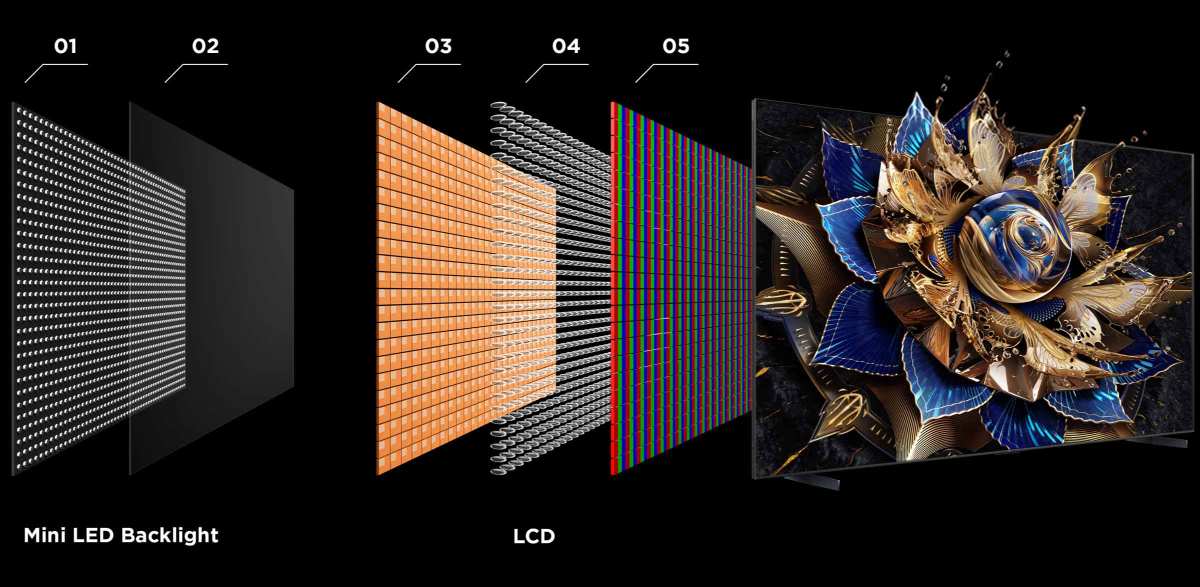
If you've been shopping for a high-end monitor lately, you've probably seen "mini LED" splashed across spec sheets and wondered what the fuss is about. Understanding how mini LED monitors work comes down to one core idea: thousands of tiny light zones behind your screen that can dim and brighten independently, giving you deeper blacks and brighter highlights in the same image.
The technology sits between traditional LED-backlit monitors and OLED panels, offering a compelling middle ground. As of 2026, mini LED monitors have dropped significantly in price while pushing peak brightness past 2,000 nits in some models. Let's break down exactly what's happening inside these displays. This directly compares with our findings on whether mini led monitors work with macbook.
Quick Answer
Mini LED monitors use thousands of tiny LED zones behind the LCD panel. Each zone dims or brightens independently based on the image content. This technique is called full-array local dimming.
It produces deeper blacks and higher peak brightness than standard LED monitors. The result is significantly better HDR performance without the burn-in risk of OLED.
How Mini LED Monitors Work — Layer by Layer
Think of a mini LED monitor as a stack of specialized layers, each doing a specific job. From back to front, here's what's inside. Readers evaluating this setup should also consider whether mini led monitors work with chromebooks for comparative benchmarks.
The Backlight Unit: Where Thousands of Tiny LEDs Live
The backlight unit is the foundation. Instead of a few dozen large LEDs along the edge or scattered behind the panel, a mini LED backlight packs anywhere from 384 to over 4,000 individual LED chips arranged in a precise grid across the entire rear surface of the display.
Each of these LEDs measures roughly 0.1 to 0.2 millimeters across. That's about the width of a human hair. This small size is what allows manufacturers to fit so many into a standard monitor panel without making the device unreasonably thick.
The LEDs are mounted on a printed circuit board that also contains driver ICs. These integrated circuits control how much current flows to each LED or group of LEDs. The driver ICs receive instructions from the monitor's processing engine and adjust brightness in real time, frame by frame.
Manufacturer specifications from panel makers like BOE and AUO indicate that modern mini LED backlights use either white LEDs or blue LEDs with a quantum dot conversion layer. The quantum dot approach produces wider color gamut coverage, typically hitting 95 to 99 percent of the DCI-P3 color space.
The Dimming Zone Grid: How Your Screen Divides Light Control
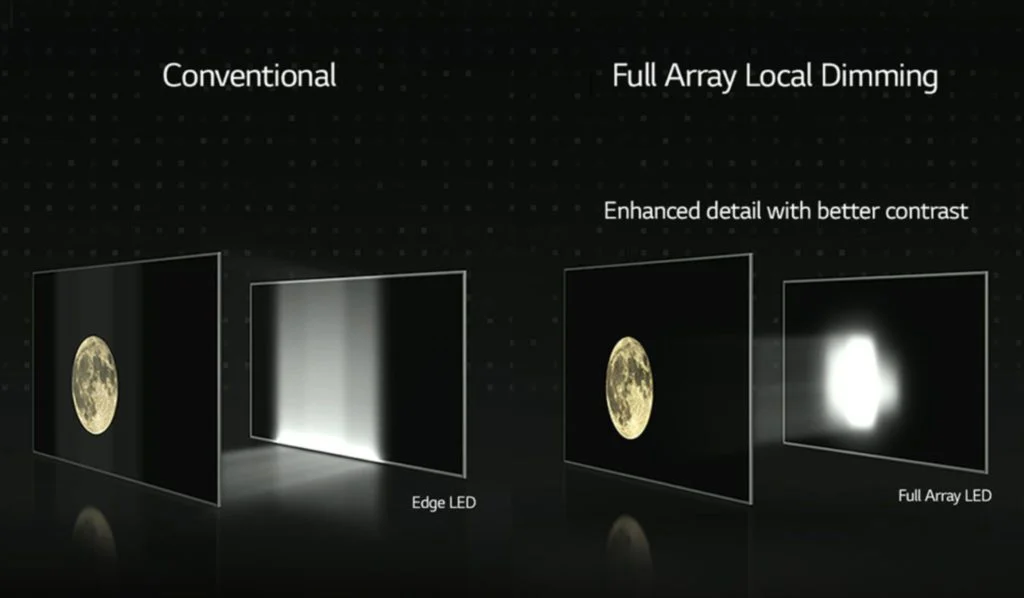
Here's where the magic happens. Those thousands of individual LEDs aren't all controlled independently. They're grouped into zones, typically ranging from 384 zones on a 27-inch budget model to 2,304 or more on a premium 32-inch display.
Each zone functions as its own dimming block. When the image calls for a dark area in the upper left corner, the zones in that region dim down or turn off entirely. Meanwhile, zones in a bright area, like a sunlit sky or an explosion effect, push to maximum brightness.
This technique is called full-array local dimming, or FALD. It's fundamentally different from edge-lit dimming, where LEDs sit along the perimeter of the screen and light spreads inward. Edge-lit systems can only dim broad horizontal or vertical strips.
FALD controls light in two-dimensional blocks across the entire panel surface.
The zone count matters, but it's not the only factor. The shape of the zones, the speed of the dimming algorithm, and how smoothly the processor transitions between zones all affect what you actually see. A well-tuned 512-zone monitor can look better than a poorly calibrated 1,152-zone display.
The LCD Layer: Where Pixels Actually Form the Image
Behind the glass you're looking at, there's a liquid crystal layer. This is the same fundamental technology used in standard LED monitors. The liquid crystals act as tiny shutters that open and close to control how much backlight passes through.
When a zone dims its LEDs, the liquid crystals in that region still do their job of shaping the image. They block as much of the dimmed backlight as possible to produce black. They open wide to let bright light through for white or colored areas.
The LCD layer itself doesn't generate light. It only modulates the light coming from behind it. This is a key distinction from OLED technology, where each pixel produces its own light.
In a mini LED display, the backlight provides the brightness and the LCD layer provides the image structure.
Panel type matters here. VA panels offer inherently higher native contrast ratios, typically 3,000:1 to 5,000:1, which pairs well with local dimming. IPS panels provide better viewing angles but have lower native contrast around 1,000:1, so they rely more heavily on the dimming zones to achieve deep blacks.
The Optical Film Stack: Spreading Light Without Ruining Contrast
Between the LED array and the LCD layer sits a stack of optical films. These films have a tough job. They need to spread the light from thousands of tiny point sources into a uniform sheet of illumination across the entire screen.
At the same time, they need to maintain the contrast benefits that the dimming zones create.
A typical film stack includes several layers working together.
- Reflector sheet: Bounces light that heads backward toward the LEDs back forward, improving efficiency.
- Diffuser sheets: One or two layers that scatter light to eliminate visible hot spots directly above individual LEDs.
- Brightness enhancement films (BEF): Prism-shaped films that recycle light rays hitting at inefficient angles, boosting overall brightness by 30 to 60 percent.
- Quantum dot enhancement film (QDEF): On quantum dot models, this layer converts blue LED light into precise red and green wavelengths for wider color gamut.
The engineering challenge is real. Too much diffusion and the zones blur together, defeating the purpose of local dimming. Too little diffusion and you see visible bright spots behind dark content.
Manufacturers spend considerable R&D effort optimizing this balance.
The Dimming Algorithm: The Brain Behind Every Bright and Dark Decision
Hardware is only half the story. The dimming algorithm determines how the monitor decides what each zone should do for every single frame of video.
The algorithm analyzes the incoming image data and calculates the optimal brightness for each zone. A good algorithm dims aggressively in dark scenes to achieve deep blacks while preserving detail in shadow areas. It ramps up zones for bright highlights without clipping the brightest information.
Cheaper monitors often use simpler algorithms that either dim too conservatively, leaving blacks looking gray, or dim too aggressively, crushing shadow detail and creating harsh transitions between zones. Premium monitors invest heavily in their firmware, sometimes using dedicated processing chips specifically for this task.
Some monitors also offer user-selectable local dimming modes. A "high" setting maximizes contrast but may introduce more visible blooming. A "low" or "medium" setting takes a gentler approach.
The best monitors adapt their algorithm dynamically based on content type.
What Makes Mini LED Different From Regular LED Monitors
Not all LED-backlit monitors are created equal. The differences between standard LED, direct-lit, and mini LED designs come down to LED count, placement, and control granularity.
Standard Edge-Lit vs. Direct-Lit vs. Full-Array Mini LED
Here's how the three main backlighting approaches compare.
| Feature | Edge-Lit LED | Direct-Lit LED | Mini LED (FALD) |
|---|---|---|---|
| LED placement | Along panel edges | Behind panel, few zones | Behind panel, hundreds to thousands of zones |
| Zone count | 0 to 8 (edge zones) | 8 to 96 | 384 to 4,096+ |
| Dimming precision | Very limited | Basic | High to very high |
| Typical thickness | Very thin (under 5mm) | Moderate (15-25mm) | Moderate to thick (18-35mm) |
| Peak brightness | 250-400 nits | 300-600 nits | 600-2,000+ nits |
| Black uniformity | Poor | Moderate | Good to excellent |
| Price range | Budget to mid-range | Budget to mid-range | Mid-range to premium |
Edge-lit monitors are the thinnest and cheapest. LEDs sit along one or more edges of the panel and light spreads inward through a light guide plate. These monitors can't do meaningful local dimming because there's no way to control light in specific screen regions.
Direct-lit monitors place LEDs behind the panel but in relatively few zones, sometimes as few as 16 or 32. They offer basic local dimming but the zones are large enough that you'll often see blooming around bright objects on dark backgrounds.
Mini LED with full-array local dimming represents the current high-end approach for LCD monitors. The combination of many small LEDs, precise zone control, and sophisticated algorithms produces the best non-OLED contrast performance available today.
Zone Count: Why 384 Zones Isn't the Same as 2304
Zone count is the spec that gets the most marketing attention, and for good reason. More zones generally means finer control over light and less blooming. But the relationship isn't perfectly linear.
A 27-inch monitor with 384 zones has roughly 14 zones per square inch of screen area. A 32-inch monitor with 1,152 zones has about 11 zones per square inch. Even though the total zone count is three times higher, the density is actually lower.
This means the larger monitor may show similar or even slightly more blooming despite having more total zones.
Panel resolution also interacts with zone count. A 4K display has roughly 8.3 million pixels. If the backlight has 512 zones, each zone is responsible for about 16,000 pixels.
That's a lot of pixels sharing one light source. The algorithm has to make smart decisions about what brightness level serves the most pixels in each zone well.
The practical takeaway: don't buy a monitor based on zone count alone. Look for reviews that specifically test blooming behavior with real content. A well-implemented 512-zone system can outperform a poorly tuned 2,000-zone system in everyday use.
The Blooming Problem — And Why It's the Biggest Trade-Off
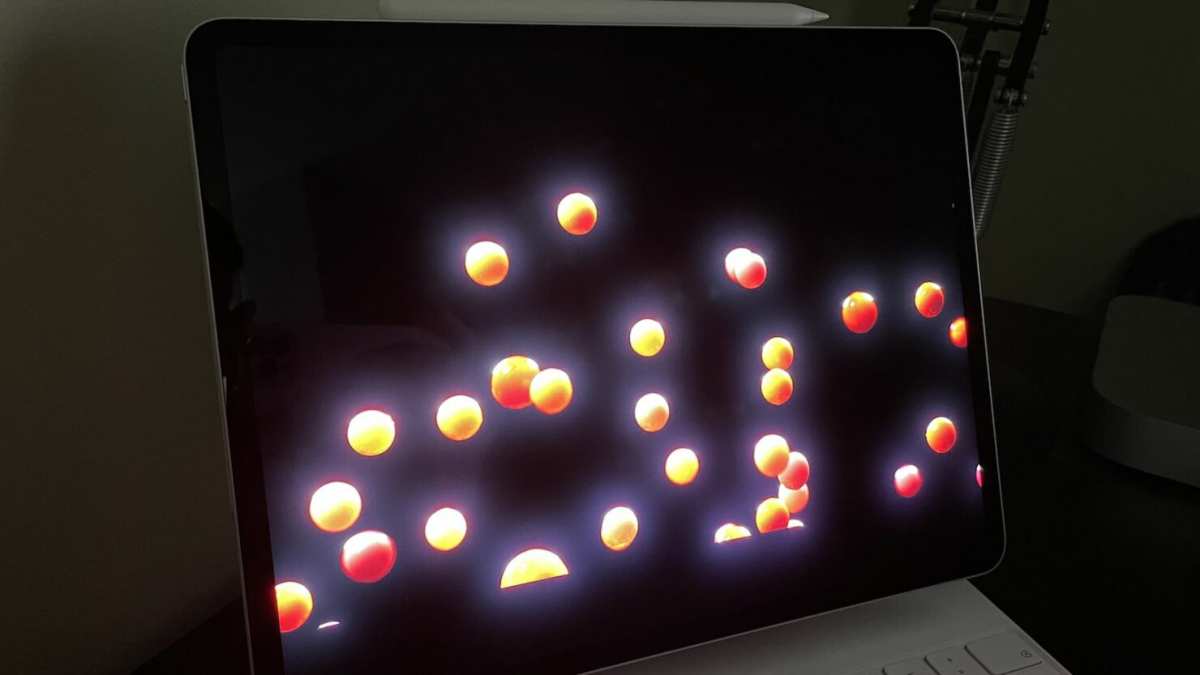
Blooming is the single most talked-about downside of mini LED technology. It's the thing that keeps mini LED from matching OLED's per-pixel perfection.
What Blooming Looks Like and Why It Happens
Blooming appears as a soft glow or halo around bright objects displayed against dark or black backgrounds. White text on a black screen, subtitles during a movie, a cursor on a dark desktop background, these are the classic scenarios where blooming shows up.
The cause is straightforward. When one or more dimming zones need to display bright content, the LEDs in those zones light up. But the light from those LEDs doesn't stay perfectly confined to the intended area.
It scatters through the optical film stack and bleeds into adjacent zones that should be dark. The result is a visible halo.
The severity of blooming depends on several factors working together.
- Zone count: Fewer zones means each zone covers more area, so the halo spreads further.
- Dimming algorithm: Aggressive dimming creates deeper blacks but harsher transitions at zone boundaries.
- Optical film quality: Better diffusion layers reduce bleed but can't eliminate it entirely.
- Content type: Small bright elements on large dark areas are the worst case.
How Better Dimming Algorithms Reduce It
Manufacturers fight blooming primarily through firmware. The dimming algorithm can employ several strategies to minimize visible halos.
One approach is zone overlap smoothing. Instead of turning a zone fully on or off, the algorithm creates gradual brightness transitions between adjacent zones. This softens the edge of the blooming halo, making it less noticeable even though it's technically still there.
Another strategy is content-aware dimming. The algorithm analyzes the spatial distribution of brightness within each zone. If only a small portion of a zone needs to be bright, the algorithm may dim the entire zone slightly to reduce blooming, then compensate by opening the LCD layer wider for that small bright area.
This trades a bit of peak brightness for better black uniformity.
Some high-end monitors use predictive algorithms that anticipate how content will change frame by frame. By adjusting zones proactively rather than reactively, these systems reduce the visible lag between content changes and dimming adjustments.
When Blooming Is Most Visible (And When You Won't Notice It)
Blooming visibility depends heavily on what you're doing and your viewing conditions.
Blooming is most visible when:
- Watching movies with letterbox bars (black bars top and bottom)
- Using dark mode interfaces with white text
- Viewing starfield or space scenes in games or videos
- Working in a dim or dark room
- Looking at the screen from an off-angle
Blooming is least visible when:
- Displaying bright, full-screen content like web pages or spreadsheets
- Watching bright, well-lit scenes
- Working in a well-lit room (ambient light masks the halo)
- Using the monitor at normal viewing distance rather than up close
For most productivity work and bright-content consumption, blooming is a non-issue on modern mini LED monitors. It becomes noticeable primarily during dark movie scenes and dark-mode computing in dim environments. If your workflow involves a lot of dark-themed coding or photo editing with black backgrounds, this is worth considering.
Mini LED vs. OLED: The Comparison That Actually Matters
If you're looking at mini LED, you're almost certainly also considering OLED. Both technologies target the same high-end display market, but they take fundamentally different approaches.
Where Mini LED Wins
Mini LED has several practical advantages over OLED that matter in real-world use.
- No burn-in risk: OLED panels can develop permanent image retention from static elements like taskbars and channel logos. Mini LED's LCD layer doesn't degrade the same way. You can leave the same image on screen for months with zero risk.
- Higher sustained peak brightness: Mini LED monitors can sustain 1,000 to 2,000+ nits across significant portions of the screen. OLED monitors typically hit 1,000 nits in small highlights but roll off quickly due to thermal and power constraints.
- Better bright-room performance: In rooms with sunlight or strong overhead lighting, mini LED's higher brightness advantage becomes more apparent. OLED can struggle to overcome ambient reflections.
- Larger sizes at lower cost: A 32-inch 4K mini LED monitor costs significantly less than a comparable 32-inch OLED. The price gap widens further at 34-inch ultrawide and larger formats.
- Longer lifespan: LED backlights are rated for 30,000 to 50,000+ hours with minimal degradation. OLED organic materials degrade over time, with blue sub-pixels typically aging fastest.
Where OLED Still Comes Out Ahead
OLED isn't standing still, and it still holds meaningful advantages in several areas.
- Perfect per-pixel dimming: Each OLED pixel produces its own light and can turn off completely. There's zero blooming because there's no backlight to bleed.
- Faster response times: OLED pixel transitions happen in microseconds, compared to milliseconds for LCD. This means less motion blur and cleaner fast-moving content.
- Thinner form factor: Without a backlight layer, OLED monitors can be remarkably thin, sometimes under 5mm at their thinnest point.
- Better viewing angles: OLED maintains color and contrast accuracy at extreme angles better than most LCD panels, including VA-based mini LED displays.
- Perfect black levels in all scenarios: Even a single bright pixel on an OLED screen produces zero light in surrounding dark areas. Mini LED can't match this.
Side-by-Side Spec Comparison
| Specification | Mini LED (Typical) | OLED (Typical) |
|---|---|---|
| Peak brightness (HDR) | 1,000-2,000 nits | 400-1,000 nits (small area) |
| Sustained full-screen brightness | 600-1,000 nits | 200-350 nits |
| Contrast ratio | 100,000:1 to 1,000,000:1+ | Effectively infinite |
| Response time | 1-4ms (GtG) | 0.1-0.5ms (GtG) |
| Burn-in risk | None | Present (mitigated but not eliminated) |
| Thickness | 18-35mm | 4-15mm |
| Color gamut (DCI-P3) | 95-99% | 98-99%+ |
| Price (27" 4K, 2025) | $400-$1,200 | $800-$2,500+ |
| Lifespan concern | Minimal | Organic degradation over years |
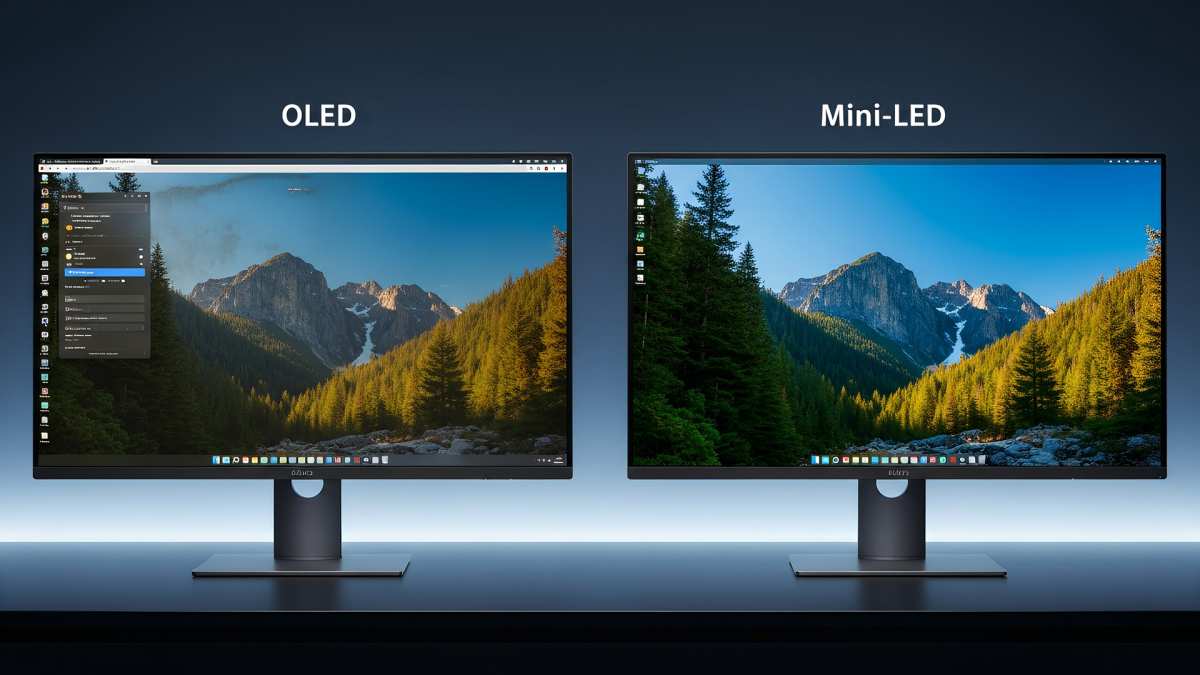
The choice between these technologies comes down to your priorities. If you want the absolute best contrast with zero burn-in anxiety and you work with static UI elements all day, mini LED is the safer bet. If you prioritize response time, thin design, and perfect per-pixel black levels in a dark room, OLED remains the gold standard.
Who Should Actually Buy a Mini LED Monitor
Not everyone needs mini LED. Here's a realistic breakdown of who benefits most and who should look elsewhere.
Color-Critical Professionals
Photographers, video editors, and colorists who work in HDR will appreciate mini LED's combination of high peak brightness and wide color gamut. The ability to preview HDR content at 1,000+ nits accurately is genuinely useful for mastering and grading workflows. Models like the ASUS ProArt PA32UCG and Dell UltraSharp UP3221Q target this audience specifically.
The lack of burn-in is a real advantage here. Professional displays often show the same toolbars, timelines, and interface elements for hours every day. On OLED, that's a long-term concern.
On mini LED, it's a non-issue.
HDR Gamers and Movie Watchers
If you game in HDR or watch HDR movies, mini LED delivers a more impactful HDR experience than most OLEDs can sustain. Bright specular highlights, like sunlight reflecting off metal or explosions, hit harder and stay brighter longer. The overall sense of dynamic range is impressive.
Competitive gamers who prioritize response time over image quality should still look at fast IPS or OLED options. Mini LED monitors with VA panels can exhibit more motion blur than their IPS or OLED counterparts.
Bright Room Users
If your workspace gets a lot of natural light or you prefer bright ambient lighting, mini LED's higher sustained brightness gives you a clearer, more readable image. OLED panels can struggle in these conditions because they simply can't push enough light to overcome reflections.
Who Should Skip It
If you primarily work with dark-themed interfaces in a dim room and blooming bothers you, OLED will likely make you happier. If you're on a tight budget, standard IPS monitors still offer excellent color accuracy at a fraction of the price. And if you need the absolute fastest response time for competitive gaming, look at dedicated fast IPS or OLED gaming monitors rather than mini LED.
Key Specs to Look For (And Which Ones Are Marketing Fluff)
Navigating mini LED monitor specs can be tricky. Some numbers genuinely matter. Others are marketing theater.
Zone Count vs. Real-World Dimming Quality
Zone count gets the headlines, but it's not the whole story. A 512-zone monitor with a well-tuned algorithm can outperform a 2,000-zone monitor with poor firmware. Look for independent reviews that test blooming specifically, not just zone count claims.
As a general guideline, here's what different zone counts deliver in practice.
- 384 zones: Entry-level mini LED. Visible blooming in challenging content. Acceptable for gaming and productivity.
- 512-1,000 zones: Mid-range. Blooming is present but manageable. Good balance of price and performance.
- 1,152-2,304 zones: Premium. Blooming is subtle in most content. Recommended for professional and enthusiast use.
- 4,096+ zones: Enthusiast tier. Blooming approaches OLED-like invisibility in many scenarios. Premium pricing.
Peak Brightness, HDR Certifications, and Contrast Numbers
VESA DisplayHDR certification provides a useful baseline. DisplayHDR 1000 is the sweet spot for mini LED monitors, indicating sustained brightness of 1,000 nits. DisplayHDR 1400 represents the current top tier.
Be wary of "peak brightness" claims that only apply to a small portion of the screen for a fraction of a second. Sustained brightness is what matters for real-world HDR performance. Manufacturer specs should specify whether brightness is measured as a peak, full-screen sustained, or windowed measurement.
Dynamic contrast ratios in the millions-to-one sound impressive but are somewhat misleading. They compare the brightest possible output to the dimmest possible output, which isn't how you experience content. Static contrast, measured at the LCD layer level, is more meaningful.
Panel Type Matters More Than You Think
The LCD panel type behind the mini LED backlight significantly affects your experience.
VA panels offer the best native contrast, typically 3,000:1 to 5,000:1. This means blacks look deeper even before local dimming kicks in. The trade-off is slower pixel response times, which can cause smearing in fast motion.
Most premium mini LED monitors use VA panels.
IPS panels provide better viewing angles and faster response times but have lower native contrast around 1,000:1. They rely more heavily on local dimming to achieve good blacks. Some budget mini LED monitors use IPS panels.
If your priority is movie watching and general productivity, VA-based mini LED is the stronger choice. If you need wide viewing angles or play fast-paced games, consider an IPS-based mini LED or evaluate OLED instead.
Common Mistakes People Make When Buying
Even well-informed buyers fall into these traps when shopping for mini LED monitors.
Chasing zone count without reading reviews. A high zone count on paper doesn't guarantee good dimming in practice. The algorithm and optical film quality matter just as much. Always check independent reviews that specifically evaluate blooming behavior.
Ignoring the panel type. Two monitors with identical zone counts can perform very differently because one uses VA and the other uses IPS. Know which panel type you're getting and understand the trade-offs.
Expecting OLED-level blacks. Mini LED is very good, but it's not OLED. If you're coming from an OLED display, you'll notice blooming in scenarios where OLED would show perfect blacks. Set realistic expectations.
Not checking firmware update support. Dimming algorithms improve over time through firmware updates. Some manufacturers actively support their monitors with updates. Others don't.
Check whether the brand has a track record of post-purchase support.
Overlooking the power and heat story. High-end mini LED monitors can draw 60 to 100 watts or more at peak brightness. They generate heat that needs to be managed. Make sure your desk setup has adequate ventilation, especially if you're running the monitor at high brightness in a warm room.
Buying based on HDR certification alone. DisplayHDR certification tells you about brightness thresholds, it doesn't tell you about dimming quality, color accuracy, or overall image quality. A DisplayHDR 1000 badge doesn't automatically make a monitor good.
Expert Tips for Getting the Most Out of a Mini LED Monitor
Once you've got your mini LED monitor set up, these adjustments will help you get the best possible image.
Enable local dimming in the monitor's on-screen display. Some monitors ship with local dimming set to off or on a conservative mode by default. Switch it to the highest setting that looks natural to your eyes.
Calibrate brightness for your environment. Running at 100 percent brightness in a dim room wastes power, generates unnecessary heat, and can cause eye strain. Match your brightness to the ambient light level. Around 200 to 300 nits is comfortable for most indoor environments.
Use the correct HDR mode. Most mini LED monitors have separate SDR and HDR modes. Make sure HDR is enabled in your operating system's display settings when you want HDR content. Windows 11's Auto HDR feature can also enhance SDR games.
Update the firmware. Check the manufacturer's website for firmware updates. Dimming algorithm improvements are common in the first year after a monitor's release.
Consider your viewing distance. Blooming is more noticeable up close. At normal arm's length viewing distance, most people find blooming on a good mini LED monitor to be a minor issue rather than a distraction.
Let the monitor warm up. LED brightness and color temperature can shift slightly during the first 30 minutes of use. For critical color work, let the monitor warm up before calibrating or making color judgments.
Frequently Asked Questions
Is mini LED better than OLED?
It depends on your priorities. Mini LED wins on peak brightness, burn-in resistance, and price at larger sizes. OLED wins on per-pixel black levels, response time, and thinness.
Neither is universally better.
Does mini LED have burn-in?
No. The LCD layer in a mini LED monitor doesn't suffer from burn-in the way OLED panels do. You can display static elements indefinitely without permanent image retention.
How long do mini LED monitors last?
LED backlights are typically rated for 30,000 to 50,000 hours of use. At eight hours per day, that's over ten years of service. The monitor will likely become obsolete before the backlight fails.
Can you use a mini LED monitor for gaming?
Absolutely. Many mini LED monitors offer 144Hz or 240Hz refresh rates with adaptive sync support. Just be aware that VA-based models may show more motion blur than IPS or OLED alternatives in fast-paced games.
Why is my mini LED monitor so thick?
The backlight unit with thousands of LEDs, the optical film stack, and the thermal management hardware all add thickness. Most mini LED monitors are 18 to 35mm thick, noticeably thicker than edge-lit or OLED alternatives.
Is mini LED worth the extra cost over standard LED?
For HDR content, professional color work, or anyone who values high contrast, yes. For basic productivity and SDR content, a good standard IPS monitor may serve you just as well at lower cost.
Final Verdict: Is Mini LED Right for You?
Mini LED monitors deliver the best LCD image quality available today. They combine high peak brightness, impressive HDR performance, and zero burn-in risk. The trade-off is some visible blooming in dark scenes and a thicker chassis.
If you work with static content all day, prioritize HDR brightness, or want a display that will last a decade without degradation, mini LED is the smart choice. If you demand perfect blacks in a dark room and instant response times, OLED remains the better fit.
The technology keeps improving. Zone counts are climbing, algorithms are getting smarter, and prices keep dropping. As of 2026, mini LED has moved from enthusiast novelty to mainstream recommendation for anyone who wants a high-performance monitor without OLED's compromises.

Similar Posts





















