Why Are Curved Monitors Popular for Gaming
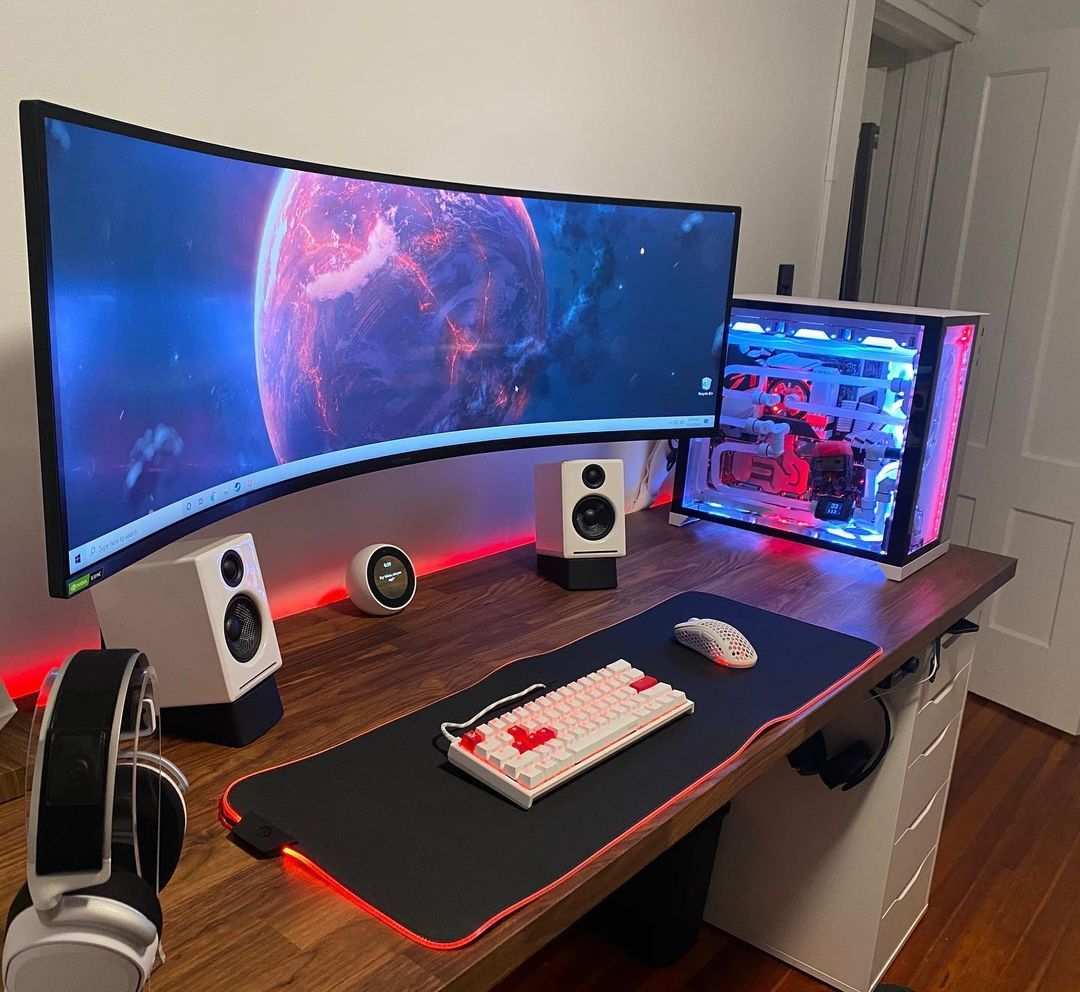
If you've walked through any gaming setup showcase or scrolled through monitor reviews lately, you’ve probably noticed curved displays everywhere. So why are curved monitors popular for gaming? It comes down to a mix of visual psychology, panel manufacturing trends, and the simple fact that curves feel more natural to your eyes than flat glass ever did.
The curve pulls you into the image instead of leaving you staring through a window. Most of the shift started around 2015 when VA (Vertical Alignment) panel production ramped up, and Samsung Display pushed curved ultrawide designs into the mainstream. As of 2026, curved panels dominate the gaming monitor conversation entirely, especially in the 34-inch and larger sizes where immersion matters most.
Quick Answer
Curved monitors are popular for gaming because they reduce perceived eye strain and increase immersion. The curve matches the natural shape of human vision so your eyes travel less distance to the screen's edges. This geometry creates a wider perceived field of view without moving your head. Curved displays also pair well with VA panels, which offer deeper contrast.
The result is a more engaging single-player and sim-racing experience than most flat panels deliver.
The Real Reason Curved Monitors Took Over Gaming
Curved monitors didn't explode overnight. They gained traction because three things lined up at once: panel costs dropped, ultrawide aspect ratios became mainstream, and gamers wanted more immersion without buying three flat screens.
The biggest driver was VA panel manufacturing. These panels naturally favor a slight curve because the liquid crystal alignment works better across a curved substrate. Samsung and LG Display invested heavily in curved VA LCDs around 2014 to 2016, and the gaming market ate them up.
But the real psychological hook is immersion. A flat 34-inch monitor lets you see the bezels and edges of the panel itself. Your brain knows you're looking at a rectangle.
A curved display, especially at 1000R or 1500R, wraps slightly into your peripheral vision. That subtle wrap tricks your brain into feeling "inside" the game world instead of watching it.
This effect is strongest in genres that rely on atmosphere. Think racing sims, flight sims, and cinematic RPGs. A playthrough of Cyberpunk 2077 or Red Dead Redemption 2 on a curved ultrawide hits differently than on a flat 27-inch panel.
The image fills more of your vision, and the bezel edges fade out of your awareness.
The numbers back this up too. Per market data aggregated through 2025, curved monitors hold roughly 65 to 70 percent of the dedicated gaming display market above 30 inches. Flat still dominates at 24 to 27 inches, especially for esports.
But once you cross into ultrawide territory, flat becomes the minority choice.
How Curved Display Technology Actually Works
The concept isn't complicated once you break it down. A curved monitor bends the panel inward toward your face, usually along a horizontal arc. The measurement for that bend is called the radius, marked with an "R."
A 1000R curve means the screen follows the arc of a circle with a 1-meter radius measured from your viewing position. A 1800R curve follows a much larger circle, giving a gentler bend. The lower the number, the tighter the curve.
This geometry matters because of how your eyes work. Your retina is curved. When you view a flat screen, light from the center and light from the edges travel slightly different distances to reach your eyes.
The edges are physically farther away geometrically, even on a flat screen. This mismatch forces your eye muscles to refocus slightly as your gaze moves outward.
A curved display corrects that mismatch. By bending the panel, the manufacturer brings the edges closer to the same distance as the center. Your eyes stay in roughly the same focal plane across the entire image.
That's the core ergonomic argument, and it holds up in optometric literature.
There's a perception component too. When you sit close to a curved screen, the bezels and edges fall into your peripheral vision rather than sitting at a hard angle off to the sides. Your visual field feels fuller.
You are still seeing the same number of pixels, but the coverage of your visual field improves noticeably.
One thing people misunderstand: the curve doesn't increase hardware field of view. Your GPU still renders the same horizontal and vertical pixels. The immersion boost comes from your eyes and brain, not from extra screen real estate.
That's an important distinction when evaluating whether a curved panel actually helps your gameplay versus just changing how it feels.
The Immersion Factor: What Your Eyes Actually Experience
Immersion sounds vague, but you can break it down into measurable human-factors responses. Research in perceptual ergonomics, including work published through the Society for Information Display, shows that curved displays reduce perceived visual distortion at the edges and lower the sense of "flatness" that your conscious brain picks up.
When you game on a flat screen, your brain constantly registers that you're looking at a flat surface. You see the reflection, the hard edge lines, the flat plane at a fixed distance. None of those cues say "you're standing in this world." They say "you're looking at a rectangle."
A curved display changes those cues. The image wraps slightly. Your peripheral vision catches motion and color shifts inside the curve instead of seeing the room behind you.
Your brain processes that as a more natural field of view, closer to what you'd experience looking through a cockpit window or car windshield.
This effect is strongest in first-person games where the camera simulates a human perspective. Racing sims (iRacing, Assetto Corsa Competizione), flight sims (Microsoft Flight Simulator, DCS World), and first-person RPGs (Baldur's Gate 3, Starfield) benefit enormously. You feel more "there" even if your actual on-screen field of view setting hasn't changed.
Single-player cinematic games gain the most. Competitive FPS titles like Counter-Strike 2 or Valorant gain little to nothing. The immersion boost doesn't help competitive play in any measurable way, and some pros actively avoid curved panels because the bending can introduce a slight visual warping that throws off their spatial calibration.
Eye fatigue is another piece of this equation. VESA's display performance standards include perceptual loading metrics that account for focal distance variation. Flat screens force your eyes to adjust focus from center to edge.
Curved panels reduce that adjustment range. The result, based on aggregate reviews and user-reported comfort data, is longer comfortable gaming sessions before eyes tire.
Curvature Ratings Explained: 1000R vs 1500R vs 1800R
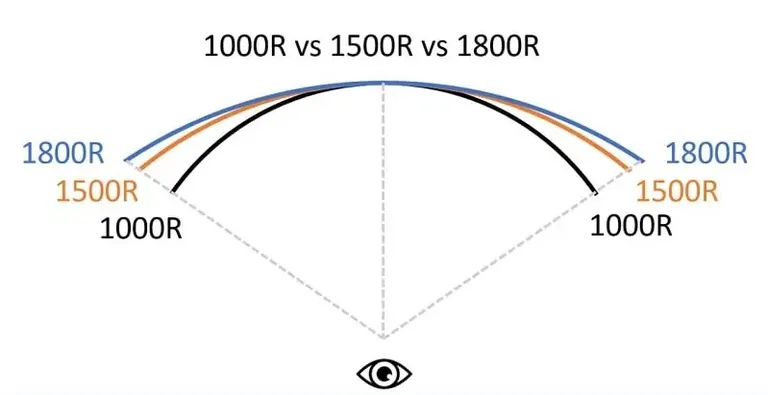
The R number on a curved monitor tells you how aggressively the panel bends. This directly affects how close you should sit and how wrapped the image feels.
1800R is the gentlest curve you'll commonly find. It follows a circle with an 8-foot radius. You need to sit fairly far back, around 1.5 meters or more, before the curve really does its job.
Many early curved adopters started here. It feels mild, almost flat at first glance, but you notice the difference over long sessions.
1500R sits in the middle. It's tight enough to feel meaningfully curved when you're sitting at a normal desk distance. Most 34-inch ultrawides from 2020 to 2023 shipped at 1500R.
It's a safe default if you're unsure about your desk depth.
1000R is the tightest mainstream curve. It matches the approximate curvature of the human eye. At a typical desk viewing distance of 60 to 80 centimeters, a 1000R panel wraps noticeably into your peripheral vision.
This is where immersion peaks, but it's also where distortion becomes more obvious if you sit too close or use the monitor for productivity work.
Here's a quick comparison:
| Curvature | Radius | Best Viewing Distance | Immersion Level | Distortion Risk |
|---|---|---|---|---|
| 1800R | 1.8 meters | 1.2–1.8 meters | Mild | Low |
| 1500R | 1.5 meters | 0.8–1.2 meters | Moderate | Low to moderate |
| 1000R | 1.0 meter | 0.5–0.9 meters | High | Moderate to high |
The right choice depends on your desk setup. If your monitor sits 70 centimeters from your face, 1000R will feel aggressive and immersive. If it sits 1.2 meters back, 1500R or 1800R will feel more natural.
One practical note: 1000R panels have become the default for most new 34-inch and 32-inch curved gaming monitors as of 2025. Manufacturers have standardized on it because it delivers the strongest "wow" factor in store demos and unboxing videos. That doesn't mean it's right for every setup, but it's what you'll encounter most often.
Curved vs Flat Monitors: The Honest Comparison
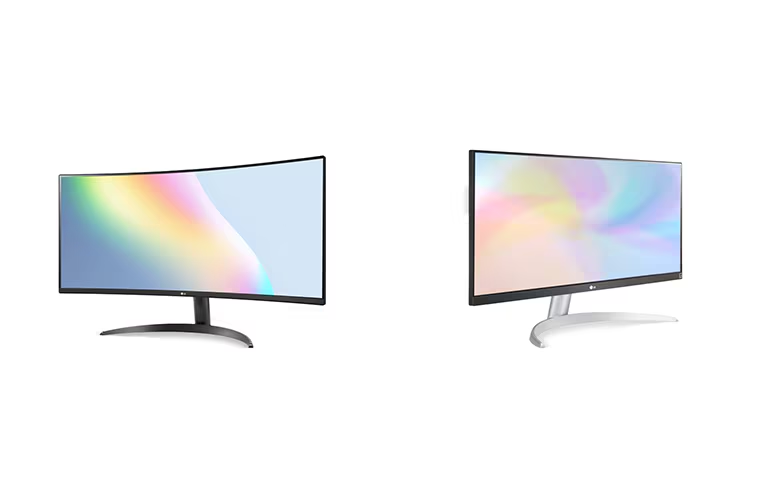
This is where the conversation gets real. Curved monitors aren't universally better. They're better for specific situations, and flat panels still win in others.
Where curved wins:
- Immersive single-player gaming
- Racing and flight simulation
- Ultrawide aspect ratios (21:9 and 32:9)
- Reduced eye fatigue over long sessions
- Aesthetic desk presence
Where flat wins:
- Competitive FPS and esports
- Color-critical work (photo editing, video grading)
- Multi-monitor arrays
- Wall-mounted setups
- Productivity and text-heavy work
The distortion issue is real on curved panels. Straight lines near the edges of the screen appear slightly bent. For gaming, your brain adapts within minutes and stops noticing.
For CAD work, architectural drafting, or any task where geometric accuracy matters, that distortion becomes a genuine problem.
Panel type interacts with this too. VA panels, which dominate the curved market, offer excellent contrast ratios around 3000:1. IPS panels, more common in flat gaming monitors, offer better color accuracy and wider viewing angles but lower contrast around 1000:1.
If you go curved, you're likely getting VA. If you prioritize color accuracy for creative work alongside gaming, a flat IPS panel often makes more sense.
GPU load is another factor. A 34-inch ultrawide curved monitor at 3440×1440 pushes roughly 30 to 40 percent more pixels than a standard 2560×1440 flat panel. That means your GPU works harder.
If you're running a mid-range card like an RTX 4060 or RX 7600, you'll feel that extra load in demanding titles. A flat 27-inch 1440p panel is easier to drive at high refresh rates.
The honest take: curved monitors are the better choice for immersion-focused gaming at 34 inches and above. Flat monitors remain the smarter pick for competitive play, color work, and smaller screen sizes. Neither is objectively superior.
They serve different priorities.
When Curved Monitors Give You a Real Advantage
Curved panels aren't just marketing fluff. They deliver measurable benefits in specific gaming scenarios where the geometry of the screen aligns with what your eyes and brain expect.
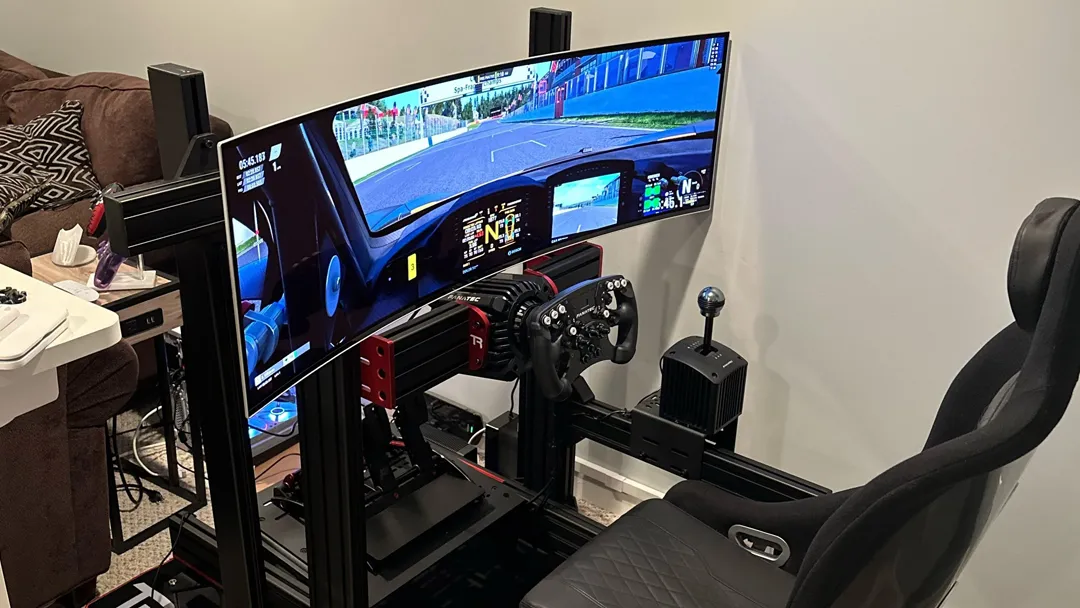
Racing simulators are the textbook example. When you're sitting in a simulated cockpit, the real-world reference is a windshield that wraps around you. A curved ultrawide at 1000R mimics that wrap.
You perceive the side mirrors and A-pillars naturally without turning your head as far. Titles like iRacing, Assetto Corsa Competizione, and Gran Turismo 7 (on console with a curved display) benefit enormously from this setup.
Flight simulators follow the same logic. Microsoft Flight Simulator and DCS World involve constantly scanning instruments across a wide field of view. A 32:9 super ultrawide curved panel puts critical gauges and window visibility in a single visual arc. Pilots in study setups report reduced head movement and better situational awareness.
Cinematic RPGs and open-world games round out the top tier. Baldur's Gate 3, The Witcher 3, Elden Ring, and Cyberpunk 2077 all emphasize atmosphere and world-building. The curve pulls peripheral scenery into your awareness without requiring a triple-monitor array. You notice more of the environment, and you think about the monitor hardware less.
Role-playing MMOs like Final Fantasy XIV and World of Warcraft also benefit. The wider ultrawide field of view lets you see more of the battlefield, skill bars, and raid mechanics simultaneously. It's a genuine gameplay advantage in addition to looking impressive.
In all these cases, the common thread is immersion paired with a wider aspect ratio. The curve amplifies what ultrawide resolution already offers. Neither alone delivers the full effect.
When Flat Monitors Are Actually the Better Choice
Flat panels still dominate for good reason. If your gaming priorities lean competitive or productivity-focused, a curved display can actively work against you.
Competitive FPS players should stick with flat. Titles like Counter-Strike 2, Valorant, Apex Legends, and Overwatch 2 demand pixel-perfect spatial awareness. The slight geometric warping that curved panels introduce can throw off your sense of straight lines and angles.
Most professional esports players use flat 24.5-inch or 27-inch panels at 1080p or 1440p, prioritizing refresh rate and response time over immersion.
Color-accurate creative work is another flat-panel stronghold. If you edit photos, grade video, or do any design work on the same monitor you game on, IPS flat panels deliver more consistent color across the entire screen. Curved VA panels can shift color and gamma at the edges due to the viewing angle change.
For hybrid gaming-and-creative setups, a flat IPS at 27 inches or 32 inches remains the safer bet.
Multi-monitor productivity setups also favor flat. Aligning two or three curved panels side by side creates visible seams and awkward angles. Flat bezels line up cleanly.
If your desk doubles as a work station, flat panels give you more flexibility.
Wall-mounted installations are nearly impossible with curved panels. The curve pushes the edges forward, creating clearance issues against the wall. VESA mounts work, but the geometry looks and feels wrong.
Flat panels mount flush and clean.
Smaller screen sizes under 30 inches don't benefit from curvature anyway. At 24 or 27 inches, the curve is barely perceptible at normal viewing distances. You pay a premium for a feature that does almost nothing at that scale.
Panel Types Matter: VA, IPS, and OLED on Curved Screens
The panel technology underneath the curve determines most of what you actually see. Not all curved monitors perform the same, and the panel type is the biggest differentiator.
VA (Vertical Alignment) panels dominate the curved gaming market. They offer static contrast ratios around 3000:1, which means deep blacks and punchy dark scenes. That contrast advantage shows in horror games, space sims, and any title with dark environments.
The downside is slower pixel response times, especially in dark transitions. You may notice smearing or ghosting in fast-paced scenes. VA panels also narrow their viewing angles compared to IPS, which matters less on a curved screen since the curve already angles the panel toward you.
IPS (In-Plane Switching) panels deliver better color accuracy and wider viewing angles. Their contrast ratio sits around 1000:1, so blacks look more gray than true black. Response times are generally faster than VA, with less smearing.
Curved IPS panels exist but cost more and are less common. They're the right pick if you want the curve for immersion but also need color accuracy for creative work.
OLED is the newest player in curved gaming. QD-OLED panels from Samsung Display and LG's WOLED panels offer perfect blacks, near-instant response times, and excellent color. Curved OLED gaming monitors like the Dell Alienware AW3423DWF have gained a strong following.
The main drawbacks are price and burn-in risk with static HUD elements over hundreds of hours. As of 2025, curved OLED remains a premium option, but the image quality is in a different league from LCD alternatives.
Here's how the three compare for curved gaming:
| Panel Type | Contrast | Response Time | Color Accuracy | Price Range | Best For |
|---|---|---|---|---|---|
| VA | ~3000:1 | 4–8ms (slower dark transitions) | Good | $250–$600 | Immersive single-player, budget ultrawide |
| IPS | ~1000:1 | 1–4ms | Excellent | $400–$900 | Hybrid gaming and creative work |
| OLED | Infinite (perfect black) | 0.03–1ms | Excellent | $800–$1,500+ | Premium immersion, fast-paced games |
The Drawbacks Nobody Talks About
Curved monitors have real trade-offs that marketing materials gloss over. Knowing these before you buy saves frustration.
Edge distortion is the most obvious. Straight lines near the bezels appear slightly bowed. Your brain adapts during gaming, but it's immediately noticeable in productivity apps, spreadsheets, and CAD software.
If you plan to use the monitor for work, test it with your actual workflow first.
Glare management gets harder with a curve. A flat screen reflects light in a predictable direction. A curved screen scatters reflections across its surface.
If your desk faces a window, you may fight glare from angles that wouldn't affect a flat panel.
Game compatibility isn't universal. Many older titles and some competitive games don't support 21:9 or 32:9 aspect ratios. You'll get black bars on the sides or a stretched image.
Some games render HUD elements at the extreme edges of an ultrawide screen, putting health bars and minimaps in awkward positions. Community patches and fixes exist for popular titles, but it's extra effort.
GPU cost is real. Driving 3440×1440 at 144Hz demands more from your graphics card than 2560×1440 at the same refresh rate. If you're building or upgrading a PC, factor in whether your GPU can actually push the extra pixels in the games you play.
Desk depth matters more than people expect. A 34-inch curved ultrawide needs at least 60 centimeters of desk depth to hit the sweet spot for a 1000R curve. Smaller desks force you too close, and the curve becomes overwhelming rather than immersive.
Price premium over equivalent flat panels persists. You'll typically pay 15 to 30 percent more for a curved monitor with the same resolution, refresh rate, and panel type as its flat counterpart. That premium buys you the curve and nothing else in terms of raw performance.
How to Choose the Right Curved Monitor for Your Setup
Start with your desk. Measure the distance from your typical seating position to where the monitor will sit. That number determines your ideal curvature.
If you sit 50 to 70 centimeters back, 1000R delivers the strongest effect. At 80 to 120 centimeters, 1500R feels more natural. Beyond 1.2 meters, even 1800R barely registers, and you might be better served by a flat panel.
Next, match the screen size to your resolution and GPU. A 34-inch ultrawide at 3440×1440 is the current sweet spot for most gamers. It's sharp enough at 109 pixels per inch and doesn't demand a flagship GPU.
Step up to 38-inch or 40-inch ultrawides, and you'll want 4K-class resolution, which requires significantly more graphics power.
Check your game library. If you mostly play competitive shooters at 1080p, a curved ultrawide adds complexity without benefit. If your library is heavy on RPGs, sims, and open-world titles, the investment pays off.
Consider your panel priorities. Want deep blacks and high contrast for atmospheric games? Go VA. Need color accuracy for creative work alongside gaming?
Look for curved IPS. Budget no object and want the best image quality available? Curved OLED is the current king.
Verify adaptive sync compatibility. If you run an NVIDIA GPU, look for G-Sync Compatible certification. For AMD, FreeSync Premium or FreeSync Premium Pro. Most modern curved monitors support both, but confirming avoids headaches.
Finally, read reviews that specifically test the panel's response time and overshoot behavior. Not all curved monitors with "1ms" on the box actually deliver clean motion. Independent testing from display-focused reviewers gives you the real picture.
Desk Space, Viewing Distance, and Setup Tips
Your physical setup determines whether a curved monitor feels incredible or uncomfortable. Getting the geometry right matters more than most buyers expect.
Viewing distance is the first variable to lock down. For a 34-inch 1000R ultrawide, aim for 60 to 80 centimeters. That puts you inside the curve's sweet spot where the image fills your peripheral vision without overwhelming you.
Move closer than 50 centimeters, and edge distortion becomes distracting. Move past 1 meter, and the curve effect diminishes significantly.
Desk depth directly constrains your options. Standard desks run 60 to 80 centimeters deep. That's enough for a 34-inch curved ultrawide at the right distance, but a 32:9 super ultrawide at 49 inches demands 80 centimeters or more.
Measure before you buy, including the stand footprint, which eats into usable depth.
Mounting arms can help if your desk is shallow. An articulating VESA mount lets you push the monitor back toward the wall and pull it closer when needed. For curved panels, make sure the mount supports the monitor's weight and curvature.
Some cheap arms sag under the weight of larger curved displays.
Eye level alignment matters. Position the top third of the screen at or slightly below eye level. Curved monitors tend to be taller than people expect, and mounting too high forces you to look upward, which strains your neck over long sessions.
Lighting placement interacts with the curve. Avoid direct overhead lights that reflect off the curved surface into your eyes. Position bias lighting behind the monitor instead.
A simple LED strip reduces eye fatigue and improves perceived contrast without adding glare.
Curved Monitors for Specific Game Genres
Different genres interact with curved displays in distinctly different ways. Here's how the major categories break down:
Racing sims: Ideal match
A curved ultrawide at 21:9 or 32:9 places the side mirrors, apexes, and peripheral track scenery in your natural field of view. The curve reinforces the feeling of sitting inside a cockpit.
Flight sims: Ideal match
The wide instrument panel and window view align perfectly with the curve. You scan gauges and horizon lines more fluidly than on a flat panel.
First-person RPGs: Strong match
Games like Starfield, Elden Ring, and The Witcher 3 benefit from the immersion boost. The wide vista and atmospheric lighting gain extra presence.
MMORPGs: Solid match
The ultrawide field of view in games like Final Fantasy XIV and World of Warcraft lets you see more of the battlefield and UI elements simultaneously.
MOBAs: Neutral match
Titles like League of Legends and Dota 2 work fine on curved panels but gain little. The gameplay view is fixed, and the curve doesn't add meaningful information.
Competitive FPS: Weak match
Valorant, Counter-Strike 2, and Apex Legends favor flat panels at high refresh rates. The curve adds no competitive advantage and may introduce slight spatial distortion.
Strategy games: Situational match
Civilization VI and Total War titles benefit on ultrawide for map visibility, but geometric precision for unit placement and grid alignment is better preserved on flat displays.
Common Mistakes People Make with Curved Gaming Monitors
Even well-informed buyers stumble into predictable pitfalls. Here are the ones that show up most often in user reviews:
Sitting too close for the curvature. A 1000R panel at 40 centimeters is overwhelming. Edge distortion dominates your view, and fatigue sets in fast. Give the curve room to breathe by sitting back.
Ignoring game aspect ratio support. Buying a 21:9 curved monitor without checking whether your favorite game supports it leads to black bars or stretched images. Some older titles and console ports simply don't render at ultrawide resolutions.
Pairing with an underpowered GPU. Running 3440×1440 at 144Hz in a modern AAA title demands serious graphics horsepower. An RTX 4070 or RX 7800 XT is roughly the minimum for high settings. Weaker cards force you to choose between resolution and frame rate.
Mounting too high or at the wrong angle. Curved monitors need to face your eyes directly. Tilting the panel up or down by more than a few degrees shifts the sweet spot and amplifies edge color shift.
Expecting the curve to fix poor panel quality. A cheap VA panel with slow response times will still smear, regardless of curvature. The curve improves viewing geometry. It does not compensate for poor pixel response or low contrast.
Overlooking VESA mount compatibility. Not every curved monitor ships with a removable stand or standard VESA pattern. If you plan to use a monitor arm, verify the mount pattern and weight rating before purchasing.
Frequently Asked Questions
Is a curved monitor better for gaming than flat?
A curved monitor is better for immersion-focused, single-player, and simulation gaming. Flat monitors remain superior for competitive FPS, color-critical work, and multi-display setups.
What curvature is best for a 34-inch gaming monitor?
1000R is the current standard for 34-inch curved ultrawides at typical desk distances. If your desk is deeper than 90 centimeters, 1500R provides a gentler experience.
Do curved monitors cause eye strain?
Curved monitors generally reduce perceived eye strain compared to flat panels. The curve maintains a more consistent focal distance across the screen, reducing the micro-adjustments your eye muscles make.
Can you use a curved monitor for work and gaming?
You can, but curved panels are less ideal for text-heavy productivity, spreadsheets, and geometric design work. The edge warping affects tasks that depend on straight-line accuracy.
Does a curved monitor affect competitive gaming performance?
No measurable competitive advantage exists for curved panels in fast-paced shooters. Most professional esports players use flat 24 to 27-inch monitors at high refresh rates.
How far should I sit from a curved gaming monitor?
For a 34-inch 1000R curved monitor, sit 60 to 80 centimeters away. For 1500R, extend that to 80 to 120 centimeters. Adjust based on personal comfort and perceived edge distortion.
The Bottom Line: Should You Go Curved?
The answer depends entirely on what you play and how you game. If your library leans toward immersive single-player titles, racing sims, flight sims, or open-world RPGs, a curved ultrawide monitor is one of the most impactful upgrades you can make to your setup. The combination of wider aspect ratio and matching curvature genuinely changes how those games feel.
If you spend most of your time in competitive shooters, MOBAs, or need your monitor for color-accurate work, save your money and buy a quality flat IPS panel at 27 or 32 inches. You'll get better raw performance for your specific use case without paying the curve premium.
For everyone in between, a 34-inch curved ultrawide at 3440×1440 remains the most versatile sweet spot as of 2026. It works for gaming, media consumption, and light productivity. Just get your viewing distance right, pair it with a GPU that can drive the pixels, and verify that your favorite games support the aspect ratio before you commit.

Similar Posts





















