What Is a Curved Gaming Monitor
If you've been shopping for a gaming setup recently, you've probably noticed that curved monitors are everywhere. But what is a curved gaming monitor, really? It's a display panel that bends inward toward you, designed to match the natural curve of your field of vision.
The idea is simple: wrap the screen around you a little, and everything feels more immersive.
The concept isn't new, but it's gotten a lot more accessible. As of 2026, you can pick up a solid curved gaming monitor for under $300, and the technology has matured well beyond the early days of gimmicky marketing. Let's break down how these things actually work, what the specs mean, and whether one belongs on your desk.
Quick Answer
A curved gaming monitor is a display with a concave panel that wraps slightly toward the viewer. The curve is measured in "R" values like 1800R or 1000R, which describe the radius of the curve in millimeters. Curved monitors reduce edge distortion and can feel more immersive than flat screens.
They work best for single-player gaming, sim racing, and ultrawide setups.
The One Thing You Need to Know Before Reading Another Word
Here's the deal. The curve only works if you're sitting at the right distance. Every curvature rating, like 1800R or 1000R, corresponds to the optimal viewing radius.
If you sit too far back, the curve does almost nothing. If you sit too close, the image can actually look distorted.
That's why buying a curved monitor without measuring your desk setup is one of the most common mistakes people make. We'll get into exact distances later, but for now, just know this: the curve is not a one-size-fits-all feature. It's a geometry problem, and your desk is the variable.
How Curved Gaming Monitors Actually Work
A curved gaming monitor uses a panel that's physically bent into a concave shape. The manufacturing process involves curving a flat panel (usually VA or IPS) to a precise radius and housing it in a frame that holds that shape permanently. The result is a screen where the edges sit slightly closer to your eyes than the center.
This matters because on a flat ultrawide monitor, the edges are physically farther from your eyes than the center. That distance difference can cause slight color shifts, geometric distortion, and extra eye strain as your focus moves across the screen. A curve corrects for that by keeping the entire surface at a more uniform distance from your eyes.
What the "R" Number Means (1800R vs 1000R Explained Simply)
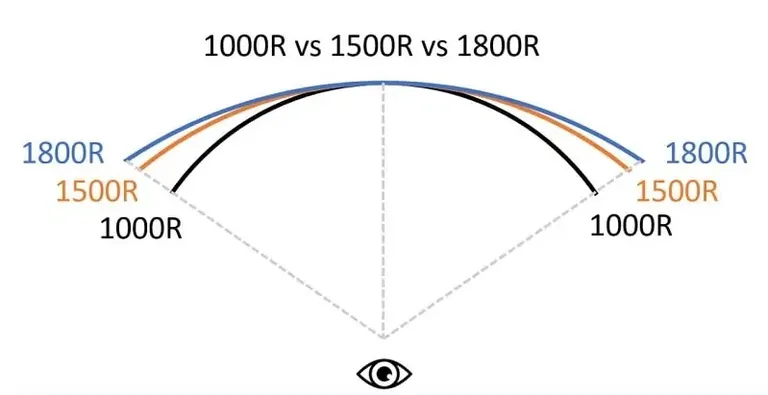
The "R" stands for radius, and it's measured in millimeters. Here's how to think about it:
- 1800R: The curve matches a circle with an 1800mm (1.8 meter) radius. This is the gentlest curve. It's forgiving with viewing distance and works well if you sit a bit farther back from your screen.
- 1500R: A moderate step up. Slightly more wrap, slightly more immersion.
- 1000R: A tight, aggressive curve. This matches a 1-meter radius circle. It's the most common "premium" curvature as of 2026 and delivers the strongest sense of wrap when you're sitting close.
- 800R: The tightest curve available. Very aggressive, very immersive, but you need to be sitting quite close for it to feel right.
The lower the number, the more the screen curves toward you. That's really all there is to it.
Why Your Distance From the Screen Changes Everything
This is where most buying guides fall short. They tell you the R value but don't explain that it's meaningless without context. A 1000R monitor is designed for you to sit roughly 1 meter (about 3.3 feet) from the screen.
Sit at 2 meters, and you've lost most of the benefit.
Here's a practical breakdown:
| Curvature | Optimal Viewing Distance | Best Desk Depth |
|---|---|---|
| 1800R | 1.5 to 2.5 meters | Deeper desks (30"+) |
| 1500R | 1.2 to 1.8 meters | Standard desks (24-30") |
| 1000R | 0.8 to 1.2 meters | Shallow to standard (20-28") |
| 800R | 0.6 to 1.0 meter | Shallow desks or arm mounts |
If your desk is shallow and you sit close to the screen, a 1000R or even 800R monitor will feel like it wraps around you. If you sit back in a deeper desk setup, 1800R is probably the better call. Buying the wrong curvature for your distance is like wearing someone else's prescription glasses.
It just doesn't work.
The Panel Type Behind the Curve: VA, IPS, and OLED
Not all curved monitors use the same panel technology, and this matters a lot for image quality.
- VA panels are the most common in curved gaming monitors. They offer high contrast ratios (often 3000:1 or better), which makes dark scenes in games look rich and deep. The downside is slower pixel response times, which can cause ghosting in fast-paced games.
- IPS panels deliver better color accuracy and wider viewing angles. Curved IPS monitors exist but tend to be more expensive. They're a solid choice if you do content creation alongside gaming.
- OLED and QD-OLED curved monitors represent the premium tier. Perfect blacks, near-instant response times, and stunning color. The trade-off is higher price and potential burn-in risk with static UI elements over time.
Samsung's Odyssey line has been the most prominent curved gaming monitor series, with models spanning VA, IPS, and QD-OLED. LG's UltraGear line also offers curved options, primarily in IPS.

What It Actually Feels Like to Game on a Curved Monitor
This is the part specs can't fully capture. Let's talk about the actual experience.
Immersion and Peripheral Vision
The first thing you'll notice on a curved monitor is that the edges of the screen feel closer to you. In a game like Cyberpunk 2077 or Elden Ring, that subtle wrap makes the world feel like it extends beyond the bezel. Your peripheral vision picks up more of the image, and your brain stops treating the monitor as a flat rectangle you're looking at.
Sim racers and flight sim players report the strongest benefit here. When you're in a cockpit or behind the wheel, a curved ultrawide fills your side vision in a way that a flat screen simply can't match. It's not just a visual trick.
It genuinely helps with spatial awareness and depth perception in those genres.
The Sweet Spot Problem
Here's the catch. A curved monitor has a sweet spot, and it's narrower than on a flat screen. If you sit dead center, the image looks fantastic.
Shift your head to the side, and you'll notice the curve starts to work against you. The far edge of the screen can look skewed or compressed from an off-angle.
This matters if you have a multi-monitor setup or if other people watch you game. A flat screen looks roughly the same from a wide range of angles. A curved screen looks best only from the center.
For solo gaming, this is fine. For shared screen viewing, it's a real limitation.
Where Curved Monitors Fall Short
Let's be honest about the downsides:
- Straight lines look bent. If you're doing photo editing, CAD work, or even just looking at a spreadsheet with grid lines, the curve introduces visible distortion. Horizontal lines near the top and bottom edges will appear to bow.
- Reflections are harder to manage. Because the surface is curved, light sources reflect across a wider area. If you have a window or lamp behind you, you'll see it scattered across the screen in a way that a flat panel handles more cleanly.
- Wall mounting is awkward. Curved monitors don't sit flush against a wall. You need an offset mount or arm, which adds cost and complexity.
- Color shift on VA panels. Many budget curved monitors use VA panels, which can show color shift when viewed even slightly off-center. On a curved screen, this means the center and edges can look slightly different in color temperature.
Curved vs Flat: The Honest Comparison
This is the question most people actually want answered. Let's break it down without the marketing fluff.
When Curved Wins
- Ultrawide gaming (21:9 or 32:9). On a flat ultrawide, the edges are noticeably farther from your eyes. A curve corrects this and makes the whole screen feel uniform. This is where curved monitors earn their keep.
- Sim racing and flight sims. The wrap effect genuinely improves immersion and spatial awareness. If you're deep into Assetto Corsa, iRacing, or Microsoft Flight Simulator, a curved ultrawide is a meaningful upgrade.
- Single-player immersion games. RPGs, open-world games, and atmospheric titles benefit from the way a curve fills your peripheral vision.
- Desk productivity with ultrawide. Having one curved ultrawide instead of two flat monitors eliminates the bezel gap and gives you a seamless workspace.
When Flat Wins
- Competitive FPS gaming. Many competitive players prefer flat screens because there's zero geometric distortion. When you're tracking targets in Counter-Strike 2 or Valorant, you want straight lines to look straight.
- Multi-monitor setups. Curved monitors don't play well side by side. The curves create a visible gap and distortion at the seam. Flat panels are far better for dual or triple monitor arrays.
- Content creation and professional work. Photo editing, video editing, graphic design, and CAD all require accurate geometry. A curve introduces distortion that makes precision work harder.
- Budget builds. Curved monitors generally cost more than equivalent flat monitors. If you're building a budget gaming rig, you'll get better specs per dollar with a flat panel.
Side-by-Side Spec Comparison
| Feature | Curved Gaming Monitor | Flat Gaming Monitor |
|---|---|---|
| Immersion | High, especially ultrawide | Moderate |
| Geometric accuracy | Compromised at edges | Accurate across entire screen |
| Viewing angles | Narrow sweet spot | Wide, consistent |
| Best genre fit | Sim, RPG, open-world | Competitive FPS, esports |
| Multi-monitor friendly | No | Yes |
| Price (same tier) | Typically 10-20% more | Baseline |
| Wall mounting | Requires offset mount | Flush mount works |
| Reflection handling | Scattered reflections | Easier to manage |
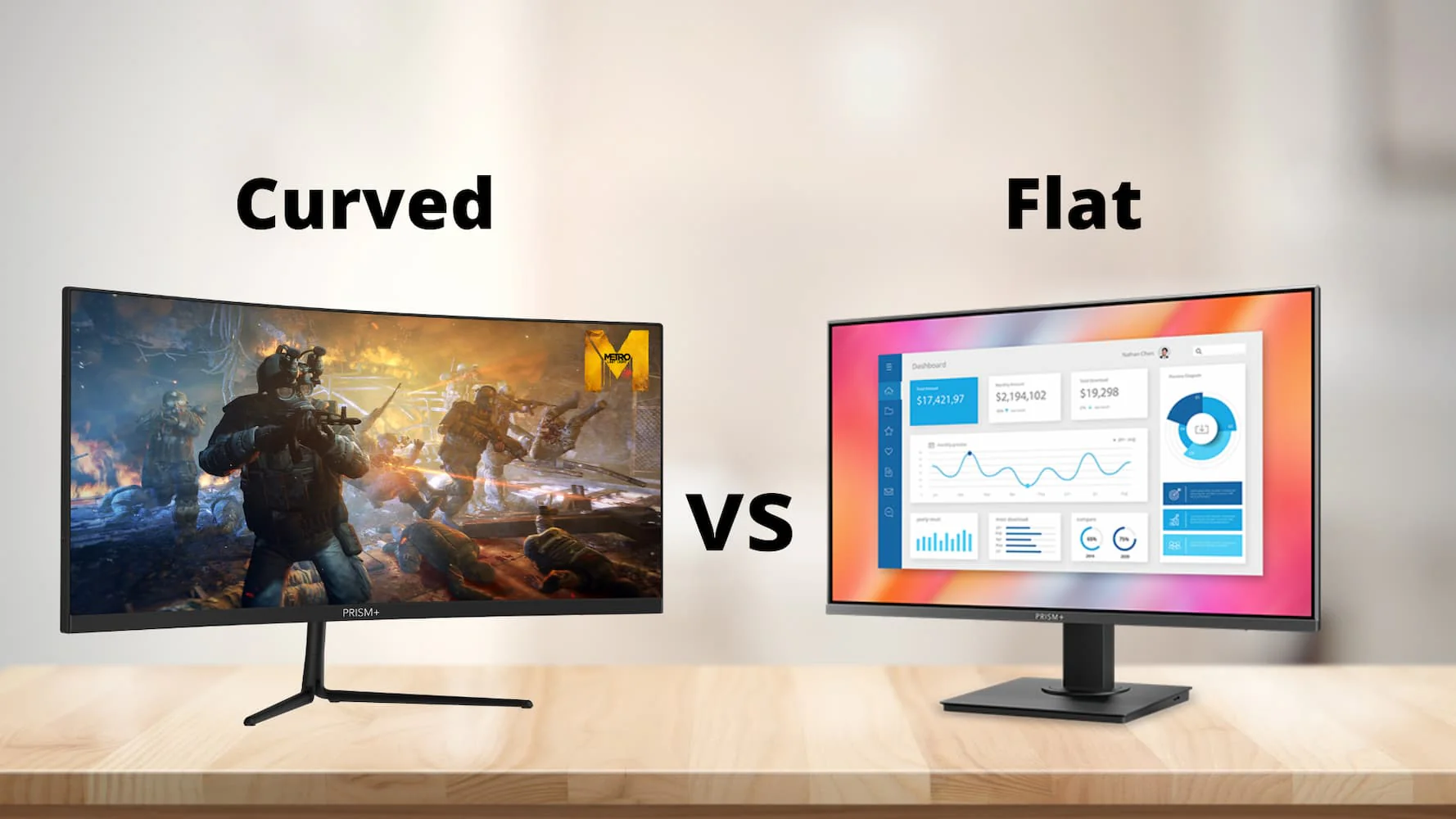
The bottom line: curved monitors aren't objectively better or worse. They're a different tool for a different job. If your primary use case is immersive single-player gaming or sim racing, the curve adds real value.
If you're grinding ranked matches or doing creative work, flat is probably the smarter choice.
Who Should Buy a Curved Gaming Monitor
Not everyone benefits equally from a curve. Let's match the technology to the right use case.
Sim Racers and Flight Sim Players
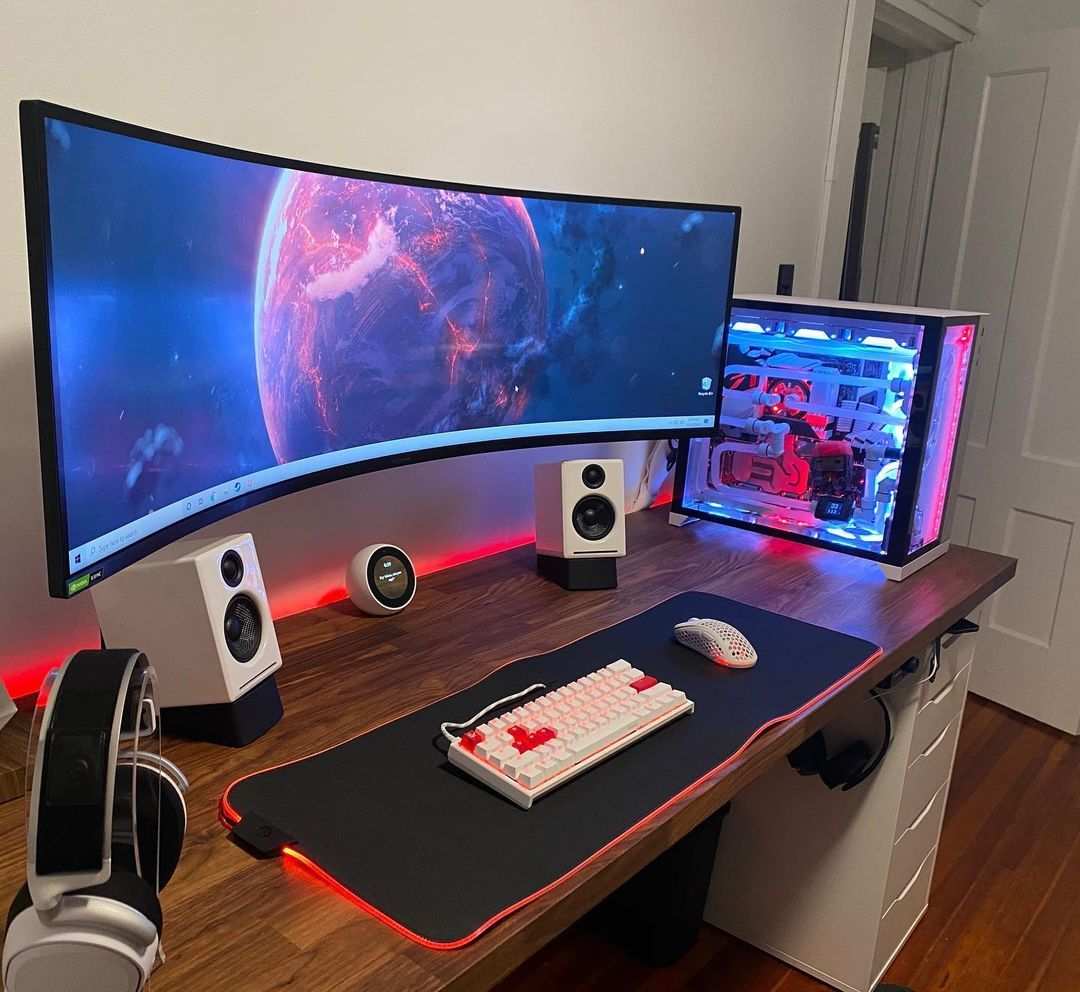
This is the strongest case for going curved. A 34" or 49" curved ultrawide in a cockpit setup fills your peripheral vision the way a real windshield does. Depth perception improves noticeably.
You can judge corners and apexes more intuitively. Multiple sim racing communities consistently report that curved ultrawides provide a measurable immersion advantage over flat panels for cockpit-based games.
Immersive Single-Player Gamers
If your library is heavy on titles like Baldur's Gate 3, Red Dead Redemption 2, or Horizon Forbidden West, a curved monitor makes those worlds feel more enveloping. It's a subtle effect, but once you've gamed on curved for a few weeks, going back to flat feels like watching TV through a window.
Competitive FPS Players
Here's where it gets controversial. Some competitive players love a curved 27" 1440p display because the wrap helps them track movement at the edges. Others swear by flat screens because straight lines stay straight and target acquisition feels more precise.
If your primary goal is climbing ranked ladders in Counter-Strike 2 or Valorant, a high-refresh flat monitor is generally the safer bet. You can still go curved, but know that you're trading a small amount of visual accuracy for comfort.
Content Creators and Multi-Taskers
A curved ultrawide is genuinely useful for productivity. You can have three windows side by side without a bezel gap breaking up your workspace. Video editors love the timeline real estate on a 21:9 or 32:9 curved panel.
Just keep in mind that if your work requires color-critical accuracy, you'll want a curved IPS or QD-OLED panel, not a budget VA.
Who Should Skip It
Skip curved if you primarily do competitive FPS gaming on a budget, run a multi-monitor wall, need geometric precision for creative work, or have a shallow desk with a wall right behind it. The curve isn't a universal upgrade. It's a situational one.
How to Choose the Right Curvature for Your Desk
Buying the wrong curvature is the single most common curved monitor mistake. Here's how to get it right.
Measuring Your Viewing Distance
Grab a tape measure. Sit in your normal gaming position. Measure from your eyes to where the screen will sit.
That number, converted to millimeters, should roughly match the R value of the monitor you buy. If you sit 100cm (1000mm) from your screen, a 1000R monitor is your target. Sit at 150cm, go with 1500R or 1800R.
It's not a hard rule. You can sit slightly outside the optimal range and still enjoy the curve. But the further you drift from the matching distance, the more the curve feels either too subtle or too aggressive.
Matching Curvature to Screen Size
Screen size and curvature work together. Here's the general pairing that makes sense:
- 27" curved: Works with 1500R or 1000R. A 27" 1800R curve is barely noticeable. You need a tighter radius on a smaller screen to feel the effect.
- 32" curved: Best with 1000R or 1500R. This is the sweet spot size for 1440p gaming on a curved panel.
- 34" ultrawide curved: Pairs well with 1800R or 1500R. The ultrawide aspect ratio already creates immersion, so you don't need an aggressive curve.
- 49" super ultrawide curved: Typically 1800R or 1000R. At this size, a tighter curve is necessary to keep the far edges at a reasonable distance from your eyes.
Desk Depth Requirements
Curved monitors push the center of the screen further into your desk than a flat panel of the same size. A 32" curved monitor needs roughly 20-24" of desk depth for comfortable use. A 34" ultrawide curved needs 24-30".
If your desk is shallow, consider a monitor arm. It frees up desk space and lets you position the screen at the optimal distance without the stand taking up too much room.
Common Mistakes People Make When Buying Curved
Let's run through the hits.
- Buying 1000R for a deep desk. If you sit more than 1.5 meters from your screen, a 1000R curve will feel uncomfortably tight. The edges will seem to lean in at you. Match the curvature to your actual seating position.
- Ignoring panel type. A cheap curved VA panel might look impressive on a showroom floor, but ghosting in dark scenes can be brutal. Check response time specs. Look for true 1ms GtG, not just a marketing number.
- Expecting curve to fix everything. A curved monitor doesn't magically make a low-resolution or low-refresh-rate display better. The curve is a comfort and immersion feature. It doesn't replace good panel performance.
- Forgetting about VESA mounting. Curved monitors have non-standard weight distribution. A basic VESA mount might not hold the tilt angle correctly. Check the manufacturer's recommended mount specifications before buying a separate arm.
- Buying curved for esports. If you're playing in tournaments or grinding competitive ranks, most pros still use flat screens. The geometric accuracy matters more than immersion when every pixel counts.
- Ignoring return policies. The curve is subjective. Some people love it immediately. Others find it disorienting after a week. Buy from a retailer with a solid return window so you can test it in your own setup.
What You'll Actually Pay: Pricing and Value Breakdown
Curved gaming monitors span a wide price range. Here's what to expect at each tier as of 2026.
| Tier | Price Range | What You Get |
|---|---|---|
| Budget | $200 – $350 | 27-32" 1080p or 1440p, VA panel, 144-165Hz, 1800R |
| Mid-range | $350 – $600 | 32-34" 1440p, IPS or VA, 165-240Hz, 1500R or 1000R |
| Premium | $600 – $1,000 | 34" ultrawide 1440p, IPS, 240Hz+, 1000R, HDR600+ |
| High-end | $1,000 – $1,800 | 49" super ultrawide, QD-OLED, 240Hz+, 1000R, HDR1000 |
| Flagship | $1,800+ | 57" dual-mode 4K/1080p, Mini-LED or OLED, 240Hz+, aggressive curve |
The best value sits in the $350-$600 range. A 32" 1440p curved IPS panel at 165Hz or 240Hz gives you excellent image quality, good refresh rates, and a noticeable curve without breaking the bank. The budget tier works fine for casual gaming, but the VA panels in that range often have noticeable smearing in dark scenes.
The premium tier is where QD-OLED curved monitors start to shine. Samsung's Odyssey OLED G9 and similar models deliver image quality that makes the price tag feel justified for enthusiasts. That said, if you're not sensitive to motion clarity or HDR differences, you might not notice enough improvement over a good mid-tier IPS to justify the cost.
Setting Up a Curved Gaming Monitor the Right Way
Getting the most out of a curved monitor takes a few extra steps compared to a flat panel.
First, position the monitor so the center of the screen is at eye level. Because the curve changes the geometry, having it too high or too low forces your neck into an awkward angle. Most curved monitors come with adjustable stands, but a monitor arm gives you finer control over height, tilt, and distance.
Second, set your viewing distance before calibrating anything. Sit in your normal gaming posture. You should be able to see the entire screen without turning your head.
If you're constantly shifting to see the edges, you're too close.
Third, calibrate the display settings in your GPU control panel. NVIDIA and AMD both have ultrawide and curved display scaling options. Make sure the resolution is set to the native panel resolution and that refresh rate is maxed out.
Enable G-Sync or FreeSync if your monitor supports it.
Finally, adjust in-game FOV settings. Many games default to FOV values optimized for flat screens. On a curved ultrawide, bumping the FOV up by 10-20 degrees can make the image feel more natural and reduce the "fisheye" effect some players notice at default settings.
Frequently Asked Questions
Does a curved monitor make a real difference for gaming?
Yes, but it depends on the game and your setup. Sim racing, flight sims, and open-world single-player games benefit the most. Competitive FPS players often prefer flat screens for geometric accuracy.
The difference is most noticeable on ultrawide panels 21:9 or wider.
What does 1000R mean on a curved monitor?
1000R means the curve has a radius of 1000mm, or 1 meter. Lower numbers mean a tighter, more aggressive curve. 1000R is the most popular premium curvature as of 2026. It works best when you sit about 1 meter from the screen.
Can you use a curved monitor for work and productivity?
Absolutely. Curved ultrawides are excellent for productivity. They replace dual-monitor setups with a single seamless display.
Just avoid curved monitors for color-critical work like photo editing unless you get an IPS or OLED panel with verified color accuracy.
Is a curved monitor good for photo editing?
Generally not ideal. The curve introduces geometric distortion that makes it hard to judge straight lines and spatial relationships accurately. If you do photo editing, a flat IPS monitor with factory calibration is the better choice.
Some professionals use curved displays for editing, but they typically verify their work on a flat reference monitor.
How far should I sit from a curved gaming monitor?
It depends on the curvature rating. For 1000R, sit about 0.8 to 1.2 meters away. For 1500R, 1.2 to 1.8 meters.
For 1800R, 1.5 to 2.5 meters. Matching your distance to the R value ensures the curve feels natural rather than forced.
Do curved monitors cause eye strain?
They can reduce eye strain for many users because the entire screen is at a more uniform distance from your eyes. Your eyes don't have to refocus as much when moving between the center and edges. However, if you sit too close or have the wrong curvature for your distance, it can cause more discomfort than a flat screen.
The Bottom Line: Should You Go Curved?
A curved gaming monitor is a genuine upgrade for the right person. If you play immersive single-player games, sim racing, or flight sims, and you're considering an ultrawide panel, the curve adds real value. It makes the experience more comfortable and more engaging.
If you're a competitive FPS player, a content creator who needs geometric accuracy, or someone on a tight budget, a flat monitor is probably the smarter buy. You'll get better specs per dollar, and you won't deal with the distortion and sweet spot limitations that come with a curve.
The key is matching the monitor to your actual use case, not just buying what looks cool on a shelf. Measure your desk. Know your viewing distance.
Pick the right curvature for your setup. Do that, and a curved monitor can be one of the best upgrades you make to your gaming experience.

Similar Posts





















