What Brands Make Mini LED Monitors
If you're searching for what brands make mini LED monitors, you've probably already noticed the market is a mess of marketing claims and confusing spec sheets. The good news is that the actual list of brands making these displays is smaller and more focused than it first appears. Let's break down who's really building these things and which ones deserve your attention.
Mini LED backlight technology has matured significantly since 2021, with VESA's DisplayHDR standards now ranging from DisplayHDR 400 up to DisplayHDR 1400. As of 2026, the technology sits in an interesting spot: it delivers HDR performance that standard LED monitors can't touch, without the burn-in risk of OLED. But not all mini LED implementations are created equal, and that's where knowing the brands really matters. If you are exploring similar hardware setups, see our detailed guide on why are mini led monitors better than normal led.
Quick Answer
Several brands make mini LED monitors as of 2026. Samsung, Dell, ASUS, Acer, and MSI lead the gaming segment. Apple, Dell, and ASUS dominate professional and creator markets.
Mini LED backlighting uses thousands of small LED zones for better contrast. Zone count and dimming quality vary dramatically between models.
What Mini LED Actually Means (And Why Marketing Makes It Confusing)
Here's the thing most product pages won't tell you upfront. "Mini LED" refers to the backlight, not the display panel itself. Your monitor still uses an LCD panel (usually IPS or VA) on top. For related troubleshooting and calibration steps, check our walkthrough on how do mini led monitors work.
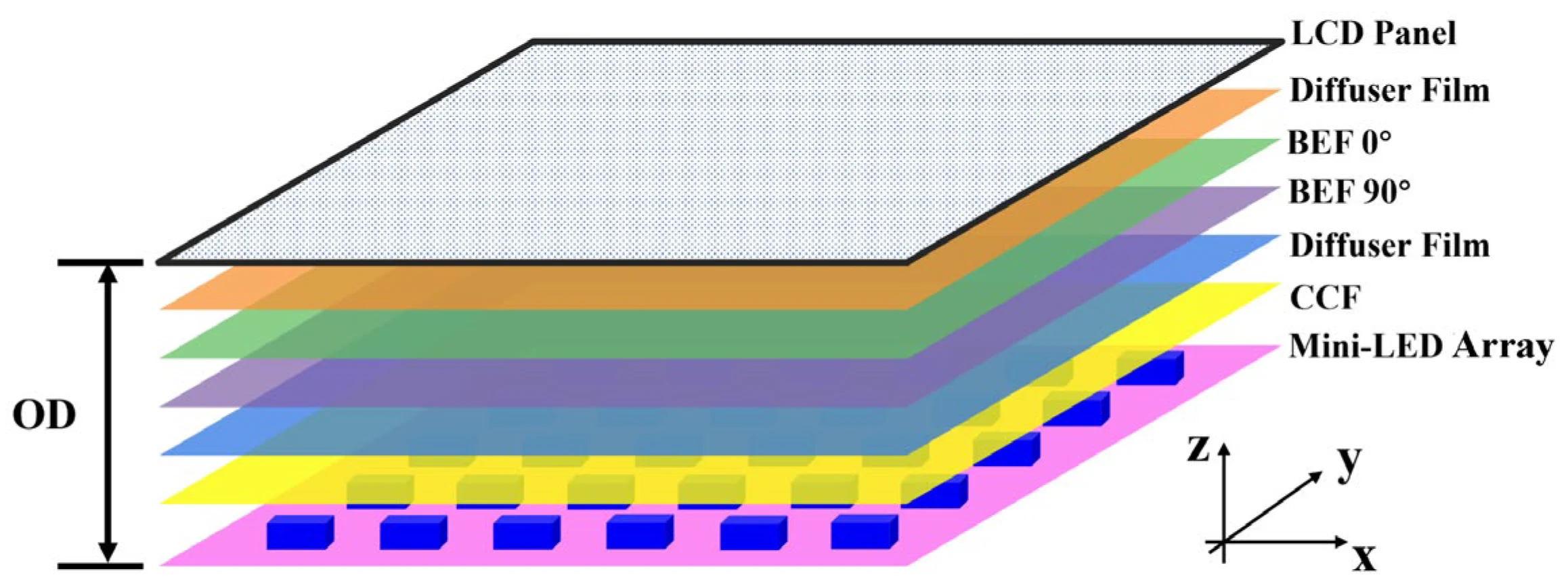
The mini LED part is the lighting behind it, made up of thousands of tiny LEDs grouped into dimming zones.
Mini LED Backlight vs. MicroLED vs. Standard LED
People mix these up constantly, so let's clear it once.
Standard LED monitors use edge-mounted LEDs along one or two sides of the screen. Light spreads across the panel through diffusion sheets. This is cheap and thin, but you get terrible HDR because the whole edge lights up together.
Mini LED monitors pack thousands of tiny LEDs across the full back of the panel. These group into dimming zones, each controlled independently. More zones mean finer control over which parts of the screen are bright and which are dark.
MicroLED is a completely different technology. Each pixel emits its own light, like OLED, but uses inorganic materials. True microLED monitors barely exist in consumer space yet.
They're not mini LED despite the similar name.
What Counts as "Mini LED" Anyway
This is where it gets frustrating. There's no strict industry standard for the minimum zone count that qualifies as mini LED. Some brands slap the label on monitors with as few as 16 zones.
Others use 1,152 or more.
VESA's DisplayHDR certification gives us some reference points.
| Certification | Peak Brightness | Black Level | Typical Zone Count |
|---|---|---|---|
| DisplayHDR 400 | 400 nits | Limited | 16-32 zones |
| DisplayHDR 600 | 600 nits | Better | 32-128 zones |
| DisplayHDR 1000 | 1,000 nits | Good | 128-512 zones |
| DisplayHDR 1400 | 1,400 nits | Excellent | 512+ zones |
A monitor with 16 zones and DisplayHDR 400 is technically mini LED, but the HDR experience won't impress you. The real jump happens around 200+ zones where blooming becomes manageable.
The Zone Count Problem: 16 Zones vs. 1,152 Zones
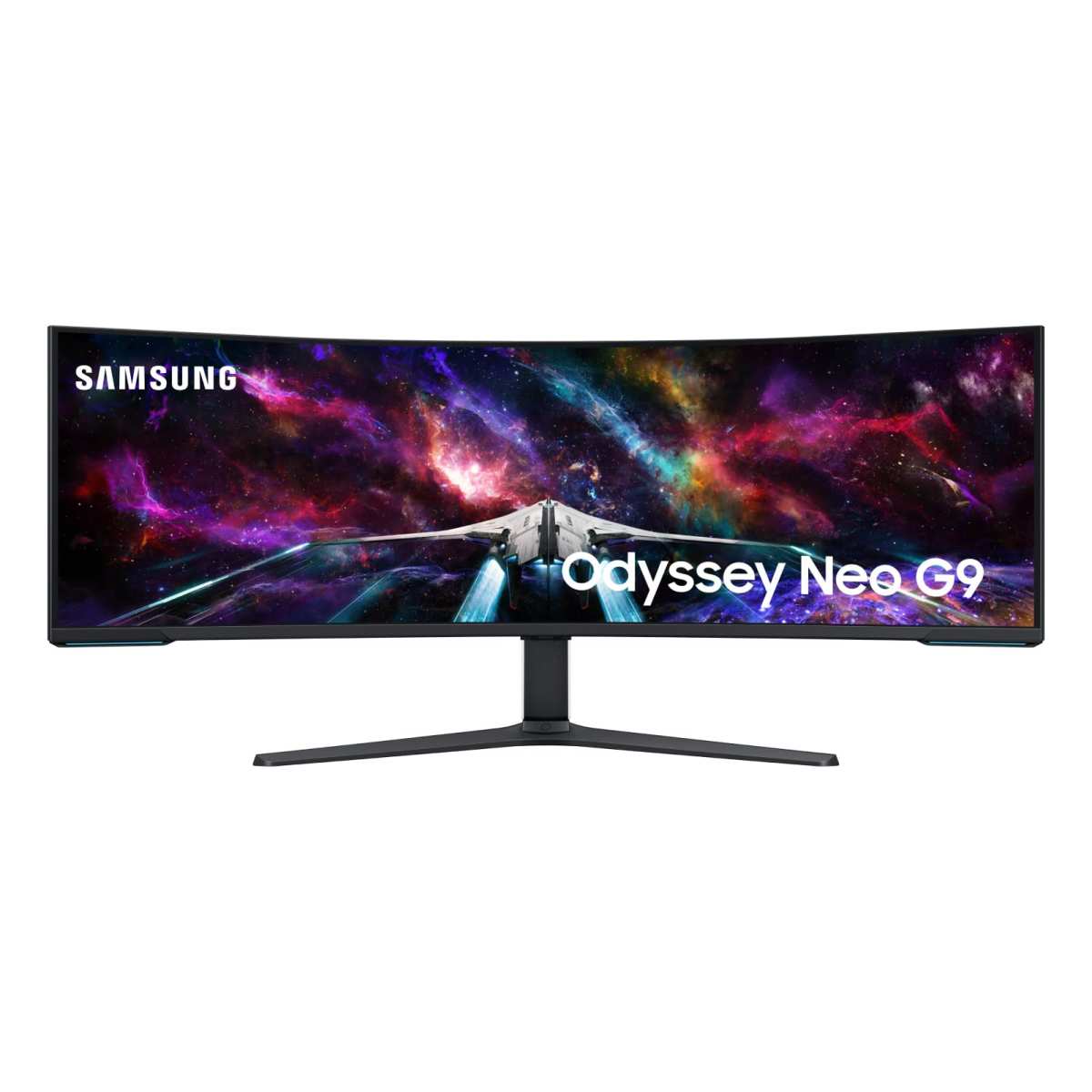
Two monitors can both say "mini LED" on the box and perform completely differently. The Samsung Odyssey Neo G9 57" packs 1,152 zones. Some budget 27" models ship with 32.
More zones generally mean better HDR. But zone count alone doesn't tell the whole story. The dimming algorithm matters just as much.
A well-tuned 256-zone monitor can look better than a poorly tuned 512-zone one.
It's Not as Simple as You Think
Before we get into specific brands, there's a layer most buyers miss entirely. The company selling you the monitor isn't necessarily the company making the display panel inside it.
True Panel Makers vs. Finished Product Brands
A handful of manufacturers actually produce the LCD panels. These get sold to brands who add their own electronics, housing, and firmware.
Major panel manufacturers:
- AUO (AU Optronics), Taiwan, supplies many gaming and professional monitors
- BOE, China, world's largest LCD producer, supplies budget and mid-range panels
- Innolux, Taiwan, strong in gaming and curved panels
- LG Display, South Korea, known for IPS panels used across many brands
- Samsung Display, South Korea, produces VA and QD-OLED panels
When you buy an ASUS ROG Swift or a Dell Alienware with mini LED, you're getting a panel from one of these manufacturers. The brand adds value through the dimming algorithm, electronics, build quality, and firmware.
Why This Confusion Costs You Money
Knowing the panel source helps you compare monitors more accurately. Two monitors using the same AUO panel with similar zone counts will perform comparably, even if one costs $200 more for the brand name.
It also explains why some lesser-known brands offer surprisingly good mini LED performance. They're using the same panels as premium brands, just with less aggressive pricing.
The real differentiator is the dimming algorithm and firmware. That's where brand expertise actually shows up.
Brands That Actually Sell Mini LED Monitors
Now let's get into the brands you can actually buy from. I've broken these down by their primary market focus.
Gaming-Focused Brands
Gaming is where mini LED has gained the most traction. High HDR brightness pairs well with HDR games, and the lack of burn-in risk means static HUD elements won't cause long-term damage.
Samsung (Odyssey Neo line)
Samsung's Odyssey Neo series is probably the most visible mini LED gaming lineup. The Odyssey Neo G9 57" (G95NC) is the flagship, a massive 7680×2160 dual-4K ultrawide with 1,152 dimming zones. The 32" and 49" Neo G9 models also use mini LED backlighting.
Samsung Display manufactures its own panels, which gives them tight integration between the panel and dimming algorithm. The monitors support G-Sync Compatible and FreeSync Premium Pro.
ASUS ROG Swift line
ASUS has pushed mini LED hard across their Republic of Gamers lineup. The ROG Swift PG32UQX (32", 4K, 1,152 zones) was one of the first high-zone-count consumer monitors. Newer models like the ROG Swift PG32UCDP offer mini LED with dual-mode refresh rate switching.
ASUS tends to use AUO or Innolux panels. Their GamePlus and Aura Sync software integration is a draw for people already in the ROG ecosystem.
Acer Predator
Acer's Predator X32 S and X49 S models target the premium gaming segment. They typically use AUO panels with 576 to 1,152 zones depending on the model. Acer's pricing often undercuts Samsung and ASUS for similar specs.
MSI
MSI's MEG 342C QD-OLED and MEG 381CQR Plus cover their premium ultrawide range. They've been expanding mini LED options, particularly in their MEG and MAG series. MSI tends to use BOE or Innolux panels in their mid-range offerings.
Gigabyte AORUS
Gigabyte's FV43U and CO49DQ models bring mini LED to larger screen sizes. They've been competitive on pricing, often offering 1,000+ zone counts at lower price points than Samsung or ASUS.
Dell Alienware
Alienware's AW3423DWF and AW2524H use mini LED backlighting. Dell's professional monitor division also uses mini LED in their UltraSharp line, but the Alienware branding targets gamers specifically.
Professional and Creator Brands
Professional users need color accuracy and consistency more than raw HDR punch. These brands prioritize calibration and wide gamut coverage.
Apple
Apple's Pro Display XDR (32") uses mini LED with 576 zones. The newer Apple Studio Display doesn't use mini LED, it's a standard backlit LCD. Apple's implementation focuses on sustained brightness and color accuracy rather than extreme HDR.
Dell UltraSharp
Dell's UP3221Q (32", 4K, 600 zones) targets color-critical work. Their UltraSharp line emphasizes factory calibration with Delta E < 2 out of the box. Dell also supplies panels to other brands, so their professional-grade mini LED monitors often use their own in-house panels.
ASUS ProArt
ASUS's ProArt line (PA32UCG, PA32UCXR) targets photographers, video editors, and colorists. These come with hardware calibration support and wide gamut coverage (99% DCI-P3, 95% Adobe RGB typical).
ViewSonic
ViewSonic's VP3881a and other VP-series models use mini LED for professional applications. They tend to be more affordable than Dell or ASUS ProArt options while still offering good color accuracy.
Budget and Value Brands
Mini LED has been trickling down to lower price points. These brands make the technology accessible without the premium markup.
TCL
TCL has been aggressive with mini LED pricing, particularly in their 32" and 43" models. They manufacture their own panels through CSOT (their display division), which keeps costs down.
Hisense
Hisense's gaming monitors use mini LED at competitive prices. Their 43" and 50" models often hit the $400-$600 range with respectable zone counts.
RedMagic
RedMagic, a Nubia subsidiary, focuses on gaming monitors with aggressive pricing. Their 27" and 32" mini LED models often undercut established brands by 20-30%.
Cooler Master
Cooler Master's GP27U and GP27Q models offer mini LED at mid-range prices. They use BOE panels and focus on solid performance without premium branding costs.
Brands Using Mini LED in Laptops and All-in-Ones
Several brands use mini LED in portable and desktop all-in-one formats, not just standalone monitors.
- Apple MacBook Pro 14" and 16", mini LED with 1,000+ zones (Liquid Retina XDR displays)
- ASUS ProArt Studiobook, mini LED in select laptop models
- Razer Blade 16, dual-mode mini LED panel
- MSI Titan series, mini LED in flagship gaming laptops
These aren't standalone monitors, but they show how broadly the technology has been adopted.
Side-by-Side: Mini LED Monitor Brands Compared
Let's put the major players head to head. This comparison focuses on their flagship or most representative mini LED gaming monitors.
| Brand | Flagship Model | Size | Resolution | Zones | Peak Brightness | Panel Type | Price Range |
|---|---|---|---|---|---|---|---|
| Samsung | Odyssey Neo G9 57" | 57" | 7680×2160 | 1,152 | 2,000 nits | VA | $1,300-$1,600 |
| ASUS ROG | Swift PG32UQX | 32" | 3840×2160 | 1,152 | 1,400 nits | IPS | $1,800-$2,200 |
| Acer Predator | X32 S | 32" | 3840×2160 | 576 | 1,000 nits | IPS | $900-$1,200 |
| Dell Alienware | AW3423DW | 34" | 3440×1440 | N/A (QD-OLED) | 1,000 nits | QD-OLED | $1,000-$1,300 |
| Gigabyte AORUS | FV43U | 43" | 3840×2160 | 1,000+ | 1,000 nits | VA | $800-$1,000 |
| MSI | MEG 381CQR Plus | 38" | 3840×1600 | 576 | 600 nits | IPS | $700-$900 |
| TCL | 32" Mini LED | 32" | 3840×2160 | 200-500 | 1,000 nits | VA | $400-$600 |
| Hisense | 43" Gaming | 43" | 3840×2160 | 200-400 | 600 nits | VA | $350-$500 |
Note: Dell Alienware's AW3423DW is actually QD-OLED, not mini LED, but it competes in the same premium ultrawide space. I've included it for comparison since many shoppers consider both technologies.
Gaming Use Cases
For competitive gaming, you want high refresh rates and low response times. Samsung's Odyssey Neo G9 57" delivers 240Hz with mini LED HDR. ASUS ROG Swift models typically hit 144Hz-165Hz with excellent response times.
Budget options from TCL and Hisense usually cap at 144Hz-165Hz, which is fine for most gamers. The trade-off is fewer dimming zones and less refined algorithms.
Professional and Creative Use Cases
Dell UltraSharp and ASUS ProArt models prioritize color accuracy over refresh rates. They typically run at 60Hz-75Hz but offer hardware calibration and wide gamut coverage.
Apple's Pro Display XDR targets video editors and colorists with its 6K resolution and sustained 1,000-nit brightness. It's not a gaming monitor, but for HDR video work, it's excellent.
Value and Budget Options
TCL and Hisense have made mini LED accessible at $400-$600. You won't get 1,000+ zones, but 200-500 zones still deliver meaningful HDR improvement over standard LED.
Gigabyte's AORUS line sits in the middle, offering 1,000+ zones at $800-$1,000. That's a solid sweet spot for gamers who want good HDR without premium pricing.
Best Mini LED Monitor by Use Case
Rather than declaring one "best" monitor, let's match specific recommendations to what you actually need.
Best for Competitive Gaming
Samsung Odyssey Neo G9 57" (G95NC)
This is the current king of mini LED gaming. The 7680×2160 resolution gives you dual 4K real estate. The 1,152 zones handle HDR well, and the 240Hz refresh rate keeps up with competitive play.
The curve is aggressive (1000R), so it's not ideal for color-critical work. But for gaming and immersive experiences, nothing else in mini LED matches it.
Alternative: ASUS ROG Swift PG32UCDP
If 57" is too much screen, this 32" 4K mini LED offers excellent HDR with a more manageable size. The dual-mode feature lets you switch between 4K/240Hz and 1080p/480Hz.
Best for Content Creation and Color Work
Dell UltraSharp UP3221Q
32" 4K with 600 mini LED zones. Factory calibrated to Delta E < 2. Covers 98% DCI-P3 and 100% Adobe RGB.
Hardware calibration support through colorimeters.
It's not cheap, but for professional photo and video work, the color accuracy justifies the price.
Alternative: ASUS ProArt PA32UCXR
Similar specs to the Dell, often at a slightly lower price. ASUS includes a built-in calibration sensor in some models.
Best for Console Gaming (PS5/Xbox Series X)
Samsung Odyssey Neo G7 (32" or 43")
The Neo G7 supports HDMI 2.1, which is essential for 4K/120Hz from PS5 and Xbox Series X. The mini LED backlight handles HDR10 content well, and Samsung's Game Mode optimizes input lag.
Alternative: Acer Predator X32 S
Also HDMI 2.1 compatible with good HDR performance. Often $200-$300 less than the Samsung.
Best for HDR Movie Watching
Samsung Odyssey Neo G9 57"
The massive 32:9 aspect ratio fills your peripheral vision. The 1,152 zones and 2,000-nit peak brightness make HDR10 content pop. The VA panel delivers good native contrast.
For standard 16:9 content, you'll have black bars on the sides. But for movies and immersive gaming, it's unmatched.
Alternative: Gigabyte AORUS FV43U
43" 4K with 1,000+ zones. More traditional 16:9 aspect ratio for movie watching. Excellent value at under $1,000.
Best Ultrawide Productivity Display
Dell U4025QW (40" 5K2K)
This 5120×2160 ultrawide uses mini LED with good zone count. The 21:9 aspect ratio gives you extra horizontal space for multitasking. Thunderbolt 4 connectivity simplifies laptop docking.
Alternative: LG 40WP95C-W
LG's ultrawide with mini LED backlight. Similar resolution and size, with LG's IPS panel technology.
What to Watch Out For
Mini LED isn't perfect. Here are the common issues you'll encounter.
The Zone Count Trap
Some brands advertise "mini LED" with 16-32 zones. That's technically mini LED, but the HDR improvement over standard LED is minimal. You'll still see blooming around bright objects on dark backgrounds.
Look for at least 200 zones for a meaningful HDR experience. 500+ zones is where mini LED really shines.
Blooming and Halo Effect
Even with 1,000+ zones, you'll sometimes see a halo of light around bright objects against dark backgrounds. This is inherent to the technology. Better dimming algorithms minimize it, but they can't eliminate it entirely.
If you're sensitive to blooming, consider OLED instead. It has per-pixel dimming with zero blooming.
Firmware and Dimming Algorithm Issues
Some monitors ship with immature firmware that causes visible zone transitions or laggy dimming. Check for firmware updates before judging a monitor's HDR performance.
Samsung and ASUS have been relatively good about post-launch firmware updates. Budget brands sometimes abandon firmware support quickly.
Panel Lottery and Uniformity Problems
Like all LCDs, mini LED monitors can suffer from panel uniformity issues. Backlight bleed, dirty screen effect, and uneven zone brightness vary unit to unit.
Buy from retailers with good return policies. Test your monitor immediately for uniformity issues.
Connectivity Compatibility
For PC gaming at 4K/120Hz+, you need DisplayPort 1.4 with DSC or HDMI 2.1. Not all mini LED monitors have HDMI 2.1.
Console gamers must check for HDMI 2.1 specifically. Some monitors advertise "4K/120Hz" but only through DisplayPort, not HDMI.
Mini LED vs. The Alternatives
Understanding how mini LED compares to other technologies helps you decide if it's right for you.
Mini LED vs. OLED Monitors
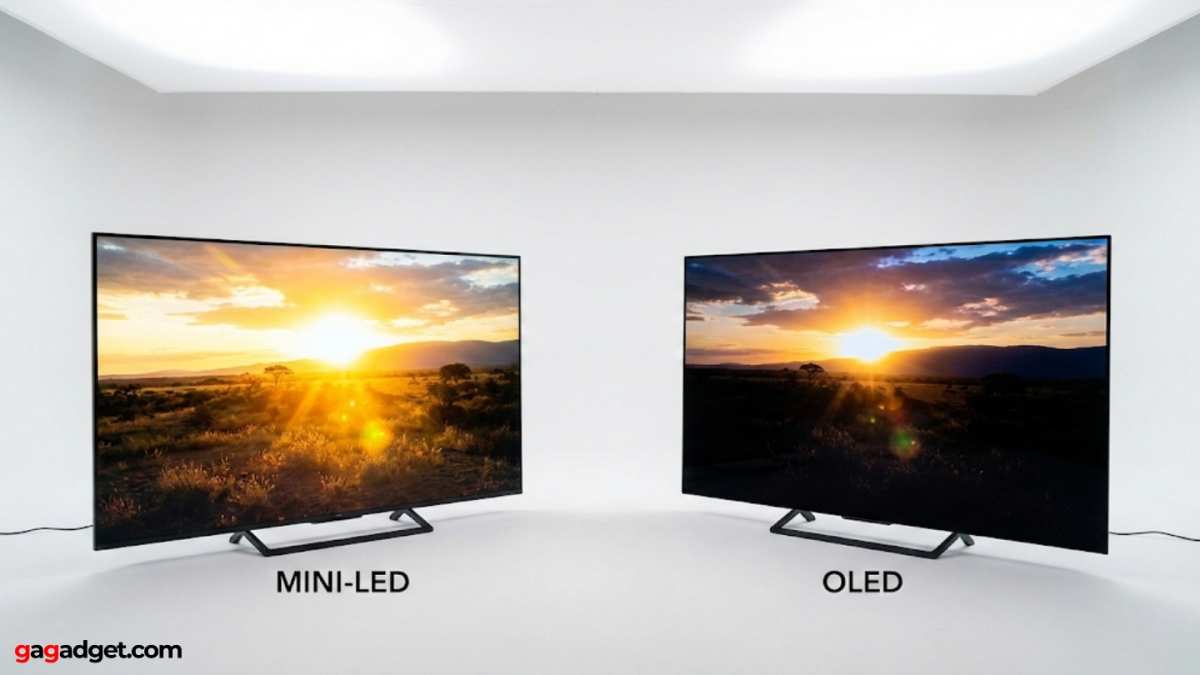
OLED has per-pixel dimming, which means zero blooming and perfect blacks. Mini LED can get much brighter (2,000+ nits vs. OLED's typical 1,000-1,300 nits peak).
Choose mini LED if:
- You play games with static HUD elements (less burn-in risk)
- You need high sustained brightness for HDR highlights
- You work in a bright room
- You want larger screen sizes (40"+) affordably
Choose OLED if:
- You prioritize perfect blacks and zero blooming
- You watch a lot of dark content
- You don't mind the burn-in risk for static elements
- You want the fastest response times
Mini LED vs. Standard LED Backlit Monitors
Standard edge-lit LED monitors are cheaper and thinner. Mini LED delivers dramatically better HDR and contrast.
Choose mini LED if:
- You want HDR content to look good
- You game or watch movies in dark rooms
- You're willing to pay a premium for better picture quality
Choose standard LED if:
- You're on a tight budget
- You only do office work and web browsing
- You prioritize thin design over picture quality
Mini LED vs. QD-OLED
QD-OLED combines quantum dot color with OLED's per-pixel emission. It offers OLED's perfect blacks with wider color gamut and higher brightness than traditional OLED.
QD-OLED currently competes more directly with OLED than mini LED. But for buyers choosing between technologies, it's worth knowing that QD-OLED exists as a premium alternative.
Pricing and What You Actually Get
Mini LED monitor prices have dropped significantly since 2022. Here's what to expect at each price tier.
Budget Tier ($300-$600)
You'll find 27" to 32" mini LED monitors with 16-32 zones. HDR performance is modest, better than standard LED but not transformative.
What you get:
- 144Hz-165Hz refresh rates
- 1440p or 4K resolution
- Basic HDR (DisplayHDR 400-600)
- VA or IPS panels
Brands to look at: TCL, Hisense, RedMagic, Cooler Master
Mid-Range ($600-$1,200)
This is the sweet spot for most buyers. 32" to 43" monitors with 200-576 zones deliver genuinely good HDR.
What you get:
- 144Hz-240Hz refresh rates
- 4K resolution
- DisplayHDR 600-1000
- Better dimming algorithms
- HDMI 2.1 on many models
Brands to look at: Gigabyte AORUS, Acer Predator, MSI, Samsung Neo G7
Premium Tier ($1,200-$3,000)
High zone counts (576-1,152) with refined dimming algorithms. These monitors deliver HDR that approaches OLED quality in bright scenes.
What you get:
- 1,000+ dimming zones
- DisplayHDR 1000-1400
- 2,000+ nit peak brightness
- Premium build quality
- Better warranty and support
Brands to look at: Samsung Odyssey Neo G9, ASUS ROG Swift PG32UQX, Dell Alienware
Professional Reference ($3,000+)
Color-accurate mini LED monitors for professional video and photography work. These prioritize calibration and consistency over gaming features.
What you get:
- Factory calibration to Delta E < 1
- Hardware LUT support
- Wide gamut coverage (99%+ DCI-P3)
- Sustained brightness consistency
- Professional connectivity (Thunderbolt, SDI on some)
Brands to look at: Apple Pro Display XDR, Dell UltraSharp UP3221Q, ASUS ProArt PA32UCG, Eizo ColorEdge
How to Choose the Right Mini LED Monitor for You
Follow these steps to narrow down your options.
Step 1: Define Your Primary Use Case
What will you do most on this monitor?
- Gaming: Prioritize refresh rate, response time, and input lag
- Content creation: Prioritize color accuracy, resolution, and calibration
- Office work: Prioritize resolution, text clarity, and connectivity
- Movie watching: Prioritize contrast, HDR performance, and screen size
Step 2: Set Your Priorities
Rank these features in order of importance to you:
- HDR performance (zone count matters)
- Color accuracy (panel type and calibration)
- Refresh rate (60Hz vs. 144Hz vs. 240Hz+)
- Resolution (1440p vs. 4K vs. ultrawide)
- Screen size (27" vs. 32" vs. 43"+)
- Budget
Step 3: Verify Before You Buy
Before purchasing, check:
- Independent reviews from display-focused outlets (RTINGS, TFTCentral, Hardware Unboxed)
- Zone count in the actual specs, not just "mini LED" marketing
- HDR certification level (DisplayHDR 400 vs. 1000 makes a huge difference)
- Connectivity matches your devices (HDMI 2.1 for consoles, DisplayPort for PC)
- Firmware update history from the manufacturer
Step 4: Check Return Policy and Warranty
Mini LED monitors can have uniformity issues. Buy from a retailer with at least a 30-day return window. Check the manufacturer's warranty for dead pixel and backlight bleed policies.
Samsung and Dell typically offer 3-year warranties. Budget brands may only offer 1 year.
Real-World Scenarios and Recommendations
Let's walk through some common buyer profiles.
Scenario 1: PS5 Gamer on a Budget
Needs: 4K/120Hz, HDMI 2.1, good HDR, under $700
Recommendation: Samsung Odyssey Neo G7 32" (G70NP) or Acer Predator X32 S
Both support HDMI 2.1 for PS5 at 4K/120Hz. The Neo G7 has better HDR performance with more zones. The Acer is often $200 cheaper.
Scenario 2: Freelance Video Editor
Needs: Color accuracy, 4K resolution, wide gamut, hardware calibration
Recommendation: Dell UltraSharp UP3221Q or ASUS ProArt PA32UCXR
Both offer factory calibration to Delta E < 2 and wide DCI-P3 coverage. The Dell has more zones (600 vs. 576). The ASUS sometimes includes a built-in calibration sensor.
Scenario 3: Competitive PC Gamer Who Also Watches Movies
Needs: High refresh rate, good HDR, 4K resolution, 32" size
Recommendation: Samsung Odyssey Neo G9 32" (G80SD) or ASUS ROG Swift PG32UCDP
The Samsung offers 240Hz with excellent HDR. The ASUS has a dual-mode feature for switching between high resolution and high refresh rate.
Scenario 4: Software Developer Wanting One Premium Display
Needs: Sharp text, high resolution, good ergonomics, USB-C connectivity
Recommendation: Dell U4025QW or LG 40WP95C-W
Both are 40" 5K2K ultrawides with mini LED backlight. The Dell has Thunderbolt 4. The LG uses an IPS panel with good text clarity.
Frequently Asked Questions
Is mini LED better than OLED?
It depends on your priorities. Mini LED gets brighter and has no burn-in risk. OLED has perfect blacks and zero blooming.
For bright rooms and gaming with static HUDs, mini LED wins. For dark room movie watching, OLED wins.
Do more zones always mean better picture quality?
Generally yes, but the dimming algorithm matters too. A well-tuned 256-zone monitor can look better than a poorly tuned 512-zone one. Zone count is important, but it's not the only factor.
Can I use a mini LED monitor for regular office work?
Absolutely. Mini LED monitors work fine for office tasks. You can turn off local dimming for standard work if you prefer.
The higher resolution and better panel quality often make them nicer to use than budget office monitors.
Will mini LED monitors drop in price?
Prices have already dropped significantly since 2022. Expect continued gradual declines, especially in the budget and mid-range segments. The premium tier with 1,000+ zones will likely stay expensive due to manufacturing complexity.
How long do mini LED monitors last?
LED backlights are rated for 30,000-50,000 hours typically. That's 10-15 years of normal use. The LED backlight itself rarely fails.
Other components (capacitors, power supply) usually fail first.

Similar Posts





















