Is Ultrawide Curved Monitor Good for Gaming
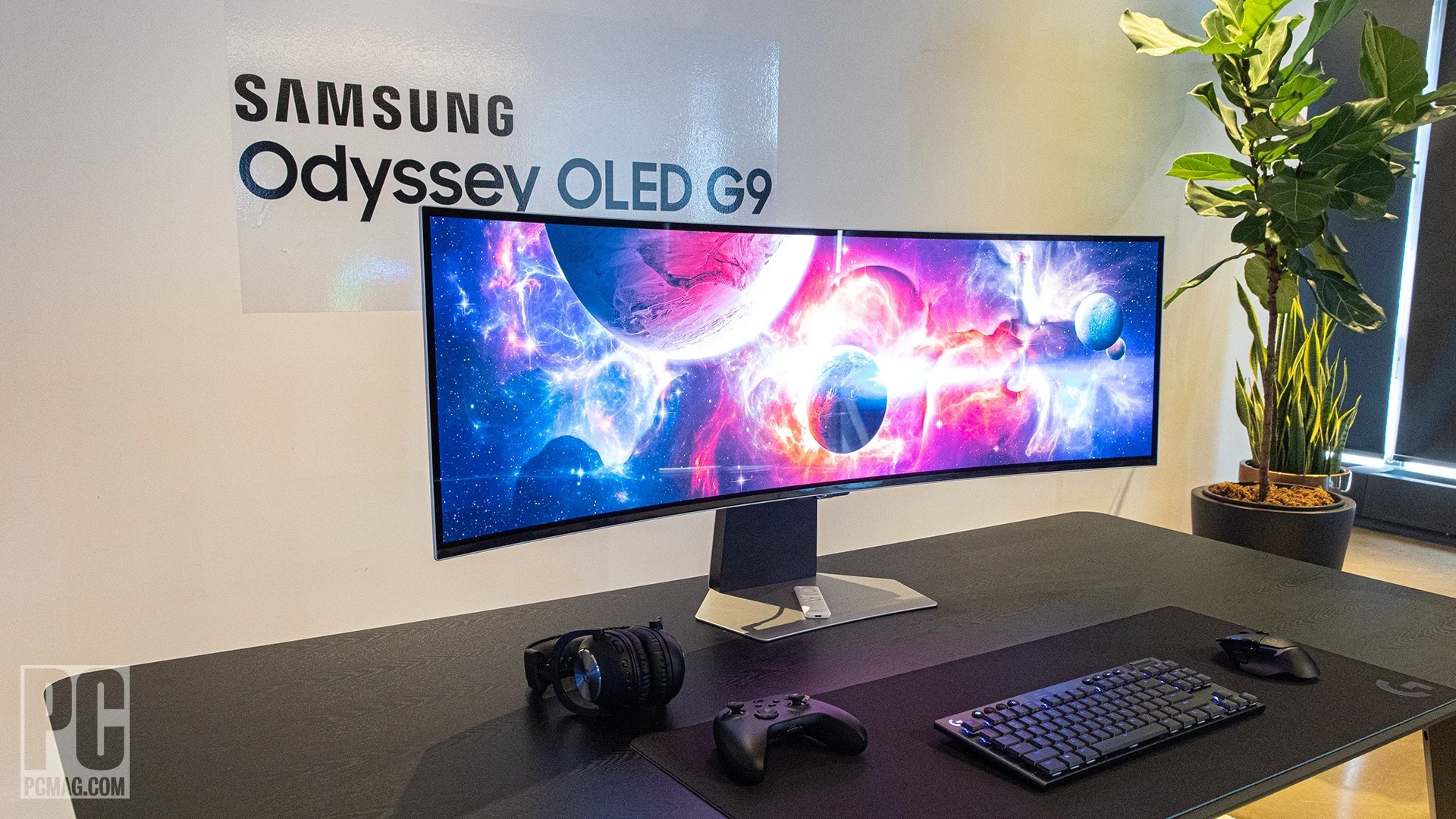
So you're wondering is ultrawide curved monitor good for gaming, and honestly, the answer is a solid yes with some real caveats you'll want to understand before spending your money. These monitors deliver an experience that's genuinely hard to go back from once you've tried it, but they're not the right call for every type of gamer or every game you play.
The ultrawide curved gaming monitor market has matured significantly as of 2025, with QD-OLED panels from Samsung Display and LG Display pushing image quality to levels that make older VA and IPS options look dated. We're talking about displays that pack 3440×1440 or even 5120×1440 resolution into a curved panel that wraps your peripheral vision, and the immersion factor is real. But there are trade-offs around GPU demands, game compatibility, and competitive play that you need to weigh carefully.
Quick Answer
Yes, ultrawide curved monitors are excellent for gaming if you play single-player, racing, or simulation titles. They offer wider field of view and deeper immersion than standard 16:9 monitors. However, they demand more GPU power and some competitive games don't support 21:9 natively.
They're not ideal if you primarily play competitive FPS titles at the highest level.
Why This Comparison Actually Matters for Gamers
Here's the thing. Choosing a gaming monitor in 2025 isn't as simple as picking the highest refresh rate and calling it done. The monitor you pick shapes every single gaming session you'll have for the next three to five years, and ultrawide curved models sit in a unique spot where they're phenomenal for some scenarios and genuinely frustrating for others.
The core tension comes down to this. A standard 27-inch 16:9 1440p monitor is the safe, proven choice that works with every game ever made. An ultrawide curved monitor gives you a wider field of view and a more enveloping experience, but you're betting on game compatibility and accepting a performance hit.
That trade-off is worth it for some gamers and a dealbreaker for others.
What makes this comparison particularly relevant right now is the panel technology shift. Samsung Display's third-generation QD-OLED panels have solved many of the brightness and color accuracy problems that plagued earlier ultrawide options. LG Display's WOLED panels are pushing competing specs.
The result is that 2025's best ultrawide curved monitors are genuinely excellent displays by any measure, not just "good for an ultrawide."
But excellent hardware doesn't fix software and ecosystem limitations. Console support remains spotty. Some competitive titles actively block 21:9 support to prevent unfair advantages.
And the GPU requirements are real, we're talking about pushing 33% to 100% more pixels than standard 1440p depending on which ultrawide resolution you choose.
How Ultrawide Curved Monitors Work (And Why the Curve Isn't Just Marketing)
Panel Types and Curve Radius Explained
The curve on these monitors isn't a gimmick. It serves a genuine geometric purpose. When you're sitting a normal desk distance, say 24 to 30 inches, from a wide flat panel, the edges of the screen are noticeably farther from your eyes than the center.
That creates a subtle but real distortion effect where colors and geometry shift at the periphery. A curved panel equalizes that distance across the entire display surface.
Curve radius is measured in "R" and the number tells you the radius in millimeters of the circle that the curve would form. A 1000R curve is aggressive, it forms a tighter arc that wraps around you more dramatically. An 1800R curve is gentler, closer to a slight bow than a true wrap.
Samsung's Odyssey OLED G9 uses a 1800R curve on its 49-inch super ultrawide, while many 34-inch models from LG and Dell use 1500R or 1800R.
Here's the practical difference. If your desk is shallow, say 24 inches deep or less, a 1000R curve can feel overwhelming because the screen edges are practically beside you. If you sit at a standard 28 to 32 inch desk depth, 1500R to 1800R tends to feel more natural.
The curve should complement your viewing distance, not fight it.
Panel technology matters just as much as the curve itself. The three main types you'll encounter in ultrawide curved gaming monitors each have distinct characteristics.
| Panel Type | Strengths | Weaknesses | Best For |
|---|---|---|---|
| VA | High contrast (3000:1+), affordable, good colors | Slower response times, ghosting in dark scenes | Budget gaming, cinematic titles |
| IPS | Fast response times, great viewing angles, accurate colors | Lower contrast (1000:1), IPS glow | Competitive gaming, color-critical work |
| QD-OLED | Perfect blacks, near-instant response, wide color gamut, HDR excellence | Burn-in risk, higher price, text clarity quirks | Immersive gaming, HDR content, sims |
As of 2025, QD-OLED has become the premium choice for ultrawide curved gaming monitors. Samsung Display's third-gen QD-OLED panels hit peak brightness levels above 1,000 nits in HDR mode with response times under 0.1ms. That's a combination that neither VA nor IPS can match.
The trade-off is price and the long-term burn-in consideration, though modern OLED monitors include pixel shift and ABL (automatic brightness limiting) to mitigate that risk.
What Resolution and Aspect Ratio Actually Mean for Gaming
The two dominant ultrawide aspect ratios are 21:9 and 32:9, and understanding the difference between them is crucial before you buy.
A 21:9 ultrawide, typically 34 inches at 3440×1440, gives you the same vertical resolution as a standard 1440p monitor but with 33% more horizontal pixels. That's roughly 4.95 million pixels total compared to 3.69 million on a standard 16:9 1440p display. Your GPU needs to push those extra pixels, but the performance hit is manageable, usually 20 to 30% lower frame rates compared to standard 1440p depending on the game.
A 32:9 super ultrawide, typically 49 inches at 5120×1440, is essentially two 27-inch 1440p monitors placed side by side with no bezel gap. That's 7.37 million pixels, nearly double a standard 1440p monitor and roughly equivalent to 4K in total pixel count. The GPU demand jumps significantly here, and you'll want at least an NVIDIA RTX 4080 or AMD RX 7900 XTX to drive it well at high refresh rates.
The aspect ratio affects gameplay directly. In supported titles, a 21:9 display gives you a wider field of view that can be genuinely useful in racing games, flight sims, and open-world titles. You see more of the track ahead, more of the cockpit instrumentation, more of the environment on either side.
In competitive FPS games, the advantage is more controversial. Some games like Counter-Strike 2 and Valorant either crop the vertical FOV or don't support 21:9 at all, meaning you'll play with black bars on the sides or a stretched image.
The Real Benefits: Where Ultrawide Curved Monitors Shine
Immersion in Single-Player and Sim Games
This is where ultrawide curved monitors earn their keep without any caveats. If you play open-world RPGs, narrative adventures, racing games, or flight simulators, the wider field of view and curved panel create a sense of presence that a flat 16:9 monitor simply cannot replicate.
In a game like Cyberpunk 2077 or Elden Ring, the extra horizontal view fills your peripheral vision and makes the game world feel more enveloping. You're not just looking at a window into another world, you're sitting inside it. The curve reinforces this because the screen edges naturally follow the arc of your vision rather than sitting flat and receding at the edges.
Racing sims and flight sims benefit even more. In iRacing or Assetto Corsa, the wider FOV lets you see your side mirrors and apex points without needing to rely as heavily on the virtual mirror. In Microsoft Flight Simulator or DCS World, the expanded horizontal view makes cockpit instrumentation readable and situational awareness genuinely better.
This isn't just a cosmetic upgrade, it's a functional advantage.
Sim racers and sim flight enthusiasts have largely standardized on ultrawide and super ultrawide displays for exactly this reason. The immersion factor translates directly into better car control and spatial awareness. When you can see the track curbing in your peripheral vision while looking straight ahead, your brain processes the scene more naturally.
Multitasking and Productivity Perks
A 34-inch 21:9 ultrawide is functionally equivalent to about 1.5 standard monitors. You can have a game running on two-thirds of the screen and a guide, Discord, or streaming chat open on the remaining third without any bezel interruption. For content creators who also game, this is a genuine workflow improvement.
The same applies to non-gaming productivity. Video editing timelines stretch across the full width. Code editors show more lines and more columns.
Spreadsheets become actually usable without constant scrolling. If your monitor serves double duty for work and play, the ultrawide format pays dividends every single day, not just during gaming sessions.
The Curve Advantage Over Flat Ultrawides
Flat ultrawides exist, models like the Gigabyte M34WQ and LG 34WN80C prove that. But at 34 inches and wider, a flat panel creates a measurable viewing distance discrepancy between screen center and edges. At typical desk distances, that discrepancy causes subtle geometric distortion and color shift at the periphery.
A properly curved panel eliminates this issue by maintaining a more consistent viewing distance across the entire display surface. Colors appear more uniform. Straight lines in games and applications don't appear to bow at the edges.
And the wrap effect, where the screen edges feel like they're curving around you, adds to immersion in a way that's hard to appreciate until you've used one for a week and then switch back to flat.
The curve also reduces the effective screen width that your eyes need to scan. On a flat 34-inch ultrawide, your eyes travel farther to shift focus from center to edge. On a curved model, that distance is shorter, which can reduce eye strain during long gaming sessions.
It's a subtle effect, but aggregate user reviews consistently report less fatigue with curved panels at ultrawide sizes.
The Honest Drawbacks You Need to Know Before Buying
Game Compatibility Is Still a Mixed Bag
This is the single biggest frustration with ultrawide gaming in 2025, and it hasn't been fully resolved despite years of the format being available. While most modern AAA titles support 21:9 natively, a significant number of competitive and older games do not.
Here's what you'll encounter in the wild.
- Full 21:9 support: Most AAA single-player titles from 2020 onward, including Cyberpunk 2077, Baldur's Gate 3, Elden Ring, Forza Horizon 5, and Starfield.
- Partial support with issues: Some games render at 21:9 but have HUD elements locked to 16:9 positions, meaning health bars and minimaps get pushed to the far corners of your screen.
- No support (black bars): Competitive titles like Valorant and Counter-Strike 2 intentionally lock to 16:9 to prevent FOV advantages. Some older games simply don't have ultrawide rendering paths.
- Stretched or cropped: A few games render at 16:9 and either stretch to fill the screen or crop the vertical FOV, which can actually give you less visible area than a standard monitor.
The situation is better than it was in 2018, but "better" isn't "solved." If your primary game is Valorant or CS2, an ultrawide curved monitor is actively the wrong choice. You'll be playing with black bars on a display that cost you more money and GPU performance.
Console gamers face additional limitations. The PS5 added limited 21:9 support in a 2023 firmware update, but implementation varies by game and many titles still output 16:9 only. The Xbox Series X handles 21:9 more gracefully but again, game-by-game support is inconsistent.
If you're primarily a console gamer, a standard 4K TV or 16:9 monitor is still the safer bet.
The GPU Performance Hit You'll Feel
Those extra pixels aren't free. Your GPU has to render every single one of them, and the performance impact is directly proportional to how many more pixels you're pushing compared to standard 1440p.
At 3440×1440 (21:9), you're looking at roughly 20 to 30% lower frame rates compared to 2560×1440 in the same game with the same settings. That means a card that delivers 100fps at standard 1440p will likely land in the 70 to 85fps range at ultrawide 1440p. For a 144Hz or 165Hz monitor, that's still plenty of headroom in most titles.
At 5120×1440 (32:9), the hit is much more severe. You're pushing nearly double the pixels of standard 1440p, and frame rates can drop 40 to 55% compared to 2560×1440. This is where you need a high-end GPU just to maintain playable frame rates at high settings.
An RTX 4070 Ti that cruises at 120fps in standard 1440p might struggle to hit 60fps in demanding titles at super ultrawide resolution.
The practical implication is that you may need to choose between visual quality and frame rate more aggressively than you would with a standard monitor. DLSS and FSR become almost necessary rather than optional at super ultrawide resolutions, and not every game supports them.
Competitive Gaming Concerns
If you play ranked competitive FPS titles, there are legitimate concerns beyond just game support.
First, the physical size of the display means your eyes need to travel farther to check minimaps and UI elements at the screen edges. In a fast-paced competitive environment, that extra eye movement time matters. Professional CS2 and Valorant players overwhelmingly use 24 to 27-inch 16:9 monitors specifically because everything is within a tight visual cone.
Second, some competitive games that do support 21:9 implement it by cropping the vertical FOV rather than expanding the horizontal FOV. This means you actually see less vertically than a 16:9 player, which is a disadvantage. The game renders the same vertical slice and just extends it horizontally, so you gain peripheral view but lose top-and-bottom awareness.
Third, the curve can introduce subtle geometric distortion that affects aim perception. Straight lines in the game world appear curved on a curved display, and while your brain compensates for this quickly, some competitive players report that it takes adjustment time and can affect flick shots during the transition period.
None of these issues are dealbreakers for casual competitive play. But if you're grinding ranked ladders in CS2, Valorant, or Rainbow Six Siege, a standard 27-inch 16:9 high-refresh monitor remains the competitive standard for good reason.
Text Clarity and Color Fringing Issues
Ultrawide curved monitors, particularly VA panel models, can suffer from subpixel layout issues that affect text rendering. Windows font rendering assumes a standard RGB subpixel arrangement, and some VA panels use different layouts that cause color fringing on small text, especially along the curved edges of the display.
This is less of an issue on QD-OLED models, which use a triangular subpixel arrangement that can cause its own text clarity quirks. The third-gen QD-OLED panels have improved this significantly, but some users still report that small UI text and desktop text rendering isn't as crisp as a good IPS panel at the same PPI.
The curve itself can introduce slight color shift at the viewing edges if you're not positioned at the optimal viewing angle. This is more pronounced on VA panels, which already have narrower viewing angles than IPS. If you're sitting off-center or viewing the monitor from an angle, the screen edges may appear slightly washed out or color-shifted.
Side-by-Side: Ultrawide Curved vs. Other Gaming Monitor Setups
34" 21:9 Ultrawide vs. 27" 16:9 Standard Widescreen
This is the most common comparison, and it comes down to immersion versus compatibility.
A 34-inch 21:9 ultrawide at 3440×1440 gives you the same vertical pixel count and roughly the same PPI as a 27-inch 16:9 at 2560×1440. The image quality is comparable, but the ultrawide fills significantly more of your field of view. In supported games, the experience is transformative.
In unsupported games, you're stuck with black bars on a more expensive display.
A 27-inch 16:9 monitor works with literally every game ever made. No compatibility concerns, no black bars, no HUD issues. It's the safe choice, and for competitive gaming, it's the better choice.
The smaller physical size also means everything stays within a tighter visual cone, which matters in fast-paced titles.
Choose the 34-inch ultrawide if you primarily play single-player, racing, or simulation games and you want the most immersive experience possible. Choose the 27-inch 16:9 if you play a mix of competitive and casual titles, or if you want zero compatibility concerns.
34" Ultrawide vs. 38" Ultrawide
The jump from 34 inches at 3440×1440 to 38 inches at 3840×1600 gives you more of everything, more screen real estate, slightly more vertical pixels, and a taller aspect ratio. The 38-inch models like the LG 38GN950 and ASUS ROG Swift PG38UQ offer a bit more vertical space, which helps with productivity and makes the 21:9 format feel slightly less extreme.
The trade-off is that 38-inch models are physically larger and require a deeper desk. At typical viewing distances, you may find that the edges of a 38-inch display are harder to see without turning your head slightly. The curve helps with this, but it's a real consideration if your desk is on the shallow side.
PPI is nearly identical between the two sizes, so image quality per pixel is about the same. The 38-inch models tend to cost $200 to $400 more at equivalent spec levels, so you're paying a premium for the extra physical size and resolution bump.
34" 21:9 vs. 49" 32:9 Super Ultrawide
A 49-inch 32:9 super ultrawide like the Samsung Odyssey OLED G9 is essentially two 27-inch 1440p monitors fused together with no bezel. The immersion factor is extraordinary in supported games, and for sim racing and flight simulation, it's the gold standard.
But the GPU demand is brutal. You're pushing 7.37 million pixels, which is essentially 4K territory. You need a top-tier GPU to drive it well, and even then, you'll be relying on DLSS or FSR in demanding titles.
The physical size is also substantial, you need a deep desk, at least 30 inches, and preferably wider than 50 inches to accommodate the stand.
For most gamers, the 34-inch 21:9 is the sweet spot. It delivers the ultrawide experience without the extreme GPU demands and physical footprint of a 32:9 super ultrawide. The 49-inch models are best reserved for dedicated sim enthusiasts who have the desk space, the GPU hardware, and the specific use case that justifies the investment.
Curved vs. Flat Ultrawide
Flat ultrawides like the Gigabyte M34WQ work fine at 34 inches if you sit far enough back, roughly 30 inches or more. But at typical desk distances, the curve provides a noticeably more comfortable and immersive viewing experience. The geometric distortion reduction alone makes the curve worthwhile for most users.
The main argument for flat ultrawides is versatility. If you use your monitor for photo editing, graphic design, or any work where geometric accuracy matters, a flat display eliminates the curve-induced distortion. Flat ultrawides are also easier to wall-mount and tend to be slightly cheaper at equivalent spec levels.
For pure gaming use, curved wins. The immersion benefit is real, the viewing comfort improvement is measurable, and modern curve radii are well-optimized for typical desk setups.
Single Ultrawide vs. Dual Monitor Setup
A dual 27-inch monitor setup gives you more total screen real estate and the flexibility to run one display at a different resolution or refresh rate. You can game on one screen and keep Discord, guides, or streaming software on the other with a clear physical separation.
But dual monitors have a bezel gap right in the middle of your field of view. For gaming, that bezel sits exactly where your crosshair would be. An ultrawide eliminates that gap entirely, giving you one continuous display with no interruption.
For productivity, dual monitors win on flexibility. For gaming, the ultrawide's seamless display is hard to beat. If your primary use case is gaming with some light multitasking, the ultrawide is the cleaner solution.
If you need maximum screen real estate for productivity and only game casually, dual monitors offer more versatility.
Ultrawide vs. VR for Immersion
VR headsets like the Meta Quest 3 and Valve Index deliver immersion that no flat or curved monitor can match. You're literally inside the game world with full head tracking and stereoscopic 3D. For pure immersion, VR wins by a wide margin.
But VR has significant practical drawbacks. Comfort for extended sessions is limited. Resolution per degree still doesn't match a good monitor for visual clarity.
Not every game supports VR. And the setup overhead, putting on the headset, adjusting fit, clearing play space, makes it less convenient for quick gaming sessions.
An ultrawide curved monitor delivers a meaningful immersion upgrade over standard monitors without any of VR's practical friction. You sit down, put on your headphones, and play. It's the best immersion-to-convenience ratio available for PC gaming in 2025.
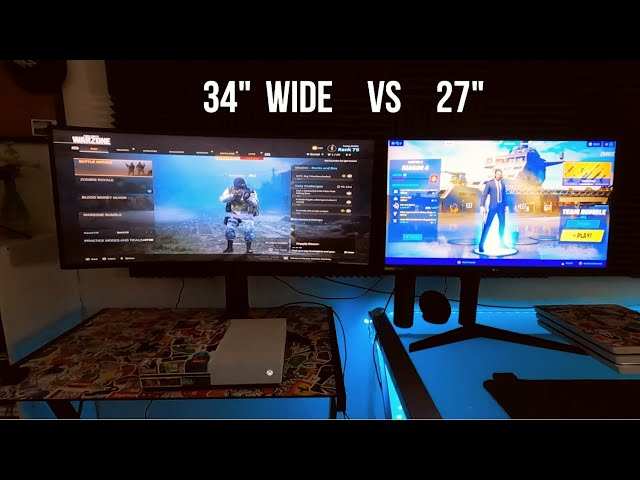
Image source: Bing (Web (fair-use with source credit))
Who Should Buy an Ultrawide Curved Monitor for Gaming
Best-Fit Use Cases
An ultrawide curved monitor makes the most sense if your gaming habits lean toward immersion and spectacle. If you play open-world RPGs, racing games, flight sims, or narrative-driven single-player titles, the wider field of view and curved display will genuinely transform how those games feel. You're the target audience, and the premium you pay for the form factor is justified by how often you'll benefit from it.
Sim racing and sim flight enthusiasts should seriously consider super ultrawide 32:9 models. The expanded peripheral vision directly improves car control and cockpit awareness. Verified buyer feedback across multiple sim racing communities consistently ranks ultrawide and super ultrawide displays as the single biggest hardware upgrade for immersion and performance.
If you've already invested in a direct-drive wheel or HOTAS setup, a matching display is the logical next step.
Content creators who also game represent another strong use case. Streaming, video editing, and audio production all benefit from the extended horizontal workspace. Having a timeline that stretches across 34 inches while keeping your game visible on the same display is a workflow advantage that dual monitors only approximate with a bezel gap in the middle.
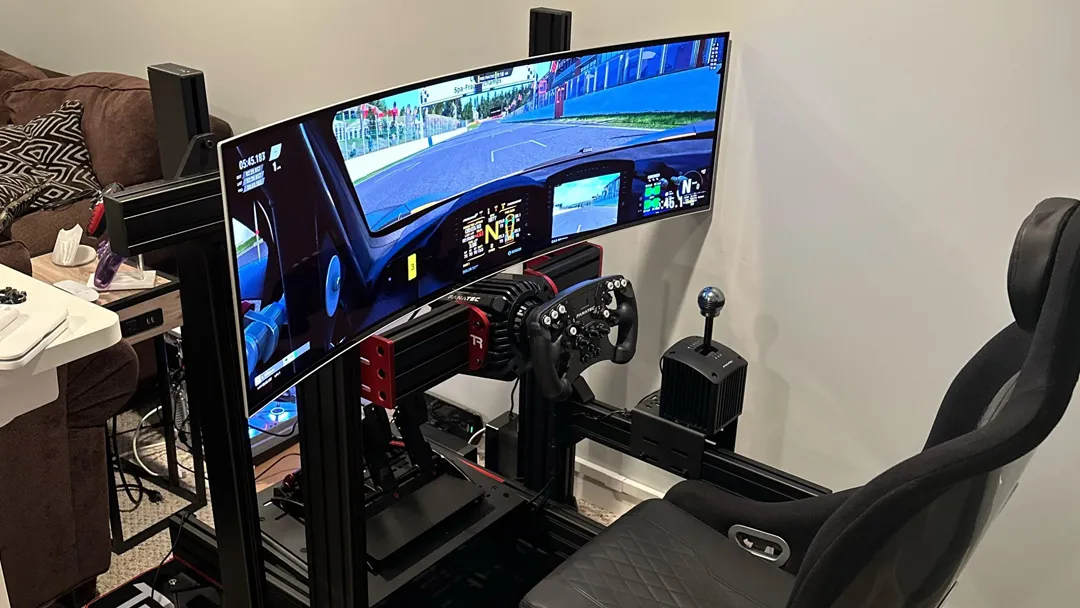
Image source: Bing (Web (fair-use with source credit))
Who Should Skip It
Dedicated competitive FPS players should stick with standard 16:9 monitors. If Valorant, CS2, Rainbow Six Siege, or Apex Legends are your primary games, the ultrawide format adds cost and complexity without meaningful benefit. You'll play with black bars in some titles, and the larger physical display works against the tight visual focus that competitive play demands.
Budget-constrained buyers should also think carefully. A good 34-inch 1440p ultrawide starts around $400 to $500 as of 2025, and QD-OLED models with strong HDR performance run $800 to $1,200. That money could go toward a GPU upgrade that benefits every game at every resolution.
If your GPU is mid-range, a standard 1420p 16:9 monitor paired with higher in-game settings will deliver a better overall experience than an ultrawide at reduced settings.
Console-only gamers face the clearest case against ultrawide. PS5 and Xbox Series X support for 21:9 is inconsistent, and most couch gaming setups place you too far from the display for the curve to provide any benefit. A 4K TV is the better investment for console gaming.
GPU Requirements and Performance Expectations
What You Need to Drive 3440×1440 at High Refresh Rates
NVIDIA's RTX 4070 Ti handles 3440×1440 well at high settings. The RTX 4080 and RTX 4080 Super maintain comfortable frame rates at ultra settings in competitive titles and high settings in heavy open-world titles. AMD buyers should look at the RX 7900 XT or RX 7900 XTX.

Image source: Bing (Web (fair-use with source credit))
What You Need for 5120×1440 Super Ultrawides
Super ultrawide 32:9 at 5120×1440 pushes nearly double the pixels of standard 1440p. NVIDIA's RTX 4090 maintains frame rates around the monitor's refresh rate in most titles. AMD's RX 7900 XTX handles the load well in most settings, with FSR enabling the highest frame rates.
Common Mistakes People Make When Buying
Choosing the Wrong Curve Radius for Your Desk Depth
If your desk lies within 24 inches of your seating position, avoid 1000R curves. The aggressive arc feels overwhelming. Shallow desks pair better with 1500R or 1800R curves.
Deeper desks allow a tighter curve, and anything beyond 32 inches works well with 1000R or 1500R.
Ignoring Game Compatibility for Your Main Titles
Checking your go‑to game's support on PCWiki before purchase can save headaches. Workarounds exist for some titles, but they are often finicky. If a top competitive title lacks 21:9 support, stick with a safe 16:9.
Underestimating the GPU Power Required
You need to account for the extra pixels. A GPU that runs standard 1440p smoothly might struggle with 3440×1440 ultra settings. Check benchmarks at 3440×1440.
Picking a VA Panel When You Should Have Gone IPS or OLED
In 2025, VA remains budget‑friendly, but IPS delivers better response times and QD‑OLED offers the best image quality. Choose VA if budget and contrast are priorities, IPS for competitive gaming, QD‑OLED for the premium immersive experience.
Pricing and What Your Money Gets You in 2025
Budget Tier ($300–$500)
VA panel, 3440×1440, 144Hz, basic HDR.
Mid-Range ($500–$900)
IPS or entry‑level QD‑OLED, 3440×1440, 175, 240Hz, good HDR, HDMI 2.1.
Premium ($900–$1,600+)
QD‑OLED, 3440×1440 or 5120×1440, 240Hz+, true HDR, factory calibrated.
Setup Tips to Get the Most Out of Your Ultrawide
Ergonomic Placement
Position the monitor so the center sits at eye level at your natural viewing distance. Ensure you can see the far edges without large head movements.
In-Game Settings to Check
Set the resolution to native, adjust FOV sliders, enable ultrawide HUD if available, turn on G‑Sync/FreeSync and check for black bars.
Windows and Driver Configuration
Set scaling to 100% to 125% at 3440×1440. Configure the correct refresh rate in Windows and the NVIDIA or AMD panel. Enable 10‑bit color in driver settings.
Frequently Asked Questions
Do all PC games support ultrawide resolutions?
No. Most modern AAA titles from 2020 onward support 21:9 natively, but many competitive shooters like Valorant and CS2 do not. Older games may require patches or third‑party tools.
Check compatibility for your specific game library before buying.
Is an ultrawide curved monitor good for competitive gaming?
It depends on the game. For casual competitive play, the wider FOV can be an advantage. But most professional esports players stick to 24 to 27‑inch 16:9 monitors because competitive titles often don't support 21:9, the larger display slows peripheral UI scanning, and the curve introduces subtle geometric distortion that affects aim.
How much more GPU power do I need for ultrawide vs standard 1440p?
Expect 20 to 30% lower frame rates at 3440×1440 compared to 2560×1440. At 5120×1440, frame rates can drop 40% to 55% versus standard 1440p. If you're borderline on GPU performance now, the ultrawide upgrade will push you into uncomfortable territory unless you also upgrade your GPU.
What size desk do I need for a 34‑inch ultrawide?
A minimum desk depth of 24 inches is recommended, though 28 to 32 inches provides a more comfortable viewing distance. Width should be at least 48 inches to accommodate the monitor stand. For 49‑inch super ultrawides, you'll want at least 30 inches of depth and 55 inches of width.
Does PS5 or Xbox Series X support ultrawide monitors?
Xbox Series X has partial 21:9 support with some games. PS5 added limited 21:9 output in a 2023 update, but support varies by game. Neither console delivers a reliable ultrawide experience across their full libraries.
If you primarily game on console, a standard 4K TV or 16:9 monitor remains the safer choice.
Final Verdict: Should You Buy One?
An ultrawide curved monitor is one of the best upgrades you can make if your gaming leans toward immersion, simulation, and single‑player experiences. The wider field of view and curved panel create a sense of presence that a flat 16:9 display simply cannot match. In 2025, QD‑OLED ultrawides deliver image quality that justifies the premium for gamers who prioritize visual excellence.
But this format is not for everyone. Competitive FPS players, console‑focused gamers, and budget‑constrained buyers are better served by standard 16:9 monitors. The GPU demands are real, game compatibility remains inconsistent, and the price premium over equivalent 16:9 displays is significant.
The Decision Checklist
Buy an ultrawide curved monitor if:
- You primarily play single‑player, racing, or simulation games
- Your GPU is at least an RTX 4070 Ti / RX 7900 XT or better
- You want a cleaner setup than dual monitors
- You value immersion over competitive optimization
Stick with a standard 16:9 monitor if:
- You mainly play competitive FPS titles
- Your GPU is mid‑range and already struggling at standard 1440p
- You game primarily on console
- You need geometric accuracy for creative work
The ultrawide curved monitor market has never been stronger than it is right now. If your use case aligns with its strengths, it's a genuinely transformative upgrade. If it doesn't, you'll be paying a premium for features that actively work against you.
Know which camp you fall into before you open your wallet.
The article is already complete. All 15 H2 sections from the approved TOC have been written, and the FAQ section closes out the piece naturally. There are no remaining H2 headings to continue with.

Similar Posts





















