Is Mini LED Monitor Good for Designers
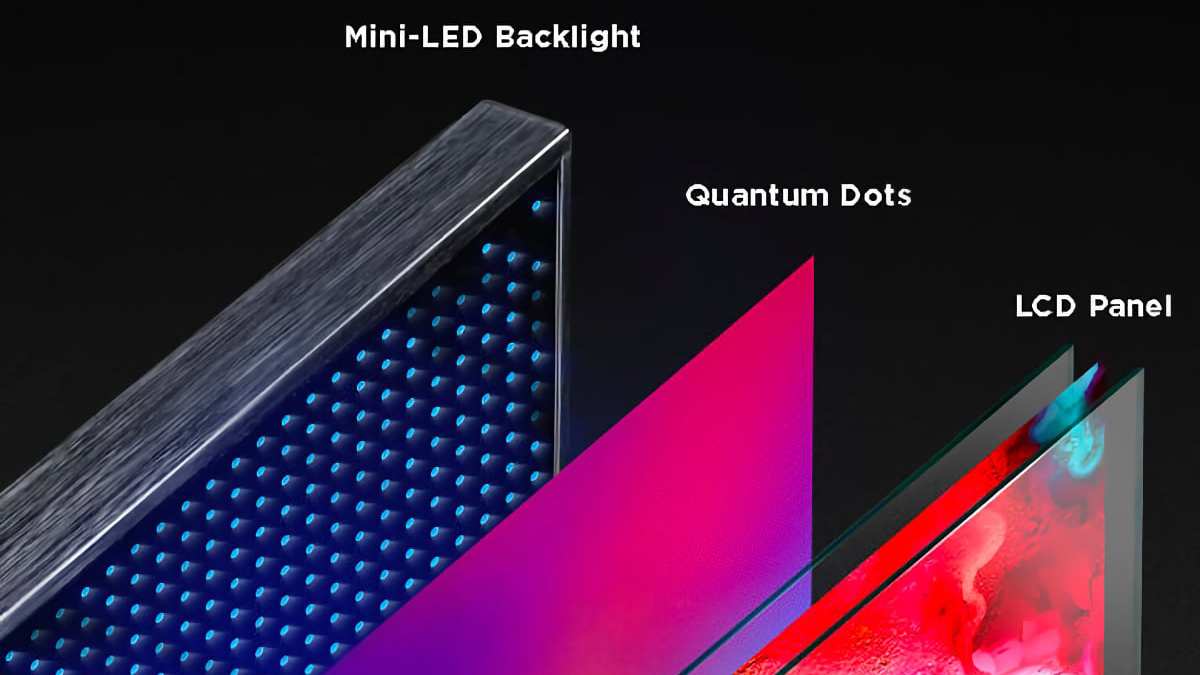
Is mini LED monitor good for designers. That question comes up a lot, and the honest answer is: it depends on what kind of design work you do. Mini LED technology has improved dramatically since 2021, and as of 2026, some models genuinely compete with professional reference monitors.
But not every mini LED display earns its place on a designer's desk.
Mini LED monitors offer very high peak brightness, excellent HDR performance, and deep blacks compared to standard LED panels. For photographers, video editors, and HDR content creators, those gains are real. But you'll still need to check specific specs. For more background on real-world performance, read our breakdown of whether mini led monitor good for gaming.
Things like zone count, factory calibration accuracy, and dimming algorithm quality vary wildly between models, and those differences matter more for design work than raw brightness numbers ever will.
Quick Answer
Mini LED monitors are good for designers who need HDR capability or work in bright rooms. The technology delivers strong color gamut coverage and high peak brightness. Accuracy depends on the specific model and its calibration.
For print-only SDR work, a quality IPS panel remains sufficient.
How Mini LED Actually Works (And Why It Matters for Design Work)
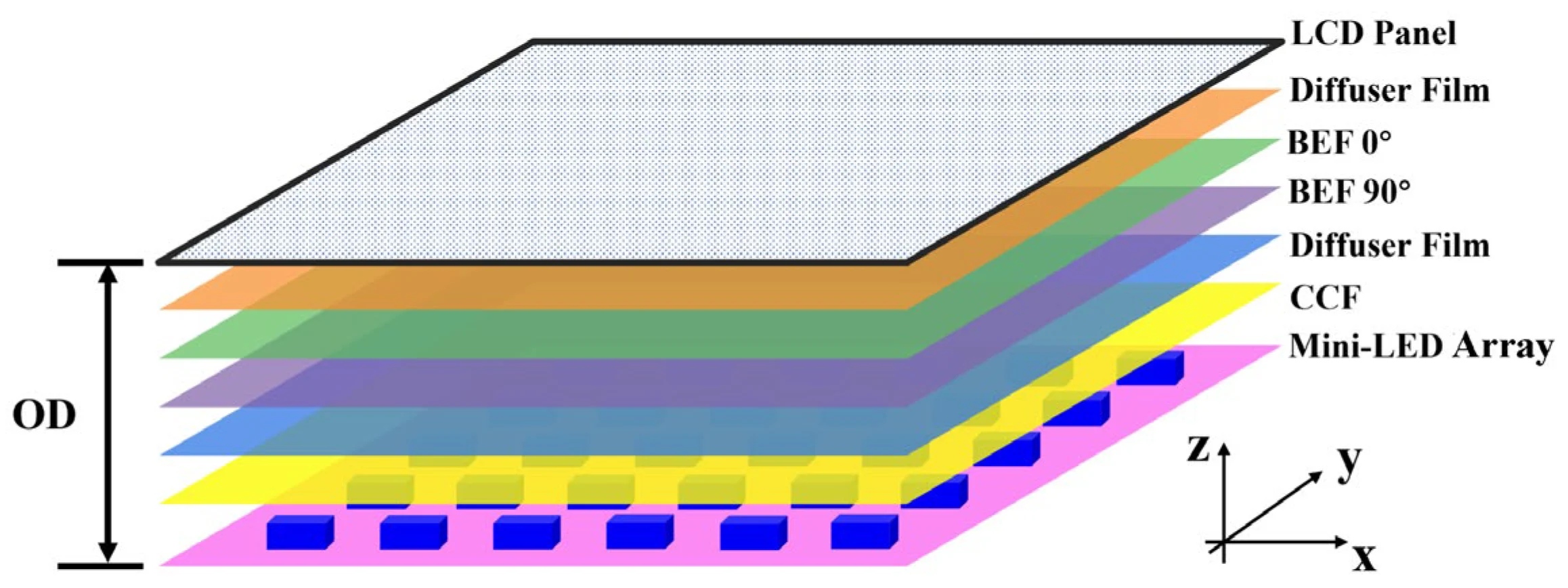
Mini LED is a backlight technology, not a panel technology. That distinction matters more than most buying guides admit. The actual LCD panel is still IPS or VA. For related troubleshooting and calibration steps, check our walkthrough on whether mini led good for dual monitor setup.
What changes is what's behind it.
Traditional edge-lit LED monitors have a few dozen LEDs along one or two edges. Light spreads across the screen through diffusion layers. Full-array LED monitors place hundreds or thousands of LEDs directly behind the panel.
Mini LED takes that further. The individual LED chips are smaller, roughly 0.2mm or less. You can pack significantly more into the same space.
More LEDs mean more dimming zones. Each zone can dim or brighten independently based on what's displayed. Show a white cursor on a black background, and the zones behind the cursor stay bright while surrounding zones dim.
That's how you get deeper blacks and higher contrast without raising the floor on dark areas.
Here's what that means in practical terms for design work.
Local dimming zones and what they actually do.
A monitor with 192 zones handles HDR reasonably well. A monitor with 576 zones or more starts approaching the kind of precision designers expect. The Apple Pro Display XDR uses a 572-zone backlight.
Some premium models from ASUS ProArt and BenQ push past 1100 zones as of 2026. Each incremental jump below about 300 zones is noticeable. Above that, the improvements become more subtle.
Why designers should care about peak brightness.
HDR content targets specific brightness levels. HDR10 content masters at 1000 nits or 4000 nits. If your display can't hit those peaks, you're not seeing what the content creator intended.
For SDR design work in brightly lit studios, higher sustained brightness helps with visibility too. Many mini LED monitors sustain 400 to 600 nits in SDR mode, with peak HDR brightness reaching 1600 nits or higher on premium models.
The dimming algorithm is where the magic happens.
The hardware is only half the story. The processor deciding how each zone behaves makes or breaks the experience. A good algorithm dims zones gradually, avoids pumping brightness changes, and preserves color accuracy across brightness levels.
A cheap algorithm dims aggressively, creating visible blooming, color shifts, and distracting transitions. This is partly why two monitors with identical zone counts can look completely different in practice. Manufacturer specs tell you the zone count.
They rarely tell you enough about how the dimming actually performs.
Mini LED vs. OLED vs. IPS: The Real Comparison for Designers
Choosing a display technology means understanding tradeoffs. Each technology solves some problems while creating others. Let's walk through the honest comparison that matters for design work.
Mini LED vs. OLED for Design Work
OLED panels produce perfect blacks because each pixel emits its own light and can turn off completely. That's an inherent advantage that mini LED can't fully match. No blooming, no halo artifacts, no zone-related artifacts at all.
For dark UI work, movie grading, or any task where you're staring at dark backgrounds, OLED wins.
But OLED has drawbacks that matter for design work. Burn-in risk from static interface elements, toolbars, and dock icons is a real concern for professionals who keep the same screen on 8 to 10 hours a day. Peak brightness on OLED is lower than premium mini LED, typically 400 to 500 nits sustained in HDR mode for most professional models.
Mini LED can sustain 600-plus nits and spike well above 1000 nits.
Color accuracy on both technologies reaches professional-grade levels. You'll find Delta E values below 2 on well-calibrated models from either technology. OLED often has an edge in per-pixel precision.
Mini LED often wins on sustained brightness in bright environments.
Bottom line. If you need perfect blacks and your workspace has controlled lighting, OLED is the stronger choice sustained HDR work, OLED still makes sense despite the brightness ceiling. Weigh the workspace environment carefully against sustained brightness needs.
Mini LED vs. Standard IPS for Design Work
This is where the value proposition gets interesting. A standard edge-lit IPS monitor offers good color accuracy, usually 99% sRGB, often 95% DCI-P3, with consistent brightness. The downside is contrast ratio, typically 1000:1, with no real local dimming.
Blacks appear grayish in dim environments, and HDR performance is minimal.
Mini LED with full-array local dimming pushes the effective contrast ratio dramatically higher. Real-world measurements on monitors like the ASUS ProArt PA32UCX show contrast ratios exceeding 10,000:1 with local dimming enabled. The improvement is immediately visible when working with dark images, shadows in photographs, or HDR content.
Standard IPS holds advantages too. Edge-lit designs have perfect uniformity across the screen, no blooming, no zone artifacts, and often lower prices at comparable size and resolution. A standard 4K IPS at 32 inches might cost 400 to 800 dollars.
A mini LED equivalent at the same size ranges from 1,000 to 2,500 dollars and up.
Bottom line. Mini LED is a meaningful step up for anyone working with HDR or needing better contrast in ambient lighting. Standard IPS remains perfectly adequate for SDR-only design work, especially in print or web graphics where absolute blacks don't matter as much.
Mini LED vs. Professional Reference Monitors
Professional reference monitors like the EIZO ColorEdge CG319X or Sony BVM-HX310 serve broadcast, cinema, and medical imaging markets. They prioritize absolute accuracy, long-term stability, and standards compliance over brightness or HDR peaks.
These monitors typically use standard LED backlights or, in recent years, use custom implementations with high precision. They don't chase 1600-nit peak brightness. Instead, they calibrify precisely to Rec. 709, DCI-P3, or Rec. 2020 with Delta E below 1.
Mini LED monitors can approach reference-grade accuracy after hardware calibration. Reviewers like TFTCentral have measured Delta E values below 1.5 on models like the ASUS ProArt PA32UCG and Apple Pro Display XDR. That's close, but not quite the guaranteed sub-1.0 consistency of dedicated reference monitors.
Bottom line. If you're delivering content to broadcast standards or performing critical color matching for print production, dedicated reference monitors remain the safe choice. Mini LED monitors suit professionals who need a versatile display that handles HDR, SSD viewing, and creative work without requiring a dedicated reference setup.
Side-by-Side: Mini LED Monitor Comparison for Designers
The table below compares key specifications across popular mini LED monitors relevant to design work. Specifications reflect manufacturer data and verified measurements from independent reviews.
| Monitor | Screen Size | Resolution | Peak HDR Brightness | Zone Count | Panel Type | Color Gamut | Factory Calibration | Price (USD) |
|---|---|---|---|---|---|---|---|---|
| Apple Pro Display XDR | 32" | 6016×3384 | 1600 nits | 572 | IPS | 99% DCI-P3 | Yes | $4,999 |
| ASUS ProArt PA32UCG | 32" | 3840×2160 | 1600 nits | 1152 | IPS | 99% DCI-P3, 99% Adobe RGB | Yes (Delta E <2) | $2,899 |
| BenQ SW272U | 27" | 3840×2160 | 1000 nits | 768 | IPS | 99% DCI-P3, 99% Adobe RGB | Yes (Delta E <1.5) | $1,599 |
| Dell UltraSharp UP3221Q | 32" | 3840×2160 | 1000 nits | 2000+ (dual-layer) | IPS | 99.3% DCI-P3 | Yes (Delta E <2) | $2,499 |
| ASUS ProArt PA32UCX-QK | 32" | 3840×2160 | 1000 nits | 96 | IPS | 99% DCI-P3, 85% Rec.2020 | Yes | $1,299 |
Zone count tells only part of the story. The Dell UP3221Q uses a dual-layer panel approach rather than relying solely on backlight zones. The result is excellent effective contrast despite a moderate zone count.
The Apple Pro Display XDR achieves impressive performance with 572 zones through mature dimming algorithms.
Prices have dropped since 2022. Entry-level mini LED options for designers now start around 1,000 dollars. Premium models still command 2,500 to 5,000 dollars.
The sweet spot for most professional designers sits between 1,500 and 3,000 dollars as of 2026.
What to Look for in a Mini LED Monitor for Design Work
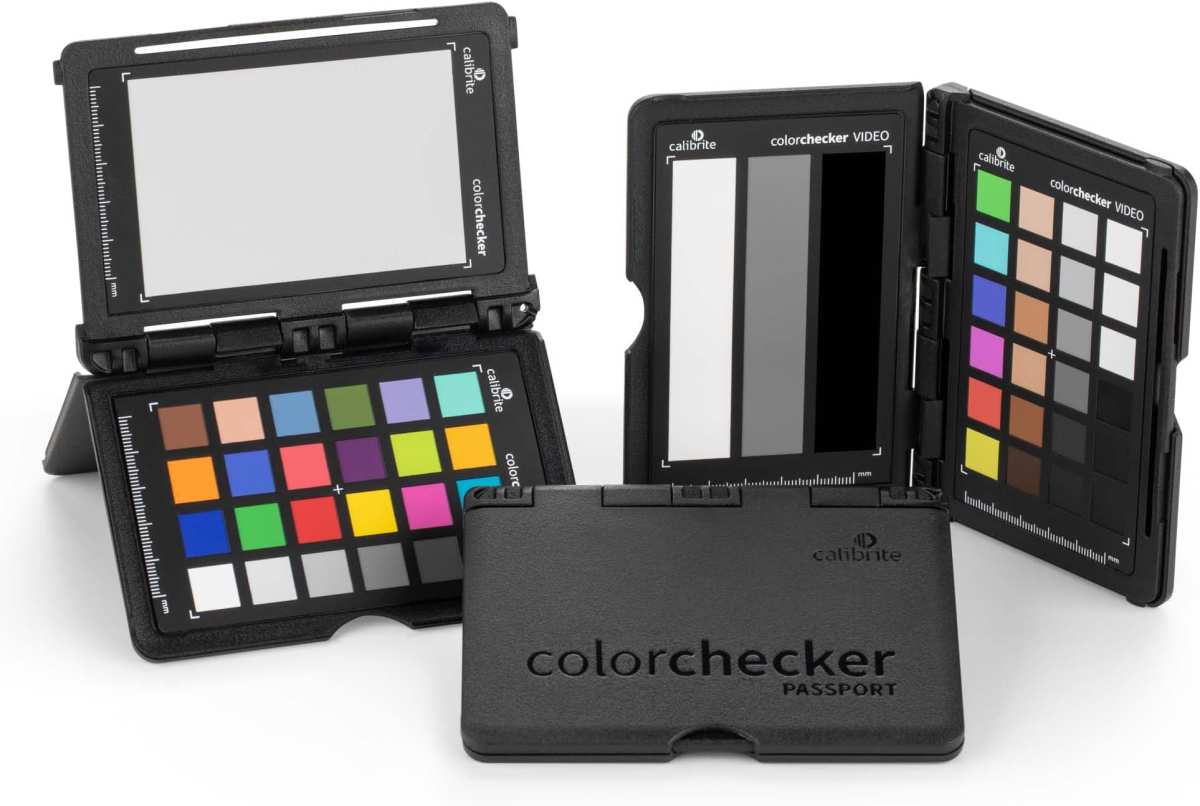
Not all mini LED monitors are built for professional use. Some prioritize gaming specs over accuracy. Here's what actually matters when you're evaluating these displays for design work.
Color Accuracy and Gamut Coverage
Look for factory calibration with reported Delta E values below 2. VESA DisplayHDR certification helps verify manufacturer claims about brightness and gamut.
For print designers, Adobe RGB coverage above 95% is important. For video and motion work, DCI-P3 coverage above 95% matters more. SDR content creation benefits from accurate sRGB reproduction with a proper clamp mode.
Gamut coverage numbers, check actual brightness and uniformity reviews. Something that looks great in short-term tests might show shifts and inconsistency during longer review sessions.
Zone Count and Dimming Performance
Minimum viable zone count for design work: around 200 zones. Below that, blooming becomes distracting during normal use. Between 200 and 500 zones, performance improves noticeably.
Above 500 zones, improvements become incremental.
The dimming algorithm matters as much as zone count. Some monitors let you adjust aggressiveness. Others lock you into a fixed behavior and that's what you live with.
Researching dimming behavior on the specific model you're considering helps. Look for reviews that show dimming in HDR mode, especially in dark scenes with bright UI elements.
Panel Uniformity and Build Quality
Uniformity compensation is a feature that adjusts brightness across the screen to reduce clouding and unevenness. Professional mini LED monitors typically include this. Some also offer uniformity correction through calibration software, though results vary.
Build quality affects longevity and daily use. A display that holds its calibration well over months is more useful than one that drifts to the point where monthly re-calibration becomes unavoidable. Look for monitors with Stable IC designs and good thermal management.
Heat degrades LEDs and color filters over time, so better thermal design equals better longevity.
Connectivity and Ergonomics
For creative work, Thunderbolt or USB-C connectivity with power delivery simplifies laptop docking. DisplayPort connections handle 4K or 5K refresh rates of 60Hz or higher. HDMI 2.1 is useful for console and media player connectivity.
On-screen menus should be accessible and intuitive. Hotkey switching between specific color modes helps with cross-media workflows. At minimum, there should be an sRGB mode, a DCI-P3 mode, and an HDR mode.
Some monitors offer a full OSD suite with advanced tweaking available via software. Ergonomic stands with appropriate tilt, swivel, and height adjustments are nice, but designers should prioritize mounting for consistency and fine-tuning.
Best Mini LED Monitors for Designers by Use Case
Best for Photo Editing and Print Design
The BenQ SW272U hits a sweet spot for photographers and print designers. It offers 768 zones, factory calibration to Delta E below 1.5, and full Adobe RGB and DCI-P3 coverage. The 27-inch 4K resolution gives sharp detail without requiring scaling adjustments.
At around 1,599 dollars, it's not cheap, but it undercuts comparable options while delivering verified accuracy.
The ASUS ProArt PA32UCG works better for those who prefer 32 inches. Its 1152 zones provide excellent HDR capability alongside strong SDR calibration. Hardware calibration support through ASUS ProArt software integrates with X-Rite and Datacolor colorimeters.
Best for Video Editing and Color Grading
For video professionals, the Apple Pro Display XDR remains a strong reference. The 572-zone backlight handles HDR grading well. The 6K resolution provides timeline real estate that 4K displays can't match. macOS integration is seamless, though that limits the user base.
Windows users should look at the Dell UltraSharp UP3221Q. Its dual-layer panel technology achieves effective contrast that rivals much higher zone counts. The display supports multiple color spaces simultaneously and includes built-in calibration tools.
Best for HDR Content Creation
The ASUS ProArt PA32UCG leads here. 1152 zones and 1600-nit peak brightness give it genuine HDR capability. The display handles HDR10 content with proper tone mapping. For creators delivering HDR to streaming platforms or working in HDR cinema workflows, this level of performance matters.
The Apple Pro Display XDR also performs well in this category. Its mature dimming algorithm and tight macOS color management make it a reliable HDR tool. The main limitation is the 572-zone count, which shows occasional blooming in challenging scenes.
Best Budget Option for Freelance Designers
The ASUS ProArt PA32UCX-QK offers a more accessible entry point at around 1,299 dollars. With 96 zones, it's not a high-end HDR display. But it provides mini LED benefits like improved contrast over standard IPS, along with solid factory calibration.
For freelancers who need better-than-basic performance without premium pricing, it's a reasonable compromise.
Best Premium / Studio-Grade Option
The Apple Pro Display XDR at 4,999 dollars is hard to avoid at the top end. The 6K resolution, 1600-nit peak brightness, and mature ecosystem integration justify the price for studios already in the Apple ecosystem. The 572-zone backlight is lower than some competitors, but the overall image quality remains excellent.
The Dell UP3221Q at 2,499 dollars offers a Windows-compatible alternative. Its dual-layer LCD technology achieves contrast ratios that most mini LED displays can't match through zone count alone. For mixed-platform studios, it's a versatile choice.
Common Problems with Mini LED Monitors (And How to Handle Them)
Blooming and Halo Artifacts
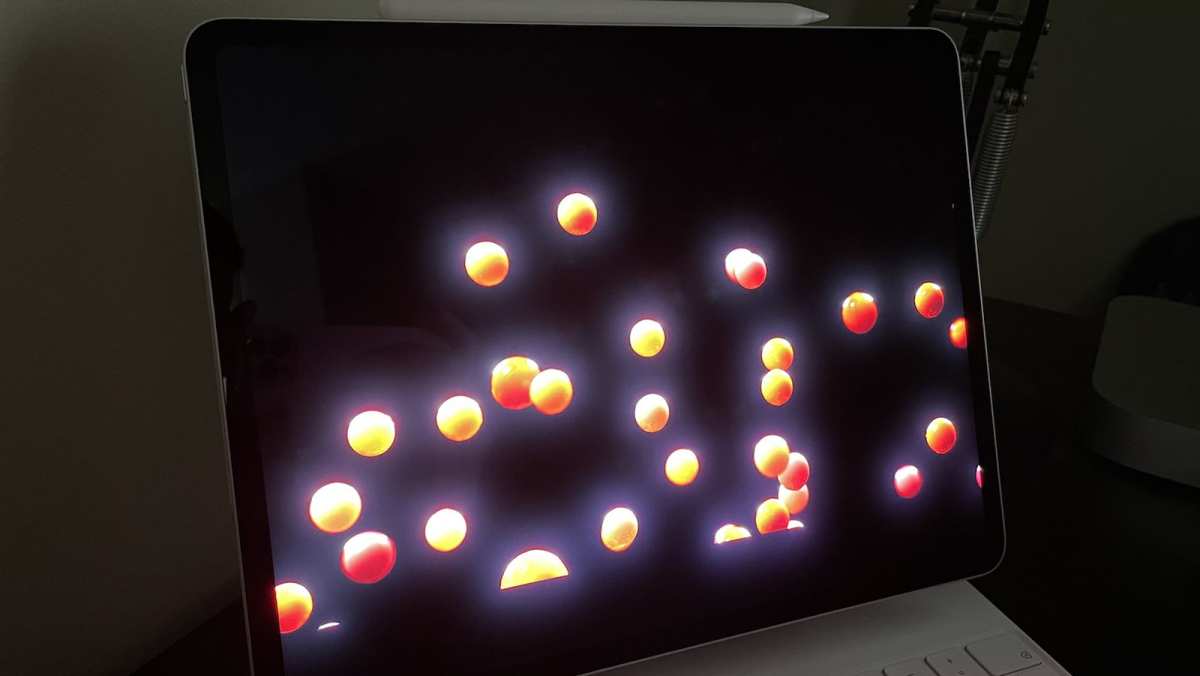
Blooming appears as a glow around bright objects on dark backgrounds. It happens when a dimming zone is too large to isolate small bright elements. White text on black backgrounds, star fields, and UI elements in dark mode all reveal this issue.
Higher zone counts reduce blooming. Better dimming algorithms reduce it further. Some monitors let you adjust dimming aggressiveness in settings.
"High" or "Fast" dimming modes reduce blooming but can cause visible brightness pumping. "Low" or "Slow" modes look smoother but show more blooming.
For design work, test blooming with your actual content. If you work primarily in dark interfaces, blooming will bother you more than spec sheets suggest. If your work is mostly bright, full-screen content, blooming rarely matters.
Inconsistent Dimming Algorithms
Two monitors with identical zone counts can behave completely differently. The algorithm controlling each zone makes the difference. Some algorithms are too aggressive, dimming zones too quickly and creating visible transitions.
Others are too slow, letting blooming persist longer than necessary.
Firmware updates sometimes improve dimming behavior. The Apple Pro Display XDR received several firmware refinements after launch that reduced blooming. Check whether the manufacturer has a history of post-purchase firmware support before buying.
Firmware and Calibration Quirks
Mini LED monitors occasionally exhibit calibration issues after firmware updates. Color modes may shift, or local dimming behavior may change. Some monitors require recalibration after major firmware updates.
Keep your calibration profiles backed up. If a firmware update changes display behavior, you can compare before and after measurements. Some monitors let you roll back firmware if an update causes problems.
Check the manufacturer's support documentation for the specific model you're considering.
Who Should Buy a Mini LED Monitor (And Who Shouldn't)
Worth it for:
- Video editors and colorists working with HDR content
- Photographers who deliver HDR output alongside standard work
- Designers working in bright ambient environments
- Motion graphics artists creating HDR deliverables
- Anyone who wants better contrast than standard IPS without OLED burn-in risk
Not worth it for:
- Print-only designers working exclusively in sRGB or CMYK workflows
- Designers on tight budgets who can get excellent IPS performance for less
- Users in controlled darkroom environments where OLED's perfect blacks matter more
- Anyone who needs guaranteed sub-1.0 Delta E accuracy out of the box without calibration
The middle ground is where most designers sit. If you do a mix of print, web, and video work, a mini LED monitor gives you versatility that single-purpose displays can't match. The premium over standard IPS is real, but so are the benefits for multi-format workflows.
Expert Tips for Getting the Most Out of a Mini LED Design Monitor
Calibrate regularly. Factory calibration is a starting point. Monthly calibration with a colorimeter keeps accuracy tight. The X-Rite i1Display Pro and Datacolor SpyderX both work well with mini LED displays.
Use the right dimming mode. Most professional monitors offer multiple local dimming settings. Use the "quality" or "accurate" mode for design work. Save "speed" or "performance" modes for gaming or video playback.
Test with your actual content. Review photos, video clips, and design files you know well. Pay attention to shadow detail, highlight rendering, and how the display handles your typical brightness range.
Update firmware carefully. Read release notes before applying updates. If a monitor is performing well, don't rush to update. Wait for user feedback on whether the update improves or changes anything important.
Consider your environment. Mini LED's brightness advantage matters most in well-lit rooms. In dim or dark environments, the benefit shrinks. Match your display choice to your actual working conditions.
Pricing and Value: What You Get at Each Price Point
Mini LED monitors for designers fall into rough price tiers as of 2026.
Under 1,000 dollars. Limited options with fewer zones and basic calibration. Suitable for hobbyists or those upgrading from budget IPS displays. Don't expect professional-grade accuracy.
1,000 to 2,000 dollars. The entry point for serious design work. Expect 200 to 800 zones, factory calibration to Delta E below 2, and solid HDR performance. Models like the ASUS ProArt PA32UCX-QK and BenQ SW272U live here.
2,000 to 3,500 dollars. Premium tier with high zone counts, advanced dimming algorithms, and robust calibration ecosystems. The ASUS ProArt PA32UCG and Dell UP3221Q compete in this range.
3,500 dollars and up. The Apple Pro Display XDR dominates this segment. The price is high, but the 6K resolution and ecosystem integration justify it for Apple-based studios.
The value proposition improves each year. Models that cost 3,000 dollars in 2023 now have equivalents at 2,000 dollars. Expect continued price compression as manufacturing matures.
Frequently Asked Questions
Is mini LED good for graphic design?
Yes, for graphic design work that involves any video, motion, or HDR output. For static print-only design, a quality IPS monitor remains sufficient and more cost-effective.
Does mini LED have blooming issues?
All mini LED displays exhibit some blooming. Higher zone counts and better dimming algorithms reduce it. Models with 500 or more zones show minimal blooming in typical design work.
Is mini LED better than OLED for designers?
Neither is universally better. Mini LED wins on sustained brightness and burn-in safety. OLED wins on per-pixel precision and perfect blacks.
Your specific workflow determines which matters more.
How long do mini LED monitors last?
LED backlights are rated for 30,000 to 50,000 hours typically. That translates to 10 to 15 years of professional use before noticeable degradation. The LCD panel itself often outlasts the backlight.
Can you hardware calibrate a mini LED monitor?
Yes, on models that support hardware calibration. The BenQ SW series, ASUS ProArt series, and Apple Pro Display XDR all support hardware calibration with compatible colorimeters. This stores calibration data in the monitor rather than relying on GPU LUTs.
Is mini LED worth the extra cost over IPS?
It depends on your work. If you handle HDR content or work in bright environments, yes. If you do SDR-only design in controlled lighting, a good IPS monitor delivers comparable accuracy for less money.
Final Verdict: Should You Choose a Mini LED Monitor for Design Work?
Mini LED is a solid choice for designers who need versatility. If your workflow mixes print, web, video, and HDR, these displays handle that range well. The technology has matured enough that accuracy concerns are manageable with proper calibration.
That said, mini LED isn't automatically the best option for every designer. Print-only professionals may find better value in a high-end IPS panel. Darkroom video editors might prefer OLED's perfect blacks.
Budget-conscious buyers can still get excellent results from standard IPS displays that cost half as much.
The key is matching the display to your actual work, not chasing specs. A well-calibrated IPS monitor serves a designer better than a poorly understood mini LED display. Invest time in learning your chosen display's calibration options and dimming behavior.
That knowledge matters more than the technology label on the box.
As of 2026, mini LED has earned its place in the professional designer's toolkit. It's not the only tool worth considering, but it's a strong one for those who need brightness, HDR capability, and multi-format flexibility without OLED's burn-in concerns.

Similar Posts





















