Is 4K Monitor Good for Competitive Gaming
Whether 4K is good for competitive gaming depends on what you play, what hardware you're running, and how much you value raw frame rates over visual clarity. There's no universal answer, and anyone who gives you one without asking about your setup is guessing. The right call changes dramatically depending on whether you're grinding ranked Valorant or exploring an open world at your own pace.
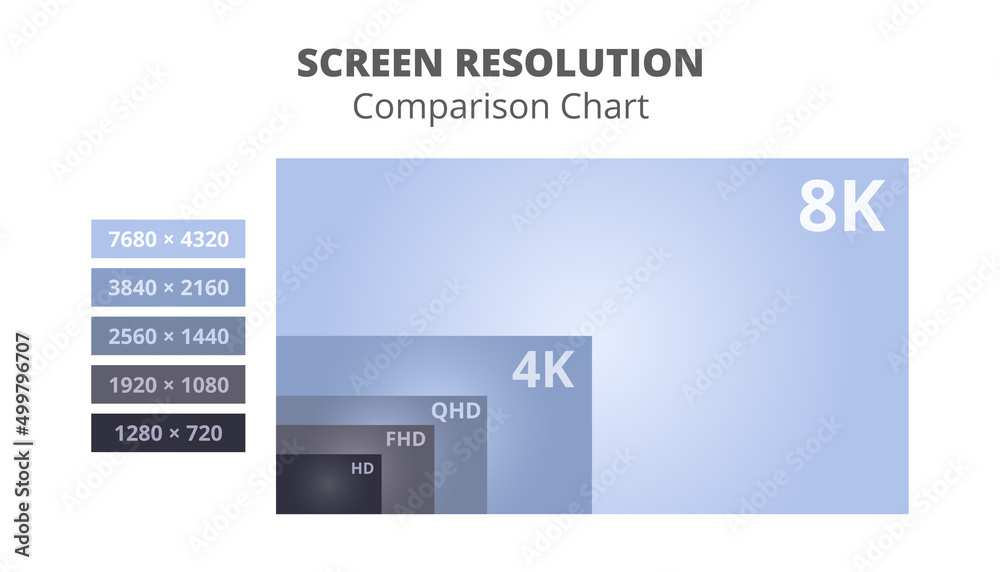
Here's the core tension: 4K UHD (3840 × 2160) pushes four times the pixels of 1080p, which means your GPU works significantly harder to maintain high frame rates. In competitive gaming, frame rate and responsiveness often matter more than pixel count. Let's walk through exactly how to figure out where you land.
Quick Answer
4K can be good for competitive gaming if your GPU sustains high frame rates at that resolution. Most competitive players still prefer 1440p or 1080p for higher refresh rates. If you have an RTX 4080 or better, 4K at 144+ Hz is viable.
For fast-paced esports titles, lower resolutions with faster refresh rates usually win.
Why 4K for Competitive Gaming Isn't a Simple Yes or No
The reason this question doesn't have a clean answer is that "competitive gaming" covers a huge range of scenarios. A professional Counter-Strike 2 player has completely different needs than someone who plays Civilization VI online or competes in console fighting games. The resolution that works best shifts based on several factors.
What matters most is the relationship between resolution, frame rate, and input responsiveness. Higher resolution gives you a sharper image and can make distant enemies easier to spot. But it also demands more from your graphics card, which can lower your frame rate and introduce latency if your hardware can't keep up.
Manufacturer specifications for modern 4K gaming monitors show refresh rates ranging from 60 Hz all the way up to 500 Hz on cutting-edge OLED panels as of 2026. That massive range means you can't treat "4K monitor" as a single category. A 4K 60 Hz display and a 4K 240 Hz OLED are completely different tools for competitive play.
The Three Things That Actually Determine Whether 4K Works for You
Before you spend a dollar, you need to evaluate three specific factors. These are the decision points that separate a great 4K competitive experience from a sluggish, frustrating one.
Your game genre and how you react
Fast-paced first-person shooters like CS2, Valorant, and Apex Legends reward high frame rates and low input lag above everything else. In these games, the difference between 144 Hz and 240 Hz is noticeable to experienced players. Pushing 4K at those frame rates requires top-tier hardware.
Slower-paced competitive games tell a different story. Real-time strategy titles, MOBAs like League of Legends, and tactical shooters like Rainbow Six Siege are less sensitive to extreme frame rates. If you're playing these, 4K at 144 Hz can look stunning without costing you a competitive edge.
Your GPU and whether it can push enough frames at 4K
This is the make-or-break factor. Running a game at 4K demands roughly 78% more pixels than 1440p and 300% more than 1080p. Your GPU has to render every single one of those pixels, 60 to 240+ times per second.
Here's a realistic breakdown of what current GPUs can handle at 4K in competitive titles:
| GPU | 4K Performance in Esports Titles (Avg FPS) | 4K Performance in AAA Titles (Avg FPS) | Viable for 4K Competitive? |
|---|---|---|---|
| RTX 4090 | 200–400+ | 90–140 | Excellent |
| RTX 4080 Super | 160–300+ | 70–110 | Very good |
| RTX 4070 Ti Super | 120–200+ | 55–85 | Good with DLSS |
| RTX 4070 Super | 90–160+ | 45–70 | Borderline |
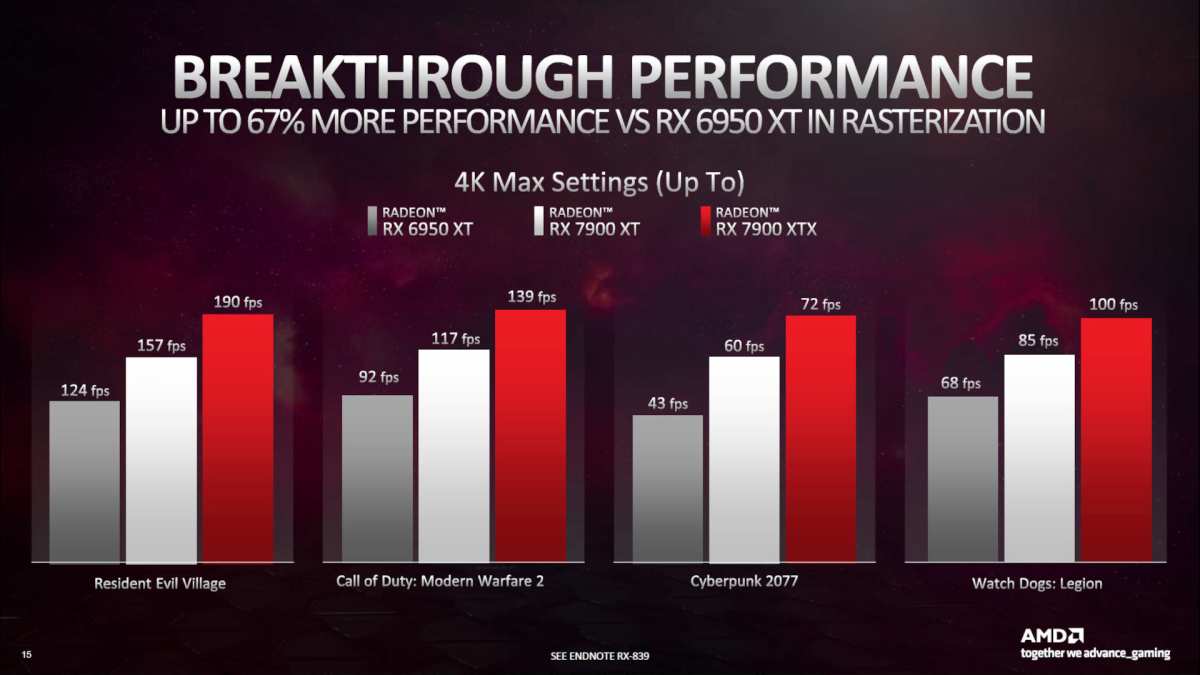
| RX 7900 XTX | 150–280+ | 65–100 | Very good |
| RX 7800 XT | 80–140+ | 40–60 | Not ideal |
If your GPU can't push at least 120 FPS at 4K in your main game, you're better off at 1440p with a higher refresh rate. DLSS and FSR can help bridge the gap, but they introduce a small amount of processing overhead that matters at the highest competitive levels.
Your monitor size and how close you sit
Pixel density changes the equation more than people realize. A 27-inch 4K monitor packs about 163 pixels per inch, which looks razor-sharp at normal desk distance. A 32-inch 4K panel drops to around 138 PPI, still sharp but slightly less crisp up close.
If you're sitting two to three feet from a 32-inch display, you'll notice the extra clarity. At 42 inches or larger, you're essentially using a TV, and the competitive advantages of a monitor (lower input lag, faster response times) start to disappear. Most competitive players stick with 27 to 32 inches for a reason.
What Happens When You Run 4K in Competitive Games — Real Performance Numbers
Let's look at what actually happens in practice. Aggregate benchmark data from GPU testing shows clear patterns across popular competitive titles.
In CS2, an RTX 4090 averages around 300, 400 FPS at 4K on competitive settings (low to medium details). Drop to 1440p and that number jumps to 400, 500+ FPS. At 1080p, you're looking at 500+ FPS, often capped by the engine rather than the hardware.
For a player on a 240 Hz monitor, the difference between 300 FPS and 500 FPS is largely academic. But for someone on a 360 Hz or 500 Hz panel, those extra frames matter.
Valorant tells a similar story. It's a less demanding game, so even mid-range GPUs can push high frame rates at 4K. An RTX 4070 Super can often clear 200 FPS at 4K in Valorant, which is plenty for a 144 Hz or 165 Hz display.
The bottleneck shifts from the GPU to the monitor's refresh rate.
Apex Legends and Warzone are more demanding. At 4K with competitive settings, even an RTX 4080 might hover around 120, 160 FPS. That's fine for a 144 Hz monitor but leaves no headroom.
Drop to 1440p and you gain 30, 50% more frame rate, which translates to smoother motion and lower input lag.
The takeaway: in lighter esports titles, 4K is viable on mid-to-high-end hardware. In demanding battle royale and AAA competitive games, you'll sacrifice frame rate that could otherwise go toward smoother gameplay.
4K vs. 1440p vs. 1080p: Which Resolution Actually Wins for Competitive Play
Each resolution has a clear sweet spot. Here's how they stack up for competitive gaming as of 2026.
1080p (1920 × 1080)
- Easiest resolution to drive at high frame rates
- Works well even on mid-range GPUs at 240, 500 Hz
- Pixelation is visible on 27-inch and larger monitors
- Still the standard for many professional esports tournaments
- Best for: players who prioritize maximum frame rate and compete at the highest level in fast-paced shooters
1440p (2560 × 1440)
- The current competitive gaming sweet spot for most players
- Sharp enough on 27-inch monitors (109 PPI) without crushing your GPU
- 240 Hz 1440p monitors are widely available at reasonable prices
- Demands about 30% more GPU power than 1080p, manageable on modern hardware
- Best for: the majority of competitive gamers who want a balance of clarity and performance
4K (3840 × 2160)
- Visually stunning with excellent detail and reduced aliasing
- Requires a high-end GPU to maintain competitive frame rates
- 4K 144 Hz monitors start around $400, while 4K 240 Hz panels run $800, $1,500+
- DLSS and FSR make 4K more accessible but add a frame of processing latency
- Best for: players with RTX 4080/4090-class hardware who play a mix of competitive and visually demanding games
The honest truth is that 1440p hits the best balance for most competitive gamers right now. It's sharp enough that you're not squinting at distant targets, and it doesn't require a $1,600 GPU to drive at high frame rates. 4K is fantastic if your hardware can handle it, but it's not the default recommendation it's sometimes made out to be.
When 4K Makes Sense for Competitive Gaming
There are specific scenarios where 4K is not just acceptable but genuinely advantageous for competitive play. If your situation matches one or more of these, a 4K monitor is worth serious consideration.
You play slower-paced or visually demanding games
If your competitive rotation includes titles like League of Legends, Dota 2, StarCraft II, or Rainbow Six Siege, the extreme frame rate demands of fast FPS games don't apply. These games benefit from visual clarity, and 4K at 144 Hz delivers a noticeably sharper image that can help you spot details in cluttered scenes. You get the competitive responsiveness of a high refresh rate without sacrificing visual quality.
You have a high-end GPU (RTX 4080/4090 or equivalent)
When your graphics card can push 144+ FPS at 4K in your main games, the resolution debate shifts in your favor. You're no longer choosing between clarity and performance. You can have both.
An RTX 4090 paired with a 4K 144 Hz or 240 Hz monitor is one of the best competitive gaming experiences available as of 2026.
You also use the monitor for content creation or single-player gaming
Many competitive players also stream, edit video, or enjoy visually rich single-player titles. A 4K monitor serves double duty beautifully. You get the sharpness for creative work and immersive single-player experiences, plus solid competitive performance when you need it.
This versatility makes the higher price tag easier to justify.
You're gaming on console at 120 Hz
PS5 and Xbox Series X both support 4K output at up to 120 Hz over HDMI 2.1. If you're competing on console, a 4K 120 Hz monitor gives you the best possible image quality without the frame rate compromises that PC players face. Console competitive gaming at 4K is a completely different conversation, and the answer is almost always yes.
When 4K Hurts Your Competitive Performance
There are equally specific scenarios where 4K actively works against you. If any of these apply, you should think twice before committing.
You play fast-paced esports titles at a high level
If you're grinding ranked in CS2, Valorant, or Overwatch 2 and you care about maximizing your performance, 4K is likely holding you back. These games reward every extra frame and every millisecond of reduced input lag. Dropping to 1440p or even 1080p on a 240 Hz or 360 Hz monitor will give you a smoother, more responsive experience that translates directly to better gameplay.
Your GPU can't sustain high frame rates at 4K
This is the most common mistake people make. They buy a 4K 144 Hz monitor, plug it in with an RTX 4060 or RX 7600, and wonder why their frame rate hovers around 60 FPS. You're now running at a lower frame rate than a cheap 1080p 144 Hz setup would deliver.
The monitor's potential is wasted, and your competitive performance suffers.
You're on a budget and need every frame you can get
Money spent on a 4K monitor is money not spent on a better GPU. A $500 1440p 240 Hz monitor paired with a stronger graphics card will almost always outperform a $500 4K 144 Hz monitor paired with a weaker GPU in competitive scenarios. Prioritize the component that actually determines your frame rate.
You need 240Hz+ and can't afford a 4K panel that delivers it
As of 2026, 4K monitors at 240 Hz or above still carry a significant price premium. You're looking at $800 to $1,500+ for a quality 4K 240 Hz display. Meanwhile, excellent 1440p 240 Hz and even 360 Hz monitors are available for $300 to $600.
If your competitive game benefits from those extreme refresh rates, the price-to-performance ratio strongly favors 1440p.
The Hidden Costs of Going 4K for Competitive Gaming
The monitor purchase is only part of the equation. Several additional costs catch people off guard when they move to 4K for competitive gaming.
GPU upgrade requirements
If your current GPU can't handle 4K at your target frame rate, you're looking at a graphics card upgrade. An RTX 4080 Super runs around $1,000, and an RTX 4090 is $1,600 or more. That's a massive additional investment on top of the monitor itself.
Factor this into your total budget before committing to 4K.
Monitor price premium
4K gaming monitors cost more than their 1440p counterparts at equivalent refresh rates. A quality 27-inch 4K 144 Hz IPS monitor starts around $400 to $500. Step up to 4K 240 Hz and you're in $800 to $1,200 territory.
The newest 4K OLED panels with 240 Hz or higher refresh rates can exceed $1,000. Compare that to 1440p 240 Hz monitors that routinely sell for $250 to $400.
DLSS and upscaling trade-offs
DLSS and FSR make 4K more accessible by rendering at a lower resolution and upscaling. The image quality is impressive, often close to native 4K. But these technologies add a small amount of input latency, typically one frame.
For casual and mid-level competitive play, this is negligible. At the highest levels of competition, some players prefer native rendering to eliminate even that small delay.
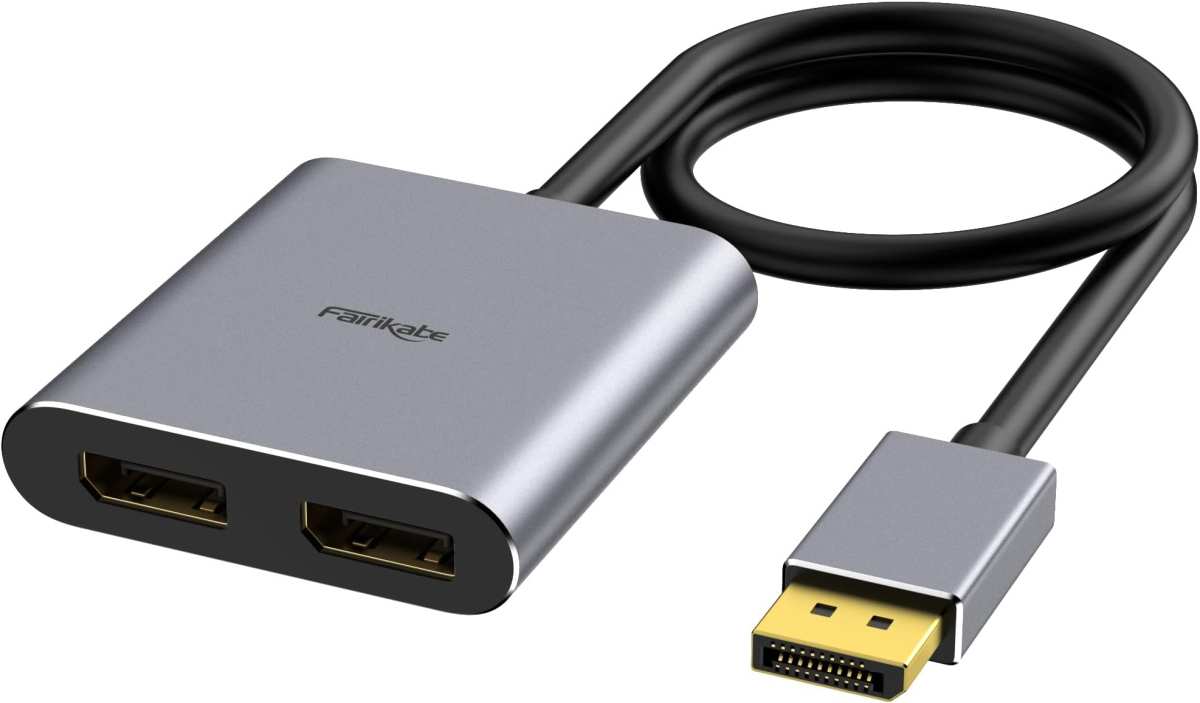
You'll also need the right cable. HDMI 2.1 supports 4K at 120 Hz, while DisplayPort 1.4 with DSC handles 4K at up to 144 Hz. For 4K at 240 Hz, you need DisplayPort 2.1 or HDMI 2.1 with DSC.
Using the wrong cable can silently cap your refresh rate, so verify your monitor's input specifications before connecting.
How to Decide: A Step-by-Step Framework
Here's a practical process to figure out whether 4K is right for your competitive gaming setup.
Step 1: Check your GPU's 4K performance in your main game
Look up benchmarks for your specific graphics card in the game you play most. Focus on the resolution and settings you'd actually use. If your GPU can't hit your monitor's refresh rate at 4K, you have your answer.
Step 2: Decide your minimum acceptable frame rate
Be honest about what you need. If you play Valorant casually, 144 FPS is plenty. If you're competing in CS2 at a high rank, you might want 240+ FPS consistently.
Your minimum frame rate determines whether 4K is viable.
Step 3: Match your monitor choice to your actual hardware
Don't buy a monitor your GPU can't drive. A 4K 144 Hz display is wasted on a card that can only push 80 FPS at that resolution. Either upgrade your GPU first or choose a resolution your current hardware can handle at high frame rates.
Step 4: Factor in your game library and future plans
If you play a mix of competitive and single-player games, 4K offers more versatility. If you're purely competitive and plan to upgrade your GPU soon, buying a 4K monitor now and using DLSS or lower settings temporarily can work. Just know what you're trading off in the meantime.
Common Mistakes People Making When Choosing a 4K Gaming Monitor
Several recurring mistakes show up in buyer feedback and reviews. Avoiding these will save you money and frustration.
Buying 4K without checking GPU compatibility is the biggest one. People see a great deal on a 4K monitor and assume their system can handle it. Always verify your graphics card's 4K performance before purchasing.
Ignoring response time specs is another common error. A 4K monitor with a 5 ms GtG response time will show more motion blur than a 1440p monitor with 1 ms GtG, even at the same refresh rate. For competitive gaming, look for 1 ms GtG or faster.
OLED panels with 0.03 ms GtG are ideal if your budget allows.
Overlooking connectivity requirements catches people off guard. Not every port on your GPU supports 4K at high refresh rates. Check whether you need DisplayPort 1.4, DisplayPort 2.1, or HDMI 2.1 to get the full performance from your new monitor.
Assuming bigger is better leads to poor desk setups. A 32-inch 4K monitor sounds great on paper, but if your desk is shallow, you'll be sitting too close and moving your head to see the whole screen. For competitive gaming, 27 inches is the sweet spot for 4K at normal desk distances.
Expert Tips to Get the Most Out of 4K in Competitive Scenarios
If you've decided 4K is right for your setup, a few optimization steps will help you squeeze out every bit of competitive performance.
Enable DLSS or FSR in supported games and set it to Quality mode. This gives you near-native 4K image quality while significantly reducing the load on your GPU. The performance gain often means the difference between hovering below your refresh rate and staying comfortably above it.
Cap your frame rate slightly below your monitor's maximum refresh rate. Running at exactly your refresh rate cap can cause micro-stuttering with VRR enabled. A cap of 141 FPS on a 144 Hz display, or 237 FPS on a 240 Hz panel, keeps G-Sync or FreeSync in its optimal range.
Use the lowest anti-aliasing settings you can tolerate at 4K. The high pixel density naturally reduces jagged edges, so heavy AA like MSAA or SSAA is often unnecessary. This frees up GPU resources for higher frame rates without a visible quality loss.
Set Windows display scaling to 150% on a 27-inch 4K monitor. Text and UI elements become comfortably readable without sacrificing screen real estate for games, which render at full resolution regardless of Windows scaling.
Frequently Asked Questions
Is 4K 144Hz good enough for competitive gaming?
Yes, 4K at 144 Hz is good enough for most competitive gamers. It provides a sharp image and smooth motion that satisfies the majority of players. Only those competing at the highest levels in fast-paced FPS titles will notice a meaningful difference from 240 Hz or higher.
Does 4K cause more input lag than 1440p?
Not inherently. Input lag is determined by the monitor's processing hardware, not the resolution itself. However, if your GPU struggles at 4K and frame rates drop, the lower frame rate increases perceived input lag.
A 4K monitor running at a stable 144 FPS will feel just as responsive as a 1440p monitor at the same frame rate.
Should I use DLSS for competitive gaming at 4K?
DLSS Quality mode is a smart choice for competitive gaming at 4K. The image quality is excellent, and the frame rate boost can be substantial. The one-frame latency penalty is negligible for all but the most elite competitive players.
FSR is a solid alternative on AMD hardware.
Is 4K worth it for console competitive gaming?
For console gaming, 4K is often the best choice. PS5 and Xbox Series X are optimized for 4K output, and most console competitive games run at 60 to 120 FPS at that resolution. You don't face the same GPU bottleneck issues that PC players deal with.
What size 4K monitor is best for competitive gaming?
27 inches is the ideal size for 4K competitive gaming. It delivers high pixel density at 163 PPI without requiring excessive head movement to see the screen edges. At 32 inches, the pixel density drops and the screen becomes large enough that peripheral vision matters more in fast-paced games.
The Bottom Line: Who Should Buy a 4K Monitor for Competitive Gaming
4K is the right choice for competitive gamers who have a high-end GPU, play a mix of game types, and value visual clarity alongside performance. If you're running an RTX 4080 or better and your favorite games run at 144+ FPS at 4K, you'll love the experience.
For players focused purely on fast-paced esports titles with mid-range hardware, 1440p at 240 Hz remains the smarter buy. You'll get higher frame rates, lower input lag, and more money left in your pocket for other upgrades.
Console competitive gamers should feel confident going 4K at 120 Hz. The hardware is designed around that output, and the experience is excellent.
The worst move is buying a 4K monitor your GPU can't properly drive. Match your display to your actual hardware, be honest about the games you play, and you'll end up with a setup that works for you rather than against you.

Similar Posts





















