Is 32 Inch Curved Gaming Monitor Too Big
Is 32 inch curved gaming monitor too big? It depends on your desk, your GPU, and what games you play. For some setups it's a game-changer.
For others it's a neck-straining mistake.
A 32-inch panel spans roughly 28 inches wide in a 16:9 aspect ratio. That's a significant jump from the 27-inch standard most gamers use. The real question isn't about size alone.
It's about whether your specific situation can handle it.
Quick Answer
A 32-inch curved gaming monitor is not too big for most setups. It works best with a desk depth of 28 inches or more. You'll want at least 1400p resolution to avoid a soft image.
Competitive FPS players may prefer a smaller 27-inch screen. Sim racers and immersive single-player gamers will love the extra size.
Why This Question Doesn't Have a One-Size-Fits-All Answer
Here's what most buying guides get wrong. They treat monitor size like a spec sheet checkbox. Bigger number, better monitor.
That's not how this works.
A 32-inch curved screen changes your entire desk geometry. It changes how far you sit, how much you turn your head, and how hard your GPU has to work. It changes whether text looks crisp or pixelated.
It changes whether you feel immersed in a game world or overwhelmed by it.
The same monitor that transforms someone's Cyberpunk 2077 experience can make another person's Valorant sessions miserable. The difference comes down to three things: your physical space, your hardware, and your game library. We'll walk through each one so you can figure out which camp you're in.
The Three Variables That Actually Decide for You
Forget the marketing specs for a second. Three real-world factors determine whether a 32-inch curved monitor will work for your setup. Get any one of them wrong and you'll regret the purchase.
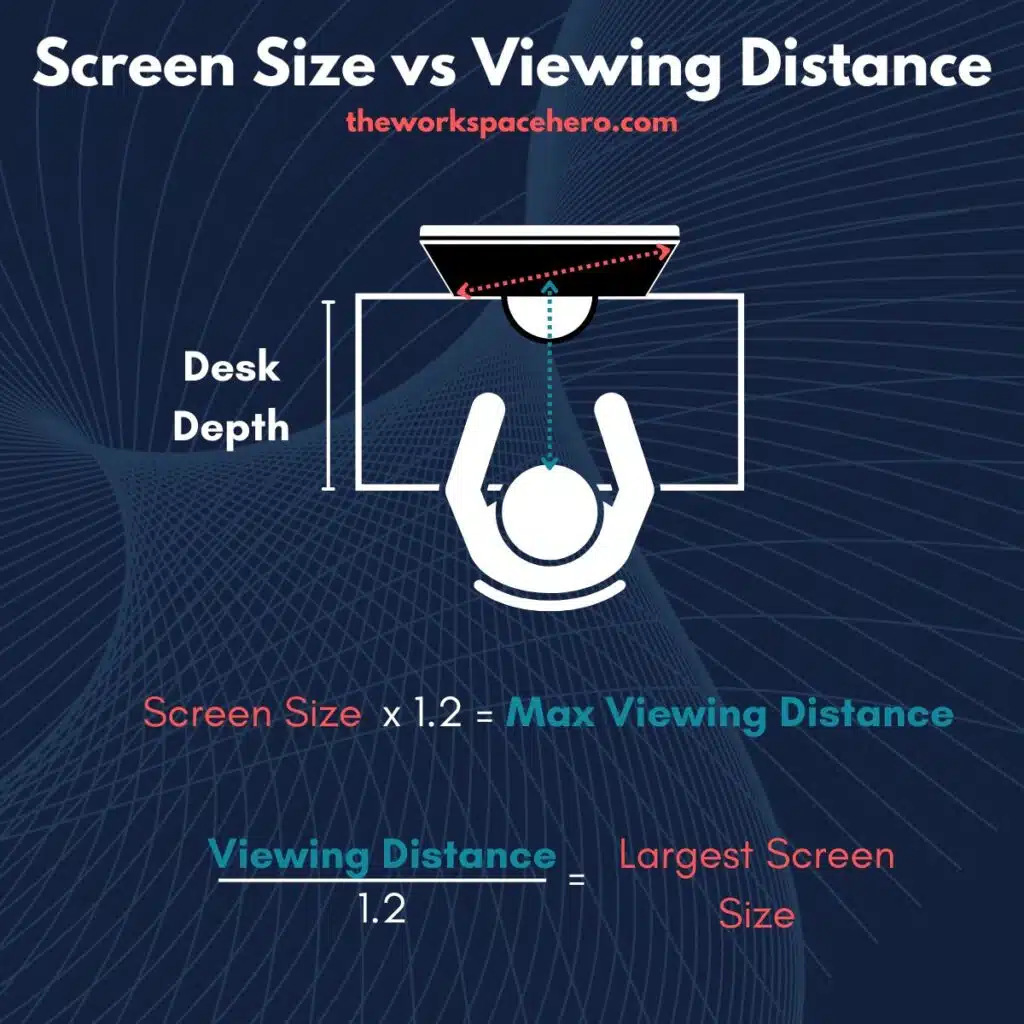
Your Desk Depth and Viewing Distance
This is the single most important factor, and it's the one people overlook. A 32-inch monitor demands more physical space than a 27-inch. The screen is wider, taller, and the curve pushes the edges closer to your face.
Here's the practical math. A 32-inch 16:9 monitor is about 27.9 inches wide and 15.7 inches tall. With a 1000R curve (the tightest common curve), the edges sit roughly 2-3 inches closer to you than a flat panel would.
That changes your effective viewing distance.
Recommended viewing distances by use case:
| Use Case | Minimum Distance | Ideal Distance | Minimum Desk Depth |
|---|---|---|---|
| Competitive gaming | 24 inches | 28-32 inches | 28 inches |
| Mixed gaming and productivity | 28 inches | 32-36 inches | 30 inches |
| Immersive single-player | 30 inches | 36-40 inches | 32 inches |
| Sim racing / flight sim | 32 inches | 36-48 inches | 34 inches |
If your desk is 24 inches deep or less, a 32-inch curved monitor will feel like sitting in the front row of a movie theater. Your eyes will work harder to take in the full image. You'll turn your head more.
After a few hours, your neck will let you know about it.
Measure from the wall (or the back of your desk) to where your keyboard sits. That's your real number. If it's under 28 inches, think carefully before going 32.
Your Resolution and Pixel Density
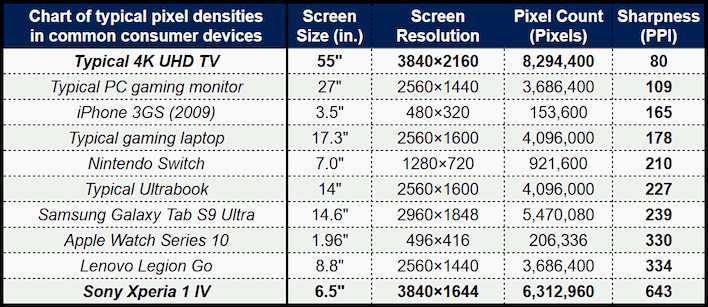
Size without enough resolution is a recipe for a soft, pixelated image. This is where the PPI (pixels per inch) math matters.
At 32 inches, the resolution you choose directly affects how sharp everything looks:
- 1080p at 32 inches: ~69 PPI. This is where things fall apart. At normal desk distance, you'll see individual pixels. Text looks fuzzy. Game textures lack detail. Most people find this unacceptable at 32 inches.
- 1440p at 32 inches: ~92 PPI. This is the practical minimum. It's not razor-sharp, but it's clean enough for gaming and general use. Most people are happy here.
- 4K at 32 inches: ~138 PPI. This is where things look genuinely crisp. Text is sharp, details pop, and you won't see pixels at any normal viewing distance. The tradeoff is GPU cost.
The curve actually helps here slightly. Because the screen wraps around your field of view, the edges are at a more consistent distance from your eyes. This can make a 1440p 32-inch curved panel look slightly sharper at the edges than a flat equivalent.
It's a small effect, but it's real.
What Games You Actually Play
Your game library is the tiebreaker. Different genres interact with large curved screens in very different ways.
Games that benefit from 32-inch curved:
- Open-world RPGs (Elden Ring, Baldur's Gate 3, The Witcher 3)
- Sim racing (Assetto Corsa, iRacing, Forza Motorsport)
- Flight simulators (Microsoft Flight Simulator, DCS World)
- Strategy games (Civilization VI, Total War, StarCraft II)
- Atmospheric horror and adventure games
- MMOs with complex UI layouts
Games where 32-inch curved can hurt you:
- Competitive tactical shooters (CS2, Valorant, Rainbow Six Siege)
- Fast-paced arena shooters (Quake, Overwatch at high level)
- Fighting games where you need to see the full screen instantly
- Any game where you're competing at a high rank and need maximum reaction speed
The issue with competitive titles isn't that you can't see more. It's that you have to process more visual information across a wider field. Your eyes travel farther to check minimaps, health bars, and peripheral movement.
At the highest levels, that extra travel time matters.
If you split your time between competitive and immersive games, a 32-inch curved monitor can still work. You just need to be honest about which mode you'll use most often.
When a 32-Inch Curved Monitor Is the Right Call
Let's get specific about the situations where a 32-inch curved gaming monitor genuinely shines. If any of these match your setup, you're probably going to love it.
Deep Desks and Immersive Single-Player Gaming
If your desk is 30 inches deep or more and you primarily play story-driven games, a 32-inch curved panel is hard to beat. The combination of size and curve creates a sense of presence that a 27-inch flat screen simply can't match.
You're not turning your head constantly. You're sitting back and letting the game world fill your peripheral vision. Titles like Red Dead Redemption 2, Horizon Forbidden West, and Starfield feel genuinely different on a screen this size.
The scale of landscapes, the detail in character models, the sense of being inside the world rather than looking at it through a window.
This is where the curve earns its keep. A 1500R or 1800R curve at this size wraps the image just enough to engage your peripheral vision without distorting straight lines. It's subtle, but it adds up over a three-hour gaming session.
Sim Racing, Flight Sims, and Strategy Games
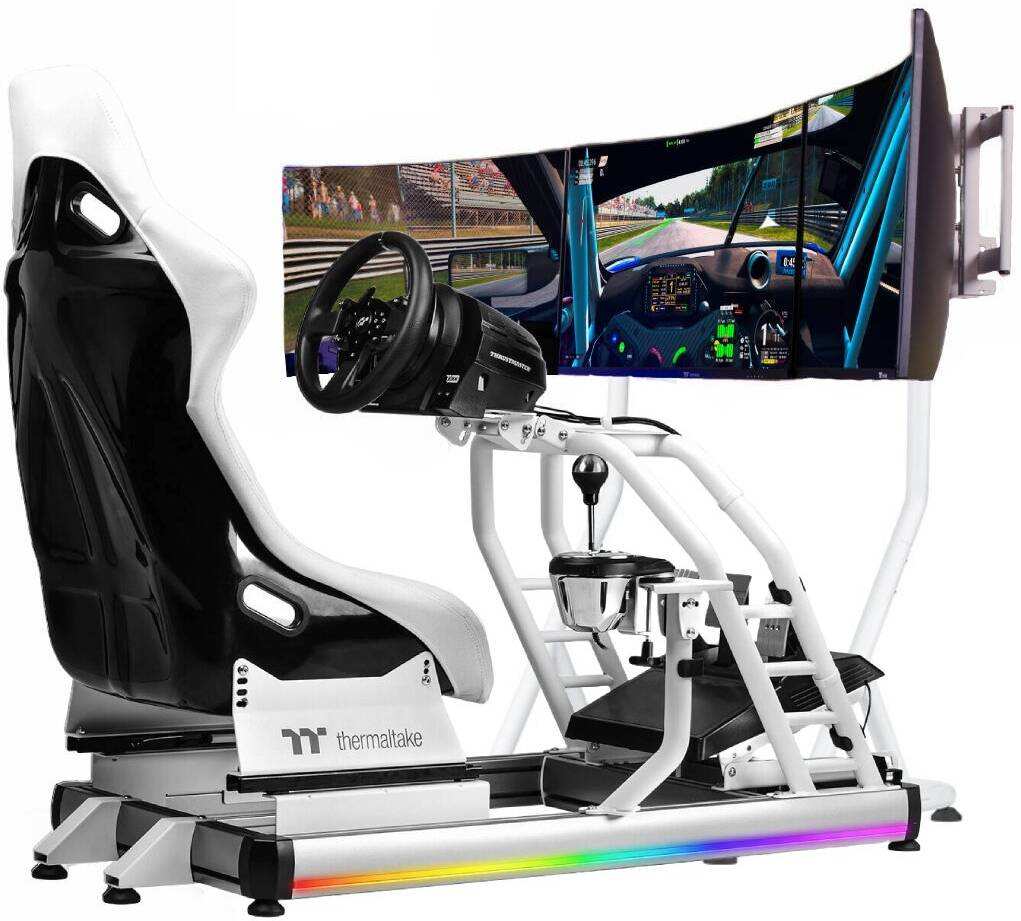
Sim racers have been using large curved monitors for years, and for good reason. A 32-inch curved screen approximates the field of view you'd get in an actual car cockpit. You can see the A-pillars, the side mirrors, and the track ahead without moving your head.
That spatial awareness translates directly to better lap times.
Flight simulators benefit for similar reasons. Microsoft Flight Simulator on a 32-inch curved panel gives you enough vertical space to see the instrument panel and the horizon simultaneously. The curve helps with the sense of being inside the cockpit rather than looking at a flat picture of one.
Strategy games are a quieter win. Having a large map visible while keeping your resource bars and unit panels in peripheral view reduces the need to scroll and click as often. It's a quality-of-life improvement that adds up over long sessions.
Content Creators Who Game on the Side
If you edit video, stream, or do any kind of creative work alongside gaming, a 32-inch curved panel doubles as a productivity tool. You can have a timeline open on one side and a preview window on the other. You can game in a window while keeping chat, OBS, or reference material visible.
It's not quite a dual-monitor replacement, but it gets you 80% of the way there with a cleaner setup and no bezel gap in the middle.
When 32 Inches Will Work Against You
Now let's talk about the scenarios where you should probably step back from 32 inches. These aren't edge cases. They're common situations that lead to buyer's remorse.
Competitive FPS and Esports Titles
If you're grinding ranked in Valorant, CS2, or Apex Legends, a 32-inch curved monitor introduces real problems. The screen is physically larger, which means your eyes have to travel farther to check information at the edges. In a game where reaction time is measured in milliseconds, that extra eye movement adds up.
The curve can also distort your perception of straight lines. Walls, crosshair placement, and enemy movement at the edges of the screen get a slight curve to them. Most people adapt to this over time, but if you're training muscle memory for precise flick shots, a flat panel is the safer choice.
Most professional esports players use 24 to 25-inch monitors at 1080p or 1440p. That's not a coincidence. It's the size where you can see the entire screen with minimal eye movement.
A 32-inch panel forces you to choose between sitting too close (and losing peripheral awareness) or sitting too far (and losing detail).
Shallow Desks and Tight Spaces
If your desk is 24 to 26 inches deep, a 32-inch curved monitor is going to dominate your space. You'll be sitting closer than ideal, which means more eye strain and more head turning. The curve makes this worse because the edges of the screen are physically closer to your face than the center.
You'll also run into keyboard and mouse placement issues. A full-size keyboard on a shallow desk with a 32-inch monitor means your hands are either cramped against the screen or your monitor is pushed so far back that you lose the benefit of the curve.
In these situations, a 27-inch monitor is almost always the better fit. You get 90% of the visual impact with none of the spatial headaches.
Underpowered GPUs and Budget Builds
This is the hidden cost that catches people off guard. A 32-inch monitor at 1440p has about 3.7 million pixels to push. A 27-inch 1440p monitor has about 3.1 million.
That's a 19% increase in pixel count, which translates directly to GPU load.
If you're running a mid-range card like an RTX 4060 or RX 7600, you'll feel that difference. Games that ran at 90 FPS on a 27-inch 1440p setup might drop to 75 FPS on a 32-inch 1440p panel with the same card. You can lower settings to compensate, but then you're not using the monitor to its potential.
At 4K on 32 inches, the demand jumps even further. You're pushing 8.3 million pixels. That requires an RTX 4080, RX 7900 XTX, or better to hit high refresh rates in modern titles.
If your GPU isn't in that tier, you'll be running at lower frame rates or dropping resolution, which defeats the purpose of the upgrade.
The Resolution Problem Most People Ignore
Let's dig deeper into the resolution question because it's where most buying decisions go wrong. People see "32-inch gaming monitor" and assume any resolution will look fine. It won't.
Here's a practical comparison of what you're actually getting:
| Resolution | PPI at 32" | Sharpness Rating | GPU Load | Best For |
|---|---|---|---|---|
| 1080p (FHD) | ~69 PPI | Low, visible pixels | Low | Budget builds, casual use only |
| 1440p (QHD) | ~92 PPI | Good, clean image | Medium | Most gamers, best value |
| 2160p (4K UHD) | ~138 PPI | Excellent, very sharp | High | High-end builds, text-heavy work |
1080p at 32 Inches: Why It Looks Soft
At 69 PPI, a 1080p 32-inch monitor shows visible pixels at any normal desk distance. Text has jagged edges. Game textures look muddy.
Fine details like distant objects or small UI elements lose clarity.
Some people genuinely don't mind this. If you sit 3+ feet back and primarily play fast-paced games where you're focused on the center of the screen, the lower sharpness might not bother you. But most people who compare 1080p at 32 inches side-by-side with 1440p at the same size immediately notice the difference.
The budget 32-inch 1080p monitors exist for a reason. They're cheap and they work. But they're a compromise, and you should go in with eyes open about what that compromise looks like.
1440p at 32 Inches: The Practical Middle Ground
This is the sweet spot for most people. At 92 PPI, the image is clean enough that you won't see pixels at normal viewing distance. Text is readable.
Game details are sharp. And the GPU requirements are manageable with current mid-range hardware.
An RTX 4070 or RX 7800 XT can push 1440p at high refresh rates in most titles. That puts 1440p 32-inch gaming within reach of a solid mid-range build without requiring a top-tier GPU.
If you're buying a 32-inch curved gaming monitor in 2026 and you're not sure about resolution, 1440p is the safe default. It balances sharpness, performance, and cost better than either alternative.
4K at 32 Inches: Sharp but GPU-Hungry
4K at 32 inches is gorgeous. At 138 PPI, everything looks crisp. Text is sharp enough to rival a high-end laptop display.
Game details are stunning. If you do any photo editing, video work, or even just read a lot of text on your screen, 4K at this size is a genuine pleasure.
The problem is the GPU tax. Pushing 8.3 million pixels at 1440p-level frame rates requires serious hardware. You're looking at an RTX 4080 or better for consistent high-FPS gaming at 4K.
That's a significant investment on top of the monitor itself.
If your GPU is already in that tier, 4K at 32 inches is worth considering. If it's not, you'll either need to upgrade your GPU or accept lower frame rates. Neither option is ideal.
Curved vs Flat at 32 Inches: Does the Curve Actually Help?
The curve on a 32-inch monitor isn't just a marketing gimmick. It serves a real purpose at this screen size, but it's not for everyone.
A curved panel keeps the entire screen at a more consistent distance from your eyes. On a flat 32-inch screen, the edges are noticeably farther away than the center. Your eyes have to refocus slightly when looking from center to edge.
Over a long session, that constant refocusing adds fatigue.
The curve eliminates most of that. The image wraps slightly around you, which feels more natural and less like you're staring at a big rectangle.
But there are tradeoffs:
- Straight lines (like building edges in games) appear slightly curved at the periphery
- The effect is less noticeable at 1500R or 1800R curves than at 1000R
- Color and brightness uniformity can suffer slightly on aggressively curved VA panels
- Wall mounting is harder with a curved panel
For gaming at 32 inches, a gentle curve (1500R to 1800R) is the sweet spot. It gives you the eye comfort benefits without introducing obvious distortion.
How to Measure Your Setup Before You Buy
Don't guess. Spend five minutes with a tape measure and you'll save yourself a return shipping fee.
Step 1: Measure Your Desk Depth
Measure from the front edge of your desk to the wall or the nearest obstruction behind it. That's your maximum available distance. Subtract about 6-8 inches for the monitor stand depth.
What's left is your realistic viewing space.
If the number is under 28 inches, 32 inches is going to be a stretch. Pun intended.
Step 2: Check Your GPU Against the Resolution
Look up your GPU model and check its performance at your target resolution. If you're aiming for 1440p at 144Hz, make sure your card can actually deliver that in the games you play. Running a 32-inch 1440p monitor at 60 FPS because your GPU can't keep up defeats the entire purpose.
Step 3: Match the Curve to Your Distance
Here's a simple rule. Closer than 2.5 feet? Go 1000R or 1500R.
Three feet or more? 1800R is plenty and introduces less distortion. The tighter the curve, the more it's designed for close-up use.
Step 4: Test Your Neck Tolerance
If possible, sit in your gaming position and hold up a piece of cardboard cut to roughly 28 inches wide and 16 inches tall. Stare at it for ten minutes. If you feel yourself turning your head frequently or leaning back, that's your body telling you the size is too much for your seating position.
Common Mistakes People Make With Large Gaming Monitors
These are the patterns that show up again and again in user feedback and returns.
Buying 32 inches at 1080p. The pixel density is simply too low for desk use. Unless you're sitting three feet back and don't care about text clarity, skip this combo.
Ignoring the VESA mount option. At 32 inches, a good monitor arm gives you positioning flexibility that the included stand can't match. Especially on shallow desks, an arm lets you push the screen back and pull it forward as needed.
Sitting on a flat desk with no tilt adjustment. Your eyes should hit the upper third of the screen, not the center. If your monitor stand doesn't tilt or adjust height, you'll be looking slightly upward all day. That's a fast track to neck pain.
Overlooking input lag specs. A big screen with 15ms of input input lag feels sluggish regardless of refresh rate. Look for panels with under 5ms of input lag for competitive play.
Assuming all 32-inch monitors are the same. Panel type matters. VA panels have better contrast but slower pixel response. IPS panels have better viewing angles and faster response but lower contrast.
OLED is excellent but comes at a premium. Match the panel to your priorities.
Real Scenarios: Who Should Buy and Who Should Walk Away
Let's put this all together with three common buyer profiles.
Scenario 1: The Immersive Gamer
Desk depth: 32 inches. Games: RPGs, open-world, adventure. GPU: RTX 4070.
Resolution target: 1440p.
Verdict: Buy it. A 32-inch curved 1440p panel is practically built for this setup. You'll get sharp visuals, smooth frame rates, and a genuinely immersive experience.
Scenario 2: The Competitive Player
Desk depth: 26 inches. Games: Valorant, CS2, ranked grind. GPU: RTX 4070 Ti.
Resolution target: 1080p or 1440p.
Verdict: Stick with 27 inches. You're too close to the screen for 32 inches to work comfortably, and competitive play benefits from a smaller, flatter panel where you can see everything at once.
Scenario 3: The Hybrid User
Desk depth: 30 inches. Games: Mix of single-player and casual competitive. GPU: RTX 4060.
Resolution target: 1440p.
Verdict: Borderline. A 32-inch 1440p curved panel works if you're willing to sit back a bit more during competitive sessions. Optimally, you might prefer a 27-inch 1440p 240Hz panel for the higher refresh rate and closer sweet spot.
But if immersion is your priority, 32 inches is viable.
Final Decision Guide: Should You Get a 32-Inch Curved Gaming Monitor?
Here's the simplest way to think about it.
Get a 32-inch curved gaming monitor if:
- Your desk is 28 inches deep or more
- You play immersive, single-player, or simulation games most of the time
- You're running 1440p or 4K with a capable GPU
- You want one screen that handles both gaming and productivity
Skip it and go 27 inches if:
- Your desk is under 26 inches deep
- You primarily play competitive FPS or esports titles
- Your GPU is mid-range and you'd be forced to run 1080p
- You're sensitive to neck strain or eye fatigue
The 32-inch curved form factor isn't too big. It's just big enough that it demands the right conditions. Get those conditions right and it's one of the best upgrades you can make to a gaming setup.
Get them wrong and you'll be shopping for a return label within a week.
Frequently Asked Questions
Is a 32-inch monitor too big for 1080p gaming?
Yes, for most people. At 69 PPI, 1080p on a 32-inch screen looks noticeably soft at normal desk distance. Text appears jagged and fine details lose clarity.
You'd need to sit three feet back or more to make it acceptable. For 32 inches, 1440p is the practical minimum.
How far should I sit from a 32-inch curved monitor?
Aim for 2.5 to 3.5 feet depending on the curve and your comfort level. A 1000R curve is designed for closer viewing around 2 to 2.5 feet. A 1800R curve works well at 3 feet or more.
If you're constantly leaning back, you're too close.
Is a 32-inch curved monitor good for competitive gaming?
Generally no. Competitive players benefit from smaller screens where the entire display is within easy eye movement range. Most serious competitive gamers prefer 24 to 25 inches.
The larger screen forces more head and eye movement, which can slow reaction times.
What GPU do I need for a 32-inch 1440p gaming monitor?
An RTX 4070 or RX 7800 XT handles 1440p at high refresh rates in most titles. For 4K at 32 inches, you'll want an RTX 4080 or RX 7900 XTX or better. Match your GPU to the resolution, not just the screen size.
Is curved better than flat for a 32-inch gaming monitor?
For most people, yes. The curve reduces eye strain by keeping the screen at a more consistent distance from your eyes. It also adds a subtle immersion benefit.
A gentle 1500R or 1800R curve is the sweet spot for 32-inch gaming.
32-Inch Curved vs the Alternatives: A Practical Comparison
Here's how a 32-inch curved panel stacks up against the most common alternatives people consider.
| Option | Screen Width | Best For | Drawbacks |
|---|---|---|---|
| 27-inch flat 1440p | 23.5 inches | Competitive gaming, small desks | Less immersive for single-player |
| 32-inch curved 1440p | 27.9 inches | Immersive gaming, productivity | Needs desk space, GPU demand |
| 34-inch ultrawide curved | 31.3 inches | Sim racing, multitasking | Shorter height, some game compatibility issues |
| 42-inch OLED 4K | 36.6 inches | Media, console gaming, premium experience | Very large for desk use, expensive |
The 32-inch curved hits a middle ground that works for more people than the ultrawide or oversized options. You get meaningful immersion without the compatibility headaches that come with 21:9 aspect ratios.

Similar Posts





















