Is 1ms Gtg Response Time Good for Gaming
Is 1ms GTG response time good for gaming? Yes, it's excellent on paper, but the real-world benefit depends heavily on your refresh rate, panel type, and what games you play. The "1ms" figure is a best-case marketing number that rarely tells the full story of a monitor's actual motion performance.
Manufacturer specifications indicate that 1ms gray-to-gray (GTG) response time is achievable on many gaming monitors as of 2026, but aggregate reviews from independent testers consistently show that real-world average GTG across all pixel transitions is often 3 to 5ms. Let's break down what that actually means for your gaming experience. If you are exploring similar hardware setups, see our detailed guide on whether you need 1ms response time monitor for gaming.
Quick Answer
1ms GTG is a strong spec for gaming. It reduces motion blur and ghosting effectively. However, most people won't notice a difference between 1ms and 4ms.
The benefit is most visible at refresh rates above 240Hz. Panel type and overdrive tuning matter more than the marketed number.
What GTG Response Time Actually Means
GTG stands for gray-to-gray. It measures how quickly a pixel transitions from one shade of gray to another, expressed in milliseconds. Lower numbers mean faster transitions and less visible trailing behind moving objects on screen. Readers evaluating this setup should also consider whether monitor response time matter for gaming for comparative benchmarks.
Here's what most people miss. The "1ms" on the box refers to the single fastest transition a panel can achieve, usually between two specific gray levels that happen to be quick. The full range of transitions, dark gray to slightly lighter gray for instance, is often much slower.
That's why two monitors both claiming "1ms GTG" can look completely different in motion.
There's also a difference between GTG and MPRT (Moving Picture Response Time). GTG measures raw pixel speed. MPRT accounts for how long a frame is actually visible to your eye, which often gives a more realistic picture of perceived blur.
A monitor with 1ms GTG might only achieve 4 or 5ms MPRT in practice.
Key terms to know:
- GTG (Gray-to-Gray): Standard pixel transition measurement, best-case scenario
- MPRT (Moving Picture Response Time): Measures perceived blur during motion
- Overdrive: Processing that voltage-boosts pixels to speed up transitions
- Inverse ghosting: White trails caused by overdrive pushing pixels too hard
The Real Story Behind "1ms" Marketing Claims
Manufacturers have every incentive to put the biggest possible number on the box. The problem is there's no enforced industry standard for how that number gets measured. Each brand chooses its own methodology, and they naturally pick the one that produces the best result.
Per VESA (Video Electronics Standards Association) guidelines, response time claims must be technically achievable, but the standard doesn't specify which transitions to test or what overdrive level to use. A manufacturer can test the fastest possible gray-to-gray shift at maximum overdrive and call it a day. That number goes on the box.
Your actual experience with mixed content at reasonable settings will be slower.
Independent testing from outlets like RTINGS.com and TFT Central consistently reveals the gap. In their standardized pursuit camera measurements, a monitor advertised as "1ms GTG" often averages closer to 3ms or 4ms across a full range of transitions. Some VA panels claiming 1ms GTG measure 8ms or higher on dark transitions, which is where VA technology struggles the most.
What manufacturers don't tell you:
- The 1ms figure is the single fastest transition, not an average
- It's usually measured at maximum overdrive, which may cause artifacts
- Different transition pairs vary wildly in speed
- There's no standardized testing protocol across the industry
This doesn't mean 1ms monitors are bad. It means the number alone isn't enough to judge motion performance. You need to look at independent measurements that test the full range of transitions and show what overdrive setting was used.
How Refresh Rate Changes Whether 1ms GTG Matters
This is the single most important concept in this entire discussion. Response time only matters relative to how long each frame stays on screen. If your monitor refreshes at 60Hz, each frame is displayed for 16.67 milliseconds.
A pixel transition of 1ms or 5ms both finish well before the next frame arrives.
The math gets interesting as refresh rates climb. At 144Hz, each frame lasts 6.94ms. A 1ms GTG transition finishes in about 14% of the frame window.
A 4ms transition takes 58%. Both are technically fine, but the faster one leaves more headroom. At 240Hz, frames last 4.17ms.
Now a 4ms transition is eating almost the entire frame, and you'll start to see smearing. At 360Hz, each frame is only 2.78ms, and you genuinely need that 1ms GTG to keep motion clean.
Frame time vs. response time by refresh rate:
| Refresh Rate | Frame Time | 1ms GTG Headroom | 4ms GTG Headroom | Does 1ms Matter? |
|---|---|---|---|---|
| 60Hz | 16.67ms | 94% remaining | 76% remaining | No |
| 144Hz | 6.94ms | 86% remaining | 42% remaining | Barely |
| 240Hz | 4.17ms | 76% remaining | 4% remaining | Yes |
| 360Hz | 2.78ms | 64% remaining | None | Absolutely |
| 500Hz | 2.00ms | 50% remaining | None | Critical |
The takeaway is straightforward. If you're gaming at 60Hz or 144Hz, a 1ms GTG monitor is nice to have but you won't perceive a meaningful difference versus a solid 3ms or 4ms panel. If you're pushing 240Hz or higher, especially in fast-paced competitive titles, that 1ms spec starts to matter a lot more.
1ms GTG Across Panel Types: TN vs. IPS vs. VA vs. OLED
Not all 1ms panels are created equal. The underlying display technology has a massive impact on real-world response time performance, and each type makes different tradeoffs to hit that 1ms number.
TN (Twisted Nematic): Historically the fastest for raw pixel response. TN panels were the first to reliably hit 1ms GTG, and they still tend to have the quickest transitions on average. The downside is poor viewing angles and washed-out colors.
If you've ever looked at a monitor from the side and seen the colors shift, that's TN. Most competitive esports players used TN for years purely for the speed advantage.
IPS (In-Plane Switching): The most popular panel type as of 2026, offering excellent color accuracy and wide viewing angles. Early IPS panels were slow, often 5ms to 8ms GTG, but modern "fast IPS" panels from LG Display and AUO have closed the gap significantly. Many fast IPS panels achieve 1ms GTG on their best transitions, with averages landing around 3ms to 4ms.
The tradeoff is that some units exhibit slight overshoot at maximum overdrive.
VA (Vertical Alignment): VA panels offer the best contrast ratios, often 3000:1 or higher compared to IPS's typical 1000:1. The problem is dark transition speed. VA pixels are notoriously slow when shifting between dark grays, sometimes taking 10ms to 20ms on the worst transitions.
A VA panel claiming "1ms GTG" is almost certainly measuring the fastest transition while ignoring the dark smearing that's visible in practice.
OLED: OLED technology is in a completely different category. Individual pixels emit their own light and can switch in roughly 0.1ms, making even the fastest LCD look sluggish by comparison. The challenge for OLED has been burn-in risk and cost rather than response time.
If motion clarity is your top priority, OLED is the current gold standard.
Panel type response time comparison:
| Panel Type | Typical Real GTG Average | Best Transition | Dark Transition Speed | Overshoot Risk | Color Accuracy |
|---|---|---|---|---|---|
| TN | 2-3ms | 1ms | Moderate | Low | Poor |
| Fast IPS | 3-4ms | 1-2ms | Moderate | Medium | Excellent |
| VA | 5-8ms | 1-2ms | Very slow | High | Good |
| OLED | <1ms | <0.5ms | Very fast | None | Excellent |
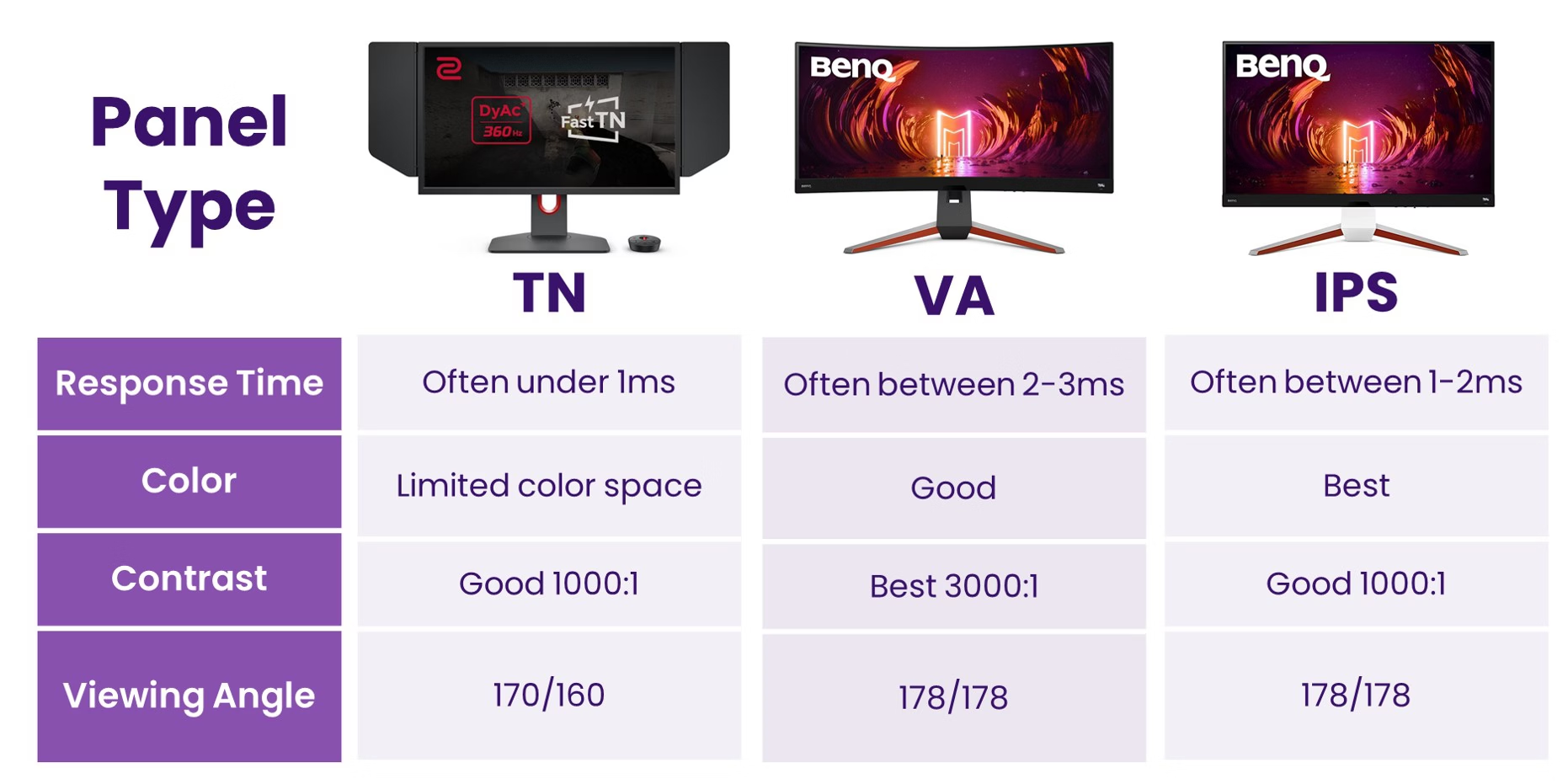
The panel type matters more than the marketed GTG number. A fast IPS with a true 3ms average will look cleaner in motion than a VA panel that claims 1ms but smears on every dark scene. Always check independent measurements that test the full transition range, not just the headline spec.
Overdrive Settings: The Hidden Tradeoff
Most gaming monitors let you adjust overdrive through the on-screen display menu. The typical options are Off, Normal, and Extreme. Each setting changes how aggressively the monitor voltage-boosts pixels to hit faster transition times.
The setting you choose directly affects whether that 1ms spec is real or a liability.
At Off or Low overdrive, pixels transition at their natural speed. You get the most accurate image with no artifacts, but motion blur and ghosting are more visible. At Extreme overdrive, pixels get pushed hard enough to hit the fastest possible transition times.
The problem is that overshoot occurs when a pixel literally overshoots its target color and has to correct back, creating a bright trail behind dark objects on light backgrounds.
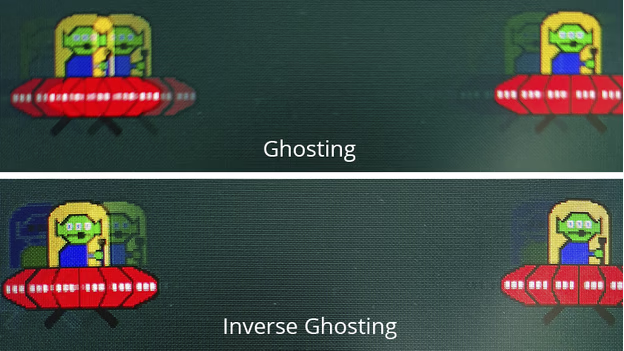
Finding the Sweet Spot Between Speed and Inverse Ghosting
The best overdrive setting is almost never the maximum. Aggregate review data from RTINGS.com testing across dozens of models shows that the "Normal" or "Medium" overdrive setting typically delivers the best balance. It achieves close to the panel's fastest transitions while keeping overshoot within acceptable levels.
You can test this yourself using the Blur Busters UFO Test. Set your browser to display the moving UFO patterns and cycle through your monitor's overdrive settings. At Extreme, you'll likely see bright halos trailing behind the UFOs.
At Normal, the UFOs should look sharper without those white outlines. The difference is immediately visible.
Overdrive setting effects:
| Setting | Response Speed | Overshoot Risk | Recommended For |
|---|---|---|---|
| Off | Slowest | None | Photo editing, media |
| Normal / Medium | Fast | Low | Most gaming scenarios |
| Extreme | Fastest | High | Competitive FPS only |
Some monitors handle Extreme overdrive better than others. Models using newer LG Display Nano IPS panels and certain Samsung OLED panels tend to have well-tuned extreme modes with minimal overshoot. Budget monitors often have poorly calibrated overdrive that makes Extreme mode look worse than Normal.
Always check what independent reviewers say about the specific overdrive tuning on the model you're considering.
Side-by-Side Comparison: 1ms vs. 2ms vs. 4ms vs. 5ms GTG
Let's put the common response time specs in direct comparison. The differences sound dramatic on paper, but perception doesn't always match the numbers.
1ms vs. 2ms GTG: Virtually indistinguishable in side-by-side testing. The 1ms advantage is a single millisecond. Human visual perception thresholds for motion blur differences typically sit around 2 to 3ms.
You'd need both monitors running simultaneously in a controlled environment to have any chance of spotting the gap.
1ms vs. 4ms GTG: This is where differences start becoming visible, particularly at 240Hz and above. In fast camera pans and quick flick shots in FPS games, the 1ms panel will show slightly sharper motion. The 4ms panel will exhibit mild ghosting that's noticeable if you're looking for it but easy to miss during actual gameplay.
1ms vs. 5ms GTG: A clear and consistent difference. The 5ms panel shows visible smearing during fast movement. This gap is noticeable even at 144Hz.
For competitive gaming, most players would prefer the 1ms panel. For casual gaming and media consumption, the 5ms panel is perfectly fine.
Response time perception threshold:
| Difference | Perceivable At 60Hz | Perceivable At 144Hz | Perceivable At 240Hz+ |
|---|---|---|---|
| 1ms vs. 2ms | No | Barely | Maybe |
| 1ms vs. 4ms | Barely | Yes | Clearly |
| 1ms vs. 5ms | Yes | Clearly | Obviously |
The diminishing returns curve is steep. Going from 5ms to 1ms is a huge improvement. Going from 2ms to 1ms is marginal at best.
Paying a significant premium for that last millisecond rarely makes sense unless you're specifically gaming at 360Hz or higher.
Who Actually Benefits From 1ms GTG?
Not every gamer needs 1ms. The spec matters far more for some use cases than others. Let's break down who gains the most and who's fine with slower panels.
Competitive FPS and Esports Players
If you play CS2, Valorant, Apex Legends, or Overwatch at high refresh rates, every millisecond of motion clarity helps. You're tracking fast-moving targets, making quick flick shots, and relying on visual information to react faster than opponents. A 1ms GTG panel at 240Hz or 360Hz gives you the cleanest possible motion, which translates to better target tracking and less visual noise during fast movement.
Professional esports players overwhelmingly use 240Hz or 360Hz monitors with the fastest response times available. At that level, the difference between 1ms and 4ms is visible and meaningful. If you're serious about competitive play, 1ms GTG is worth prioritizing.
High-Refresh-Rate Monitor Owners (240Hz+)
Anyone running a 240Hz, 360Hz, or 500Hz monitor should care about response time. At these refresh rates, frame times are short enough that pixel speed becomes a limiting factor. A 1ms GTG panel lets each frame display cleanly before the next one arrives.
A slower panel will smear frames together, partially negating the benefit of the high refresh rate you paid for.
Console and Console and Casual Gamers
If you're gaming on a PS5 or Xbox Series X at 60Hz or 120Hz, 1ms GTG is overkill. The frame times are long enough that even a 5ms panel keeps up comfortably. You're better off spending your budget on a panel with better color accuracy, higher contrast, or better HDR performance.
The response time spec should be low on your priority list.
Content Creators Who Game
If you use the same monitor for photo editing, video production, or graphic design alongside gaming, you likely need an IPS panel with accurate colors. Modern fast IPS panels offer a good middle ground. You get response times in the 2ms to 4ms range with excellent color reproduction.
That's fast enough for smooth gaming while still being suitable for color-sensitive work.
Common Mistakes People Making With Response Time Specs
The biggest mistake is treating the 1ms number as an accurate, standardized measurement. It's a marketing figure that varies wildly between manufacturers and even between individual units of the same model. Without independent measurements, you have no way of knowing what the panel actually does in practice.
Another common error is confusing response time with input lag. Response time is about pixel transitions and motion blur. Input lag is the delay between your mouse click and the action appearing on screen.
Both affect perceived responsiveness, but they're completely different measurements. A monitor can have 1ms GTG and terrible input lag, making it feel sluggish despite the impressive spec.
Some buyers also assume that a higher price automatically means better response time performance. That's not always true. A $300 fast IPS monitor can match or beat a $500 monitor in motion clarity if the cheaper model uses a better panel with better overdrive tuning.
Price correlates with features and build quality, not necessarily with raw pixel speed.
Finally, many people crank overdrive to Extreme and assume they're getting the best performance. As we covered earlier, Extreme overdrive often introduces more inverse ghosting than it eliminates in motion blur. The "best" setting is usually the middle option, not the maximum.
What to Look for When Buying a "1ms" Gaming Monitor
Don't rely on the box spec alone. Look for independent response time measurements from sources like RTINGS.com, TFT Central, or Hardware Unboxed. These outlets use pursuit cameras and standardized test patterns to measure actual pixel transitions across the full gray range, not just the best-case pair.
Check what overdrive setting the 1ms spec is measured at. If a manufacturer only achieves 1ms at Extreme overdrive and that setting produces heavy inverse ghosting, the number is essentially useless in practice. The best monitors hit their advertised speed at the Normal or Medium overdrive setting with minimal artifacts.
Look for the "GtG average" or "GtG average" measurement in reviews. This tells you the mean response time across multiple transition pairs. A monitor with a 3ms average will look better in motion than one with a 1ms best-case and 7ms average.
The average is what you'll actually see during gaming.

Expert Tips for Evaluating Response Time in Practice
If you're shopping in person, bring up a fast-paced video on your phone and look at motion on the demo unit. Camera pans and scrolling text reveal ghosting and smearing that static display images never will. Pay attention to dark scenes specifically, since that's where VA panels and poorly tuned IPS panels show their worst motion artifacts.
Use the Blur Busters UFO Test on any monitor you're considering. It's free, runs in a browser, and immediately shows you ghosting, overshoot, and motion clarity differences. Move your mouse quickly across the screen and watch the trailing patterns.
Clean, sharp UFOs with minimal halos indicate good overdrive tuning.
Check whether the monitor's response time performance varies with refresh rate. Some monitors have well-optimized overdrive at 144Hz but poorly tuned overdrive at 60Hz or 240Hz. If you switch between refresh rates often, you may need to change your overdrive setting each time to maintain optimal motion quality.
Frequently Asked Questions
Is 1ms GTG noticeable over 4ms?
At 240Hz or higher, yes, the difference is visible in fast motion. At 144Hz and below, most people won't notice. The gap is more apparent in competitive FPS games than in slower-paced titles.
Is 1ms GTG good for PS5 gaming?
The PS5 outputs at 60Hz or 120Hz. At 120Hz, 1ms GTG is beneficial but the difference versus 3-4ms is subtle. At 60Hz, it's completely unnecessary.
Spend your budget on other features instead.
Is 1ms GTG the same as 1ms MPRT?
No. GTG measures raw pixel transition speed. MPRT measures perceived motion blur during actual display.
A monitor with 1ms GTG might measure 4-5ms MPRT. MPRT is generally more representative of what you'll actually see.
Can a VA panel with 1ms GTG match an IPS panel for motion clarity?
Usually not. VA panels achieve 1ms on select transitions but struggle with dark-to-dark shifts that cause visible smearing. A fast IPS with a true 3ms average will typically deliver cleaner overall motion than a VA panel claiming 1ms.
Does response time affect input lag?
No. Response time and input lag are separate measurements. Response time affects motion blur.
Input lag affects the delay between your input and the display updating. A monitor can have fast response time and high input lag, or vice versa.
Final Verdict: Should You Care About 1ms GTG?
1ms GTG is a genuinely good spec, but it's not the whole story. If you're gaming at 240Hz or higher, especially in competitive FPS titles, it's worth prioritizing. If you're at 144Hz or below, a solid 3-4ms panel will serve you just as well in most cases.
The smartest approach is to ignore the marketing number and look at independent measurements. Check the GtG average across all transitions, verify the overdrive setting used, and confirm that overshoot is well-controlled. A monitor that hits 3ms average with clean motion will outperform a "1ms" monitor with heavy inverse ghosting every time.
Spend your money on the panel that measures well, not the one with the biggest number on the box.

Similar Posts





















