Do HDR Monitors Need DisplayPort 1.4
The Quick Answer: No, But It Depends on Your Setup
No, HDR monitors don't universally need DisplayPort 1.4. The connection you need depends on your resolution, refresh rate, and color depth. Many HDR setups work perfectly over HDMI 2.0.
Higher-end configurations benefit from DisplayPort 1.4's extra bandwidth.
What HDR Actually Demands From Your Connection
Here's the thing most people get wrong. HDR and DisplayPort 1.4 aren't automatically linked. HDR is a display capability.
DisplayPort 1.4 is just a pipe that carries the signal. Whether you need that specific pipe depends on how much data you're pushing through it.
When a monitor displays HDR content, it needs more data than standard dynamic range. That extra data comes from higher bit depth (usually 10-bit instead of 8-bit), wider color gamut, and sometimes higher peak brightness metadata. All of that adds up.
But it doesn't automatically max out older connection standards.
The real question isn't "does HDR need DisplayPort 1.4?" It's "does my specific resolution, refresh rate, and color depth combination exceed what my current connection can handle?"
The Bandwidth Calculation That Matters
Every video connection has a maximum bandwidth. Think of it like a highway. More lanes mean more cars can pass at once.
Higher resolution, faster refresh rates, and deeper color all require more lanes.
Here's how the main standards compare as of 2026:
| Standard | Max Bandwidth | Max Uncompressed 4K Refresh at 10-bit |
|---|---|---|
| HDMI 2.0 | 18.0 Gbps | 60Hz (with 4:2:0 chroma) |
| DisplayPort 1.2 | 17.28 Gbps | 60Hz (with compression or reduced chroma) |
| DisplayPort 1.4 | 25.92 Gbps | 120Hz (with DSC) or 60Hz uncompressed |
| HDMI 2.1 | 48.0 Gbps | 120Hz uncompressed |
| DisplayPort 2.1 | 77.37 Gbps (UHBR20) | 240Hz+ with DSC |
Manufacturer specifications confirm that DisplayPort 1.4 with Display Stream Compression (DSC) can handle up to 4K at 240Hz or 8K at 60Hz with HDR. Without DSC, it tops out around 4K 120Hz with 10-bit color and 4:4:4 chroma subsampling.
Resolutions, Refresh Rates, and Where Each Port Version Hits Its Limit
Let's break down what each common setup actually requires. This is where the decision tree starts to matter.
1080p HDR at 144Hz, 8-bit color: Needs about 8.5 Gbps. HDMI 2.0 handles this. DisplayPort 1.2 handles this.
You're fine with almost anything.
1440p HDR at 144Hz, 10-bit color: Needs about 15.7 Gbps. HDMI 2.0 can barely squeeze this with 4:2:2 chroma subsampling. DisplayPort 1.2 struggles.
DisplayPort 1.4 handles it comfortably.
4K HDR at 60Hz, 10-bit color, 4:4:4: Needs about 17.82 Gbps. HDMI 2.0 can't quite do full 4:4:4 at this spec. DisplayPort 1.2 falls short.
DisplayPort 1.4 handles it easily. HDMI 2.1 handles it easily.
4K HDR at 120Hz, 10-bit color, 4:4:4: Needs about 35.68 Gbps. This exceeds HDMI 2.0 and DisplayPort 1.4 without DSC. You need DisplayPort 1.4 with DSC, or HDMI 2.1.
4K HDR at 144Hz, 10-bit color, 4:4:4: Needs about 42.8 Gbps. Only HDMI 2.1 or DisplayPort 1.4/2.1 with DSC can handle this.
The pattern is clear. Lower resolutions and refresh rates don't need DisplayPort 1.4 for HDR. Higher combinations do.
Your specific situation determines everything.
DisplayPort 1.4 vs. HDMI 2.0 vs. HDMI 2.1 for HDR
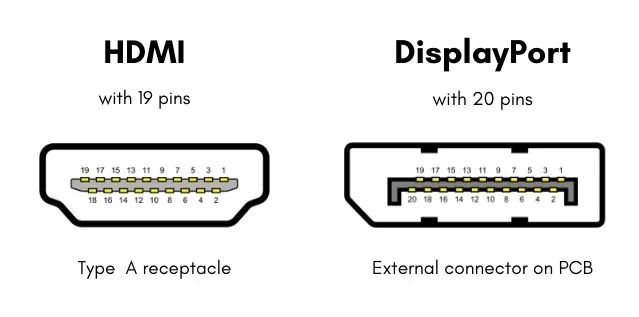
Now let's compare the three most common connection types you'll encounter on HDR monitors. Each has strengths and limitations.
Side-by-Side Bandwidth Comparison
| Feature | HDMI 2.0 | DisplayPort 1.4 | HDMI 2.1 |
|---|---|---|---|
| Max Bandwidth | 18.0 Gbps | 25.92 Gbps | 48.0 Gbps |
| 4K 60Hz 10-bit HDR | Limited (4:2:0 chroma) | Yes (full chroma) | Yes (full chroma) |
| 4K 120Hz 10-bit HDR | No | Yes (with DSC) | Yes (uncompressed) |
| 4K 144Hz 10-bit HDR | No | Yes (with DSC) | Yes (with DSC) |
| DSC Support | No | Yes (DSC 1.2a) | Yes (DSC 1.2a) |
| Dynamic HDR Metadata | No | Yes (via Dolby Vision, HDR10+) | Yes |
| Common On | Monitors, TVs, consoles | PC monitors, GPUs | TVs, PS5, Xbox Series X |
| Cable Cost | Low | Moderate | Moderate to High |
When Each Connection Type Gets You There
HDMI 2.0 works for HDR at 4K 60Hz, but with compromises. You'll likely run 4:2:0 chroma subsampling, which reduces color resolution. For gaming and general use, most people won't notice.
For text rendering and color-critical work, it's not ideal.
DisplayPort 1.4 is the sweet spot for PC HDR monitors as of 2026. It handles 4K 60Hz HDR with full chroma, and with DSC it pushes to 4K 120Hz or even 144Hz. Most mid-range to high-end HDR monitors use this standard.
HDMI 2.1 offers the most headroom. It's overkill for 4K 60Hz HDR but perfect for 4K 120Hz HDR without relying on compression. Console gamers with PS5 or Xbox Series X often prefer this.
The key insight: if your monitor only has HDMI 2.0 and you're running 4K 60Hz HDR, you're fine for most use cases. If you want higher refresh rates at 4K with HDR, you need either DisplayPort 1.4 or HDMI 2.1.
The Decision Tree: Do You Actually Need DisplayPort 1.4?
This is where we walk through your specific situation. Answer each question in order, and you'll land on the right connection type.
Step 1: What Resolution and Refresh Rate Are You Running?
Start here because this is the biggest factor.
- 1080p at any refresh rate up to 240Hz: You don't need DisplayPort 1.4. HDMI 2.0 or DisplayPort 1.2 handles this.
- 1440p at 60Hz: You don't need DisplayPort 1.4. HDMI 2.0 works.
- 1440p at 144Hz: DisplayPort 1.4 recommended. HDMI 2.0 will force chroma subsampling.
- 4K at 60Hz: DisplayPort 1.4 recommended for full chroma. HDMI 2.0 works with 4:2:0.
- 4K at 120Hz or above: DisplayPort 1.4 with DSC, or HDMI 2.1. No other option.
Step 2: Do You Need 10-bit Color Depth?
HDR content is typically mastered in 10-bit. If you're just watching HDR videos, 8-bit with dithering often looks fine over HDMI 2.0. If you're doing color-critical work (video editing, photo grading), you want true 10-bit output.
True 10-bit at 4K 60Hz with 4:4:4 chroma needs DisplayPort 1.4 or HDMI 2.1. HDMI 2.0 can't deliver this combination.
Step 3: Does Your Specific Monitor and GPU Support DSC?
Display Stream Compression is a visually lossless compression technology. It lets DisplayPort 1.4 push more data than its raw bandwidth suggests. But both your GPU and monitor must support it.
Most NVIDIA RTX 20-series and newer GPUs support DSC. Most AMD RX 5000-series and newer support DSC. On the monitor side, most 4K 120Hz+ HDR monitors with DisplayPort 1.4 support DSC.
If either your GPU or monitor lacks DSC support, you're limited to uncompressed bandwidth only. That means DisplayPort 1.4 tops out around 4K 98Hz at 10-bit 4:4:4, or 4K 120Hz with 4:2:0 chroma.
Step 4: Matching Your Situation to the Right Cable and Port
Based on the previous answers, here's your match:
- You answered "no" to needing high refresh AND "no" to 10-bit critical work: HDMI 2.0 is sufficient. Save your money.
- You need 4K 60Hz with full chroma 10-bit: DisplayPort 1.4 cable recommended. Works without DSC.
- You need 4K 120Hz+ with HDR: DisplayPort 1.4 with DSC, or HDMI 2.1. Check both your GPU and monitor specs.
- You're connecting a laptop via USB-C: Make sure your laptop's USB-C port supports DisplayPort Alt Mode 1.4. Not all do.
When DisplayPort 1.4 Is the Only Way to Get Full HDR
There are specific scenarios where DisplayPort 1.4 isn't just recommended, it's required.
4K 120Hz and Above
At 4K resolution with 120Hz refresh and 10-bit HDR, you need about 35.68 Gbps for uncompressed 4:4:4 chroma. HDMI 2.0 maxes out at 18 Gbps. DisplayPort 1.4 without DSC maxes at 25.92 Gbps.
Only DisplayPort 1.4 with DSC, or HDMI 2.1, can handle this.
If your monitor is 4K 120Hz HDR and only has HDMI 2.0 and DisplayPort 1.4, you must use DisplayPort 1.4. There's no workaround.
10-bit Color Without Compromise
For professional video editing, color grading, or photography work where you need true 10-bit 4:4:4 output at 4K 60Hz, DisplayPort 1.4 delivers this without compression. HDMI 2.0 forces chroma subsampling, which can cause color fringing on fine details.
This matters less for gaming and movie watching. It matters a lot for professional work.
Multi-Monitor HDR Configurations
DisplayPort 1.4 supports Multi-Stream Transport (MST), which lets you daisy-chain multiple monitors from a single port. If you're running two 4K HDR monitors from one PC, DisplayPort 1.4 MST is often the cleanest solution. HDMI doesn't support daisy-chaining.
When You Don't Need DisplayPort 1.4 at All
On the flip side, many HDR setups work fine without DisplayPort 1.4.
4K 60Hz HDR Works on HDMI 2.0
This surprises people. A 4K 60Hz HDR signal with 8-bit color fits within HDMI 2.0's 18 Gbps bandwidth. Even 10-bit works if you accept 4:2:0 chroma subsampling.
For console gaming, movie watching, and general desktop use, this is perfectly adequate.
Most HDR content (streaming, Blu-ray) is mastered at 4K 60Hz. If that's your primary use case, HDMI 2.0 gets the job done.
1440p and 1080p HDR Have Plenty of Headroom
At 1440p 144Hz with 8-bit HDR, you need roughly 10.6 Gbps. HDMI 2.0 handles this with room to spare. At 1080p, even 240Hz HDR only needs about 10.9 Gbps.
If you're gaming at 1440p or 1080p with an HDR monitor, you likely don't need DisplayPort 1.4. Your existing HDMI 2.0 or DisplayPort 1.2 connection works fine.
Display Stream Compression: The Hidden Factor
DSC changes the bandwidth equation significantly. Understanding it helps you make a better decision.
What DSC Actually Does
Display Stream Compression 1.2a is a visually lossless compression standard. It compresses the video signal at a ratio of roughly 2:1 to 3:1, then decompresses it at the monitor end. The result looks identical to uncompressed to human eyes.
Without DSC, DisplayPort 1.4 maxes out at about 25.92 Gbps usable bandwidth. With DSC, it can push enough data for 4K 240Hz HDR or 8K 60Hz HDR.
The catch: both your GPU and your monitor must support DSC. If either doesn't, you're limited to uncompressed bandwidth.
DSC Compatibility Between Your GPU and Monitor
Here's a quick compatibility check:
- NVIDIA: RTX 20-series and newer support DSC. GTX 10-series and older do not.
- AMD: RX 5000-series and newer support DSC. RX 5000-series and older do not.
- Intel: Arc GPUs and newer integrated graphics support DSC.
- Monitors: Check the spec sheet. Most 4K 120Hz+ monitors with DisplayPort 1.4 list DSC support. Budget HDR monitors sometimes omit it.
If you're unsure, look for "DSC" or "Display Stream Compression" in both your GPU specs and monitor specs. No DSC on either end means no DSC period.
Common Mistakes People Make
Let's address the errors we see most often.
Buying an Expensive DP 1.4 Cable When You Don't Need One
If you're running 4K 60Hz HDR, a basic High-Speed HDMI cable works fine. You don't need a VESA-certified DisplayPort 1.4 cable. Save your money.
Assuming All HDR Monitors Require DisplayPort
This is the core misconception behind the original question. HDR is a display capability. The connection type is separate.
Many HDR monitors work perfectly over HDMI 2.0.
Ignoring the Cable Itself
A DisplayPort 1.4 cable must actually be rated for HBR3 (High Bit Rate 3) to deliver full 25.92 Gbps. Cheap uncertified cables often aren't. Look for VESA-certified cables if you need full DP 1.4 bandwidth.
Forgetting to Check GPU Output Capabilities
Your monitor might have DisplayPort 1.4, but your GPU's output port matters too. A GPU with only DisplayPort 1.2 output can't deliver DP 1.4 signal regardless of the cable or monitor.
Real-World Setups: Which Cable and Port You Actually Need
Let's walk through common scenarios with specific recommendations.
Gaming at 4K 60Hz HDR
Connection: HDMI 2.0 or DisplayPort 1.4 both work. HDMI 2.0 with 4:2:0 chroma is fine for gaming. DisplayPort 1.4 gives you full chroma if you want it.
Cable: Standard High-Speed HDMI or any DisplayPort cable.
Gaming at 4K 120Hz HDR
Connection: DisplayPort 1.4 with DSC, or HDMI 2.1. No other option handles this without compression.
Cable: VESA-certified DisplayPort 1.4 (DP80) cable, or Ultra High Speed HDMI cable.
Video Editing with HDR Preview
Connection: DisplayPort 1.4 recommended for true 10-bit 4:4:4 output. HDMI 2.1 also works.
Cable: VESA-certified DisplayPort 1.4 cable.
Laptop USB-C Connection to HDR Monitor
Connection: Depends on your laptop's USB-C capabilities. Check if it supports DisplayPort Alt Mode 1.4. Many laptops only support DP 1.2 over USB-C.
Cable: USB-C to DisplayPort cable rated for your laptop's DP Alt Mode version.
Quick Reference: Bandwidth Requirements by Setup
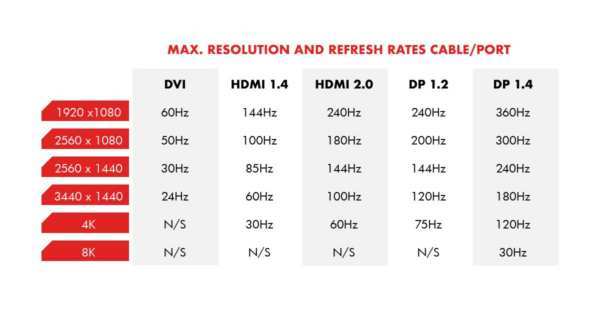
Bookmark this. It tells you exactly what each setup needs.
| Setup | Required Bandwidth | HDMI 2.0 | DP 1.2 | DP 1.4 | HDMI 2.1 |
|---|---|---|---|---|---|
| 1080p 144Hz 8-bit HDR | ~8.5 Gbps | Yes | Yes | Yes | Yes |
| 1440p 144Hz 8-bit HDR | ~10.6 Gbps | Yes | Yes | Yes | Yes |
| 1440p 144Hz 10-bit HDR | ~15.7 Gbps | Limited | No | Yes | Yes |
| 4K 60Hz 8-bit HDR | ~11.9 Gbps | Yes | Yes | Yes | Yes |
| 4K 60Hz 10-bit HDR 4:4:4 | ~17.82 Gbps | No | No | Yes | Yes |
| 4K 120Hz 10-bit HDR 4:4:4 | ~35.68 Gbps | No | No | DSC only | Yes |
| 4K 144Hz 10-bit HDR 4:4:4 | ~42.8 Gbps | No | No | DSC only | DSC only |
| 4K 240Hz 10-bit HDR 4:4:4 | ~85.6 Gbps | No | No | DSC only | DSC only |
"Limited" means it works but with chroma subsampling. "DSC only" means you need Display Stream Compression enabled on both GPU and monitor.
The Bottom Line: Match the Port to Your Actual Use Case
Here's the simplest way to think about it. If you're running 4K at 60Hz or below with HDR, you probably don't need DisplayPort 1.4. HDMI 2.0 or DisplayPort 1.2 handles that just fine.
If you're pushing 4K at 120Hz or above with HDR and 10-bit color, DisplayPort 1.4 with DSC becomes necessary. Or HDMI 2.1 if your gear supports it.
The answer to "do HDR monitors need DisplayPort 1.4" is: only when your resolution, refresh rate, and color depth combination demands more bandwidth than older standards provide. Check your specific setup against the bandwidth chart above, and you'll know exactly what you need.
Frequently Asked Questions
Can I use HDMI 2.0 for HDR at 4K?
Yes, but with limitations. HDMI 2.0 handles 4K 60Hz HDR with 4:2:0 chroma subsampling. For gaming and video, this looks fine.
For text-heavy work or color-critical tasks, you'll want DisplayPort 1.4 or HDMI 2.1 for full chroma.
Does DisplayPort 1.4 support HDR10 and Dolby Vision?
Yes. DisplayPort 1.4 supports static HDR metadata (HDR10) and dynamic HDR metadata (Dolby Vision, HDR10+) through the monitor's EDID. Both formats work over DP 1.4.
Will a DisplayPort 1.2 cable work for HDR?
For basic HDR at lower resolutions and refresh rates, yes. DisplayPort 1.2 supports HDR10 at up to 4K 60Hz with reduced chroma. It doesn't support DSC, so high-refresh 4K HDR won't work.
Do I need a VESA-certified DisplayPort cable?
If you need full DisplayPort 1.4 bandwidth (25.92 Gbps) or DSC functionality, yes. VESA-certified cables (DP40 or DP80) guarantee proper shielding and signal integrity. For lower bandwidth needs, any decent DisplayPort cable works.
Is HDMI 2.1 better than DisplayPort 1.4 for HDR?
HDMI 2.1 has higher raw bandwidth (48 Gbps vs 25.92 Gbps), but DisplayPort 1.4 with DSC can match or exceed it for most use cases. For PC monitors, DisplayPort 1.4 is more common. For TVs and consoles, HDMI 2.1 is standard.
My monitor has both HDMI 2.1 and DisplayPort 1.4. Which should I use?
For most users, either works. DisplayPort 1.4 is typically better for PC connections (better MST support, more common on GPUs). HDMI 2.1 is better if you're also connecting a console.
Use whichever matches your primary device's output best.
The Bottom Line: Match the Port to Your Actual Use Case
Here's the simplest way to think about it. If you're running 4K at 60Hz or below with HDR, you probably don't need DisplayPort 1.4. HDMI 2.0 or DisplayPort 1.2 handles that just fine.
If you're pushing 4K at 120Hz or above with HDR and 10-bit color, DisplayPort 1.4 with DSC becomes necessary. Or HDMI 2.1 if your gear supports it.
The answer to "do HDR monitors need DisplayPort 1.4" is: only when your resolution, refresh rate, and color depth combination demands more bandwidth than older standards provide. Check your specific setup against the bandwidth chart above, and you'll know exactly what you need.

Similar Posts





















