Can Mini LED Monitors Replace OLED for Editing
Can mini LED monitors replace OLED for editing? It's one of the most common questions we see in display forums and professional editing communities right now. The honest answer isn't a simple yes or no, because both technologies do something the other can't quite match.
Mini LED genuinely closes the gap for most editing work. But if you want the deepest blacks and fastest pixel response money can buy, OLED still owns that lane. A VESA DisplayHDR True Black 500-certified OLED hits per-pixel contrast that no local-dimming backlight can touch.
Let's dig into how each technology behaves when you push it in real editing scenarios.
Quick Answer
Mini LED monitors can replace OLED for most editing work. HDR content editors get sustained brightness OLED can't match. True blacks remain OLED's unbeatable edge.
Pick Mini LED if you fear burn-in from static UI. Some editors run both, using each for its strength.
The Short Answer: It Depends on What You're Editing
The technology matters, sure. But how you work matters more.
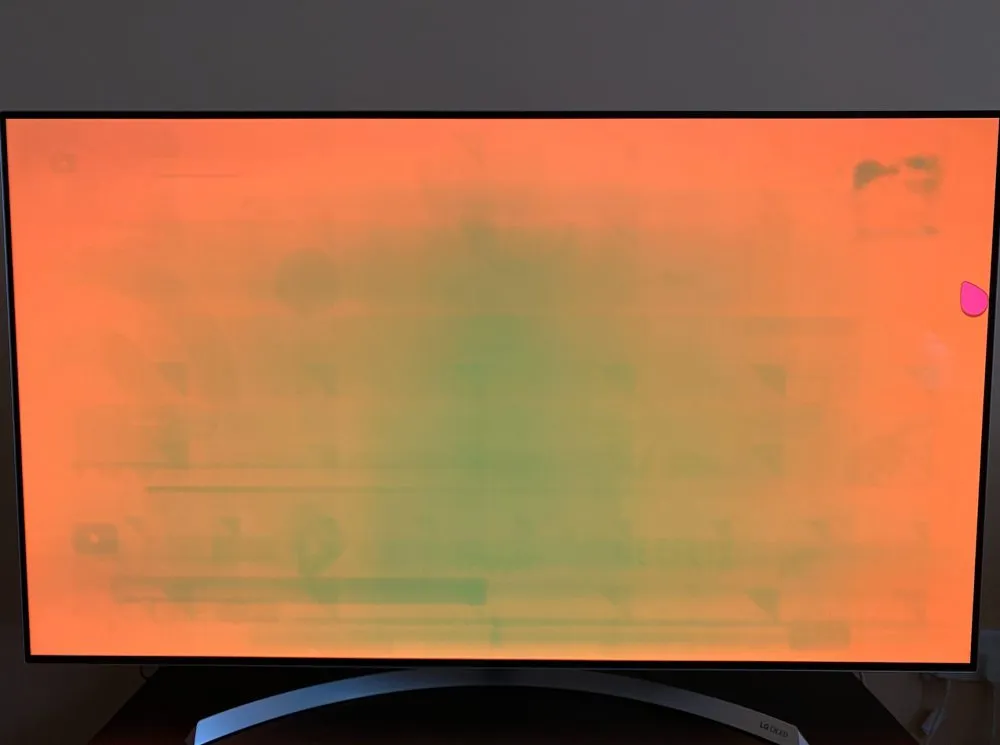
If you spend all day in DaVinci Resolve with scopes and timeline panels sitting permanently on screen, burn-in risk on a WOLED panel is not theoretical. It's a warranty anxiety you'll carry across years of daily use. Mini LED has zero burn-in risk because there's nothing organic to degrade in that backlight array.
If you're delivering HDR masters for streaming, peak brightness demands are higher than OLED can sustain across a full screen. We're talking 400-600 nits sustained on quality Mini LED panels against 150-250 nits full-screen on most OLED editing monitors as of 2026. That gap matters when you're evaluating highlight roll-off in a grading suite.
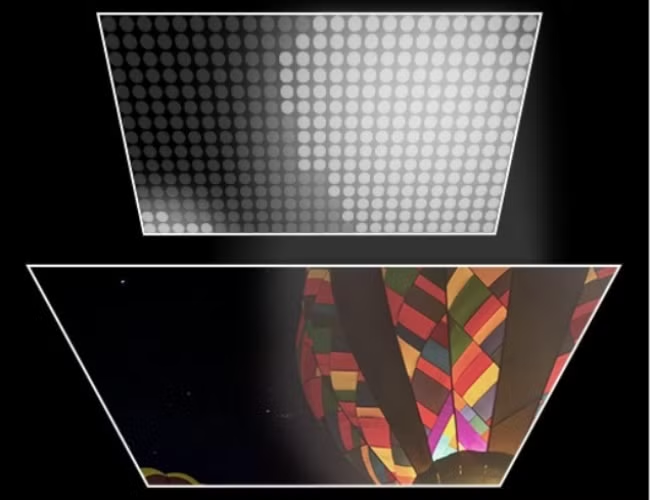
If photo editing is your main workflow, local dimming blooming can cause real frustration. You might be calling up shadow detail and seeing halos near bright edges. OLED renders per-pixel darkness with zero blooming.
Read on for full pros and cons of each display type, so you can match the spec to your actual work.
How Mini LED and OLED Actually Work (And Why It Matters)
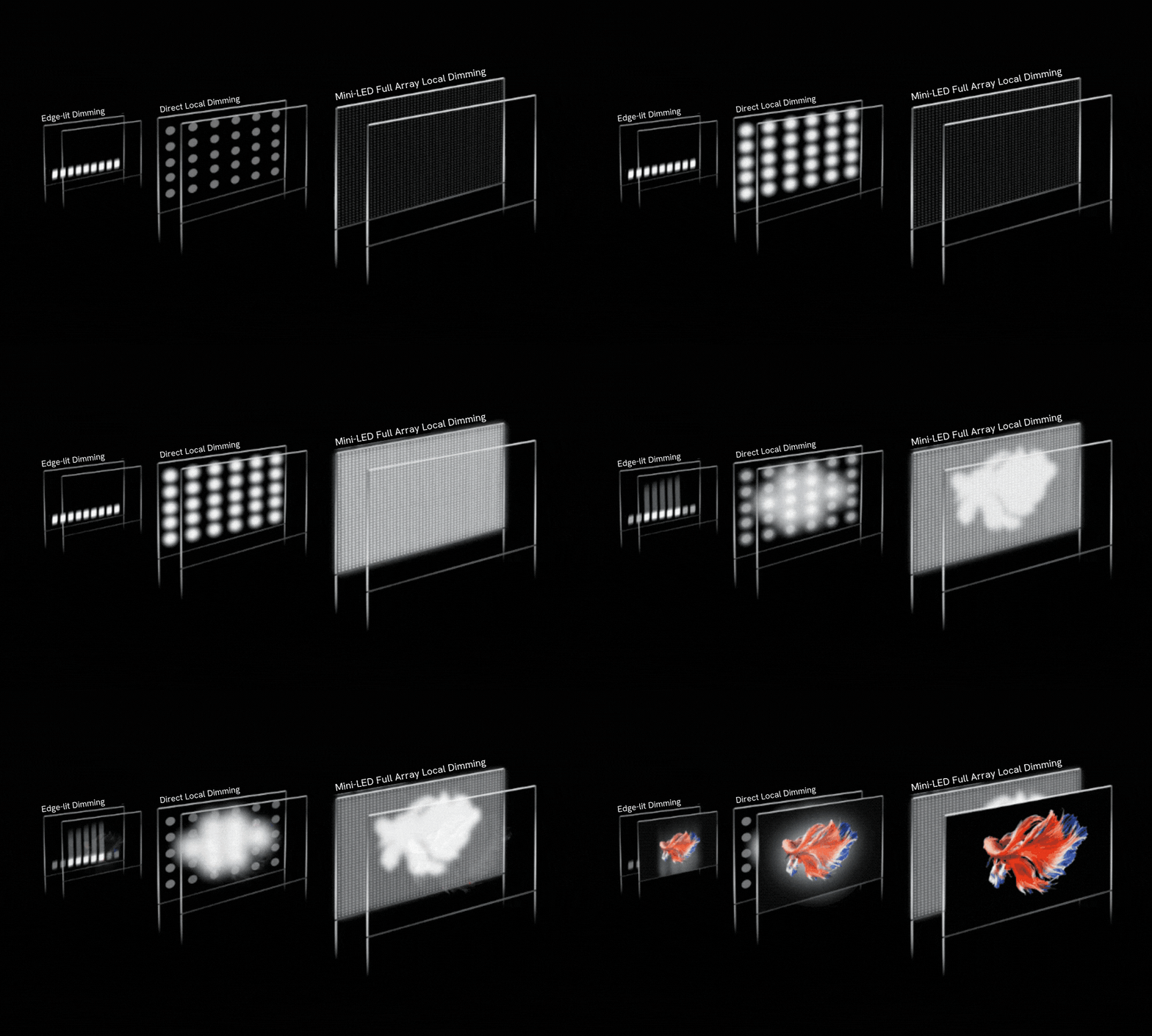
Mini LED isn't a new panel type. It's an LED backlight architecture packed with thousands of tiny LEDs behind an LCD panel. Each zone dims or brightens based on content.
More zones mean tighter dimming control, which translates to better shadow detail and less blooming.
Per manufacturer specifications, a 384-zone Mini LED panel will show more blooming than a 1152-zone panel of similar size. The trade-off? Higher zone counts drive up cost significantly.
A 1152-zone 32-inch monitor often costs triple a 384-zone equivalent.
OLED skips the backlight entirely. Each pixel emits its own light and turns off individually. Think roughly 33 million dimming zones on a 4K display.
That's what gives OLED its perfect black level and essentially infinite static contrast ratio.
QD-OLED adds a quantum dot layer to push color volume higher than traditional WOLED. Peak brightness on QD-OLED can hit 1000 nit in small windows, but full-screen sustained brightness still trails Mini LED dramatically. We'll show exactly how that plays out in practice.
The Real Differences That Show Up in Your Editing Workflow
Specs on paper tell one story. What you actually see when you're color-calling tells another.
For photo editors retoucing portraits near a window, a Mini LED panel's 400-600 nits sustained brightness makes working in moderately lit rooms more comfortable. OLED's full-screen sustained 150-250 nits means the work often feels dim in a lit room. You'll be staring at brighter-than-expected highlights relative to surrounding content.
For video editors cutting HDR content from mirrorless cameras in Log, Mini LED lets you see highlight headroom more accurately in sustained playback. When you push a window brighter and see it tracked at peak 100% to 90% in scopes, you need the sustained brightness to evaluate if the recovery holds or clips.
For anyone cutting SDR narrative content in a dim or darkened suite, OLED's per-pixel contrast gives you cleaner gradients in shadows. A night scene at 1% white clip looks more organic on OLED because the specular highlights bloom less.
Where the differences bite hardest:
- Sustained full-screen brightness: Mini LED sustains 400-600 nits; OLED tops out around 150-250 nits across a full white window.
- Blooming artifacts: Mini LED suffers from halo around bright objects on dark backgrounds. OLED is bloom-free.
- Peak white in small highlights: OLED often looks punchier in tiny specular highlights because per-pixel duty feels cleaner than local dimming zone edge transitions.
- Response time: OLED at 0.1ms gray-to-gray hits shadows and instant transitions without inverse ghosting. Typical Mini LED runs 4-8ms, which can show faint overshoot artifacts in dark scrolling.
- Color volume in high luminance: Mini LED pushes high-brightness saturation better in DCI-P3 and Rec. 2020 because organic emitters in OLED lose saturation as brightness increases.
- Uniformity: OLED generally shows cleaner grayscale uniformity across the screen because there's no backlight zone bleeding to correct. Mini LED can show zone-edge banding across gradients.
Side-by-Side: Mini LED vs OLED for Photo and Video Work
Here's a breakdown across the specs and behaviors that actually matter for creative work.
| Factor | Mini LED | OLED (WOLED/QD-OLED) |
|---|---|---|
| Full-screen sustained brightness | 400-600 nits (peak 1000-1600 in small window) | 150-250 nits (peak 600-1000 in small window on QD-OLED) |
| Contrast ratio (published) | 10,000:1 to 1,000,000:1 (dynamic) | Effectively infinite (per-pixel dimming) |
| Local dimming zones | 384 to 1152 | 33.2 million (per pixel at 4K) |
| Blooming | Present, varies by zone count | None |
| Burn-in risk | None | Real, worsens with static UI and years of use |
| Response time (GtG) | 4-8ms typical | 0.1ms |
| Peak HDR punch in grade | Better for sustained highlights | Better for tiny specular highlights |
| Color saturation at high luminance | Stronger at 800+ nits | Drops as brightness rises |
| Panel lifespan to half-brightness | 50,000+ hours (backlight) | 30,000-50,000 hours (organic emitters) |
| Typical 32-inch price range (2025-2026) | US$800 – US$2,500 | US$900 – US$2,500 |
| Behavior in bright rooms (500 lux) | Clear, punchy, handles ambient light | Image can feel dim; ABL kicks in sooner |
While OLED handles true blacks smarter for cinema grade review, Mini LED keeps brightness higher and safer all day for UI-heavy editors. For standard mastering with Dolby Vision trim passes, OLED's small highlight punch can look preferable. For extended editing in bright environments, Mini LED delivers something OLED struggles to match.
Where Mini LED Wins: Brightness, Longevity, and Burn-In Safety
Mini LED excels at sustained brightness. That alone makes it the better choice if you're regularly delivering HDR grades. When you trim highlights at 4000 nit PQ and P3 D65 highlights at 1000 nit, being able to view at 600-800 nits full screen gives you confidence the roll-off reads as intended.
Burn-in anxiety disappears. No special usage habits are required. Panel refreshes, logo luminance adjustments, and organic emitter wear leveling all get skipped.
You can work 10 hours a day with After Effects panels locked open and never worry.
Longevity compounds in commercial settings. A grading suite refurbished every three years probably benefits more from a display that doesn't drop 20% peak brightness in 18 months. Mini LED stays closer to spec over time, and its LCD front layer rarely suffers color aging the way organic emitters do.
Price per inch at larger sizes is more accessible. A 32-inch 4K Mini LED with decent local dimming comes in around US$800-1,200 from ASUS ProArt or BenQ, while a 32-inch OLED competitor runs US$1,200-1,800.
Where OLED Wins: True Blacks, Response Time, and Shadow Detail
OLED's per-pixel light control is its superpower. Every pixel in a black frame sits at zero nits. There's no backlight, no zone edge bleaching, and no halo blooming around stars in night scenes.
That matters for cinema-grade review. When you're looking for crushed shadows in a night exterior, OLED reveals what's actually captured on sensor. Mini LED with 384 zones can smear zone boundaries across subtle gradients.
The difference reads more noticeably during scene-to-scene comparison than when viewing a single frame.
Response time favors OLED hands down. At 0.1ms gray-to-gray, transitions are nearly instantaneous. That translates to cleaner scrubbing in timelines and less dark-trail ghosting in 24fps cuts.
Mini LED's 4-8ms response can leave faint overshoot artifacts on fast scrolling, most noticeable in dark-to-light transitions.
Perceived contrast in a dark grading suite makes OLED look punchier instantly. When evaluating grade against a letterbox matte, black bars merge seamlessly on OLED but show as slightly raised gray trims on Mini LED. For narrative and documentary work viewed in controlled lighting, the difference carries real weight.
When OLED still holds a decisive edge
- Film and television grading in darkened suites where reflection and room flare sit at a minimum per SMPTE reference viewing conditions
- Motion graphics evaluation where clean time-domain precision matters for caption legibility and dark transitions
- Still photo editing in RawTherapee or DPP where grain structure and color transitions at 1-5% luminance need artifact-free rendering
- On-camera confidence monitor where any spec of haze in blacks undermines trust in what the DP sees
The trade-offs you're accepting
Full-screen brightness is limited. An OLED grading UI and timeline will run dimmer and flatter than it would on Mini LED at similar peak target. Tiny highlights pop beautifully, but sustained broad highlights read muted.
Burn-in risk is real across years of daily UI stress. Modern panels include wear-leveling, but the risk doesn't vanish. OLED simply lives with an organic degradation model.
Cost for larger sizes remains steep. A 34-inch ultrawide OLED or a 42-inch reference OLED costs significantly more than a similar Mini LED alternative.
Best Mini LED Monitors for Editing Right Now
The Mini LED editing market matured substantially through 2024-2025. A few models keep surfacing in professional discussions for calibration reliability and clean dimming behavior.
ASUS ProArt PA32UCG
32-inch, 4K, 120Hz, 1152-zone local dimming with a peak 1600 nit target. Factory calibration reports come in around 0.5-1.5 Delta E. The aggressive zone count handles zone-edge banding well in practice.
Priced around US$2,000 street, it sits at the upper tier for non-reference-monitors.
BenQ SW272U / SW322U
Photo-focused line with 99% Adobe RGB and hardware calibration via Palette Master Ultimate. The SW322U brings full-array local dimming into a 32-inch format at a more modest zone count. Color accuracy targets are tight.
Pricing runs US$1,300-1,800 depending on screen size and generation.
Apple Pro Display XDR (Studio Display fashion but aging)
Apple's 32-inch Retina 6K panel isn't classically marketed as Mini LED, but it uses a sophisticated full-array backlight with 576 zones. Color accuracy out of the box remains excellent for P3 workflows. Starting around US$4,999-5,999, it's expensive but integrates tightly with macOS color management.
Innocn 27M2V
A 27-inch 4K entry with 384 zones and a price closer to US$700-900. Budget-friendly for indie editors, though zone count limits shadow detail handling. Reported uniformity varies panel to panel, so that's worth noting for color-critical work.
Best OLED Monitors for Editing Right Now
OLED options for grading are narrower but growing. The panel types matter: traditional LG Display WOLED versus newer Samsung Display QD-OLED.
LG UltraFine 32EP950 (WOLED)
32-inch white OLED. Excellent coverage at 99% DCI-P3. Brightness ceiling is modest, but perceived contrast in a dark suite is superb.
Stable color aging over rated lifespan. Pricing hovers near US$2,000-3,000 depending on availability.
Alienware AW3225QF (QD-OLED)
32-inch, 4K at 240Hz. QD-OLED delivers stronger peak brightness and color volume than WOLED. Priced competitively around US$800-1,000, it's become a go-to recommendation for budget-conscious editors who want OLED's black handling without reference-monitor pricing.
ASUS ProArt OLED PA32DC
32-inch reference-class OLED with built-in calibration sensor and thermalmanagement. Designed explicitly for content creation. Pricing sits around US$3,000.
It's the most purpose-built OLED for grading right now.
LG 27GR95QE-B (QD-OLED)
A 27-inch QD-OLED option at 1440p. Smaller screen lowers pixel density for fine retouch work, but the per-pixel speed and zero blooming make it attractive for video and gaming crossover use. Priced near US$700-800.
Who Should Pick Mini LED (And Who Shouldn't)
Mini LED is the pragmatic pick when these conditions line up.
You're a good fit for Mini LED if:
- You work 8-10 hours a day with NLE bins, scopes, panels, and toolbars permanently on screen
- Your primary output is HDR delivery for streaming platforms
- Your workspace is a bright or moderately lit room without full light control
- You don't want to learn and apply burn-in mitigation habits
- Your budget sits between US$800-1,500
- You need a portable editing display (Mini LED options are far more common)
Mini LED might frustrate you if:
- You exclusively grade narrative cinema in a dark room
- You frequently evaluate shadow grain structure in 3-8% luminance ranges
- You're delivering work primarily for theatrical DCI review where DCDM mastering suites are the final gate
For editors in commercial, corporate, music video, or broadcast work, Mini LED is a safe and sensible step. You'll gain brightness, longevity, and zero burn-in anxiety without sacrificing high-grade color accuracy.
Who Should Pick OLED (And Who Shouldn't)
OLED is a stronger choice for those who can offset its limitations.
You're a good fit for OLED if:
- You grade mostly narrative, documentary, or commercial content in a light-controlled suite
- Per-pixel shadow detail is essential to your evaluation workflow
- You primarily edit still photos in RawTherapee, Capture One, or DPP where grain texture and color banding matter
- You keep solid habits around hiding taskbars, using screensavers, and turning off the panel during breaks
- Your budget stretches to US$1,200-3,000
- You want the cleanest possible image for client presentations where per-unit display impression counts
OLED might frustrate you if:
- You leave timelines and panels frozen in place for hours at a stretch
- You're working in a bright office without bias lighting or curtains
- You're evaluating peak HDR highlights sustained across full-screen windows
- You're uncomfortable accepting eventual luminance degradation across 3-4 years of daily use
- You need a 42-inch-class OLED for scale (OLED availability at large sizes over 42 inches remains limited through 2026, though commercial panels are starting to arrive)
For mix of photo editing, music video work, and indie feature grading, OLED delivers a noticeably cleaner per-pixel experience. The trade-offs with full-screen brightness and burn-in are real but manageable for disciplined users.
Calibration, Color Accuracy, and Getting Either Display Right
Out-of-the-box accuracy is not your final result. Neither technology delivers reference-grade color without profiling.
VESA DisplayHDR certification tells you what the panel can hit. It doesn't confirm uniformity or track color drift over time. Both need a proper 3D LUT profile loaded to your OS or directly to the display.
Calibration essentials for both panel types
- Hardware colorimeter or spectrophotometer is mandatory. The Calibrite ColorChecker Display Pro stays under US$200 and handles 1000+ nits natively.
- Calibrate under your working target. That usually means 80 or 100 cd/m² reference white for SDR, D65 white point, and a gamma 2.4 or ST.2084 PQ curve for HDR.
- Set your ambient lighting first using a cheap lux meter or phone app. Color decisions under 500 lux versus 300 lux are unfailingly different.
- Recheck monthly. Mini LED drifts mainly from backlight aging. OLED drifts faster per-channel because the three organic emitter types age at slightly different rates.
- Use hardware LUTs when you can. ASUS ProArt, BenQ SW, and Eizo ColorEdge lines load calibration data into the panel itself. That bypasses GPU interpolation artifacts and stays accurate regardless of which machine you plug in.
OLED-specific touches worth tracking:
- Run the built-in pixel compensation cycle after heavy use sessions. Most manufacturers recommend this after every 4 hours of cumulative use.
- Turn on logo dimming and ABL adjustments even for fine retouch work. They help mitigate risk of visible static retention issues.
- Watch for per-channel aging skew. Report measure every few months when profiling. A drift toward blue or magenta at low luminance is early organic wear.
Mini LED-specific touches worth tracking:
- Zone count doesn't fix tone mapping behavior on the panel's FALD processing. Before calibrating, disable "dynamic contrast" and lock the local dimming mode to the most consistent preset.
- Check how the panel handles near-black transitions. Some Mini LED displays show zone banding at 1-5% signal if the 10-bit lookup table and local dimming algorithms don't co-operate.
- Expect brightness drop over 2-3 years of use. Save your calibration profiles and remeasure accordingly so old profiles don't steer you toward wrong starting points.
Common Mistakes People Make When Choosing Between These Two
Mistakes here aren't subtle. They show up as wasted money or reliability problems.
Assuming "Mini LED" is one thing. A 384-zone panel near US$600 and a 1152-zone panel near US$2,000 behave like different technologies in shadow work. Zone count matters at least as much as the marketing label.
Assuming OLED is inherently fragile. Modern WOLED and QD-OLED panels hold up well under creative use cases if you adopt reasonable habits. But leaving a grading timeline maximized at full intensity for a 9-hour session is asking for trouble in any panel generation.
You'd still be running your brightness low enough to feel dim in many rooms.
Ignoring full-screen sustained brightness in spec sheets. Peak nit numbers from marketing are almost always small-window peak measurements. A panel rated at 1500 nits peak might only sustain 200 nits full-screen.
Check the full-field sustained numbers VESA DisplayHDR certification documents for that panel's generation.
Overlooking your ambient environment. Sitting 30 inches from a QD-OLED in a bright office with windows behind you means the ABL dims your image sooner and the boost disappears. A Mini LED panel at 500 nits sustained handles that room more comfortably right out of the box.
Skipping proper calibration and assuming factory accuracy holds. Modern panels measure well out of the box, but uniformity problems and tone-mapping artifacts don't auto-fix. A calibration tool pays for itself in confidence within one week of proper use.
Final Verdict: Which One Belongs on Your Desk
Neither technology definitively replaces the other. They each do something the other simply can't match.
Pick Mini LED if you want a durable, burn-in-free panel that handles HDR highlights brightly, works well in lit rooms, and costs less over its lifespan. It's the workhorse choice for heavy daily UI exposure and brighter environments.
Pick OLED if you crave per-pixel black, clean shadow gradients, instant response, and deliver mostly narrative or photo content in a controlled suite. You'll manage brightness limits and treat the panel with some care, but the image quality at reference conditions is genuinely hard to beat.
Many professional houses run an OLED primary grade display alongside a Mini LED client-review display. That covers the limitations of each.
Frequently Asked Questions
Is mini LED good enough for professional color grading?
Most professional colorists find Mini LED reliable for HDR workflows thanks to sustained brightness. Feature film cinema grading with dark 4K projection evaluation still favors OLED.
Will OLED burn in if I edit photos 8 hours a day?
Photo editing poses less risk than video work with static panels. Frequent image changes and auto-hide taskbars help, but some burn-in risk accumulates over multiple years of continuous usage.
Does OLED look brighter than mini LED despite lower peak nit specs?
Small window highlights can appear punchier because of how per-pixel light delivery magnifies perceived local contrast. Once you fill the screen with sustained white, Mini LED outshines OLED every time.
Does mini LED blooming ruin shadow grading?
Blooming varies significantly by zone count. A 384-zone panel is noticeably worse than a 1152-zone panel when grading dark content with small bright elements nearby. For most editing scenarios it's manageable, though never fully invisible.
Is OLED response time better than Mini LED for scrubbing?
Yes. OLED's sub-millisecond gray-to-gray transitions clean up smear in dark timeline scrubbing and improve motion readability. If smooth scrub speed matters to you, notice this difference early.
Can I mix mini LED and OLED in a dual-screen setup?
Absolutely. This is common in professional workflows: OLED on the grade screen for reference quality, Mini LED on the UI display for toolbars and scopes. They'll look different out of the box, but proper calibration brings them close.

Similar Posts





















